Page 313 of 585
312
uuCustomized Featuresu
Features
*1:Default SettingSetup
Group Customizable Features Descri
ption Selectable Settings
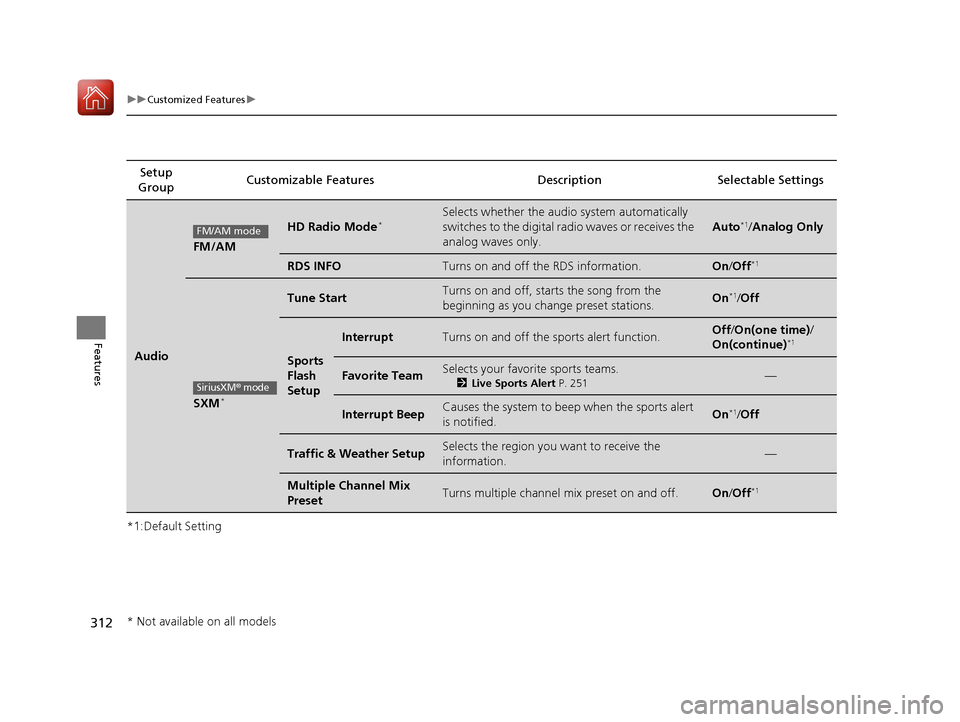
Audio
FM/AM
HD Radio Mode*
Selects whether the audio system automatically
switches to the digital radio waves or receives the
analog waves only.
Auto*1
/Analog Only
RDS INFOTurns on and off the RDS information.On /Off *1
SXM *
Tune StartTurns on and off, starts the song from the
beginning as you change preset stations.On*1
/Off
Sports Flash
Setup
InterruptTurns on and off the sports alert function.Off /On(one time) /
On(continue) *1
Favorite TeamSelects your favori
te sports teams.
2 Live Sports Alert P. 251—
Interrupt BeepCauses the system to beep when the sports alert
is notified.On *1
/Off
Traffic & Weather SetupSelects the region you want to receive the
information.—
Multiple Channel Mix
PresetTurns multiple channel mix preset on and off.On /Off *1
FM/AM mode
SiriusXM® mode
* Not available on all models
16 CIVIC 2D HC2 (0A 01 0C)-31TBG6000.book 312 ページ >0>.>/6年>0月>/>0日
金曜日 午後4時>/6分
Page 314 of 585
313
uuCustomized Featuresu
Continued
Features
*1:Default Setting
*2:Appears only when you change the screen interface design.Setup
Group Customizable Features Descri
ption Selectable Settings
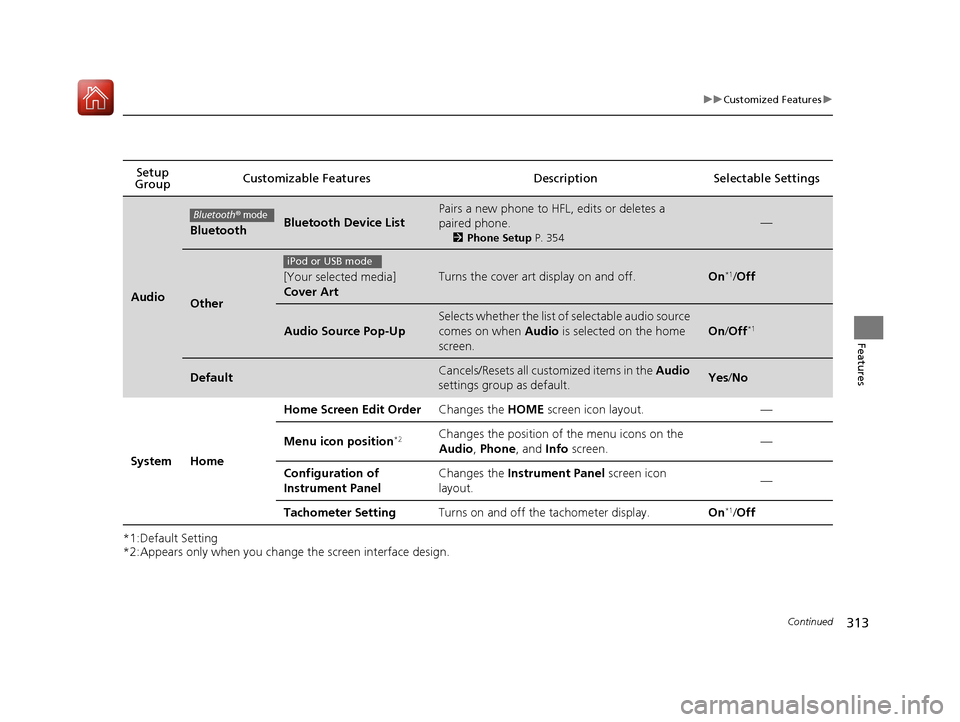
Audio
BluetoothBluetooth Device List
Pairs a new phone to HFL, edits or deletes a paired phone.
2Phone Setup P. 354
—
Other
[Your selected media] Cover ArtTurns the cover art display on and off.On*1
/Off
Audio Source Pop-Up
Selects whether the list of selectable audio source
comes on when Audio is selected on the home
screen.
On /Off *1
DefaultCancels/Resets all customized items in the
Audio
settings group as default.Yes /No
System Home Home Screen Edit Order
Changes the HOME screen icon layout. —
Menu icon position *2Changes the position of the menu icons on the
Audio
, Phone , and Info screen. —
Configuration of
Instrument Panel Changes the
Instrument Panel screen icon
layout. —
Tachometer Setting Turns on and off the tachometer display. On*1
/Off
Bluetooth® mode
iPod or USB mode
16 CIVIC 2D HC2 (0A 01 0C)-31TBG6000.book 313 ページ >0>.>/6年>0月>/>0日 金曜日 午後4時>/6分
Page 317 of 585
316
uuCustomized Featuresu
Features
*1:Default Setting
*2:Does not appear when you change the screen interface design.
*3:Appears only when you change the screen interface design.Setup
Group Customizable Features Description Selectable Settings
System Clock Clock/
Wallpaper Type
*2
/
Clock Type *3 Clock
See Info on P. 308
Wallpaper
Clock Adjustment Auto Time Zone *
Manual Time Zone *
Auto Daylight Saving Time
Clock Format
Clock Display
Overlay Clock Location
Clock Reset
Others Language Change the display language. English
*1
/Français /
Español
* Not available on all models
16 CIVIC 2D HC2 (0A 01 0C)-31TBG6000.book 316 ページ >0>.>/6年>0月>/>0日 金曜日 午後4時>/6分
Page 318 of 585
317
uuCustomized Featuresu
Continued
Features
*1:Default Setting
*2:Models with the smart entry system have an ENGINE START/STOP button instead of an ignition switch.
*3:Does not appear when you chan ge the screen interface design.
Setup
Group Customizable Features Description Selectable Settings
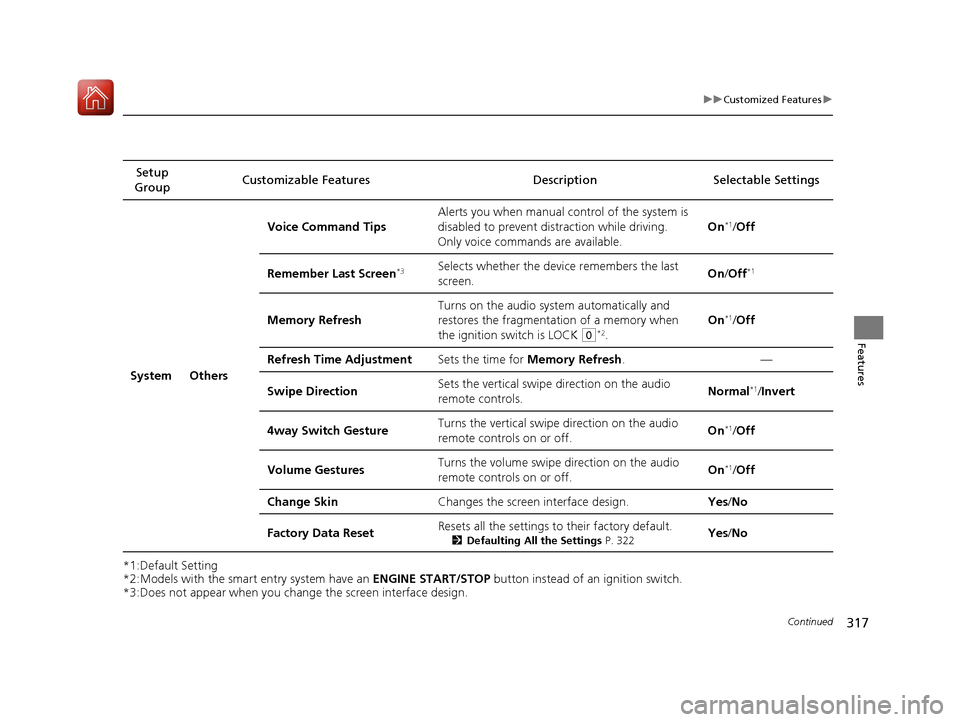
System Others Voice Command Tips
Alerts you when manual c
ontrol of the system is
disabled to prevent distraction while driving.
Only voice comman ds are available. On
*1
/Off
Remember Last Screen *3Selects whether the device remembers the last
screen. On
/Off *1
Memory Refresh Turns on the audio system automatically and
restores the fragmentation of a memory when
the ignition switch is LOCK
(0
*2
. On
*1
/Off
Refresh Time Adjustment Sets the time for Memory Refresh . —
Swipe Direction Sets the vertical swipe
direction on the audio
remote controls. Normal
*1
/Invert
4way Switch Gesture Turns the vertical swipe direction on the audio
remote controls on or off. On
*1
/Off
Volume Gestures Turns the volume swipe
direction on the audio
remote controls on or off. On
*1
/Off
Change Skin Changes the screen interface design. Yes/No
Factory Data Reset Resets all the settings to their factory default.
2Defaulting All the Settings P. 322Yes
/No
16 CIVIC 2D HC2 (0A 01 0C)-31TBG6000.book 317 ページ >0>.>/6年>0月>/>0日 金曜日 午後4時>/6分
Page 319 of 585
318
uuCustomized Featuresu
Features
*1:Default SettingSetup
Group Customizable Features Desc
ription Selectable Settings
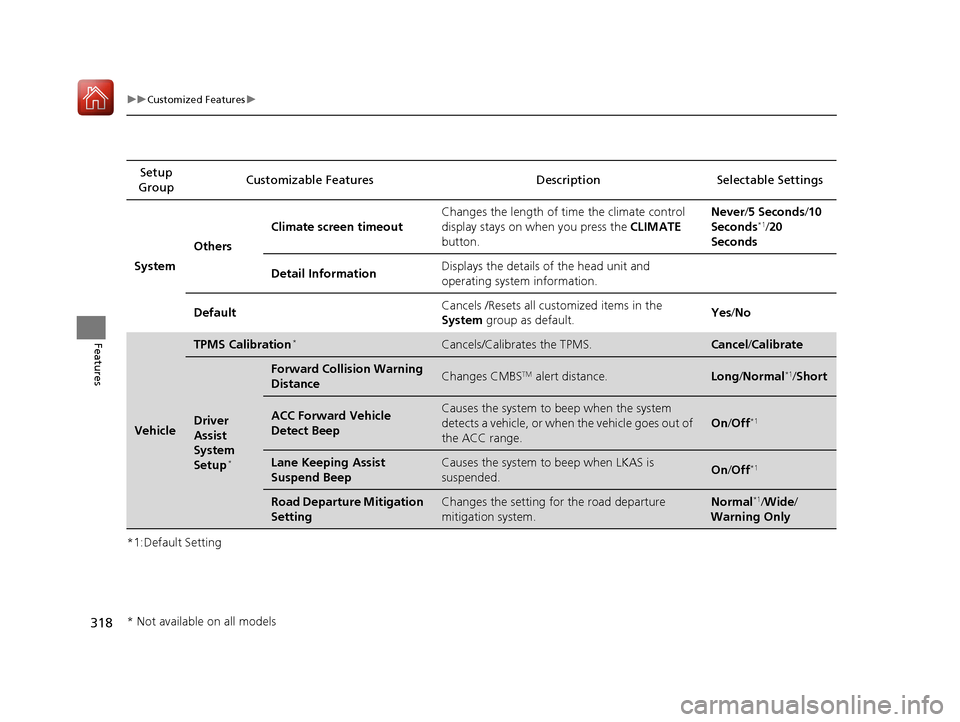
System Others Climate screen timeout
Changes the length of time the climate control
display stays on when you press the
CLIMATE
button. Never
/5 Seconds /10
Seconds *1
/20
Seconds
Detail Information Displays the details of the head unit and
operating system information.
Default Cancels /Resets all cust
omized items in the
System group as default. Yes
/No
Vehicle
TPMS Calibration *Cancels/Calibrates the TPMS.Cancel
/Calibrate
Driver
Assist
System
Setup *
Forward Collision Warning
DistanceChanges CMBS
TM
alert distance.Long /Normal *1
/Short
ACC Forward Vehicle
Detect BeepCauses the system to beep when the system
detects a vehicle, or when the vehicle goes out of
the ACC range.
On /Off *1
Lane Keeping Assist
Suspend BeepCauses the system to
beep when LKAS is
suspended.On /Off *1
Road Departure Mitigation
SettingChanges the setting for the road departure
mitigation system.Normal *1
/Wide /
Warning Only
* Not available on all models
16 CIVIC 2D HC2 (0A 01 0C)-31TBG6000.book 318 ページ >0>.>/6年>0月>/>0日 金曜日 午後4時>/6分
Page 320 of 585
319
uuCustomized Featuresu
Continued
Features
*1:Default SettingSetup
Group Customizable Features Description Selectable Settings
VehicleMeter
Setup
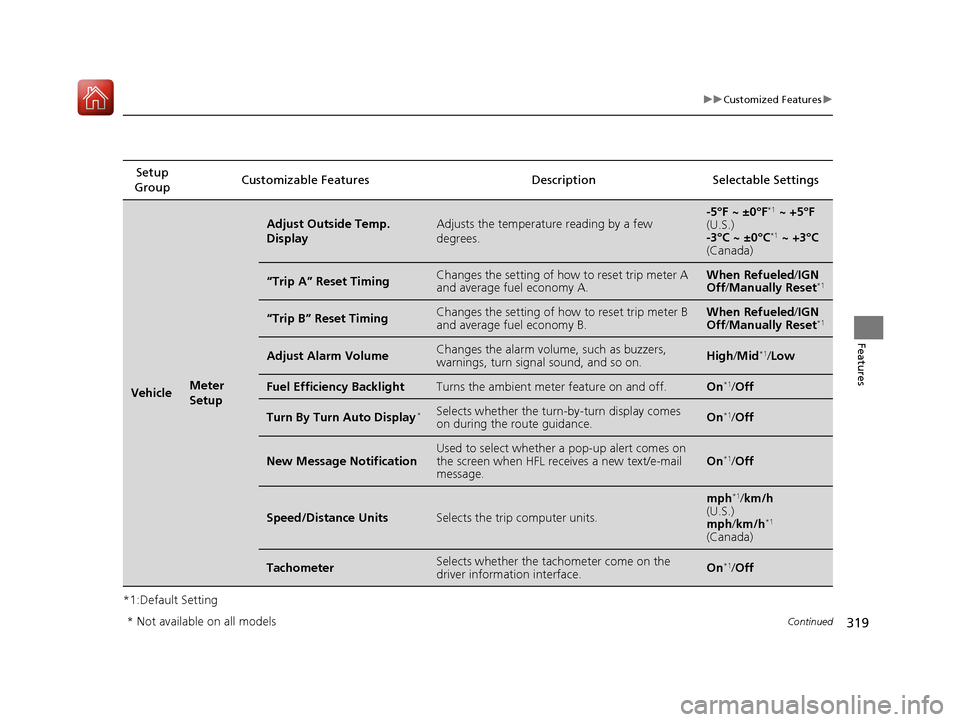
Adjust Outside Temp. DisplayAdjusts the temperature reading by a few degrees.-5°F ~ ±0°F
*1
~ +5°F
(U.S.)
-3°C ~ ±0°C *1
~ +3°C
(Canada)
“Trip A” Reset TimingChanges the setting of how to reset trip meter A and average fuel economy A.When Refueled /IGN
Off /Manually Reset *1
“Trip B” Reset TimingChanges the setting of how to reset trip meter B and average fuel economy B.When Refueled
/IGN
Off /Manually Reset *1
Adjust Alarm VolumeChanges the alarm volu
me, such as buzzers,
warnings, turn signal sound, and so on.High /Mid *1
/Low
Fuel Efficiency BacklightTurns the ambient meter feature on and off.On *1
/Off
Turn By Turn Auto Display *Selects whether the turn
-by-turn display comes
on during the route guidance.On *1
/Off
New Message NotificationUsed to select whether a pop-up alert comes on
the screen when HFL receives a new text/e-mail message.On *1
/Off
Speed/Distance UnitsSelects the trip computer units.
mph *1
/km/h
(U.S.) mph /km/h *1
(Canada)
TachometerSelects whether the tach ometer come on the
driver information interface.On *1
/Off
* Not available on all models
16 CIVIC 2D HC2 (0A 01 0C)-31TBG6000.book 319 ページ >0>.>/6年>0月>/>0日 金曜日 午後4時>/6分
Page 322 of 585
321
uuCustomized Featuresu
Features
*1:Default Setting
*2:Continuously variable transmission modelsSetup
Group Customizable Features Description Selectable Settings
Vehicle
Lighting
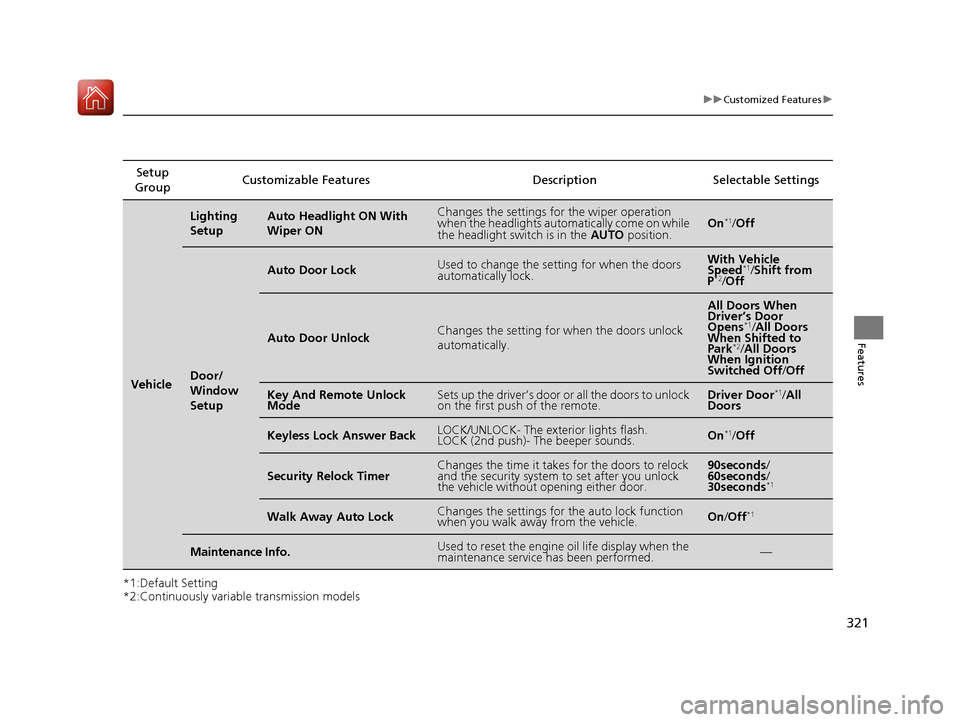
SetupAuto Headlight ON With Wiper ONChanges the settings for the wiper operation
when the headlights automa
tically come on while
the headlight switch is in the AUTO position.On*1
/Off
Door/
Window
Setup
Auto Door LockUsed to change the sett ing for when the doors
automatically lock.With Vehicle
Speed *1
/Shift from
P *2
/Off
Auto Door UnlockChanges the setting for when the doors unlock
automatically.
All Doors When
Driver’s Door
Opens *1
/All Doors
When Shifted to Park *2
/All Doors
When Ignition
Switched Off /Off
Key And Remote Unlock
ModeSets up the driver’s door or all the doors to unlock
on the first push of the remote.Driver Door *1
/All
Doors
Keyless Lock Answer BackLOCK/UNLOCK- The exterior lights flash.
LOCK (2nd push)- The beeper sounds.On *1
/Off
Security Relock TimerChanges the time it takes for the doors to relock
and the security system to set after you unlock
the vehicle without opening either door.90seconds /
60seconds /
30seconds *1
Walk Away Auto LockChanges the settings for the auto lock function
when you walk away from the vehicle.On
/Off *1
Maintenance Info.Used to reset the engine
oil life display when the
maintenance service has been performed.—
16 CIVIC 2D HC2 (0A 01 0C)-31TBG6000.book 321 ページ >0>.>/6年>0月>/>0日 金曜日 午後4時>/6分
Page 323 of 585
322
uuCustomized FeaturesuDefaulting All the Settings
Features
Defaulting All the Settings
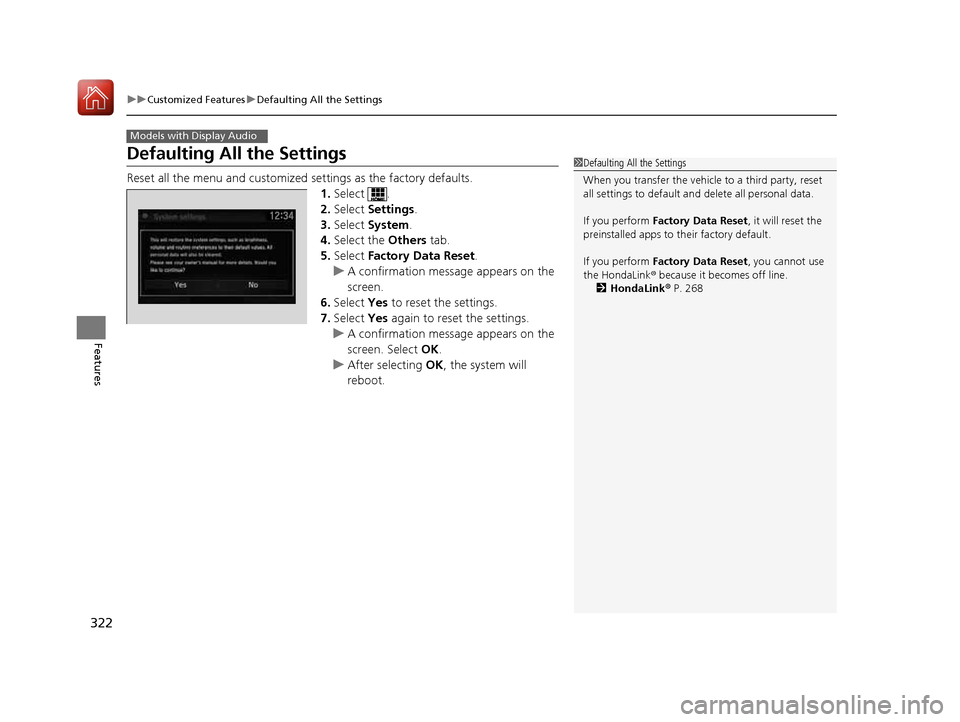
Reset all the menu and customized settings as the factory defaults.
1. Select .
2. Select Settings .
3. Select System .
4. Select the Others tab.
5. Select Factory Data Reset .
uA confirmation message appears on the screen.
6. Select Yes to reset the settings.
7. Select Yes again to reset the settings.
uA confirmation message appears on the
screen. Select OK.
uAfter selecting OK, the system will
reboot.
Models with Display Audio
1Defaulting All the Settings
When you transfer the vehicle to a third party, reset all settings to default a nd delete all personal data.
If you perform Factory Data Reset , it will reset the
preinstalled apps to their factory default.
If you perform Factory Data Reset , you cannot use
the HondaLink ® because it becomes off line.
2 HondaLink ® P. 268
16 CIVIC 2D HC2 (0A 01 0C)-31TBG6000.book 322 ページ >0>.>/6年>0月>/>0日 金曜日 午後4時>/6分