2016 HONDA CIVIC COUPE change time
[x] Cancel search: change timePage 138 of 585
Continued137
uuSecurity SystemuSecurity System Alarm
Controls
■Setting the security system alarm
The security system alarm automatically sets when the following conditions have
been met: • The ignition switch is in LOCK
(0 *1
, and the key has been removed from the
ignition switch.
• The hood and trunk are closed.
• Both doors are locked with the key, the remote transmitter, or smart entry
system.
■ When the security system alarm sets
The security system alarm indicator in the instrument panel blinks. When the
blinking interval changes after about 15 se conds, the security system alarm is set.
■ To cancel the security system alarm
The security system is canc eled when the vehicle is unlocked using the remote
transmitter, smart entry system, or th e ignition switch is turned to ON
(w*1
. The
security system indicator go es off at the same time.
*1: Models with the smart entry system have an ENGINE START/STOP button instead of an
ignition switch.
1Security System Alarm
Do not set the security system alarm when someone
is in the vehicle or a window is open. The system can
accidentally activate when: • Unlocking the door with the lock tab.
• Opening the trunk with th e trunk release button on
the driver’s door or the emergency trunk opener.
• Opening the hood with the hood release.
• Moving the shift lever out of
(P .
If the battery goes dead after you have set the
security system alarm, the security alarm may go off once the battery is re charged or replaced.
If this occurs, deactivate the security system alarm by
unlocking a door using th e remote transmitter.
Continuously variable transmission models
16 CIVIC 2D HC2 (0A 01 0C)-31TBG6000.book 137 ページ >0>.>/6年>0月>/>0日 金曜日 午後4時>/6分
Page 149 of 585
148
uuOperating the Switches Around the Steering WheeluTurn Signals
Controls
Turn SignalsThe turn signals can be used when the ignition
switch is in ON
(w*1
.
■ One-touch turn signal
When you lightly push up or down and release
the turn signal lever, th e exterior turn signals
and turn signal indicator blink three times.
This feature can be used when signaling for a
lane change.
Light Switches
Rotating the light switch turns the lights on
and off, regardless of the power mode setting
or position of the ignition switch. ■High beams
Push the lever forward until you hear a click. ■ Low beams
When in high beams, pull the lever back to
return to low beams. ■ Flashing the high beams
Pull the lever back, and release it.
*1: Models with the smart entry system have an ENGINE START/STOP button instead of an
ignition switch.
Right Turn
Left Turn
■Manual Operation
1Light Switches
If you leave the power mode in VEHICLE OFF (LOCK)
while the lights are on, a chime sounds when the driver’s door is opened.
If you remove the key from the ignition switch while
the lights are on, a chime sounds when the driver’s door is opened.
When the lights are on, the lights on indicator in the
instrument pane l will be on.
2 Lights On Indicator P. 83
Do not leave the lights on when the engine is off because it will cause the battery to discharge.
If you sense that the le vel of the headlights is
abnormal, have the vehicl e inspected by a dealer.
Models with smart entry system
Models without smart entry system
High Beams
Flashing the high beams
Low Beams
Turns on parking/daytime
running lights, side marker, tail,
and rear license plate lights
Turns on headlights, parking, side
marker, tail, and rear license plate
lights
16 CIVIC 2D HC2 (0A 01 0C)-31TBG6000.book 148 ページ >0>.>/6年>0月>/>0日 金曜日 午後4時>/6分
Page 151 of 585
uuOperating the Switches Around the Steering WheeluLight Switches
150
Controls
The headlights automatically co me on when the wipers are used several times within
a certain number of intervals wi th the headlight switch in AUTO.
The headlights automatically go off a few minutes later if the wipers are stopped.
The headlights, all other exterior lights, an d the instrument panel lights turn off 15
seconds after you remove the key or set the power mode to VEHICLE OFF (LOCK),
take the remote with you, and close the driver’s door.
uYou can change the headlight auto off timer setting.
2 Customized Features P. 292
If you turn the igniti on switch to LOCK
(0*1
with the headlight switch on, but do
not open the door, the lights turn off after 10 minutes (3 minutes, if the switch is in
the AUTO position).
The lights turn on again when you unlock or open the driver’s door. If you unlock
the door, but do not open it within 15 seconds, the lights go off. If you open the
driver’s door, you will hear a lights on reminder chime.
*1: Models with the smart entry system have an ENGINE START/STOP button instead of an
ignition switch.
■Headlight Integration with Wipers *
■Automatic Lighting Off Feature
1Automatic Operation (aut
omatic lighting control)
Adjust the auto light sensitivity as follows:
2 Customized Features P. 292
SettingThe exterior lights come on
when the ambient light is at
MAX
HIGH
MID
LOW
MIN
Bright Dark
1Headlight Integration with Wipers *
This feature activates while the headlights are off in AUTO .
The instrument panel br ightness does not change
when the headlights come on.
At dark ambient light leve ls, the automatic lighting
control feature turns on the headlights, regardless of
the number of wiper sweeps.Models with Display Audio
* Not available on all models
16 CIVIC 2D HC2 (0A 01 0C)-31TBG6000.book 150 ページ >0>.>/6年>0月>/>0日 金曜日 午後4時>/6分
Page 153 of 585
152
uuOperating the Switches Around the Steering WheeluWipers and Washers
Controls
Wipers and WashersThe windshield wipers and washers can be
used when the ignition switch is in ON
(w*1
.
■ MIST
The wipers run at high speed until you release the lever. ■ Wiper switch (OFF, INT *
, LO, HI)
Change the wiper switch setting according to
the amount of rain.
■ AUTO *
2 Automatic Intermittent Wipers *
P. 153
■ Adjusting wiper operation *
Turn the adjustment ring to adjust the wiper
delay. ■ Washer
Sprays while you pull the lever toward you.
When you release the lever for more than one
second, the spray stops, the wipers sweep two
or three more times to clear the windshield,
then stop.
*1: Models with the smart entry system have an ENGINE START/STOP button instead of an
ignition switch.
■Windshield Wiper/Washer1Wipers and Washers
NOTICE
Do not use the wipers when the windshield is dry.
The windshield will get sc ratched, or the rubber
blades will get damaged.
NOTICE
In cold weather, the blades may freeze to the
windshield, becoming stuck.
Operating the wipers in th is condition may damage
the wipers. Use the defroster to warm the
windshield, then turn the wipers on.
If the vehicle speeds up while the wipers are
operating intermittently, the length of the wipe
interval shortens. When the vehicle starts moving, the
wipers make a single sweep.
When the vehicle speeds up, the wiper operation’s shortest
delay setting ( ) and the LO setting become the same.
Turn the washers off if no washer fluid comes out.
The pump may get damaged.
The wiper motor may stop motor operation
temporarily to prevent an overload. Wiper operation
will return to normal within a few minutes, once the
circuit has returned to normal.
If the wiper stops operating due to any obstacle such as
the build-up of snow, park the vehicle in a safe place.
Rotate the wiper switch to OFF, and turn the ignition
switch to ACCESSORY (q or LOCK (0*1
, then
remove the obstacle.
Models with adjustment ring
All models
Intermittent Time Adjustment Ring *
MIST INT *
:
OFF LO
: Low speed wipe
HI : High speed wipe Pull to use washer.
Low speed with intermittent
Auto *
: Automatic intermittent
operation
Lower speed, fewer sweeps
Higher speed, more sweeps
* Not available on all models
16 CIVIC 2D HC2 (0A 01 0C)-31TBG6000.book 152 ページ >0>.>/6年>0月>/>0日 金曜日 午後4時>/6分
Page 169 of 585
168
Controls
Interior Lights/Interior Convenience Items
Interior Lights
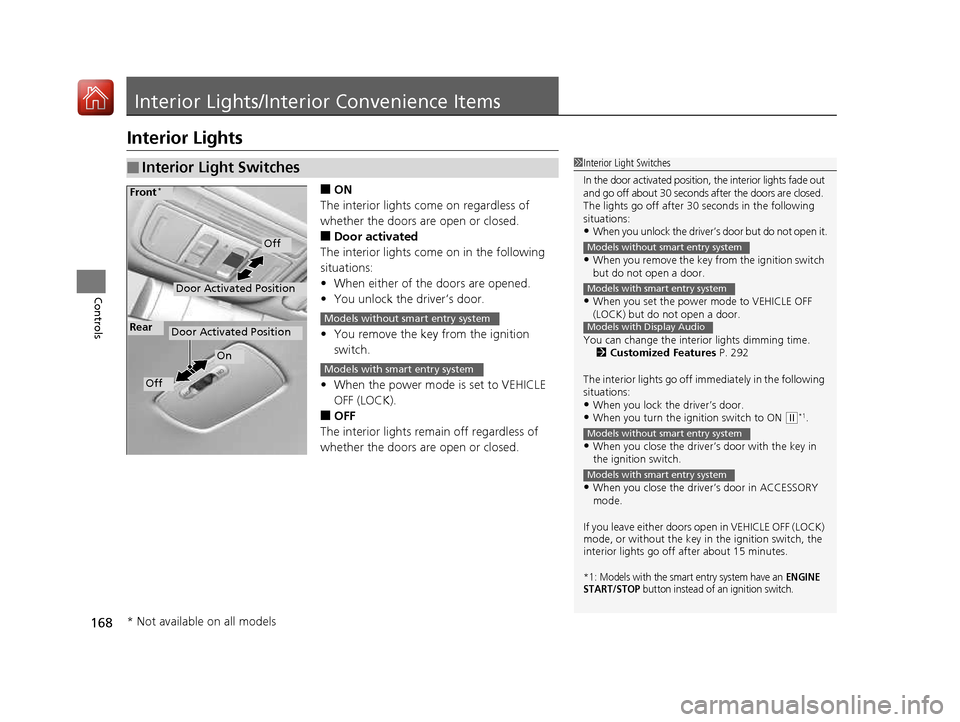
■ON
The interior lights come on regardless of
whether the doors are open or closed. ■ Door activated
The interior lights come on in the following
situations: • When either of the doors are opened.
• You unlock the driver’s door.
• You remove the key from the ignition switch.
• When the power mode is set to VEHICLE OFF (LOCK).
■ OFF
The interior lights remain off regardless of
whether the doors are open or closed.
■Interior Light Switches1Interior Light Switches
In the door activated position, the interior lights fade out
and go off about 30 seconds after the doors are closed.
The lights go off after 30 seconds in the following
situations:
• When you unlock the driver’s door but do not open it.
• When you remove the key from the ignition switch
but do not open a door.
• When you set the power mode to VEHICLE OFF
(LOCK) but do not open a door.
You can change the interi or lights dimming time.
2 Customized Features P. 292
The interior lights go off i mmediately in the following
situations:
• When you lock the driver’s door.
• When you turn the ignition switch to ON
(w *1
.
• When you close the driver’s door with the key in
the ignition switch.
• When you close the driver’s door in ACCESSORY mode.
If you leave either doors open in VEHICLE OFF (LOCK) mode, or without the key in the ignition switch, the
interior lights go off after about 15 minutes.
*1: Models with the smart entry system have an ENGINE
START/STOP button instead of an ignition switch.
Models without smart entry system
Models with smart entry system
Models with Display Audio
Models without smart entry system
Models with smart entry system
Door Activated Position
Off
Front *
Door Activated Position
On
Off
RearModels without smart entry system
Models with smart entry system
* Not available on all models
16 CIVIC 2D HC2 (0A 01 0C)-31TBG6000.book 168 ページ >0>.>/6年>0月>/>0日
金曜日 午後4時>/6分
Page 196 of 585
195
Features
Audio System Basic Operation
To use the audio system, the ignition switch must be in ACCESSORY (q or ON (w*1
.
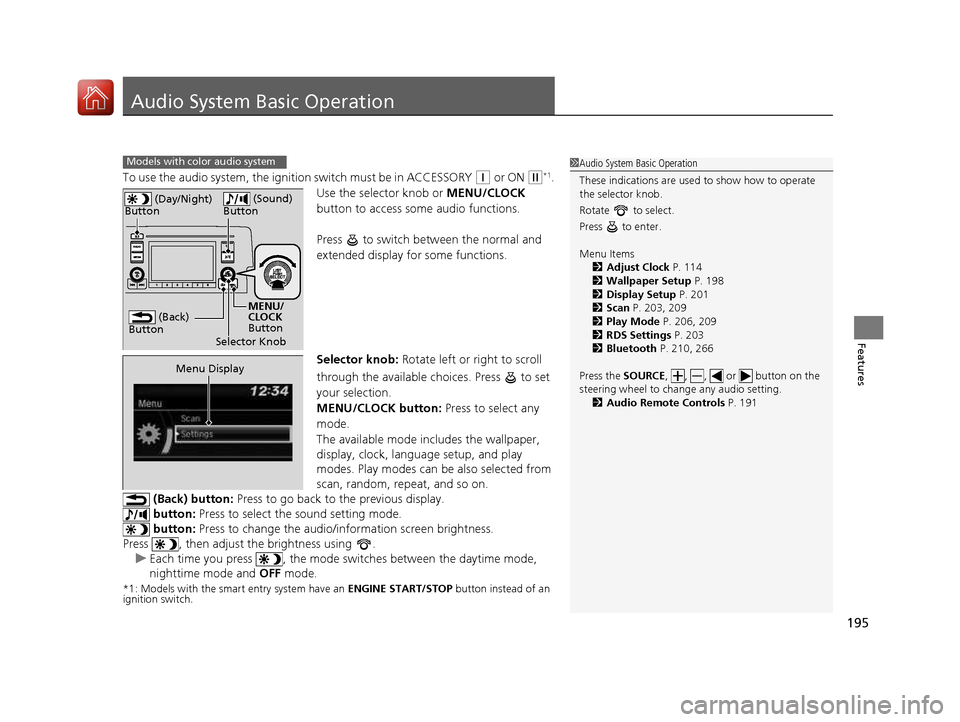
Use the selector knob or MENU/CLOCK
button to access some audio functions.
Press to switch between the normal and
extended display fo r some functions.
Selector knob: Rotate left or right to scroll
through the available choices. Press to set
your selection.
MENU/CLOCK button: Press to select any
mode.
The available mode in cludes the wallpaper,
display, clock, language setup, and play
modes. Play modes can be also selected from
scan, random, repeat, and so on.
(Back) button: Press to go back to the previous display.
button: Press to select the sound setting mode.
button: Press to change the audio/in formation screen brightness.
Press , then adjust the brightness using .
uEach time you press , the mode sw itches between the daytime mode,
nighttime mode and OFF mode.
*1: Models with the smart entry system have an ENGINE START/STOP button instead of an
ignition switch.
Models with color audio system1Audio System Basic Operation
These indications are used to show how to operate
the selector knob.
Rotate to select.
Press to enter. Menu Items 2 Adjust Clock P. 114
2 Wallpaper Setup P. 198
2 Display Setup P. 201
2 Scan P. 203, 209
2 Play Mode P. 206, 209
2 RDS Settings P. 203
2 Bluetooth P. 210, 266
Press the SOURCE, , , or button on the
steering wheel to cha nge any audio setting.
2 Audio Remote Controls P. 191
(Back)
Button
Selector Knob MENU/
CLOCK
Button
(Day/Night)
Button
(Sound)
Button
Menu Display
16 CIVIC 2D HC2 (0A 01 0C)-31TBG6000.book 195 ページ >0>.>/6年>0月>/>0日 金曜日 午後4時>/6分
Page 199 of 585
uuAudio System Basic OperationuAudio/Information Screen
198
Features
You can change, store, and delete the wa llpaper on the audio/information screen.
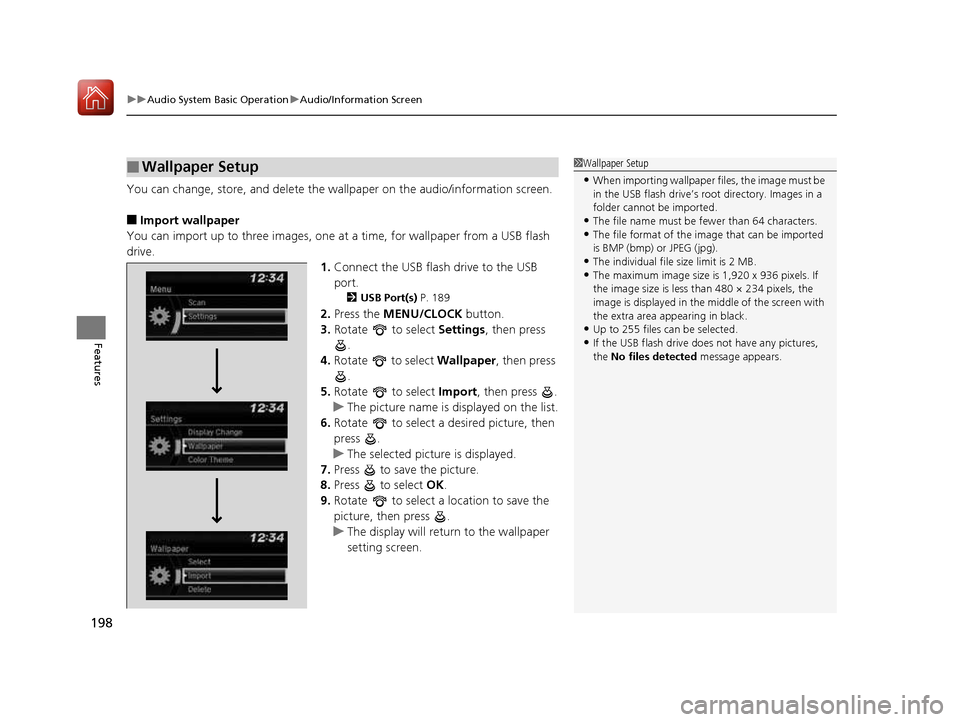
■ Import wallpaper
You can import up to three images, one at a time, for wallpaper from a USB flash
drive.
1.Connect the USB flash drive to the USB port.
2 USB Port(s) P. 189
2. Press the MENU/CLOCK button.
3. Rotate to select Settings, then press
.
4. Rotate to select Wallpaper, then press
.
5. Rotate to select Import, then press .
uThe picture name is displayed on the list.
6. Rotate to select a desired picture, then
press .
uThe selected picture is displayed.
7. Press to save the picture.
8. Press to select OK.
9. Rotate to select a location to save the
picture, then press .
uThe display will return to the wallpaper
setting screen.
■Wallpaper Setup1Wallpaper Setup
• When importing wallpaper files, the image must be
in the USB flash drive’s root directory. Images in a
folder cannot be imported.
• The file name must be fewer than 64 characters.
• The file format of the im age that can be imported
is BMP (bmp) or JPEG (jpg).
• The individual file size limit is 2 MB.
• The maximum image size is 1,920 x 936 pixels. If
the image size is less than 480 × 234 pixels, the
image is displayed in the middle of the screen with
the extra area appearing in black.
• Up to 255 files can be selected.
• If the USB flash drive doe s not have any pictures,
the No files detected message appears.
16 CIVIC 2D HC2 (0A 01 0C)-31TBG6000.book 198 ページ >0>.>/6年>0月>/>0日 金曜日 午後4時>/6分
Page 204 of 585
203
uuAudio System Basic OperationuPlaying the AM/FM Radio
Features
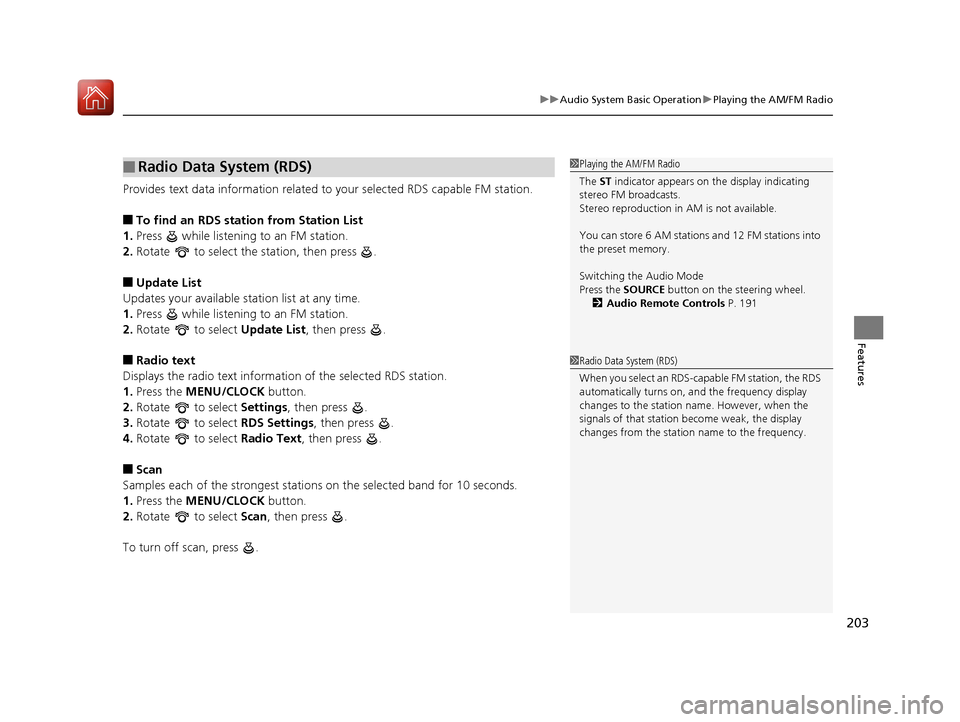
Provides text data information related to your selected RDS capable FM station. ■To find an RDS station from Station List
1. Press while listening to an FM station.
2. Rotate to select the station, then press .
■ Update List
Updates your available st ation list at any time.
1. Press while listening to an FM station.
2. Rotate to select Update List, then press .
■ Radio text
Displays the radio text information of the selected RDS station. 1. Press the MENU/CLOCK button.
2. Rotate to select Settings, then press .
3. Rotate to select RDS Settings, then press .
4. Rotate to select Radio Text, then press .
■ Scan
Samples each of the strongest stations on the selected band for 10 seconds.
1. Press the MENU/CLOCK button.
2. Rotate to select Scan, then press .
To turn off scan, press .
■Radio Data System (RDS)1Playing the AM/FM Radio
The ST indicator appears on the display indicating
stereo FM broadcasts.
Stereo reproduction in AM is not available.
You can store 6 AM stations and 12 FM stations into
the preset memory.
Switching the Audio Mode
Press the SOURCE button on the steering wheel.
2 Audio Remote Controls P. 191
1Radio Data System (RDS)
When you select an RDS-capable FM station, the RDS
automatically turns on, and the frequency display
changes to the station name. However, when the
signals of that station become weak, the display
changes from the statio n name to the frequency.
16 CIVIC 2D HC2 (0A 01 0C)-31TBG6000.book 203 ページ >0>.>/6年>0月>/>0日 金曜日 午後4時>/6分