2016 FORD SUPER DUTY mirror controls
[x] Cancel search: mirror controlsPage 50 of 510
Note:
Replacing the battery will not delete
the transmitter from the vehicle. The
transmitter should operate normally.
The remote control uses one coin-type
three-volt lithium battery CR2032 or
equivalent.
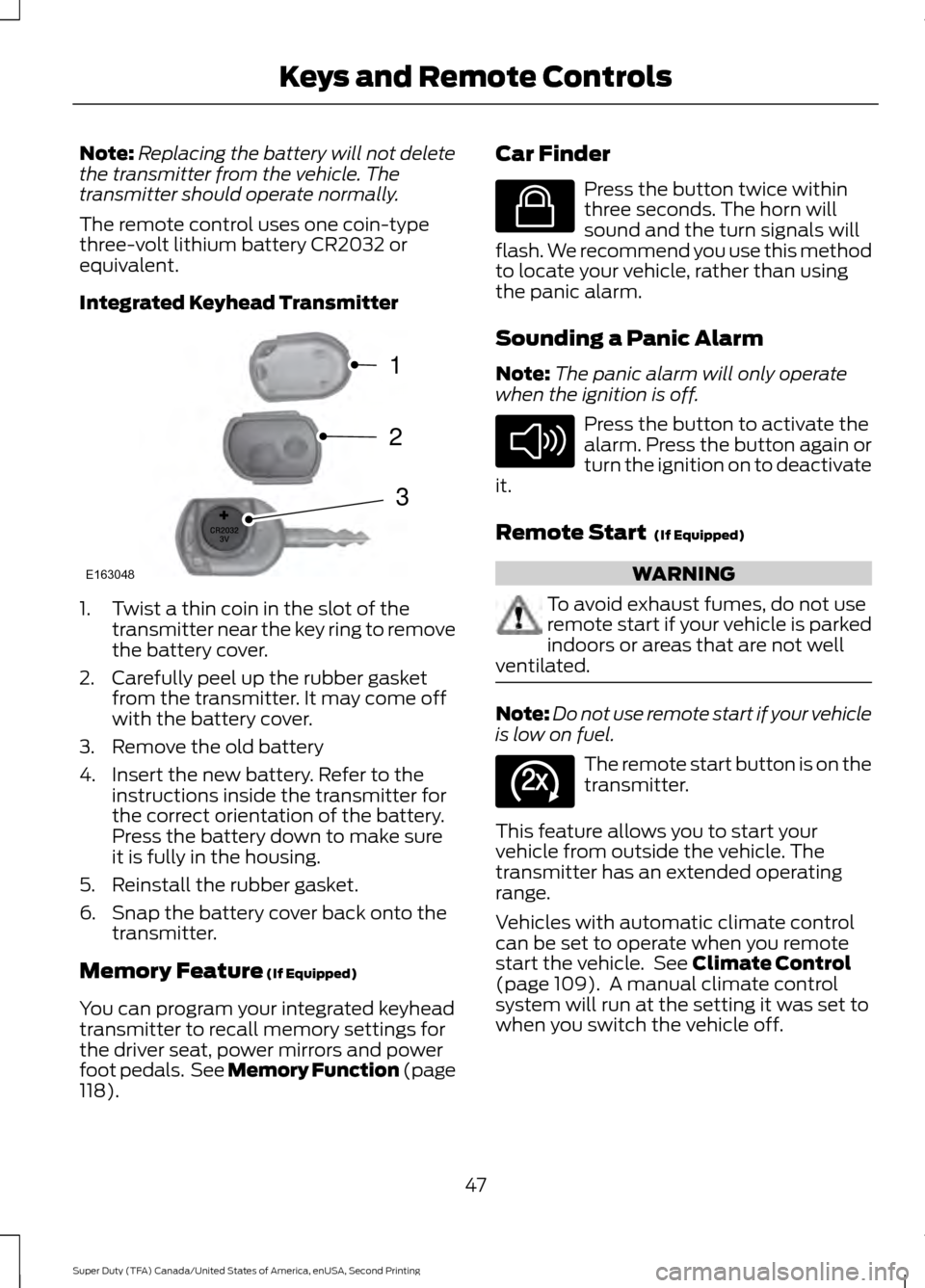
Integrated Keyhead Transmitter 1. Twist a thin coin in the slot of the
transmitter near the key ring to remove
the battery cover.
2. Carefully peel up the rubber gasket from the transmitter. It may come off
with the battery cover.
3. Remove the old battery
4. Insert the new battery. Refer to the instructions inside the transmitter for
the correct orientation of the battery.
Press the battery down to make sure
it is fully in the housing.
5. Reinstall the rubber gasket.
6. Snap the battery cover back onto the transmitter.
Memory Feature (If Equipped)
You can program your integrated keyhead
transmitter to recall memory settings for
the driver seat, power mirrors and power
foot pedals. See Memory Function (page
118
). Car Finder Press the button twice within
three seconds. The horn will
sound and the turn signals will
flash. We recommend you use this method
to locate your vehicle, rather than using
the panic alarm.
Sounding a Panic Alarm
Note: The panic alarm will only operate
when the ignition is off. Press the button to activate the
alarm. Press the button again or
turn the ignition on to deactivate
it.
Remote Start
(If Equipped) WARNING
To avoid exhaust fumes, do not use
remote start if your vehicle is parked
indoors or areas that are not well
ventilated. Note:
Do not use remote start if your vehicle
is low on fuel. The remote start button is on the
transmitter.
This feature allows you to start your
vehicle from outside the vehicle. The
transmitter has an extended operating
range.
Vehicles with automatic climate control
can be set to operate when you remote
start the vehicle. See
Climate Control
(page 109). A manual climate control
system will run at the setting it was set to
when you switch the vehicle off.
47
Super Duty (TFA) Canada/United States of America, enUSA, Second Printing Keys and Remote ControlsE163048
3
2
1 E138623 E138624 E138625
Page 79 of 510

Window Lock
Unlock
A
Lock
B
Press the control to lock or unlock the rear
window controls.
Accessory Delay (If Equipped)
You can use the window switches for
several minutes after you switch the
ignition off or until you open either front
door.
GLOBAL OPENING
(If Equipped)
You can use the remote control to operate
the windows with the ignition off.
Note: To operate this feature, accessory
delay must not be active.
Opening the Windows
You can only open the windows for a short
time after you unlock your vehicle with the
remote control. After you unlock your
vehicle, press and hold the remote control
unlock button to open the windows.
Release the button once movement starts.
Press the lock or unlock button to stop
movement. EXTERIOR MIRRORS
Power Exterior Mirrors
(If Equipped) WARNING
Do not adjust the mirrors when your
vehicle is moving.
Left-hand mirror
A
OffB
Right-hand mirror
C
To adjust a mirror:
1. Rotate the control to select the mirror you want to adjust.
2. Adjust the position of the mirror.
3. Return the control to the center position to lock mirrors in place.
Fold-Away Exterior Mirrors
For tight parking conditions, you can push
the mirror toward the door window glass.
Before driving, make sure that you fully
engage the mirror in its support when
returning it to its original position.
76
Super Duty (TFA) Canada/United States of America, enUSA, Second Printing Windows and MirrorsE163057AB E163059
B
AC
Page 82 of 510
SUN VISORS
Slide-on-rod (If Equipped)
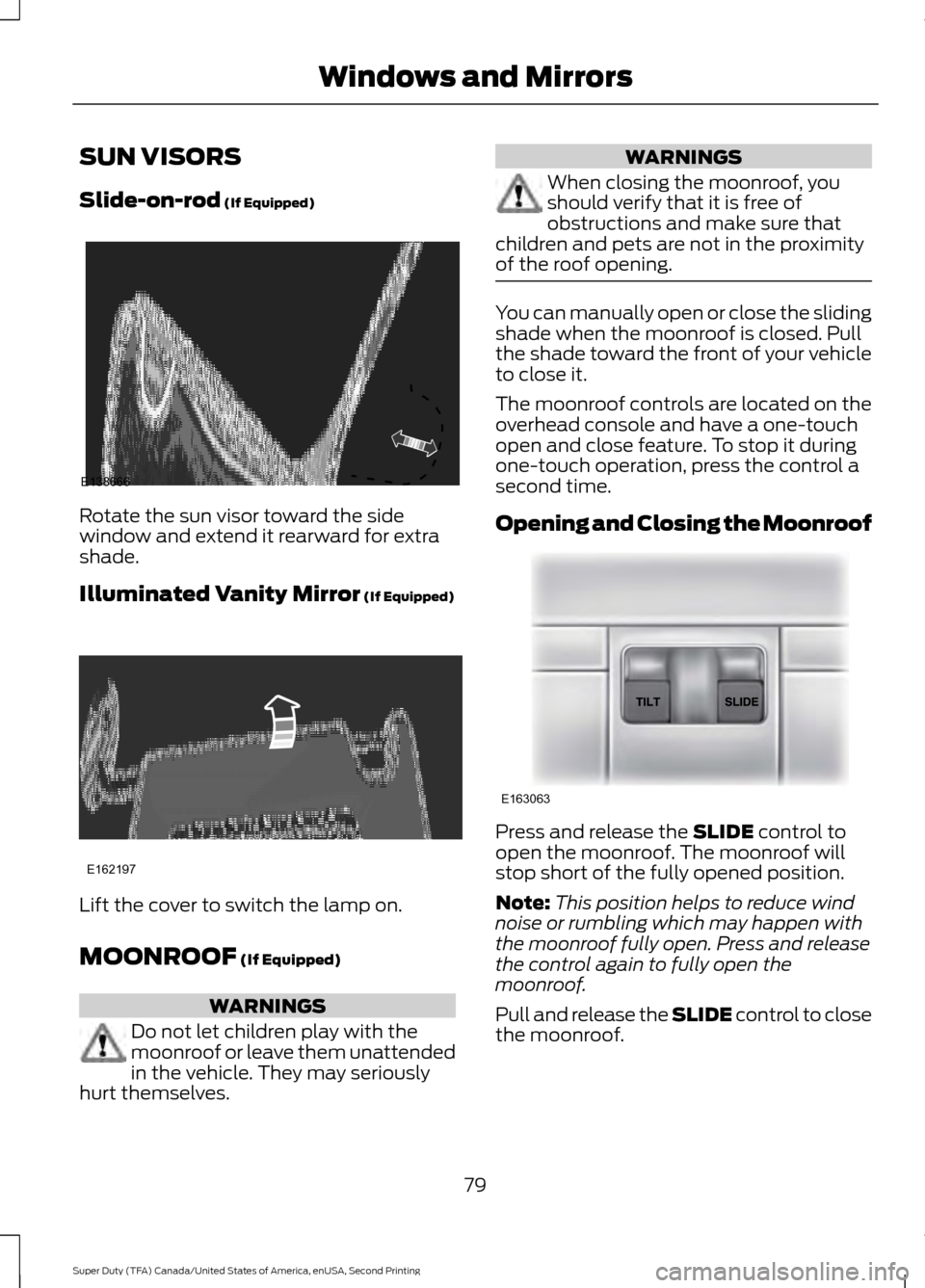
Rotate the sun visor toward the side
window and extend it rearward for extra
shade.
Illuminated Vanity Mirror
(If Equipped)
Lift the cover to switch the lamp on.
MOONROOF
(If Equipped)
WARNINGS
Do not let children play with the
moonroof or leave them unattended
in the vehicle. They may seriously
hurt themselves. WARNINGS
When closing the moonroof, you
should verify that it is free of
obstructions and make sure that
children and pets are not in the proximity
of the roof opening. You can manually open or close the sliding
shade when the moonroof is closed. Pull
the shade toward the front of your vehicle
to close it.
The moonroof controls are located on the
overhead console and have a one-touch
open and close feature. To stop it during
one-touch operation, press the control a
second time.
Opening and Closing the Moonroof
Press and release the
SLIDE control to
open the moonroof. The moonroof will
stop short of the fully opened position.
Note: This position helps to reduce wind
noise or rumbling which may happen with
the moonroof fully open. Press and release
the control again to fully open the
moonroof.
Pull and release the SLIDE control to close
the moonroof.
79
Super Duty (TFA) Canada/United States of America, enUSA, Second Printing Windows and MirrorsE138666 E162197 E163063
Page 113 of 510
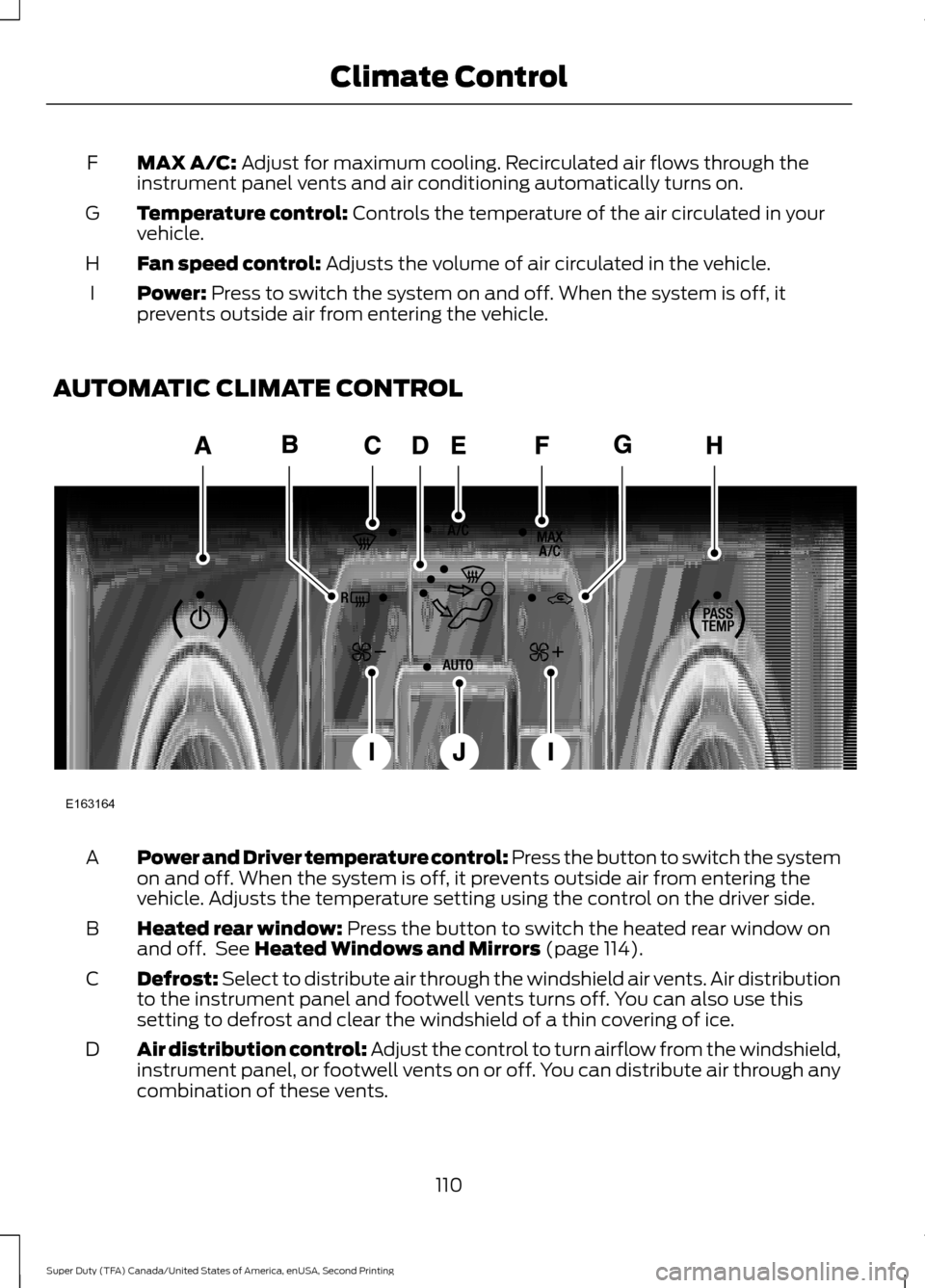
MAX A/C: Adjust for maximum cooling. Recirculated air flows through the
instrument panel vents and air conditioning automatically turns on.
F
Temperature control:
Controls the temperature of the air circulated in your
vehicle.
G
Fan speed control:
Adjusts the volume of air circulated in the vehicle.
H
Power:
Press to switch the system on and off. When the system is off, it
prevents outside air from entering the vehicle.
I
AUTOMATIC CLIMATE CONTROL Power and Driver temperature control: Press the button to switch the system
on and off. When the system is off, it prevents outside air from entering the
vehicle. Adjusts the temperature setting using the control on the driver side.
A
Heated rear window:
Press the button to switch the heated rear window on
and off. See Heated Windows and Mirrors (page 114).
B
Defrost: Select to distribute air through the windshield air vents. Air distribution
to the instrument panel and footwell vents turns off. You can also use this
setting to defrost and clear the windshield of a thin covering of ice.
C
Air distribution control: Adjust the control to turn airflow from the windshield,
instrument panel, or footwell vents on or off. You can distribute air through any
combination of these vents.
D
110
Super Duty (TFA) Canada/United States of America, enUSA, Second Printing Climate ControlE163164
Page 117 of 510
HEATED WINDOWS AND
MIRRORS
Heated Rear Window (If Equipped)
Note: Make sure the engine is running
before operating the heated windows.
Note: If your vehicle is equipped with a
sliding rear window, the feature still
operates when you open the window. Press the button to clear the
heated rear window of thin ice
and fog. The heated rear window
will automatically turn off after a short
period of time. Start the engine before you
switch the heated rear window on.
Do not use razor blades or other sharp
objects to clean or remove decals from
the inside of the heated rear window.
The vehicle warranty does not cover
damage caused to the heated rear
window grid lines.
Heated Exterior Mirror
When you switch the heated rear window
on, the heated exterior mirrors will
automatically turn on.
Note: Do not remove ice from the mirrors
with a scraper or adjust the mirror glass
when it is frozen in place.
Note: Do not clean the mirror housing or
glass with harsh abrasives, fuel or other
petroleum-based cleaning products.
REMOTE START
(If Equipped)
The remote start feature allows you to
pre-condition the interior of your vehicle.
The climate control system works to
achieve comfort according to your previous
settings.
Note: You cannot adjust the system during
remote start operation. Turn the ignition on to return the system
to its previous settings. You can now make
adjustments normally, but you need to turn
certain vehicle-dependent features back
on, such as:
•
Heated seats.
• Cooled seats.
• Heated steering wheel.
• Heated mirrors.
• Heated rear window.
You can adjust the default remote start
settings using the information display
controls. See
Information Displays
(page 88).
Automatic Settings
In hot weather, the system is set to
72°F
(22°C). The cooled seats are set to high
(if available, and selected to AUTO in the
information display).
In moderate weather, the system either
heats or cools (based on previous
settings). The rear defroster, heated
mirrors and heated seats do not
automatically turn on.
In cold weather, the system is set to
72°F
(22°C). The heated seats are set to high
(if available, and selected to AUTO in the
information display). The rear defroster
and heated mirrors automatically turn on.
114
Super Duty (TFA) Canada/United States of America, enUSA, Second Printing Climate ControlE184884
Page 122 of 510
WARNINGS
Do not use the memory function
when your vehicle is moving.
This feature automatically recalls the
position of the following:
•
Driver seat.
• Power mirrors.
• Optional adjustable pedals.
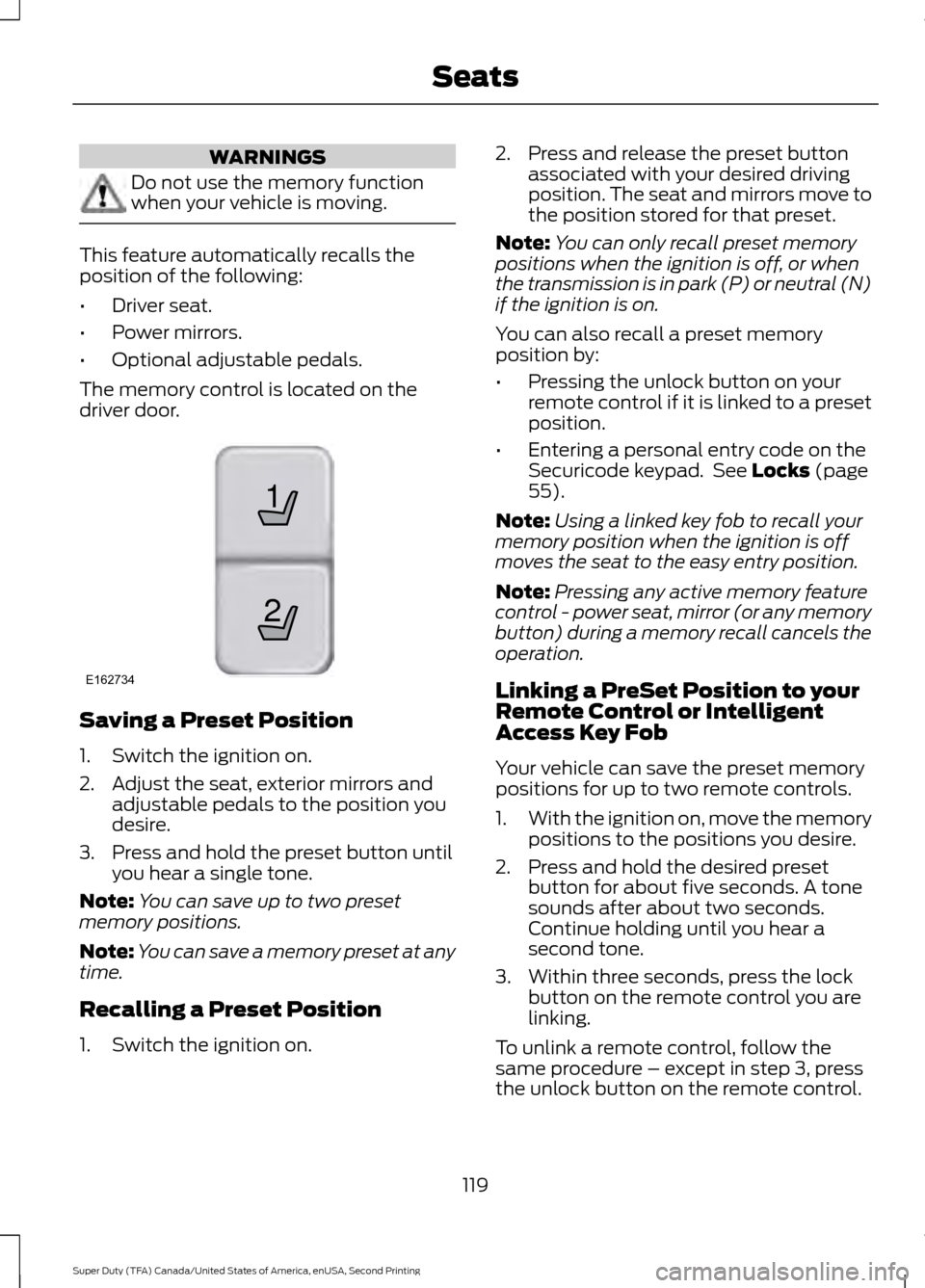
The memory control is located on the
driver door. Saving a Preset Position
1. Switch the ignition on.
2. Adjust the seat, exterior mirrors and
adjustable pedals to the position you
desire.
3. Press and hold the preset button until you hear a single tone.
Note: You can save up to two preset
memory positions.
Note: You can save a memory preset at any
time.
Recalling a Preset Position
1. Switch the ignition on. 2. Press and release the preset button
associated with your desired driving
position. The seat and mirrors move to
the position stored for that preset.
Note: You can only recall preset memory
positions when the ignition is off, or when
the transmission is in park (P) or neutral (N)
if the ignition is on.
You can also recall a preset memory
position by:
• Pressing the unlock button on your
remote control if it is linked to a preset
position.
• Entering a personal entry code on the
Securicode keypad. See Locks (page
55).
Note: Using a linked key fob to recall your
memory position when the ignition is off
moves the seat to the easy entry position.
Note: Pressing any active memory feature
control - power seat, mirror (or any memory
button) during a memory recall cancels the
operation.
Linking a PreSet Position to your
Remote Control or Intelligent
Access Key Fob
Your vehicle can save the preset memory
positions for up to two remote controls.
1. With the ignition on, move the memory
positions to the positions you desire.
2. Press and hold the desired preset button for about five seconds. A tone
sounds after about two seconds.
Continue holding until you hear a
second tone.
3. Within three seconds, press the lock button on the remote control you are
linking.
To unlink a remote control, follow the
same procedure – except in step 3, press
the unlock button on the remote control.
119
Super Duty (TFA) Canada/United States of America, enUSA, Second Printing Seats21
E162734
Page 436 of 510
Touch Rear Control to allow the rear seat passengers to adjust the rear climate
settings. Touch it again to prevent the rear seat passengers from adjusting the
settings.
Rear Control automatically turns off when you use the touchscreen
to adjust the rear climate settings.
Touch + or – to adjust the temperature.
To adjust fan speed, touch + or – next to the fan icon.
Touch
Rear again to close the rear controls. Closing the rear climate control
functions does not affect their current settings.
Recirculated air:
Touch the button to switch between outside air and
recirculated air. When you select recirculated air, the air currently in the
passenger compartment recirculates. This may reduce the time needed to cool
the interior (when used with
A/C) and may reduce unwanted odors from
entering your vehicle.
E
Note:
Recirculated air may turn off automatically (or be prevented from turning
on) in all airflow modes except Max A/C to reduce risk of fogging. Recirculated
air may also turn on and off automatically in Panel or Panel and Floor airflow
modes during hot weather in order to improve cooling efficiency.
MAX A/C: Touch the button to maximize cooling. Recirculated air flows through
the instrument panel vents, air conditioning automatically turns on, and the fan
automatically adjusts to the highest speed.
F
A/C:
Touch the button to switch air conditioning compressor on or off. Use air
conditioning with recirculated air to improve cooling performance and efficiency.
G
Note:
In certain conditions (such as when using Max Defrost), the air
conditioning compressor may continue to operate even after you switch off the
air conditioning with the
A/C button.
AUTO:
Touch the button to turn on automatic operation. Select the desired
temperature using the temperature control. The system adjusts fan speed, air
distribution, air conditioning operation, and selects outside air or recirculated
air to heat or cool the vehicle in order to maintain the desired temperature. You
can also use the AUTO button to turn off dual zone operation by touching and
holding the button for more than two seconds.
H
Heated rear window: Turns the heated rear window on and off. See the heated
Windows and Mirrors chapter in your owner manual.
I
Defrost: Press the button to distribute air to the windshield vents and de-mister.
Air distribution to instrument panel and footwell vents turn off. You can use
this setting to defog and clear the windshield of a thin covering of ice.
J
Air distribution control:
Touch these buttons to turn airflow from the
windshield, instrument panel, or footwell vents on or off. The system can
distribute air through any combination of these vents.
K
Driver settings:
L
433
Super Duty (TFA) Canada/United States of America, enUSA, Second Printing MyFord Touch
™
(If Equipped)
Page 505 of 510
K
Keyless Entry...................................................56
SECURICODE™ KEYLESS ENTRY
KEYPAD.............................................................. 56
Unlocking and Locking the Doors.................. 58
Keys and Remote Controls........................46
L
Lighting Control..............................................70 Headlamp Flasher................................................. 71
High Beams............................................................ 70
Lighting..............................................................70 General Information............................................ 70
Limited Slip Differential.............................165
Load Carrying
.................................................183
Load Limit.......................................................183
Special Loading Instructions for Owners of
Pick-up Trucks and Utility-type
Vehicles............................................................. 189
Vehicle Loading - with and without a Trailer .................................................................. 183
Locking and Unlocking.................................55 Autolock and Autounlock................................. 55
Battery Saver......................................................... 56
Illuminated Entry.................................................. 56
Power Door Locks................................................ 55
Remote Control.................................................... 55
Smart Unlocks....................................................... 55
Locks...................................................................55
Lug Nuts See: Changing a Road Wheel....................... 290
M
Maintenance..................................................232 General Information.......................................... 232
Manual Climate Control............................109
Manual Seats
...................................................117
Manual Lumbar ................................................... 118
Moving the Seat Backward and Forward............................................................... 117
Recline Adjustment............................................. 117
Media Hub
......................................................328 Memory Function
..........................................118
Easy Entry and Exit Feature............................ 120
Linking a PreSet Position to your Remote Control or Intelligent Access Key Fob
........................................................................\
....... 119
Recalling a Preset Position.............................. 119
Saving a Preset Position................................... 119
Message Center See: Information Displays................................ 88
Mirrors See: Heated Windows and Mirrors...............114
See: Windows and Mirrors................................ 75
Mobile Communications Equipment.......13
Moonroof...........................................................79 Bounce-Back......................................................... 80
Opening and Closing the Moonroof..............79
Venting the Moonroof........................................ 80
Motorcraft Parts
..........................................304
MyFord Touch ™...........................................376
General Information.......................................... 376
MyFord Touch ™ Troubleshooting.........443
MyKey Troubleshooting
...............................54
MyKey ™............................................................50
Principle of Operation........................................ 50
N
Navigation......................................................434 cityseekr................................................................ 436
Destination Mode.............................................. 434
Map Mode............................................................ 440
Navigation Map Updates................................ 443
Navigation Voice Commands....................... 443
Point of Interest (POI) Categories..............436
Quick-touch Buttons........................................ 442
Setting Your Navigation Preferences..........437
Normal Scheduled Maintenance..........459 6.2L and 6.8L Gasoline Engines.................. 459
6.7L Diesel Engine............................................. 460
O
Oil Change Indicator Reset......................236 Resetting the Oil Life Monitoring
System.............................................................. 236
Oil Check See: Engine Oil Check...................................... 235
Opening and Closing the Hood..............232
502
Super Duty (TFA) Canada/United States of America, enUSA, Second Printing Index