2016 FORD SUPER DUTY ECU
[x] Cancel search: ECUPage 26 of 510
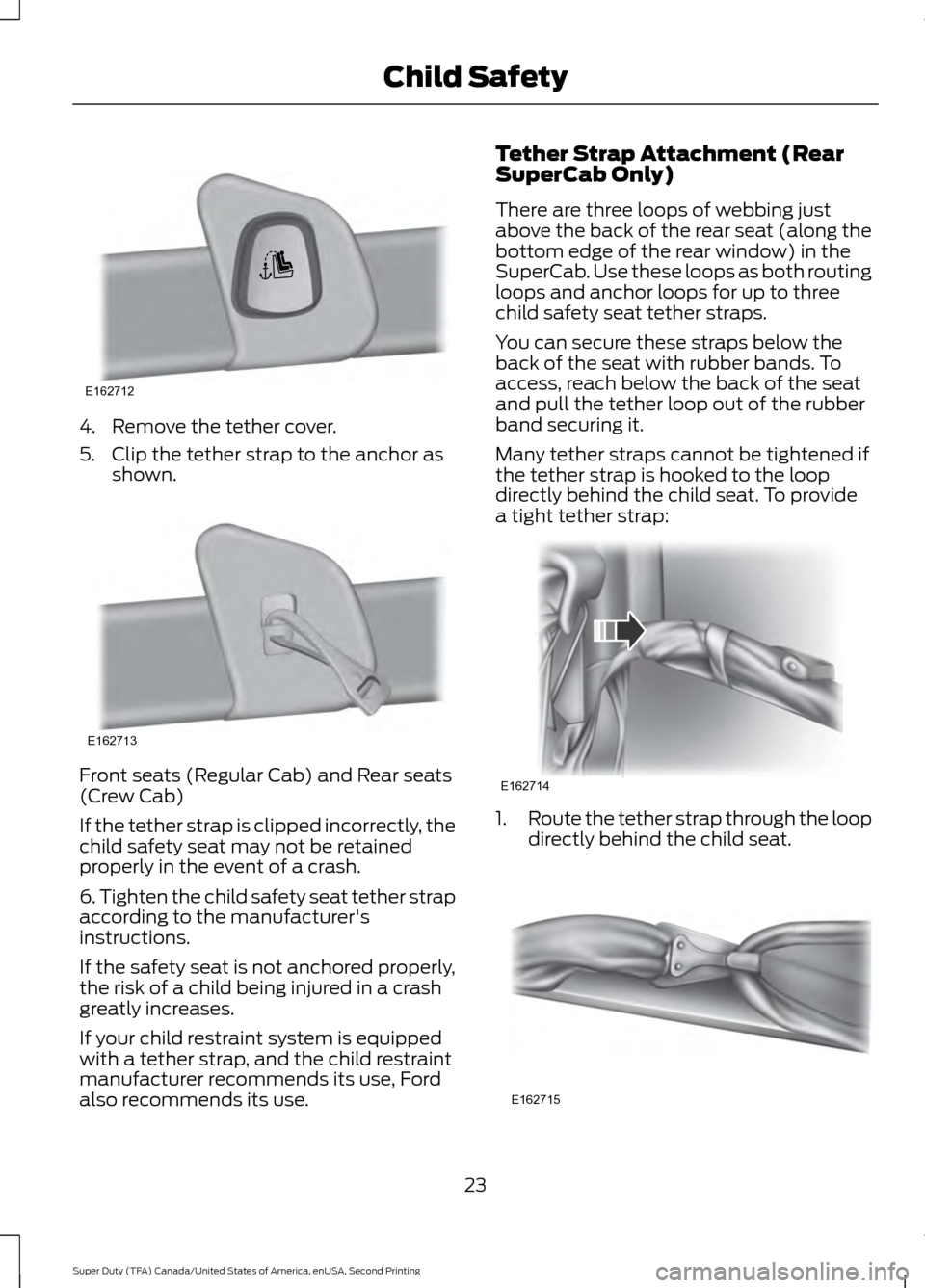
4. Remove the tether cover.
5. Clip the tether strap to the anchor as
shown. Front seats (Regular Cab) and Rear seats
(Crew Cab)
If the tether strap is clipped incorrectly, the
child safety seat may not be retained
properly in the event of a crash.
6. Tighten the child safety seat tether strap
according to the manufacturer's
instructions.
If the safety seat is not anchored properly,
the risk of a child being injured in a crash
greatly increases.
If your child restraint system is equipped
with a tether strap, and the child restraint
manufacturer recommends its use, Ford
also recommends its use. Tether Strap Attachment (Rear
SuperCab Only)
There are three loops of webbing just
above the back of the rear seat (along the
bottom edge of the rear window) in the
SuperCab. Use these loops as both routing
loops and anchor loops for up to three
child safety seat tether straps.
You can secure these straps below the
back of the seat with rubber bands. To
access, reach below the back of the seat
and pull the tether loop out of the rubber
band securing it.
Many tether straps cannot be tightened if
the tether strap is hooked to the loop
directly behind the child seat. To provide
a tight tether strap:
1.
Route the tether strap through the loop
directly behind the child seat. 23
Super Duty (TFA) Canada/United States of America, enUSA, Second Printing Child SafetyE162712 E162713 E162714 E162715
Page 32 of 510
The safety belt pretensioners at the front
seating positions are designed to tighten
the safety belts when activated. In frontal
and near-frontal crashes, side crashes and
rollovers, the safety belt pretensioners may
be activated alone or, if the crash is of
sufficient severity, together with the front
airbags.
FASTENING THE SEATBELTS
The front outboard and rear safety
restraints in the vehicle are combination
lap and shoulder belts.
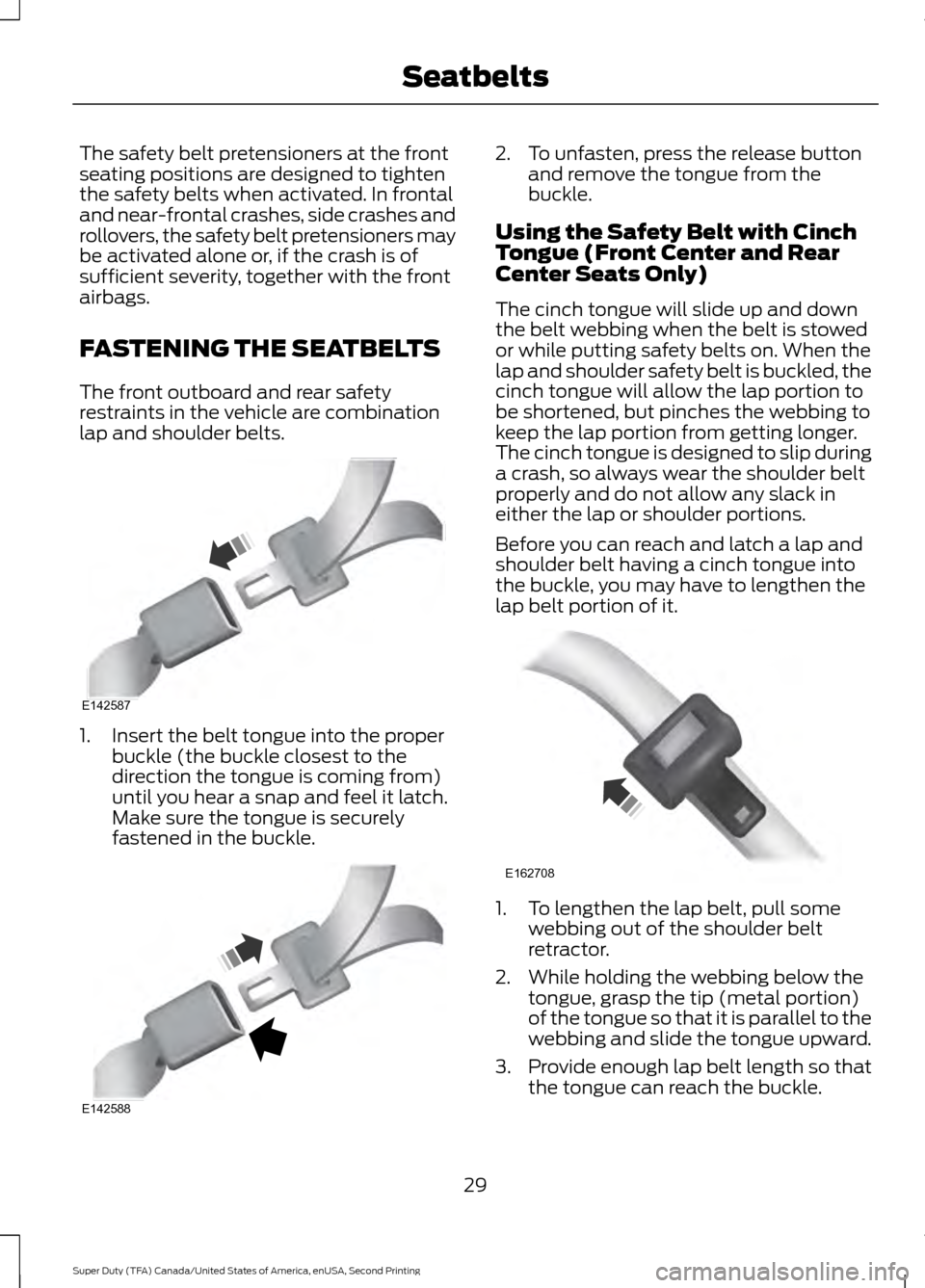
1. Insert the belt tongue into the proper
buckle (the buckle closest to the
direction the tongue is coming from)
until you hear a snap and feel it latch.
Make sure the tongue is securely
fastened in the buckle. 2. To unfasten, press the release button
and remove the tongue from the
buckle.
Using the Safety Belt with Cinch
Tongue (Front Center and Rear
Center Seats Only)
The cinch tongue will slide up and down
the belt webbing when the belt is stowed
or while putting safety belts on. When the
lap and shoulder safety belt is buckled, the
cinch tongue will allow the lap portion to
be shortened, but pinches the webbing to
keep the lap portion from getting longer.
The cinch tongue is designed to slip during
a crash, so always wear the shoulder belt
properly and do not allow any slack in
either the lap or shoulder portions.
Before you can reach and latch a lap and
shoulder belt having a cinch tongue into
the buckle, you may have to lengthen the
lap belt portion of it. 1. To lengthen the lap belt, pull some
webbing out of the shoulder belt
retractor.
2. While holding the webbing below the tongue, grasp the tip (metal portion)
of the tongue so that it is parallel to the
webbing and slide the tongue upward.
3. Provide enough lap belt length so that
the tongue can reach the buckle.
29
Super Duty (TFA) Canada/United States of America, enUSA, Second Printing SeatbeltsE142587 E142588 E162708
Page 33 of 510
Fastening the Cinch Tongue
WARNING
The lap belt should fit snugly and as
low as possible around the hips, not
across the waist.
1.
Pull the lap and shoulder belt from the
retractor so that the shoulder belt
portion of the safety belt crosses your
shoulder and chest.
2. Be sure the belt is not twisted. If the belt is twisted, remove the twist.
3. Insert the belt tongue into the proper buckle for your seating position until
you hear a snap and feel it latch.
4. Make sure the tongue is securely fastened to the buckle by pulling on
the tongue.
While you are fastened in the safety belt,
the lap and shoulder belt with a cinch
tongue adjusts to your movement.
However, if you brake hard, turn hard, or if
your vehicle receives an impact of 5.0 mph
(8 km/h) or more, the safety belt will
become locked and help reduce your
forward movement.
Using Safety Belts During
Pregnancy WARNING
Always ride and drive with your
seatback upright and the safety belt
properly fastened. The lap portion of
the safety belt should fit snug and be
positioned low across the hips. The
shoulder portion of the safety belt should
be positioned across the chest. Pregnant
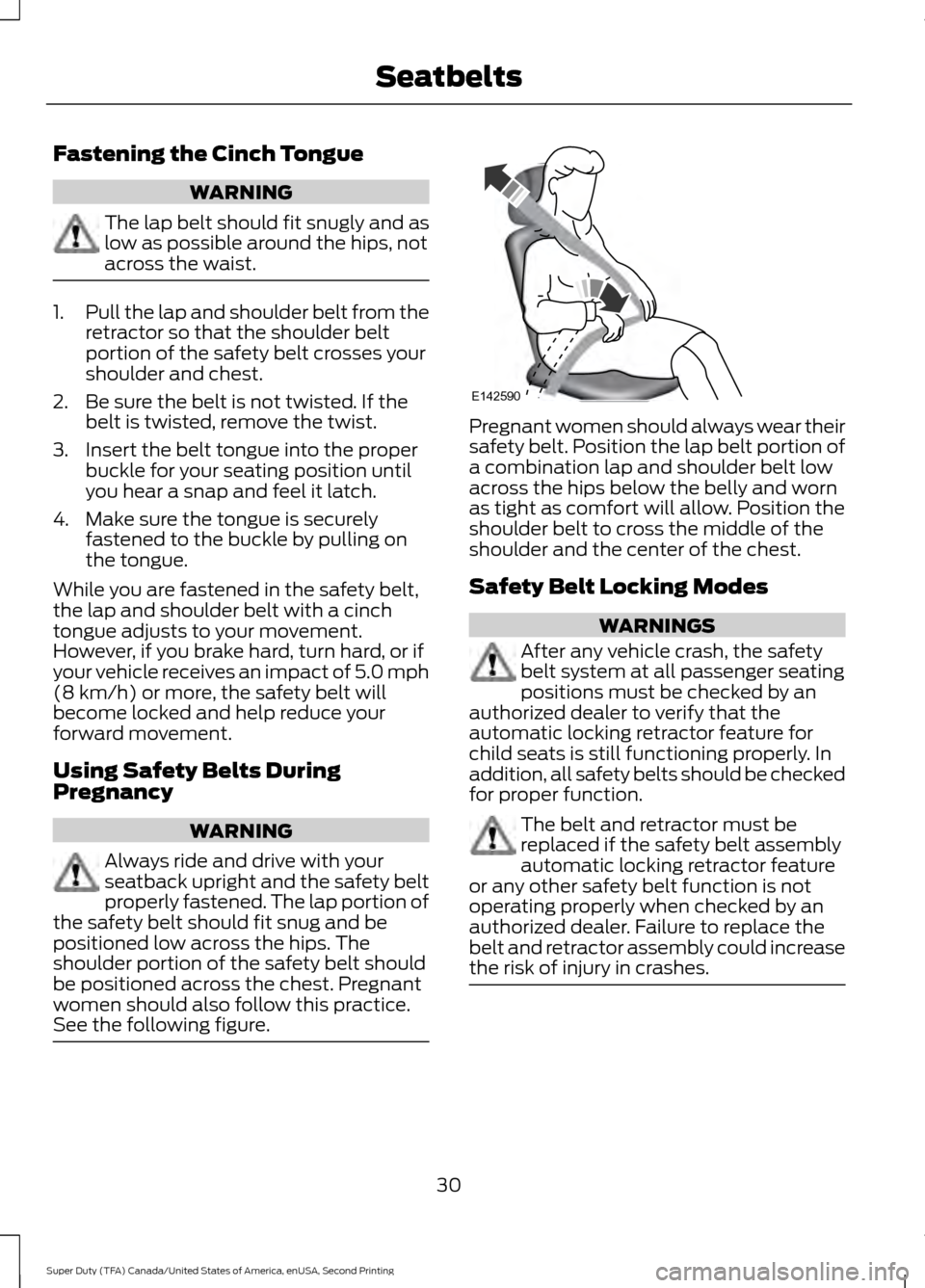
women should also follow this practice.
See the following figure. Pregnant women should always wear their
safety belt. Position the lap belt portion of
a combination lap and shoulder belt low
across the hips below the belly and worn
as tight as comfort will allow. Position the
shoulder belt to cross the middle of the
shoulder and the center of the chest.
Safety Belt Locking Modes
WARNINGS
After any vehicle crash, the safety
belt system at all passenger seating
positions must be checked by an
authorized dealer to verify that the
automatic locking retractor feature for
child seats is still functioning properly. In
addition, all safety belts should be checked
for proper function. The belt and retractor must be
replaced if the safety belt assembly
automatic locking retractor feature
or any other safety belt function is not
operating properly when checked by an
authorized dealer. Failure to replace the
belt and retractor assembly could increase
the risk of injury in crashes. 30
Super Duty (TFA) Canada/United States of America, enUSA, Second Printing SeatbeltsE142590
Page 49 of 510
GENERAL INFORMATION ON
RADIO FREQUENCIES
This device complies with Part 15 of the
FCC Rules and with Industry Canada
license-exempt RSS standard(s).
Operation is subject to the following two
conditions: (1) This device may not cause
harmful interference, and (2) This device
must accept any interference received,
including interference that may cause
undesired operation.
Note:
Changes or modifications not
expressively approved by the party
responsible for compliance could void the
user's authority to operate the equipment.
The term IC before the radio certification
number only signifies that Industry Canada
technical specifications were met.
The typical operating range for your
transmitter is approximately 33 feet (10
meters). Vehicles with the remote start
feature will have a greater range. One of
the following could cause a decrease in
operating range:
• weather conditions
• nearby radio towers
• structures around the vehicle
• other vehicles parked next to your
vehicle
The radio frequency used by your remote
control can also be used by other short
distance radio transmissions, for example
amateur radios, medical equipment,
wireless headphones, remote controls and
alarm systems. If the frequencies are
jammed, you will not be able to use your
remote control. You can lock and unlock
the doors with the key.
Note: Make sure to lock your vehicle before
leaving it unattended.
Note: If you are in range, the remote control
will operate if you press any button
unintentionally. Note:
The remote control contains sensitive
electrical components. Exposure to moisture
or impact may cause permanent damage.
REMOTE CONTROL
Integrated Keyhead Transmitters
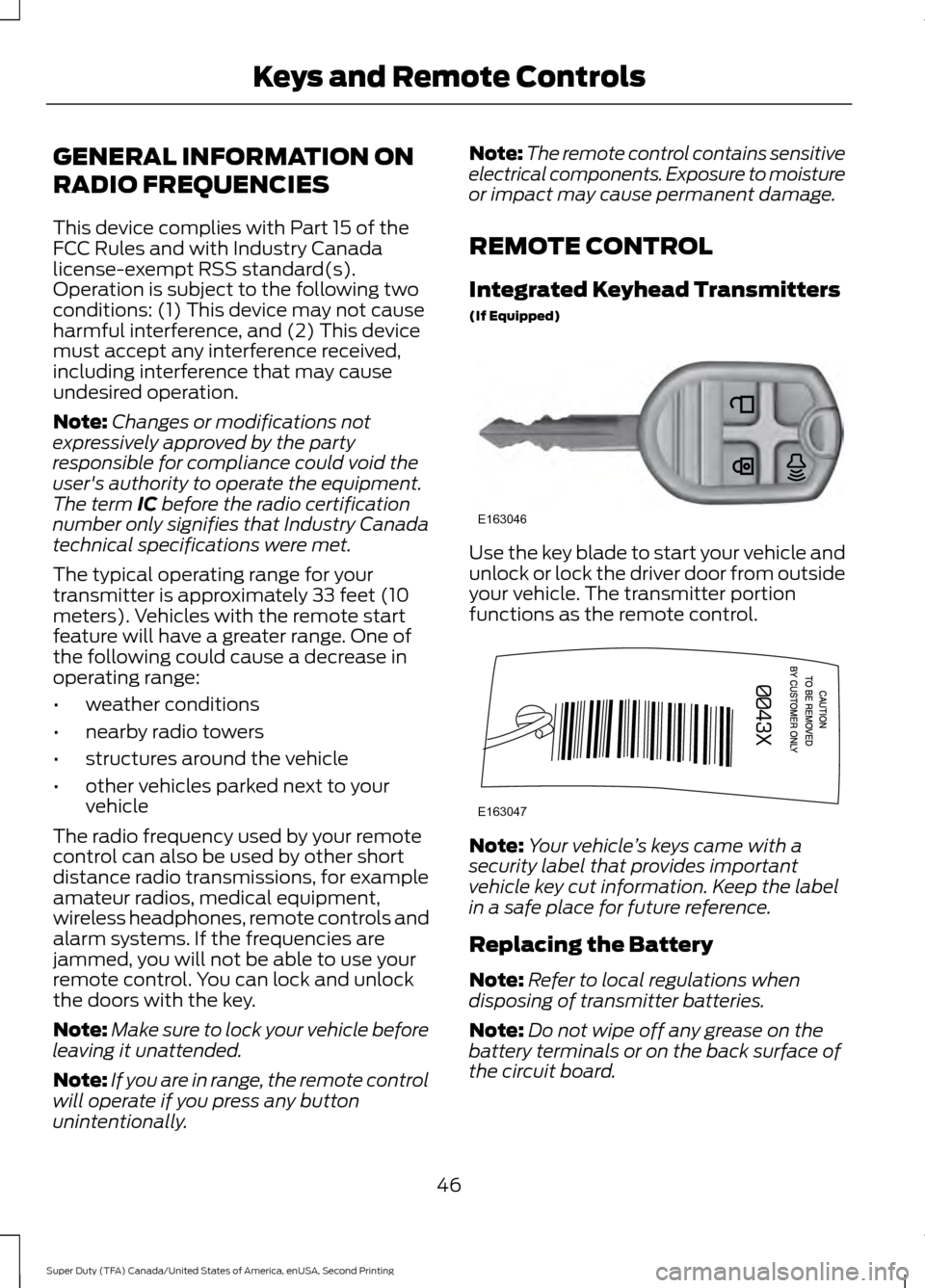
(If Equipped) Use the key blade to start your vehicle and
unlock or lock the driver door from outside
your vehicle. The transmitter portion
functions as the remote control.
Note:
Your vehicle ’s keys came with a
security label that provides important
vehicle key cut information. Keep the label
in a safe place for future reference.
Replacing the Battery
Note: Refer to local regulations when
disposing of transmitter batteries.
Note: Do not wipe off any grease on the
battery terminals or on the back surface of
the circuit board.
46
Super Duty (TFA) Canada/United States of America, enUSA, Second Printing Keys and Remote ControlsE163046 E163047
Page 57 of 510
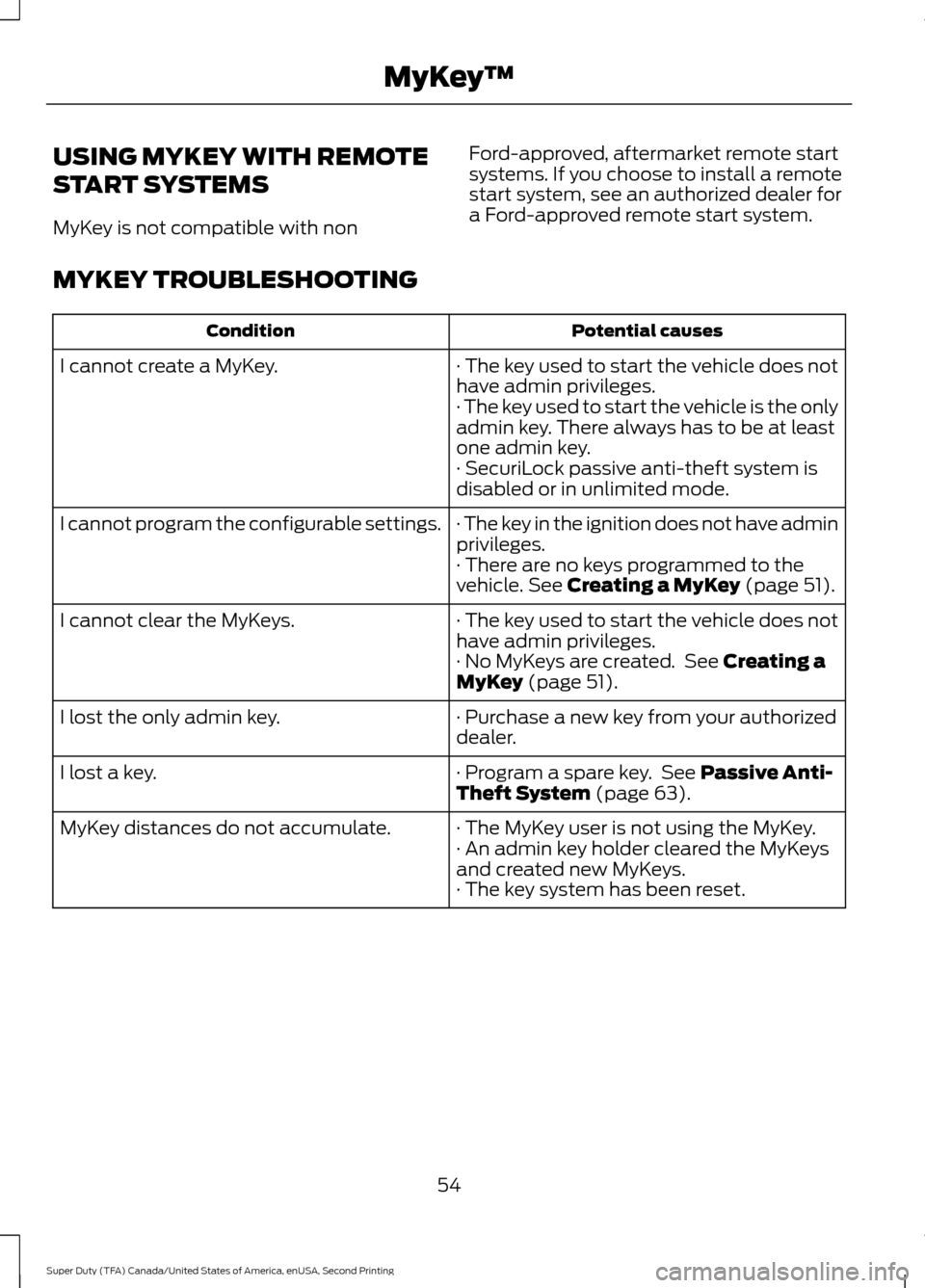
USING MYKEY WITH REMOTE
START SYSTEMS
MyKey is not compatible with non
Ford-approved, aftermarket remote start
systems. If you choose to install a remote
start system, see an authorized dealer for
a Ford-approved remote start system.
MYKEY TROUBLESHOOTING Potential causes
Condition
· The key used to start the vehicle does not
have admin privileges.
I cannot create a MyKey.
· The key used to start the vehicle is the only
admin key. There always has to be at least
one admin key.
· SecuriLock passive anti-theft system is
disabled or in unlimited mode.
· The key in the ignition does not have admin
privileges.
I cannot program the configurable settings.
· There are no keys programmed to the
vehicle. See Creating a MyKey (page 51).
· The key used to start the vehicle does not
have admin privileges.
I cannot clear the MyKeys.
· No MyKeys are created. See
Creating a
MyKey (page 51).
· Purchase a new key from your authorized
dealer.
I lost the only admin key.
· Program a spare key. See
Passive Anti-
Theft System (page 63).
I lost a key.
· The MyKey user is not using the MyKey.
MyKey distances do not accumulate.
· An admin key holder cleared the MyKeys
and created new MyKeys.
· The key system has been reset.
54
Super Duty (TFA) Canada/United States of America, enUSA, Second Printing MyKey
™
Page 59 of 510
The autolock feature will unlock all the
doors when:
•
autolock has locked the doors
• you stop the vehicle and switch the
ignition off or to accessory mode, and
• you open the driver door within 10
minutes.
Note: The doors will not autounlock if you
have electronically locked them before
opening the driver door.
Enabling or Disabling
You can enable or disable these features
in the information display or your
authorized dealer can do it for you. See
General Information (page 88).
Note: You can enable or disable the
autolock and autounlock features
independently of each other.
Illuminated Entry
The interior lamps and select exterior
lamps will illuminate when you unlock the
doors with the remote entry system.
The illuminated entry system will turn off
the lights if:
• the ignition is on
• you press the remote control lock
button, or
• after 25 seconds of illumination.
The dome lamp will not turn on if the
control is set to the off position.
The lights will not turn off if:
• you turn them on with the dimmer
control, or
• any door is open. Battery Saver
The battery saver turns off the interior
lamps 30 minutes after you switch the
ignition off if a door is open and the dome
lamp switch is on. It turns off the interior
lamps after 10 minutes if the dome lamp
switch is off.
KEYLESS ENTRY
(If Equipped)
SECURICODE™ KEYLESS ENTRY
KEYPAD
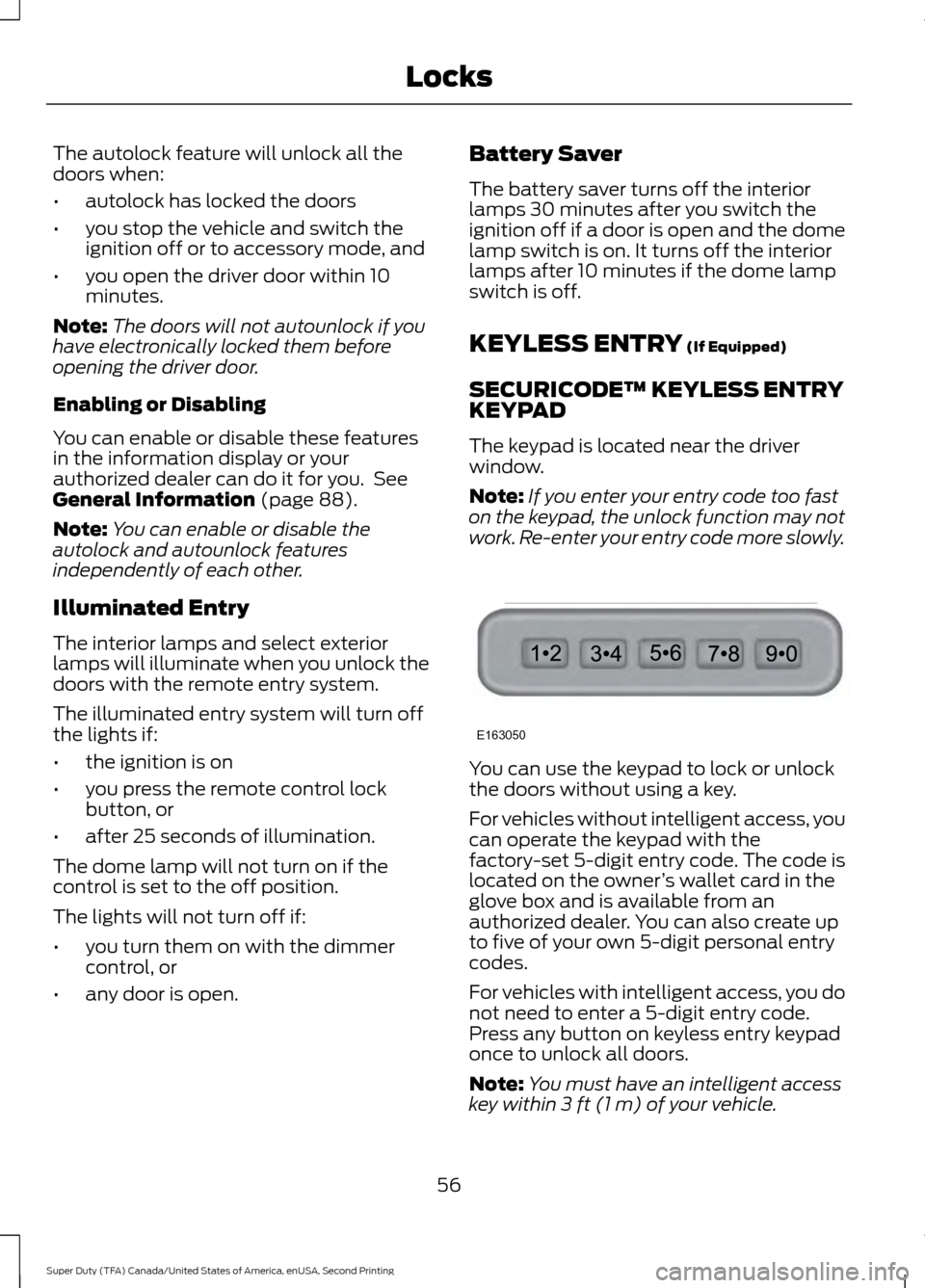
The keypad is located near the driver
window.
Note: If you enter your entry code too fast
on the keypad, the unlock function may not
work. Re-enter your entry code more slowly. You can use the keypad to lock or unlock
the doors without using a key.
For vehicles without intelligent access, you
can operate the keypad with the
factory-set 5-digit entry code. The code is
located on the owner
’s wallet card in the
glove box and is available from an
authorized dealer. You can also create up
to five of your own 5-digit personal entry
codes.
For vehicles with intelligent access, you do
not need to enter a 5-digit entry code.
Press any button on keyless entry keypad
once to unlock all doors.
Note: You must have an intelligent access
key within
3 ft (1 m) of your vehicle.
56
Super Duty (TFA) Canada/United States of America, enUSA, Second Printing LocksE163050
Page 60 of 510
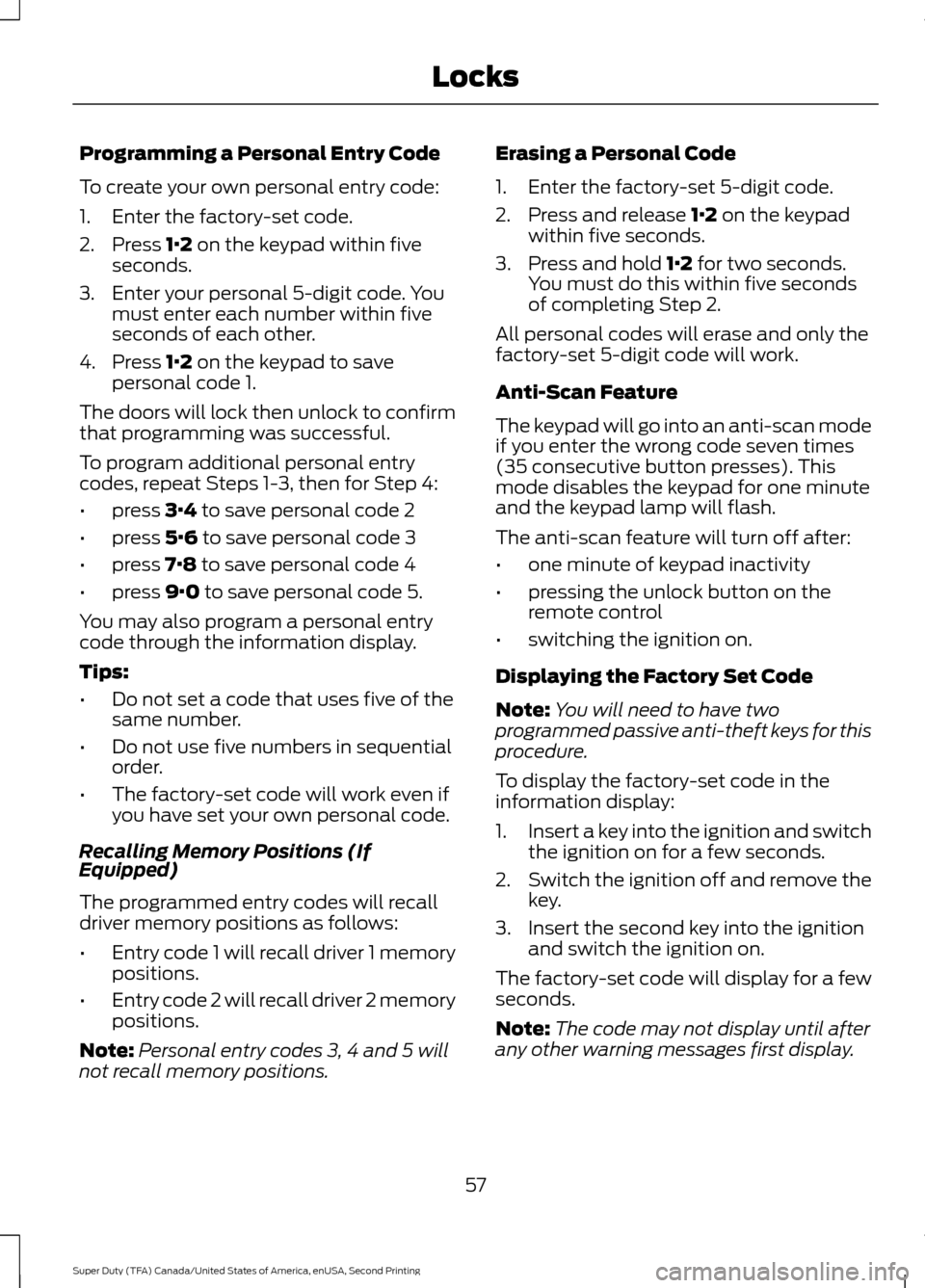
Programming a Personal Entry Code
To create your own personal entry code:
1. Enter the factory-set code.
2. Press 1·2 on the keypad within five
seconds.
3. Enter your personal 5-digit code. You must enter each number within five
seconds of each other.
4. Press
1·2 on the keypad to save
personal code 1.
The doors will lock then unlock to confirm
that programming was successful.
To program additional personal entry
codes, repeat Steps 1-3, then for Step 4:
• press
3·4 to save personal code 2
• press
5·6 to save personal code 3
• press
7·8 to save personal code 4
• press
9·0 to save personal code 5.
You may also program a personal entry
code through the information display.
Tips:
• Do not set a code that uses five of the
same number.
• Do not use five numbers in sequential
order.
• The factory-set code will work even if
you have set your own personal code.
Recalling Memory Positions (If
Equipped)
The programmed entry codes will recall
driver memory positions as follows:
• Entry code 1 will recall driver 1 memory
positions.
• Entry code 2 will recall driver 2 memory
positions.
Note: Personal entry codes 3, 4 and 5 will
not recall memory positions. Erasing a Personal Code
1. Enter the factory-set 5-digit code.
2. Press and release
1·2 on the keypad
within five seconds.
3. Press and hold
1·2 for two seconds.
You must do this within five seconds
of completing Step 2.
All personal codes will erase and only the
factory-set 5-digit code will work.
Anti-Scan Feature
The keypad will go into an anti-scan mode
if you enter the wrong code seven times
(35 consecutive button presses). This
mode disables the keypad for one minute
and the keypad lamp will flash.
The anti-scan feature will turn off after:
• one minute of keypad inactivity
• pressing the unlock button on the
remote control
• switching the ignition on.
Displaying the Factory Set Code
Note: You will need to have two
programmed passive anti-theft keys for this
procedure.
To display the factory-set code in the
information display:
1. Insert a key into the ignition and switch
the ignition on for a few seconds.
2. Switch the ignition off and remove the
key.
3. Insert the second key into the ignition and switch the ignition on.
The factory-set code will display for a few
seconds.
Note: The code may not display until after
any other warning messages first display.
57
Super Duty (TFA) Canada/United States of America, enUSA, Second Printing Locks
Page 62 of 510
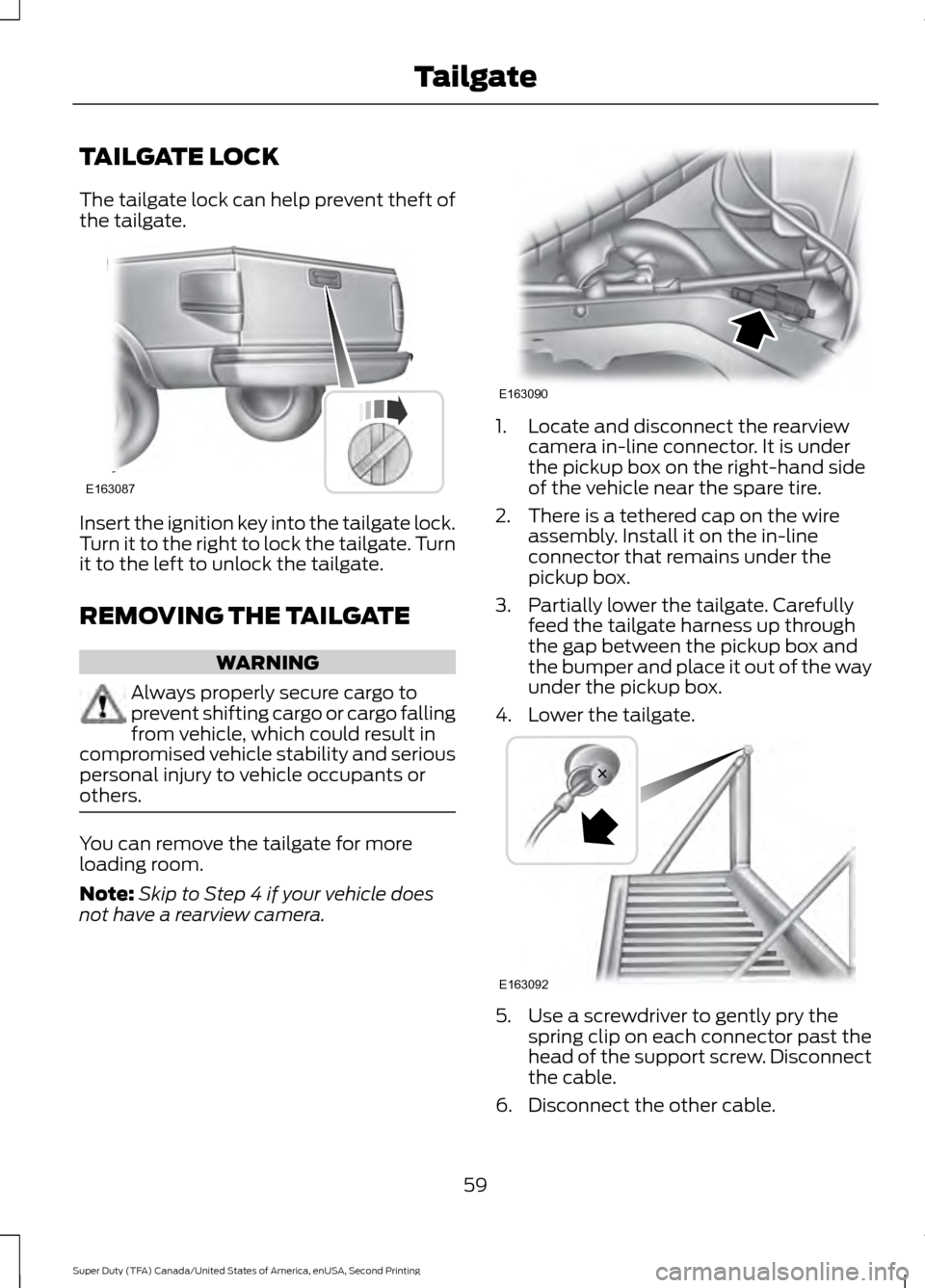
TAILGATE LOCK
The tailgate lock can help prevent theft of
the tailgate.
Insert the ignition key into the tailgate lock.
Turn it to the right to lock the tailgate. Turn
it to the left to unlock the tailgate.
REMOVING THE TAILGATE
WARNING
Always properly secure cargo to
prevent shifting cargo or cargo falling
from vehicle, which could result in
compromised vehicle stability and serious
personal injury to vehicle occupants or
others. You can remove the tailgate for more
loading room.
Note:
Skip to Step 4 if your vehicle does
not have a rearview camera. 1. Locate and disconnect the rearview
camera in-line connector. It is under
the pickup box on the right-hand side
of the vehicle near the spare tire.
2. There is a tethered cap on the wire assembly. Install it on the in-line
connector that remains under the
pickup box.
3. Partially lower the tailgate. Carefully feed the tailgate harness up through
the gap between the pickup box and
the bumper and place it out of the way
under the pickup box.
4. Lower the tailgate. 5. Use a screwdriver to gently pry the
spring clip on each connector past the
head of the support screw. Disconnect
the cable.
6. Disconnect the other cable.
59
Super Duty (TFA) Canada/United States of America, enUSA, Second Printing TailgateE163087 E163090 E163092