2016 FORD FOCUS Starting
[x] Cancel search: StartingPage 5 of 385

Steering Wheel
Adjusting the Steering Wheel...................69
Audio Control..................................................69
Voice Control
...................................................70
Cruise Control..................................................70
Information Display Control
.......................70
Heated Steering Wheel
.................................71
Wipers and Washers
Windshield Wipers.........................................72
Windshield Washers
......................................72
Rear Window Wiper and Washers...........73
Lighting
General Information......................................74
Lighting Control...............................................74
Autolamps .........................................................
75
Instrument Lighting Dimmer
......................76
Headlamp Exit Delay....................................76
Daytime Running Lamps
.............................76
Automatic High Beam Control..................77
Front Fog Lamps............................................78
Direction Indicators
........................................78
Interior Lamps
.................................................79
Ambient Lighting
............................................79
Windows and Mirrors
Power Windows...............................................81
Exterior Mirrors................................................82
Interior Mirror...................................................84
Sun Visors
.........................................................84
Moonroof..........................................................84
Instrument Cluster
Gauges...............................................................86
Warning Lamps and Indicators.................87
Audible Warnings and Indicators............90 Information Displays
General Information
.......................................91
Trip Computer
.................................................94
Information Messages
.................................95
Climate Control
Manual Climate Control
............................103
Automatic Climate Control......................104
Hints on Controlling the Interior Climate........................................................106
Heated Windows and Mirrors..................108
Cabin Air Filter
...............................................108
Remote Start.................................................109
Seats
Sitting in the Correct Position...................110
Head Restraints.............................................110
Manual Seats
..................................................112
Power Seats
.....................................................112
Rear Seats
........................................................113
Heated Seats...................................................115
Auxiliary Power Points
Auxiliary Power Points
.................................116
Storage Compartments
Center Console
................................................117
Overhead Console.........................................117
Starting and Stopping the Engine
General Information
.....................................118
Ignition Switch................................................118
Keyless Starting.............................................118
Starting a Gasoline Engine.........................121
Engine Block Heater
....................................124
2
Focus (CDH) Canada/United States of America, enUSA, First Printing Table of Contents
Page 7 of 385

Hazard Warning Flashers..........................190
Fuel Shutoff
...................................................190
Jump Starting the Vehicle..........................191
Post-Crash Alert System...........................193
Customer Assistance
Getting the Services You Need...............194
In California (U.S. Only).............................195
The Better Business Bureau (BBB) Auto Line Program (U.S. Only)......................196
Utilizing the Mediation/Arbitration Program (Canada Only)........................197
Getting Assistance Outside the U.S. and Canada.........................................................197
Ordering Additional Owner's Literature.....................................................198
Reporting Safety Defects (U.S. Only)
.............................................................199
Reporting Safety Defects (Canada Only)
.............................................................199
Fuses
Fuse Specification Chart...........................201
Changing a Fuse...........................................210
Maintenance
General Information.....................................212
Opening and Closing the Hood...............212
Under Hood Overview - 1.0L EcoBoost™.................................................214
Under Hood Overview - 2.0L....................215
Engine Oil Dipstick - 1.0L EcoBoost™.................................................216
Engine Oil Dipstick - 2.0L...........................216
Engine Oil Check...........................................216
Engine Coolant Check.................................217
Automatic Transmission Fluid Check............................................................218
Brake Fluid Check.........................................219
Clutch Fluid Check - Manual Transmission..............................................219
Washer Fluid Check
.....................................219 Fuel Filter
........................................................220
Changing the 12V Battery.........................220
Checking the Wiper Blades
.......................221
Changing the Wiper Blades
......................221
Adjusting the Headlamps
.........................223
Removing a Headlamp..............................224
Changing a Bulb...........................................225
Bulb Specification Chart
..........................230
Changing the Engine Air Filter.................232
Vehicle Care
General Information
...................................234
Cleaning Products
.......................................234
Cleaning the Exterior..................................234
Waxing.............................................................235
Cleaning the Engine....................................236
Cleaning the Windows and Wiper Blades..........................................................236
Cleaning the Interior....................................237
Cleaning the Instrument Panel and Instrument Cluster Lens........................237
Cleaning Leather Seats.............................238
Repairing Minor Paint Damage..............238
Cleaning the Alloy Wheels.......................238
Vehicle Storage
............................................239
Wheels and Tires
Tire Care
...........................................................241
Using Snow Chains.....................................256
Tire Pressure Monitoring System...........257
Changing a Road Wheel...........................260
Driving at High Speed................................263
Lug Nuts
..........................................................264
Capacities and Specific- ations
Engine Specifications - 1.0L EcoBoost™................................................265
Engine Specifications - 2.0L....................265
Motorcraft Parts - 1.0L EcoBoost™......266
4
Focus (CDH) Canada/United States of America, enUSA, First Printing Table of Contents
Page 54 of 385

Vehicles with automatic climate control
can be configured to operate when your
vehicle is remote started. See Automatic
Climate Control (page 104).
Many states and provinces have
restrictions for the use of remote start.
Check your local and state or provincial
laws for specific requirements regarding
remote start systems.
Note: Do not use remote start if your vehicle
is low on fuel.
The remote start system does not work if
any of the following occur:
• The ignition is on.
• The alarm system activates.
• You turn off the feature.
• The hood is open.
• The transmission is not in park (P).
• Your vehicle battery has no charge.
• The powertrain fault indicator was on
the last time you drove your vehicle.
Remote Starting your Vehicle
Note: You must press each button within
three seconds of each other. If you do not
follow this sequence, your vehicle does not
start remotely, the direction indicators do
not flash twice and the horn does not sound. The label on your transmitter details the
starting procedure.
To remote start your vehicle: 1. Press the lock button to lock all the
doors.
2. Press the remote start button twice. The direction indicators flash twice.
The horn sounds if the system fails to start,
unless quiet start is on. Quiet start runs the
blower fan at a slower speed to reduce
noise. You can switch it on or off using the
information display. See
General
Information (page 91).
The power windows do not work during
remote start and the radio does not turn
on automatically.
The parking lamps remain on and your
vehicle runs for 5, 10 or 15 minutes,
depending on the setting.
Note: If you remote start your vehicle with
an intelligent access transmitter, you must
press the push button ignition switch on the
instrument panel once while applying the
brake pedal before driving your vehicle.
Extending the Engine Running Time
To extend the engine running time duration
of your vehicle during remote start, repeat
steps 1 and 2 while the engine is running.
If the duration is set to 10 minutes, the
duration extends by another 10 minutes.
For example, if your vehicle had been
running from the first remote start for 5
minutes, your vehicle continues to run now
for a total of 20 minutes. You can extend
the engine running time duration to a
maximum of 30 minutes.
Wait at least five seconds before remote
starting after a vehicle shutdown.
Turning Your Vehicle Off After Remote
Starting Press the button once. The
parking lamps turn off.
51
Focus (CDH) Canada/United States of America, enUSA, First Printing Keys and Remote ControlsE138626 E138625
Page 55 of 385
You may have to be closer to your vehicle
than when starting due to ground reflection
and the added noise of the running vehicle.
You can turn the remote start system on
or off using the information display. See
General Information (page 91).
REPLACING A LOST KEY OR
REMOTE CONTROL
You can purchase replacement keys or
remote controls from an authorized dealer.
Authorized dealers can program remote
controls for your vehicle.
See Passive
Anti-Theft System (page 66).
To re-program the passive anti-theft
system see an authorized dealer.
52
Focus (CDH) Canada/United States of America, enUSA, First Printing Keys and Remote Controls
Page 60 of 385
Potential Causes
Condition
Purchase a new key from an authorized dealer.
I lost the only admin key.
Program a spare key. See Passive Anti-Theft System
(page 66).
I lost a key.
The MyKey is not being used by the intended user.
The MyKey distance does
not accumulate. The MyKeys have been cleared and the MyKey system has
been reset.
Vehicles With Push-Button Start Potential Causes
Condition
The transmitter is not in the backup position. See Keyless
Starting
(page 118).
I cannot create a MyKey.
An admin key is present when you switch the ignition on.
There are no MyKey driving
modes. There are no MyKeys programmed to your vehicle.
See
Creating a MyKey (page 54).
57
Focus (CDH) Canada/United States of America, enUSA, First Printing MyKey
™
Page 69 of 385
PASSIVE ANTI-THEFT
SYSTEM
Note:
The system is not compatible with
non-Ford aftermarket remote start systems.
Use of these systems may result in engine
starting problems and a loss of security
protection.
Note: Metallic objects, electronic devices
or a second coded key on the same key
chain may result in vehicle starting
problems, especially if they are too close to
the key when starting your vehicle. Prevent
these objects from touching the coded key
when starting your vehicle. If your vehicle
fails to start, switch the ignition off, move
all objects on the key chain away from the
key and start your vehicle.
Note: Do not leave a duplicate coded key
in your vehicle. Always take your keys and
lock all doors when leaving your vehicle.
SecuriLock
The system helps prevent the engine from
starting unless you use a coded key
programmed to your vehicle. A message
may appear in the information display.
If your vehicle fails to start, the system may
have a fault. Contact an authorized dealer.
A message may appear in the information
display.
Automatic Arming
The system arms when you switch the
ignition off.
Automatic Disarming
The system disarms when you switch the
ignition on with a coded key.
Replacement Keys
Note: Your vehicle comes with two keys. The intelligent access key functions as a
programmed key that operates the driver
door lock and turns on the intelligent
access with push button start system, as
well as a remote control.
If your intelligent access keys are lost or
stolen and you do not have an extra coded
key, you need to have your vehicle towed
to an authorized dealer. You need to erase
the key codes from your vehicle and
program new coded keys.
Store a spare intelligent access key away
from your vehicle in a safe place. Contact
an authorized dealer to purchase
additional spare or replacement keys.
Programming a Spare Integrated
Keyhead Transmitter
You can program your own integrated
keyhead transmitter or standard
SecuriLock coded keys to your vehicle. This
procedure will program both the vehicle
immobilizer keycode and the remote entry
portion of the remote control to your
vehicle.
Only use integrated keyhead transmitters
or standard SecuriLock keys.
You must have two previously
programmed coded keys and the new
unprogrammed key readily accessible.
Contact an authorized dealer to have the
spare key programmed if two previously
programmed keys are not available.
Make sure that the ignition is switched off
before beginning this procedure. Carry out
all steps within 30 seconds of starting the
sequence. Stop and wait for at least one
minute before starting again if you carry
out any steps out of sequence.
Note:
You can program a maximum of eight
coded keys to your vehicle. All eight can be
integrated keyhead transmitters.
Read and understand the entire procedure
before you begin.
66
Focus (CDH) Canada/United States of America, enUSA, First Printing Security
Page 70 of 385
1.
Insert the first previously programmed
coded key into the ignition.
2. Switch the ignition from off to on. Keep
the ignition on for at least 3 seconds,
but no more than 10 seconds.
3. Switch the ignition off and remove the
first coded key from the ignition.
4. After at least 3 seconds but within 10 seconds of switching the ignition off,
insert the second previously coded key
into the ignition.
5. Switch the ignition from off to on. Keep
the ignition on for at least 3 seconds,
but no more than 10 seconds.
6. Switch the ignition off and remove the
second previously programmed coded
key from the ignition.
7. After at least 3 seconds but within 10 seconds of switching the ignition off
and removing the previously
programmed coded key, insert the new
unprogrammed key into the ignition.
8. Switch the ignition from off to on. Keep
the ignition on for at least six seconds.
9. Remove the newly programmed coded
key from the ignition.
If you have successfully programmed the
coded key, it will start your vehicle and
operate the remote entry system.
If programming was unsuccessful, wait 10
seconds and repeat Steps 1 through 8. If
programming remains unsuccessful, have
your vehicle checked by an authorized
dealer.
Wait 20 seconds and repeat Steps 1
through 9 to program an additional key. Programming a Spare Intelligent
Access Key
You must have two previously
programmed coded keys and the new
unprogrammed key readily accessible.
Contact an authorized dealer to have the
spare key programmed if two previously
programmed keys are not available.
Make sure that the ignition is switched off
before beginning this procedure. Make sure
that you close all the doors before
beginning and that they remain closed
throughout the procedure. Carry out all
steps within 30 seconds of starting the
sequence. Stop and wait for at least one
minute before starting again if you carry
out any steps out of sequence.
Note:
You can program a maximum of eight
intelligent access keys to your vehicle.
Read and understand the entire procedure
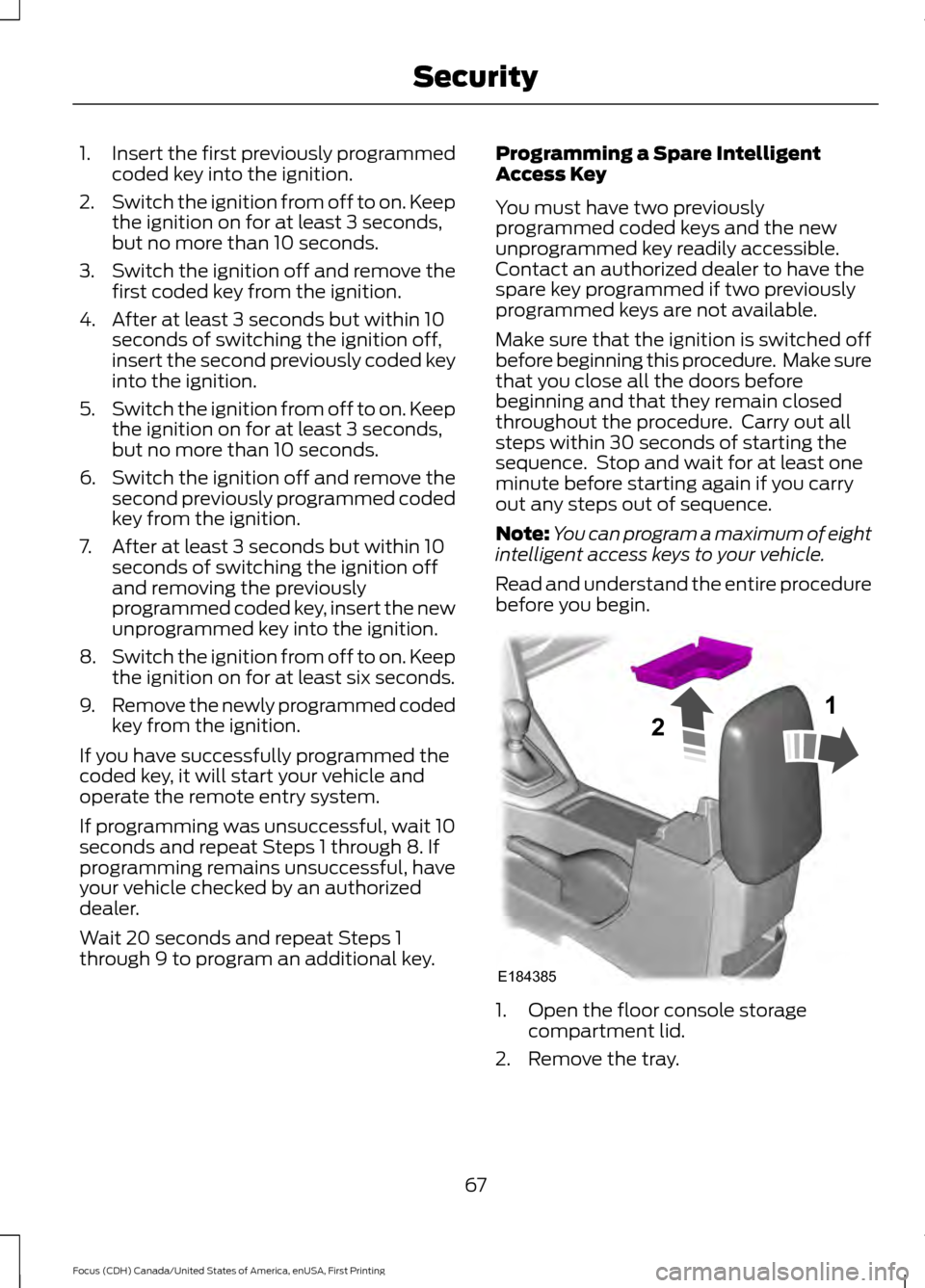
before you begin. 1. Open the floor console storage
compartment lid.
2. Remove the tray.
67
Focus (CDH) Canada/United States of America, enUSA, First Printing SecurityE184385
21
Page 90 of 385

If the needle enters the red section, the
engine is overheating. Stop the engine,
switch the ignition off and determine the
cause once the engine has cooled down.
See Engine Coolant Check (page 217).
Fuel Gauge
Note: : The fuel gauge may vary slightly
when your vehicle is moving or on a gradient.
Switch the ignition on. The fuel gauge will
indicate approximately how much fuel is
left in the fuel tank. The arrow adjacent to
the fuel pump symbol indicates on which
side of your vehicle the fuel filler door is
located.
The needle should move toward F when
you refuel your vehicle. If the needle points
to E after adding fuel, this indicates your
vehicle needs service soon.
After refueling some variability in needle
position is normal.
Note: It may take a short time for the
needle to reach F after leaving the gas
station. This is normal and depends upon
the slope of pavement at the gas station.
Note: The fuel amount dispensed into the
tank is a little less or more than the gauge
indicated. This is normal and depends upon
the slope of pavement at the gas station.
Note: If the gas station nozzle shuts off
before the tank is full, try a different gas
pump nozzle.
Low Fuel Reminder
A low fuel reminder triggers at about 50
miles (80 km). The low fuel warning light
will light, a warning chime will sound and
a pop up will be shown in the display
indicating the remaining distance to empty.
You will also get a subsequent reminder
at 20, 10 and 0 miles. WARNING LAMPS AND
INDICATORS
The following warning lamps and
indicators alert you to a vehicle condition
that may become serious. Some lamps
light when you start your vehicle to make
sure they work. If any lamps remain on
after starting your vehicle, refer to the
respective system warning lamp for further
information.
Note:
Some warning indicators appear in
the information display and function the
same as a warning lamp but do not display
when you start your vehicle.
Adaptive Cruise Control
(If Equipped) The speed control system
indicator light changes color to
indicate what mode the system
is in.
On (white light): Illuminates when you
switch on the adaptive cruise control
system. Turns off when you switch off the
speed control system.
Engaged (green light): Illuminates when
you engage the adaptive cruise control
system. Turns off when you disengage the
speed control system.
Anti-Lock Braking System If it lights when you are driving,
this indicates a malfunction. You
continue to have normal braking
(without anti-lock braking system) unless
the brake system warning lamp also lights.
Have the system checked by an authorized
dealer.
Auto Start-stop
(If Equipped) It lights to inform you when the
engine shuts down or in
conjunction with a message.
87
Focus (CDH) Canada/United States of America, enUSA, First Printing Instrument ClusterE144524