2016 FORD FOCUS Starting
[x] Cancel search: StartingPage 101 of 385

Hill Start Assist
Action
Message
Displays when hill start assist is not available. Contact
an authorized dealer. See Hill Start Assist (page 145).
Hill start assist not available
Keyless Vehicle Action
Message
Displays to remind you that the key is in the trunk. SeeKeyless Starting (page 118).
Ford KeyFree Key inside vehicle
Displayed if the key is not detected by the system. SeeKeyless Starting
(page 118).
Ford KeyFree No key detected
Displayed as a reminder to turn off the vehicle. SeeKeyless Starting
(page 118).
Switch ign. off Press ENGINE
Start/Stop button
Displayed as a reminder to press the brake whilestarting the vehicle.
Press brake to start
Displayed when a valid key is not detected within thevehicle. See
Keyless Starting (page 118).
Ford KeyFree Key not inside car
Displays when the key battery is low. Change the
battery as soon as possible. See
Remote Control
(page 45).
Key Battery low Replace soon
Lane Keeping Aid Action
Message
Displays when the system has detected a condition that
requires service. Have your vehicle checked by an author- ized dealer.
Lane Keeping Sys Fault
Service required
98
Focus (CDH) Canada/United States of America, enUSA, First Printing Information Displays
Page 102 of 385

Lighting
Action
Message
Displays when the brake lamp bulb has burned out.Contact an authorized dealer.
Brake lamp Bulb fault
Displays when the low beam headlamp bulb hasburned out. Contact an authorized dealer.
Low beam Bulb fault
Displays when an electrical system problem occurswith the headlamp system. Contact an authorized dealer.
Headlamp fault Service required
Maintenance Action
Message
Displays when the engine oil life is depleted and
requires a change. See Engine Oil Check (page 216).
Oil change required
Indicates the brake fluid level is low and the brake
system should be inspected immediately. See Brake
Fluid Check (page 219).
Brake fluid level low Service
now
MyKey Action
Message
Displays when MyKey is active.
MyKey active Drive Safely
Displays when starting the vehicle and MyKey is in useand the MyKey speed limit is on.
MyKey Speed Limited to XX
MPH/km/h
Displays when a MyKey is in use and the MyKey speedlimit is on and the vehicle speed is approaching 80 mph (130 km/h).
MyKey Vehicle Near Top Speed
Displays when a MyKey is in use and the MyKey speedlimit is reached.
MyKey Vehicle at Top Speed
Displays when MyKey is active.
MyKey Check Speed Drive
Safely
Displays when a MyKey is in use and Belt-Minder isactivated.
MyKey Buckle Up to Unmute
Audio
99
Focus (CDH) Canada/United States of America, enUSA, First Printing Information Displays
Page 104 of 385

Power Steering
Action
Message
The power steering system is not working. Stop the
vehicle at a safe place. Contact an authorized dealer.
Steering loss Stop safely
The power steering system is not working. Stop the
vehicle at a safe place. Contact an authorized dealer.
Steering assist fault Service
required
The power steering system has detected a condition
within the power steering system, or the passive entry or passive start system requires service. Contact an authorized dealer.
Steering fault Service now
Starting System Action
Message
Displays when starting the vehicle as a reminder toapply the brake.
Press brake to start
Displays when the vehicle fails to start.
Cranking time exceeded
Start-Stop Action
Message
Switch the ignition off before leaving your vehicle if the
system has shut down the engine. See Auto-Start-Stop
(page 126).
Auto StartStop Switch igni-
tion off
Have your vehicle checked by an authorized dealer.
Auto StartStop fault
Service required
The engine needs to be restarted, press the clutch pedalto start. See
Auto-Start-Stop (page 126).
Auto StartStop Press a
pedal to start engine
Select neutral for the system to restart the engine.
See
Auto-Start-Stop (page 126).
Auto StartStop Select
neutral to start engine
The system is not functioning. A manual restart is required.
Auto StartStop Manual
restart required
101
Focus (CDH) Canada/United States of America, enUSA, First Printing Information Displays
Page 110 of 385
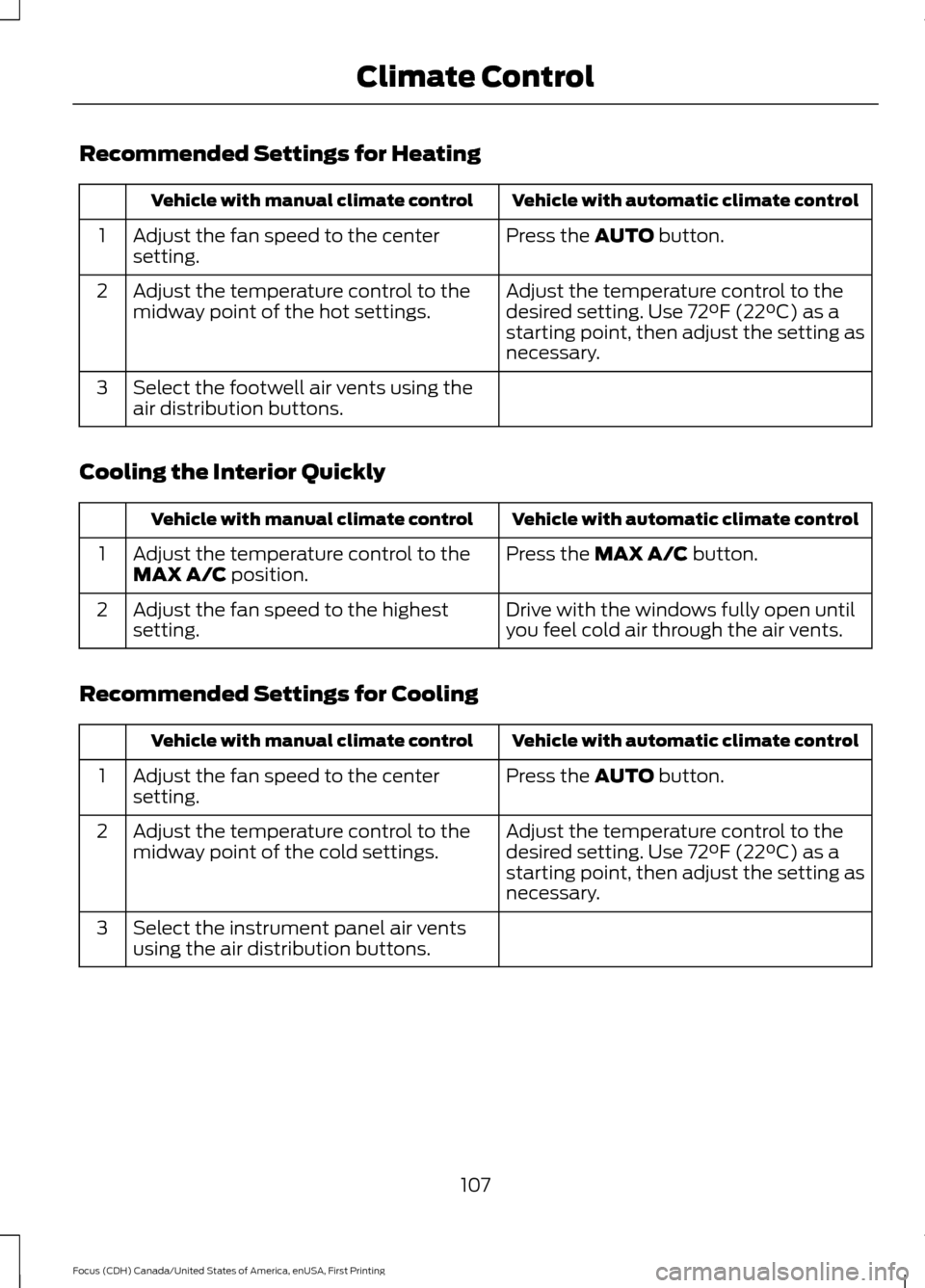
Recommended Settings for Heating
Vehicle with automatic climate control
Vehicle with manual climate control
Press the AUTO button.
Adjust the fan speed to the center
setting.
1
Adjust the temperature control to the
desired setting. Use 72°F (22°C) as a
starting point, then adjust the setting as
necessary.
Adjust the temperature control to the
midway point of the hot settings.
2
Select the footwell air vents using the
air distribution buttons.
3
Cooling the Interior Quickly Vehicle with automatic climate control
Vehicle with manual climate control
Press the
MAX A/C button.
Adjust the temperature control to the
MAX A/C position.
1
Drive with the windows fully open until
you feel cold air through the air vents.
Adjust the fan speed to the highest
setting.
2
Recommended Settings for Cooling Vehicle with automatic climate control
Vehicle with manual climate control
Press the
AUTO button.
Adjust the fan speed to the center
setting.
1
Adjust the temperature control to the
desired setting. Use 72°F (22°C) as a
starting point, then adjust the setting as
necessary.
Adjust the temperature control to the
midway point of the cold settings.
2
Select the instrument panel air vents
using the air distribution buttons.
3
107
Focus (CDH) Canada/United States of America, enUSA, First Printing Climate Control
Page 111 of 385
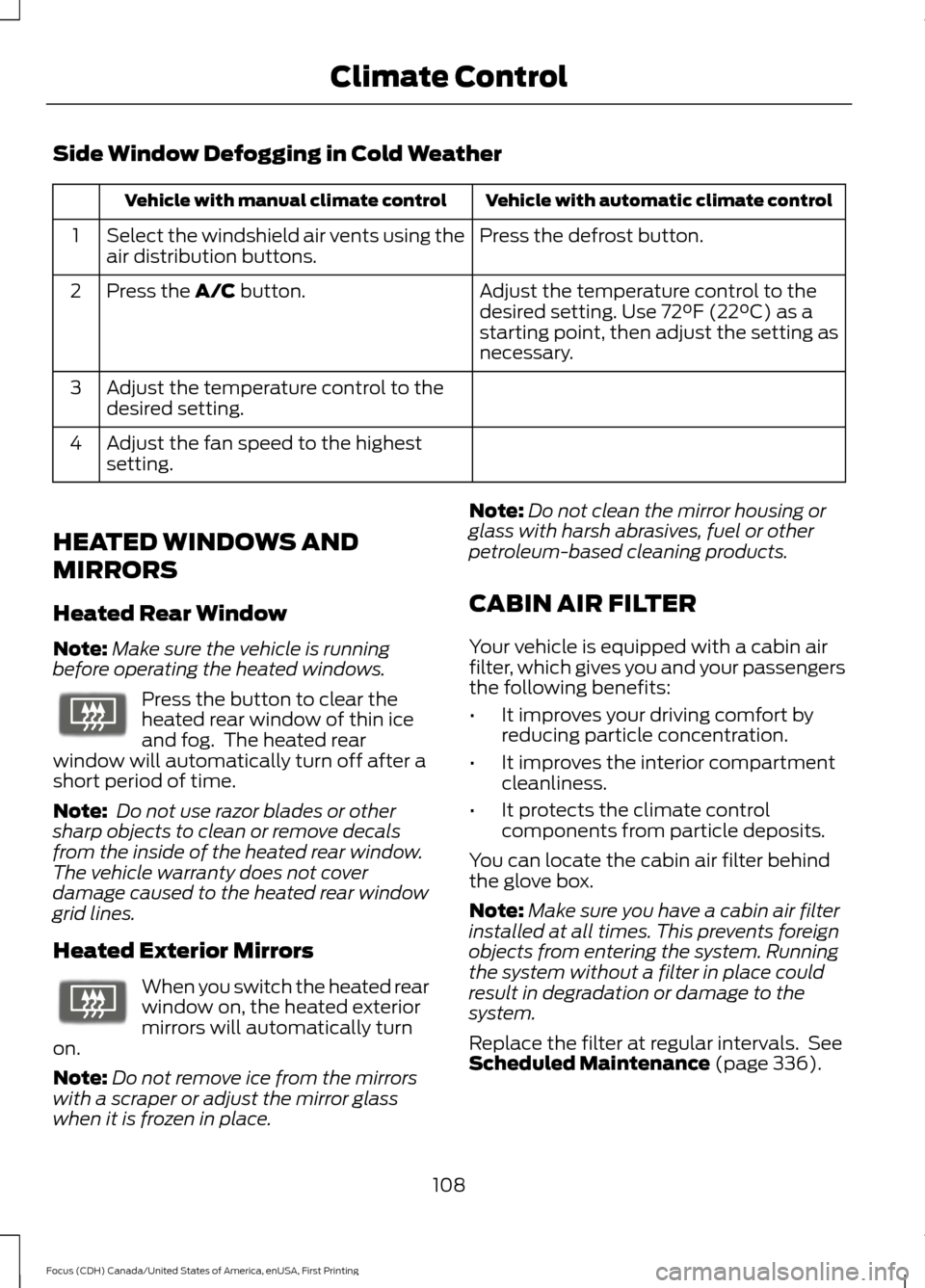
Side Window Defogging in Cold Weather
Vehicle with automatic climate control
Vehicle with manual climate control
Press the defrost button.
Select the windshield air vents using the
air distribution buttons.
1
Adjust the temperature control to the
desired setting. Use 72°F (22°C) as a
starting point, then adjust the setting as
necessary.
Press the A/C button.
2
Adjust the temperature control to the
desired setting.
3
Adjust the fan speed to the highest
setting.
4
HEATED WINDOWS AND
MIRRORS
Heated Rear Window
Note: Make sure the vehicle is running
before operating the heated windows. Press the button to clear the
heated rear window of thin ice
and fog. The heated rear
window will automatically turn off after a
short period of time.
Note: Do not use razor blades or other
sharp objects to clean or remove decals
from the inside of the heated rear window.
The vehicle warranty does not cover
damage caused to the heated rear window
grid lines.
Heated Exterior Mirrors When you switch the heated rear
window on, the heated exterior
mirrors will automatically turn
on.
Note: Do not remove ice from the mirrors
with a scraper or adjust the mirror glass
when it is frozen in place. Note:
Do not clean the mirror housing or
glass with harsh abrasives, fuel or other
petroleum-based cleaning products.
CABIN AIR FILTER
Your vehicle is equipped with a cabin air
filter, which gives you and your passengers
the following benefits:
• It improves your driving comfort by
reducing particle concentration.
• It improves the interior compartment
cleanliness.
• It protects the climate control
components from particle deposits.
You can locate the cabin air filter behind
the glove box.
Note: Make sure you have a cabin air filter
installed at all times. This prevents foreign
objects from entering the system. Running
the system without a filter in place could
result in degradation or damage to the
system.
Replace the filter at regular intervals. See
Scheduled Maintenance
(page 336).
108
Focus (CDH) Canada/United States of America, enUSA, First Printing Climate ControlE72507 E72507
Page 119 of 385
12 Volt DC Power Point
WARNING
Do not plug optional electrical
accessories into the cigar lighter
socket. Incorrect use of the lighter
can cause damage not covered by your
warranty, and can result in fire or serious
injury. Note:
After starting your vehicle, you can
use the socket to power 12-volt appliances
with a maximum current rating of 20 amps.
After you switch your vehicle off, the power
supply works only for a maximum of 30
minutes.
Note: Do not insert objects other than an
accessory plug into the power point. This
damages the outlet and can blow the fuse.
Note: Do not hang any type of accessory or
accessory bracket from the plug.
Note: Do not use the power point over the
vehicle capacity of 12 volt DC 180 watt or a
fuse may blow.
Note: Do not use the power point for
operating a cigar lighter element.
Note: Incorrect use of the power point can
cause damage not covered by your
warranty.
Note: Always keep the power point caps
closed when not in use.
Run the vehicle for full capacity use of the
power point.
To prevent the battery from running out of
charge:
• Do not use the power point longer than
necessary after switching the vehicle
off.
• Do not leave devices plugged in
overnight or when your vehicle is in park
(P) for extended periods. Location
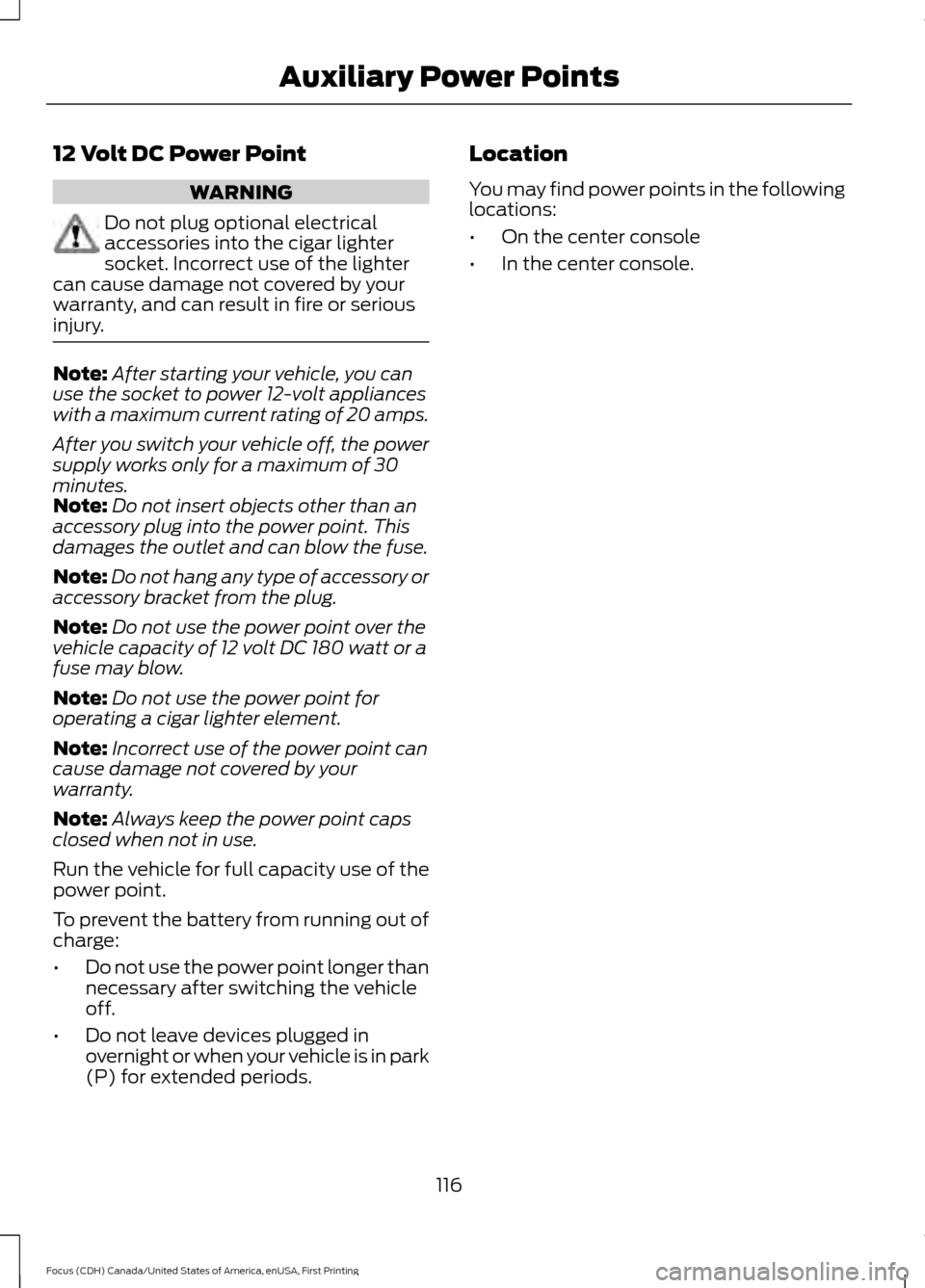
You may find power points in the following
locations:
•
On the center console
• In the center console.
116
Focus (CDH) Canada/United States of America, enUSA, First Printing Auxiliary Power Points
Page 121 of 385

GENERAL INFORMATION
WARNINGS
Extended idling at high engine
speeds can produce very high
temperatures in the engine and
exhaust system, creating the risk of fire or
other damage. Do not park, idle or drive your vehicle
on dry grass or other dry ground
cover. The emission system heats up
the engine compartment and exhaust
system, creating the risk of fire. Do not start the engine in a closed
garage or in other enclosed areas.
Exhaust fumes can be toxic. Always
open the garage door before you start the
engine. If you smell exhaust fumes inside
your vehicle, have your vehicle
checked by an authorized dealer
immediately. Do not drive your vehicle if
you smell exhaust fumes. If you disconnect the battery, your vehicle
may exhibit some unusual driving
characteristics for approximately 5 miles
(8 kilometers) after you reconnect it. This
is because the engine management system
must realign itself with the engine. You can
disregard any unusual driving
characteristics during this period.
The powertrain control system meets all
Canadian interference-causing equipment
standard requirements regulating the
impulse electrical field or radio noise.
When you start the engine, avoid pressing
the accelerator pedal before and during
operation. Only use the accelerator pedal
when you have difficulty starting the
engine. IGNITION SWITCH
0 (off) - The ignition is off.
Note: When you switch the ignition off and
leave your vehicle, do not leave your key in
the ignition. This could cause your vehicle
battery to lose charge.
I
(accessory) - Allows the electrical
accessories, such as the radio, to operate
while the engine is not running.
Note: Do not leave the ignition key in this
position for too long. This could cause your
vehicle battery to lose charge.
II
(on) - All electrical circuits are
operational and the warning lamps and
indicators illuminate.
III
(start) - cranks the engine.
KEYLESS STARTING
(If Equipped)
Note: The system may not function if the
passive key is close to metal objects or
electronic devices, for example keys or a cell
phone.
Note: The ignition automatically turns off
if you leave your vehicle unattended. This is
to prevent the vehicle battery from losing
charge.
Note: A valid passive key must be located
inside your vehicle to switch the ignition on
and start the engine.
118
Focus (CDH) Canada/United States of America, enUSA, First Printing Starting and Stopping the EngineE72128
Page 122 of 385
Switching the Ignition On to
Accessory Mode
Press the push button ignition switch once
without your foot on the brake or clutch
pedal. It is on the instrument panel near
the steering wheel. All electrical circuits
and accessories are operational and the
warning lamps and indicators illuminate.
Press the push button ignition switch again
without your foot on the brake or clutch
pedal to switch the ignition off.
Starting Your Vehicle
Vehicles with Manual Transmission
1. Fully depress the clutch pedal.
2. Press the push button ignition switch
until the engine starts.
Note: Releasing the clutch pedal during
engine starting stops the engine from
cranking.
Vehicles with Automatic Transmission
1. Move the gearshift lever to park (P).
2. Fully depress the brake pedal.
3. Briefly press the push button ignition switch. Note:
Releasing the brake pedal during
engine starting stops the engine cranking.
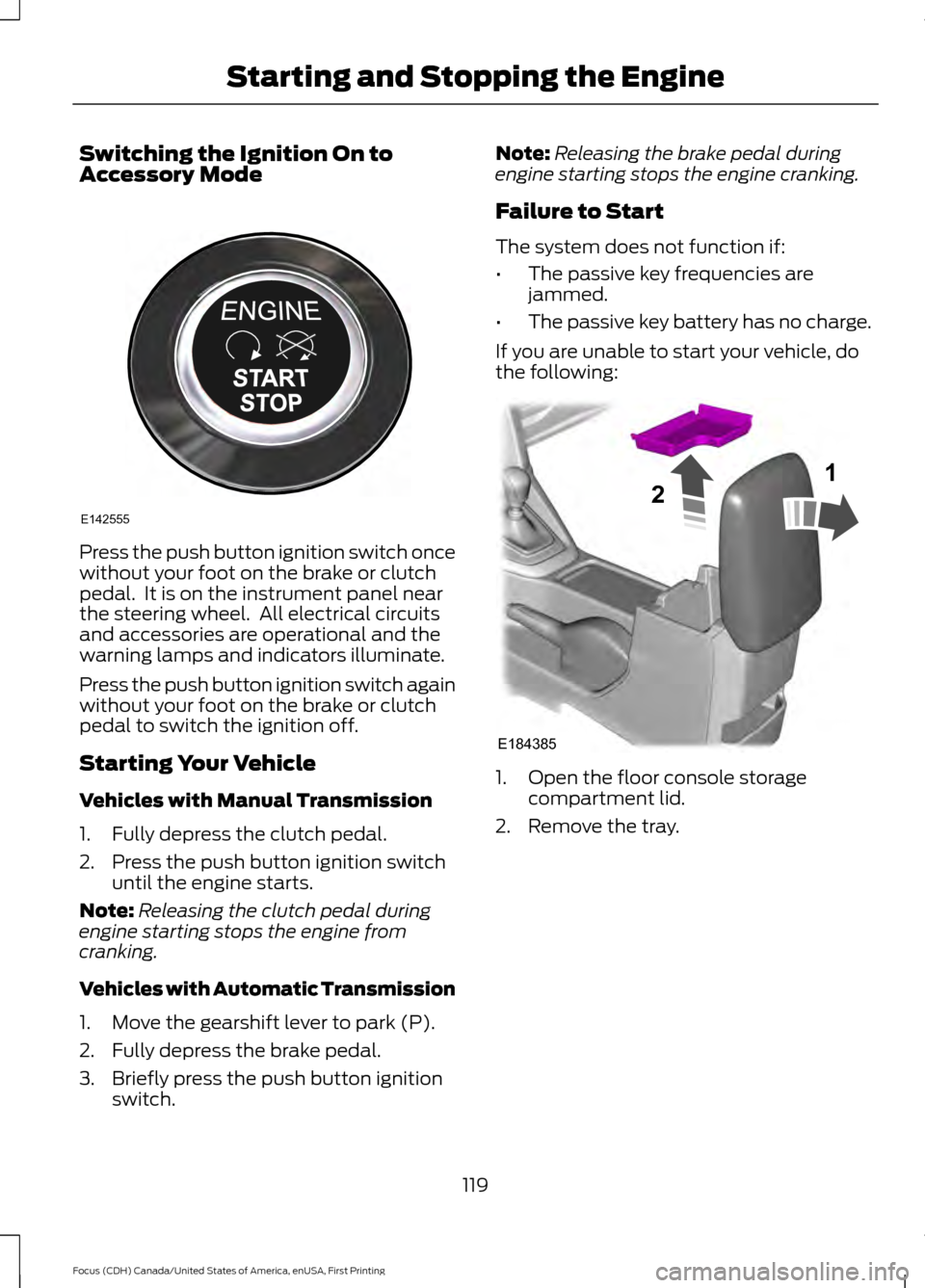
Failure to Start
The system does not function if:
• The passive key frequencies are
jammed.
• The passive key battery has no charge.
If you are unable to start your vehicle, do
the following: 1. Open the floor console storage
compartment lid.
2. Remove the tray.
119
Focus (CDH) Canada/United States of America, enUSA, First Printing Starting and Stopping the EngineE142555 E184385
21