2016 FORD FOCUS ELECTRIC battery
[x] Cancel search: batteryPage 52 of 276

Sounding the Panic Alarm (If Equipped)
Press the button to activate the
alarm. Press the button again or
switch your vehicle on to
deactivate it.
Note: The panic alarm only operates when
your vehicle is switched off.
Remote Start The remote start button is on the
transmitter.
This feature allows you to start your
vehicle from the outside. The transmitter
has an extended operating range.
Vehicles with automatic climate control
can be configured to operate when your
vehicle is remote started. See Automatic
Climate Control (page 101).
Many states and provinces have
restrictions for the use of remote start.
Check your local and state or provincial
laws for specific requirements regarding
remote start systems.
The remote start system does not work if
any of the following occur:
• Your vehicle is switched on.
• The alarm system activates.
• You turn off the feature.
• The hood is open.
• The transmission is not in park (P).
• Your vehicle battery has no charge.
• The powertrain fault indicator was on
the last time you drove your vehicle.
Remote Starting your Vehicle
Note: You must press each button within
three seconds of each other. If you do not
follow this sequence, your vehicle does not
start remotely, the direction indicators do
not flash twice and the horn does not sound. The label on your transmitter details the
starting procedure.
To remote start your vehicle:
1. Press the lock button to lock all the
doors.
2. Press the remote start button twice. The direction indicators flash twice.
The horn sounds if the system fails to start,
unless quiet start is on. Quiet start runs the
blower fan at a slower speed to reduce
noise. You can switch the feature on or off
using the information display. See
General
Information (page 87).
The power windows do not work during
remote start and the radio does not turn
on automatically.
The parking lamps remain on and your
vehicle runs for 5, 10 or 15 minutes,
depending on the setting.
Note: If you remote start your vehicle with
an intelligent access transmitter, you must
press the
START STOP button on the
instrument panel once while applying the
brake pedal before driving your vehicle.
Extending the Remote Start Running
Time
To extend the remote start running time
duration of your vehicle during remote
start, repeat steps 1 and 2 while your
vehicle is running. For example, if your
vehicle had been running from the first
remote start for 5 minutes, your vehicle
49
Focus (CDH) Battery Electric Vehicle (BEV), Canada/United States of America, enUSA, First Printing Keys and Remote ControlsE138624 E138625 E138626
Page 53 of 276
continues to run now for a total of 20
minutes. If the duration is set to 10
minutes, the duration extends by another
10 minutes. You can extend the remote
start running time duration to a maximum
of 30 minutes.
Wait at least five seconds before remote
starting after you switch your vehicle off.
Turning Your Vehicle Off After Remote
Starting
Press the button once. The
parking lamps turn off.
You may have to be closer to
your vehicle than when starting due to
ground reflection and the added noise of
the running vehicle.
You can turn the remote start system on
or off using the information display. See
General Information (page 87).
REPLACING A LOST KEY OR
REMOTE CONTROL
You can purchase replacement keys or
remote controls from an authorized dealer.
Authorized dealers can program remote
controls for your vehicle.
See Passive
Anti-Theft System (page 65).
To re-program the passive anti-theft
system see an authorized dealer.
50
Focus (CDH) Battery Electric Vehicle (BEV), Canada/United States of America, enUSA, First Printing Keys and Remote ControlsE138625
Page 54 of 276
PRINCIPLE OF OPERATION
MyKey allows you to program keys with
restricted driving modes to promote good
driving habits. All but one of the keys can
be activated with these restricted modes.
Any keys that remain unprogrammed are
referred to as administrator keys or admin
keys. They can be used to:
•
Create a MyKey.
• Program configurable MyKey settings.
• Clear all MyKey features.
When you have created a MyKey, you can
access the following information by using
the information display to determine:
• How many admin keys and MyKeys are
programmed to your vehicle.
• The total distance your vehicle traveled
with a MyKey.
Note: Switch the ignition on to use the
system.
Note: All MyKeys are programmed to the
same settings. You cannot program them
individually.
Note: For vehicles equipped with a
push-button start, when both a MyKey and
an admin key are present, the admin key will
be recognized by the vehicle while switching
the vehicle on to start.
Non-configurable Settings
The following settings cannot be changed
by an admin key user:
• Safety belt reminder. You cannot
disable this feature. The audio system
will mute when the front seat
passengers’ safety belts are not
fastened.
• Early low charge. The low-charge
warning activates earlier, giving the
MyKey user more time to recharge. •
Driver assist features, if equipped on
your vehicle, are forced on: parking aid.
• Satellite radio adult content
restrictions, if equipped on your vehicle.
Configurable Settings
With an admin key, you can configure
certain MyKey settings when you first
create a MyKey and before you recycle the
key or restart the engine. You can also
change the settings afterward with an
admin key.
• A vehicle speed limit can be set.
Warnings will be shown in the display
followed by an audible tone when your
vehicle reaches the set speed. You
cannot override the set speed by fully
depressing the accelerator pedal or by
setting cruise control. WARNING
Do not set MyKey maximum speed
limit to a limit that will prevent the
driver from maintaining a safe speed
considering posted speed limits and
prevailing road conditions. The driver is
always responsible to drive in accordance
with local laws and prevailing conditions.
Failure to do so could result in accident or
injury. 51
Focus (CDH) Battery Electric Vehicle (BEV), Canada/United States of America, enUSA, First Printing MyKey
™
Page 55 of 276
•
Various vehicle speed minders can be
set. Once you select a speed, it will be
shown in the display, followed by an
audible tone when the preselected
vehicle speed is exceeded.
• Audio system maximum volume of
45%. A message will be shown in the
display when you attempt to exceed
the limited volume. Also, the
speed-sensitive or compensated
automatic volume control will be
disabled.
• Always on setting. When this is
selected, you will not be able to turn
off AdvanceTrac or traction control,
E911 or Emergency Assistance, or the
do not disturb feature (if your vehicle
is equipped with these features). CREATING A MYKEY
Use the information display to create a
MyKey:
1.
Insert the key you want to program into
the ignition. If your vehicle is equipped
with a push-button start, place the
intelligent access transmitter into the
backup position. The location of your
backup position is in another chapter.
See Starting the Electric Motor
(page 113).
2. Switch the vehicle on.
3. Access the main menu through the information display controls. Use the
arrow keys to get to the following menu
selections: Action and Description
Message
Press the OK button or the right arrow key.
Settings
Press the OK button or the right arrow key.
MyKey
Press the OK button or the right arrow key.
Create MyKey
When prompted, hold the OK button until
you see a message informing you to label
this key as a MyKey. The key will be
restricted at the next start.
MyKey is successfully created. Make sure
you label it so you can distinguish it from
the admin keys.
You can also program configurable
settings for the key(s). See
Programming/Changing Configurable
Settings
. Programming/Changing
Configurable Settings
Use the information display to access your
configurable MyKey settings by doing the
following:
1. Switch the vehicle on using an admin
key.
2. Use the arrow keys to get to the following menu selections: Action and Description
Message
Press the OK button or the right arrow key.
Settings
Press the OK button or the right arrow key.
MyKey
52
Focus (CDH) Battery Electric Vehicle (BEV), Canada/United States of America, enUSA, First Printing MyKey
™
Page 56 of 276
Note:
You can clear or change your MyKey
settings at any time during the same key
cycle as you created the MyKey. Once you
have switched the vehicle off, however, you
will need an admin key to change or clear
your MyKey settings.
Note: When you make any changes to your
MyKey settings, you change the settings for
every MyKey. You cannot make individual
changes to apply to certain MyKeys. CLEARING ALL MYKEYS
You can clear or change your MyKey
settings using the information display
control on the steering wheel. See
Information Displays (page 87).
Switch the ignition on using an admin key
or remote control.
To clear all MyKeys of all MyKey settings, press the left arrow button to access
the main menu and scroll to: Action and Description
Message
Press the
OK button.
Settings
Press the
OK button.
MyKey
Press and hold the
OK button until the following message
displays.
Clear MyKey
All MyKeys
Cleared
Note: When you clear your MyKeys, you remove all restrictions and return all MyKeys to
their original admin key status.
53
Focus (CDH) Battery Electric Vehicle (BEV), Canada/United States of America, enUSA, First Printing MyKey
™
Page 57 of 276
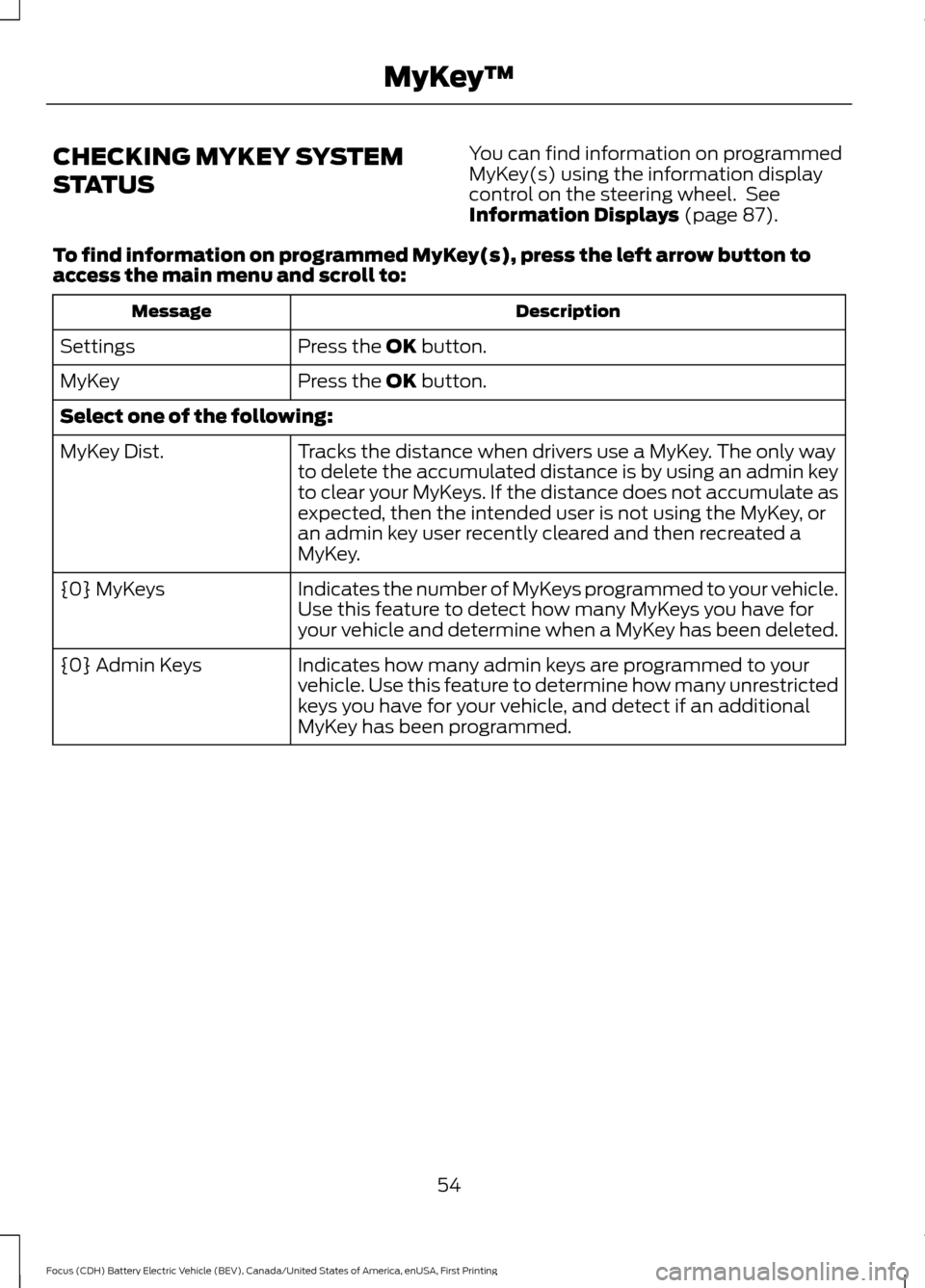
CHECKING MYKEY SYSTEM
STATUS
You can find information on programmed
MyKey(s) using the information display
control on the steering wheel. See
Information Displays (page 87).
To find information on programmed MyKey(s), press the left arrow button to
access the main menu and scroll to: Description
Message
Press the
OK button.
Settings
Press the
OK button.
MyKey
Select one of the following:
Tracks the distance when drivers use a MyKey. The only way
to delete the accumulated distance is by using an admin key
to clear your MyKeys. If the distance does not accumulate as
expected, then the intended user is not using the MyKey, or
an admin key user recently cleared and then recreated a
MyKey.
MyKey Dist.
Indicates the number of MyKeys programmed to your vehicle.
Use this feature to detect how many MyKeys you have for
your vehicle and determine when a MyKey has been deleted.
{0} MyKeys
Indicates how many admin keys are programmed to your
vehicle. Use this feature to determine how many unrestricted
keys you have for your vehicle, and detect if an additional
MyKey has been programmed.
{0} Admin Keys
54
Focus (CDH) Battery Electric Vehicle (BEV), Canada/United States of America, enUSA, First Printing MyKey
™
Page 58 of 276
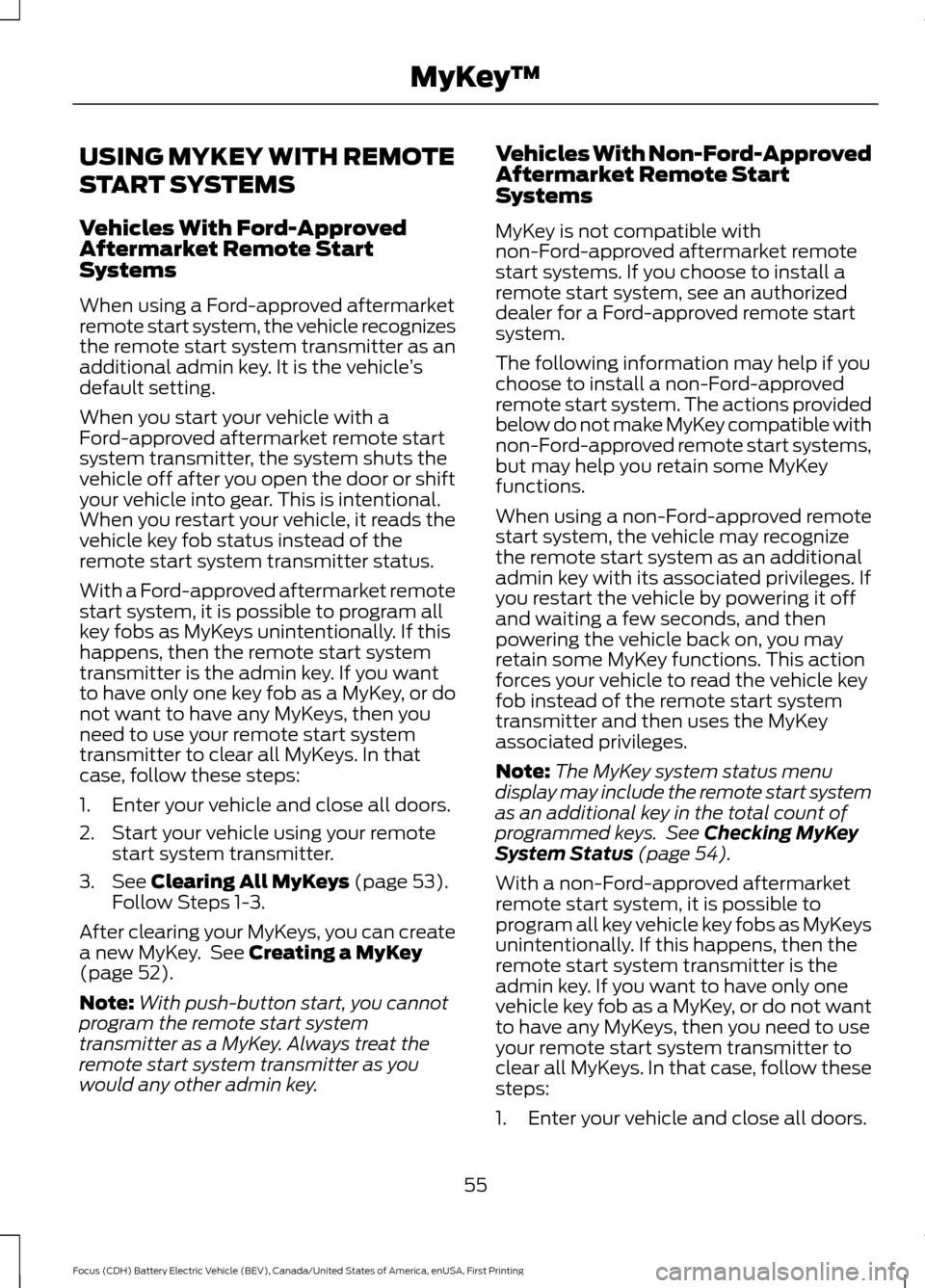
USING MYKEY WITH REMOTE
START SYSTEMS
Vehicles With Ford-Approved
Aftermarket Remote Start
Systems
When using a Ford-approved aftermarket
remote start system, the vehicle recognizes
the remote start system transmitter as an
additional admin key. It is the vehicle
’s
default setting.
When you start your vehicle with a
Ford-approved aftermarket remote start
system transmitter, the system shuts the
vehicle off after you open the door or shift
your vehicle into gear. This is intentional.
When you restart your vehicle, it reads the
vehicle key fob status instead of the
remote start system transmitter status.
With a Ford-approved aftermarket remote
start system, it is possible to program all
key fobs as MyKeys unintentionally. If this
happens, then the remote start system
transmitter is the admin key. If you want
to have only one key fob as a MyKey, or do
not want to have any MyKeys, then you
need to use your remote start system
transmitter to clear all MyKeys. In that
case, follow these steps:
1. Enter your vehicle and close all doors.
2. Start your vehicle using your remote start system transmitter.
3. See Clearing All MyKeys (page 53).
Follow Steps 1-3.
After clearing your MyKeys, you can create
a new MyKey. See
Creating a MyKey
(page 52).
Note: With push-button start, you cannot
program the remote start system
transmitter as a MyKey. Always treat the
remote start system transmitter as you
would any other admin key. Vehicles With Non-Ford-Approved
Aftermarket Remote Start
Systems
MyKey is not compatible with
non-Ford-approved aftermarket remote
start systems. If you choose to install a
remote start system, see an authorized
dealer for a Ford-approved remote start
system.
The following information may help if you
choose to install a non-Ford-approved
remote start system. The actions provided
below do not make MyKey compatible with
non-Ford-approved remote start systems,
but may help you retain some MyKey
functions.
When using a non-Ford-approved remote
start system, the vehicle may recognize
the remote start system as an additional
admin key with its associated privileges. If
you restart the vehicle by powering it off
and waiting a few seconds, and then
powering the vehicle back on, you may
retain some MyKey functions. This action
forces your vehicle to read the vehicle key
fob instead of the remote start system
transmitter and then uses the MyKey
associated privileges.
Note:
The MyKey system status menu
display may include the remote start system
as an additional key in the total count of
programmed keys. See
Checking MyKey
System Status (page 54).
With a non-Ford-approved aftermarket
remote start system, it is possible to
program all key vehicle key fobs as MyKeys
unintentionally. If this happens, then the
remote start system transmitter is the
admin key. If you want to have only one
vehicle key fob as a MyKey, or do not want
to have any MyKeys, then you need to use
your remote start system transmitter to
clear all MyKeys. In that case, follow these
steps:
1. Enter your vehicle and close all doors.
55
Focus (CDH) Battery Electric Vehicle (BEV), Canada/United States of America, enUSA, First Printing MyKey
™
Page 59 of 276
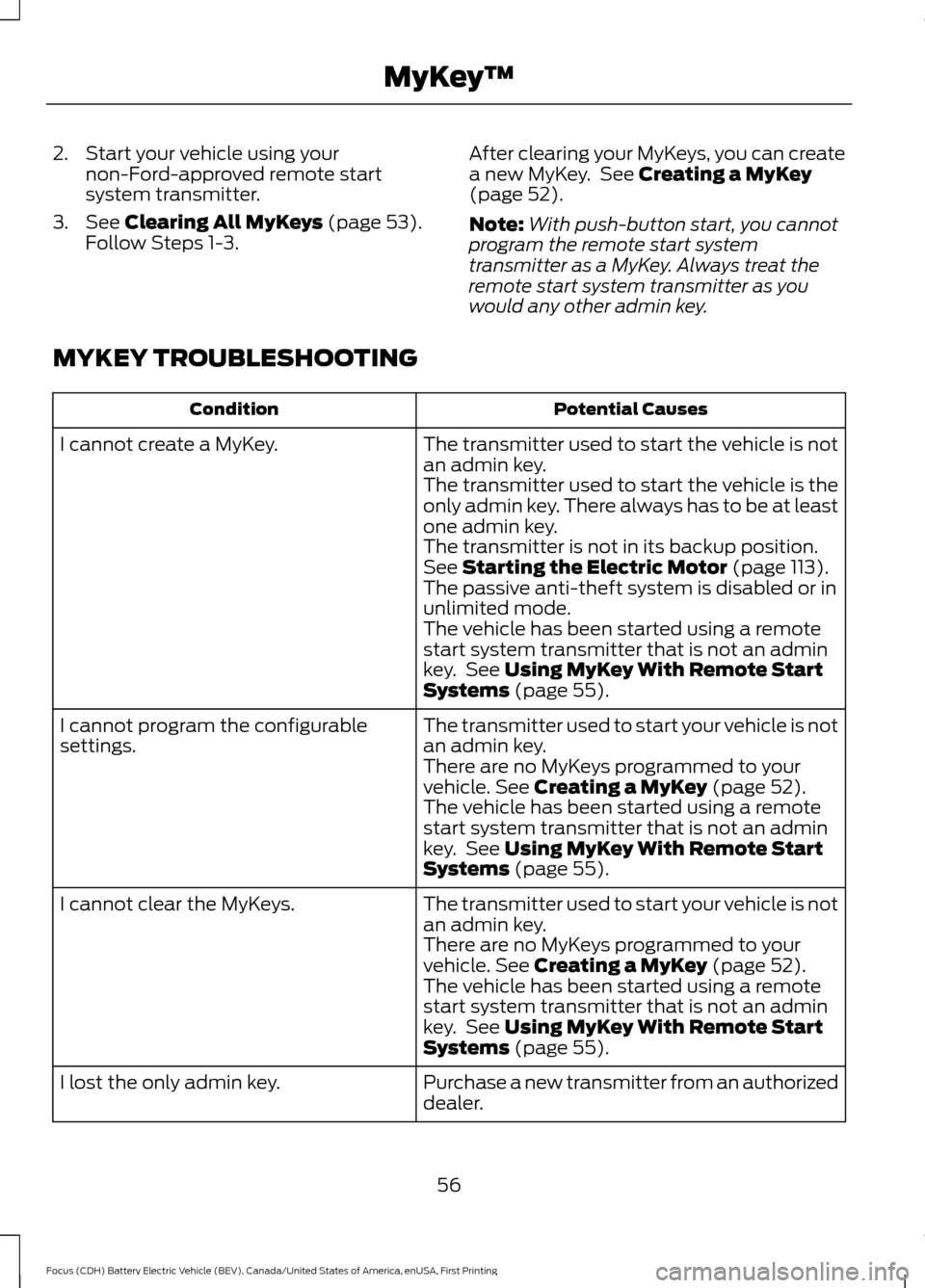
2. Start your vehicle using your
non-Ford-approved remote start
system transmitter.
3. See Clearing All MyKeys (page 53).
Follow Steps 1-3. After clearing your MyKeys, you can create
a new MyKey. See
Creating a MyKey
(page 52).
Note: With push-button start, you cannot
program the remote start system
transmitter as a MyKey. Always treat the
remote start system transmitter as you
would any other admin key.
MYKEY TROUBLESHOOTING Potential Causes
Condition
The transmitter used to start the vehicle is not
an admin key.
I cannot create a MyKey.
The transmitter used to start the vehicle is the
only admin key. There always has to be at least
one admin key.
The transmitter is not in its backup position.
See
Starting the Electric Motor (page 113).
The passive anti-theft system is disabled or in
unlimited mode.
The vehicle has been started using a remote
start system transmitter that is not an admin
key. See
Using MyKey With Remote Start
Systems (page 55).
The transmitter used to start your vehicle is not
an admin key.
I cannot program the configurable
settings.
There are no MyKeys programmed to your
vehicle.
See Creating a MyKey (page 52).
The vehicle has been started using a remote
start system transmitter that is not an admin
key. See
Using MyKey With Remote Start
Systems (page 55).
The transmitter used to start your vehicle is not
an admin key.
I cannot clear the MyKeys.
There are no MyKeys programmed to your
vehicle.
See Creating a MyKey (page 52).
The vehicle has been started using a remote
start system transmitter that is not an admin
key. See
Using MyKey With Remote Start
Systems (page 55).
Purchase a new transmitter from an authorized
dealer.
I lost the only admin key.
56
Focus (CDH) Battery Electric Vehicle (BEV), Canada/United States of America, enUSA, First Printing MyKey
™