2016 FORD FOCUS ELECTRIC bulb
[x] Cancel search: bulbPage 6 of 276
Hints on Driving With Anti-Lock
Brakes...........................................................126
Parking Brake.................................................126
Hill Start Assist..............................................126
Traction Control
Principle of Operation.................................128
Using Traction Control................................128
Stability Control
Principle of Operation.................................129
Using Stability Control...............................130
Parking Aids
Principle of Operation..................................131
Rear Parking Aid.............................................131
Rear View Camera........................................132
Cruise Control
Principle of Operation.................................136
Using Cruise Control
....................................136
Driving Aids
Steering
.............................................................137
Load Carrying
Rear Under Floor Storage..........................138
Load Limit
.......................................................138
Towing
Towing a Trailer
.............................................145
Transporting the Vehicle............................145
Towing the Vehicle on Four Wheels
......145
Driving Hints
Breaking-In......................................................147
Cold Weather Precautions........................147
Driving Through Water................................147
Floor Mats........................................................147 Roadside Emergencies
Roadside Assistance
...................................149
Hazard Warning Flashers..........................150
Jump Starting the Vehicle.........................150
Collision, Damage or Fire Event...............152
Post-Crash Alert System...........................153
Customer Assistance
Getting the Services You Need................154
In California (U.S. Only).............................155
The Better Business Bureau (BBB) Auto Line Program (U.S. Only)......................156
Utilizing the Mediation/Arbitration Program (Canada Only).........................157
Getting Assistance Outside the U.S. and Canada.........................................................157
Ordering Additional Owner's Literature
.....................................................158
Reporting Safety Defects (U.S. Only).............................................................159
Reporting Safety Defects (Canada Only).............................................................159
Fuses
Fuse Specification Chart
............................161
Changing a Fuse.............................................171
Maintenance
General Information.....................................172
Opening and Closing the Hood...............173
Under Hood Overview.................................174
Coolant Check................................................174
Brake Fluid Check.........................................176
Washer Fluid Check......................................177
Changing the 12V Battery...........................177
Checking the Wiper Blades
.......................178
Changing the Wiper Blades......................179
Adjusting the Headlamps.........................180
Removing a Headlamp...............................181
Changing a Bulb
............................................182
Bulb Specification Chart...........................184
3
Focus (CDH) Battery Electric Vehicle (BEV), Canada/United States of America, enUSA, First Printing Table of Contents
Page 16 of 276
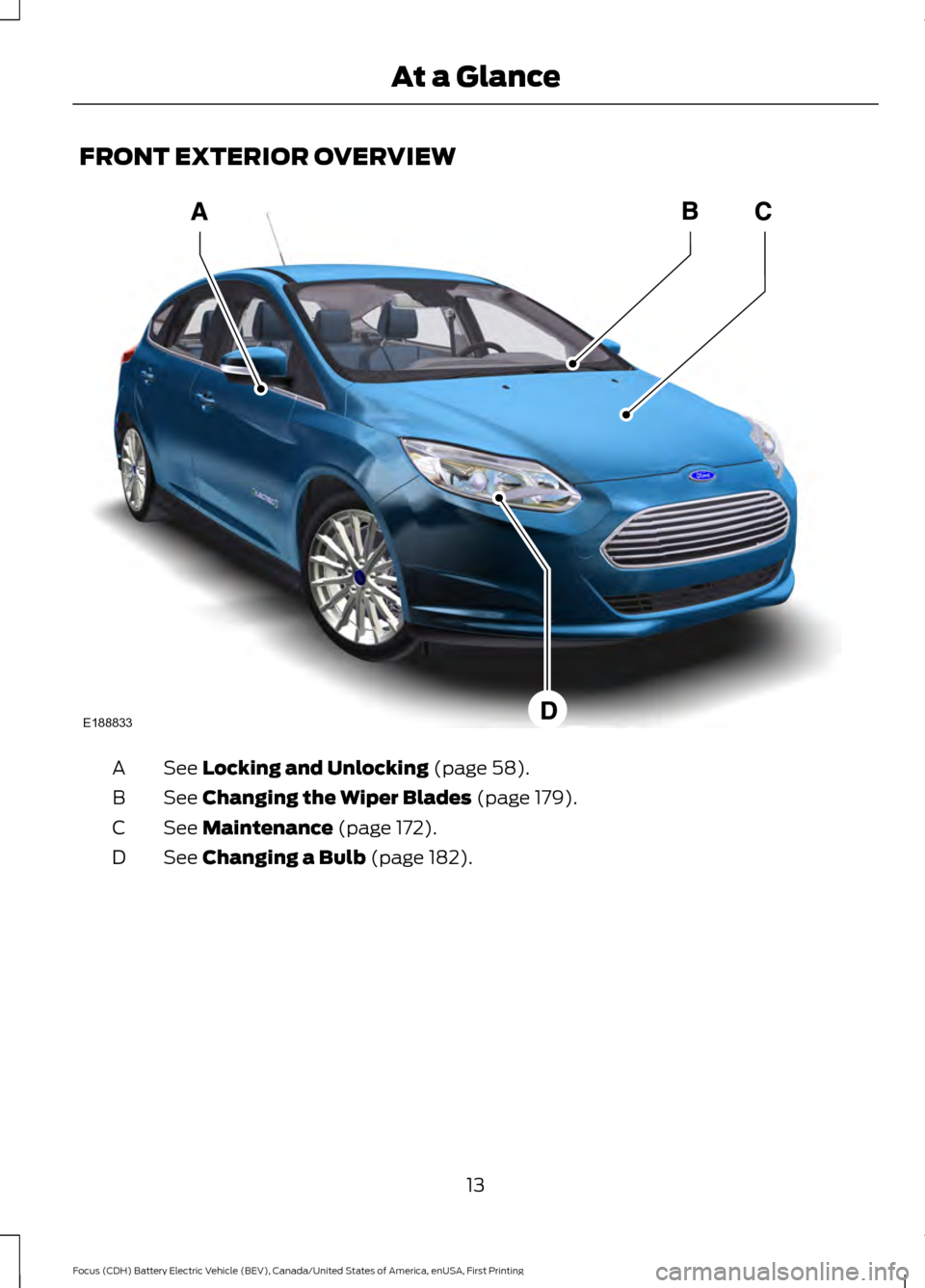
FRONT EXTERIOR OVERVIEW
See Locking and Unlocking (page 58).
A
See
Changing the Wiper Blades (page 179).
B
See
Maintenance (page 172).
C
See
Changing a Bulb (page 182).
D
13
Focus (CDH) Battery Electric Vehicle (BEV), Canada/United States of America, enUSA, First Printing At a GlanceE188833
Page 17 of 276
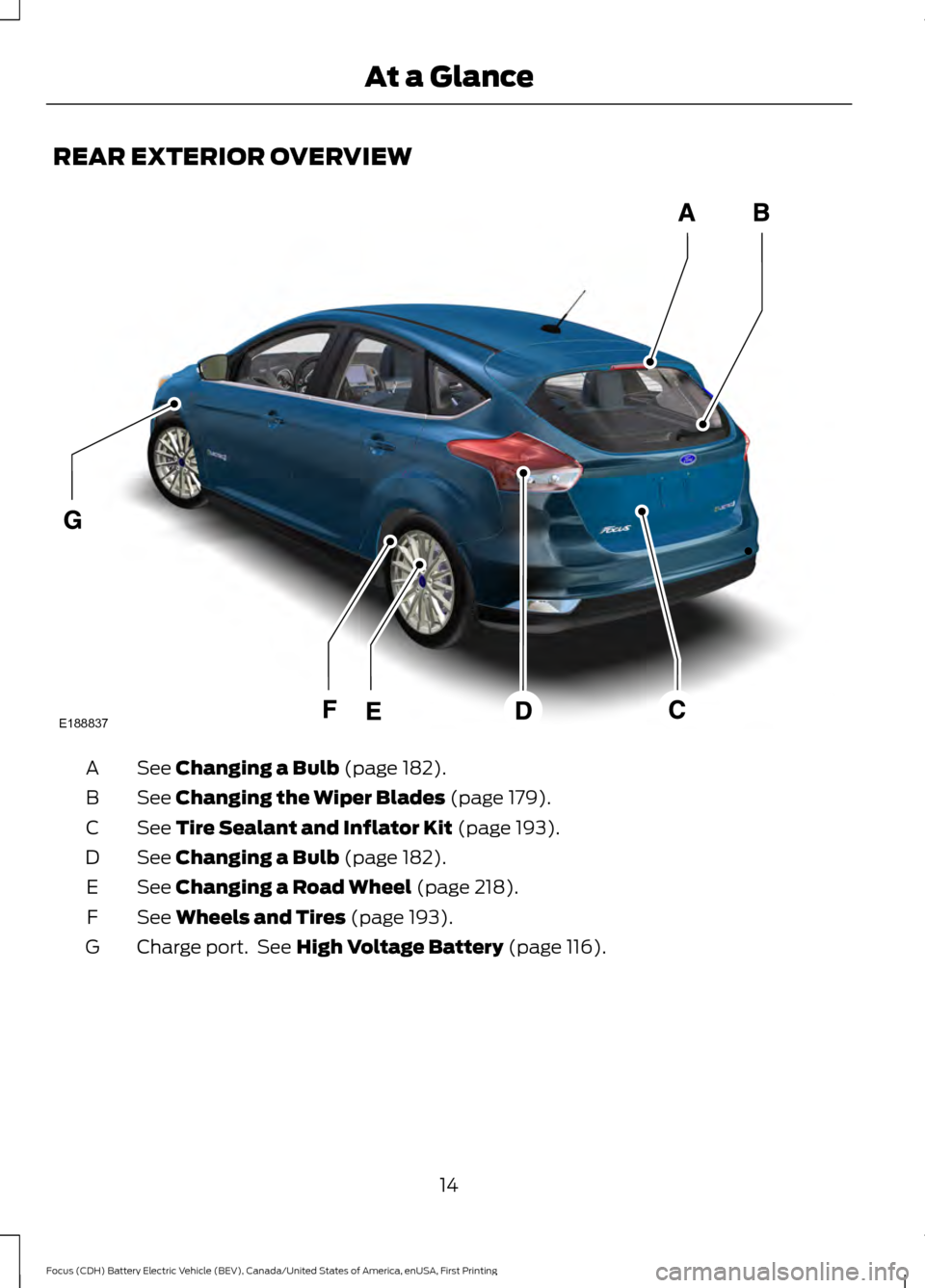
REAR EXTERIOR OVERVIEW
See Changing a Bulb (page 182).
A
See
Changing the Wiper Blades (page 179).
B
See
Tire Sealant and Inflator Kit (page 193).
C
See
Changing a Bulb (page 182).
D
See
Changing a Road Wheel (page 218).
E
See
Wheels and Tires (page 193).
F
Charge port. See
High Voltage Battery (page 116).
G
14
Focus (CDH) Battery Electric Vehicle (BEV), Canada/United States of America, enUSA, First Printing At a GlanceE188837
Page 87 of 276

Charging Status Screen
When you enter or switch off the vehicle,
on your right information display you have
the opportunity to view charging status,
charge start and end times as well as the
charging mode. You can also switch your
charging mode between Value Charge and
Charge Now. See Electric Vehicle
Information in your SYNC information.
WARNING LAMPS AND
INDICATORS
The following warning lamps and
indicators alert you to a vehicle condition
that may become serious. Some lamps
illuminate when you start your vehicle to
make sure they work. If any lamps remain
on after starting your vehicle, refer to the
respective system warning lamp for further
information.
Note:
Some warning indicators appear in
the information display and operate the
same as a warning lamp but do not
illuminate when you start your vehicle
Anti-Lock Braking System Warning
Lamp If it illuminates when you are
driving, this indicates a
malfunction. You will continue
to have the normal braking system
(without anti-lock braking system) unless
the brake system warning lamp is also
illuminated. Have your vehicle checked by
an authorized dealer.
Battery Warning Lamp If it illuminates when driving, this
indicates a malfunction. Switch
off all unnecessary electrical
equipment. Have your vehicle checked by
an authorized dealer immediately. Brake System Warning Lamp It will illuminate when you
engage the parking brake with
the vehicle on.
If it illuminates when you are driving, check
that the parking brake is not engaged. If
the parking brake is not engaged, this
indicates low brake fluid level or a brake
system malfunction. Have your vehicle
checked by an authorized dealer
immediately. WARNING
Driving your vehicle with the warning
lamp on is dangerous. A significant
decrease in braking performance
may occur. It will take you longer to stop
your vehicle. Have your vehicle checked by
your authorized dealer immediately. Driving
extended distances with the parking brake
engaged can cause brake failure and the
risk of personal injury. Cruise Control Indicator
It will illuminate when you switch
this feature on.
Direction Indicator Illuminates when the left or right
direction indicator or the hazard
warning flasher is turned on. If
the indicators stay on or flash faster, check
for a burnt out bulb.
Door Ajar Displays when the vehicle is on
and any door is not completely
closed.
84
Focus (CDH) Battery Electric Vehicle (BEV), Canada/United States of America, enUSA, First Printing Instrument Cluster E144522 E71340
Page 100 of 276
Hill Start Assist
Action
Message
Displays when hill start assist is not available. Contact anauthorized dealer. See Hill Start Assist (page 126).
Hill Start Assist Not
Available
Keys and Intelligent Access Action
Message
This message is displayed when there is a problem with yourvehicle ’s starting system. See your authorized dealer for
service.
Starting System Fault
Displays to remind you that the key is in the luggage
compartment. See Starting the Electric Motor (page 113).
Key Inside vehicle
Displayed when a valid key is not detected within the vehicle.See
Starting the Electric Motor (page 113).
Key Not Inside vehicle
Displayed if the key is not detected by the system. SeeStarting the Electric Motor
(page 113).
No Key Detected
Displayed when your vehicle is in the Accessory ignition state.
Accessory Power is
Active
Displayed as a reminder to press the brake while starting the vehicle.
To START Press Brake
Displayed as needed by the system for proper function.
Place Key in Backup
Location
Lighting Action
Message
Displays when the brake lamp bulb has burned out. Contact an authorized dealer.
Brake lamp Bulb fault
Displays when the low beam headlamp bulb has burned out.Contact an authorized dealer.
Low beam Bulb fault
Displays when an electrical system problem occurs with theheadlamp system. Contact an authorized dealer.
Headlamp fault Service
req'd
97
Focus (CDH) Battery Electric Vehicle (BEV), Canada/United States of America, enUSA, First Printing Information Displays
Page 154 of 276
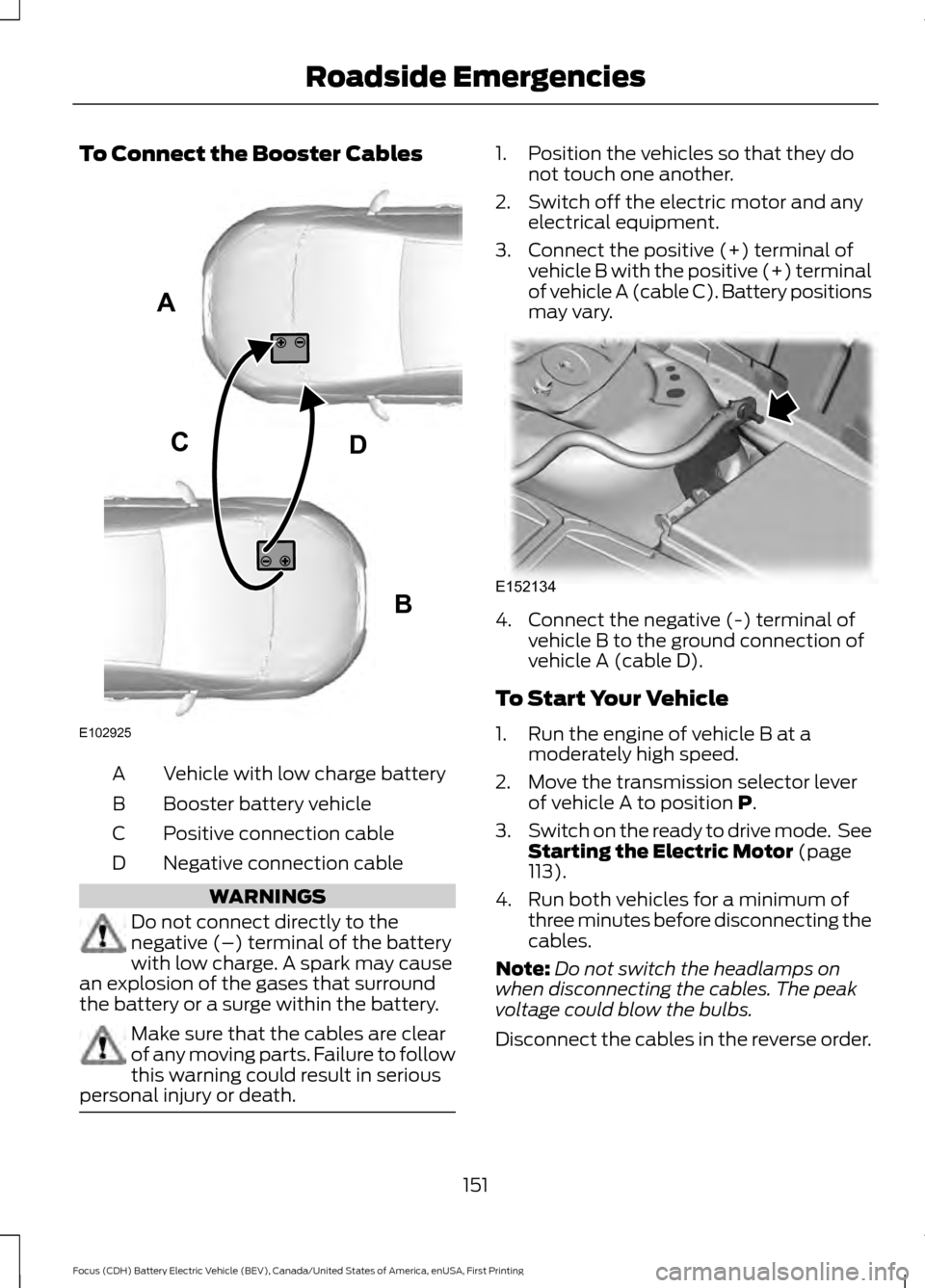
To Connect the Booster Cables
Vehicle with low charge battery
A
Booster battery vehicle
B
Positive connection cable
C
Negative connection cable
D WARNINGS
Do not connect directly to the
negative (–) terminal of the battery
with low charge. A spark may cause
an explosion of the gases that surround
the battery or a surge within the battery. Make sure that the cables are clear
of any moving parts. Failure to follow
this warning could result in serious
personal injury or death. 1. Position the vehicles so that they do
not touch one another.
2. Switch off the electric motor and any electrical equipment.
3. Connect the positive (+) terminal of vehicle B with the positive (+) terminal
of vehicle A (cable C). Battery positions
may vary. 4. Connect the negative (-) terminal of
vehicle B to the ground connection of
vehicle A (cable D).
To Start Your Vehicle
1. Run the engine of vehicle B at a moderately high speed.
2. Move the transmission selector lever of vehicle A to position P.
3. Switch on the ready to drive mode. See
Starting the Electric Motor
(page
113).
4. Run both vehicles for a minimum of three minutes before disconnecting the
cables.
Note: Do not switch the headlamps on
when disconnecting the cables. The peak
voltage could blow the bulbs.
Disconnect the cables in the reverse order.
151
Focus (CDH) Battery Electric Vehicle (BEV), Canada/United States of America, enUSA, First Printing Roadside EmergenciesA
B
CD
E102925 E152134
Page 183 of 276
2. Press the locking buttons together.
3. Rotate and remove the wiper blade.
4. Install in the reverse order.
Note:
Make sure that the wiper blade locks
into place.
Changing the Rear Window Wiper
Blade
1. Lift the wiper arm. Note:
Make sure that the wiper arm does
not spring back against the glass when the
wiper blade is not attached.
2. Slightly rotate the wiper blade.
3. Disengage the wiper blade from the wiper arm.
4. Remove the wiper blade.
5. Install in the reverse order.
Note: Make sure that the wiper blade locks
into place. ADJUSTING THE HEADLAMPS
Vertical Aim Adjustment
If your vehicle has been involved in a crash,
have the aim of the headlamp beam
checked by an authorized dealer.
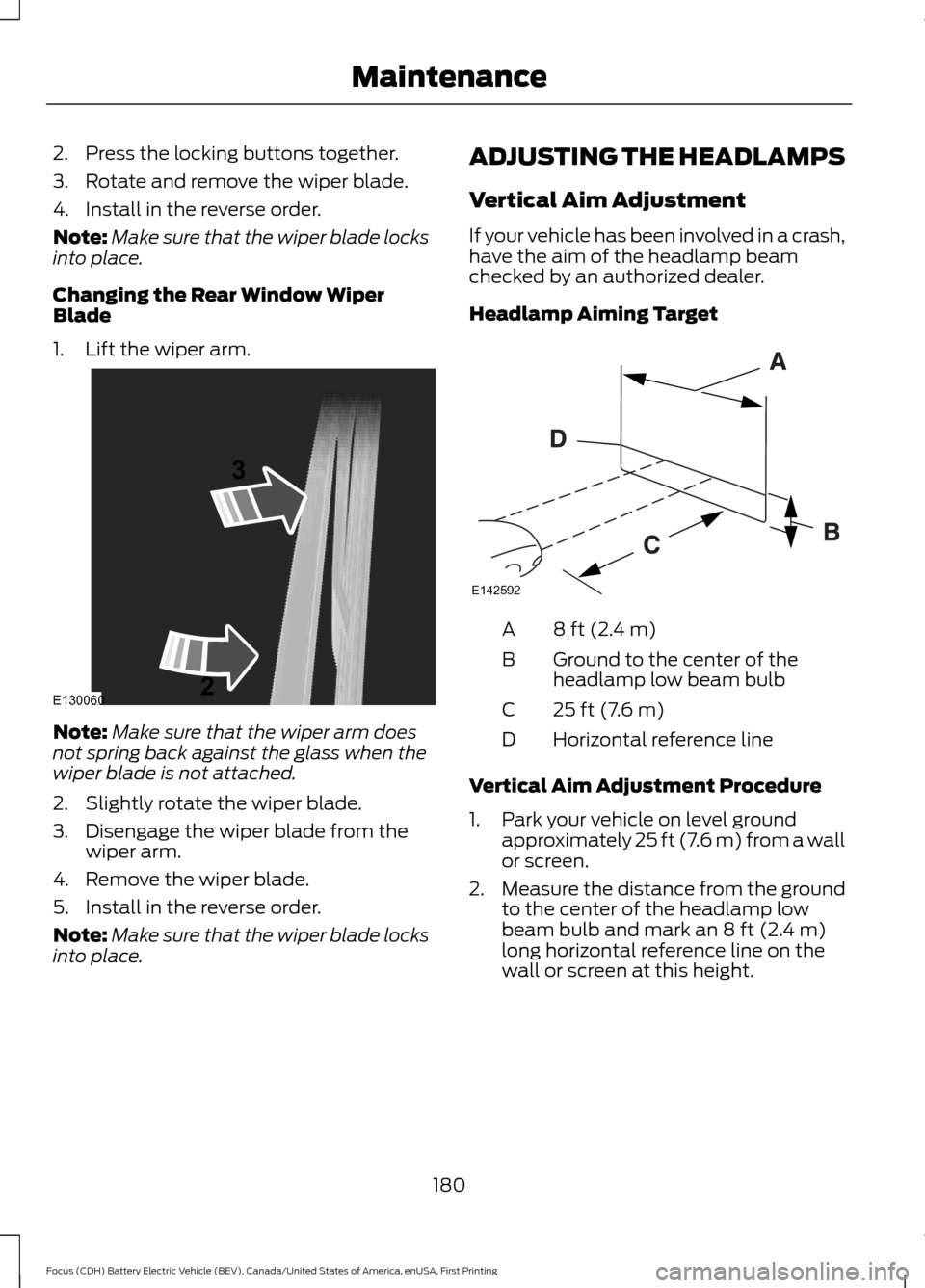
Headlamp Aiming Target
8 ft (2.4 m)
A
Ground to the center of the
headlamp low beam bulb
B
25 ft (7.6 m)
C
Horizontal reference line
D
Vertical Aim Adjustment Procedure
1. Park your vehicle on level ground approximately 25 ft (7.6 m) from a wall
or screen.
2. Measure the distance from the ground
to the center of the headlamp low
beam bulb and mark an
8 ft (2.4 m)
long horizontal reference line on the
wall or screen at this height.
180
Focus (CDH) Battery Electric Vehicle (BEV), Canada/United States of America, enUSA, First Printing MaintenanceE130060
3
2 E142592
Page 184 of 276
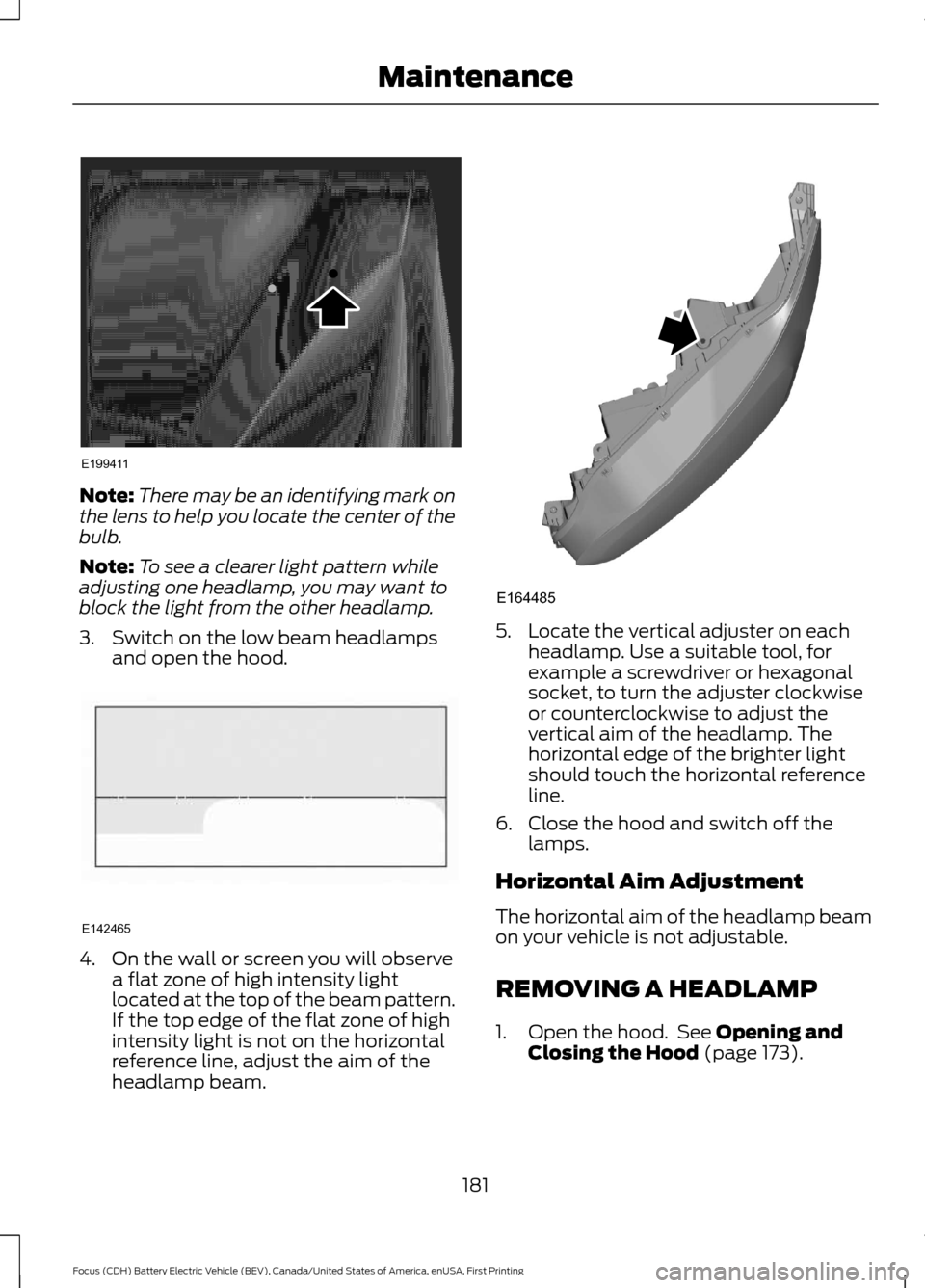
Note:
There may be an identifying mark on
the lens to help you locate the center of the
bulb.
Note: To see a clearer light pattern while
adjusting one headlamp, you may want to
block the light from the other headlamp.
3. Switch on the low beam headlamps and open the hood. 4. On the wall or screen you will observe
a flat zone of high intensity light
located at the top of the beam pattern.
If the top edge of the flat zone of high
intensity light is not on the horizontal
reference line, adjust the aim of the
headlamp beam. 5. Locate the vertical adjuster on each
headlamp. Use a suitable tool, for
example a screwdriver or hexagonal
socket, to turn the adjuster clockwise
or counterclockwise to adjust the
vertical aim of the headlamp. The
horizontal edge of the brighter light
should touch the horizontal reference
line.
6. Close the hood and switch off the lamps.
Horizontal Aim Adjustment
The horizontal aim of the headlamp beam
on your vehicle is not adjustable.
REMOVING A HEADLAMP
1. Open the hood. See Opening and
Closing the Hood (page 173).
181
Focus (CDH) Battery Electric Vehicle (BEV), Canada/United States of America, enUSA, First Printing MaintenanceE199411 E142465 E164485