2016 FORD FOCUS ELECTRIC stop start
[x] Cancel search: stop startPage 93 of 276
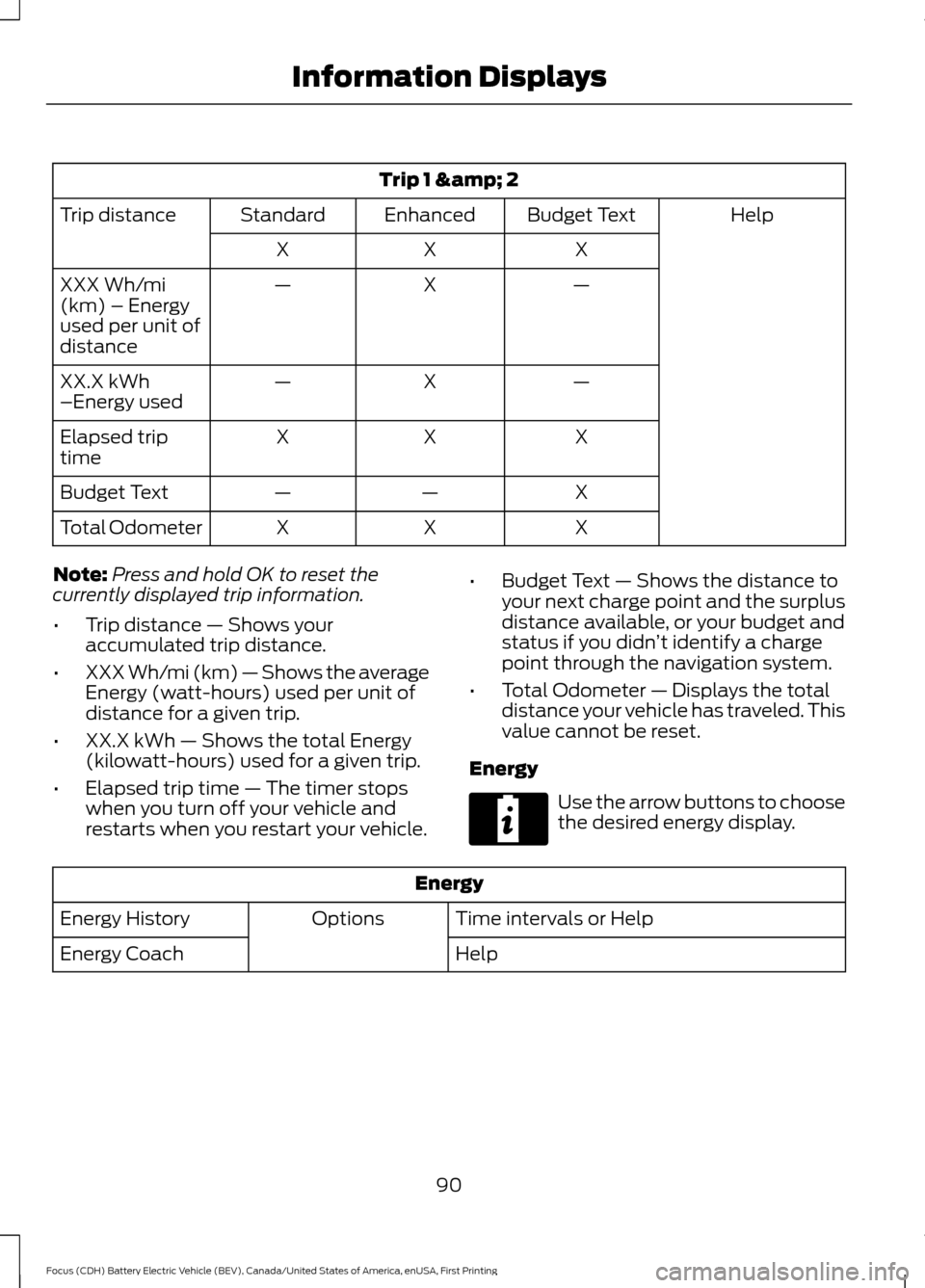
Trip 1 & 2
Help
Budget Text
Enhanced
Standard
Trip distance
X
X
X
—
X
—
XXX Wh/mi
(km) – Energy
used per unit of
distance
—
X
—
XX.X kWh
–Energy used
X
X
X
Elapsed trip
time
X
—
—
Budget Text
X
X
X
Total Odometer
Note: Press and hold OK to reset the
currently displayed trip information.
• Trip distance — Shows your
accumulated trip distance.
• XXX Wh/mi (km) — Shows the average
Energy (watt-hours) used per unit of
distance for a given trip.
• XX.X kWh — Shows the total Energy
(kilowatt-hours) used for a given trip.
• Elapsed trip time — The timer stops
when you turn off your vehicle and
restarts when you restart your vehicle. •
Budget Text — Shows the distance to
your next charge point and the surplus
distance available, or your budget and
status if you didn ’t identify a charge
point through the navigation system.
• Total Odometer — Displays the total
distance your vehicle has traveled. This
value cannot be reset.
Energy Use the arrow buttons to choose
the desired energy display.
Energy
Time intervals or Help
Options
Energy History
Help
Energy Coach
90
Focus (CDH) Battery Electric Vehicle (BEV), Canada/United States of America, enUSA, First Printing Information DisplaysE220615
Page 98 of 276
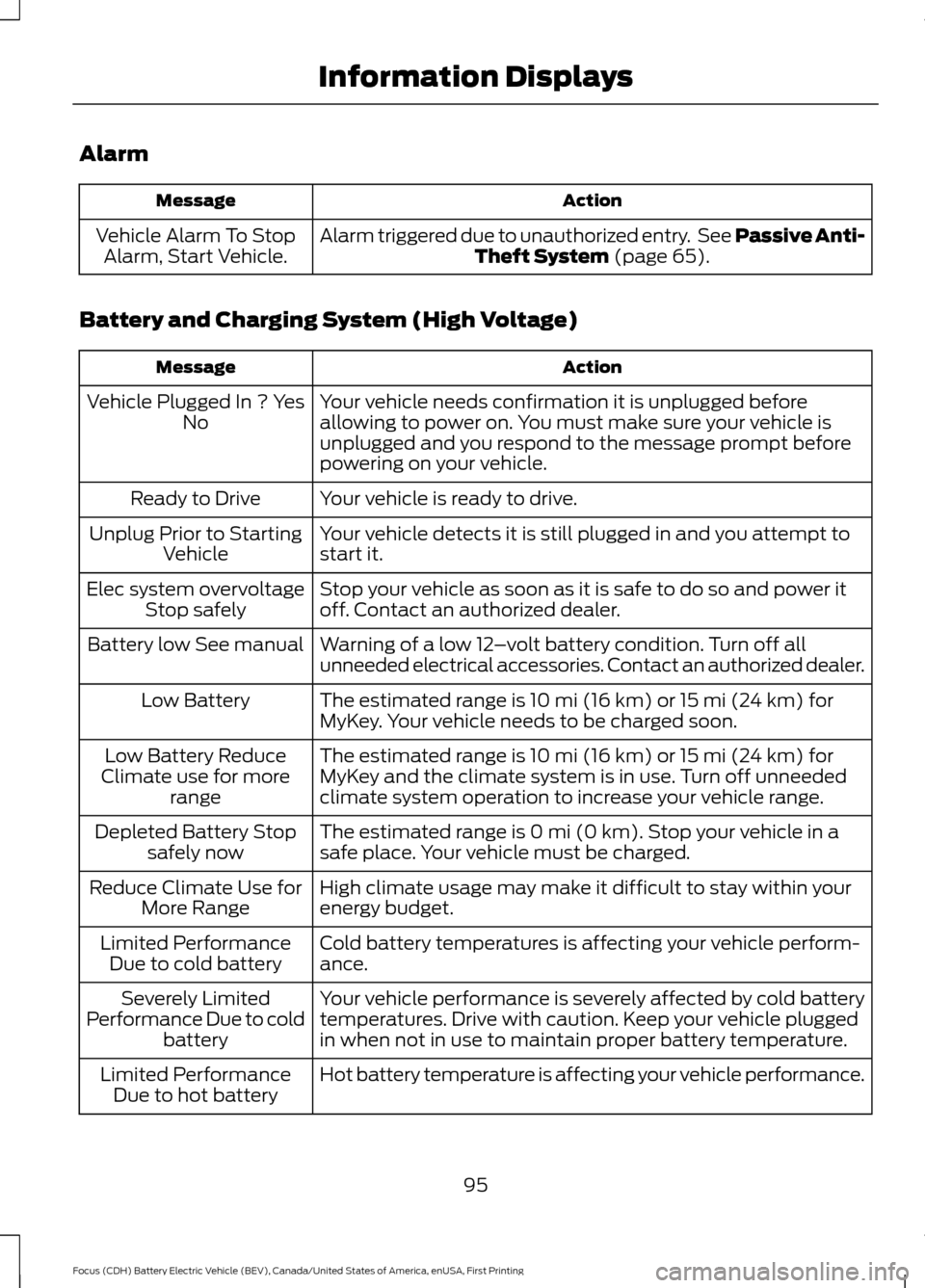
Alarm
Action
Message
Alarm triggered due to unauthorized entry. See Passive Anti-Theft System (page 65).
Vehicle Alarm To Stop
Alarm, Start Vehicle.
Battery and Charging System (High Voltage) Action
Message
Your vehicle needs confirmation it is unplugged before
allowing to power on. You must make sure your vehicle is
unplugged and you respond to the message prompt before
powering on your vehicle.
Vehicle Plugged In ? Yes
No
Your vehicle is ready to drive.
Ready to Drive
Your vehicle detects it is still plugged in and you attempt to
start it.
Unplug Prior to Starting
Vehicle
Stop your vehicle as soon as it is safe to do so and power it
off. Contact an authorized dealer.
Elec system overvoltage
Stop safely
Warning of a low 12–volt battery condition. Turn off all
unneeded electrical accessories. Contact an authorized dealer.
Battery low See manual
The estimated range is 10 mi (16 km) or 15 mi (24 km) for
MyKey. Your vehicle needs to be charged soon.
Low Battery
The estimated range is 10 mi (16 km) or 15 mi (24 km) for
MyKey and the climate system is in use. Turn off unneeded
climate system operation to increase your vehicle range.
Low Battery Reduce
Climate use for more range
The estimated range is 0 mi (0 km). Stop your vehicle in a
safe place. Your vehicle must be charged.
Depleted Battery Stop
safely now
High climate usage may make it difficult to stay within your
energy budget.
Reduce Climate Use for
More Range
Cold battery temperatures is affecting your vehicle perform-
ance.
Limited Performance
Due to cold battery
Your vehicle performance is severely affected by cold battery
temperatures. Drive with caution. Keep your vehicle plugged
in when not in use to maintain proper battery temperature.
Severely Limited
Performance Due to cold battery
Hot battery temperature is affecting your vehicle performance.
Limited Performance
Due to hot battery
95
Focus (CDH) Battery Electric Vehicle (BEV), Canada/United States of America, enUSA, First Printing Information Displays
Page 101 of 276
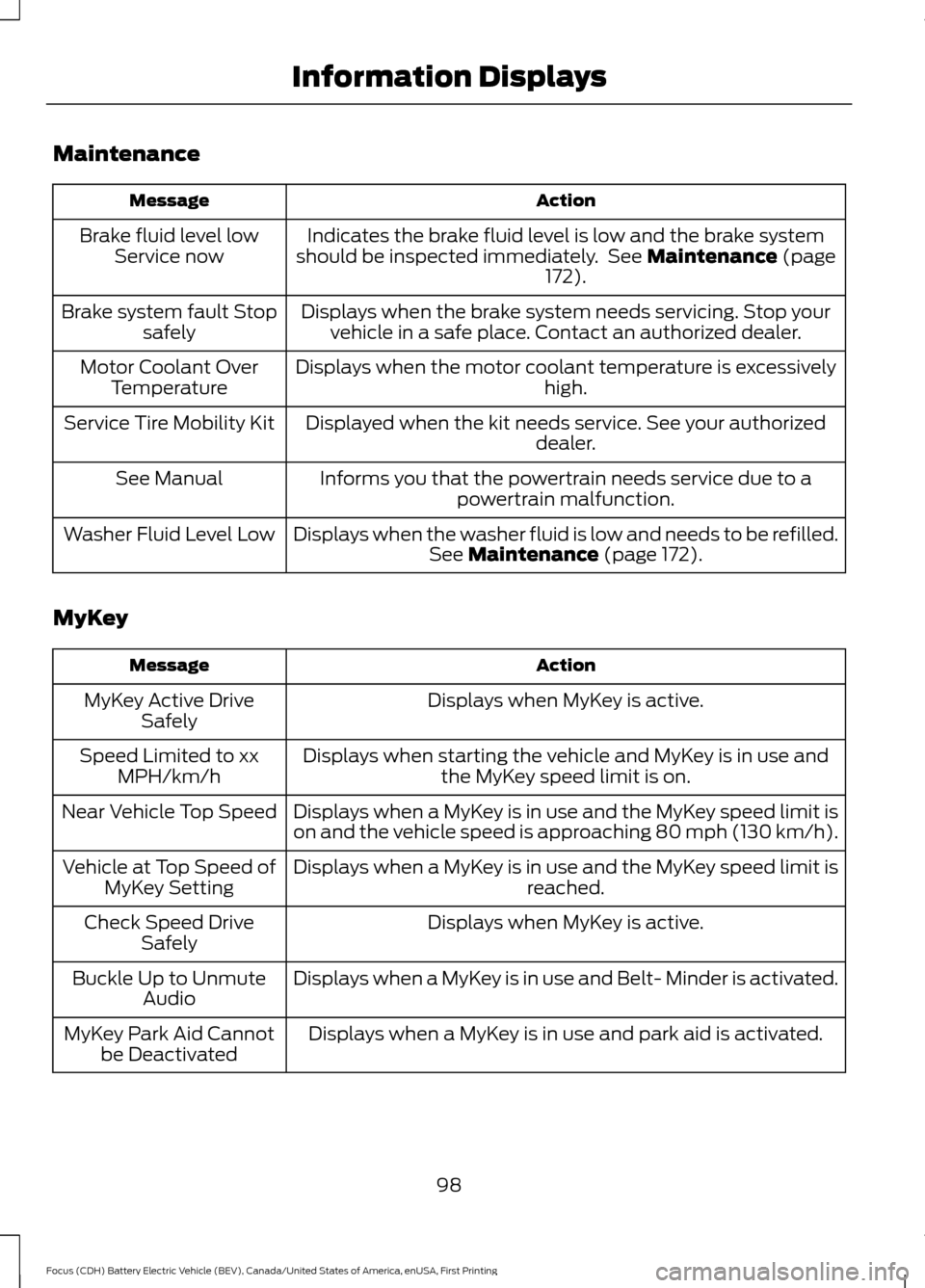
Maintenance
Action
Message
Indicates the brake fluid level is low and the brake system
should be inspected immediately. See Maintenance (page
172).
Brake fluid level low
Service now
Displays when the brake system needs servicing. Stop yourvehicle in a safe place. Contact an authorized dealer.
Brake system fault Stop
safely
Displays when the motor coolant temperature is excessively high.
Motor Coolant Over
Temperature
Displayed when the kit needs service. See your authorized dealer.
Service Tire Mobility Kit
Informs you that the powertrain needs service due to apowertrain malfunction.
See Manual
Displays when the washer fluid is low and needs to be refilled.See
Maintenance (page 172).
Washer Fluid Level Low
MyKey Action
Message
Displays when MyKey is active.
MyKey Active Drive
Safely
Displays when starting the vehicle and MyKey is in use andthe MyKey speed limit is on.
Speed Limited to xx
MPH/km/h
Displays when a MyKey is in use and the MyKey speed limit is
on and the vehicle speed is approaching 80 mph (130 km/h).
Near Vehicle Top Speed
Displays when a MyKey is in use and the MyKey speed limit is reached.
Vehicle at Top Speed of
MyKey Setting
Displays when MyKey is active.
Check Speed Drive
Safely
Displays when a MyKey is in use and Belt- Minder is activated.
Buckle Up to Unmute
Audio
Displays when a MyKey is in use and park aid is activated.
MyKey Park Aid Cannot
be Deactivated
98
Focus (CDH) Battery Electric Vehicle (BEV), Canada/United States of America, enUSA, First Printing Information Displays
Page 102 of 276
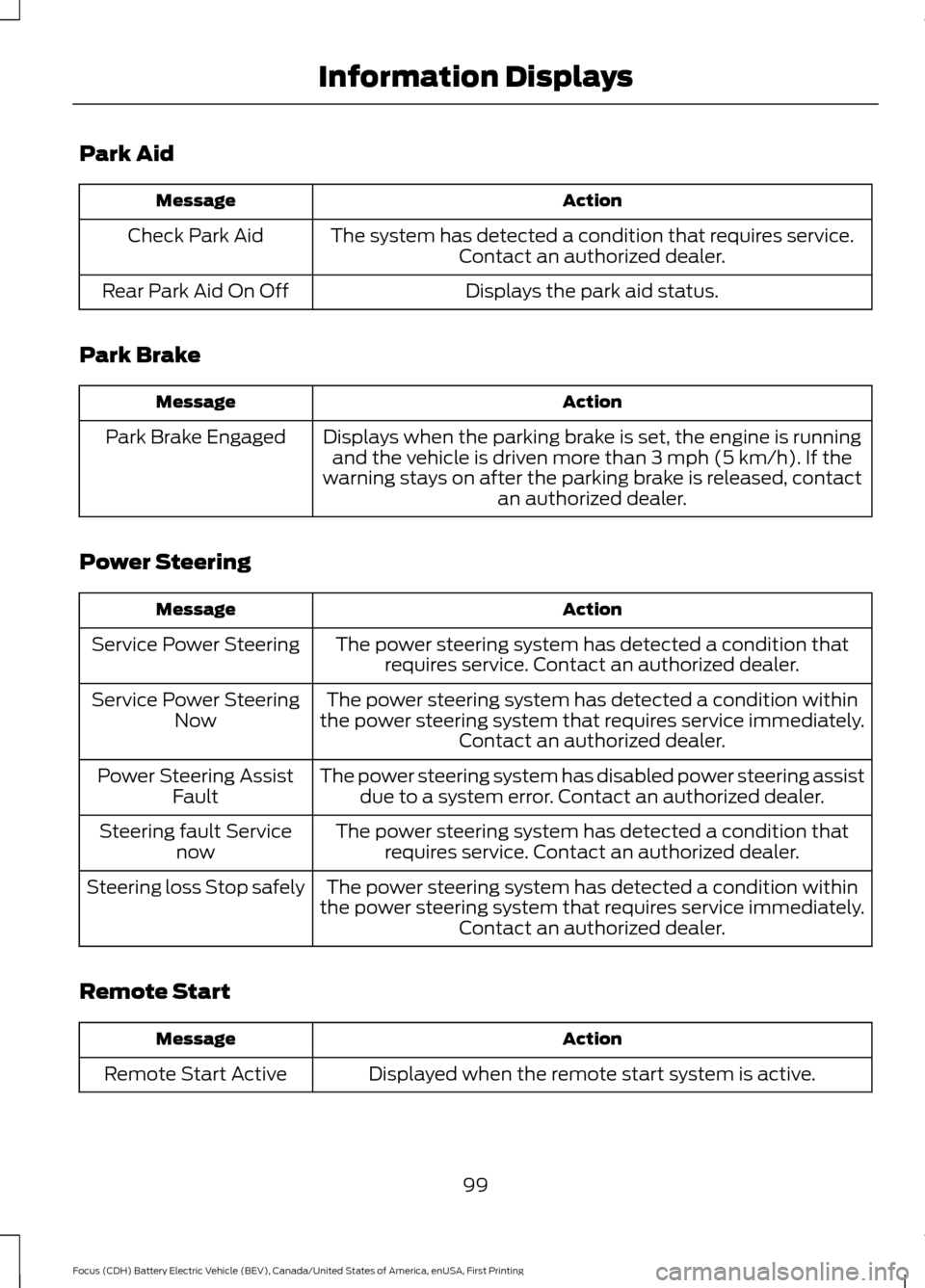
Park Aid
Action
Message
The system has detected a condition that requires service.Contact an authorized dealer.
Check Park Aid
Displays the park aid status.
Rear Park Aid On Off
Park Brake Action
Message
Displays when the parking brake is set, the engine is runningand the vehicle is driven more than 3 mph (5 km/h). If the
warning stays on after the parking brake is released, contact an authorized dealer.
Park Brake Engaged
Power Steering Action
Message
The power steering system has detected a condition thatrequires service. Contact an authorized dealer.
Service Power Steering
The power steering system has detected a condition within
the power steering system that requires service immediately. Contact an authorized dealer.
Service Power Steering
Now
The power steering system has disabled power steering assistdue to a system error. Contact an authorized dealer.
Power Steering Assist
Fault
The power steering system has detected a condition thatrequires service. Contact an authorized dealer.
Steering fault Service
now
The power steering system has detected a condition within
the power steering system that requires service immediately. Contact an authorized dealer.
Steering loss Stop safely
Remote Start Action
Message
Displayed when the remote start system is active.
Remote Start Active
99
Focus (CDH) Battery Electric Vehicle (BEV), Canada/United States of America, enUSA, First Printing Information Displays
Page 116 of 276
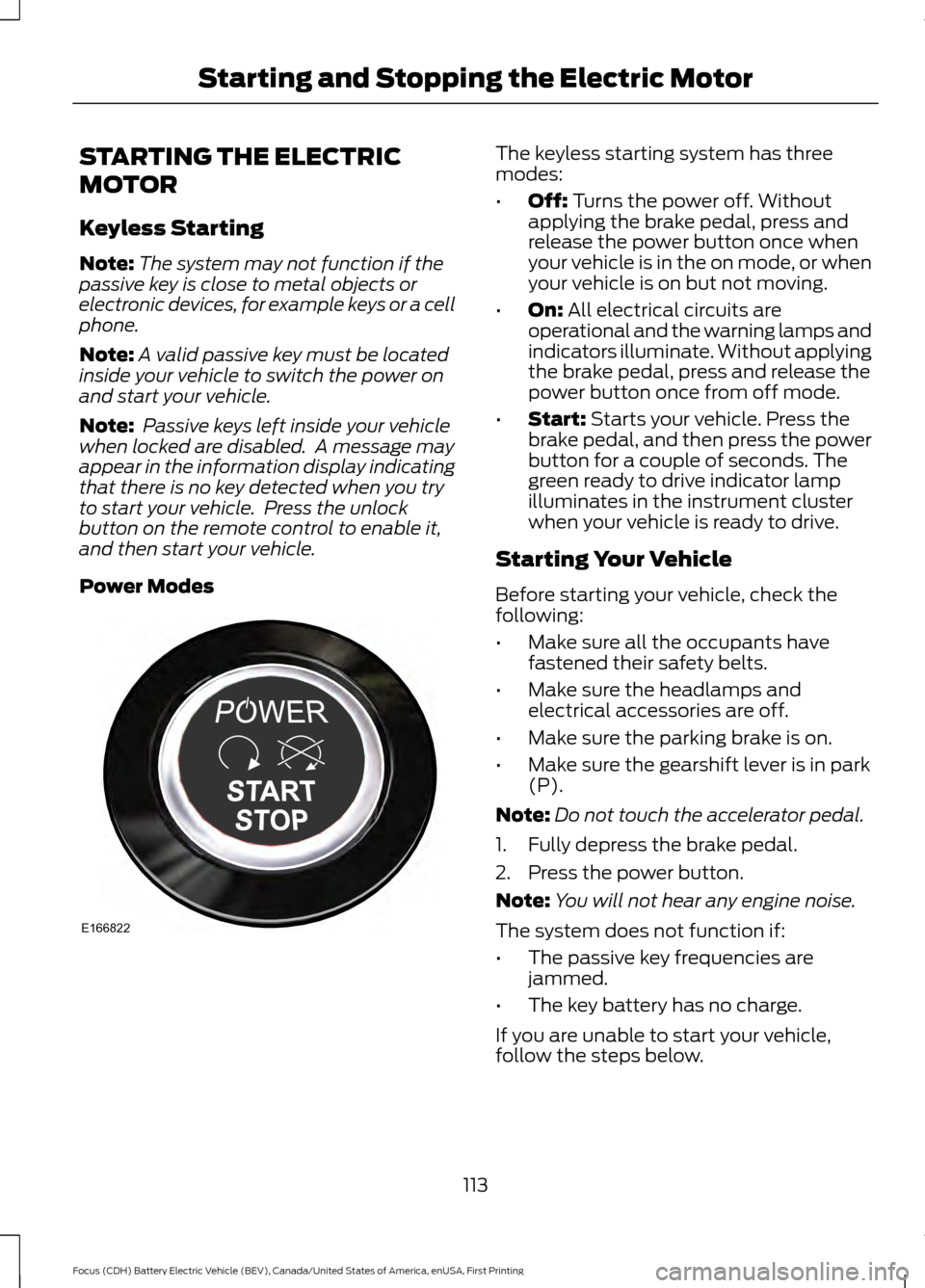
STARTING THE ELECTRIC
MOTOR
Keyless Starting
Note:
The system may not function if the
passive key is close to metal objects or
electronic devices, for example keys or a cell
phone.
Note: A valid passive key must be located
inside your vehicle to switch the power on
and start your vehicle.
Note: Passive keys left inside your vehicle
when locked are disabled. A message may
appear in the information display indicating
that there is no key detected when you try
to start your vehicle. Press the unlock
button on the remote control to enable it,
and then start your vehicle.
Power Modes The keyless starting system has three
modes:
•
Off: Turns the power off. Without
applying the brake pedal, press and
release the power button once when
your vehicle is in the on mode, or when
your vehicle is on but not moving.
• On:
All electrical circuits are
operational and the warning lamps and
indicators illuminate. Without applying
the brake pedal, press and release the
power button once from off mode.
• Start:
Starts your vehicle. Press the
brake pedal, and then press the power
button for a couple of seconds. The
green ready to drive indicator lamp
illuminates in the instrument cluster
when your vehicle is ready to drive.
Starting Your Vehicle
Before starting your vehicle, check the
following:
• Make sure all the occupants have
fastened their safety belts.
• Make sure the headlamps and
electrical accessories are off.
• Make sure the parking brake is on.
• Make sure the gearshift lever is in park
(P).
Note: Do not touch the accelerator pedal.
1. Fully depress the brake pedal.
2. Press the power button.
Note: You will not hear any engine noise.
The system does not function if:
• The passive key frequencies are
jammed.
• The key battery has no charge.
If you are unable to start your vehicle,
follow the steps below.
113
Focus (CDH) Battery Electric Vehicle (BEV), Canada/United States of America, enUSA, First Printing Starting and Stopping the Electric MotorE166822
Page 117 of 276
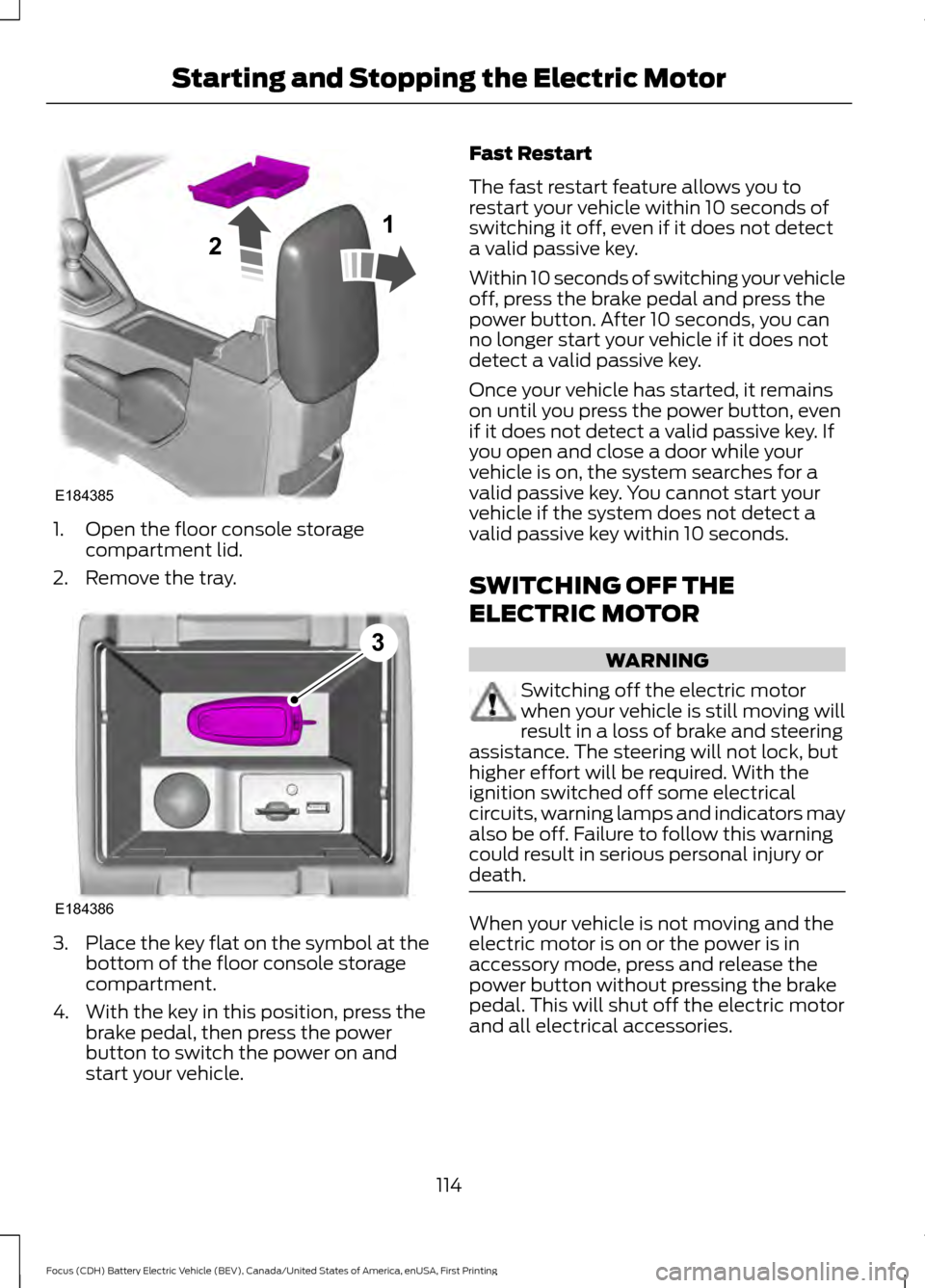
1. Open the floor console storage
compartment lid.
2. Remove the tray. 3.
Place the key flat on the symbol at the
bottom of the floor console storage
compartment.
4. With the key in this position, press the brake pedal, then press the power
button to switch the power on and
start your vehicle. Fast Restart
The fast restart feature allows you to
restart your vehicle within 10 seconds of
switching it off, even if it does not detect
a valid passive key.
Within 10 seconds of switching your vehicle
off, press the brake pedal and press the
power button. After 10 seconds, you can
no longer start your vehicle if it does not
detect a valid passive key.
Once your vehicle has started, it remains
on until you press the power button, even
if it does not detect a valid passive key. If
you open and close a door while your
vehicle is on, the system searches for a
valid passive key. You cannot start your
vehicle if the system does not detect a
valid passive key within 10 seconds.
SWITCHING OFF THE
ELECTRIC MOTOR
WARNING
Switching off the electric motor
when your vehicle is still moving will
result in a loss of brake and steering
assistance. The steering will not lock, but
higher effort will be required. With the
ignition switched off some electrical
circuits, warning lamps and indicators may
also be off. Failure to follow this warning
could result in serious personal injury or
death. When your vehicle is not moving and the
electric motor is on or the power is in
accessory mode, press and release the
power button without pressing the brake
pedal. This will shut off the electric motor
and all electrical accessories.
114
Focus (CDH) Battery Electric Vehicle (BEV), Canada/United States of America, enUSA, First Printing Starting and Stopping the Electric MotorE184385
21 E184386
3
Page 118 of 276
When your vehicle is moving, press the
power button three times within two
seconds or press and hold for at least one
second. Move the transmission selector
lever to position N and use the brakes to
bring your vehicle to a safe stop. When your
vehicle has come to a complete stop,
move the transmission selector lever to
position
P.
115
Focus (CDH) Battery Electric Vehicle (BEV), Canada/United States of America, enUSA, First Printing Starting and Stopping the Electric Motor
Page 125 of 276
1. Press the START/STOP button to
power off your vehicle.
2. Wait for your vehicle to fully shut down
and the instrument cluster to turn off.
Note: Your vehicle may take between 30
to 90 seconds to shut down.
3. Press the brake pedal and press the START/STOP
button.
4. If your vehicle is not powered after this
sequence, repeat steps 1 through 3 up
to two more times.
Note: During this process, your vehicle
detects if the electrical system is safe and
reactivates. Once your vehicle determines
the electrical system safe, you can start your
vehicle as you would normally by pressing
the brake in combination with the
START/STOP
button.
Note: In the event your vehicle does not
reactivate after the third power cycle,
contact an authorized dealer.
122
Focus (CDH) Battery Electric Vehicle (BEV), Canada/United States of America, enUSA, First Printing High Voltage Battery