2016 FORD FOCUS ELECTRIC low beam
[x] Cancel search: low beamPage 77 of 276
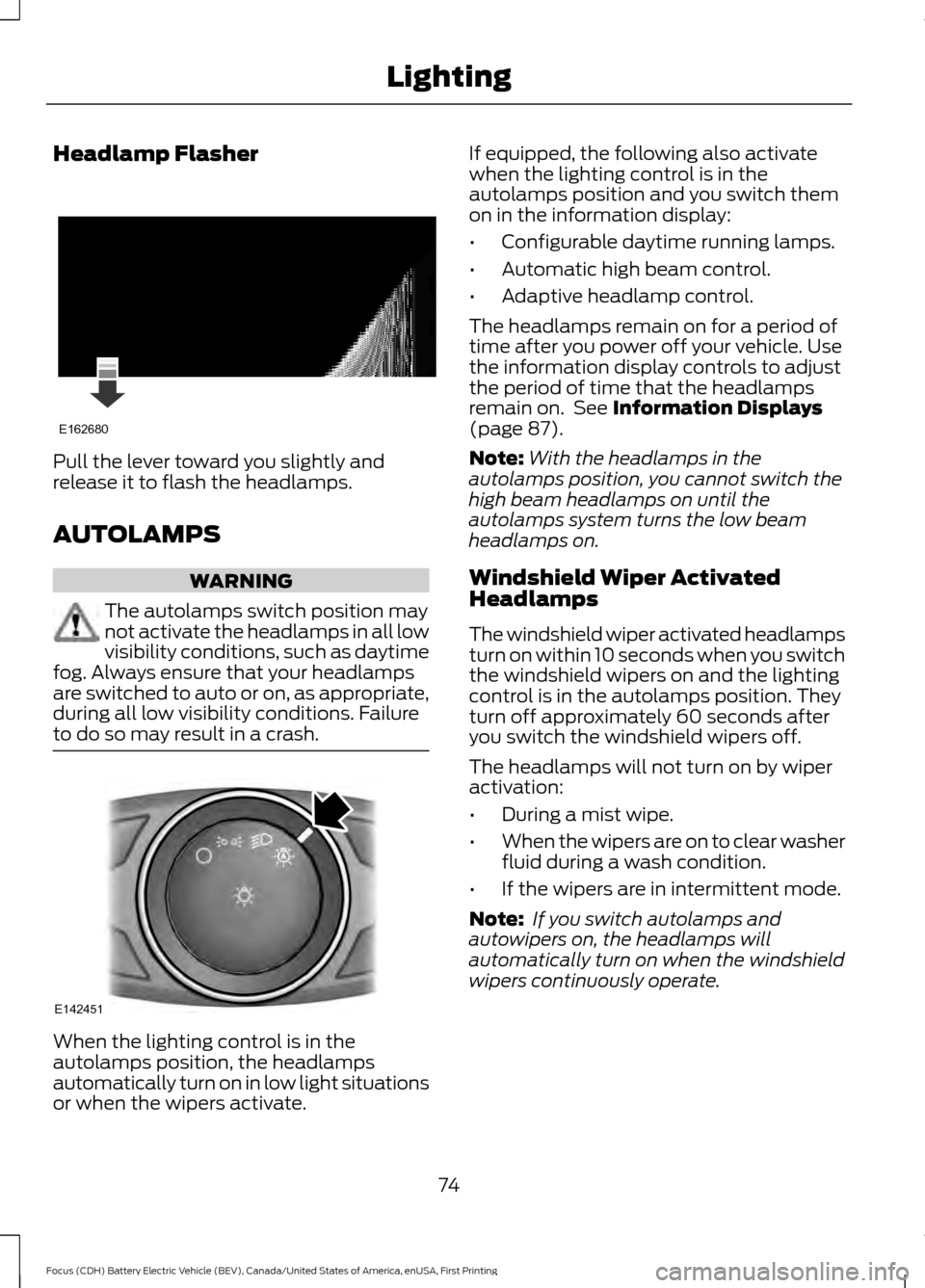
Headlamp Flasher
Pull the lever toward you slightly and
release it to flash the headlamps.
AUTOLAMPS
WARNING
The autolamps switch position may
not activate the headlamps in all low
visibility conditions, such as daytime
fog. Always ensure that your headlamps
are switched to auto or on, as appropriate,
during all low visibility conditions. Failure
to do so may result in a crash. When the lighting control is in the
autolamps position, the headlamps
automatically turn on in low light situations
or when the wipers activate. If equipped, the following also activate
when the lighting control is in the
autolamps position and you switch them
on in the information display:
•
Configurable daytime running lamps.
• Automatic high beam control.
• Adaptive headlamp control.
The headlamps remain on for a period of
time after you power off your vehicle. Use
the information display controls to adjust
the period of time that the headlamps
remain on. See Information Displays
(page 87).
Note: With the headlamps in the
autolamps position, you cannot switch the
high beam headlamps on until the
autolamps system turns the low beam
headlamps on.
Windshield Wiper Activated
Headlamps
The windshield wiper activated headlamps
turn on within 10 seconds when you switch
the windshield wipers on and the lighting
control is in the autolamps position. They
turn off approximately 60 seconds after
you switch the windshield wipers off.
The headlamps will not turn on by wiper
activation:
• During a mist wipe.
• When the wipers are on to clear washer
fluid during a wash condition.
• If the wipers are in intermittent mode.
Note: If you switch autolamps and
autowipers on, the headlamps will
automatically turn on when the windshield
wipers continuously operate.
74
Focus (CDH) Battery Electric Vehicle (BEV), Canada/United States of America, enUSA, First Printing LightingE162680 E142451
Page 88 of 276

Motor Coolant Temperature
Lights when the motor coolant
temperature is high. Stop your
vehicle as soon as possible,
power it down and let it cool.
Fasten Safety Belt Warning Lamp It will illuminate and a chime will
sound to remind you to fasten
your safety belt. See Seatbelt
Reminder (page 34).
Front Airbag Warning Lamp If the warning lamp does not
illuminate during start up,
remains on or flashes, the
system may be disabled. Have your vehicle
checked by an authorized dealer.
High Beam Indicator It will illuminate when you switch
the high beam headlamps on. It
will flash when you use the
headlamp flasher.
Liftgate Ajar Lights when the liftgate is not
completely closed.
Limited Performance Amber: Indicates limited vehicle
performance due to a cold or hot
battery. A corresponding
message displays.
Red: Indicates severely limited vehicle
performance due to a cold or hot battery.
This is accompanied by a corresponding
message. Drive with caution. Keep your
vehicle plugged in when not in use to
maintain battery temperature. Low Battery Lights when the battery level is
low. You may also see a
message suggesting you reduce
your usage of the climate system.
Low Tire Pressure Warning Lights when your tire pressure is
low. If the lamp remains on at
start up or when driving, check
your tire pressure as soon as possible.
It also lights momentarily when you switch
on your vehicle to confirm the lamp is
functional. If it does not light when you
switch on your vehicle, or begins to flash
at any time, have the system checked by
an authorized dealer.
Low Washer Fluid Lights when the windshield
washer fluid is low.
Headlamp and Parking Lamp
Indicator It will illuminate when you switch
the headlamps or parking lamps
on.
Powertrain Fault Lights when the system detects
a powertrain or high-voltage
charge system fault. If the
indicator stays on or continues to come on,
contact an authorized dealer as soon as
possible.
Ready to Drive Lights after you power your
vehicle on and it is ready to drive.
A corresponding message may
display stating ready to drive.
85
Focus (CDH) Battery Electric Vehicle (BEV), Canada/United States of America, enUSA, First Printing Instrument Cluster E162453 E144690 E144691 E132353 E144692
Page 100 of 276
Hill Start Assist
Action
Message
Displays when hill start assist is not available. Contact anauthorized dealer. See Hill Start Assist (page 126).
Hill Start Assist Not
Available
Keys and Intelligent Access Action
Message
This message is displayed when there is a problem with yourvehicle ’s starting system. See your authorized dealer for
service.
Starting System Fault
Displays to remind you that the key is in the luggage
compartment. See Starting the Electric Motor (page 113).
Key Inside vehicle
Displayed when a valid key is not detected within the vehicle.See
Starting the Electric Motor (page 113).
Key Not Inside vehicle
Displayed if the key is not detected by the system. SeeStarting the Electric Motor
(page 113).
No Key Detected
Displayed when your vehicle is in the Accessory ignition state.
Accessory Power is
Active
Displayed as a reminder to press the brake while starting the vehicle.
To START Press Brake
Displayed as needed by the system for proper function.
Place Key in Backup
Location
Lighting Action
Message
Displays when the brake lamp bulb has burned out. Contact an authorized dealer.
Brake lamp Bulb fault
Displays when the low beam headlamp bulb has burned out.Contact an authorized dealer.
Low beam Bulb fault
Displays when an electrical system problem occurs with theheadlamp system. Contact an authorized dealer.
Headlamp fault Service
req'd
97
Focus (CDH) Battery Electric Vehicle (BEV), Canada/United States of America, enUSA, First Printing Information Displays
Page 183 of 276
2. Press the locking buttons together.
3. Rotate and remove the wiper blade.
4. Install in the reverse order.
Note:
Make sure that the wiper blade locks
into place.
Changing the Rear Window Wiper
Blade
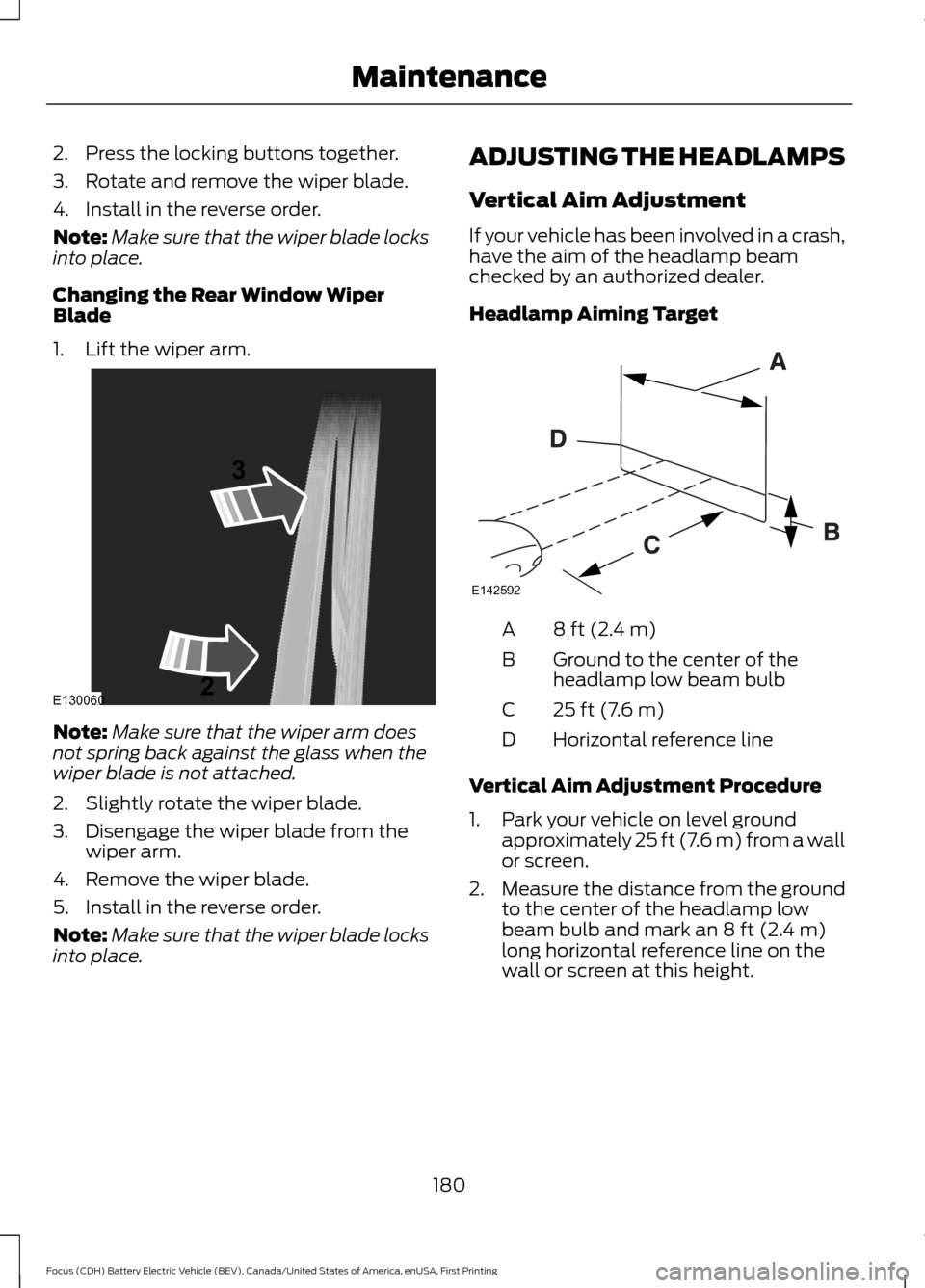
1. Lift the wiper arm. Note:
Make sure that the wiper arm does
not spring back against the glass when the
wiper blade is not attached.
2. Slightly rotate the wiper blade.
3. Disengage the wiper blade from the wiper arm.
4. Remove the wiper blade.
5. Install in the reverse order.
Note: Make sure that the wiper blade locks
into place. ADJUSTING THE HEADLAMPS
Vertical Aim Adjustment
If your vehicle has been involved in a crash,
have the aim of the headlamp beam
checked by an authorized dealer.
Headlamp Aiming Target
8 ft (2.4 m)
A
Ground to the center of the
headlamp low beam bulb
B
25 ft (7.6 m)
C
Horizontal reference line
D
Vertical Aim Adjustment Procedure
1. Park your vehicle on level ground approximately 25 ft (7.6 m) from a wall
or screen.
2. Measure the distance from the ground
to the center of the headlamp low
beam bulb and mark an
8 ft (2.4 m)
long horizontal reference line on the
wall or screen at this height.
180
Focus (CDH) Battery Electric Vehicle (BEV), Canada/United States of America, enUSA, First Printing MaintenanceE130060
3
2 E142592
Page 184 of 276
Note:
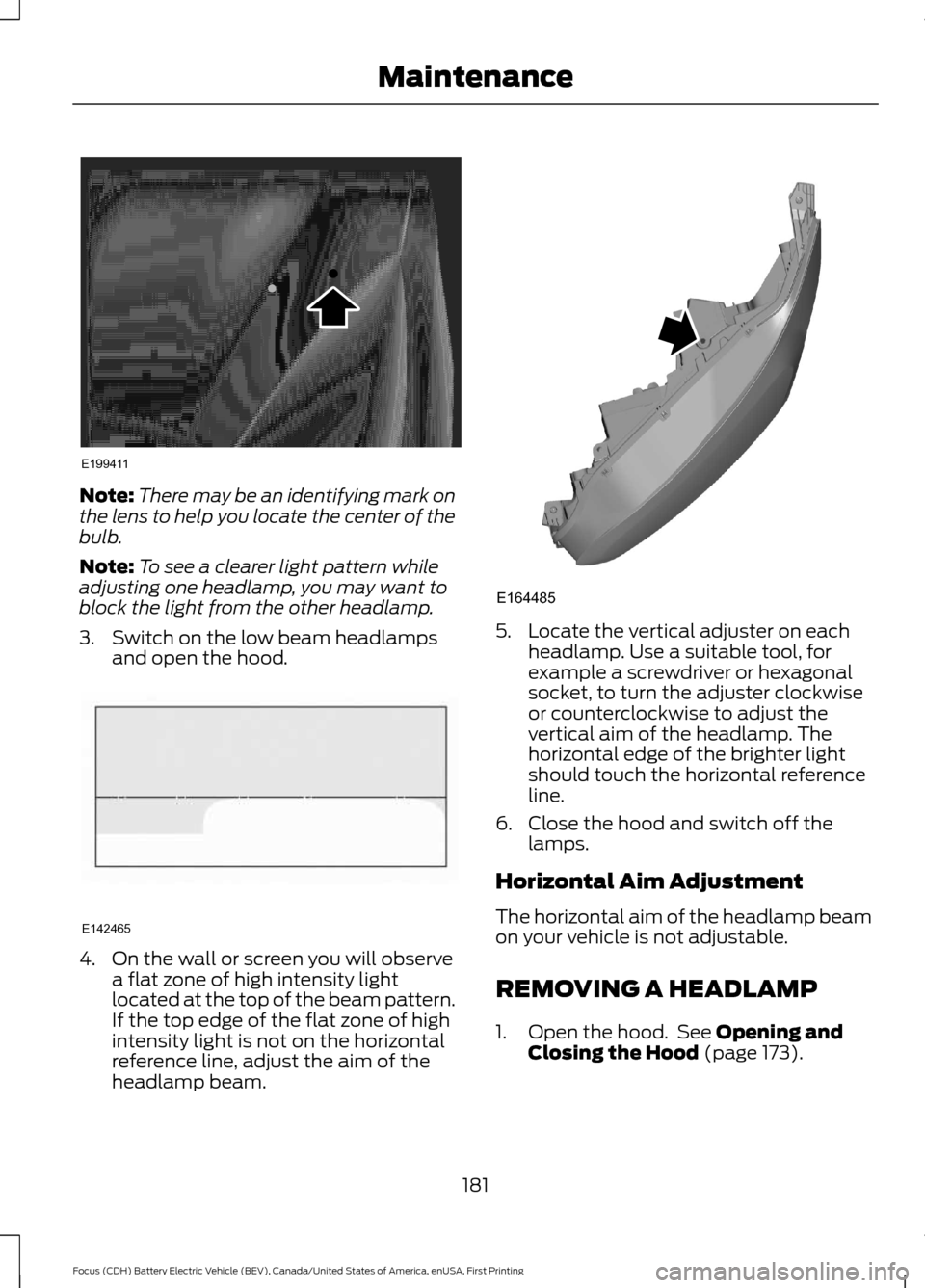
There may be an identifying mark on
the lens to help you locate the center of the
bulb.
Note: To see a clearer light pattern while
adjusting one headlamp, you may want to
block the light from the other headlamp.
3. Switch on the low beam headlamps and open the hood. 4. On the wall or screen you will observe
a flat zone of high intensity light
located at the top of the beam pattern.
If the top edge of the flat zone of high
intensity light is not on the horizontal
reference line, adjust the aim of the
headlamp beam. 5. Locate the vertical adjuster on each
headlamp. Use a suitable tool, for
example a screwdriver or hexagonal
socket, to turn the adjuster clockwise
or counterclockwise to adjust the
vertical aim of the headlamp. The
horizontal edge of the brighter light
should touch the horizontal reference
line.
6. Close the hood and switch off the lamps.
Horizontal Aim Adjustment
The horizontal aim of the headlamp beam
on your vehicle is not adjustable.
REMOVING A HEADLAMP
1. Open the hood. See Opening and
Closing the Hood (page 173).
181
Focus (CDH) Battery Electric Vehicle (BEV), Canada/United States of America, enUSA, First Printing MaintenanceE199411 E142465 E164485
Page 185 of 276
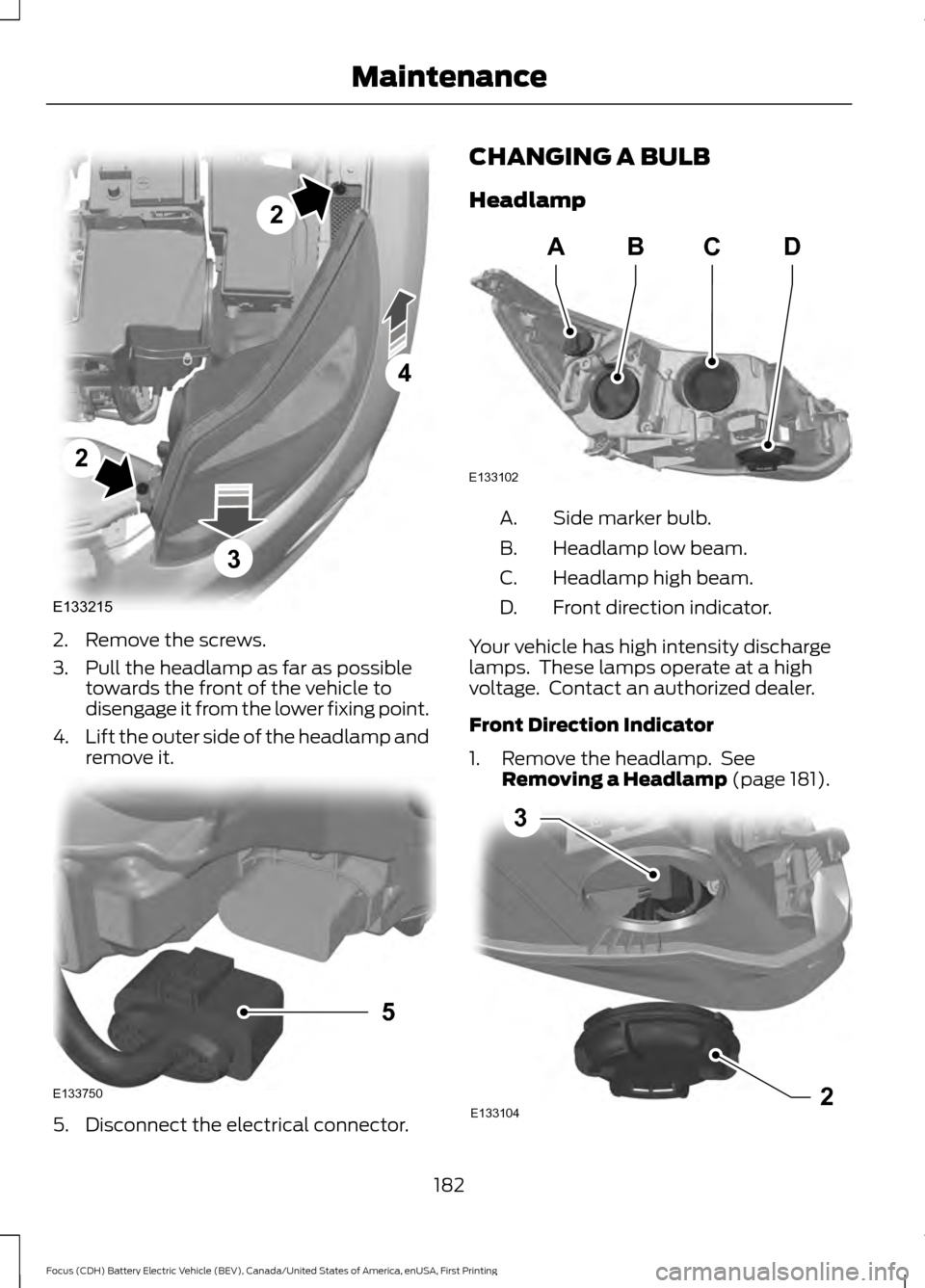
2. Remove the screws.
3. Pull the headlamp as far as possible
towards the front of the vehicle to
disengage it from the lower fixing point.
4. Lift the outer side of the headlamp and
remove it. 5. Disconnect the electrical connector. CHANGING A BULB
Headlamp
Side marker bulb.
A.
Headlamp low beam.
B.
Headlamp high beam.
C.
Front direction indicator.
D.
Your vehicle has high intensity discharge
lamps. These lamps operate at a high
voltage. Contact an authorized dealer.
Front Direction Indicator
1. Remove the headlamp. See Removing a Headlamp (page 181). 182
Focus (CDH) Battery Electric Vehicle (BEV), Canada/United States of America, enUSA, First Printing MaintenanceE133215
2
2
4
3 E133750
5 E133102
ABCD E1331042
3
Page 188 of 276
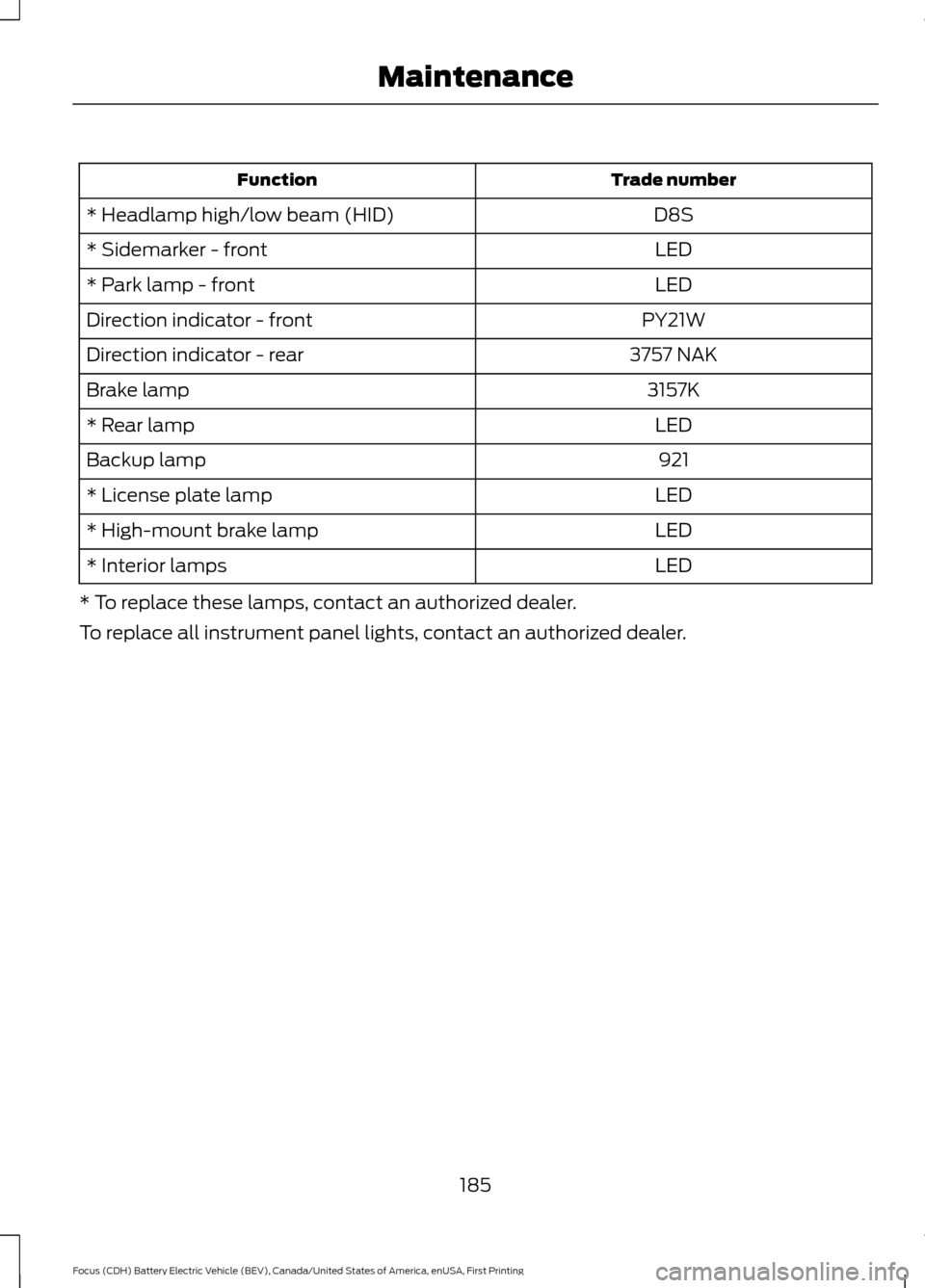
Trade number
Function
D8S
* Headlamp high/low beam (HID)
LED
* Sidemarker - front
LED
* Park lamp - front
PY21W
Direction indicator - front
3757 NAK
Direction indicator - rear
3157K
Brake lamp
LED
* Rear lamp
921
Backup lamp
LED
* License plate lamp
LED
* High-mount brake lamp
LED
* Interior lamps
* To replace these lamps, contact an authorized dealer.
To replace all instrument panel lights, contact an authorized dealer.
185
Focus (CDH) Battery Electric Vehicle (BEV), Canada/United States of America, enUSA, First Printing Maintenance
Page 273 of 276
Information Messages.................................94
AdvanceTrac®...................................................... 94
Alarm........................................................................\
95
Battery and Charging System (High Voltage).............................................................. 95
Doors........................................................................\
96
Hill Start Assist...................................................... 97
Keys and Intelligent Access.............................. 97
Lighting..................................................................... 97
Maintenance.......................................................... 98
MyKey....................................................................... 98
Park Aid................................................................... 99
Park Brake............................................................... 99
Power Steering..................................................... 99
Remote Start......................................................... 99
Tire Pressure Monitoring System.................100
Transmission....................................................... 100
Installing Child Restraints............................19 Child Seats............................................................... 19
Using Lap and Shoulder Belts......................... 20
Using Lower Anchors and Tethers for Children (LATCH)............................................ 22
Using Tether Straps............................................. 24
Instrument Cluster
.........................................82
Instrument Lighting Dimmer......................75
Instrument Panel Overview........................16
Interior Lamps
.................................................76
Front Interior Lamps (If Equipped)................76
Interior Mirror
...................................................80
Introduction........................................................5
J
Jump Starting the Vehicle.........................150 To Connect the Booster Cables..................... 151
To Start Your Vehicle.......................................... 151
K
Keyless Entry
....................................................63
SECURICODE™ KEYLESS ENTRY
KEYPAD.............................................................. 63
Keys and Remote Controls.........................47 L
Lighting Control
...............................................73
Headlamp Flasher................................................ 74
High Beams............................................................. 73
Lighting...............................................................73 General Information............................................ 73
Load Carrying
.................................................138
Load Limit.......................................................138
Vehicle Loading - with and without a
Trailer .................................................................. 138
Locking and Unlocking
.................................58
Activating Intelligent Access............................ 59
Autolock Feature................................................. 60
Autounlock Feature.............................................. 61
Battery Saver......................................................... 62
Disabled Intelligent Access Keys................... 60
Enabling or Disabling Autolock and Autounlock......................................................... 61
Illuminated Entry................................................... 61
Illuminated Exit...................................................... 61
Opening the Liftgate........................................... 62
Power Door Locks................................................ 58
Remote Control.................................................... 58
Smart Unlocks for Intelligent Access Keys...................................................................... 60
Locks...................................................................58
Lug Nuts See: Changing a Road Wheel........................ 218
Lug Nuts
...........................................................219
M
Maintenance...................................................172 General Information........................................... 172
Manual Liftgate
...............................................62
Closing the Liftgate............................................. 63
Opening the Liftgate........................................... 62
Manual Seats.................................................107
Media Hub
......................................................228
Message Center See: Information Displays................................. 87
Mirrors See: Heated Windows and Mirrors..............103
See: Windows and Mirrors................................ 78
Mobile Communications Equipment......................................................10
Motorcraft Parts
...........................................220
270
Focus (CDH) Battery Electric Vehicle (BEV), Canada/United States of America, enUSA, First Printing Index