2016 FORD FOCUS ELECTRIC radio
[x] Cancel search: radioPage 4 of 276
Introduction
About This Manual...........................................5
Symbols Glossary.............................................5
Data Recording..................................................7
California Proposition 65...............................9
Perchlorate..........................................................9
Ford Credit
...........................................................9
Replacement Parts Recommendation........................................9
Special Notices
................................................10
Mobile Communications Equipment.....................................................10
Environment
Protecting the Environment
........................12
At a Glance
Front Exterior Overview
................................13
Rear Exterior Overview..................................14
Vehicle Interior Overview..............................15
Instrument Panel Overview........................16
Child Safety
General Information
.......................................18
Installing Child Restraints
............................19
Booster Seats..................................................25
Child Restraint Positioning
..........................27
Child Safety Locks.........................................28
Seatbelts
Principle of Operation
..................................30
Fastening the Seatbelts
................................31
Seatbelt Height Adjustment
......................33
Seatbelt Warning Lamp and Indicator Chime.............................................................34
Seatbelt Reminder
........................................34
Child Restraint and Seatbelt Maintenance................................................36 Personal Safety System
™
Personal Safety System ™
..........................37
Supplementary Restraints System
Principle of Operation..................................38
Driver and Passenger Airbags...................39
Front Passenger Sensing System............40
Side Airbags.....................................................42
Driver Knee Airbag.........................................43
Safety Canopy ™
............................................44
Crash Sensors and Airbag Indicator.......45
Airbag Disposal
..............................................46
Keys and Remote Controls
General Information on Radio Frequencies..................................................47
Remote Control
...............................................47
Replacing a Lost Key or Remote Control...........................................................50
MyKey ™
Principle of Operation
...................................51
Creating a MyKey............................................52
Clearing All MyKeys.......................................53
Checking MyKey System Status...............54
Using MyKey With Remote Start Systems.........................................................55
MyKey Troubleshooting...............................56
Locks
Locking and Unlocking
.................................58
Manual Liftgate
...............................................62
Keyless Entry
....................................................63
Security
Passive Anti-Theft System
........................65
Anti-Theft Alarm............................................66
1
Focus (CDH) Battery Electric Vehicle (BEV), Canada/United States of America, enUSA, First Printing Table of Contents
Page 13 of 276
development we validate these parts
deliver the intended level of protection as
a whole system. A great way to know for
sure you are getting this level of protection
is to use genuine Ford replacement
collision parts.
Warranty on Replacement Parts
Genuine Ford and Motorcraft replacement
parts are the only replacement parts that
benefit from a Ford Warranty. Damage
caused to your vehicle as a result of the
failure of non-Ford parts may not be
covered by the Ford Warranty. For
additional information, refer to the terms
and conditions of the Ford Warranty.
SPECIAL NOTICES
New Vehicle Limited Warranty
For a detailed description of what is
covered and what is not covered by your
vehicle
’s New Vehicle Limited Warranty,
refer to the Warranty Manual that is
provided to you along with your Owner ’s
Manual.
Special Instructions
For your added safety, your vehicle is fitted
with sophisticated electronic controls. WARNINGS
You risk death or serious injury to
yourself and others if you do not
follow the instruction highlighted by
the warning symbol. Failure to follow the
specific warnings and instructions could
result in personal injury. Front seat mounted rear-facing child
or infant seats should NEVER be
placed in front of an active
passenger airbag. On-board Diagnostics (OBD-II)
Your vehicle
’s On-board Diagnostics
(OBD-II) system has a data port for
diagnostics, repair and reprogramming
services with diagnostic scan tools.
Installing a non-Ford-approved
aftermarket OBD plug-in device that uses
the port during normal driving, for example
remote insurance company monitoring,
remote vehicle diagnostics, telematics or
engine reprogramming, may cause
interference or damage to vehicle systems.
We do not recommend or endorse the use
of any non-Ford-approved aftermarket
OBD plug-in devices. The vehicle Warranty
may not cover damage caused by any
non-Ford-approved aftermarket OBD
plug-in device.
MOBILE COMMUNICATIONS
EQUIPMENT
Using mobile communications equipment
is becoming increasingly important in the
conduct of business and personal affairs.
However, you must not compromise your
own or others’ safety when using such
equipment. Mobile communications can
enhance personal safety and security when
appropriately used, particularly in
emergency situations. Safety must be
paramount when using mobile
communications equipment to avoid
negating these benefits. Mobile
communication equipment includes, but
is not limited to, cellular phones, pagers,
portable email devices, text messaging
devices and portable two-way radios.
10
Focus (CDH) Battery Electric Vehicle (BEV), Canada/United States of America, enUSA, First Printing Introduction
Page 50 of 276
GENERAL INFORMATION ON
RADIO FREQUENCIES
This device complies with Part 15 of the
FCC Rules and with Industry Canada
license-exempt RSS standard(s).
Operation is subject to the following two
conditions: (1) This device may not cause
harmful interference, and (2) This device
must accept any interference received,
including interference that may cause
undesired operation.
Note:
Changes or modifications not
expressively approved by the party
responsible for compliance could void the
user's authority to operate the equipment.
The term IC before the radio certification
number only signifies that Industry Canada
technical specifications were met.
The typical operating range for your
transmitter is approximately 33 feet (10
meters). Vehicles with the remote start
feature will have a greater range. One of
the following could cause a decrease in
operating range:
• weather conditions
• nearby radio towers
• structures around the vehicle
• other vehicles parked next to your
vehicle
The radio frequency used by your remote
control can also be used by other short
distance radio transmissions, for example
amateur radios, medical equipment,
wireless headphones, remote controls and
alarm systems. If the frequencies are
jammed, you will not be able to use your
remote control. You can lock and unlock
the doors with the key.
Note: Make sure to lock your vehicle before
leaving it unattended.
Note: If you are in range, the remote control
will operate if you press any button
unintentionally. Note:
The remote control contains sensitive
electrical components. Exposure to moisture
or impact may cause permanent damage.
REMOTE CONTROL
Intelligent Access Key
(If Equipped) The intelligent access keys operate the
power locks and the remote start system.
The key must be in your vehicle to use the
push button start.
Key Blade
The intelligent access key also contains a
removable key blade that you can use to
unlock your vehicle.
Slide the release on the back of the
transmitter, then pull the blade out.
47
Focus (CDH) Battery Electric Vehicle (BEV), Canada/United States of America, enUSA, First Printing Keys and Remote ControlsE138616 E142431
Page 52 of 276

Sounding the Panic Alarm (If Equipped)
Press the button to activate the
alarm. Press the button again or
switch your vehicle on to
deactivate it.
Note: The panic alarm only operates when
your vehicle is switched off.
Remote Start The remote start button is on the
transmitter.
This feature allows you to start your
vehicle from the outside. The transmitter
has an extended operating range.
Vehicles with automatic climate control
can be configured to operate when your
vehicle is remote started. See Automatic
Climate Control (page 101).
Many states and provinces have
restrictions for the use of remote start.
Check your local and state or provincial
laws for specific requirements regarding
remote start systems.
The remote start system does not work if
any of the following occur:
• Your vehicle is switched on.
• The alarm system activates.
• You turn off the feature.
• The hood is open.
• The transmission is not in park (P).
• Your vehicle battery has no charge.
• The powertrain fault indicator was on
the last time you drove your vehicle.
Remote Starting your Vehicle
Note: You must press each button within
three seconds of each other. If you do not
follow this sequence, your vehicle does not
start remotely, the direction indicators do
not flash twice and the horn does not sound. The label on your transmitter details the
starting procedure.
To remote start your vehicle:
1. Press the lock button to lock all the
doors.
2. Press the remote start button twice. The direction indicators flash twice.
The horn sounds if the system fails to start,
unless quiet start is on. Quiet start runs the
blower fan at a slower speed to reduce
noise. You can switch the feature on or off
using the information display. See
General
Information (page 87).
The power windows do not work during
remote start and the radio does not turn
on automatically.
The parking lamps remain on and your
vehicle runs for 5, 10 or 15 minutes,
depending on the setting.
Note: If you remote start your vehicle with
an intelligent access transmitter, you must
press the
START STOP button on the
instrument panel once while applying the
brake pedal before driving your vehicle.
Extending the Remote Start Running
Time
To extend the remote start running time
duration of your vehicle during remote
start, repeat steps 1 and 2 while your
vehicle is running. For example, if your
vehicle had been running from the first
remote start for 5 minutes, your vehicle
49
Focus (CDH) Battery Electric Vehicle (BEV), Canada/United States of America, enUSA, First Printing Keys and Remote ControlsE138624 E138625 E138626
Page 54 of 276
PRINCIPLE OF OPERATION
MyKey allows you to program keys with
restricted driving modes to promote good
driving habits. All but one of the keys can
be activated with these restricted modes.
Any keys that remain unprogrammed are
referred to as administrator keys or admin
keys. They can be used to:
•
Create a MyKey.
• Program configurable MyKey settings.
• Clear all MyKey features.
When you have created a MyKey, you can
access the following information by using
the information display to determine:
• How many admin keys and MyKeys are
programmed to your vehicle.
• The total distance your vehicle traveled
with a MyKey.
Note: Switch the ignition on to use the
system.
Note: All MyKeys are programmed to the
same settings. You cannot program them
individually.
Note: For vehicles equipped with a
push-button start, when both a MyKey and
an admin key are present, the admin key will
be recognized by the vehicle while switching
the vehicle on to start.
Non-configurable Settings
The following settings cannot be changed
by an admin key user:
• Safety belt reminder. You cannot
disable this feature. The audio system
will mute when the front seat
passengers’ safety belts are not
fastened.
• Early low charge. The low-charge
warning activates earlier, giving the
MyKey user more time to recharge. •
Driver assist features, if equipped on
your vehicle, are forced on: parking aid.
• Satellite radio adult content
restrictions, if equipped on your vehicle.
Configurable Settings
With an admin key, you can configure
certain MyKey settings when you first
create a MyKey and before you recycle the
key or restart the engine. You can also
change the settings afterward with an
admin key.
• A vehicle speed limit can be set.
Warnings will be shown in the display
followed by an audible tone when your
vehicle reaches the set speed. You
cannot override the set speed by fully
depressing the accelerator pedal or by
setting cruise control. WARNING
Do not set MyKey maximum speed
limit to a limit that will prevent the
driver from maintaining a safe speed
considering posted speed limits and
prevailing road conditions. The driver is
always responsible to drive in accordance
with local laws and prevailing conditions.
Failure to do so could result in accident or
injury. 51
Focus (CDH) Battery Electric Vehicle (BEV), Canada/United States of America, enUSA, First Printing MyKey
™
Page 72 of 276
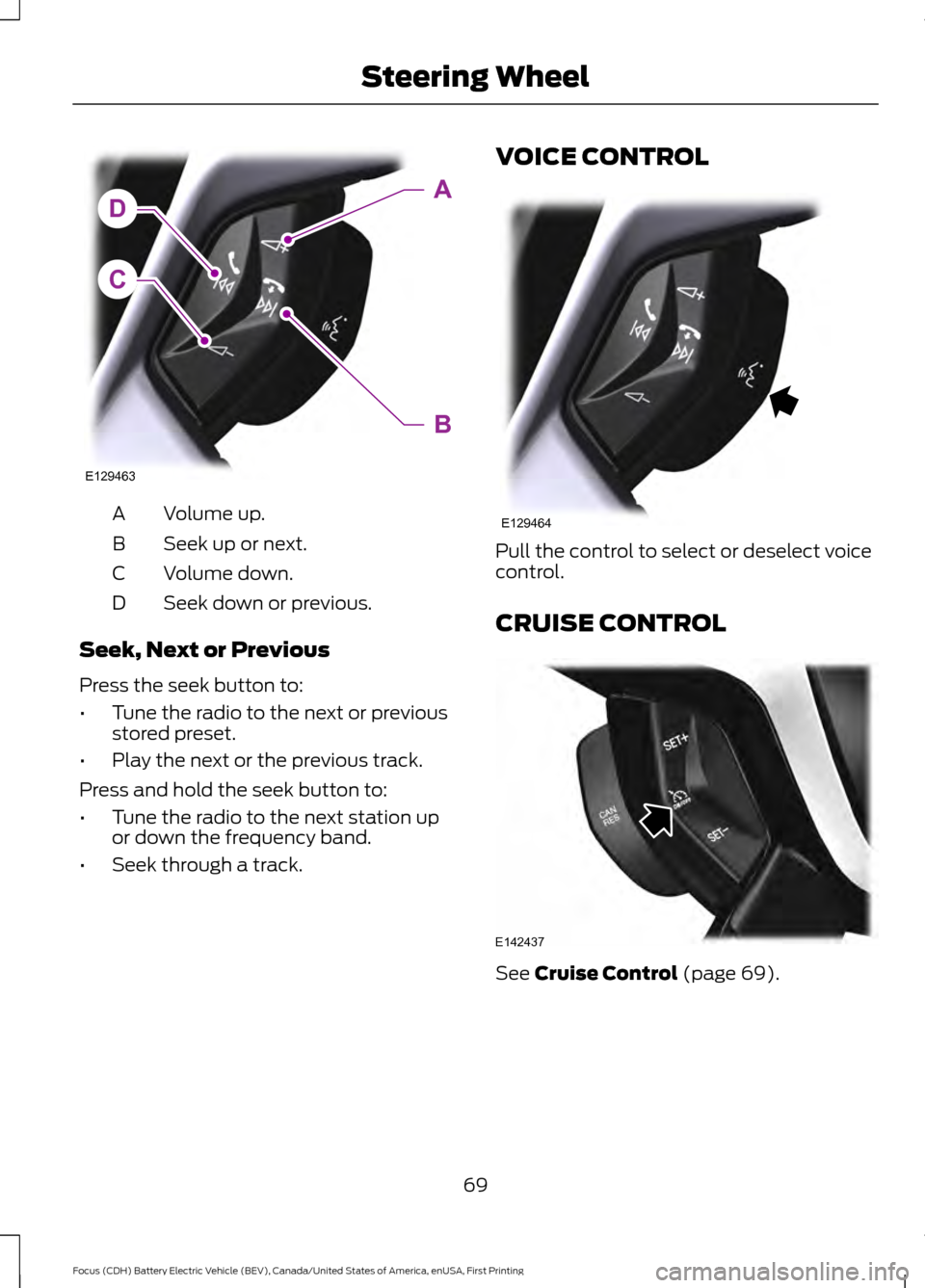
Volume up.
A
Seek up or next.
B
Volume down.
C
Seek down or previous.
D
Seek, Next or Previous
Press the seek button to:
• Tune the radio to the next or previous
stored preset.
• Play the next or the previous track.
Press and hold the seek button to:
• Tune the radio to the next station up
or down the frequency band.
• Seek through a track. VOICE CONTROL
Pull the control to select or deselect voice
control.
CRUISE CONTROL
See Cruise Control (page 69).
69
Focus (CDH) Battery Electric Vehicle (BEV), Canada/United States of America, enUSA, First Printing Steering WheelC
DA
B
E129463 E129464 E142437
Page 170 of 276
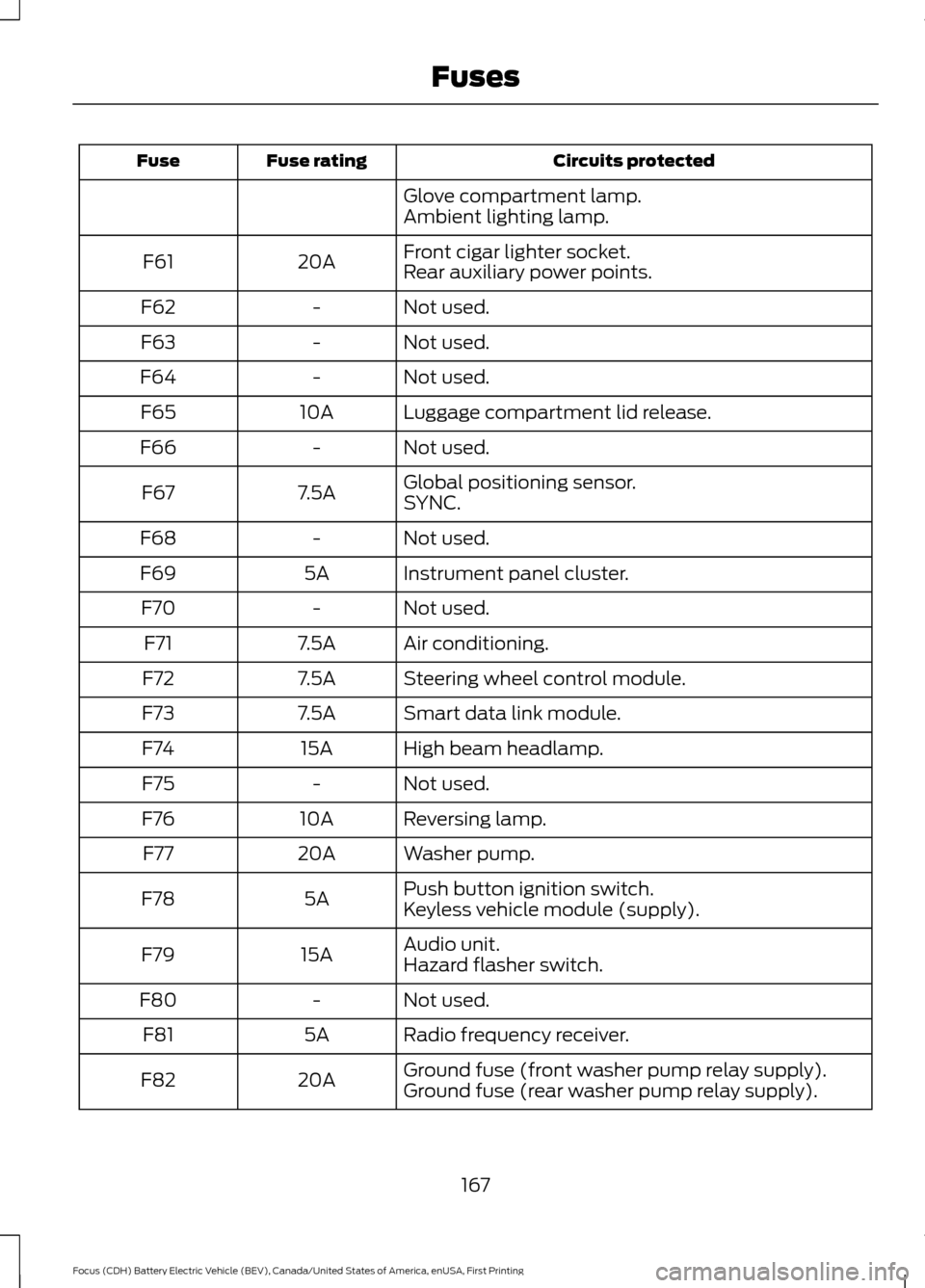
Circuits protected
Fuse rating
Fuse
Glove compartment lamp.
Ambient lighting lamp.
Front cigar lighter socket.
20A
F61
Rear auxiliary power points.
Not used.
-
F62
Not used.
-
F63
Not used.
-
F64
Luggage compartment lid release.
10A
F65
Not used.
-
F66
Global positioning sensor.
7.5A
F67
SYNC.
Not used.
-
F68
Instrument panel cluster.
5A
F69
Not used.
-
F70
Air conditioning.
7.5A
F71
Steering wheel control module.
7.5A
F72
Smart data link module.
7.5A
F73
High beam headlamp.
15A
F74
Not used.
-
F75
Reversing lamp.
10A
F76
Washer pump.
20A
F77
Push button ignition switch.
5A
F78
Keyless vehicle module (supply).
Audio unit.
15A
F79
Hazard flasher switch.
Not used.
-
F80
Radio frequency receiver.
5A
F81
Ground fuse (front washer pump relay supply).
20A
F82
Ground fuse (rear washer pump relay supply).
167
Focus (CDH) Battery Electric Vehicle (BEV), Canada/United States of America, enUSA, First Printing Fuses
Page 181 of 276
Your vehicle is fitted with a Motorcraft
maintenance-free battery which normally
does not require additional water.
Note:
After cleaning or replacing the
battery, make sure you reinstall the battery
cover or shield.
When a battery replacement is required,
you must use a recommended
replacement battery that matches the
electrical requirements of the vehicle.
Note: Contact an authorized dealer for low
voltage battery access, testing or
replacement.
To make sure the battery management
system works correctly, do not connect an
electrical device ground connection
directly to the low voltage battery negative
post. This can cause inaccurate
measurements of the battery condition
and potential incorrect system operation.
Note: If you add electrical accessories or
components to the vehicle, it may adversely
affect the low voltage battery performance
and durability. This may also affect the
performance of other electrical systems in
the vehicle.
For longer, trouble-free operation, keep the
top of the battery clean and dry.
If you see any corrosion on the battery or
terminals, remove the cables from the
terminals and clean with a wire brush. You
can neutralize the acid with a solution of
baking soda and water.
A computer electronically controls your
vehicle. The power of the low voltage
battery maintains the memory of some
settings, for example, clock setting or radio
presets. When the low voltage battery is
disconnected and then connected, these
settings erase.
To restore the settings, do the following:
1. Apply the parking brake.
2. Shift into park (P) or neutral (N). 3. Switch off all accessories.
4. Press the brake pedal and start your
vehicle.
5. Reset the clock.
6. Reset the bounce-back feature. See Power Windows (page 78).
7. Reset the radio station presets. See Audio System
(page 225).
Make sure that you dispose of old batteries
in an environmentally friendly way. Seek
advice from your local authority about
recycling old batteries.
If storing your vehicle for more than 30
days without recharging the battery, we
recommend that you disconnect the
battery cables to maintain battery charge
for quick starting.
CHECKING THE WIPER
BLADES Run the tip of your fingers over the edge of
the blade to check for roughness.
Clean the wiper blades with washer fluid
or water applied with a soft sponge or
cloth.
178
Focus (CDH) Battery Electric Vehicle (BEV), Canada/United States of America, enUSA, First Printing MaintenanceE142463