2016 FORD FIESTA ignition
[x] Cancel search: ignitionPage 198 of 363

CHANGING A BULB - 5-DOOR
WARNINGS
Switch the lamps and the ignition off.
Let the bulb cool down before
removing it.
Do not touch the glass of the bulb.
Note:
Only fit bulbs of the correct
specification.
Note: The following instructions describe
how to remove the bulbs. Fit replacements
in the reverse order unless otherwise stated.
Headlamp
Note: Remove the covers to gain access to
the bulbs. Side marker
A
Headlamp low beam
B
Headlamp high beam
C
Direction indicator
D
Side Marker
1. Remove the headlamp. See Removing a Headlamp (page 189). 2. Remove the bulb holder.
3. Remove the bulb.
Headlamp Low Beam
1. Remove the headlamp. See
Removing a Headlamp
(page 189). 2. Remove the cover.
3. Disconnect the electrical connector.
4. Release the clip and remove the bulb.
Note:
Do not touch the glass of the bulb.
195
Fiesta (CCT) Canada/United States of America, enUSA, First Printing MaintenanceBACD
E159827 E161707
A E146803
4
2
Page 208 of 363
•
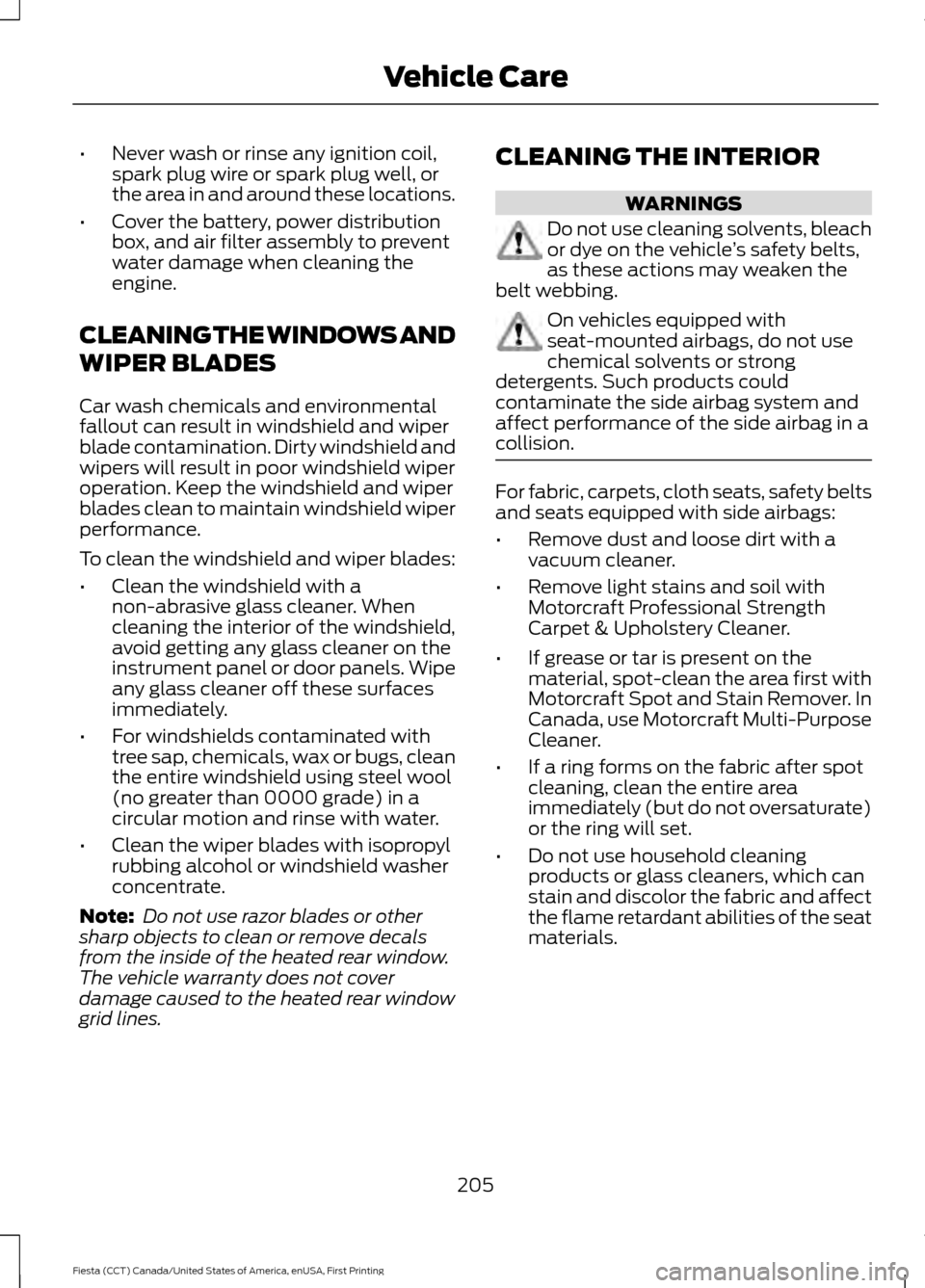
Never wash or rinse any ignition coil,
spark plug wire or spark plug well, or
the area in and around these locations.
• Cover the battery, power distribution
box, and air filter assembly to prevent
water damage when cleaning the
engine.
CLEANING THE WINDOWS AND
WIPER BLADES
Car wash chemicals and environmental
fallout can result in windshield and wiper
blade contamination. Dirty windshield and
wipers will result in poor windshield wiper
operation. Keep the windshield and wiper
blades clean to maintain windshield wiper
performance.
To clean the windshield and wiper blades:
• Clean the windshield with a
non-abrasive glass cleaner. When
cleaning the interior of the windshield,
avoid getting any glass cleaner on the
instrument panel or door panels. Wipe
any glass cleaner off these surfaces
immediately.
• For windshields contaminated with
tree sap, chemicals, wax or bugs, clean
the entire windshield using steel wool
(no greater than 0000 grade) in a
circular motion and rinse with water.
• Clean the wiper blades with isopropyl
rubbing alcohol or windshield washer
concentrate.
Note: Do not use razor blades or other
sharp objects to clean or remove decals
from the inside of the heated rear window.
The vehicle warranty does not cover
damage caused to the heated rear window
grid lines. CLEANING THE INTERIOR WARNINGS
Do not use cleaning solvents, bleach
or dye on the vehicle
’s safety belts,
as these actions may weaken the
belt webbing. On vehicles equipped with
seat-mounted airbags, do not use
chemical solvents or strong
detergents. Such products could
contaminate the side airbag system and
affect performance of the side airbag in a
collision. For fabric, carpets, cloth seats, safety belts
and seats equipped with side airbags:
•
Remove dust and loose dirt with a
vacuum cleaner.
• Remove light stains and soil with
Motorcraft Professional Strength
Carpet & Upholstery Cleaner.
• If grease or tar is present on the
material, spot-clean the area first with
Motorcraft Spot and Stain Remover. In
Canada, use Motorcraft Multi-Purpose
Cleaner.
• If a ring forms on the fabric after spot
cleaning, clean the entire area
immediately (but do not oversaturate)
or the ring will set.
• Do not use household cleaning
products or glass cleaners, which can
stain and discolor the fabric and affect
the flame retardant abilities of the seat
materials.
205
Fiesta (CCT) Canada/United States of America, enUSA, First Printing Vehicle Care
Page 275 of 363

USING SYNC™ WITH YOUR
PHONE
Hands-free calling is one of the main
features of SYNC. While the system
supports a variety of features, many are
dependent on your cell phone's
functionality. At a minimum, most cell
phones with Bluetooth wireless technology
support the following functions:
•
Answering an incoming call.
• Ending a call.
• Using privacy mode.
• Dialing a number.
• Redialing.
• Call waiting notification.
• Caller ID. Other features, such as text messaging
using Bluetooth and automatic phonebook
download, are cell phone-dependent
features. To check your cell phone's
compatibility, see your cell phone's manual
and visit www.SYNCMyRide.com,
www.SYNCMyRide.ca or
www.syncmaroute.ca.
Pairing a Cell Phone for the First
Time
Note:
SYNC can support downloading up
to approximately 1000 entries per
Bluetooth-enabled cell phone.
Note: Make sure to switch on the ignition
and the radio. Put the transmission in
position park (P) (automatic transmission)
or neutral with the parking brake applied
(manual transmission).
Note: To scroll through the menus, press
the up and down arrows on your audio
system.
Wirelessly pairing your cell phone with
SYNC allows you to make and receive
hands-free calls.
Press the phone button. When the display indicates there is no cell phone paired,
do the following: Action and Description
Message
Press the
OK button.
No Phone Paired
Find SYNC 1. Press the
OK button.
2. Put your cell phone into Bluetooth discovery mode. See your device's manual if necessary.
3. When prompted on your cell phone's display, enter the six-digit PIN provided by SYNC in the radio display. The
display indicates when the pairing is successful.
272
Fiesta (CCT) Canada/United States of America, enUSA, First Printing SYNC™
Page 276 of 363

Depending on your cell phone's capability
and your market, the system may prompt
you with questions, such as setting the
current cell phone as the primary cell
phone (the cell phone SYNC automatically
tries to connect with first upon vehicle
start-up) and downloading your
phonebook.
Pairing Subsequent Cell Phones
Note:
To scroll through the menus, press
the up and down arrows on your audio
system.
Note: Make sure to switch on the ignition
and the radio. Put the transmission in
position park (P) (automatic transmission)
or neutral with the parking brake applied
(manual transmission).
Press the phone button, then scroll to: Action
Message
Press the
OK button.
Phone settings
Press the
OK button.
Bluetooth device
Press the
OK button. When the following message appears
in the display.
Add
Find SYNC
1. Press the
OK button.
2. Put your cell phone into Bluetooth discovery mode. See your device's manual if necessary.
3. When prompted on your cell phone's display, enter the six-digit PIN provided by SYNC in the radio display. The
display indicates when the pairing is successful.
The system then prompts with questions, such as if you would like to set the current cell
phone as the primary cell phone (the cell phone SYNC automatically tries to connect
with first upon vehicle start-up) or download your phonebook.
Phone Voice Commands
Press the voice icon and say: Voice Commands
Phone
You can then say any of the following
commands.
Call History Incoming
Call History Missed
Call History Outgoing Voice Commands
Phonebook ___
Phonebook ___ at Home
Phonebook ___ at Work
Phonebook ___ in Office
Phonebook ___ on Cell
___ is a dynamic listing that should be the
name of a contact in your phonebook. For
example you could say "Call Mom".
273
Fiesta (CCT) Canada/United States of America, enUSA, First Printing SYNC™
Page 285 of 363
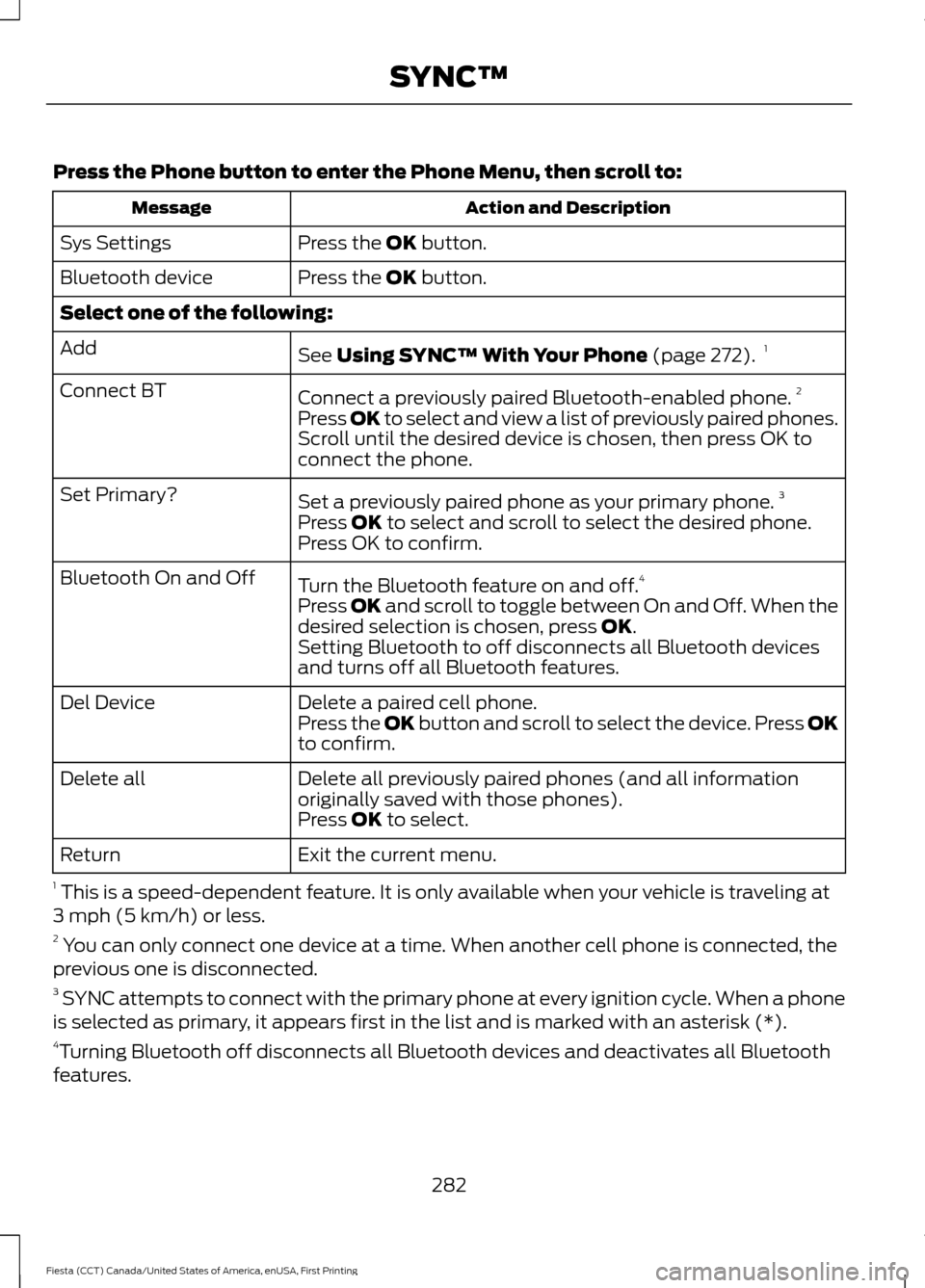
Press the Phone button to enter the Phone Menu, then scroll to:
Action and Description
Message
Press the OK button.
Sys Settings
Press the
OK button.
Bluetooth device
Select one of the following:
See
Using SYNC™ With Your Phone (page 272).1
Add
Connect a previously paired Bluetooth-enabled phone. 2
Connect BT
Press OK to select and view a list of previously paired phones.
Scroll until the desired device is chosen, then press OK to
connect the phone.
Set a previously paired phone as your primary phone. 3
Set Primary?
Press
OK to select and scroll to select the desired phone.
Press OK to confirm.
Turn the Bluetooth feature on and off. 4
Bluetooth On and Off
Press
OK and scroll to toggle between On and Off. When the
desired selection is chosen, press OK.
Setting Bluetooth to off disconnects all Bluetooth devices
and turns off all Bluetooth features.
Delete a paired cell phone.
Del Device
Press the OK button and scroll to select the device. Press OK
to confirm.
Delete all previously paired phones (and all information
originally saved with those phones).
Delete all
Press
OK to select.
Exit the current menu.
Return
1 This is a speed-dependent feature. It is only available when your vehicle is traveling at
3 mph (5 km/h) or less.
2 You can only connect one device at a time. When another cell phone is connected, the
previous one is disconnected.
3 SYNC attempts to connect with the primary phone at every ignition cycle. When a phone
is selected as primary, it appears first in the list and is marked with an asterisk (*).
4 Turning Bluetooth off disconnects all Bluetooth devices and deactivates all Bluetooth
features.
282
Fiesta (CCT) Canada/United States of America, enUSA, First Printing SYNC™
Page 312 of 363
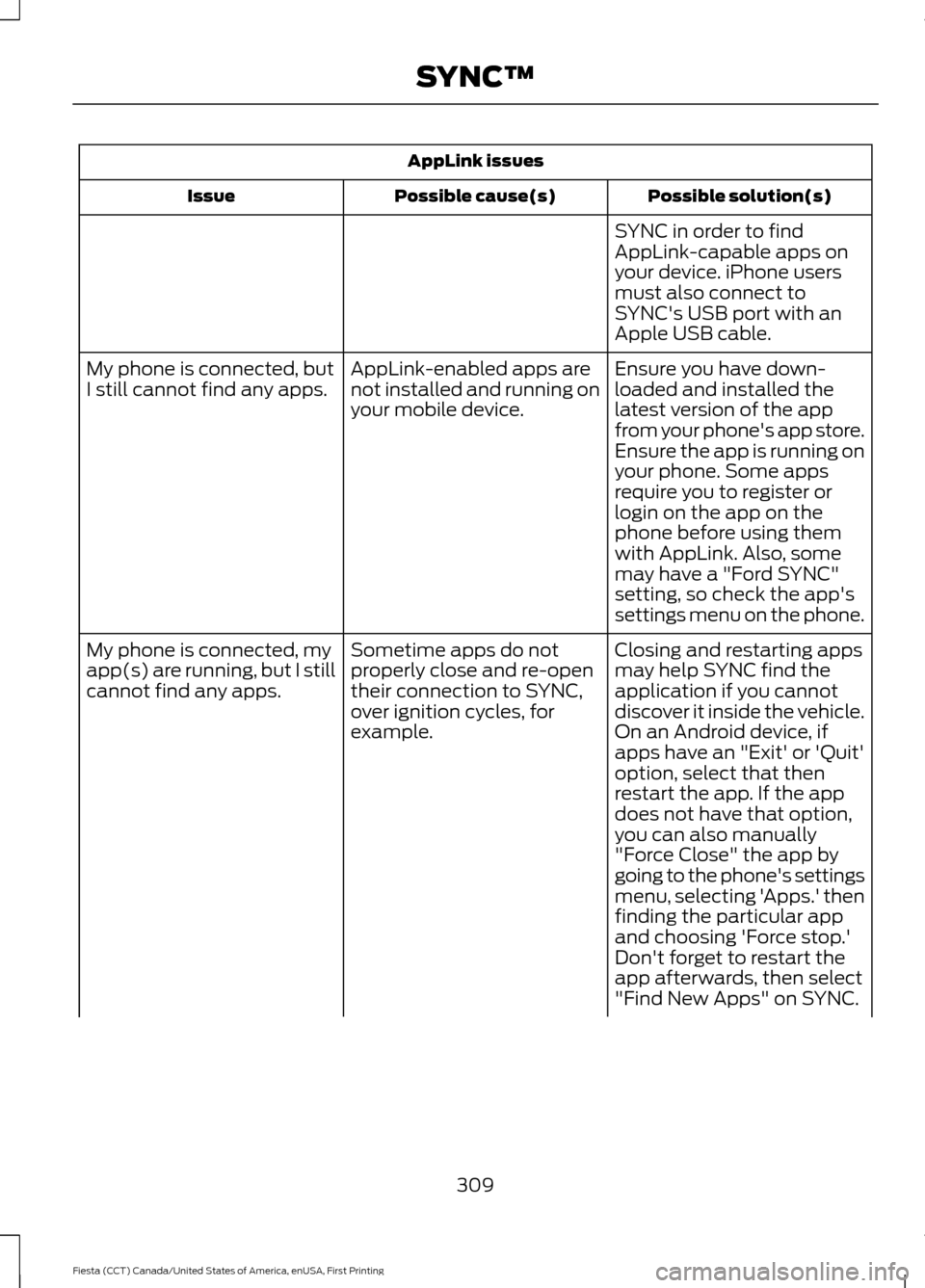
AppLink issues
Possible solution(s)
Possible cause(s)
Issue
SYNC in order to find
AppLink-capable apps on
your device. iPhone users
must also connect to
SYNC's USB port with an
Apple USB cable.
Ensure you have down-
loaded and installed the
latest version of the app
from your phone's app store.
Ensure the app is running on
your phone. Some apps
AppLink-enabled apps are
not installed and running on
your mobile device.
My phone is connected, but
I still cannot find any apps.
require you to register or
login on the app on the
phone before using them
with AppLink. Also, some
may have a "Ford SYNC"
setting, so check the app's
settings menu on the phone.
Closing and restarting apps
may help SYNC find the
application if you cannot
discover it inside the vehicle.
On an Android device, if
apps have an "Exit' or 'Quit'
Sometime apps do not
properly close and re-open
their connection to SYNC,
over ignition cycles, for
example.
My phone is connected, my
app(s) are running, but I still
cannot find any apps.
option, select that then
restart the app. If the app
does not have that option,
you can also manually
"Force Close" the app by
going to the phone's settings
menu, selecting 'Apps.' then
finding the particular app
and choosing 'Force stop.'
Don't forget to restart the
app afterwards, then select
"Find New Apps" on SYNC.
309
Fiesta (CCT) Canada/United States of America, enUSA, First Printing SYNC™
Page 354 of 363

A
A/C
See: Climate Control.......................................... 96
About This Manual...........................................7
ABS See: Brakes............................................................. 131
ABS driving hints See: Hints on Driving With Anti-Lock
Brakes.................................................................. 131
Accessories.....................................................312 Exterior style......................................................... 312
Interior style.......................................................... 312
Lifestyle.................................................................. 312
Peace of mind...................................................... 312
Accessories See: Replacement Parts
Recommendation............................................. 11
Adjusting the Headlamps..........................187 Horizontal Aim Adjustment............................ 189
Vertical Aim Adjustment.................................. 187
Adjusting the Steering Wheel...................66
Airbag Disposal...............................................44
Air Conditioning See: Climate Control.......................................... 96
Air Filter See: Changing the Engine Air Filter.............201
Alarm See: Anti-Theft Alarm........................................ 64
Ambient Lighting............................................74
Anti-Theft Alarm
............................................64
Alarm System........................................................ 64
Arming the Alarm................................................. 64
Disarming the Alarm........................................... 64
Triggering the Alarm........................................... 64
Appendices....................................................334
Audible Warnings and Indicators.............83 Exterior Lamps On............................................... 83
Gearshift Lever Not in Park (P)....................... 83
Key in Ignition......................................................... 83
Key Outside Vehicle - Vehicles With Keyless System................................................................ 83
Parking Brake On.................................................. 83
Safety Belt Minder............................................... 83
Audio Control
..................................................66
Audio Input Jack...........................................265
Audio System................................................248 General Information......................................... 248Audio Unit - Vehicles With: AM/FM/CD/
SYNC.............................................................253
Alternative Frequencies.................................. 256
Automatic Volume Control............................ 256
Autostore Control.............................................. 256
Sound Button...................................................... 255
Station Preset Buttons.................................... 255
Station Tuning Control..................................... 255
Waveband Button............................................. 255
Audio Unit - Vehicles With: AM/FM/ CD...................................................................249
Alternative Frequencies................................... 252
Automatic Volume Control............................ 252
Autostore Control.............................................. 252
Sound Button....................................................... 251
Station Preset Buttons.................................... 252
Station Tuning Control...................................... 251
Waveband Button.............................................. 251
Audio Unit - Vehicles With: Sony Audio System/Touchscreen Display
..............258
Audio Unit - Vehicles With: Touchscreen Display...........................................................257
Autolamps..........................................................71 Windshield Wiper Activated
Headlamps.......................................................... 71
Automatic Climate Control........................97 Temperature Control.......................................... 98
Automatic Transmission
............................126
Emergency Park Position Release
Lever................................................................... 129
Hints on Driving with an Automatic Transmission................................................... 128
Selector Lever Positions................................... 126
Sport Mode and Manual Shifting.................. 127
Automatic Transmission Fluid Check.............................................................186
Auxiliary Power Points
...............................109
12 Volt DC Power Point..................................... 109
Location................................................................. 109
B
Battery See: Changing the 12V Battery...................... 186
Bonnet Lock See: Opening and Closing the Hood............177
Booster Seats
..................................................22
Types of Booster Seats...................................... 23
351
Fiesta (CCT) Canada/United States of America, enUSA, First Printing Index
Page 357 of 363

Fuse Specification Chart...........................168
Engine Compartment Fuse Box................... 168
Passenger Compartment Fuse Box.............172
G
Gauges................................................................79 Compass (If Equipped)...................................... 79
Engine Coolant Temperature Gauge............80
Fuel Gauge............................................................. 80
Low Fuel Reminder............................................. 80
General Information on Radio Frequencies...................................................45
Intelligent Access................................................. 45
General Maintenance Information
........316
Multi-Point Inspection...................................... 318
Owner Checks and Services........................... 317
Protecting Your Investment............................ 316
Why Maintain Your Vehicle?.......................... 316
Why Maintain Your Vehicle at Your Dealership?...................................................... 316
Getting Assistance Outside the U.S. and Canada..........................................................165
Getting the Services You Need................162 Away From Home............................................... 162
H
Handbrake See: Parking Brake.............................................. 132
Hazard Warning Flashers..........................158
Headlamp Adjusting See: Adjusting the Headlamps...................... 187
Headlamp Exit Delay.....................................72
Headlamp Removal See: Removing a Headlamp.......................... 189
Head Restraints............................................103 Adjusting the Head Restraint........................ 104
Heated Seats..................................................107
Heated Windows and Mirrors...................101 Heated Exterior Mirrors..................................... 101
Heated Windows................................................. 101
Heating See: Climate Control.......................................... 96
Hill Start Assist
..............................................129
Switching the System On and Off...............130
Using Hill Start Assist....................................... 130Hints on Controlling the Interior
Climate
...........................................................98
Cooling the Interior Quickly............................ 100
General Hints......................................................... 98
Heating the Interior Quickly............................. 99
Maximum Cooling Performance in Instrument Panel or Instrument Panel
and Footwell Positions................................ 101
Recommended Settings for Cooling .........100
Recommended Settings for Heating...........99
Side Window Defogging in Cold Weather.............................................................. 101
Vehicle Stationary for Extended Periods During Extreme High Ambient
Temperatures................................................. 100
Hints on Driving With Anti-Lock Brakes..............................................................131
Hood Lock See: Opening and Closing the Hood............177
I
Ignition Switch
.................................................111
In California (U.S. Only).............................163
Information Displays
....................................84
General Information........................................... 84
Information Messages.................................88
Installing Child Seats.....................................16 Child Seats............................................................... 16
Using Lap and Shoulder Belts.......................... 17
Using Lower Anchors and Tethers for Children (LATCH)............................................. 19
Using Tether Straps.............................................. 21
Instrument Cluster
.........................................79
Instrument Lighting Dimmer......................72
Interior Lamps
..................................................73
Front Interior Lamps............................................ 73
Rear Interior Lamps............................................. 74
Interior Luggage Compartment Release.............................................................61
Interior Mirror....................................................77 Auto-Dimming Mirror.......................................... 78
Introduction.........................................................7
354
Fiesta (CCT) Canada/United States of America, enUSA, First Printing Index