2016 FORD FIESTA ignition
[x] Cancel search: ignitionPage 131 of 363

Gears may be skipped by pressing the + or
- buttons repeatedly at short intervals.
We recommend you upshift according to
the following guide to achieve the best fuel
economy for your vehicle. Recommended
Speed
Shift From
15 mph (24 km/h)
1 - 2
25 mph (40 km/h)
2 - 3
40 mph (64 km/h)
3 - 4
45 mph (72 km/h)
4 - 5
50 mph (80 km/h)
5 - 6
Manual mode also provides a downshift
function. See
Downshift in this section.
Note: The transmission will automatically
upshift if the engine speed is too high or
downshift if the engine speed is too low.
Hints on Driving with an Automatic
Transmission WARNINGS
Do not apply the brake and
accelerator pedals simultaneously
for more than three seconds as this
limits engine rpm and labors the
transmission. This may make it difficult to
maintain speeds in traffic and lead to an
accident or injury. Do not idle the engine for long
periods of time in
D with the brakes
applied. This could damage the
transmission and may lead to an accident
or injury. Note:
The system carries out a series of
checks when you switch the ignition on and
off. You may hear clicking sounds. This is
normal. Moving off
1. Press the brake pedal to apply the
brakes.
2. Move the transmission selector lever to
R,D or S.
3. Release the parking brake.
4. Release the brake pedal and press the
accelerator pedal.
Stopping
1. Release the accelerator pedal and press the brake pedal.
2. Apply the parking brake.
3. Move the transmission selector lever to
N or P.
Downshift
Press the accelerator pedal fully with the
transmission selector lever in either
D, S
mode or manual shifting position to select
a lower gear for optimum performance.
Release the accelerator pedal when you
no longer require downshift.
If Your Vehicle Gets Stuck In Mud or
Snow
If your vehicle gets stuck in mud or snow,
it may be rocked out by shifting between
D
and R, stopping between shifts in a
steady pattern. Press the accelerator
lightly in each gear.
Note: Do not rock your vehicle if the engine
is not at normal operating temperature as
this can damage the transmission.
Note: Do not rock your vehicle for more
than a minute as this can damage the
transmission or the tires and the engine may
overheat.
128
Fiesta (CCT) Canada/United States of America, enUSA, First Printing Transmission
Page 132 of 363

Emergency Park Position Release
Lever
WARNINGS
Do not drive your vehicle until you
verify that the brake lamps are
working. Failure to adhere to warning
indicators may lead to an accident or injury. If you release the parking brake and
the brake warning lamp remains
illuminated the brakes may not be
working correctly. Have your vehicle
checked by an authorized dealer as soon
as possible. Failure to adhere to warning
lamps and indicators may lead to an
accident or injury. Use the emergency P position release lever
to move the transmission selector lever
from the P position in the event of a
malfunction or if your vehicle battery has
no charge. 1.
Apply the parking brake and switch the
ignition off before carrying out this
procedure.
2. Remove the retaining screw.
3. Remove the center console side panel. 4.
Press the brake pedal. Using a suitable
tool rotate the lever forward while
pulling the transmission selector lever
out of the P position.
Note: The emergency
P position release
lever is pink.
Note: See an authorized dealer as soon as
possible if you use procedure.
HILL START ASSIST
(If Equipped) WARNINGS
The system does not replace the
parking brake. When you leave your
vehicle, always apply the parking
brake and move the transmission selector
lever into position
P (Park). You must remain in your vehicle once
you have activated the system.
During all times, you are responsible
for controlling your vehicle,
supervising the system and
intervening, if required. If the engine is revved excessively, or
if a malfunction is detected, the
system will be deactivated.
129
Fiesta (CCT) Canada/United States of America, enUSA, First Printing TransmissionE14219332 E142214
4
Page 134 of 363

GENERAL INFORMATION
WARNING
The system does not relieve you of
your responsibility to drive with due
care and attention.
Note:
Occasional brake noise is normal. If
a metal-to-metal, continuous grinding or
continuous squeal sound is present, the
brake linings may be worn-out. If the vehicle
has continuous vibration or shudder in the
steering wheel while braking, have your
vehicle checked by an authorized dealer.
Note: Brake dust may accumulate on the
wheels, even under normal driving
conditions. Some dust is inevitable as the
brakes wear. See Cleaning the Alloy
Wheels (page 207).
Wet brakes result in reduced braking
efficiency. Gently press the brake pedal a
few times when driving from a car wash or
standing water to dry the brakes.
Brake Over Accelerator
In the event that the accelerator pedal
becomes stuck or entrapped, apply firm
pressure to the brake pedal to slow your
vehicle and reduce engine power. If you
experience this condition, apply the brakes
and bring your vehicle to a safe stop. Move
the transmission to park (P), switch the
engine off and apply the parking brake.
Inspect the accelerator pedal for any
interference. If none are found and the
condition persists, have your vehicle towed
to the nearest authorized dealer. Emergency Brake Assist
Brake assist detects when you rapidly
brake by measuring the rate at which you
press the brake pedal. It provides
maximum braking efficiency as long as you
press the pedal. Emergency brake assist
can reduce stopping distances in critical
situations.
Anti-lock Brake System
This system helps you maintain steering
control and vehicle stability during
emergency stops by keeping the brakes
from locking.
This lamp momentarily
illuminates when you switch the
ignition on. If the light does not
illuminate during start up, remains on or
flashes, the system may be disabled. Have
the system checked by an authorized
dealer. If the anti-lock brake system is
disabled, normal braking is still effective. If the brake warning lamp
illuminates when you release the
parking brake, have the system
checked by an authorized dealer.
HINTS ON DRIVING WITH
ANTI-LOCK BRAKES
Note: When the system is operating, the
brake pedal will pulse and may travel
further. Maintain pressure on the brake
pedal. You may also hear a noise from the
system. This is normal.
The anti-lock braking system will not
eliminate the risks when:
• You drive too closely to the vehicle in
front of you.
• Your vehicle is hydroplaning.
• You take corners too fast.
• The road surface is poor.
131
Fiesta (CCT) Canada/United States of America, enUSA, First Printing Brakes E144522
Page 136 of 363
PRINCIPLE OF OPERATION
The traction control system helps avoid
drive wheel spin and loss of traction.
If your vehicle begins to slide, the system
applies the brakes to individual wheels
and, when needed, reduces engine power
at the same time. If the wheels spin when
accelerating on slippery or loose surfaces,
the system reduces engine power in order
to increase traction.
USING TRACTION CONTROL
WARNING
The stability and traction control
light illuminates steadily if the
system detects a failure. Make sure
you did not manually disable the traction
control system using the information
display controls or the switch. If the
stability control and traction control light
is still illuminating steadily, have the
system serviced by an authorized dealer
immediately. Operating your vehicle with
the traction control disabled could lead to
an increased risk of loss of vehicle control,
vehicle rollover, personal injury and death. The system automatically turns on each
time you switch the ignition on.
If your vehicle is stuck in mud or snow,
switching traction control off may be
beneficial as this allows the wheels to spin.
Note:
When you switch traction control off,
stability control remains fully active.
Switching the System Off
When you switch the system off or on, a
message appears in the information
display showing system status.
You can switch the system off by either
using the information display controls or
the switch. Using the Information Display
Controls
You can switch this feature off or on in the
information display. See General
Information (page 84).
Using a Switch
(If Equipped)
Use the traction control switch on the
instrument panel to switch the system off
or on.
The switch illuminates when traction
control is off.
System Indicator Lights and
Messages The stability and traction control
light:
• Temporarily illuminates on engine
start-up.
• Flashes when a driving condition
activates either of the systems.
• Illuminates if a problem occurs in either
of the systems. The stability and traction control
off light temporarily illuminates
on engine start-up and stays on
when you switch the traction control
system off.
133
Fiesta (CCT) Canada/United States of America, enUSA, First Printing Traction ControlE138639
Page 138 of 363
USING STABILITY CONTROL -
1.0L ECOBOOST™/1.6L
DURATEC-16V TI-VCT (SIGMA)
Note:
The system automatically turns on
each time you switch the ignition on.
You can switch the traction control system
off and on . See Using Traction Control
(page 133).
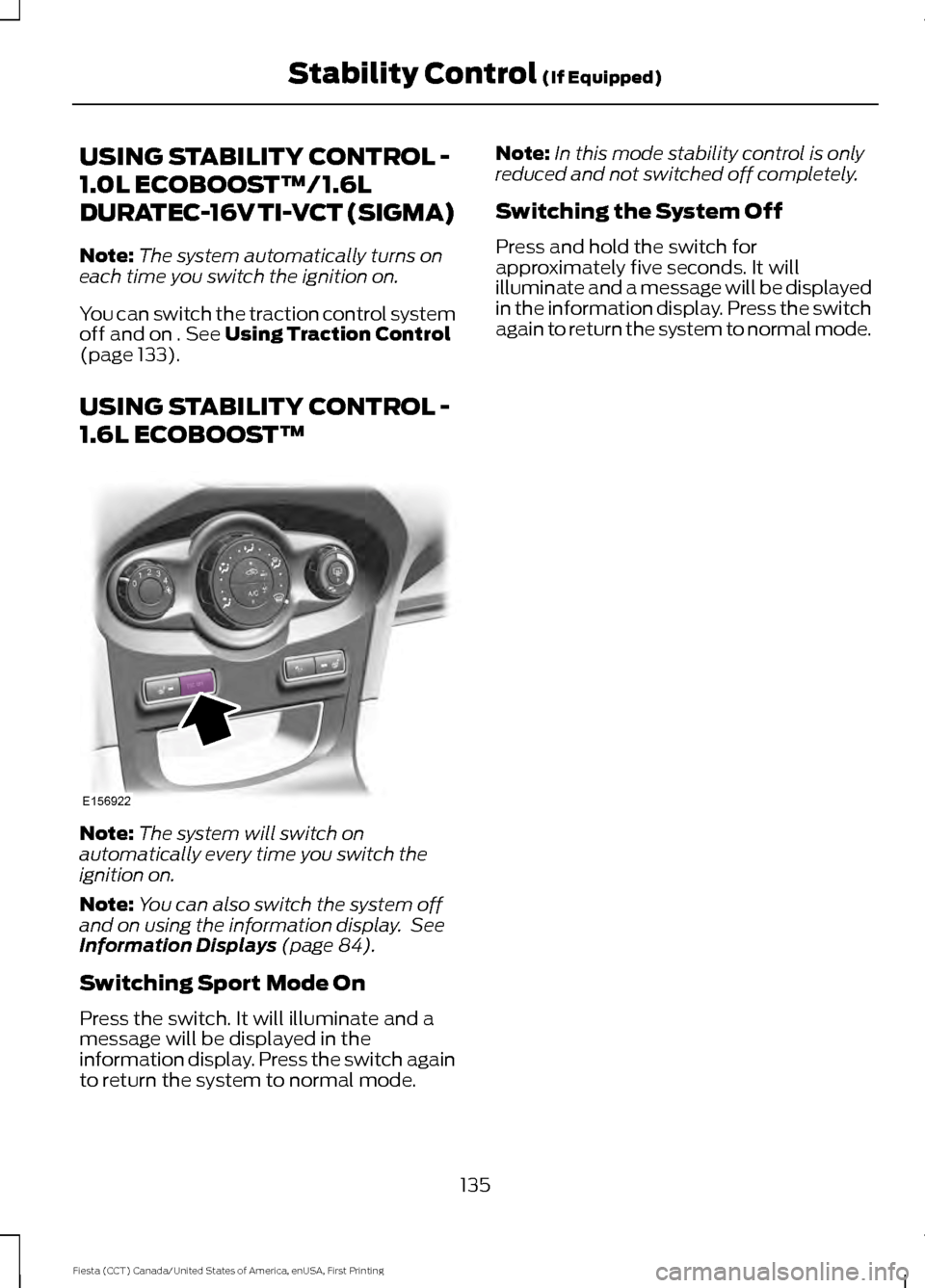
USING STABILITY CONTROL -
1.6L ECOBOOST™ Note:
The system will switch on
automatically every time you switch the
ignition on.
Note: You can also switch the system off
and on using the information display. See
Information Displays
(page 84).
Switching Sport Mode On
Press the switch. It will illuminate and a
message will be displayed in the
information display. Press the switch again
to return the system to normal mode. Note:
In this mode stability control is only
reduced and not switched off completely.
Switching the System Off
Press and hold the switch for
approximately five seconds. It will
illuminate and a message will be displayed
in the information display. Press the switch
again to return the system to normal mode.
135
Fiesta (CCT) Canada/United States of America, enUSA, First Printing Stability Control
(If Equipped)E156922
Page 141 of 363

REAR VIEW CAMERA (If Equipped)
WARNINGS
The operation of the camera may
vary depending on the ambient
temperature, vehicle and road
conditions. Objects in the display are closer than
they appear.
Do not place objects in front of the
camera.
The rear view camera system is a
reverse aid supplement device that
still requires the driver to use it in
conjunction with the interior and exterior
mirrors for maximum coverage. The camera is on the liftgate or luggage
compartment lid.
Switching the Rear View Camera
On
WARNING
The camera may not detect objects
that are very close to your vehicle.
Switch the ignition on and shift into reverse
(R). The image will display on the screen.
The system may not correctly operate in
any of the following conditions:
•
Dark areas.
• Intense light areas.
• If there is a sudden change to the
ambient temperature.
• If the camera is wet.
• If the camera is dirty.
• If the camera is obstructed.
Using the Display WARNING
Objects above the camera may not
be visible. Check the area behind
your vehicle when necessary.
If the vehicle battery is disconnected, the
guidelines are not fully functional directly
after the battery is reconnected. The
guidelines become fully functional after
you drive your vehicle as straight as
possible for five minutes at a minimum
speed of
31 mph (50 km/h).
Note: When reversing with a trailer the
camera shows the direction of your vehicle
and not the direction of the trailer.
Note: If the camera image is not clear, clean
the camera lens with a soft cloth.
Note: If the image comes on when the
transmission is not in reverse (R), the
system requires service.
Vehicles with Parking Aid
The display shows colored distance bars.
This indicates the approximate distance
from the rear bumper to an object.
138
Fiesta (CCT) Canada/United States of America, enUSA, First Printing Parking Aids
(If Equipped)E147796
Page 144 of 363
Resuming the Set Speed
Press and release RES. The indicator
displays in the instrument cluster.
Switching Cruise Control Off
Press and release
OFF when the system
is in stand by mode or switch the ignition
off.
Note: You erase the set speed when you
switch the system off.
141
Fiesta (CCT) Canada/United States of America, enUSA, First Printing Cruise Control
(If Equipped)
Page 145 of 363

STEERING
Electric Power Steering
WARNINGS
The electric power steering system
has diagnostic checks that
continuously monitor the system. If
a fault is detected, a message displays in
the information display. Stop your vehicle
as soon as it is safe to do so. Switch the
ignition off. After at least 10 seconds,
switch the ignition on and watch the
information display for a steering system
warning message. If a steering system
warning message returns, have the system
checked by an authorized dealer. If the system detects an error, you
may not feel a difference in the
steering, however a serious condition
may exist. Obtain immediate service from
an authorized dealer, failure to do so may
result in loss of steering control. Your vehicle has an electric power steering
system. There is no fluid reservoir. No
maintenance is required.
If your vehicle loses electrical power while
you are driving, electric power steering
assistance is lost. The steering system still
operates and you can steer your vehicle
manually. Manually steering your vehicle
requires more effort.
Extreme continuous steering may increase
the effort required for you to steer your
vehicle. This increased effort prevents
overheating and permanent damage to
the steering system. You do not lose the
ability to steer your vehicle manually.
Typical steering and driving maneuvers
allow the system to cool and return to
normal operation. Steering Tips
If the steering wanders or pulls, check for:
•
Correct tire pressures.
• Uneven tire wear.
• Loose or worn suspension
components.
• Loose or worn steering components.
• Improper vehicle alignment.
Note: A high crown in the road or high
crosswinds may also make the steering
seem to wander or pull.
Adaptive Learning
The electronic power steering system
adaptive learning helps correct road
irregularities and improves overall handling
and steering feel. It communicates with
the brake system to help operate
advanced stability control and accident
avoidance systems. Additionally, whenever
the battery is disconnected or a new
battery installed, you must drive your
vehicle a short distance before the system
relearns the strategy and reactivates all
systems.
142
Fiesta (CCT) Canada/United States of America, enUSA, First Printing Driving Aids