Page 118 of 505
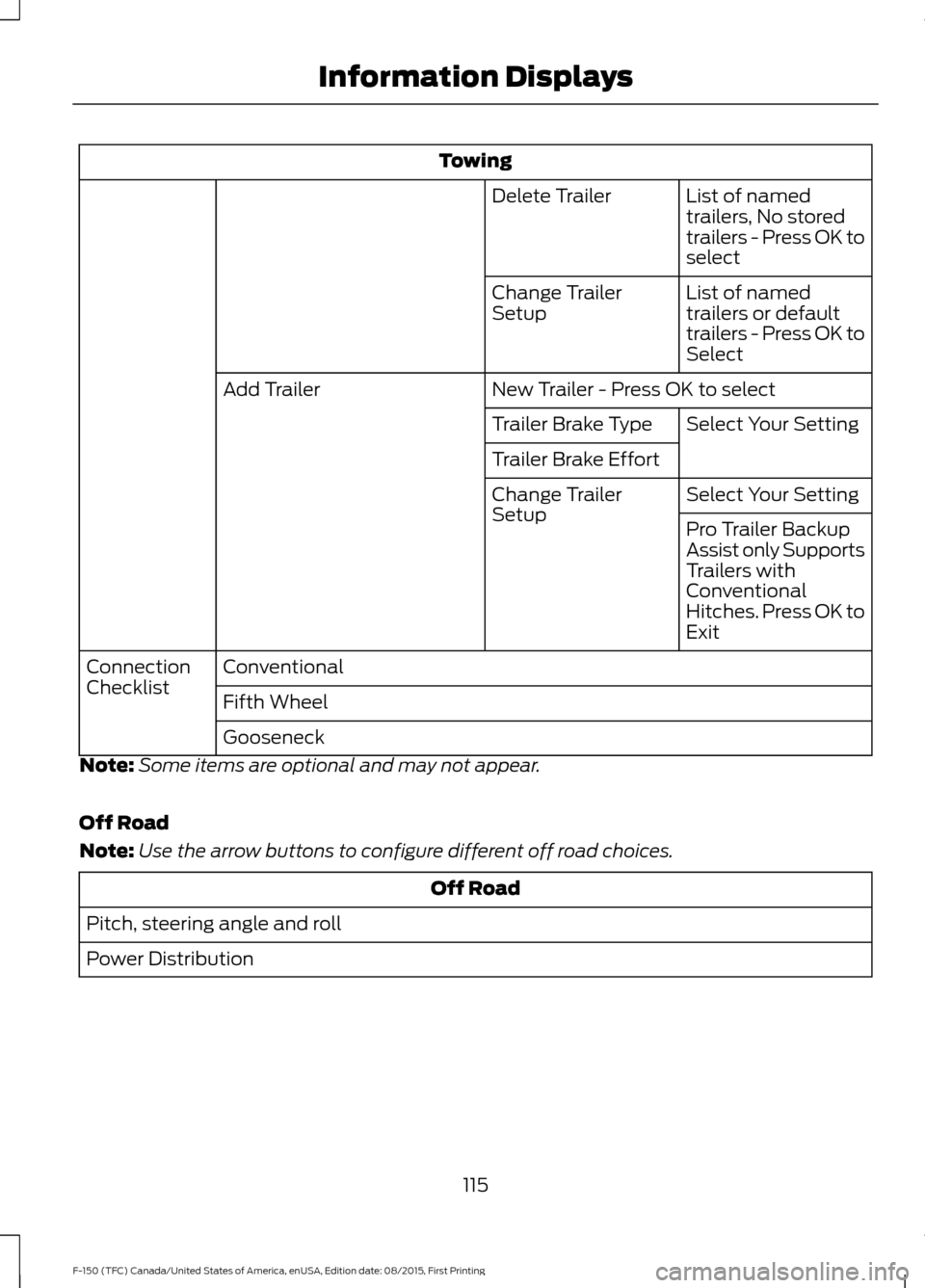
Towing
List of named
trailers, No stored
trailers - Press OK to
select
Delete Trailer
List of named
trailers or default
trailers - Press OK to
Select
Change Trailer
Setup
New Trailer - Press OK to select
Add Trailer
Select Your Setting
Trailer Brake Type
Trailer Brake Effort
Select Your Setting
Change Trailer
Setup
Pro Trailer Backup
Assist only Supports
Trailers with
Conventional
Hitches. Press OK to
Exit
Conventional
Connection
Checklist
Fifth Wheel
Gooseneck
Note: Some items are optional and may not appear.
Off Road
Note: Use the arrow buttons to configure different off road choices. Off Road
Pitch, steering angle and roll
Power Distribution
115
F-150 (TFC) Canada/United States of America, enUSA, Edition date: 08/2015, First Printing Information Displays
Page 124 of 505
Towing
% Grade, steering angle, gain and output display
Towing
Status
Trailer Name, Accumulated Miles, Pro Trailer Backup Assist Status - Press
OK for Trailer Options
Towing
Informa-
tion
Running, Brake/Turn Signal Light Status or No Trailer Detected
Trailer
Light
Status
Trailer Sway Control
Trailer
Setup
no active trailer
Select trailer
Programmed trailers
Default TrailerList of named
trailers, No Stored
Trailers - Press OK
to rename
Rename Trailer
Change Trailer Settings
List of named or
default trailers -
Press OK to select
Reset Trailer
Distance
Name of stored Pro
Trailer Backup
Assist trailer name
Change Pro Trailer
Sticker
No stored Pro
Backup trailers -
Press OK to select
Name of stored
conventional trailer
Add Pro Trailer
Backup
No stored conven-
tional trailer - Press
OK to select
Select Your Setting
Change Brake Type
Change Brake Effort
121
F-150 (TFC) Canada/United States of America, enUSA, Edition date: 08/2015, First Printing Information Displays
Page 125 of 505
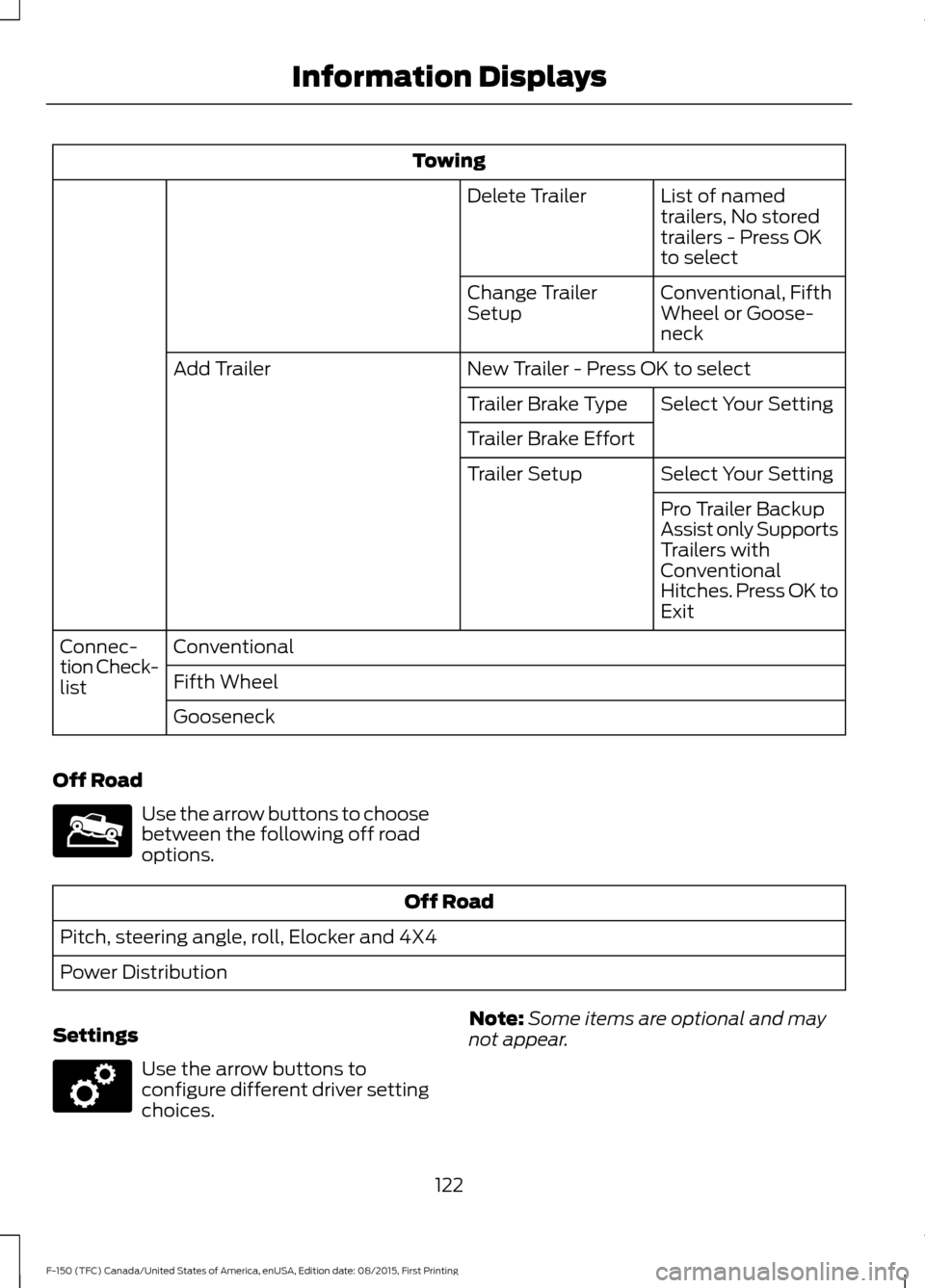
Towing
List of named
trailers, No stored
trailers - Press OK
to select
Delete Trailer
Conventional, Fifth
Wheel or Goose-
neck
Change Trailer
Setup
New Trailer - Press OK to select
Add Trailer
Select Your Setting
Trailer Brake Type
Trailer Brake Effort
Select Your Setting
Trailer Setup
Pro Trailer Backup
Assist only Supports
Trailers with
Conventional
Hitches. Press OK to
Exit
Conventional
Connec-
tion Check-
list Fifth Wheel
Gooseneck
Off Road Use the arrow buttons to choose
between the following off road
options.
Off Road
Pitch, steering angle, roll, Elocker and 4X4
Power Distribution
Settings Use the arrow buttons to
configure different driver setting
choices.
Note:
Some items are optional and may
not appear.
122
F-150 (TFC) Canada/United States of America, enUSA, Edition date: 08/2015, First Printing Information DisplaysE176097 E176098
Page 133 of 505

Keys and Intelligent Access
Action
Message
A reminder to press the brake while starting the vehicle.
To START Press Brake
The system does not detect a key in your vehicle. See KeylessStarting (page 166).
No Key Detected
You pressed the StartStop button to switch off the engine
and your vehicle does not detect your intelligent access key inside your vehicle.
Restart Now or Key is
Needed
Your vehicle is in the run ignition state.
Run Power Active
There is a problem with your vehicle ’s starting system. See
an authorized dealer for service.
Starting System Fault
You have successfully programmed an intelligent access keyto the system.
Key Program Successful
You have failed to program an intelligent access key to thesystem.
Key Program Failure
You have programmed the maximum number of keys to the system.
Max Number of Keys
Learned
You have not programmed enough keys to the system.
Not Enough Keys
Learned
The key battery is low. Change the battery as soon as possible.
Key Battery Low Replace
Soon
Informs you that you are exiting your vehicle and the engine is on.
Engine ON
130
F-150 (TFC) Canada/United States of America, enUSA, Edition date: 08/2015, First Printing Information Displays
Page 134 of 505
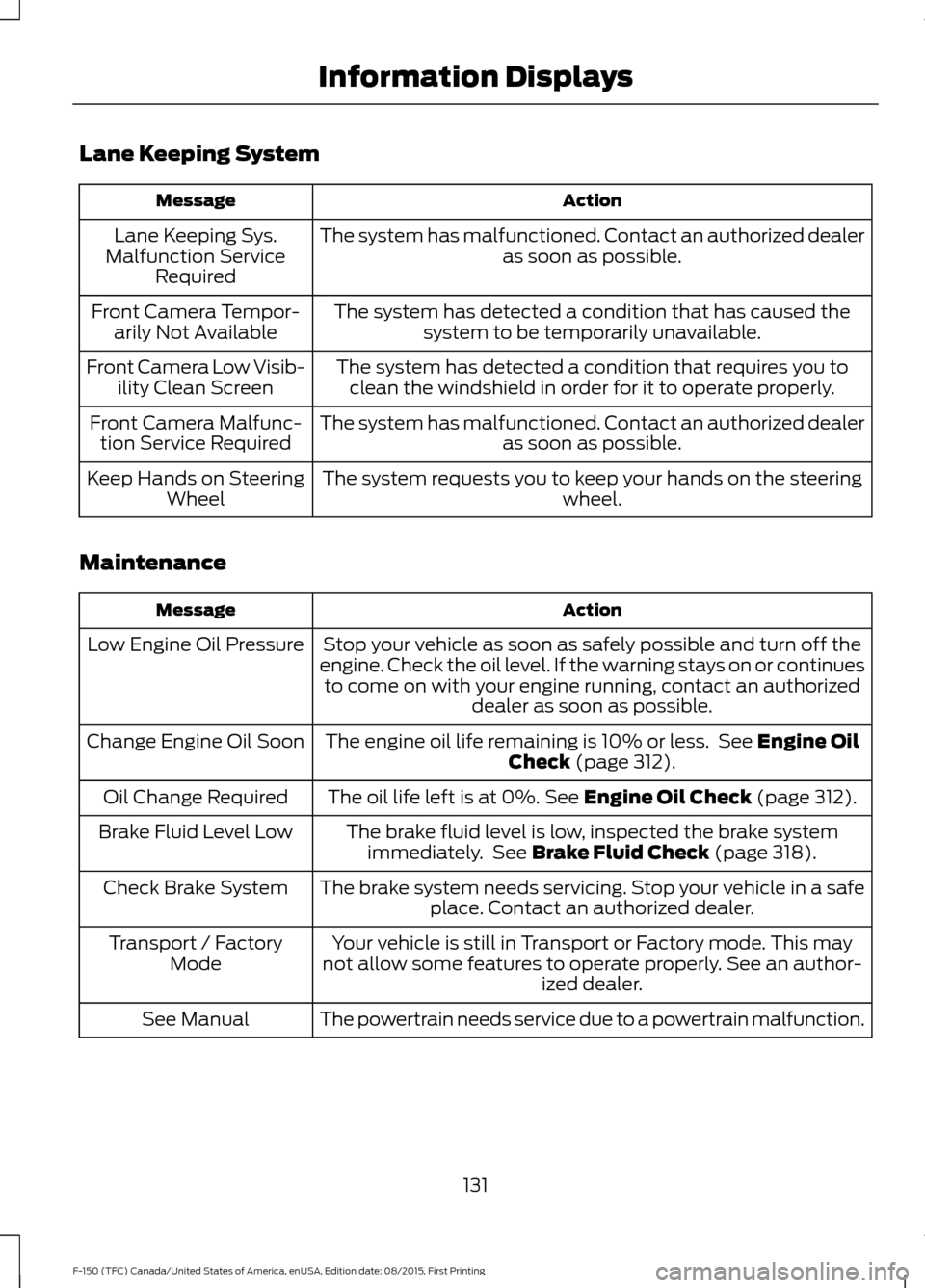
Lane Keeping System
Action
Message
The system has malfunctioned. Contact an authorized dealer as soon as possible.
Lane Keeping Sys.
Malfunction Service Required
The system has detected a condition that has caused thesystem to be temporarily unavailable.
Front Camera Tempor-
arily Not Available
The system has detected a condition that requires you toclean the windshield in order for it to operate properly.
Front Camera Low Visib-
ility Clean Screen
The system has malfunctioned. Contact an authorized dealeras soon as possible.
Front Camera Malfunc-
tion Service Required
The system requests you to keep your hands on the steering wheel.
Keep Hands on Steering
Wheel
Maintenance Action
Message
Stop your vehicle as soon as safely possible and turn off the
engine. Check the oil level. If the warning stays on or continues to come on with your engine running, contact an authorized dealer as soon as possible.
Low Engine Oil Pressure
The engine oil life remaining is 10% or less. See Engine Oil
Check (page 312).
Change Engine Oil Soon
The oil life left is at 0%.
See Engine Oil Check (page 312).
Oil Change Required
The brake fluid level is low, inspected the brake systemimmediately. See
Brake Fluid Check (page 318).
Brake Fluid Level Low
The brake system needs servicing. Stop your vehicle in a safeplace. Contact an authorized dealer.
Check Brake System
Your vehicle is still in Transport or Factory mode. This may
not allow some features to operate properly. See an author- ized dealer.
Transport / Factory
Mode
The powertrain needs service due to a powertrain malfunction.
See Manual
131
F-150 (TFC) Canada/United States of America, enUSA, Edition date: 08/2015, First Printing Information Displays
Page 136 of 505
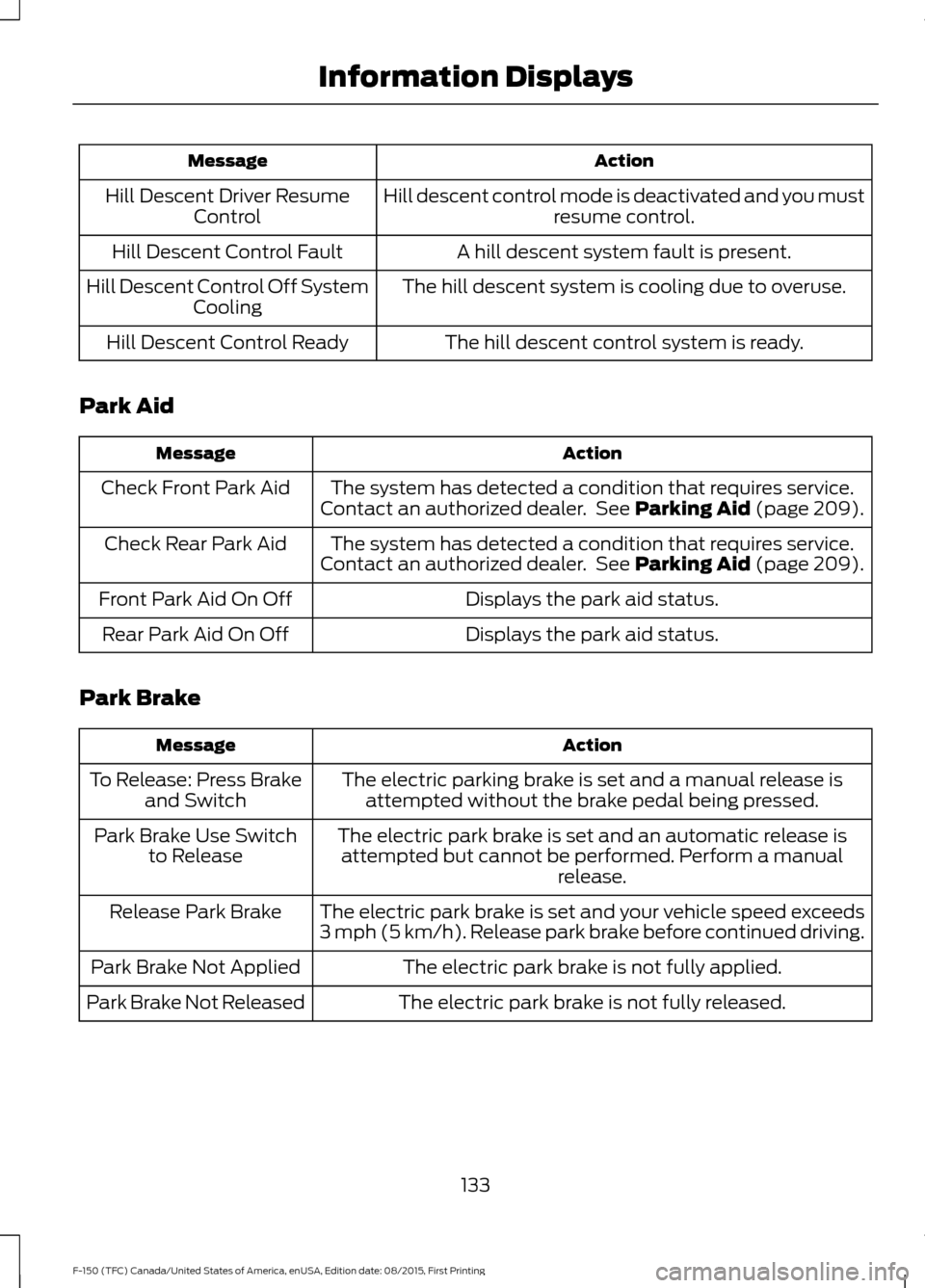
Action
Message
Hill descent control mode is deactivated and you mustresume control.
Hill Descent Driver Resume
Control
A hill descent system fault is present.
Hill Descent Control Fault
The hill descent system is cooling due to overuse.
Hill Descent Control Off System
Cooling
The hill descent control system is ready.
Hill Descent Control Ready
Park Aid Action
Message
The system has detected a condition that requires service.
Contact an authorized dealer. See Parking Aid (page 209).
Check Front Park Aid
The system has detected a condition that requires service.
Contact an authorized dealer. See
Parking Aid (page 209).
Check Rear Park Aid
Displays the park aid status.
Front Park Aid On Off
Displays the park aid status.
Rear Park Aid On Off
Park Brake Action
Message
The electric parking brake is set and a manual release isattempted without the brake pedal being pressed.
To Release: Press Brake
and Switch
The electric park brake is set and an automatic release isattempted but cannot be performed. Perform a manual release.
Park Brake Use Switch
to Release
The electric park brake is set and your vehicle speed exceeds
3 mph (5 km/h). Release park brake before continued driving.
Release Park Brake
The electric park brake is not fully applied.
Park Brake Not Applied
The electric park brake is not fully released.
Park Brake Not Released
133
F-150 (TFC) Canada/United States of America, enUSA, Edition date: 08/2015, First Printing Information Displays
Page 137 of 505
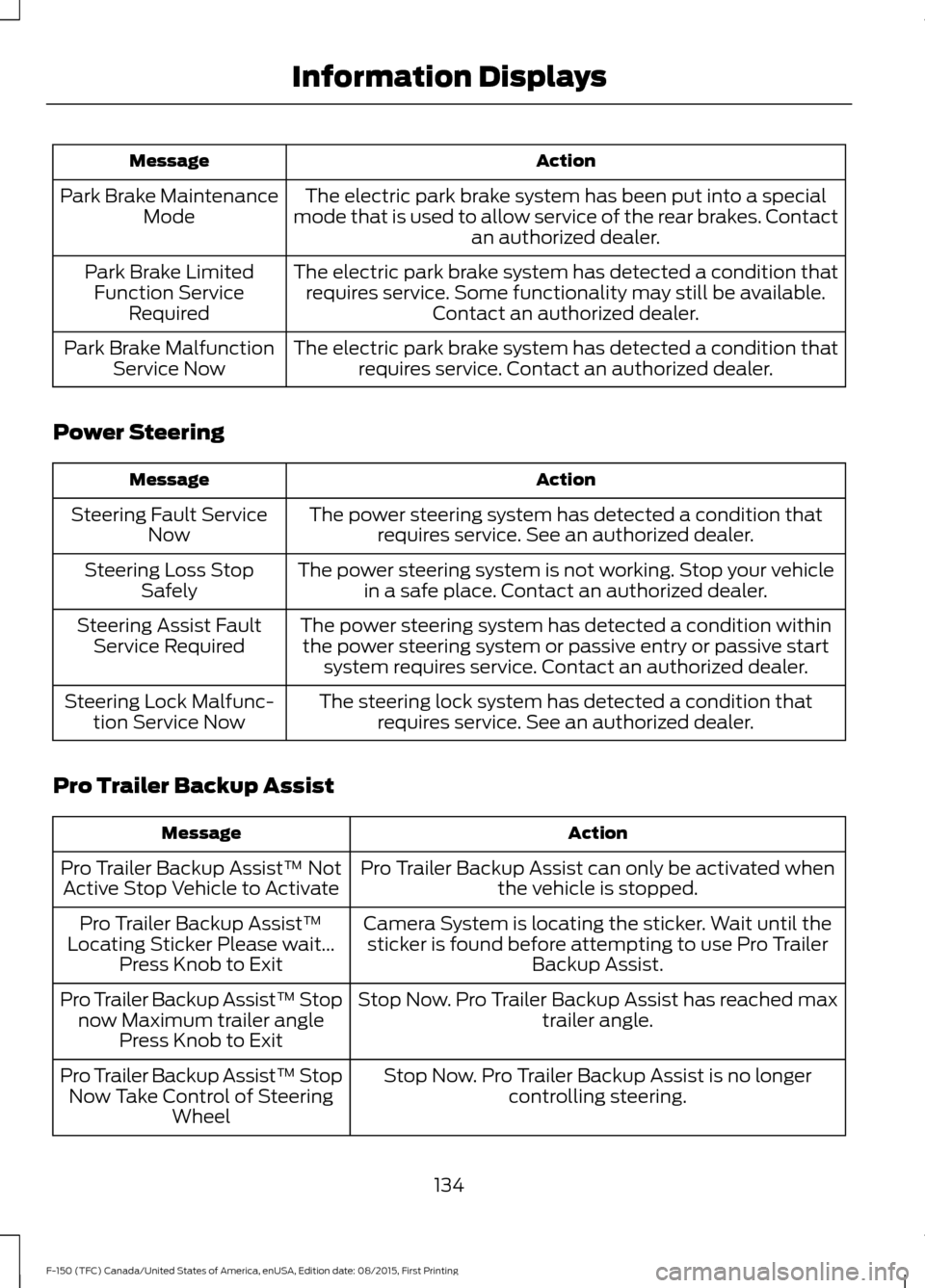
Action
Message
The electric park brake system has been put into a special
mode that is used to allow service of the rear brakes. Contact an authorized dealer.
Park Brake Maintenance
Mode
The electric park brake system has detected a condition thatrequires service. Some functionality may still be available. Contact an authorized dealer.
Park Brake Limited
Function Service Required
The electric park brake system has detected a condition thatrequires service. Contact an authorized dealer.
Park Brake Malfunction
Service Now
Power Steering Action
Message
The power steering system has detected a condition thatrequires service. See an authorized dealer.
Steering Fault Service
Now
The power steering system is not working. Stop your vehiclein a safe place. Contact an authorized dealer.
Steering Loss Stop
Safely
The power steering system has detected a condition withinthe power steering system or passive entry or passive start system requires service. Contact an authorized dealer.
Steering Assist Fault
Service Required
The steering lock system has detected a condition thatrequires service. See an authorized dealer.
Steering Lock Malfunc-
tion Service Now
Pro Trailer Backup Assist Action
Message
Pro Trailer Backup Assist can only be activated whenthe vehicle is stopped.
Pro Trailer Backup Assist™ Not
Active Stop Vehicle to Activate
Camera System is locating the sticker. Wait until thesticker is found before attempting to use Pro Trailer Backup Assist.
Pro Trailer Backup Assist™
Locating Sticker Please wait... Press Knob to Exit
Stop Now. Pro Trailer Backup Assist has reached maxtrailer angle.
Pro Trailer Backup Assist™ Stop
now Maximum trailer angle Press Knob to Exit
Stop Now. Pro Trailer Backup Assist is no longercontrolling steering.
Pro Trailer Backup Assist™ Stop
Now Take Control of Steering Wheel
134
F-150 (TFC) Canada/United States of America, enUSA, Edition date: 08/2015, First Printing Information Displays
Page 138 of 505

Action
Message
Slow vehicle speed. Vehicle is approaching the exitspeed for the Pro Trailer Backup Assist feature.
Pro Trailer Backup Assist™
Reduce Speed Turn Knob to Steer Press Knob to Exit
Conditions for Pro Trailer Backup Assist operation are
not met. See Pro Trailer Backup Assist™ (page 253).
Pro Trailer Backup Assist™
System is Not Available
Pro Trailer Backup Assist cannot operate with handson wheel. Remove hands to activate.
Pro Trailer Backup Assist™
Remove Hands from Steering
Wheel to Activate Press Knob to Exit
Pro Trailer Backup Assist knob has been pushed todeactivate the system.
Pro Trailer Backup Assist™
Cancelled by Driver Take
Control of Steering Wheel
Pro Trailer Backup Assist operation is only available in
reverse gear. Shift gear selector into reverse to activate.
Pro Trailer Backup Assist™ Shift
to Reverse to Activate. Press Knob to Exit
Camera system cannot locate sticker. Shift to park.
Pro Trailer Backup Assist™
Sticker Not Found Shift to Park Press Knob to Exit
Camera system cannot locate sticker. See Pro Trailer
Backup Assist™ (page 253).
Pro Trailer Backup Assist™
Sticker Not Found Refer to
Owner's Manual. Press Knob to Exit
Drive between
4–24 mph (6– 39 km/h) straight
forward to calibrate Pro Trailer Backup Assist.
Pro Trailer Backup Assist™
Drive Straight Forward to Calib- rate. Press Knob to Exit
The system has completed calibration. Stop thevehicle to use Pro Trailer Backup Assist feature.
Pro Trailer Backup Assist™
Calibration Complete Stop Vehicle
Remote Start Action
Message
A reminder to apply the brake and push the gearshift buttonto drive your vehicle after a remote start.
To Drive: Press Brake
and Gear Shift Button
135
F-150 (TFC) Canada/United States of America, enUSA, Edition date: 08/2015, First Printing Information Displays