2016 FORD F150 brake
[x] Cancel search: brakePage 59 of 505

The tag with your transmitter details the
starting procedure.
To remote start your vehicle:
1. Press the lock button.
2. Press the remote start button twice.
The exterior lamps flash twice.
The horn sounds if the system fails to start,
unless quiet start is on. Quiet start runs the
blower fan at a slower speed to reduce
noise. You can switch it on or off in the
information display. See General
Information (page 108).
Note: If you have remote started your
vehicle with an integrated keyhead
transmitter, you must switch on the ignition
before driving your vehicle. With an
intelligent access transmitter, you must
press the brake pedal before driving your
vehicle.
The power windows do not work during
the remote start and the radio does not
turn on automatically.
The parking lamps remain on and the
vehicle runs for 5, 10 or 15 minutes
depending on the setting. Extending the Vehicle Run Time
Repeat Steps 1 and 2 with the vehicle still
running to extend the run time for another
remote start period. If you programmed
the periods to last 10 minutes, the second
10 minutes begins after what is left of the
first activation time. For example, if the
vehicle has run from the first remote start
for five minutes, the vehicle continues to
run now for a total of 20 minutes. You can
extend the remote start up to a maximum
of 35 minutes.
Wait at least five seconds before remote
starting after a vehicle shutdown.
Turning the Vehicle Off After Remote
Starting
Press the button once. The
parking lamps turn off.
You may have to be closer to the
vehicle than when starting due to ground
reflection and the added noise of the
running vehicle.
You can disable or enable the remote start
system through the information display.
See
General Information (page 108).
REPLACING A LOST KEY OR
REMOTE CONTROL
Replacement keys or remote controls can
be purchased from an authorized dealer.
Authorized dealers can program remote
controls for your vehicle. See
Passive
Anti-Theft System (page 72).
56
F-150 (TFC) Canada/United States of America, enUSA, Edition date: 08/2015, First Printing Keys and Remote ControlsE138626 E138625
Page 84 of 505
ADJUSTING THE PEDALS (If
Equipped)
Note: Never use the controls when your feet
are on the accelerator or brake pedals,
especially when the vehicle is moving.
Note: Adjust the pedals only when your
vehicle is in park (P).
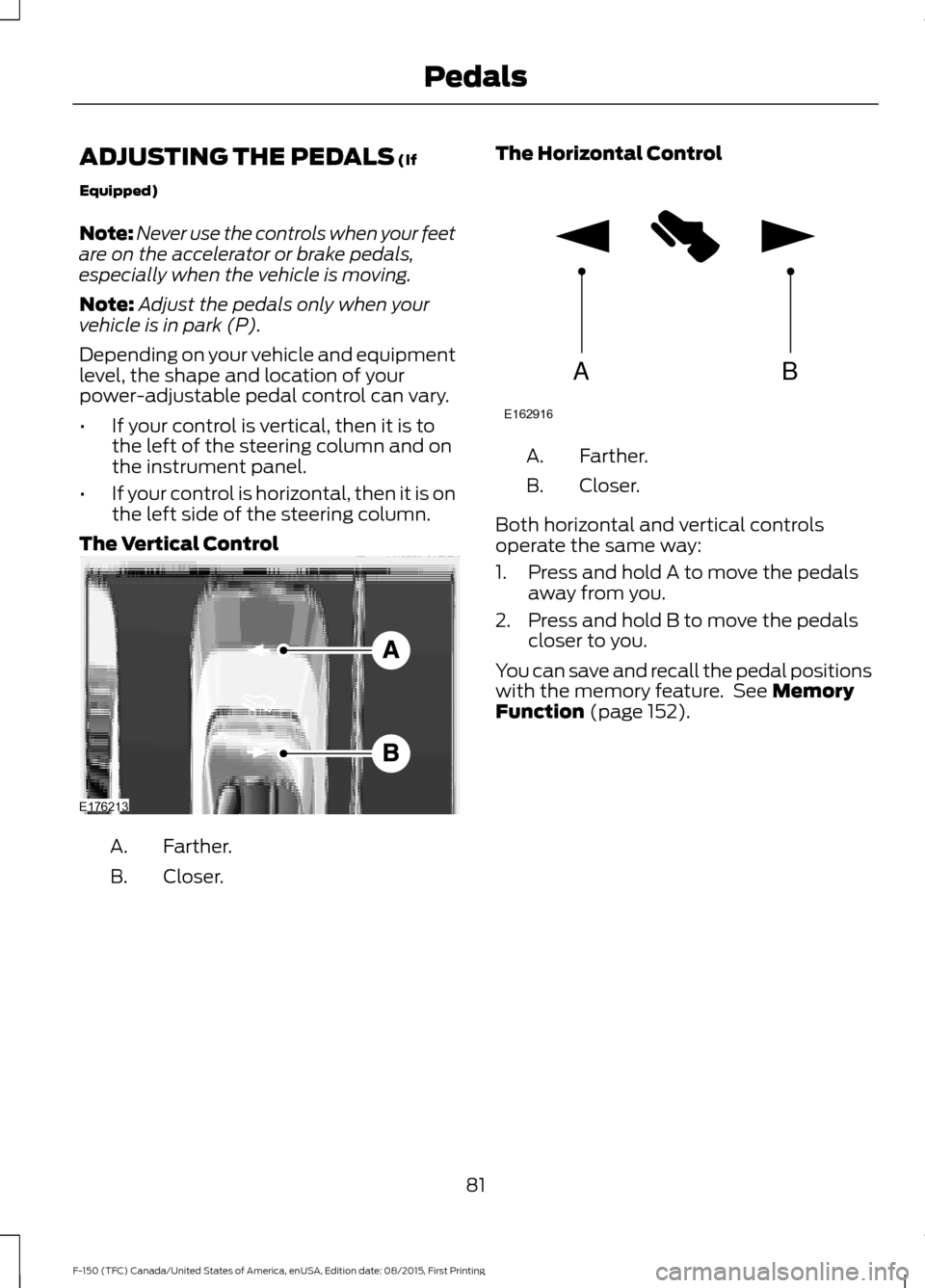
Depending on your vehicle and equipment
level, the shape and location of your
power-adjustable pedal control can vary.
• If your control is vertical, then it is to
the left of the steering column and on
the instrument panel.
• If your control is horizontal, then it is on
the left side of the steering column.
The Vertical Control Farther.
A.
Closer.
B. The Horizontal Control Farther.
A.
Closer.
B.
Both horizontal and vertical controls
operate the same way:
1. Press and hold A to move the pedals away from you.
2. Press and hold B to move the pedals closer to you.
You can save and recall the pedal positions
with the memory feature. See
Memory
Function (page 152).
81
F-150 (TFC) Canada/United States of America, enUSA, Edition date: 08/2015, First Printing PedalsE176213 AB
E162916
Page 89 of 505

DAYTIME RUNNING LAMPS (If
Equipped) WARNING
The daytime running lamps system
does not activate the rear lamps and
may not provide adequate lighting
during low visibility driving conditions. Also,
the autolamps switch position may not
activate the headlamps in all low visibility
conditions, such as daytime fog. Make sure
the headlamps are switched to auto or on,
as appropriate, during all low visibility
conditions. Failure to do so may result in a
crash. Type 1 - Conventional (Non-
Configurable)
The daytime running lamps turn on when:
1. The ignition is switched to the on
position.
2. The transmission is not in park (P) for vehicles with automatic transmissions
or the parking brake is released for
vehicles with manual transmissions.
3. The lighting control is in the off, parking
lamp or autolamps positions.
4. The headlamps are off.
Type 2 - Configurable
Switch the daytime running lamps on or
off using the information display controls.
See
Information Displays (page 108).
The daytime running lamps turn on when:
1. They are switched on in the information
display. See
Information Displays
(page 108).
2. The ignition is switched to the on position. 3. The transmission is not in park (P) for
vehicles with automatic transmissions
or the parking brake is released for
vehicles with manual transmissions.
4. The lighting control is in the autolamps
position.
5. The headlamps are off.
The other lighting control switch positions
do not activate the daytime running lamps,
and you can use them to temporarily
override autolamp control.
When switched off in the information
display, the daytime running lamps are off
in all lighting control switch positions.
AUTOMATIC HIGH BEAM
CONTROL
(If Equipped)
The system automatically turns on the high
beams if it is dark enough and no other
traffic is present. When it detects the
headlights of an approaching vehicle, the
tail lamps of the preceding vehicle or street
lighting, the system turns off the high
beams before they distract other drivers.
The low beams remain on.
Note: If it appears that automatic high
beam is not functioning properly, check the
windshield in front of the camera for a
blockage. A clear view of the road is required
for proper system operation. Make sure that
authorized personnel repair any windshield
damage in the area of the camera's field of
view.
Note: If the system detects a blockage such
as bird droppings, bug splatter, snow or ice,
and you do not observe changes, the system
may go into low beam mode until you clear
the blockage. A message may also appear
in the information display noting the front
camera is blocked.
86
F-150 (TFC) Canada/United States of America, enUSA, Edition date: 08/2015, First Printing Lighting
Page 106 of 505

Transmission Fluid Temperature
Gauge
Indicates transmission fluid temperature.
At normal operating temperature, the level
indicator will be in the normal range. If the
transmission fluid temperature exceeds
the normal range, stop the vehicle as soon
as safely possible and verify the airflow is
not restricted such as snow or debris
blocking airflow through the grill. Also,
higher than normal operating temperature
can be caused by special operation
conditions (i.e. snowplowing, towing or
off-road use). Refer to Special operating
conditions in the scheduled maintenance
information for instructions. Operating the
transmission for extended periods with the
gauge in the higher than normal area may
cause internal transmission damage. You
need to alter the severity of your driving
conditions to lower the transmission
temperature into the normal range. If the
gauge continues to show high
temperatures, see an authorized dealer.
Information Display
Odometer
Located in the bottom of the information
display. Registers the accumulated
distance your vehicle has traveled.
Compass
Displays the vehicle
’s heading direction.
Trip Computer
See General Information (page 108).
Vehicle Settings and Personalization
See
General Information (page 108). WARNING LAMPS AND
INDICATORS
The following warning lamps and
indicators will alert you to a vehicle
condition that may become serious. Some
lamps will illuminate when you start your
vehicle to make sure they work. If any
lamps remain on after starting your vehicle,
refer to the respective system warning
lamp for further information.
Note:
Some warning indicators appear in
the information display and function the
same as a warning lamp but do not display
when you start your vehicle.
Adaptive Cruise Control
(If Equipped) The speed control system
indicator light changes color to
indicate what mode the system
is in: See Using Adaptive Cruise Control
(page
221).
Anti-Lock Braking System If it illuminates when you are
driving, this indicates a
malfunction. You will continue
to have normal braking (without Anti-lock
braking system) unless the brake system
warning lamp is also illuminated. Have the
system checked by an authorized dealer.
Automatic High Beam
(If Equipped) Illuminates when this feature is
on. See
Automatic High Beam
Control (page 86).
Auto Start-stop
(If Equipped) It will illuminate to inform you
when the engine shuts down or
in conjunction with a message.
103
F-150 (TFC) Canada/United States of America, enUSA, Edition date: 08/2015, First Printing Instrument ClusterE144524
Page 107 of 505

Battery
If it illuminates while driving, it
indicates a malfunction. Switch
off all unnecessary electrical
equipment and have the system checked
by an authorized dealer immediately.
Blind Spot Monitor (If Equipped) It will illuminate when you switch
this feature off or in conjunction
with a message. See Blind Spot
Information System
(page 232).
Brake System It will illuminate when you
engage the parking brake with
the ignition on.
If it illuminates when you are driving, check
that you do not have the parking brake
engaged. If you do not have the parking
brake engaged, this indicates low brake
fluid level or a brake system malfunction.
Have the system checked immediately by
an authorized dealer. WARNING
Driving your vehicle with the warning
lamp on is dangerous. A significant
decrease in braking performance
may occur. It will take you longer to stop
your vehicle. Have your vehicle checked by
your authorized dealer immediately. Driving
extended distances with the parking brake
engaged can cause brake failure and the
risk of personal injury. Check 4X4
(If Equipped)
Illuminates with the message
CHECK 4X4 when a four-wheel
drive fault is present. See
Using
Four-Wheel Drive (page 188). Cruise Control
(If Equipped) Illuminates gray or green when
you switch this feature on. See
Using Cruise Control
(page
220).
Direction Indicator Illuminates when the left or right
turn signal or the hazard warning
flasher is turned on. If the
indicators stay on or flash faster, check for
a burned out bulb.
Door Ajar Displays when the ignition is on
and any door is not completely
closed.
Electronic Locking Differential Illuminates when using the
electronic locking differential.
Electric Park Brake It will illuminate or flash when
the electric parking brake has a
malfunction. See
Electric
Parking Brake (page 199).
Engine Coolant Temperature Illuminates when the engine
coolant temperature is high.
Stop the vehicle as soon as
possible, switch off the engine and let cool.
See
Engine Coolant Check (page 313).
104
F-150 (TFC) Canada/United States of America, enUSA, Edition date: 08/2015, First Printing Instrument Cluster E151262 E144522 E71340 E163170 E146190
Page 110 of 505

Transmission Tow/Haul (If Equipped)
Illuminates when the tow/haul
feature has been activated. If the
light flashes steadily, have the
system serviced immediately, damage to
the transmission could occur. See
Automatic Transmission
(page 182).
AUDIBLE WARNINGS AND
INDICATORS
Airbag Secondary Warning
Sounds if there is a malfunction with the
safety belt warning lamp and there is a
fault in the supplemental restraints
system.
Beltminder Warning
Sounds when a safety belt is unfastened
in an occupied seat and your vehicle is
moving.
Door Ajar Warning
Sounds when any door is not completely
closed and your vehicle speed exceeds
3 mph (5 km/h)
.
Headlamps On Warning
Sounds when you remove the key from the
ignition and open the driver's door and you
have left the headlamps or parking lamps
on.
Key in Ignition Warning
Sounds when you open the driver's door
and you have left the key in the ignition. Keyless Warning Alert
(If Equipped)
Sounds the horn twice when you exit your
vehicle with the intelligent access key, after
the last door is closed and your keyless
vehicle is in RUN, indicating your vehicle is
still on.
Rear Park Aid Warning
A detection warning sounds when
obstacles are within a certain range of the
bumper area. The system turns on
automatically whenever you switch the
ignition on.
Parking Brake On Warning
Sounds when you have left the parking
brake on and drive your vehicle. If the
warning chime remains on after you have
released the parking brake, have the
system checked by your authorized dealer
immediately.
Service Advancetrac Warning
Sounds when there is a malfunction with
the Electronic Stability Control (ESC) or
Rollover Stability Control (RSC) system.
107
F-150 (TFC) Canada/United States of America, enUSA, Edition date: 08/2015, First Printing Instrument ClusterE161509
Page 113 of 505

Fuel Economy
Distance to E
Instant Fuel Economy
Average Fuel Economy
Auto StartStop status
• Distance to E - Shows the approximate distance your vehicle can travel before running
out of fuel.
• Instant Fuel Economy - Shows your instantaneous fuel usage.
• Average Fuel Economy - Shows the average fuel usage based on time. Press and hold
OK to reset this value.
• Auto StartStop status - Shows the current status of the auto startstop system.
Note: You can reset your average fuel economy by pressing and holding the OK button on
the left hand steering wheel controls.
Driver Assist
Note: Use the arrow buttons to configure different driver setting choices. Driver Assist
Engine Hours XXXXXX
Engine Hours
Driver Assist
Engine Idle Hours XXXXXX
Vehicle graphic with tire pres-
sures
Tire Pressure
Rear Park Aid
Select Your Setting
Brake Type
Trailer Sway
Note: Some items are optional and may not appear.
110
F-150 (TFC) Canada/United States of America, enUSA, Edition date: 08/2015, First Printing Information Displays
Page 117 of 505
Note:
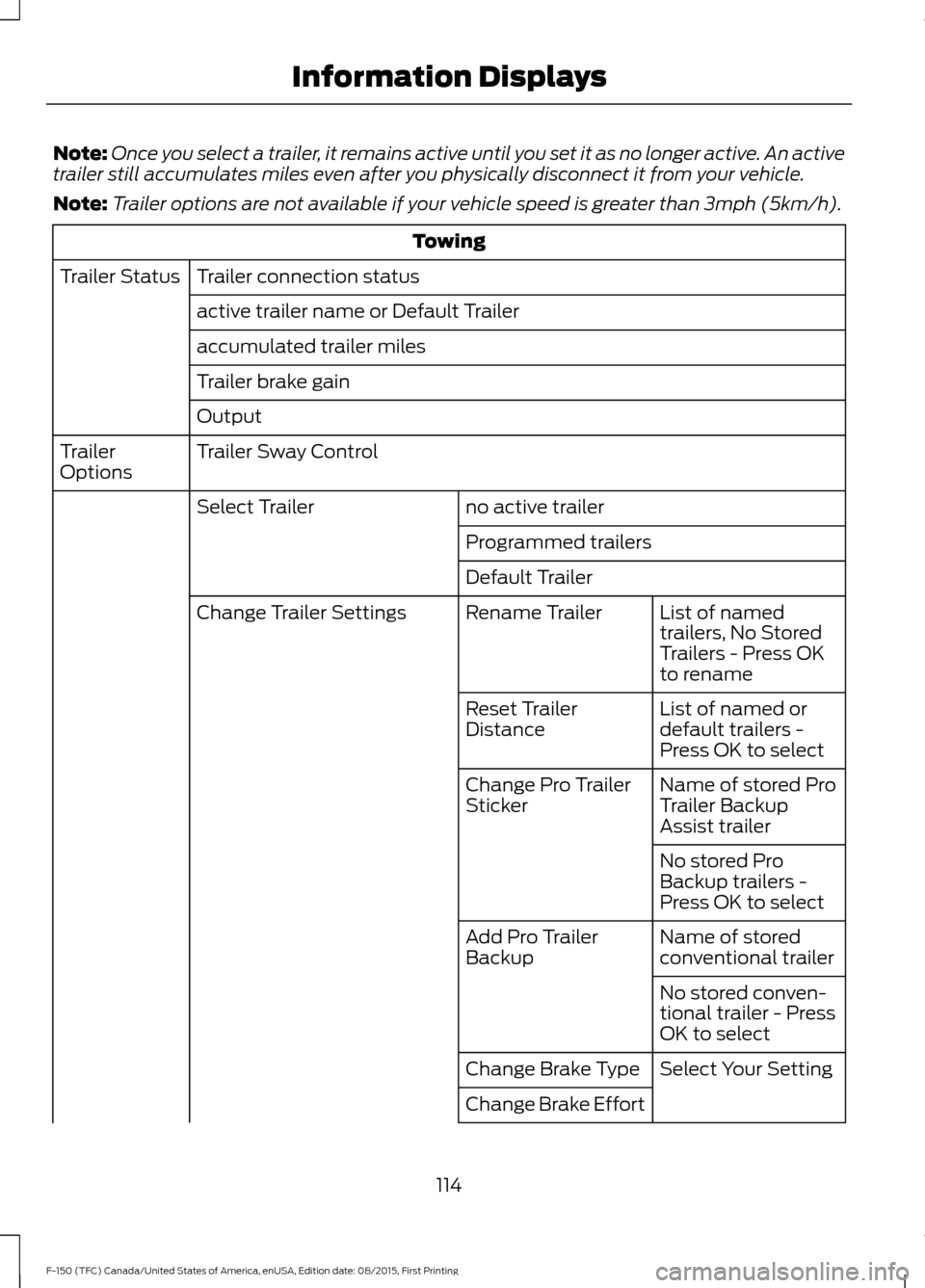
Once you select a trailer, it remains active until you set it as no longer active. An active
trailer still accumulates miles even after you physically disconnect it from your vehicle.
Note: Trailer options are not available if your vehicle speed is greater than 3mph (5km/h). Towing
Trailer connection status
Trailer Status
active trailer name or Default Trailer
accumulated trailer miles
Trailer brake gain
Output
Trailer Sway Control
Trailer
Options
no active trailer
Select Trailer
Programmed trailers
Default TrailerList of named
trailers, No Stored
Trailers - Press OK
to rename
Rename Trailer
Change Trailer Settings
List of named or
default trailers -
Press OK to select
Reset Trailer
Distance
Name of stored Pro
Trailer Backup
Assist trailer
Change Pro Trailer
Sticker
No stored Pro
Backup trailers -
Press OK to select
Name of stored
conventional trailer
Add Pro Trailer
Backup
No stored conven-
tional trailer - Press
OK to select
Select Your Setting
Change Brake Type
Change Brake Effort
114
F-150 (TFC) Canada/United States of America, enUSA, Edition date: 08/2015, First Printing Information Displays