Page 11 of 505
Brake system
Cabin air filter
Check fuel cap
Child safety door lock or unlock
Child seat lower anchor
Child seat tether anchor
Cruise control
Do not open when hot
Engine air filter
Engine coolant
Engine coolant temperature
Engine oil
Explosive gas
Fan warning
Fasten seatbelt Front airbag
Front fog lamps
Fuel pump reset
Fuse compartment
Hazard warning flashers
Heated rear window
Heated windshield
Interior luggage compartment
release
Jack
Keep out of reach of children
Lighting control
Low tire pressure warning
Maintain correct fluid level
Note operating instructions
Panic alarm
8
F-150 (TFC) Canada/United States of America, enUSA, Edition date: 08/2015, First Printing Introduction E71340 E161353
Page 113 of 505

Fuel Economy
Distance to E
Instant Fuel Economy
Average Fuel Economy
Auto StartStop status
• Distance to E - Shows the approximate distance your vehicle can travel before running
out of fuel.
• Instant Fuel Economy - Shows your instantaneous fuel usage.
• Average Fuel Economy - Shows the average fuel usage based on time. Press and hold
OK to reset this value.
• Auto StartStop status - Shows the current status of the auto startstop system.
Note: You can reset your average fuel economy by pressing and holding the OK button on
the left hand steering wheel controls.
Driver Assist
Note: Use the arrow buttons to configure different driver setting choices. Driver Assist
Engine Hours XXXXXX
Engine Hours
Driver Assist
Engine Idle Hours XXXXXX
Vehicle graphic with tire pres-
sures
Tire Pressure
Rear Park Aid
Select Your Setting
Brake Type
Trailer Sway
Note: Some items are optional and may not appear.
110
F-150 (TFC) Canada/United States of America, enUSA, Edition date: 08/2015, First Printing Information Displays
Page 114 of 505
Tire Pressure
Displays your current vehicle tire pres- sures.Settings
Settings
Select Your Setting
DTE Calculate
Vehicle
Select Your Setting
Autolamp Delay
Lighting
Daytime Light
Autolock
Locks
Autounlock Select Your Setting
Remote Unlock
Remaining Life XX% - Hold OK to reset
Oil Life Reset
Select Your Setting
Climate Control
Remote Start
Duration
System
Courtesy Wipe
Wiper
Controls
Admin Keys and MyKeys
MyKey Status
MyKey
MyKey Mileage
Hold OK to Create MyKey
Create MyKey
Select Your Setting
911 Assist
Do Not
Disturb
AdvanceTrac
111
F-150 (TFC) Canada/United States of America, enUSA, Edition date: 08/2015, First Printing Information DisplaysE185360
Page 115 of 505
Settings
Max Speed
Speed Minder
Vol. Limiter Clear MyKeys - Press OK to clear MyKeys
Clear MyKeys
Select Your Setting
Units
Display Setup
Temperature
Tire Pressure
Language
Main menu (Type 2)
• Display Mode
• Trip/Fuel
• Towing •
Off Road
• Settings
Note: Some options may appear slightly
different or not at all if the items are
optional.
Display Mode
Note: Use the arrow buttons to choose between the following display options. Display Mode
DTE
Transmission Temp.
Tire Pressure
Digital Speedometer - Press OK for km/h
Engine Information - Oil Life, Engine Hours, Engine Idle Hours - Hold OK to Reset
MyKey Status - Admin Keys and MyKey Mileage
• DTE - Shows the approximate distance your vehicle can travel before running out of
fuel.
• Transmission Temp - Shows the trans temp value.
• Tire Pressure - Shows the tire pressure psi.
• Engine Information - Shows engine information.
• MyKey Status - Shows the status of your MyKeys.
112
F-150 (TFC) Canada/United States of America, enUSA, Edition date: 08/2015, First Printing Information Displays
Page 116 of 505

Tire Pressure
Displays your current vehicle tire pres- sures.Trip/Fuel
Note:
Use the arrow buttons to choose between the following trip and fuel options. Trip/Fuel
Trip 1 or 2
Fuel Economy
Fuel History Select Your Setting
Compass
Auto StartStop status
Trip 1 or 2
• Trip Timer - Registers the time of individual journeys.
• DTE - Shows the approximate distance your vehicle can travel before running out of
fuel.
• Mi - Registers the mileage of individual journeys.
• Avg mpg - Shows the average fuel economy for a given trip.
Fuel
• Fuel Economy - Shows your instantaneous fuel usage as a bar graph and average
mpg.
• Fuel History - Shows your fuel usage based on time. The graph is updated each minute
with the fuel economy that you achieved during 30 minutes of driving.
• Auto StartStop status - Shows the current status of the auto startstop system.
Note: Press and hold OK to reset the currently displayed information.
Towing
Note: Use the arrow buttons to configure different towing setting choices.
113
F-150 (TFC) Canada/United States of America, enUSA, Edition date: 08/2015, First Printing Information DisplaysE184771
Page 122 of 505

Trip/Fuel
Trip 1 or 2
Fuel Economy
Fuel History
Navigation Select Your Setting
Compass
Auto StartStop status
Trip 1 or 2
• Trip Timer - Registers the time of individual journeys.
• DTE - Shows the approximate distance your vehicle can travel before running out of
fuel.
• Mi - Registers the mileage of individual journeys.
• Avg mpg - Shows the average fuel economy for a given trip.
Fuel
• Fuel Economy - Shows your instantaneous fuel usage as a bar graph and average
mpg.
• Fuel History - Shows your fuel usage based on time. The graph is updated each minute
with the fuel economy that you achieved during 30 minutes of driving.
• Navigation - Shows navigation turn by turn (Compass displayed when a route in
Navigation is not set).
• Auto StartStop status - Shows the current status of the auto startstop system.
Note: Press and hold OK to reset the currently displayed information.
Truck Info In this mode, off-road
information depicted with
graphics are available.
Note:
Some items are optional and may
not appear.
Note: Use the arrow buttons to choose between the following display options. Truck Info
Gauge View
Tire Pressure
Digital Speedometer - Press OK for km/h
119
F-150 (TFC) Canada/United States of America, enUSA, Edition date: 08/2015, First Printing Information DisplaysE163181
Page 123 of 505
Truck Info
Engine Information - Oil Life, Engine Hours, Engine Idle Hours - Hold OK to Reset
MyKey Status - Admin Keys, MyKeys and MyKey Mileage
• Gauge View - Shows the turbo boost or transmission temp value.
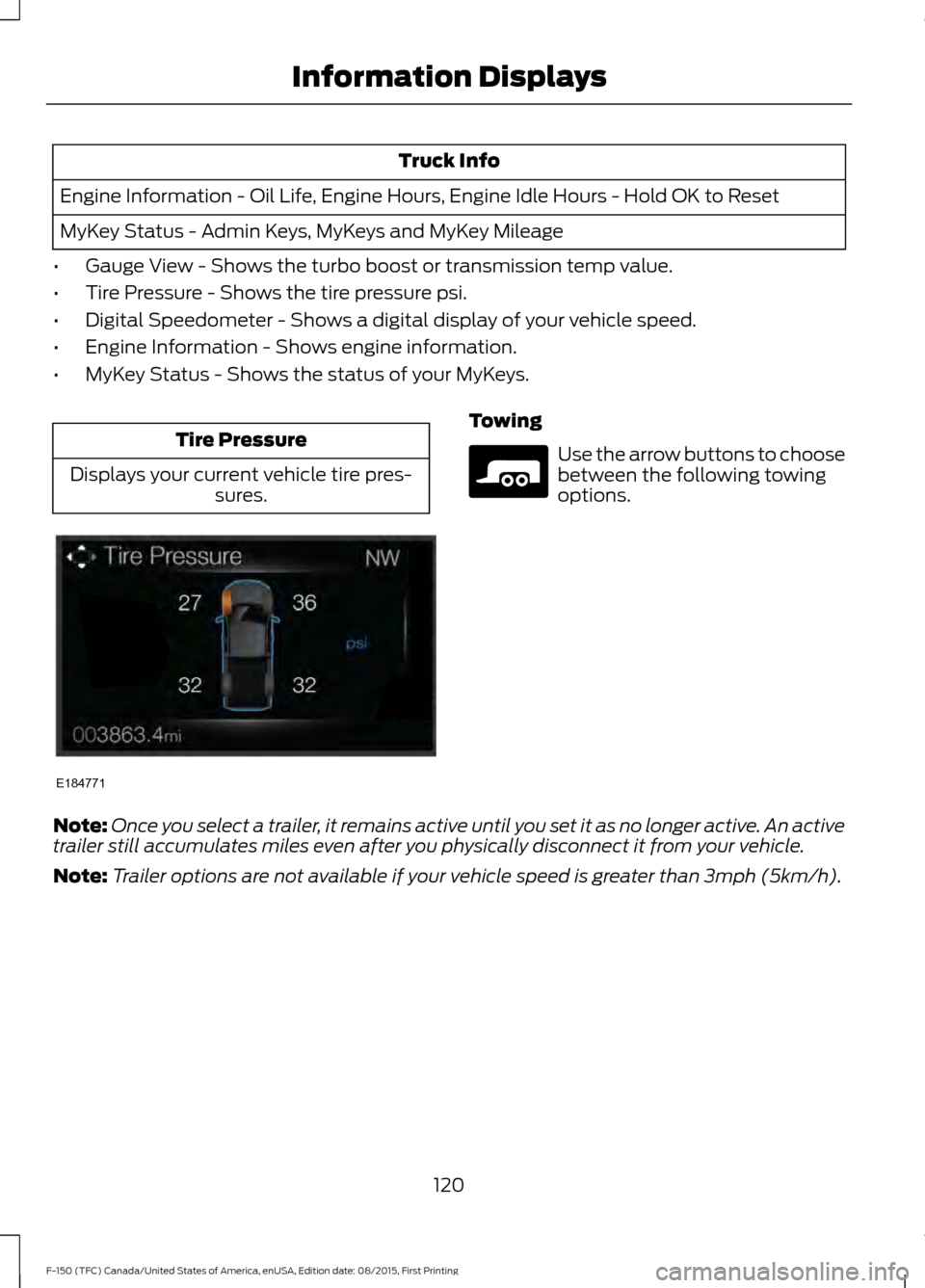
• Tire Pressure - Shows the tire pressure psi.
• Digital Speedometer - Shows a digital display of your vehicle speed.
• Engine Information - Shows engine information.
• MyKey Status - Shows the status of your MyKeys. Tire Pressure
Displays your current vehicle tire pres- sures. Towing
Use the arrow buttons to choose
between the following towing
options.
Note: Once you select a trailer, it remains active until you set it as no longer active. An active
trailer still accumulates miles even after you physically disconnect it from your vehicle.
Note: Trailer options are not available if your vehicle speed is greater than 3mph (5km/h).
120
F-150 (TFC) Canada/United States of America, enUSA, Edition date: 08/2015, First Printing Information DisplaysE184771 E176096
Page 340 of 505

Battery
•
Check and recharge as necessary. Keep
connections clean.
• If storing your vehicle for more than 30
days without recharging the battery,
we recommend that you disconnect
the battery cables to maintain battery
charge for quick starting.
Note: It is necessary to reset memory
features if battery cables are disconnected.
Brakes
• Make sure the brakes and parking brake
release fully.
Tires
• Maintain recommended air pressure.
Miscellaneous
• Make sure all linkages, cables, levers
and pins under your vehicle are covered
with grease to prevent rust.
• Move vehicles at least 25 ft (7.5 m)
every 15 days to lubricate working parts
and prevent corrosion.
Removing Vehicle From Storage
When your vehicle is ready to come out of
storage, do the following:
• Wash your vehicle to remove any dirt
or grease film build-up on window
surfaces.
• Check windshield wipers for any
deterioration.
• Check under the hood for any foreign
material that may have collected
during storage such as mice or squirrel
nests.
• Check the exhaust for any foreign
material that may have collected
during storage. •
Check tire pressures and set tire
inflation per the Tire Label.
• Check brake pedal operation. Drive
your vehicle
15 ft (4.5 m) back and
forth to remove rust build-up.
• Check fluid levels (including coolant,
oil and gas) to make sure there are no
leaks, and fluids are at recommended
levels.
• If you remove the battery, clean the
battery cable ends and check for
damage.
Contact an authorized dealer if you have
any concerns or issues.
337
F-150 (TFC) Canada/United States of America, enUSA, Edition date: 08/2015, First Printing Vehicle Care