2016 FORD F150 steering
[x] Cancel search: steeringPage 430 of 505
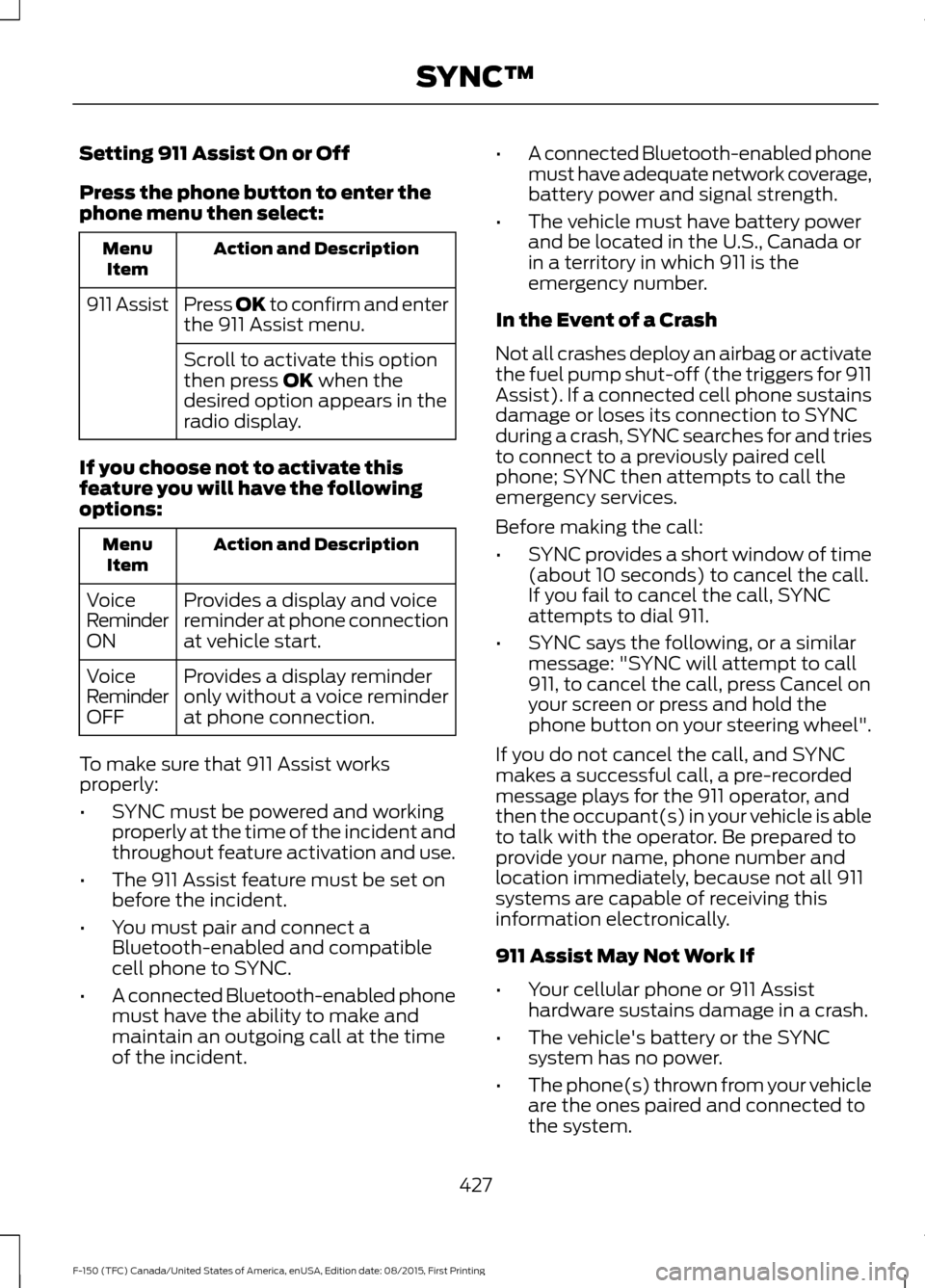
Setting 911 Assist On or Off
Press the phone button to enter the
phone menu then select:
Action and Description
Menu
Item
Press OK to confirm and enter
the 911 Assist menu.
911 Assist
Scroll to activate this option
then press OK when the
desired option appears in the
radio display.
If you choose not to activate this
feature you will have the following
options: Action and Description
Menu
Item
Provides a display and voice
reminder at phone connection
at vehicle start.
Voice
Reminder
ON
Provides a display reminder
only without a voice reminder
at phone connection.
Voice
Reminder
OFF
To make sure that 911 Assist works
properly:
• SYNC must be powered and working
properly at the time of the incident and
throughout feature activation and use.
• The 911 Assist feature must be set on
before the incident.
• You must pair and connect a
Bluetooth-enabled and compatible
cell phone to SYNC.
• A connected Bluetooth-enabled phone
must have the ability to make and
maintain an outgoing call at the time
of the incident. •
A connected Bluetooth-enabled phone
must have adequate network coverage,
battery power and signal strength.
• The vehicle must have battery power
and be located in the U.S., Canada or
in a territory in which 911 is the
emergency number.
In the Event of a Crash
Not all crashes deploy an airbag or activate
the fuel pump shut-off (the triggers for 911
Assist). If a connected cell phone sustains
damage or loses its connection to SYNC
during a crash, SYNC searches for and tries
to connect to a previously paired cell
phone; SYNC then attempts to call the
emergency services.
Before making the call:
• SYNC provides a short window of time
(about 10 seconds) to cancel the call.
If you fail to cancel the call, SYNC
attempts to dial 911.
• SYNC says the following, or a similar
message: "SYNC will attempt to call
911, to cancel the call, press Cancel on
your screen or press and hold the
phone button on your steering wheel".
If you do not cancel the call, and SYNC
makes a successful call, a pre-recorded
message plays for the 911 operator, and
then the occupant(s) in your vehicle is able
to talk with the operator. Be prepared to
provide your name, phone number and
location immediately, because not all 911
systems are capable of receiving this
information electronically.
911 Assist May Not Work If
• Your cellular phone or 911 Assist
hardware sustains damage in a crash.
• The vehicle's battery or the SYNC
system has no power.
• The phone(s) thrown from your vehicle
are the ones paired and connected to
the system.
427
F-150 (TFC) Canada/United States of America, enUSA, Edition date: 08/2015, First Printing SYNC™
Page 431 of 505

911 Assist Privacy Notice
When you switch on 911 Assist, it may
disclose to emergency services that your
vehicle has been in a crash involving the
deployment of an airbag or activation of
the fuel pump shut-off. Certain versions or
updates to 911 Assist may also be capable
of electronically or verbally disclosing to
911 operators your vehicle location or other
details about your vehicle or crash to assist
911 operators to provide the most
appropriate emergency services. If you do
not want to disclose this information, do
not switch the feature on.
SYNC Mobile Apps
The system enables voice and steering
wheel control of SYNC AppLink enabled
smartphone apps. When an app is running
through AppLink, you can control main
features of the app through voice
commands and steering wheel controls.
Note:
You must pair and connect your
smartphone to SYNC to access AppLink.
Note: iPhone users need to connect the
phone to the USB port.
Note: Android users need to connect the
phone to SYNC using Bluetooth.
Note: For information on available apps,
supported smartphone devices and
troubleshooting tips please visit the Ford
website.
Availability of SYNC AppLink enabled Apps
will vary by region. Note:
Make sure you have an active account
for the app that you have downloaded.
Some apps work automatically with no
setup. Other apps want you to configure
your personal settings and personalize your
experience by creating stations or favorites.
We recommend you do this at home or
outside of your vehicle.
Note: AppLink is not available if your
vehicle is equipped with the MyFordTouch
system.
To Access Using the SYNC Menu
Press the MENU button to access the
menu on-screen. Then select: Action and Description
Menu
Item
SYNC-Apps Scroll through the list of
available applications and
select a particular app or
select:
Mobile
Apps
Find New Apps
Note: If you cannot find a compatible SYNC
AppLink app, make sure the required app is
running on the mobile device.
Accessing an App's Menu
When an app is running through SYNC,
press the right arrow button on the steering
wheel control to access the app menu.
You can access various app features from
here, for example thumbs up and thumbs
down.
Press the left arrow button on the steering
wheel control to exit the app menu.
428
F-150 (TFC) Canada/United States of America, enUSA, Edition date: 08/2015, First Printing SYNC™
Page 432 of 505

To Access Using Voice Commands
Press the voice button then when prompted say:
Action and Description
Menu Item
Say the name of the application after the tone.
The app should start. When an app is running through SYNC, you can press the voice button and speak commands specific to the app, for example "Play Playlist Road Trip".
mobile (apps |
applications)
Use this command to discover the available voice commands.
help
SYNC Mobile App Voice Commands
The following voice commands are always available: Action and Description
Menu Item
SYNC prompts you to say the name of an
app to start it on SYNC.
mobile (apps | applications)
SYNC lists all of the currently available
mobile apps.
list [mobile] (apps | applications)
Searches your connected mobile device for
SYNC-compatible mobile apps.
find [new] [mobile] (apps | applications)
help
You can say the name of a mobile app at any time to start the mobile app on SYNC.
App Permissions
App permissions are organized by groups.
You can grant these group permissions
individually. You can change a permission
group status any time when not driving, by
using the settings menu. When you launch an app using SYNC, the
system may ask you to grant certain
permissions, for example:
•
To allow your vehicle to provide vehicle
information to the app such as, but not
limited to: Fuel level, fuel economy, fuel
consumption, engine speed, rain
sensor, odometer, VIN, external
temperature, gear position, tire
pressure, and head lamp status.
• To allow your vehicle to provide driving
characteristic information such as, but
not limited to: MyKey, seat belt status,
engine revolutions per minute, gear
position, braking events, steering wheel
angle, and accelerator pedal position.
429
F-150 (TFC) Canada/United States of America, enUSA, Edition date: 08/2015, First Printing SYNC™
Page 459 of 505

Multi-Point inspection
Hazard warning system operation
Accessory drive belt(s)
Horn operation
Battery performance
Radiator, cooler, heater and air conditioninghoses
Engine air filter
Suspension components for leaks ordamage
Exhaust system
Steering and linkage
Exterior lamps operation
Tires (including spare) for wear and properpressure**
Fluid levels *
; fill if necessary
Windshield for cracks, chips or pits
For oil and fluid leaks
Washer spray and wiper operation
Half-shaft dust boots
* Brake, coolant recovery reservoir, automatic transmission and window washer
** If your vehicle is equipped with a temporary mobility kit, check the tire sealant expiration
Use By date on the canister. Replace as needed.
Be sure to ask your dealership service
advisor or technician about the multi-point
vehicle inspection. It is a comprehensive
way to perform a thorough inspection of
your vehicle. Your checklist gives you
immediate feedback on the overall
condition of your vehicle.
NORMAL SCHEDULED
MAINTENANCE
Intelligent Oil-Life Monitor
Your vehicle is equipped with an Intelligent
Oil-Life Monitor that determines when you
should change the engine oil based on how
your vehicle is used. By using several
important factors in its calculations, the
monitor helps reduce the cost of owning
your vehicle and reduces environmental
waste at the same time. This means you do not have to remember
to change the oil on a mileage-based
schedule. Your vehicle lets you know when
an oil change is due by displaying a
message in the information display.
The following table provides examples of
vehicle use and its impact on oil change
intervals. It is a guideline only. Actual oil
change intervals depend on several factors
and generally decrease with severity of
use.
456
F-150 (TFC) Canada/United States of America, enUSA, Edition date: 08/2015, First Printing Scheduled Maintenance
Page 461 of 505

At every oil change interval as indicated by the information display
*
Inspect the steering linkage, ball joints, suspension, tire-rod ends, driveshaft and U-
joints. Lubricate any areas with grease fittings.
Inspect the wheels and related components for abnormal noise, wear, looseness or
drag.
* Do not exceed one year or 10000 miles (16000 kilometers) between service intervals.
** Reset the Intelligent Oil-Life Monitor after engine oil and filter changes. Other maintenance items
1
Replace engine air filter.
Every 30000 miles (48000
km)
Change engine coolant.2
At 100000 miles (160000
km)
Replace spark plugs.
Every 100000 miles
(160000 km) Inspect accessory drive belt(s). 3
Change automatic transmission fluid and filter.
Every 150000 miles
(240000 km) Change front axle fluid (Four-wheel drive vehicles).
Change rear axle fluid.
Change transfer case fluid (Four-wheel drive vehicles).
Replace accessory drive belt(s).
1 Perform these maintenance items within 3000 miles (4800 kilometers) of the last
engine oil and filter change. Do not exceed the designated distance for the interval.
2 Initial replacement at six years or 100000 miles (160000 kilometers), then every three
years or 50000 miles (80000 kilometers).
3 After initial inspection, inspect every other oil change until replaced.
458
F-150 (TFC) Canada/United States of America, enUSA, Edition date: 08/2015, First Printing Scheduled Maintenance
Page 463 of 505

Operating in dusty or sandy conditions (such as unpaved or dusty roads)
Replace engine air filter.
Inspect frequently, service
as required
Inspect the wheels and related components for abnormal
noise, wear, looseness or drag.
Every 5,000 mi (8,000 km)
Rotate tires, inspect tires for wear and measure tread
depth.
Change engine oil and filter. *
Every
5,000 mi (8,000 km)
or six months
Change transfer case fluid (Four-wheel drive vehicles).
Every
60,000 mi
(96,000 km)
* Reset your Intelligent Oil-Life Monitor after each engine oil and filter change. Off-road operation
Inspect steering linkage, ball joints and U-joints. Lubricate
if equipped with grease fittings.
Inspect frequently, service
as required
Replace engine air filter.
Change engine oil and filter.*
Every
5,000 mi (8,000 km)
or six months
Inspect the wheels and related components for abnormal
noise, wear, looseness or drag.
Rotate tires, inspect tires for wear and measure tread
depth.
Replace front wheel bearing grease and grease seals if
non-sealed bearings are used (Two-wheel drive vehicles).
Every
30,000 mi
(48,000 km)
Change transfer case fluid (Four-wheel drive vehicles).
Every
60,000 mi
(96,000 km)
* Reset your Intelligent Oil-Life Monitor after each engine oil and filter change. Exclusive use of E85 (Flex fuel vehicles only)
If ran exclusively on E85, fill the fuel tank full with regular
unleaded fuel.
Every oil change interval
460
F-150 (TFC) Canada/United States of America, enUSA, Edition date: 08/2015, First Printing Scheduled Maintenance
Page 494 of 505

3
360 Degree Camera.....................................217
Camera Views...................................................... 218
Front Camera....................................................... 218
Side Camera......................................................... 219
4
4WD See: Four-Wheel Drive..................................... 188
A
A/C See: Climate Control......................................... 139
About This Manual...........................................7
ABS See: Brakes........................................................... 198
ABS driving hints See: Hints on Driving With Anti-Lock
Brakes................................................................ 198
Accessories...................................................448 Exterior style....................................................... 448
Interior style......................................................... 448
Lifestyle................................................................. 448
Peace of mind.................................................... 448
Accessories See: Replacement Parts
Recommendation............................................. 11
ACC See: Using Adaptive Cruise Control.............221
Active Park Assist.........................................210 Automatic Steering into Parking
Space.................................................................. 212
Deactivating the Park Assist Feature..........212
Troubleshooting the System.......................... 213
Using Active Park Assist.................................... 211
Adjusting the Headlamps..........................321 Horizontal Aim Adjustment........................... 322
Vertical Aim Adjustment.................................. 321
Adjusting the Pedals......................................81
Adjusting the Steering Wheel....................78 Power Tilt and Telescope Steering
Column................................................................ 78
Airbag Disposal..............................................50
Air Conditioning See: Climate Control......................................... 139Air Filter
See: Changing the Engine Air Filter.............329
Alarm See: Anti-Theft Alarm......................................... 74
Ambient Lighting
.............................................91
Anti-Theft Alarm............................................74
Arming the Alarm................................................. 75
Disarming the Alarm........................................... 75
Full Guard ............................................................... 75
Reduced Guard...................................................... 74
Appendices.....................................................472
Audible Warnings and Indicators............107 Airbag Secondary Warning............................. 107
Beltminder Warning........................................... 107
Door Ajar Warning.............................................. 107
Headlamps On Warning................................... 107
Key in Ignition Warning..................................... 107
Keyless Warning Alert....................................... 107
Parking Brake On Warning.............................. 107
Rear Park Aid Warning...................................... 107
Service Advancetrac Warning........................ 107
Audio Control
...................................................79
Media........................................................................\
79
Seek, Next or Previous........................................ 79
Audio System
................................................392
General Information......................................... 392
Audio Unit - Vehicles With: AM/FM/CD/ SYNC/Satellite Radio............................400
Audio Unit - Vehicles With: AM/FM/ CD
...................................................................395
Audio Unit - Vehicles With: AM/FM/ SYNC.............................................................398
Audio Unit - Vehicles With: AM/ FM...................................................................393
Audio Unit - Vehicles With: Sony AM/ FM/CD..........................................................402
Autolamps........................................................84 Windshield Wiper Activated
Headlamps........................................................ 85
Automatic Climate Control........................141
Automatic High Beam Control.................86 Activating the System........................................ 87
Manually Overriding the System.................... 87
491
F-150 (TFC) Canada/United States of America, enUSA, Edition date: 08/2015, First Printing Index
Page 499 of 505

Information Messages................................124
4WD........................................................................\
. 137
Active Park............................................................. 125
Adaptive Cruise Control................................... 125
AdvanceTrac and Traction Control..............126
Airbag...................................................................... 126
Alarm and Security............................................ 126
Battery and Charging System......................... 127
Blind Spot Information and Cross Traffic Alert System..................................................... 127
Collision Warning System............................... 128
Doors and Locks.................................................. 128
Driver Alert............................................................. 128
Drivetrain................................................................ 129
Engine..................................................................... 129
Fuel........................................................................\
.. 129
Keys and Intelligent Access............................ 130
Lane Keeping System......................................... 131
Maintenance.......................................................... 131
MyKey...................................................................... 132
Off Road................................................................. 132
Park Aid................................................................... 133
Park Brake.............................................................. 133
Power Steering.................................................... 134
Pro Trailer Backup Assist................................. 134
Remote Start........................................................ 135
Seats....................................................................... 136
Starting System ................................................. 136
Tire Pressure Monitoring System.................. 136
Trailer....................................................................... 137Installing Child Restraints............................16
Child Seats............................................................... 16
Combining Safety Belt and LATCH Lower Anchors for Attaching Child Safety
Seats.................................................................... 25
Front Seat Tether Strap Attachment (Regular Cab)................................................... 26
Rear Seat Tether Strap Attachment (Crew Cab and Super Cab)....................................... 27
Use of Inboard Lower Anchors from the Outboard Seating Positions (Center
Seating Use) ..................................................... 24
Using Inflatable Safety Belts (Rear Seat Outboard Positions)........................................ 21
Using Lap and Shoulder Belts (Except Front Center Position of Super Cab and Crew
Cab)....................................................................... 17
Using Lap and Shoulder Belts (Front Center Position of Super Cab and Crew
Cab)....................................................................... 19
Using Lower Anchors and Tethers for CHildren (LATCH)............................................ 23
Using Tether Straps............................................. 25
Instrument Cluster......................................100
Instrument Lighting Dimmer
.....................85
Interior Lamps.................................................89
Front Interior Lamps........................................... 89
Rear Interior Lamps.............................................. 91
Interior Mirror
....................................................97
Auto-Dimming Mirror.......................................... 97
Introduction.........................................................7
J
Jump Starting the Vehicle........................288 Connecting the Jumper Cables.................... 288
Jump Starting..................................................... 289
Preparing Your Vehicle.................................... 288
Removing the Jumper Cables....................... 289
K
Keyless Entry
...................................................64
SECURICODE™ KEYLESS ENTRY
KEYPAD.............................................................. 64
Keyless Starting
............................................166
Ignition Modes...................................................... 167
Keys and Remote Controls..........................51
496
F-150 (TFC) Canada/United States of America, enUSA, Edition date: 08/2015, First Printing Index