2016 FORD EXPEDITION EL power steering
[x] Cancel search: power steeringPage 4 of 421

Introduction
About This Manual...........................................7
Symbols Glossary.............................................7
Data Recording..................................................9
California Proposition 65..............................11
Perchlorate.........................................................11
Ford Credit..........................................................11
Replacement PartsRecommendation........................................11
Special Notices................................................12
Mobile CommunicationsEquipment.....................................................12
Export Unique Options..................................13
Environment
Protecting the Environment........................14
Child Safety
General Information.......................................15
Installing Child Restraints............................16
Booster Seats..................................................23
Child Restraint Positioning.........................25
Child Safety Locks.........................................26
Seatbelts
Principle of Operation..................................28
Fastening the Seatbelts..............................29
Seatbelt Height Adjustment.......................31
Seatbelt Warning Lamp and IndicatorChime..............................................................32
Seatbelt Reminder.........................................33
Child Restraint and SeatbeltMaintenance................................................34
Supplementary RestraintsSystem
Principle of Operation..................................35
Driver and Passenger Airbags...................36
Side Airbags......................................................37
Safety Canopy™............................................38
Crash Sensors and Airbag Indicator........39
Airbag Disposal..............................................40
Keys and Remote Controls
Principle of Operation...................................41
General Information on RadioFrequencies...................................................41
Remote Control..............................................42
Replacing a Lost Key or RemoteControl...........................................................45
MyKey™
Principle of Operation..................................46
Creating a MyKey............................................47
Clearing All MyKeys.......................................48
Checking MyKey System Status..............49
Using MyKey With Remote StartSystems.........................................................50
MyKey Troubleshooting................................51
Locks
Locking and Unlocking.................................53
Manual Liftgate...............................................55
Power Liftgate..................................................57
Keyless Entry...................................................59
Security
Passive Anti-Theft System.........................62
Anti-Theft Alarm............................................63
Power Running Boards
Using Power Running Boards....................64
Steering Wheel
Adjusting the Steering Wheel - VehiclesWith: Column Shift/Manual AdjustableSteering Column........................................66
Adjusting the Steering Wheel - VehiclesWith: Floor Shift/Manual AdjustableSteering Column........................................66
1
Expedition (TB7) Canada/United States of America, enUSA, First Printing
Table of Contents
Page 5 of 421
Adjusting the Steering Wheel - VehiclesWith: Power Adjustable SteeringColumn...........................................................67
Audio Control..................................................68
Voice Control...................................................69
Cruise Control..................................................70
Information Display Control.......................70
Heated Steering Wheel................................70
Pedals
Adjusting the Pedals......................................71
Wipers and Washers
Windshield Wipers.........................................72
Autowipers........................................................72
Windshield Washers......................................73
Rear Window Wiper and Washers...........73
Lighting
General Information......................................74
Lighting Control...............................................74
Autolamps.........................................................75
Instrument Lighting Dimmer......................76
Daytime Running Lamps.............................76
Front Fog Lamps.............................................77
Direction Indicators........................................77
Interior Lamps.................................................78
Ambient Lighting............................................79
Windows and Mirrors
Power Windows.............................................80
Exterior Mirrors.................................................81
Interior Mirror...................................................82
Childminder Mirror.........................................82
Rear Quarter Windows................................83
Sun Visors.........................................................83
Moonroof...........................................................83
Instrument Cluster
Gauges...............................................................85
Warning Lamps and Indicators................88
Audible Warnings and Indicators..............91
Information Displays
General Information......................................92
Information Messages................................103
Climate Control
Manual Climate Control..............................113
Manual Climate Control - Vehicles With:Electronic Manual TemperatureControl (EMTC)..........................................114
Automatic Climate Control.......................116
Hints on Controlling the InteriorClimate..........................................................117
Rear Passenger Climate Controls..........120
Heated Windows and Mirrors....................121
Remote Start...................................................121
Seats
Sitting in the Correct Position..................122
Head Restraints.............................................122
Manual Seats.................................................124
Power Seats....................................................125
Memory Function.........................................126
Rear Seats........................................................127
Heated Seats..................................................134
Climate Controlled Seats..........................135
Universal Garage DoorOpener
Universal Garage Door Opener................137
Auxiliary Power Points
Auxiliary Power Points................................142
Storage Compartments
Center Console..............................................144
Overhead Console.......................................144
2
Expedition (TB7) Canada/United States of America, enUSA, First Printing
Table of Contents
Page 12 of 421
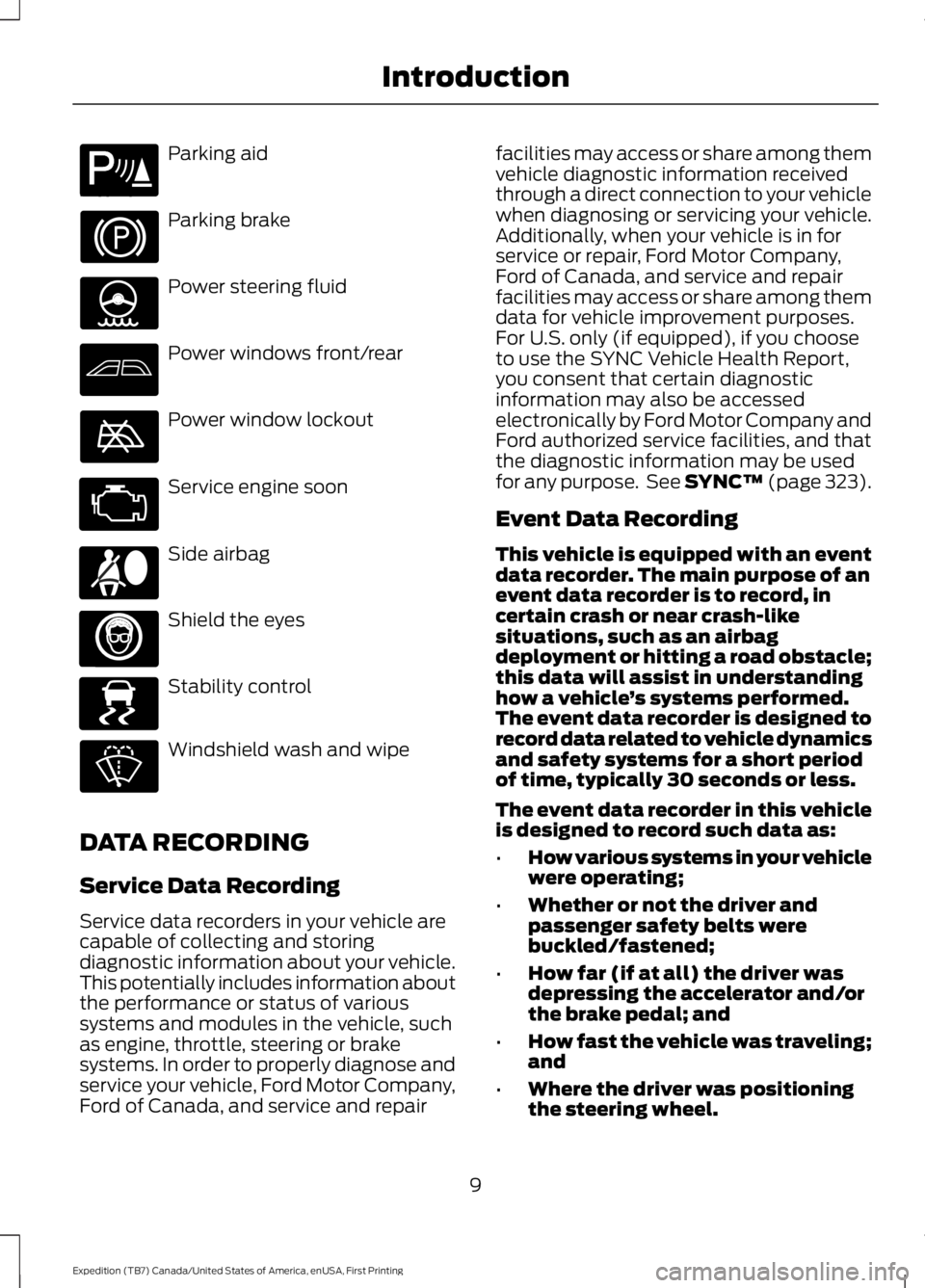
Parking aid
Parking brake
Power steering fluid
Power windows front/rear
Power window lockout
Service engine soon
Side airbag
Shield the eyes
Stability control
Windshield wash and wipe
DATA RECORDING
Service Data Recording
Service data recorders in your vehicle arecapable of collecting and storingdiagnostic information about your vehicle.This potentially includes information aboutthe performance or status of varioussystems and modules in the vehicle, suchas engine, throttle, steering or brakesystems. In order to properly diagnose andservice your vehicle, Ford Motor Company,Ford of Canada, and service and repair
facilities may access or share among themvehicle diagnostic information receivedthrough a direct connection to your vehiclewhen diagnosing or servicing your vehicle.Additionally, when your vehicle is in forservice or repair, Ford Motor Company,Ford of Canada, and service and repairfacilities may access or share among themdata for vehicle improvement purposes.For U.S. only (if equipped), if you chooseto use the SYNC Vehicle Health Report,you consent that certain diagnosticinformation may also be accessedelectronically by Ford Motor Company andFord authorized service facilities, and thatthe diagnostic information may be usedfor any purpose. See SYNC™ (page 323).
Event Data Recording
This vehicle is equipped with an eventdata recorder. The main purpose of anevent data recorder is to record, incertain crash or near crash-likesituations, such as an airbagdeployment or hitting a road obstacle;this data will assist in understandinghow a vehicle’s systems performed.The event data recorder is designed torecord data related to vehicle dynamicsand safety systems for a short periodof time, typically 30 seconds or less.
The event data recorder in this vehicleis designed to record such data as:
•How various systems in your vehiclewere operating;
•Whether or not the driver andpassenger safety belts werebuckled/fastened;
•How far (if at all) the driver wasdepressing the accelerator and/orthe brake pedal; and
•How fast the vehicle was traveling;and
•Where the driver was positioningthe steering wheel.
9
Expedition (TB7) Canada/United States of America, enUSA, First Printing
IntroductionE139213 E167012 E138639
Page 48 of 421
To start your vehicle remotely:
1. Press the lock button to lock all thedoors.
2. Press the remote start button twice.The exterior lamps flash twice.
The horn sounds if the system fails to start,unless quiet start is on. Quiet start runs theblower fan at a slower speed to reducenoise. You can switch this feature on or offin the information display. See GeneralInformation (page 92).
Note:If you remote start your vehicle withan integrated keyhead transmitter, you mustswitch the ignition on before driving yourvehicle. If you remote start your vehicle withan intelligent access transmitter, you mustpress the push button ignition switch on theinstrument panel once while applying thebrake pedal before driving your vehicle.
The power windows do not work duringremote start and the radio does not turnon automatically.
The parking lamps remain on and thevehicle runs for 5, 10 or 15 minutes,depending on the setting.
Extending the Engine Running Time
To extend the engine running time durationof your vehicle during remote start, repeatsteps 1 and 2 while the engine is running.If the duration is set to 10 minutes, theduration extends by another 10 minutes.For example, if your vehicle had beenrunning from the first remote start for 5minutes, your vehicle continues to run nowfor a total of 20 minutes. You can extendthe remote start up to a maximum of 35minutes.
Wait at least five seconds before remotestarting after the engine stops running.
Turning Your Vehicle Off After RemoteStarting
Press the button once. Theparking lamps turn off.
You may have to be closer to your vehicleto remotely switch off your vehicle afterremote starting. This is due to the addednoise of your running vehicle.
You can switch this feature on or off in theinformation display. See GeneralInformation (page 92).
Memory Feature (If Equipped)
You can use the remote control to recallmemory settings for the driver seat, powermirrors, power steering column and poweradjustable foot pedals. Press the unlockbutton on the remote control or unlockyour vehicle with the intelligent access keyto recall the memory positions. You canprogram the remote control or intelligentaccess key to recall memory positions. SeeMemory Function (page 126).
REPLACING A LOST KEY OR
REMOTE CONTROL
Replacement keys or remote controls canbe purchased from an authorized dealer.Authorized dealers can program remotecontrols for your vehicle. See PassiveAnti-Theft System (page 62).
45
Expedition (TB7) Canada/United States of America, enUSA, First Printing
Keys and Remote ControlsE138625
Page 70 of 421
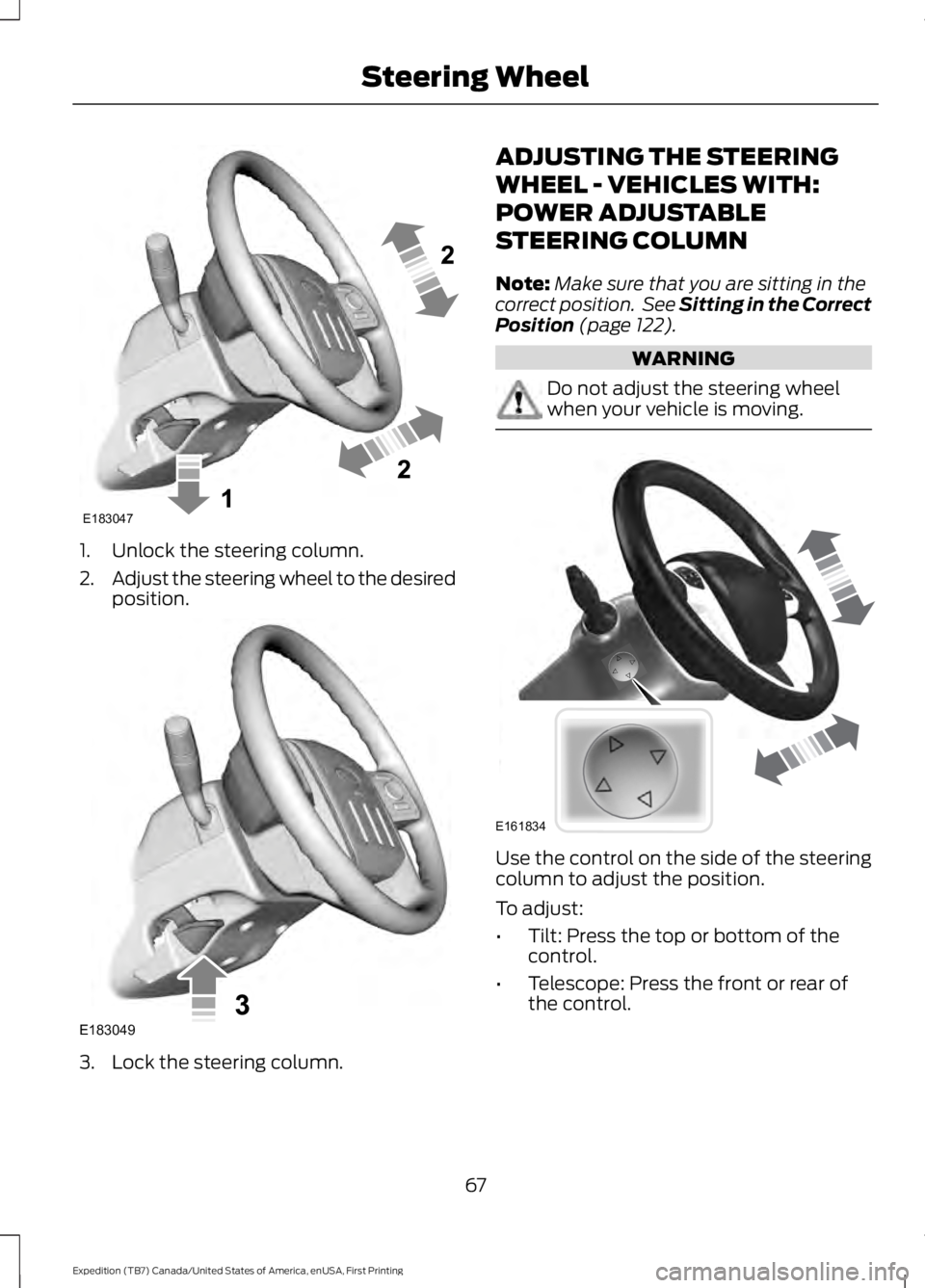
1. Unlock the steering column.
2.Adjust the steering wheel to the desiredposition.
3. Lock the steering column.
ADJUSTING THE STEERING
WHEEL - VEHICLES WITH:
POWER ADJUSTABLE
STEERING COLUMN
Note:Make sure that you are sitting in thecorrect position. See Sitting in the CorrectPosition (page 122).
WARNING
Do not adjust the steering wheelwhen your vehicle is moving.
Use the control on the side of the steeringcolumn to adjust the position.
To adjust:
•Tilt: Press the top or bottom of thecontrol.
•Telescope: Press the front or rear ofthe control.
67
Expedition (TB7) Canada/United States of America, enUSA, First Printing
Steering WheelE183047 E183049 E161834
Page 100 of 421
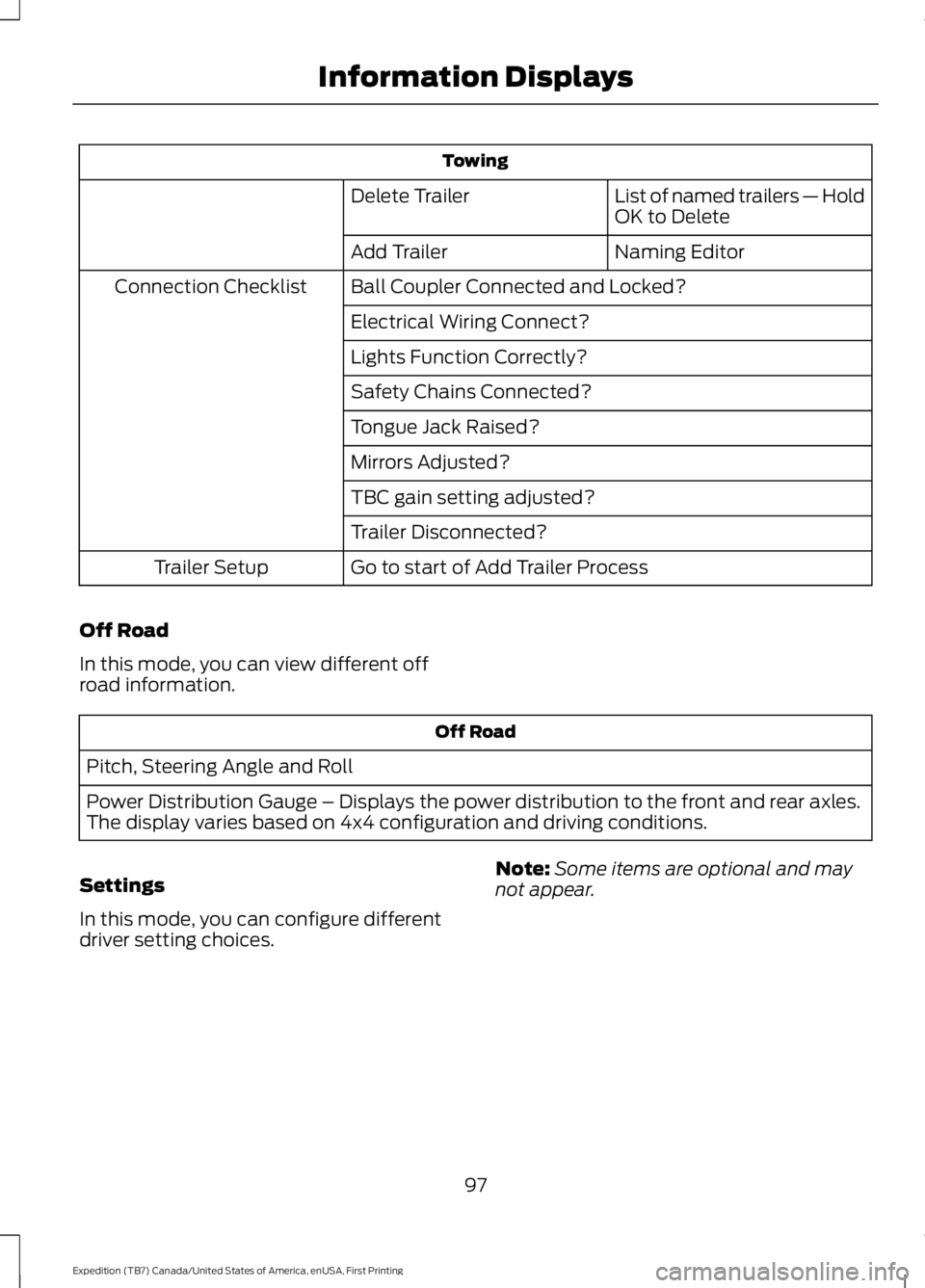
Towing
List of named trailers — HoldOK to DeleteDelete Trailer
Naming EditorAdd Trailer
Ball Coupler Connected and Locked?Connection Checklist
Electrical Wiring Connect?
Lights Function Correctly?
Safety Chains Connected?
Tongue Jack Raised?
Mirrors Adjusted?
TBC gain setting adjusted?
Trailer Disconnected?
Go to start of Add Trailer ProcessTrailer Setup
Off Road
In this mode, you can view different offroad information.
Off Road
Pitch, Steering Angle and Roll
Power Distribution Gauge – Displays the power distribution to the front and rear axles.The display varies based on 4x4 configuration and driving conditions.
Settings
In this mode, you can configure differentdriver setting choices.
Note:Some items are optional and maynot appear.
97
Expedition (TB7) Canada/United States of America, enUSA, First Printing
Information Displays
Page 112 of 421
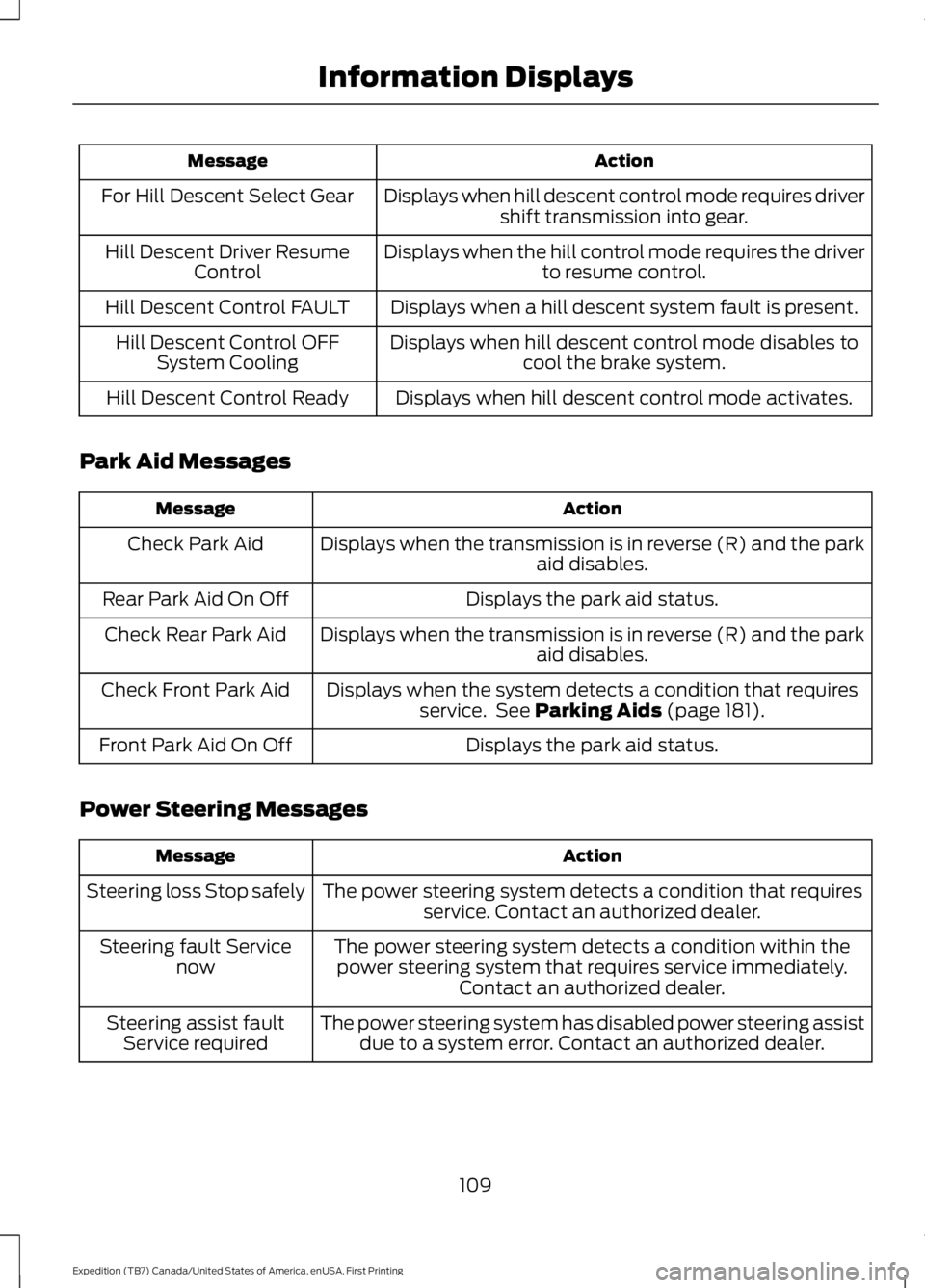
ActionMessage
Displays when hill descent control mode requires drivershift transmission into gear.For Hill Descent Select Gear
Displays when the hill control mode requires the driverto resume control.Hill Descent Driver ResumeControl
Displays when a hill descent system fault is present.Hill Descent Control FAULT
Displays when hill descent control mode disables tocool the brake system.Hill Descent Control OFFSystem Cooling
Displays when hill descent control mode activates.Hill Descent Control Ready
Park Aid Messages
ActionMessage
Displays when the transmission is in reverse (R) and the parkaid disables.Check Park Aid
Displays the park aid status.Rear Park Aid On Off
Displays when the transmission is in reverse (R) and the parkaid disables.Check Rear Park Aid
Displays when the system detects a condition that requiresservice. See Parking Aids (page 181).Check Front Park Aid
Displays the park aid status.Front Park Aid On Off
Power Steering Messages
ActionMessage
The power steering system detects a condition that requiresservice. Contact an authorized dealer.Steering loss Stop safely
The power steering system detects a condition within thepower steering system that requires service immediately.Contact an authorized dealer.
Steering fault Servicenow
The power steering system has disabled power steering assistdue to a system error. Contact an authorized dealer.Steering assist faultService required
109
Expedition (TB7) Canada/United States of America, enUSA, First Printing
Information Displays
Page 129 of 421
2. Continue pressing the control until itreaches the end of the seat track.
3.Continue pressing the control for abouttwo seconds. You will feel the seatbounce back slightly.
Power Lumbar (If Equipped)
The control is located on the outboard sideof the seat. Press the forward or rearwardside of the control for more or less support.
MEMORY FUNCTION (If Equipped)
WARNINGS
Before activating the seat memory,make sure that the area immediatelysurrounding the seat is clear ofobstructions and that all occupants areclear of moving parts.
Do not use the memory functionwhen your vehicle is moving.
This feature automatically recalls theposition of the following:
•Driver seat.
•Power mirrors.
•Power steering column.
•Optional power adjustable foot pedals.
The memory control is located on the leftside of the driver seat.
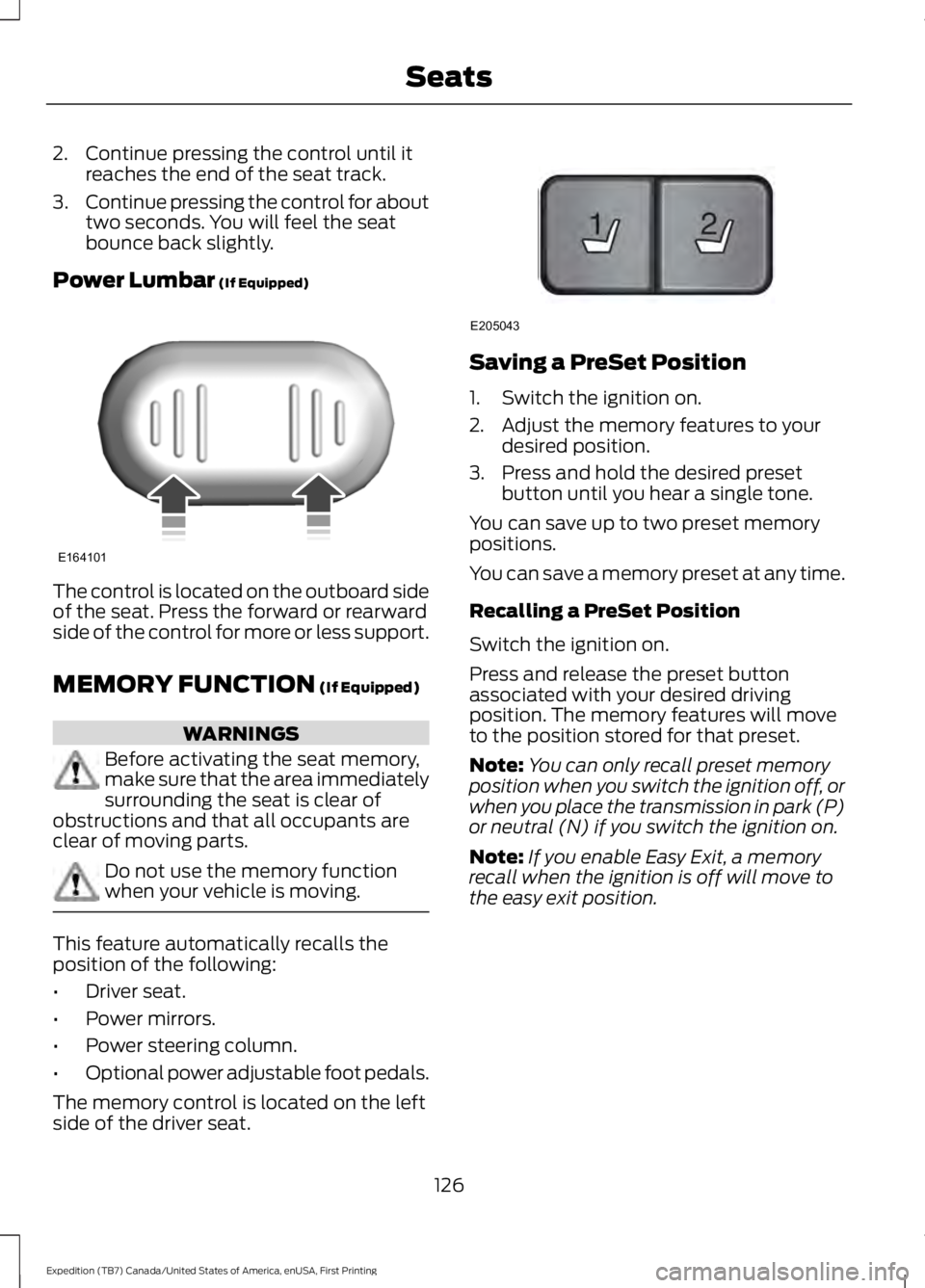
Saving a PreSet Position
1. Switch the ignition on.
2. Adjust the memory features to yourdesired position.
3. Press and hold the desired presetbutton until you hear a single tone.
You can save up to two preset memorypositions.
You can save a memory preset at any time.
Recalling a PreSet Position
Switch the ignition on.
Press and release the preset buttonassociated with your desired drivingposition. The memory features will moveto the position stored for that preset.
Note:You can only recall preset memoryposition when you switch the ignition off, orwhen you place the transmission in park (P)or neutral (N) if you switch the ignition on.
Note:If you enable Easy Exit, a memoryrecall when the ignition is off will move tothe easy exit position.
126
Expedition (TB7) Canada/United States of America, enUSA, First Printing
SeatsE164101 21
E205043