2016 FORD EXPEDITION EL display
[x] Cancel search: displayPage 189 of 421
PRINCIPLE OF OPERATION
Cruise control lets you maintain a setspeed without keeping your foot on theaccelerator pedal. You can use cruisecontrol when your vehicle speed is greaterthan 20 mph (30 km/h).
USING CRUISE CONTROL
WARNINGS
Do not use cruise control on windingroads, in heavy traffic or when theroad surface is slippery. This couldresult in loss of vehicle control, seriousinjury or death.
When you are going downhill, yourvehicle speed may increase abovethe set speed. The system will notapply the brakes but a warning displays.Failure to follow this warning could resultin serious personal injury or death.
Note:Cruise control will disengage if thevehicle speed decreases more than 10 mph(16 km/h) below the set speed while drivinguphill.
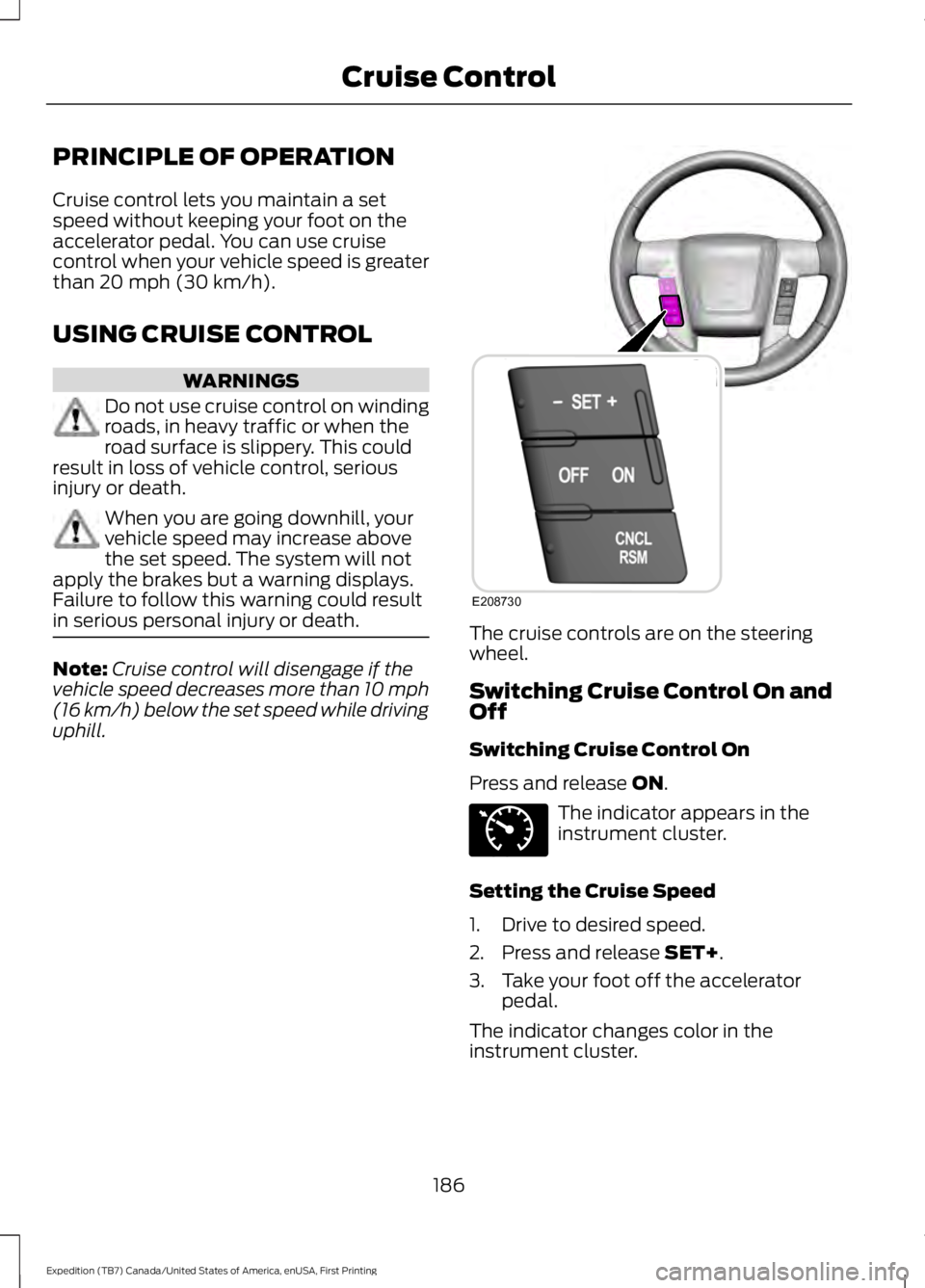
The cruise controls are on the steeringwheel.
Switching Cruise Control On andOff
Switching Cruise Control On
Press and release ON.
The indicator appears in theinstrument cluster.
Setting the Cruise Speed
1. Drive to desired speed.
2. Press and release SET+.
3. Take your foot off the acceleratorpedal.
The indicator changes color in theinstrument cluster.
186
Expedition (TB7) Canada/United States of America, enUSA, First Printing
Cruise ControlE208730 E71340
Page 190 of 421
Changing the Set Speed
Note: If you accelerate by pressing theaccelerator pedal, the set speed will notchange. When you release the acceleratorpedal, your vehicle returns to the speed thatyou previously set.
•Press and release SET+ or SET-. Whenyou select km/h as the displaymeasurement in the Informationdisplay the set speed changes inapproximately 2 km/h increments.When you select mph as the displaymeasurement in the informationdisplay the set speed changes inapproximately 1 mph increments.
•Press the accelerator or brake pedaluntil you reach the desired speed. Pressand release SET +.
•Press and hold SET+ or SET-. Releasethe control when you reach the desiredspeed.
Canceling the Set Speed
Press and release CNCL or tap the brakepedal. The set speed does not erase.
Resuming the Set Speed
Press and release RSM.
Switching Cruise Control Off
Press and release OFF when the systemis in stand by mode or switch the ignitionoff.
Note:You erase the set speed when youswitch the system off.
187
Expedition (TB7) Canada/United States of America, enUSA, First Printing
Cruise Control
Page 193 of 421

If the system detects a degradedperformance condition, a message warningof a blocked sensor will appear in theinformation display. Also the BLIS alertindicators will remain ON and BLIS will nolonger provide any vehicle warnings. Youcan clear the information display warningbut the alert indicators will remainilluminated.
A "blocked" condition can be cleared intwo ways:
•After the blockage in front of thesensors is removed or therainfall/snowfall rate decreases orstops, drive for a few minutes in trafficto allow the sensors to detect passingvehicles.
•By cycling the ignition from ON to OFFand then back ON.
Note:If your vehicle has a tow bar with afactory equipped trailer tow module and itis towing a trailer, the sensors willautomatically turn the Blind SpotInformation System off. If your vehicle hasa tow bar but no factory equipped trailertow module, it is recommended to turn theBlind Spot Information System offmanually. Operating the Blind SpotInformation System with a trailer attachedwill cause poor system performance.
System Errors
If the system senses a problem with theleft or right sensor, the telltale willilluminate and a message will appear inthe information display. See InformationMessages (page 103).
Switching the System Off and On
You can temporarily switch the Blind SpotInformation System off in the informationdisplay. See General Information (page92). When the Blind Spot InformationSystem switches off, you will not receivealerts and the information display showsa system off message. The telltale in thecluster also illuminates. When you switchthe Blind Spot Information System on oroff, the alert indicators flash twice.
Note:The Blind Spot Information Systemremembers the last selected on or offsetting.
You can also have the Blind SpotInformation System switched offpermanently at an authorized dealer. Onceswitched off permanently, the system canonly be switched back on at an authorizeddealer.
CROSS TRAFFIC ALERT
WARNING
To help avoid personal injury, NEVERuse the Cross Traffic Alert system asa replacement for using the interiorand exterior mirrors and looking over yourshoulder before backing out of a parkingspace. Cross Traffic Alert is not areplacement for careful driving.
Cross Traffic Alert is designed to warn youof vehicles approaching from the sideswhen the transmission is in reverse (R).
Using the System
Cross Traffic Alert turns on when you startthe engine and you shift into reverse (R).Once shifted out of reverse (R), CrossTraffic Alert turns off.
Note:Cross Traffic Alert only functionswhile your transmission is in reverse (R).
190
Expedition (TB7) Canada/United States of America, enUSA, First Printing
Driving Aids
Page 195 of 421

Zone coverage also decreases whenparking at shallow angles. Here, the leftsensor is mostly obstructed; zone coverageon that side is severely limited.
System Lights, Messages andAudible Alerts
The Cross Traffic Alert illuminates anamber alert indicator in the outside mirroron the side of your vehicle the approachingvehicle is coming from. Cross Traffic Alertalso sounds an audible alert and amessage appears in the informationdisplay indicating a vehicle is coming fromthe right or left. Cross Traffic Alert workswith the reverse sensing system thatsounds its own series of tones. See RearParking Aid (page 181).
The system uses radar sensors that arelocated behind the bumper fascia on eachside of your vehicle. Do not allow mud,snow or bumper stickers to obstruct theseareas, this can cause degraded systemperformance. See Blind SpotInformation System (page 188). If theBlind Spot Information System is blocked,Cross Traffic Alert is also blocked. Acorresponding message appears in theinformation display as soon as you shiftthe transmission into reverse (R).
System Limitations
Cross Traffic Alert has its limitations;situations such as severe weatherconditions or debris build-up on the sensorarea may limit vehicle detection.
192
Expedition (TB7) Canada/United States of America, enUSA, First Printing
Driving AidsE142442 E205199
Page 196 of 421

The following are other situations that maylimit the Cross Traffic Alert performance:
•Adjacently parked vehicles or objectsobstructing the sensors.
•Approaching vehicles passing atspeeds greater than 37 mph(60 km/h).
•Driving in reverse faster than 7 mph(12 km/h).
•Backing out of an angled parking spot.
False Alerts
Note:If your vehicle has a tow bar with afactory equipped trailer tow module and itis towing a trailer, the sensors willautomatically turn the Cross Traffic Alertoff. If your vehicle has a tow bar but nofactory equipped trailer tow module, it isrecommended to turn the Cross Traffic Alertoff manually. Operating Cross Traffic Alertwith a trailer attached will cause poor CrossTraffic Alert performance.
There may be certain instances when thereis a false alert by the Cross Traffic Alertsystem that illuminates the alert indicatorwith no vehicle in the coverage zone. Someamount of false alerts are normal; they aretemporary and self-correct.
System Errors
If Cross Traffic Alert senses a problem withthe left or right sensor a message willappear in the information display. SeeInformation Messages (page 103).
Switching the System Off and On
You can temporarily switch Cross TrafficAlert off in the information display. SeeGeneral Information (page 92). Whenyou switch Cross Traffic Alert off, you willnot receive alerts and the informationdisplay will display a system off message.
Note:The Cross Traffic Alert switches onwhenever the ignition is switched on andready to provide appropriate alerts whenthe transmission is in reverse (R). CrossTraffic Alert will not remember the lastselected on or off setting.
You can also have Cross Traffic Alertswitched off permanently at an authorizeddealer. Once switched off permanently,the system can only be switched back onat an authorized dealer.
STEERING
Electric Power Steering
WARNINGS
The electric power steering systemhas diagnostic checks thatcontinuously monitor the system. Ifa fault is detected, a message displays inthe information display. Stop your vehicleas soon as it is safe to do so. Switch theignition off. After at least 10 seconds,switch the ignition on and watch theinformation display for a steering systemwarning message. If a steering systemwarning message returns, have the systemchecked by an authorized dealer.
If the system detects an error, youmay not feel a difference in thesteering, however a serious conditionmay exist. Obtain immediate service froman authorized dealer, failure to do so mayresult in loss of steering control.
Your vehicle has an electric power steeringsystem. There is no fluid reservoir. Nomaintenance is required.
If your vehicle loses electrical power whileyou are driving, electric power steeringassistance is lost. The steering system stilloperates and you can steer your vehiclemanually. Manually steering your vehiclerequires more effort.
193
Expedition (TB7) Canada/United States of America, enUSA, First Printing
Driving Aids
Page 197 of 421
Extreme continuous steering may increasethe effort required for you to steer yourvehicle. This increased effort preventsoverheating and permanent damage tothe steering system. You do not lose theability to steer your vehicle manually.Typical steering and driving maneuversallow the system to cool and return tonormal operation.
Steering Tips
If the steering wanders or pulls, check for:
•Correct tire pressures.
•Uneven tire wear.
•Loose or worn suspensioncomponents.
•Loose or worn steering components.
•Improper vehicle alignment.
Note:A high crown in the road or highcrosswinds may also make the steeringseem to wander or pull.
Adaptive Learning
The electronic power steering systemadaptive learning helps correct roadirregularities and improves overall handlingand steering feel. It communicates withthe brake system to help operateadvanced stability control and accidentavoidance systems. Additionally, wheneverthe battery is disconnected or a newbattery installed, you must drive yourvehicle a short distance before the systemrelearns the strategy and reactivates allsystems.
DRIVE CONTROL
Driver Select Suspension
Driver select suspension delivers a uniquedriving experience through a suite ofsophisticated electronic vehicle systems.These systems continuously monitor yourdriving inputs and the road conditions tooptimize ride comfort, steering andhandling.
Driver select suspension consists of thefollowing systems:
•Continuously controlled dampingdynamically adjusts the shockabsorbers stiffness in real time tomatch the road surface and driverinputs. This system continuouslymonitors your vehicle’s motion (roll,pitch, bounce), suspension position,load, speed, road conditions, andsteering to adjust the suspensiondamping for optimal vehicle control.
•Electronically power-assisted steeringadjusts steering effort and feel basedon your vehicle speed and your inputs.
The configuration remains active untilmodified from the main menu on theinformation display. See GeneralInformation (page 92).
194
Expedition (TB7) Canada/United States of America, enUSA, First Printing
Driving Aids
Page 198 of 421
Modes:
•Comfort – Provides a more relaxeddriving experience, maximizing comfort.Your steering effort decreases and thesuspension movement is more fluid.Comfort mode is ideal when you desireenhanced traveling comfort.
•Normal – Delivers a balancedcombination of comfortable, controlledride and confident handling. This modeprovides an engaging drive experienceand a direct connection to the roadwithout sacrificing any of thecomposure demanded from yourvehicle.
•Sport – Provides a sportier drivingexperience. The suspension stiffens,with an emphasis on handling andcontrol. The engine responds moredirectly to your inputs. Sport mode isideal for use during more spiriteddriving.
Adaptive Steering
You can configure which of the modes areactive from the main menu on theinformation display. See GeneralInformation (page 92).
Modes:
•Normal – Default factory setting.
•Sport – Slightly higher effort requiredfor steering with more road force feltthrough the steering wheel.
Note:The Drive Control has diagnosticchecks that continuously monitor thesystem to ensure proper operation. Certaintypes of system errors will gray out themode selections within the informationdisplay, preventing you from changing stateswhen the gear position is changed. Othertypes of errors will produce a temporarymessage that states a malfunction. If eithercondition persists for multiple key cycles,have your vehicle checked by an authorizeddealer.
SELF-LEVELING SUSPENSION
The self-leveling suspension system isdesigned to improve ride, handling andgeneral vehicle performance during:
•Certain road conditions
•Steering maneuvers
•Braking
•Acceleration
•Towing
This system keeps the rear of your vehicleat a constant level through a hydraulicpump inside each rear shock. Dependingon the payload or road surface conditionsit will take approximately 2 mi (3.2 km) forthe leveling to complete.
If the loaded vehicle is not moved forapproximately 12 hours, the leveling systemmay bleed down to a lower height. Thiscan be especially apparent if a trailer is leftattached to the parked vehicle for longperiods of time. You must drive your vehiclein order to re-level the suspension.
If a self-equalizing hitch is used, yourvehicle should be driven approximately2 mi (3.2 km) with the trailer prior toadjusting (leveling) the hitch.
195
Expedition (TB7) Canada/United States of America, enUSA, First Printing
Driving Aids
Page 209 of 421

RV & Trailer Towing Guide Online
http://www.fleet.ford.com/towing-guides/Website
TRAILER SWAY CONTROL
WARNING
Turning off trailer sway controlincreases the risk of loss of vehiclecontrol, serious injury or death. Forddoes not recommend disabling this featureexcept in situations where speed reductionmay be detrimental (such as hill climbing),the driver has significant trailer towingexperience, and can control trailer swayand maintain safe operation.
Note:This feature does not prevent trailersway, but reduces it once it begins.
Note:This feature cannot stop all trailersfrom swaying.
Note:In some cases, if vehicle speed is toohigh, the system may activate multipletimes, gradually reducing vehicle speed.
This feature applies your vehicle brakes atindividual wheels and, if necessary, reducesengine power. If the trailer begins to sway,the stability control light flashes and themessage TRAILER SWAY REDUCESPEED appears in the information display.The first thing to do is slow your vehicledown, then pull safely to the side of theroad and check for proper tongue load andtrailer load distribution. See LoadCarrying (page 196).
RECOMMENDED TOWING
WEIGHTS
Note:Do not exceed the trailer weight foryour vehicle configuration listed in the chartbelow.
Note:Make sure to take into considerationtrailer frontal area. Do not exceed 36.5 feet²(3.39 meters²) if your vehicle is equippedwith the standard towing package, or 60feet² (5.57 meters²) if your vehicle isequipped with the optional heavy dutypackage.
Note:Exceeding this limitation maysignificantly reduce the performance of yourtowing vehicle. Selecting a trailer with a lowaerodynamic drag and rounded front designhelps optimize performance and fueleconomy.
Note:For high altitude operation, reducethe gross combined weight by 2% per 1000feet (300 meters) starting at the 1000 foot(300 meter) elevation point.
Note:Certain states require electric trailerbrakes for trailers over a specified weight.Be sure to check state regulations for thisspecified weight. The maximum trailerweights listed may be limited to thisspecified weight, as the vehicle’s electricalsystem may not include the wiringconnector needed to activate electric trailerbrakes.
Your vehicle may tow a trailer provided themaximum trailer weight is less than orequal to the maximum trailer weight listedfor your vehicle configuration on thefollowing chart.
206
Expedition (TB7) Canada/United States of America, enUSA, First Printing
Towing