2016 FORD EXPEDITION EL display
[x] Cancel search: displayPage 320 of 421
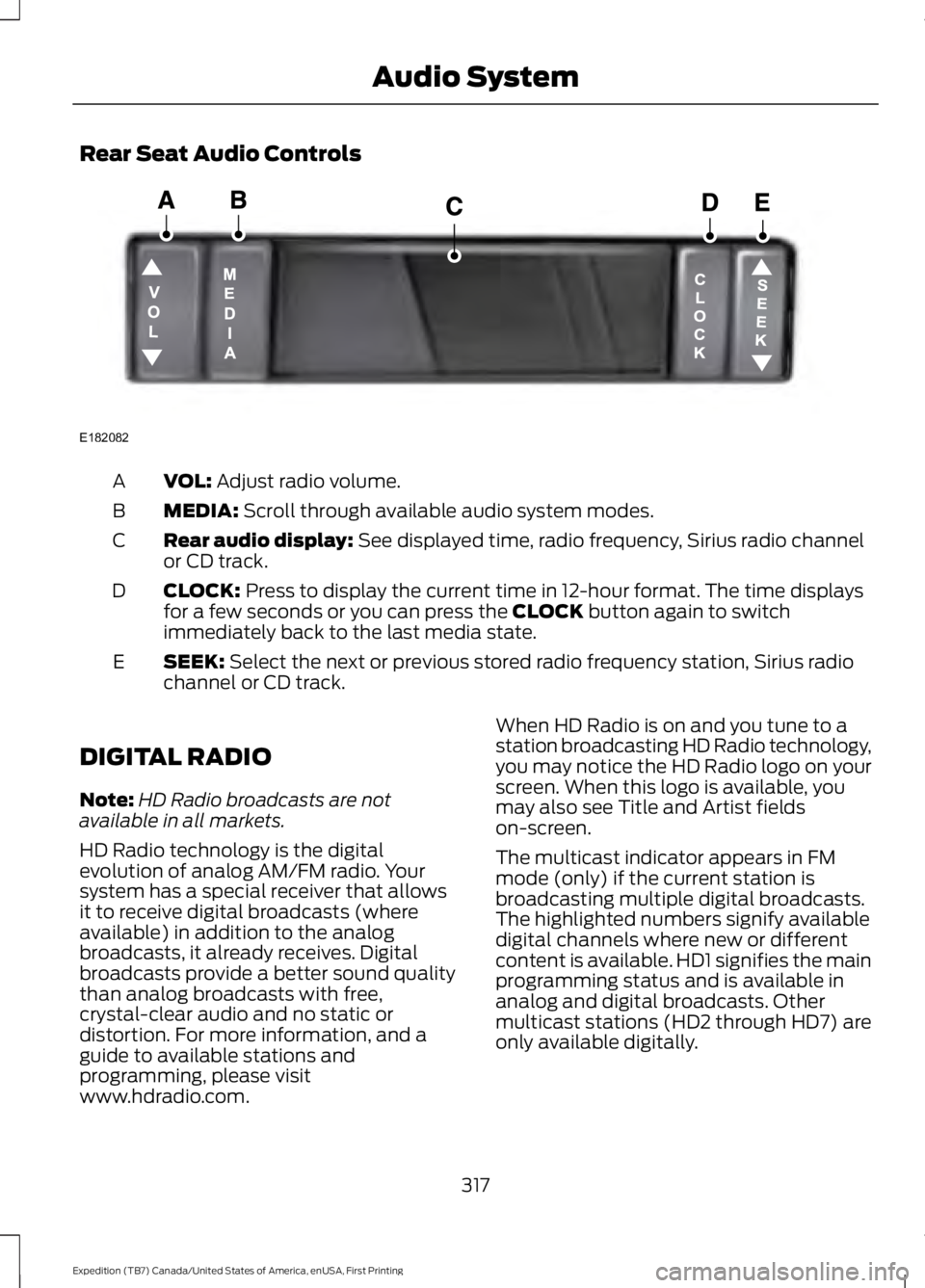
Rear Seat Audio Controls
VOL: Adjust radio volume.A
MEDIA: Scroll through available audio system modes.B
Rear audio display: See displayed time, radio frequency, Sirius radio channelor CD track.C
CLOCK: Press to display the current time in 12-hour format. The time displaysfor a few seconds or you can press the CLOCK button again to switchimmediately back to the last media state.
D
SEEK: Select the next or previous stored radio frequency station, Sirius radiochannel or CD track.E
DIGITAL RADIO
Note:HD Radio broadcasts are notavailable in all markets.
HD Radio technology is the digitalevolution of analog AM/FM radio. Yoursystem has a special receiver that allowsit to receive digital broadcasts (whereavailable) in addition to the analogbroadcasts, it already receives. Digitalbroadcasts provide a better sound qualitythan analog broadcasts with free,crystal-clear audio and no static ordistortion. For more information, and aguide to available stations andprogramming, please visitwww.hdradio.com.
When HD Radio is on and you tune to astation broadcasting HD Radio technology,you may notice the HD Radio logo on yourscreen. When this logo is available, youmay also see Title and Artist fieldson-screen.
The multicast indicator appears in FMmode (only) if the current station isbroadcasting multiple digital broadcasts.The highlighted numbers signify availabledigital channels where new or differentcontent is available. HD1 signifies the mainprogramming status and is available inanalog and digital broadcasts. Othermulticast stations (HD2 through HD7) areonly available digitally.
317
Expedition (TB7) Canada/United States of America, enUSA, First Printing
Audio SystemE182082
Page 323 of 421

Note:This receiver includes the eCosreal-time operating system. eCos ispublished under the eCos License.
Satellite Radio Reception Factors
Potential satellite radio reception issues
For optimal reception performance, keep the antennaclear of snow and ice build-up and keep luggage and othermaterial as far away from the antenna as possible.
Antenna obstructions
Hills, mountains, tall buildings, bridges, tunnels, freewayoverpasses, parking garages, dense tree foliage andthunderstorms can interfere with your reception.
Terrain
When you pass a ground-based broadcast-repeatingtower, a stronger signal may overtake a weaker one andthe audio system may mute.
Station overload
Your display may show ACQUIRING . . . to indicate theinterference and the audio system may mute.Satellite radio signal interfer-ence
SIRIUS® Satellite Radio Service
Note:SIRIUS reserves the unrestricted rightto change, rearrange, add or deleteprogramming including canceling, movingor adding particular channels, and its prices,at any time, with or without notice to you.Ford Motor Company shall not beresponsible for any such programmingchanges.
SIRIUS satellite radio is asubscription-based satellite radio servicethat broadcasts a variety of music, sports,news, weather, traffic and entertainmentprogramming. Your factory-installedSIRIUS satellite radio system includeshardware and a limited subscription term,which begins on the date of sale or leaseof your vehicle. See an authorized dealerfor availability.
For more information on extendedsubscription terms (a service fee isrequired), the online media player and acomplete list of SIRIUS satellite radiochannels, and other features, please visitwww.siriusxm.com in the United States,www.siriusxm.ca in Canada, or call SIRIUSat 1-888-539-7474.
Satellite Radio Electronic SerialNumber (ESN)
You need your ESN to activate, modify ortrack your satellite radio account. When insatellite radio mode, tune to channel 0.
320
Expedition (TB7) Canada/United States of America, enUSA, First Printing
Audio SystemE208625
Page 331 of 421
USING SYNC™ WITH YOUR
PHONE
Hands-free calling is one of the mainfeatures of SYNC. While the systemsupports a variety of features, many aredependent on your cell phone'sfunctionality. At a minimum, most cellphones with Bluetooth wireless technologysupport the following functions:
•Answering an incoming call.
•Ending a call.
•Using privacy mode.
•Dialing a number.
•Redialing.
•Call waiting notification.
•Caller ID.
Other features, such as text messagingusing Bluetooth and automatic phonebookdownload, are cell phone-dependentfeatures. To check your cell phone'scompatibility, see your cell phone's manualand visit www.SYNCMyRide.com,www.SYNCMyRide.ca orwww.syncmaroute.ca.
Pairing a Cell Phone for the FirstTime
Note:SYNC can support downloading upto approximately 1000 entries perBluetooth-enabled cell phone.
Note:Make sure to switch on the ignitionand the radio. Put the transmission inposition park (P) (automatic transmission)or neutral with the parking brake applied(manual transmission).
Note:To scroll through the menus, pressthe up and down arrows on your audiosystem.
Wirelessly pairing your cell phone withSYNC allows you to make and receivehands-free calls.
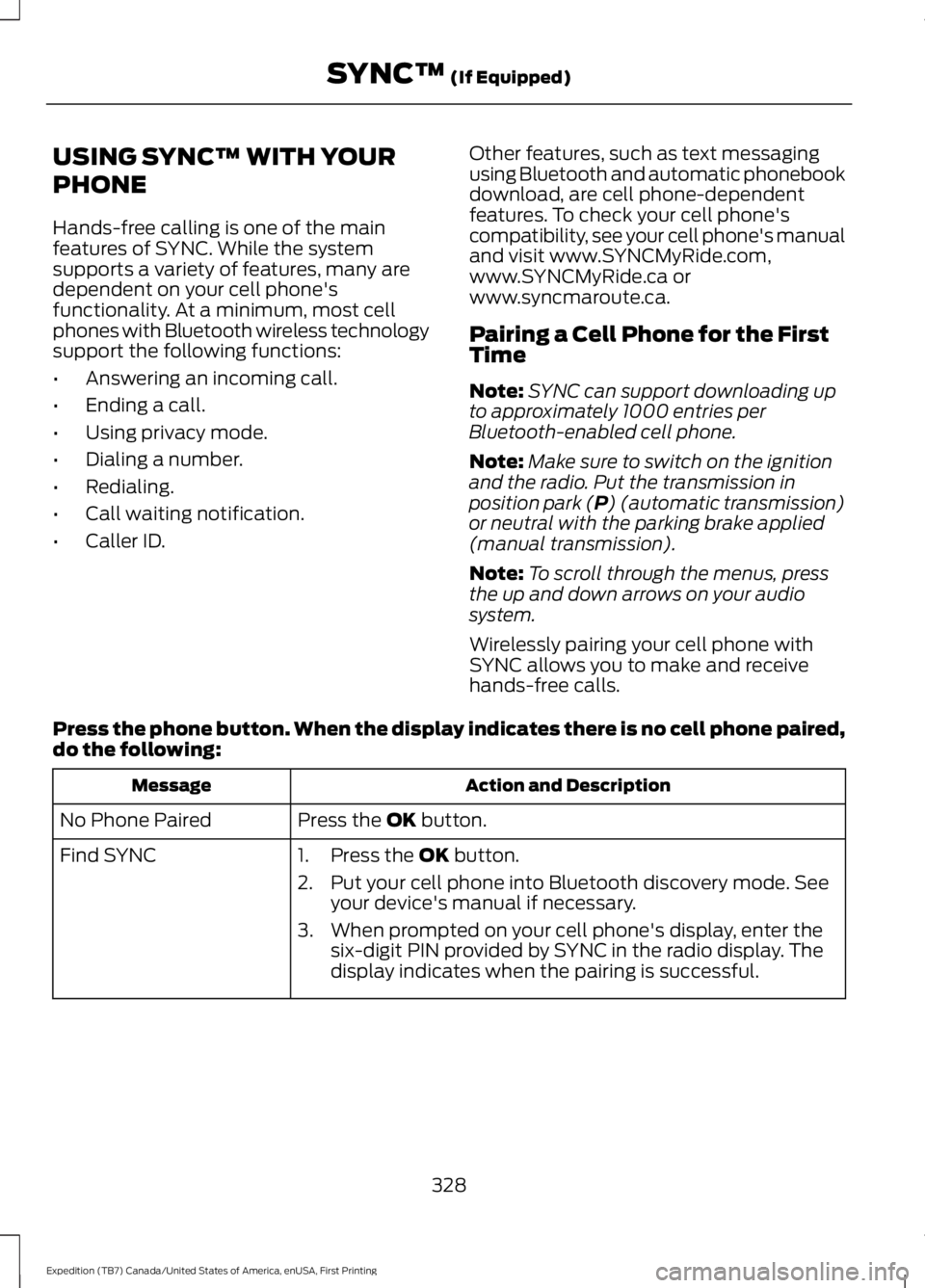
Press the phone button. When the display indicates there is no cell phone paired,do the following:
Action and DescriptionMessage
Press the OK button.No Phone Paired
Find SYNC1. Press the OK button.
2. Put your cell phone into Bluetooth discovery mode. Seeyour device's manual if necessary.
3. When prompted on your cell phone's display, enter thesix-digit PIN provided by SYNC in the radio display. Thedisplay indicates when the pairing is successful.
328
Expedition (TB7) Canada/United States of America, enUSA, First Printing
SYNC™ (If Equipped)
Page 332 of 421
Depending on your cell phone's capabilityand your market, the system may promptyou with questions, such as setting thecurrent cell phone as the primary cellphone (the cell phone SYNC automaticallytries to connect with first upon vehiclestart-up) and downloading yourphonebook.
Pairing Subsequent Cell Phones
Note:To scroll through the menus, pressthe up and down arrows on your audiosystem.
Note:Make sure to switch on the ignitionand the radio. Put the transmission inposition park (P) (automatic transmission)or neutral with the parking brake applied(manual transmission).
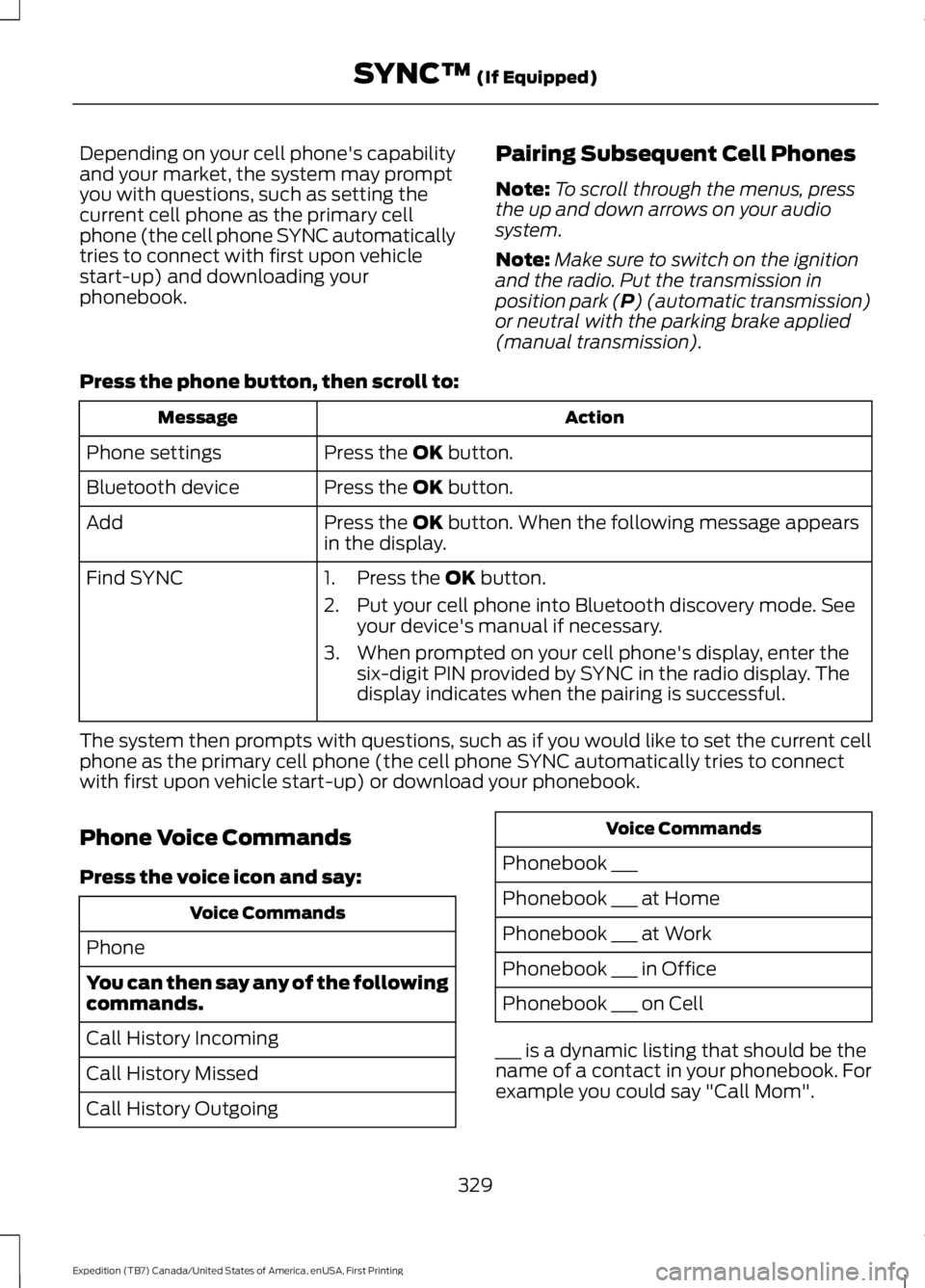
Press the phone button, then scroll to:
ActionMessage
Press the OK button.Phone settings
Press the OK button.Bluetooth device
Press the OK button. When the following message appearsin the display.Add
Find SYNC1. Press the OK button.
2. Put your cell phone into Bluetooth discovery mode. Seeyour device's manual if necessary.
3. When prompted on your cell phone's display, enter thesix-digit PIN provided by SYNC in the radio display. Thedisplay indicates when the pairing is successful.
The system then prompts with questions, such as if you would like to set the current cellphone as the primary cell phone (the cell phone SYNC automatically tries to connectwith first upon vehicle start-up) or download your phonebook.
Phone Voice Commands
Press the voice icon and say:
Voice Commands
Phone
You can then say any of the followingcommands.
Call History Incoming
Call History Missed
Call History Outgoing
Voice Commands
Phonebook ___
Phonebook ___ at Home
Phonebook ___ at Work
Phonebook ___ in Office
Phonebook ___ on Cell
___ is a dynamic listing that should be thename of a contact in your phonebook. Forexample you could say "Call Mom".
329
Expedition (TB7) Canada/United States of America, enUSA, First Printing
SYNC™ (If Equipped)
Page 333 of 421

You can also say any of the following:
Voice Command
Call ___
Call ___ at Home
Call ___ at Work
Call ___ in Office
Call ___ on Mobile
Call ___ on Other
Dial
None of these commands are availableuntil your cell phone information iscompletely downloaded using Bluetooth.
___ is a dynamic listing that should be thename of a contact in your phonebook. Forexample you could say "Call Mom".
The following commands are onlyavailable during active calls:
Voice Commands
Go To Privacy
Hold
Join
Phone Menu Commands
To access the phone menu with voicecommands, press the voice button andwhen prompted say:
Voice Command
[Phone] Menu
You can then say any of the following:
[Phone] Connections | [Media] Connec-tions | [Bluetooth] Connections
Voice Command
[Phone] Settings [Message] NotificationOn
[Phone] Settings [Message] NotificationOff
[Phone] Settings [Set] Phone Ringer
[Phone] Settings [Set] Ringer 1
[Phone] Settings [Set] Ringer 2
[Phone] Settings [Set] Ringer 3
[Phone] Settings [Set] Ringer Off
Battery
Phone Name
Signal
Text Message Inbox
Send [New] Text Message
You do not need to say word containedwithin brackets for the system tounderstand your command.
Note:To exit dial mode, press and hold thephone button or press MENU to go to thePHONE menu.
Phonebook Commands
When you ask SYNC to access content, forexample the phonebook name or number,the requested information appears in thedisplay to view.
330
Expedition (TB7) Canada/United States of America, enUSA, First Printing
SYNC™ (If Equipped)
Page 335 of 421
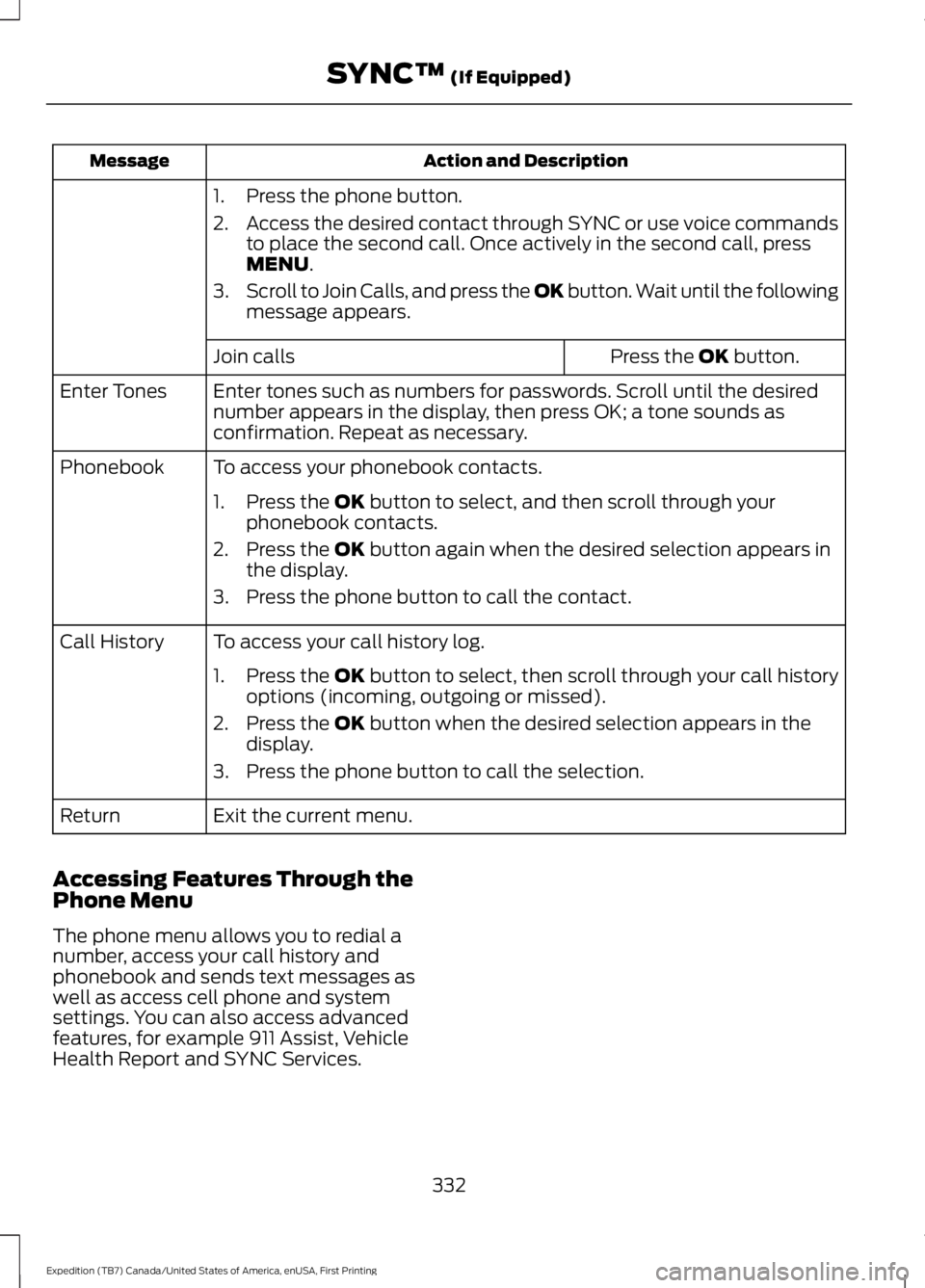
Action and DescriptionMessage
1. Press the phone button.
2.Access the desired contact through SYNC or use voice commandsto place the second call. Once actively in the second call, pressMENU.
3.Scroll to Join Calls, and press the OK button. Wait until the followingmessage appears.
Press the OK button.Join calls
Enter tones such as numbers for passwords. Scroll until the desirednumber appears in the display, then press OK; a tone sounds asconfirmation. Repeat as necessary.
Enter Tones
To access your phonebook contacts.Phonebook
1. Press the OK button to select, and then scroll through yourphonebook contacts.
2. Press the OK button again when the desired selection appears inthe display.
3. Press the phone button to call the contact.
To access your call history log.Call History
1.Press the OK button to select, then scroll through your call historyoptions (incoming, outgoing or missed).
2. Press the OK button when the desired selection appears in thedisplay.
3. Press the phone button to call the selection.
Exit the current menu.Return
Accessing Features Through thePhone Menu
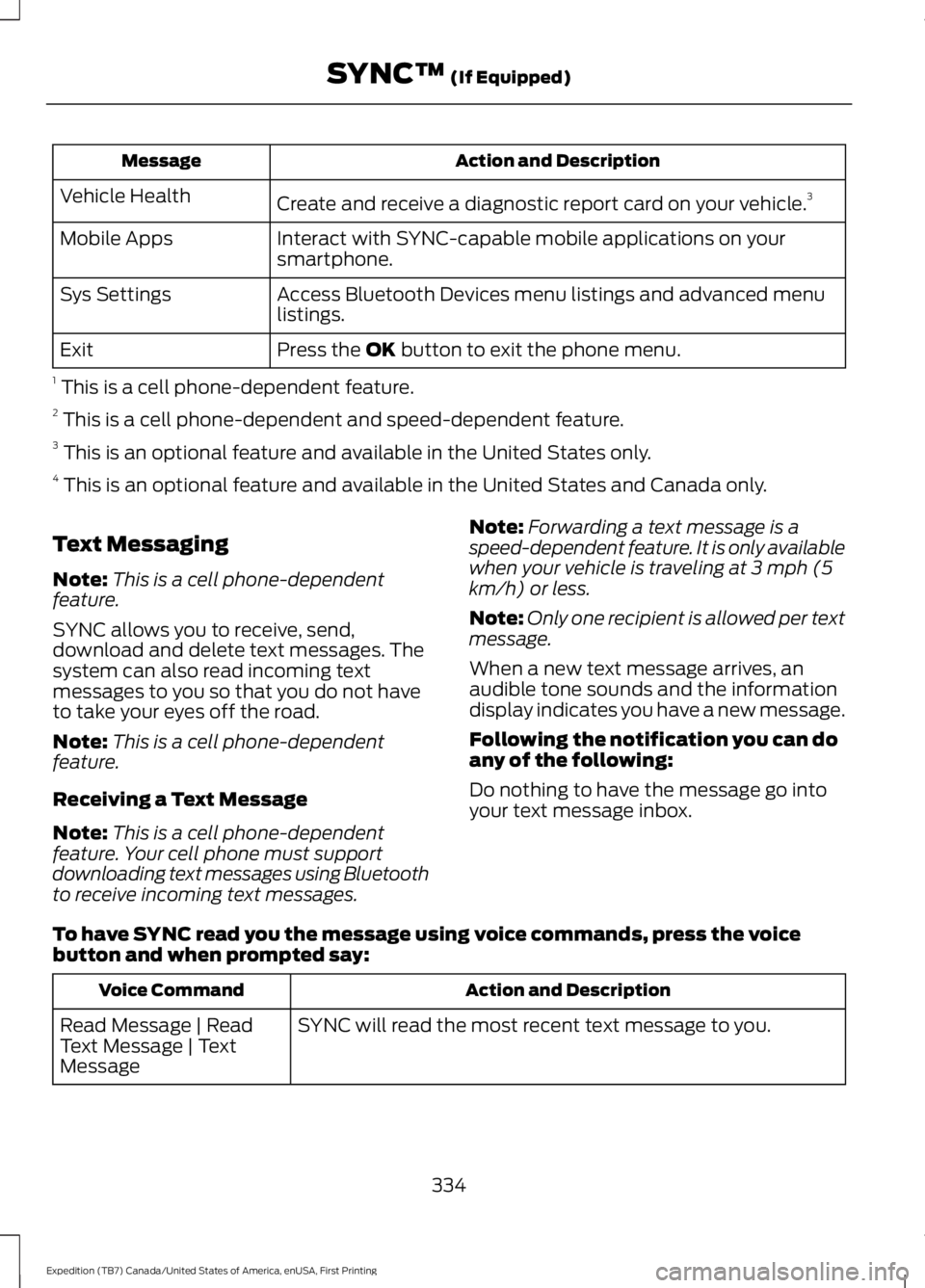
The phone menu allows you to redial anumber, access your call history andphonebook and sends text messages aswell as access cell phone and systemsettings. You can also access advancedfeatures, for example 911 Assist, VehicleHealth Report and SYNC Services.
332
Expedition (TB7) Canada/United States of America, enUSA, First Printing
SYNC™ (If Equipped)
Page 337 of 421
Action and DescriptionMessage
Create and receive a diagnostic report card on your vehicle.3Vehicle Health
Interact with SYNC-capable mobile applications on yoursmartphone.Mobile Apps
Access Bluetooth Devices menu listings and advanced menulistings.Sys Settings
Press the OK button to exit the phone menu.Exit
1 This is a cell phone-dependent feature.2 This is a cell phone-dependent and speed-dependent feature.3 This is an optional feature and available in the United States only.4 This is an optional feature and available in the United States and Canada only.
Text Messaging
Note:This is a cell phone-dependentfeature.
SYNC allows you to receive, send,download and delete text messages. Thesystem can also read incoming textmessages to you so that you do not haveto take your eyes off the road.
Note:This is a cell phone-dependentfeature.
Receiving a Text Message
Note:This is a cell phone-dependentfeature. Your cell phone must supportdownloading text messages using Bluetoothto receive incoming text messages.
Note:Forwarding a text message is aspeed-dependent feature. It is only availablewhen your vehicle is traveling at 3 mph (5km/h) or less.
Note:Only one recipient is allowed per textmessage.
When a new text message arrives, anaudible tone sounds and the informationdisplay indicates you have a new message.
Following the notification you can doany of the following:
Do nothing to have the message go intoyour text message inbox.
To have SYNC read you the message using voice commands, press the voicebutton and when prompted say:
Action and DescriptionVoice Command
SYNC will read the most recent text message to you.Read Message | ReadText Message | TextMessage
334
Expedition (TB7) Canada/United States of America, enUSA, First Printing
SYNC™ (If Equipped)
Page 339 of 421
Action and DescriptionMessage
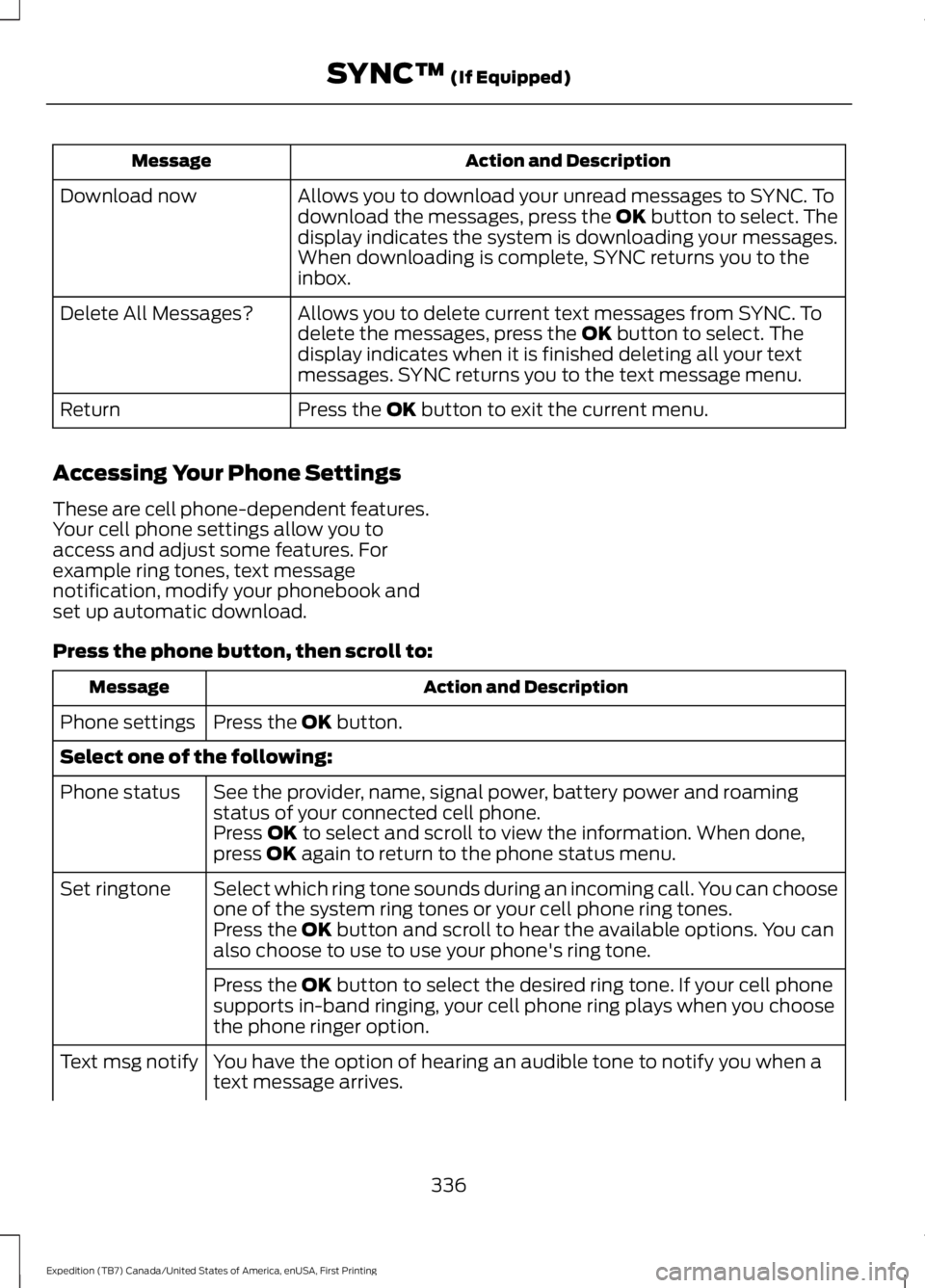
Allows you to download your unread messages to SYNC. Todownload the messages, press the OK button to select. Thedisplay indicates the system is downloading your messages.When downloading is complete, SYNC returns you to theinbox.
Download now
Allows you to delete current text messages from SYNC. Todelete the messages, press the OK button to select. Thedisplay indicates when it is finished deleting all your textmessages. SYNC returns you to the text message menu.
Delete All Messages?
Press the OK button to exit the current menu.Return
Accessing Your Phone Settings
These are cell phone-dependent features.Your cell phone settings allow you toaccess and adjust some features. Forexample ring tones, text messagenotification, modify your phonebook andset up automatic download.
Press the phone button, then scroll to:
Action and DescriptionMessage
Press the OK button.Phone settings
Select one of the following:
See the provider, name, signal power, battery power and roamingstatus of your connected cell phone.Phone status
Press OK to select and scroll to view the information. When done,press OK again to return to the phone status menu.
Select which ring tone sounds during an incoming call. You can chooseone of the system ring tones or your cell phone ring tones.Set ringtone
Press the OK button and scroll to hear the available options. You canalso choose to use to use your phone's ring tone.
Press the OK button to select the desired ring tone. If your cell phonesupports in-band ringing, your cell phone ring plays when you choosethe phone ringer option.
You have the option of hearing an audible tone to notify you when atext message arrives.Text msg notify
336
Expedition (TB7) Canada/United States of America, enUSA, First Printing
SYNC™ (If Equipped)