Page 102 of 421
Settings
°Fahrenheit or °CelsiusTemperature
Select Language - Hold OK to SetLanguage
*Some MyKey items only appear if a MyKey is set.
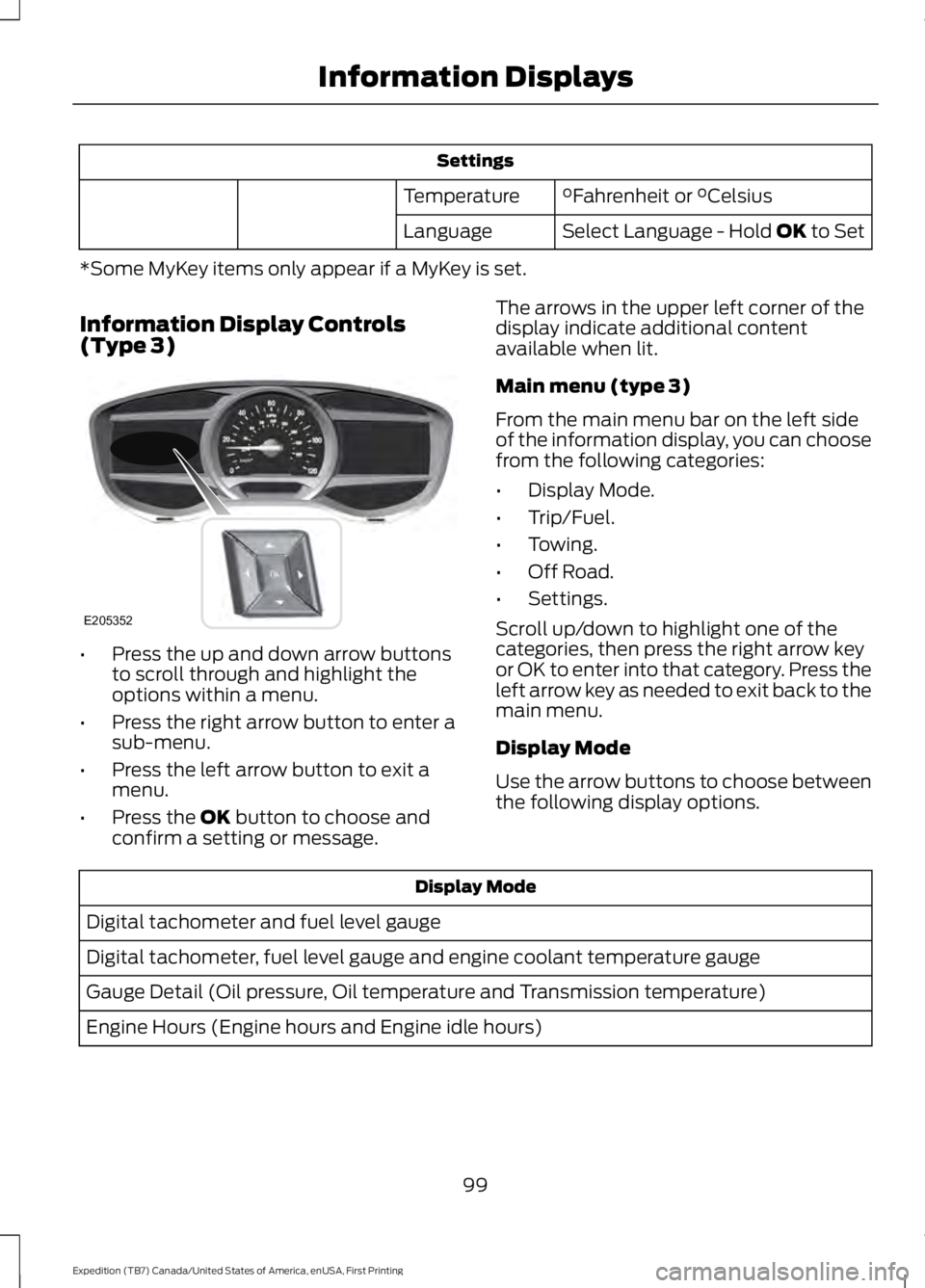
Information Display Controls(Type 3)
•Press the up and down arrow buttonsto scroll through and highlight theoptions within a menu.
•Press the right arrow button to enter asub-menu.
•Press the left arrow button to exit amenu.
•Press the OK button to choose andconfirm a setting or message.
The arrows in the upper left corner of thedisplay indicate additional contentavailable when lit.
Main menu (type 3)
From the main menu bar on the left sideof the information display, you can choosefrom the following categories:
•Display Mode.
•Trip/Fuel.
•Towing.
•Off Road.
•Settings.
Scroll up/down to highlight one of thecategories, then press the right arrow keyor OK to enter into that category. Press theleft arrow key as needed to exit back to themain menu.
Display Mode
Use the arrow buttons to choose betweenthe following display options.
Display Mode
Digital tachometer and fuel level gauge
Digital tachometer, fuel level gauge and engine coolant temperature gauge
Gauge Detail (Oil pressure, Oil temperature and Transmission temperature)
Engine Hours (Engine hours and Engine idle hours)
99
Expedition (TB7) Canada/United States of America, enUSA, First Printing
Information DisplaysE205352
Page 103 of 421
Display Mode
Oil Life
Distance to Empty
Digital Speedometer - Press OK to change the currently units displayed
Trip/Fuel
Use the arrow buttons to choose betweenthe following trip and fuel options.
Note:Press and hold OK to reset thecurrently displayed information.
Trip/Fuel
Trip 1 or Trip 2
Fuel Economy
Fuel History
•Fuel Economy - Shows yourinstantaneous fuel usage as a bargraph and average mpg.
•Fuel History - Shows your fuel usagebased on time. The graph updates eachminute with the fuel economy that youachieved during 30 minutes of driving.
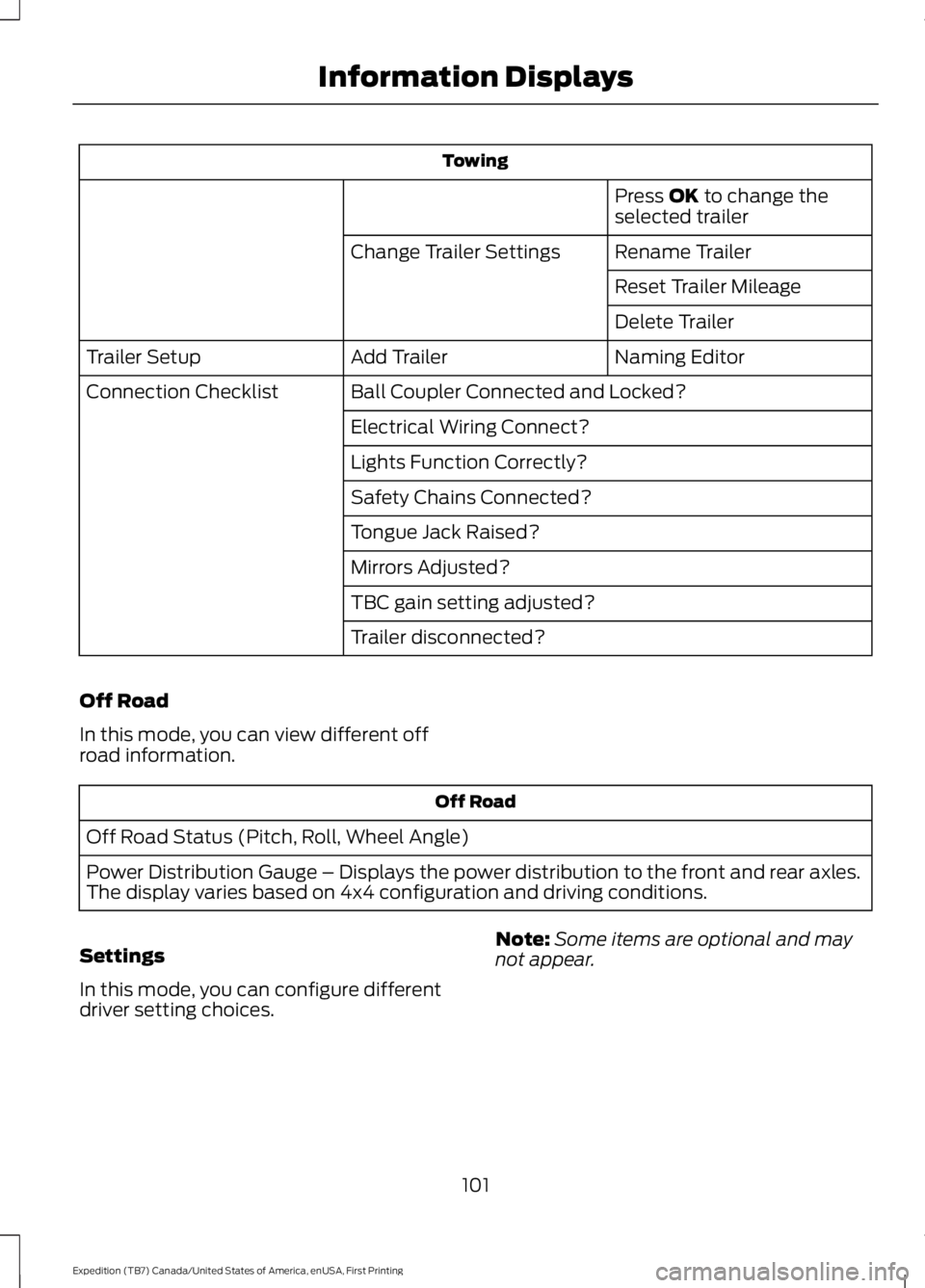
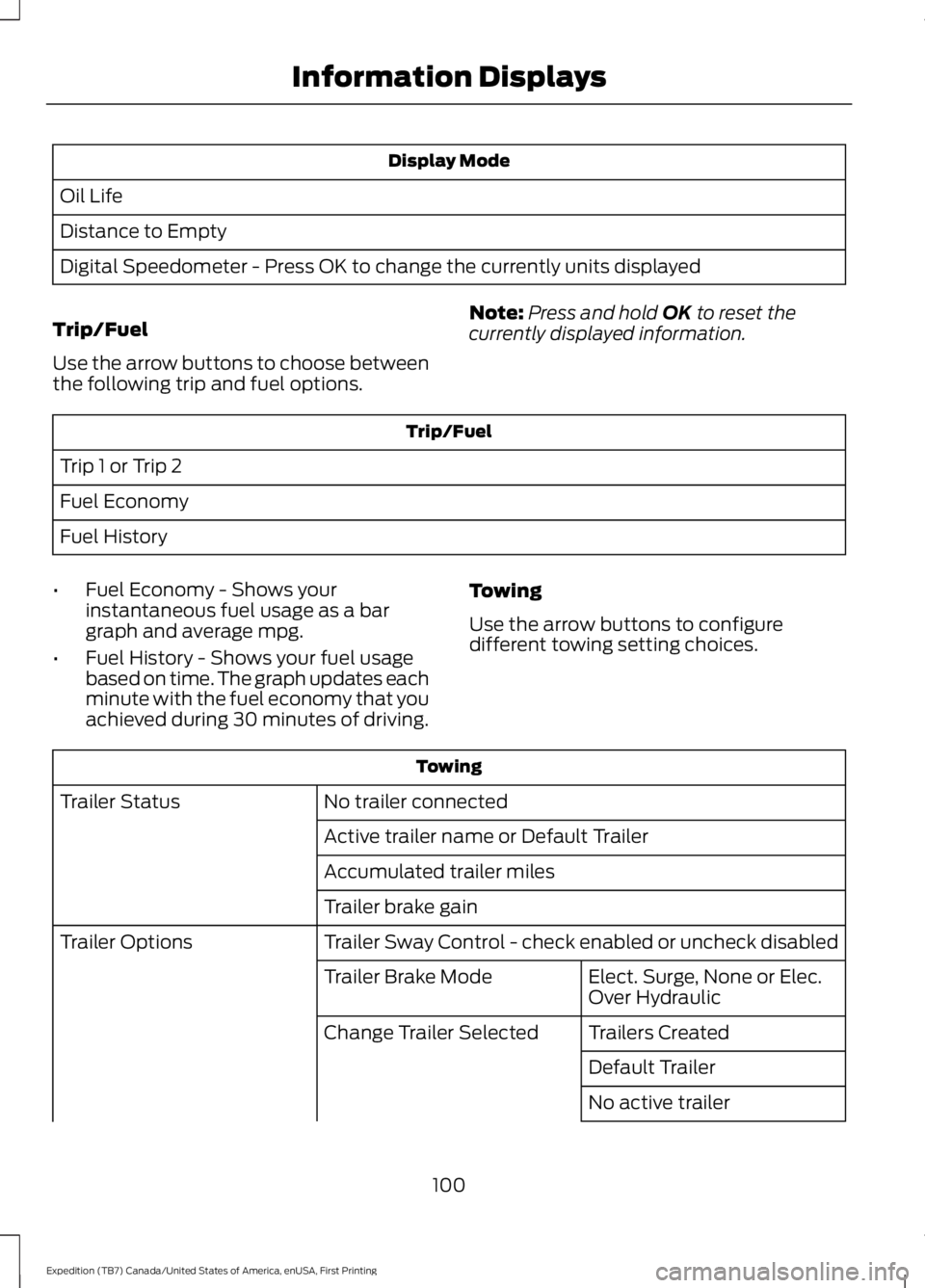
Towing
Use the arrow buttons to configuredifferent towing setting choices.
Towing
No trailer connectedTrailer Status
Active trailer name or Default Trailer
Accumulated trailer miles
Trailer brake gain
Trailer Sway Control - check enabled or uncheck disabledTrailer Options
Elect. Surge, None or Elec.Over HydraulicTrailer Brake Mode
Trailers CreatedChange Trailer Selected
Default Trailer
No active trailer
100
Expedition (TB7) Canada/United States of America, enUSA, First Printing
Information Displays
Page 104 of 421
Towing
Press OK to change theselected trailer
Rename TrailerChange Trailer Settings
Reset Trailer Mileage
Delete Trailer
Naming EditorAdd TrailerTrailer Setup
Ball Coupler Connected and Locked?Connection Checklist
Electrical Wiring Connect?
Lights Function Correctly?
Safety Chains Connected?
Tongue Jack Raised?
Mirrors Adjusted?
TBC gain setting adjusted?
Trailer disconnected?
Off Road
In this mode, you can view different offroad information.
Off Road
Off Road Status (Pitch, Roll, Wheel Angle)
Power Distribution Gauge – Displays the power distribution to the front and rear axles.The display varies based on 4x4 configuration and driving conditions.
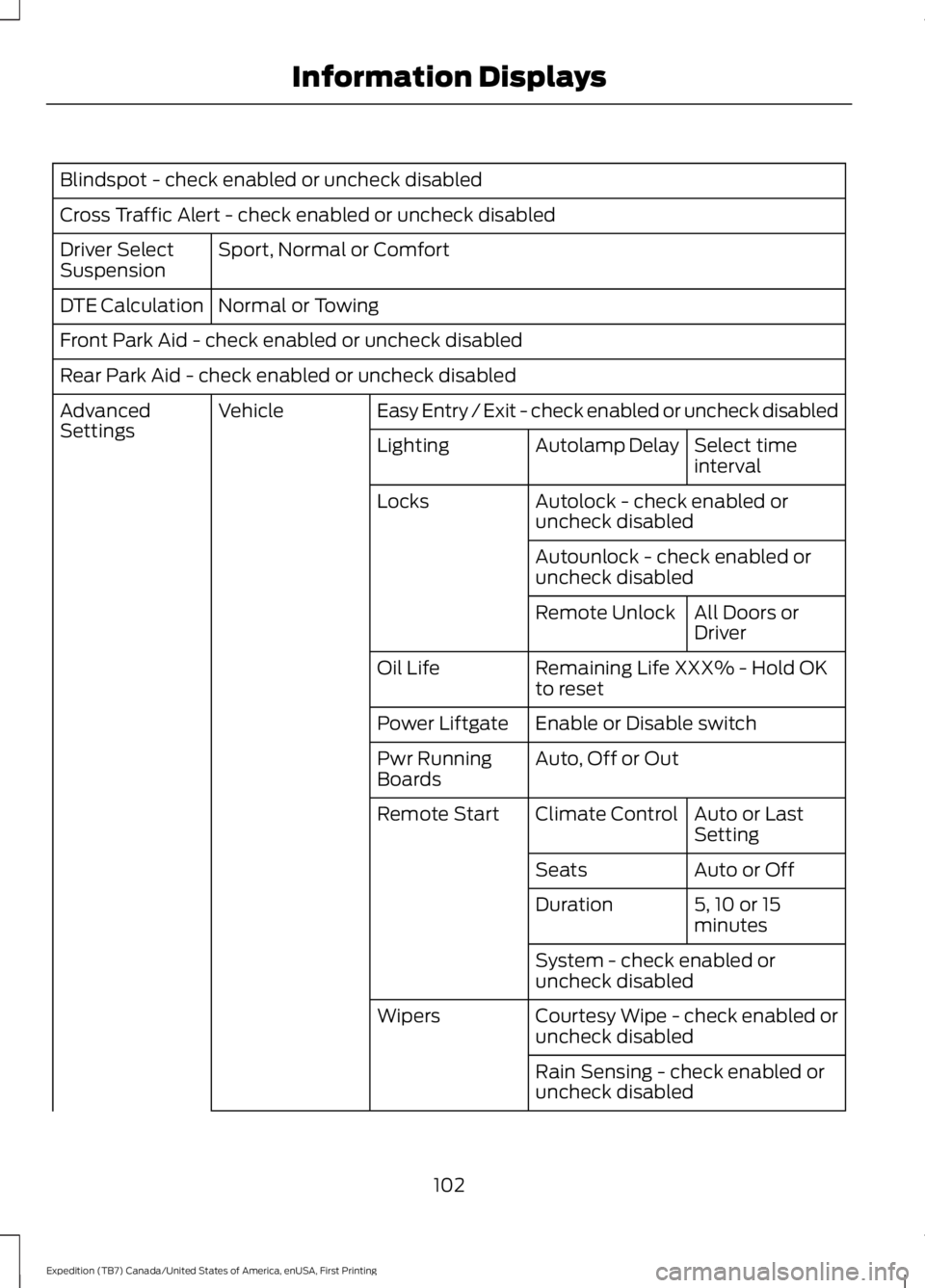
Settings
In this mode, you can configure differentdriver setting choices.
Note:Some items are optional and maynot appear.
101
Expedition (TB7) Canada/United States of America, enUSA, First Printing
Information Displays
Page 105 of 421
Blindspot - check enabled or uncheck disabled
Cross Traffic Alert - check enabled or uncheck disabled
Sport, Normal or ComfortDriver SelectSuspension
Normal or TowingDTE Calculation
Front Park Aid - check enabled or uncheck disabled
Rear Park Aid - check enabled or uncheck disabled
Easy Entry / Exit - check enabled or uncheck disabledVehicleAdvancedSettingsSelect timeintervalAutolamp DelayLighting
Autolock - check enabled oruncheck disabledLocks
Autounlock - check enabled oruncheck disabled
All Doors orDriverRemote Unlock
Remaining Life XXX% - Hold OKto resetOil Life
Enable or Disable switchPower Liftgate
Auto, Off or OutPwr RunningBoards
Auto or LastSettingClimate ControlRemote Start
Auto or OffSeats
5, 10 or 15minutesDuration
System - check enabled oruncheck disabled
Courtesy Wipe - check enabled oruncheck disabledWipers
Rain Sensing - check enabled oruncheck disabled
102
Expedition (TB7) Canada/United States of America, enUSA, First Printing
Information Displays
Page 114 of 421
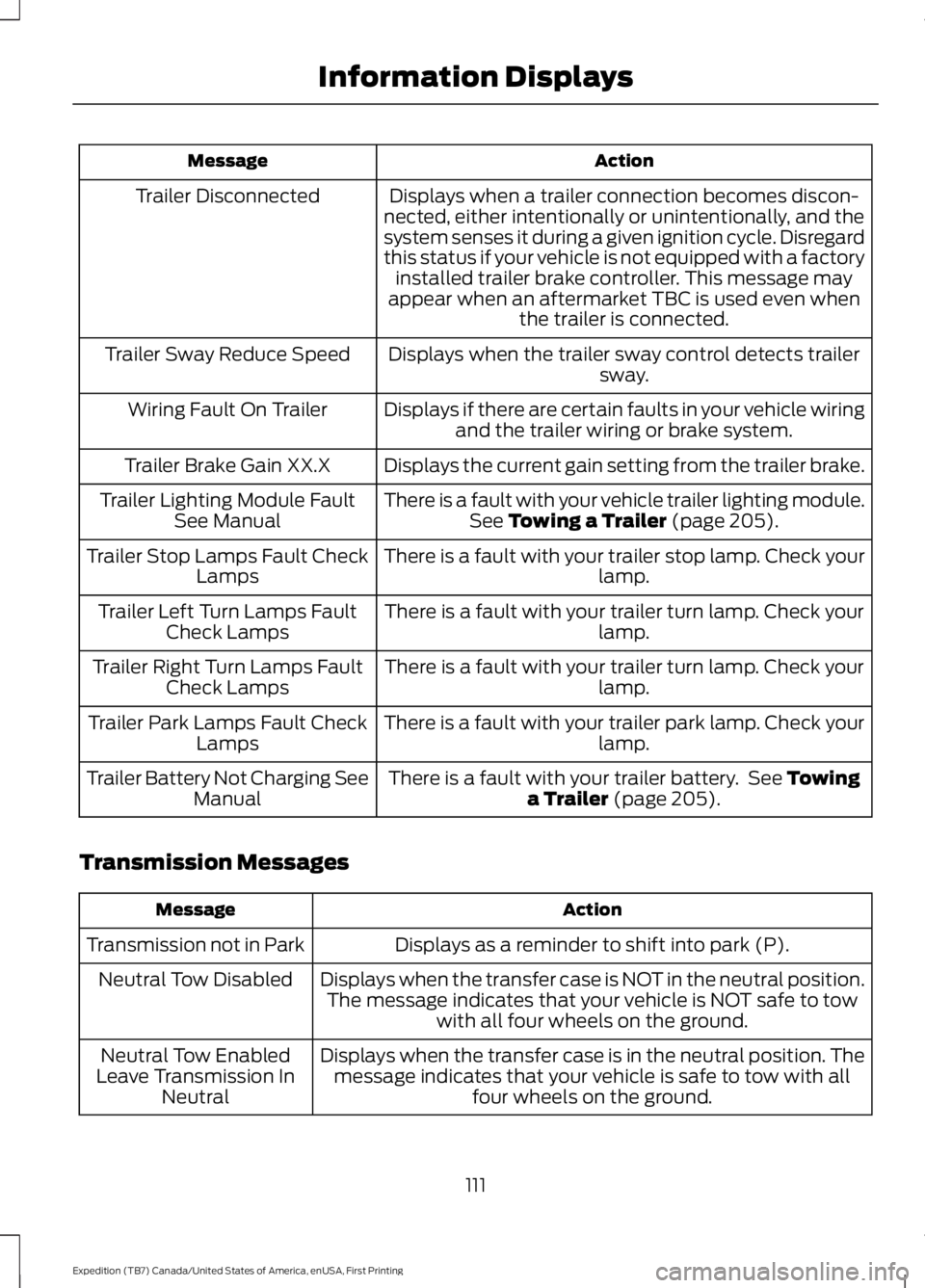
ActionMessage
Displays when a trailer connection becomes discon-nected, either intentionally or unintentionally, and thesystem senses it during a given ignition cycle. Disregardthis status if your vehicle is not equipped with a factoryinstalled trailer brake controller. This message mayappear when an aftermarket TBC is used even whenthe trailer is connected.
Trailer Disconnected
Displays when the trailer sway control detects trailersway.Trailer Sway Reduce Speed
Displays if there are certain faults in your vehicle wiringand the trailer wiring or brake system.Wiring Fault On Trailer
Displays the current gain setting from the trailer brake.Trailer Brake Gain XX.X
There is a fault with your vehicle trailer lighting module.See Towing a Trailer (page 205).Trailer Lighting Module FaultSee Manual
There is a fault with your trailer stop lamp. Check yourlamp.Trailer Stop Lamps Fault CheckLamps
There is a fault with your trailer turn lamp. Check yourlamp.Trailer Left Turn Lamps FaultCheck Lamps
There is a fault with your trailer turn lamp. Check yourlamp.Trailer Right Turn Lamps FaultCheck Lamps
There is a fault with your trailer park lamp. Check yourlamp.Trailer Park Lamps Fault CheckLamps
There is a fault with your trailer battery. See Towinga Trailer (page 205).Trailer Battery Not Charging SeeManual
Transmission Messages
ActionMessage
Displays as a reminder to shift into park (P).Transmission not in Park
Displays when the transfer case is NOT in the neutral position.The message indicates that your vehicle is NOT safe to towwith all four wheels on the ground.
Neutral Tow Disabled
Displays when the transfer case is in the neutral position. Themessage indicates that your vehicle is safe to tow with allfour wheels on the ground.
Neutral Tow EnabledLeave Transmission InNeutral
111
Expedition (TB7) Canada/United States of America, enUSA, First Printing
Information Displays
Page 131 of 421
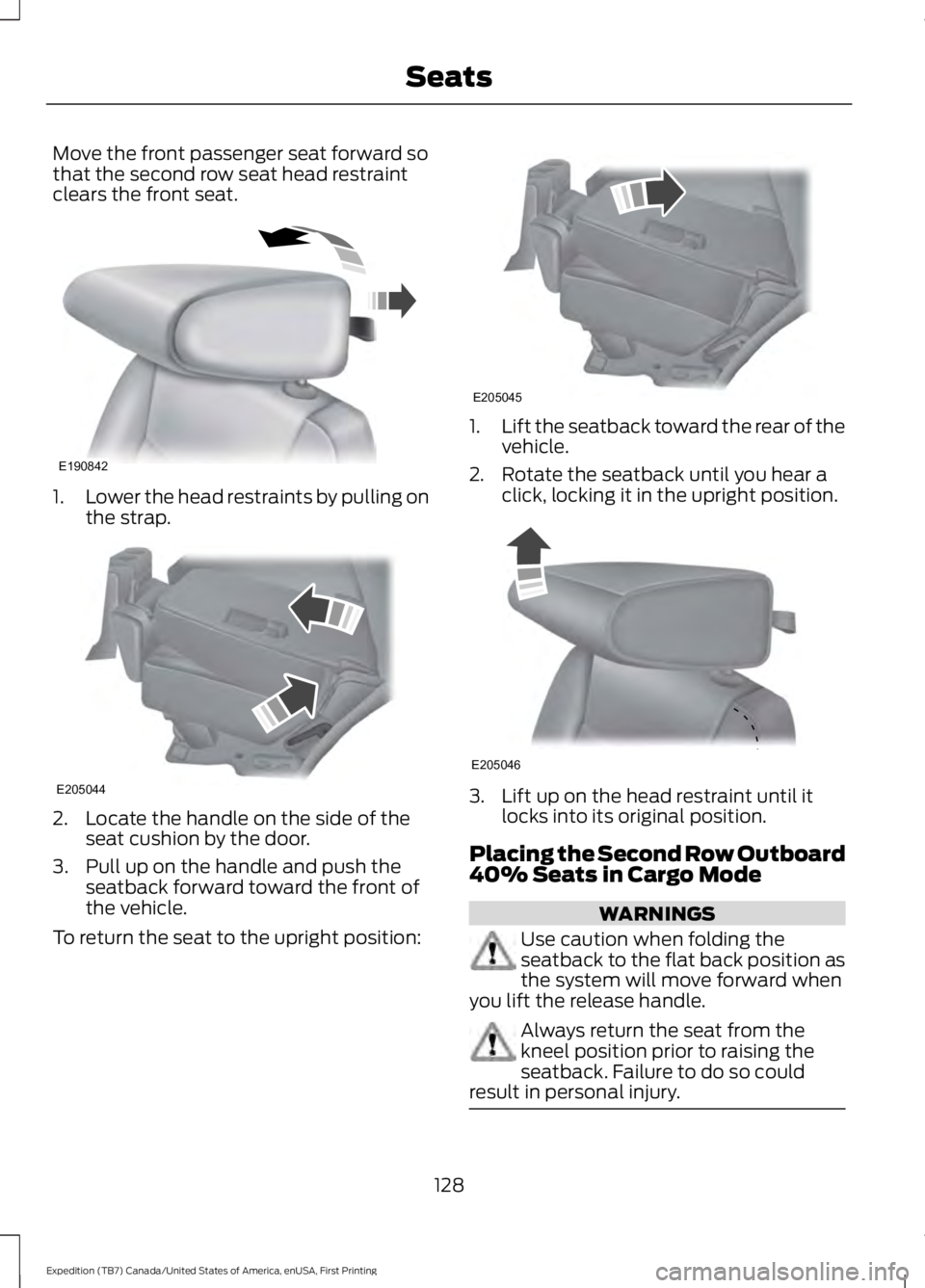
Move the front passenger seat forward sothat the second row seat head restraintclears the front seat.
1.Lower the head restraints by pulling onthe strap.
2. Locate the handle on the side of theseat cushion by the door.
3. Pull up on the handle and push theseatback forward toward the front ofthe vehicle.
To return the seat to the upright position:
1.Lift the seatback toward the rear of thevehicle.
2. Rotate the seatback until you hear aclick, locking it in the upright position.
3. Lift up on the head restraint until itlocks into its original position.
Placing the Second Row Outboard40% Seats in Cargo Mode
WARNINGS
Use caution when folding theseatback to the flat back position asthe system will move forward whenyou lift the release handle.
Always return the seat from thekneel position prior to raising theseatback. Failure to do so couldresult in personal injury.
128
Expedition (TB7) Canada/United States of America, enUSA, First Printing
SeatsE190842 E205044 E205045 E205046
Page 133 of 421
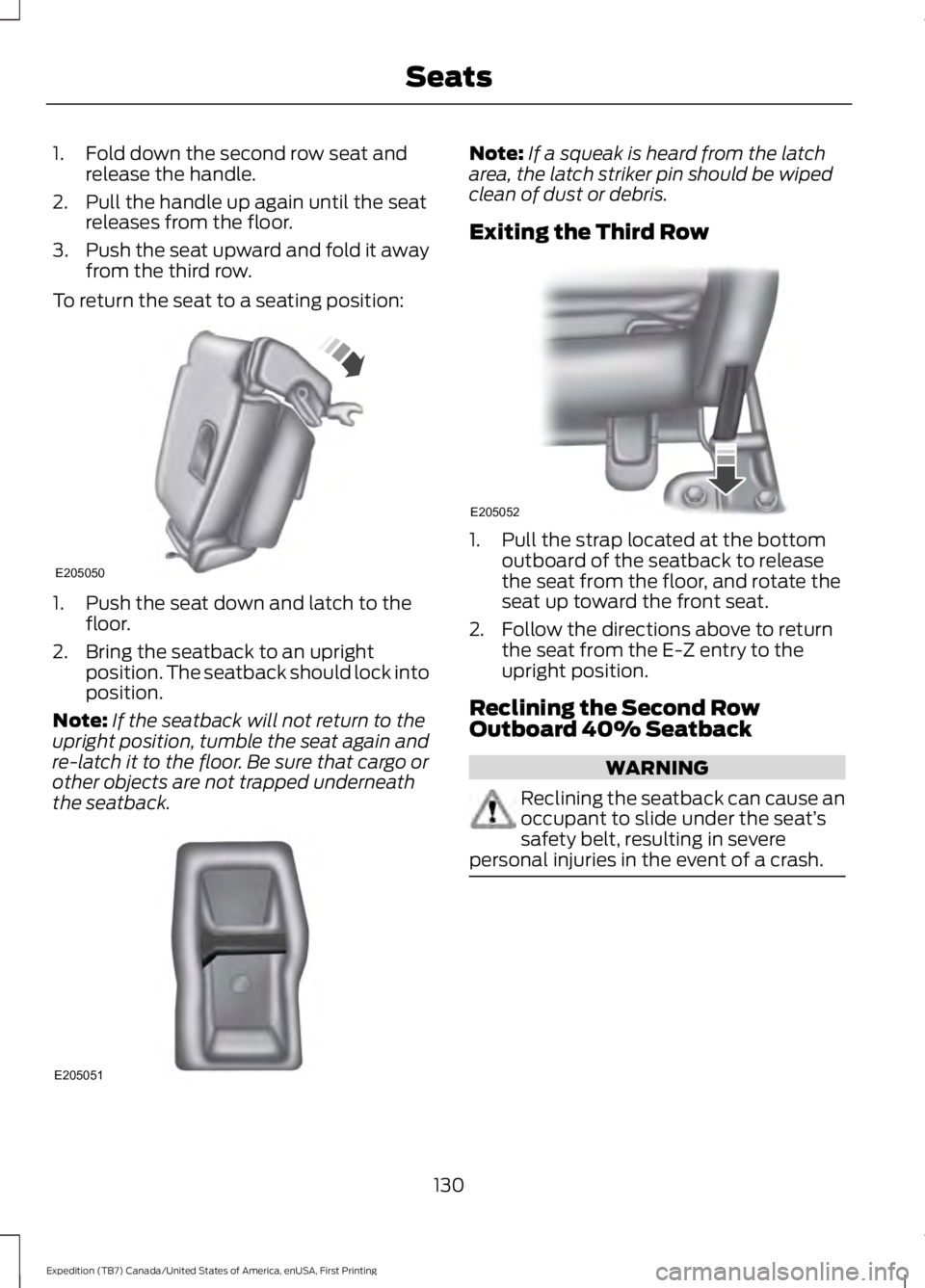
1. Fold down the second row seat andrelease the handle.
2. Pull the handle up again until the seatreleases from the floor.
3.Push the seat upward and fold it awayfrom the third row.
To return the seat to a seating position:
1. Push the seat down and latch to thefloor.
2. Bring the seatback to an uprightposition. The seatback should lock intoposition.
Note:If the seatback will not return to theupright position, tumble the seat again andre-latch it to the floor. Be sure that cargo orother objects are not trapped underneaththe seatback.
Note:If a squeak is heard from the latcharea, the latch striker pin should be wipedclean of dust or debris.
Exiting the Third Row
1. Pull the strap located at the bottomoutboard of the seatback to releasethe seat from the floor, and rotate theseat up toward the front seat.
2. Follow the directions above to returnthe seat from the E-Z entry to theupright position.
Reclining the Second RowOutboard 40% Seatback
WARNING
Reclining the seatback can cause anoccupant to slide under the seat’ssafety belt, resulting in severepersonal injuries in the event of a crash.
130
Expedition (TB7) Canada/United States of America, enUSA, First Printing
SeatsE205050 E205051 E205052
Page 147 of 421
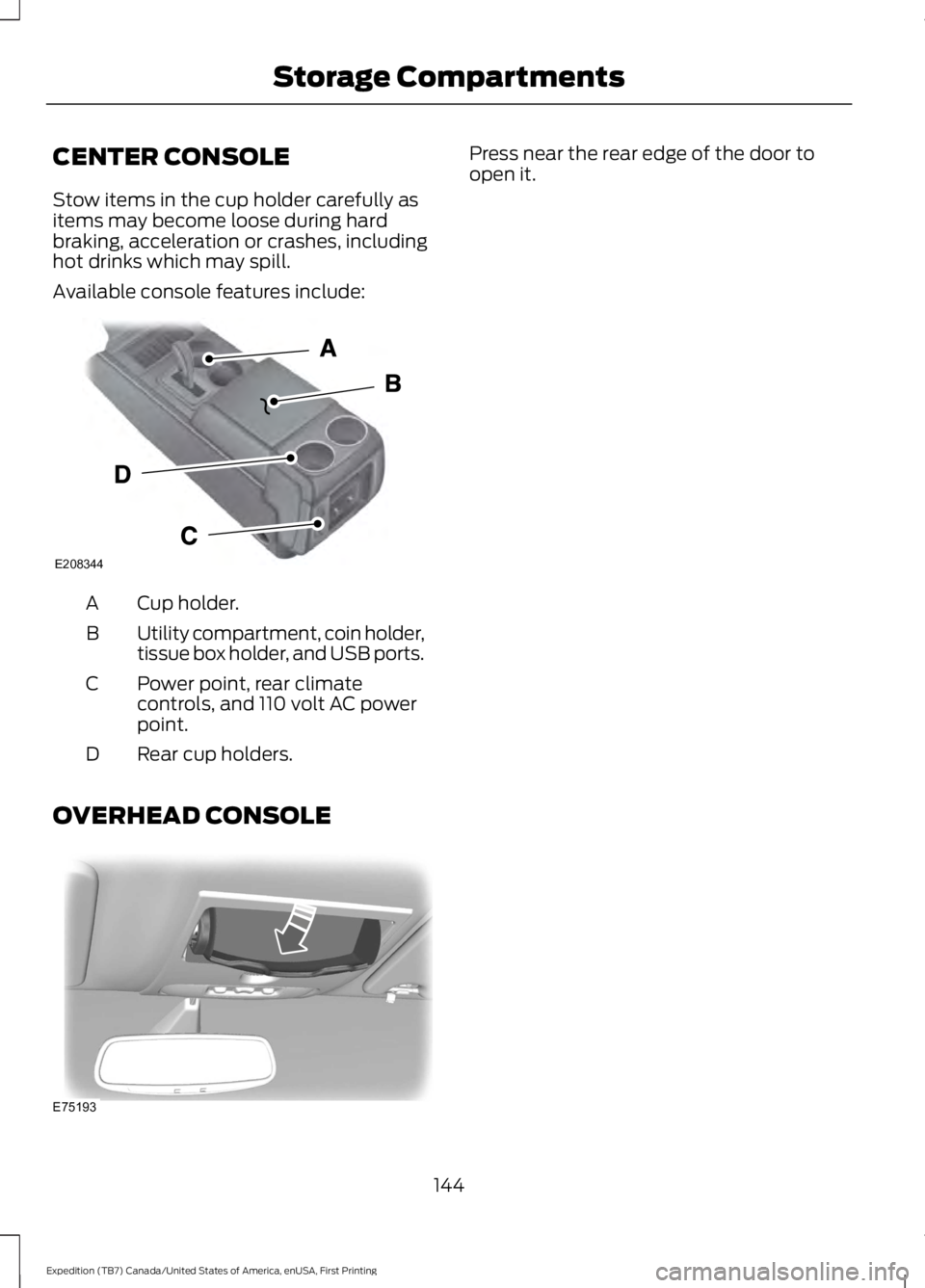
CENTER CONSOLE
Stow items in the cup holder carefully asitems may become loose during hardbraking, acceleration or crashes, includinghot drinks which may spill.
Available console features include:
Cup holder.A
Utility compartment, coin holder,tissue box holder, and USB ports.B
Power point, rear climatecontrols, and 110 volt AC powerpoint.
C
Rear cup holders.D
OVERHEAD CONSOLE
Press near the rear edge of the door toopen it.
144
Expedition (TB7) Canada/United States of America, enUSA, First Printing
Storage CompartmentsE208344 E75193