2016 FORD EXPEDITION EL center console
[x] Cancel search: center consolePage 5 of 421
Adjusting the Steering Wheel - VehiclesWith: Power Adjustable SteeringColumn...........................................................67
Audio Control..................................................68
Voice Control...................................................69
Cruise Control..................................................70
Information Display Control.......................70
Heated Steering Wheel................................70
Pedals
Adjusting the Pedals......................................71
Wipers and Washers
Windshield Wipers.........................................72
Autowipers........................................................72
Windshield Washers......................................73
Rear Window Wiper and Washers...........73
Lighting
General Information......................................74
Lighting Control...............................................74
Autolamps.........................................................75
Instrument Lighting Dimmer......................76
Daytime Running Lamps.............................76
Front Fog Lamps.............................................77
Direction Indicators........................................77
Interior Lamps.................................................78
Ambient Lighting............................................79
Windows and Mirrors
Power Windows.............................................80
Exterior Mirrors.................................................81
Interior Mirror...................................................82
Childminder Mirror.........................................82
Rear Quarter Windows................................83
Sun Visors.........................................................83
Moonroof...........................................................83
Instrument Cluster
Gauges...............................................................85
Warning Lamps and Indicators................88
Audible Warnings and Indicators..............91
Information Displays
General Information......................................92
Information Messages................................103
Climate Control
Manual Climate Control..............................113
Manual Climate Control - Vehicles With:Electronic Manual TemperatureControl (EMTC)..........................................114
Automatic Climate Control.......................116
Hints on Controlling the InteriorClimate..........................................................117
Rear Passenger Climate Controls..........120
Heated Windows and Mirrors....................121
Remote Start...................................................121
Seats
Sitting in the Correct Position..................122
Head Restraints.............................................122
Manual Seats.................................................124
Power Seats....................................................125
Memory Function.........................................126
Rear Seats........................................................127
Heated Seats..................................................134
Climate Controlled Seats..........................135
Universal Garage DoorOpener
Universal Garage Door Opener................137
Auxiliary Power Points
Auxiliary Power Points................................142
Storage Compartments
Center Console..............................................144
Overhead Console.......................................144
2
Expedition (TB7) Canada/United States of America, enUSA, First Printing
Table of Contents
Page 85 of 421

Heated Exterior Mirrors
See Heated Windows and Mirrors (page121).
Memory Mirrors (If Equipped)
You can save and recall the mirrorpositions through the memory function.See Memory Function (page 126).
Auto-Dimming Feature
The driver exterior mirror automaticallydims with the auto-dimming interior mirror.
Signal Indicator Mirrors (If Equipped)
The outer portion of the appropriate mirrorhousing blinks when you switch on thedirection indicator.
Blind Spot Monitor (If Equipped)
See Blind Spot Information System(page 188).
INTERIOR MIRROR
WARNING
Do not adjust the mirror when yourvehicle is moving.
Note:Do not clean the housing or glass ofany mirror with harsh abrasives, fuel or otherpetroleum or ammonia-based cleaningproducts.
You can adjust the interior mirror to yourpreference. Some mirrors also have asecond pivot point. This lets you move themirror head up or down and from side toside.
Auto-Dimming Mirror
Note:Do not block the sensors on the frontand back of the mirror. Mirror performancemay be affected. A rear center passenger orraised rear center head restraint may alsoblock light from reaching the sensor.
The mirror will dim automatically to reduceglare when bright lights are detected frombehind your vehicle. It will automaticallyreturn to normal reflection when you selectreverse gear to make sure you have a clearview when backing up.
CHILDMINDER MIRROR
On double bin overhead consoles, theconversation mirror allows the driver toview the rear seating area.
WARNING
Do not use the childminder mirror toview rearward traffic, do not allowrear passengers to distract you fromthe driving task, and make sure the rearview mirror has a clear view of rearwardtraffic. Failure to do so could increase therisk of a crash from an unseen vehicle,which may result in serious injury.
Press the release area on the rear edge ofthe bin door to open the childminder mirror.The door will open to full open position.
82
Expedition (TB7) Canada/United States of America, enUSA, First Printing
Windows and MirrorsE205354
Page 137 of 421
HEATED SEATS (If Equipped)
Front Seats
WARNING
People who are unable to feel painto their skin because of advancedage, chronic illness, diabetes, spinalcord injury, medication, alcohol use,exhaustion or other physical conditions,must exercise care when using the heatedseat. The heated seat may cause burnseven at low temperatures, especially ifused for long periods of time. Do not placeanything on the seat that insulates againstheat, such as a blanket or cushion. Thismay cause the heated seat to overheat.Do not puncture the seat with pins, needlesor other pointed objects. This may damagethe heating element which may cause theheated seat to overheat. An overheatedseat may cause serious personal injury.
Do not do the following:
•Place heavy objects on the seat.
•Operate the heated seat if water or anyother liquid spills on the seat. Allow theseat to dry thoroughly.
•Operate the heated seats unless theengine is running. Doing so can causethe battery to lose charge.
Press the heated seat symbol to cyclethrough the various heat settings and off.More indicator lights indicate warmersettings.
Rear Seats (If Equipped)
WARNING
Persons who are unable to feel painto the skin because of advanced age,chronic illness, diabetes, spinal cordinjury, medication, alcohol use, exhaustion,or other physical conditions, must exercisecare when using the seat heater. The seatheater may cause burns even at lowtemperatures, especially if used for longperiods of time. Do not place anything onthe seat that insulates against heat, suchas a blanket or cushion, because this maycause the seat heater to overheat. Do notpuncture the seat with pins, needles, orother pointed objects because this maydamage the heating element which maycause the seat heater to overheat. Anoverheated seat may cause seriouspersonal injury.
Do not do the following:
•Place heavy objects on the seat.
•Operate the seat heater if water or anyother liquid is spilled on the seat. Allowthe seat to dry thoroughly.
•Operate the heated seats unless theengine is running. Doing so can causethe battery to lose charge.
The rear seat heat controls are located onthe rear of the center console.
134
Expedition (TB7) Canada/United States of America, enUSA, First Printing
SeatsE146322 E146322
Page 145 of 421
12 Volt DC Power Point
WARNINGS
Do not plug optional electricalaccessories into the cigar lightersocket. Incorrect use of the cigarlighter can cause damage not covered bythe vehicle warranty, and can result in fireor serious injury.
Do not use a power point foroperating a cigar lighter. Incorrectuse of the power points can causedamage not covered by the vehiclewarranty, and can result in fire or seriousinjury.
Note:When you switch the ignition on, youcan use the socket to power 12 voltappliances with a maximum current ratingof 15 amps.
If the power supply does not work after youswitch the ignition off, switch the ignitionon.Note:Do not hang any accessory from theaccessory plug.
Note:Do not use the power point over thevehicle capacity of 12 volt DC 180 watts ora fuse may blow.
Note:Always keep the power point capsclosed when not in use.
Do not insert objects other than anaccessory plug into the power point. Thiswill damage the power point and blow thefuse.
Run the vehicle for full capacity use of thepower point.
To prevent the battery from running out ofcharge:
•Do not use the power point longer thannecessary when the vehicle is notrunning.
•Do not leave devices plugged inovernight or when you park your vehiclefor extended periods.
Locations
Power points may be in the followinglocations:
•On the lower instrument panel.
•Inside the center console.
•On the rear of the center console.
•In the rear cargo area.
110 Volt AC Power Point (If Equipped)
WARNING
Do not keep electrical devicesplugged in the power point wheneverthe device is not in use. Do not useany extension cord with the 110 volt ACpower point, since it will defeat the safetyprotection design. Doing so may cause thepower point to overload due to poweringmultiple devices that can reach beyondthe 150 watt load limit and could result infire or serious injury.
Note:The power point will turn off whenthe ignition is switched off or the batteryvoltage drops below 11 volts.
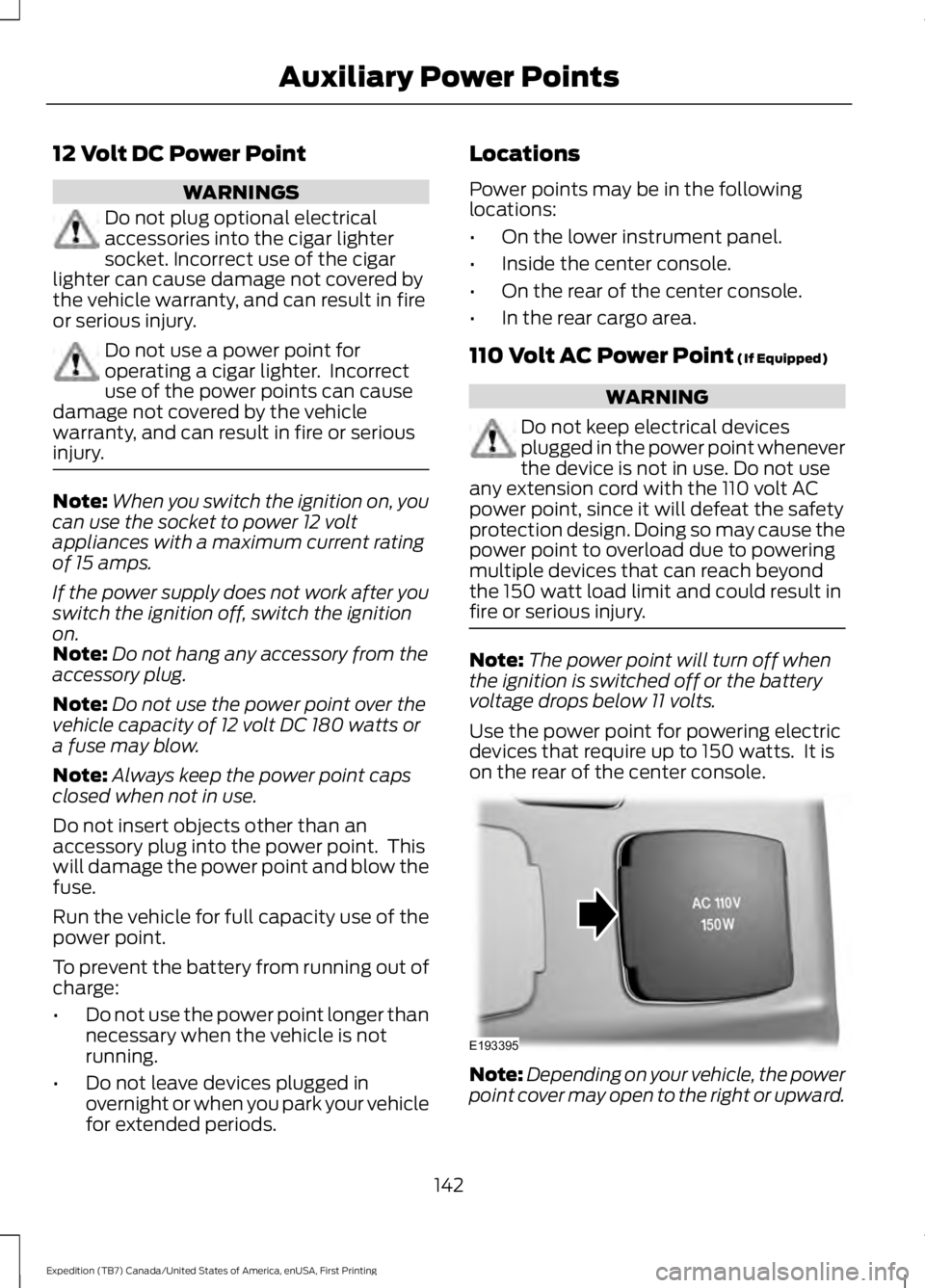
Use the power point for powering electricdevices that require up to 150 watts. It ison the rear of the center console.
Note:Depending on your vehicle, the powerpoint cover may open to the right or upward.
142
Expedition (TB7) Canada/United States of America, enUSA, First Printing
Auxiliary Power PointsE193395
Page 147 of 421
CENTER CONSOLE
Stow items in the cup holder carefully asitems may become loose during hardbraking, acceleration or crashes, includinghot drinks which may spill.
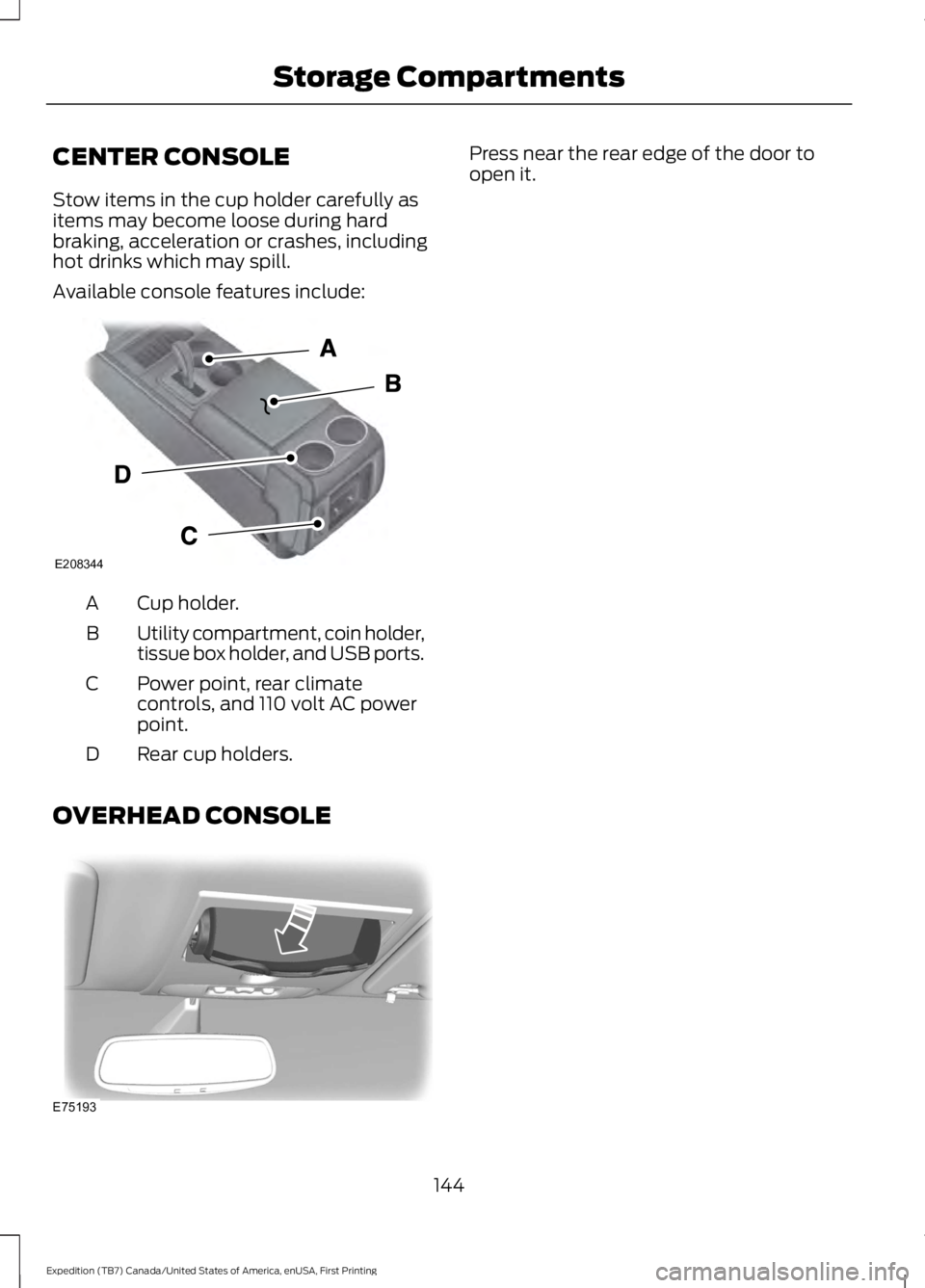
Available console features include:
Cup holder.A
Utility compartment, coin holder,tissue box holder, and USB ports.B
Power point, rear climatecontrols, and 110 volt AC powerpoint.
C
Rear cup holders.D
OVERHEAD CONSOLE
Press near the rear edge of the door toopen it.
144
Expedition (TB7) Canada/United States of America, enUSA, First Printing
Storage CompartmentsE208344 E75193
Page 179 of 421

PRINCIPLE OF OPERATION
WARNINGS
Vehicle modifications involvingbraking system, aftermarket roofracks, suspension, steering system,tire construction and wheel and tire sizemay change the handling characteristicsof your vehicle and may adversely affectthe performance of the electronic stabilitycontrol system. In addition, installing anystereo loudspeakers may interfere withand adversely affect the electronic stabilitycontrol system. Install any aftermarketstereo loudspeaker as far as possible fromthe front center console, the tunnel, andthe front seats in order to minimize the riskof interfering with the electronic stabilitycontrol sensors. Reducing theeffectiveness of the electronic stabilitycontrol system could lead to an increasedrisk of loss of vehicle control, vehiclerollover, personal injury and death.
Remember that even advancedtechnology cannot defy the laws ofphysics. It’s always possible to losecontrol of a vehicle due to inappropriatedriver input for the conditions. Aggressivedriving on any road condition can causeyou to lose control of your vehicleincreasing the risk of personal injury orproperty damage. Activation of theelectronic stability control system is anindication that at least some of the tireshave exceeded their ability to grip the road;this could reduce the operator’s ability tocontrol the vehicle potentially resulting ina loss of vehicle control, vehicle rollover,personal injury and death. If your electronicstability control system activates, SLOWDOWN.
The system automatically turns on eachtime you switch the ignition on.
If a driving condition activates either thestability control or the traction controlsystem you may experience the followingconditions:
•The stability and traction control lightflashes.
•Your vehicle slows down.
•Reduced engine power.
•A vibration in the brake pedal.
•The brake pedal is stiffer than usual.
•If the driving condition is severe andyour foot is not on the brake, the brakepedal may move as the systemsapplies higher brake forces.
The stability control system has severalfeatures built into it to help you maintaincontrol of your vehicle:
Electronic Stability Control
The system enhances your vehicle’s abilityto prevent skids or lateral slides byapplying brakes to one or more of thewheels individually and, if necessary,reducing engine power.
Roll Stability Control
The system enhances your vehicle’s abilityto prevent rollovers by detecting yourvehicle’s roll motion and the rate at whichit changes by applying the brakes to oneor more wheels individually.
Traction Control
The system enhances your vehicle’s abilityto maintain traction of the wheels bydetecting and controlling wheel spin. SeeUsing Traction Control (page 175).
176
Expedition (TB7) Canada/United States of America, enUSA, First Printing
Stability Control
Page 240 of 421
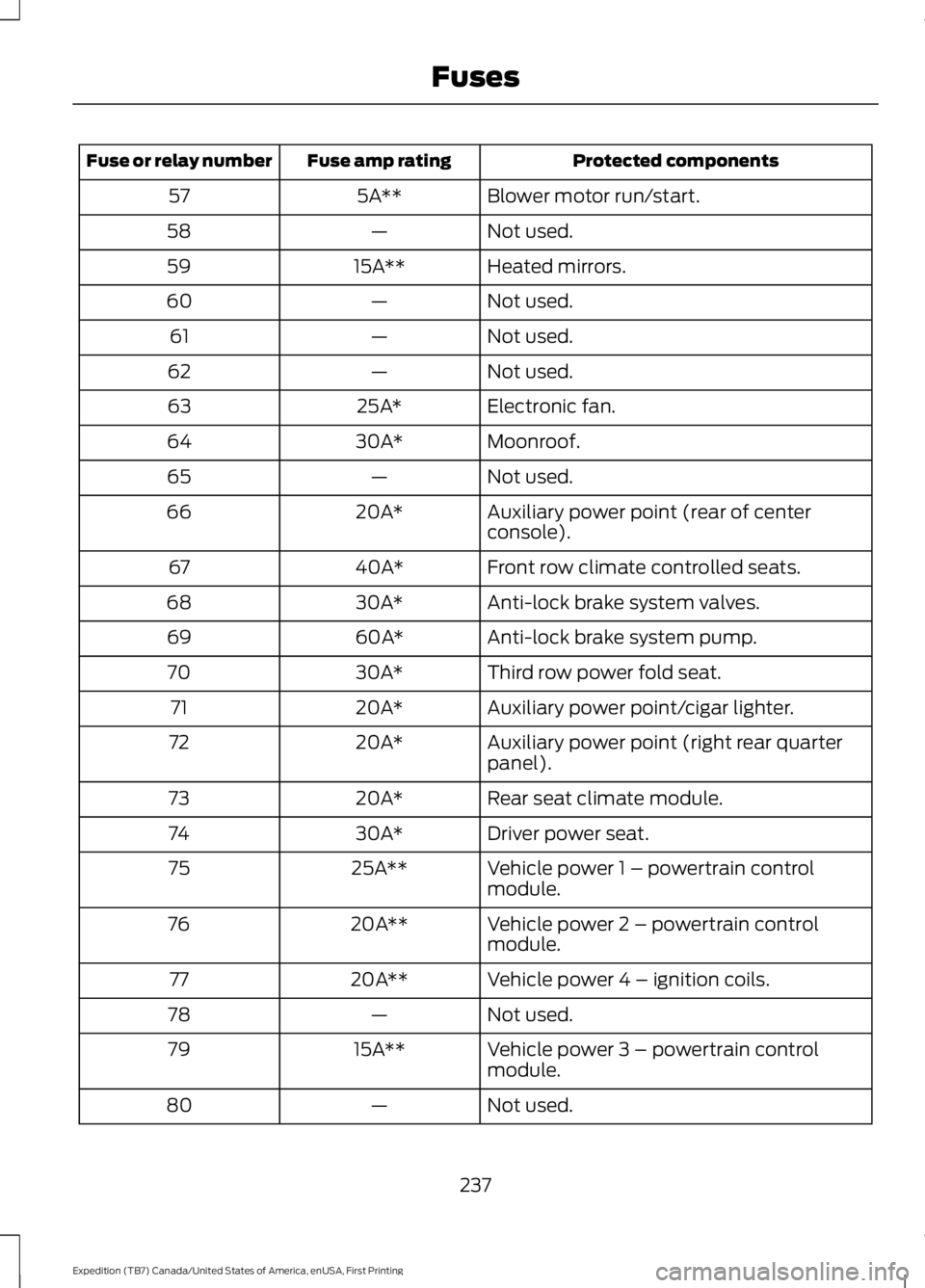
Protected componentsFuse amp ratingFuse or relay number
Blower motor run/start.5A**57
Not used.—58
Heated mirrors.15A**59
Not used.—60
Not used.—61
Not used.—62
Electronic fan.25A*63
Moonroof.30A*64
Not used.—65
Auxiliary power point (rear of centerconsole).20A*66
Front row climate controlled seats.40A*67
Anti-lock brake system valves.30A*68
Anti-lock brake system pump.60A*69
Third row power fold seat.30A*70
Auxiliary power point/cigar lighter.20A*71
Auxiliary power point (right rear quarterpanel).20A*72
Rear seat climate module.20A*73
Driver power seat.30A*74
Vehicle power 1 – powertrain controlmodule.25A**75
Vehicle power 2 – powertrain controlmodule.20A**76
Vehicle power 4 – ignition coils.20A**77
Not used.—78
Vehicle power 3 – powertrain controlmodule.15A**79
Not used.—80
237
Expedition (TB7) Canada/United States of America, enUSA, First Printing
Fuses
Page 325 of 421
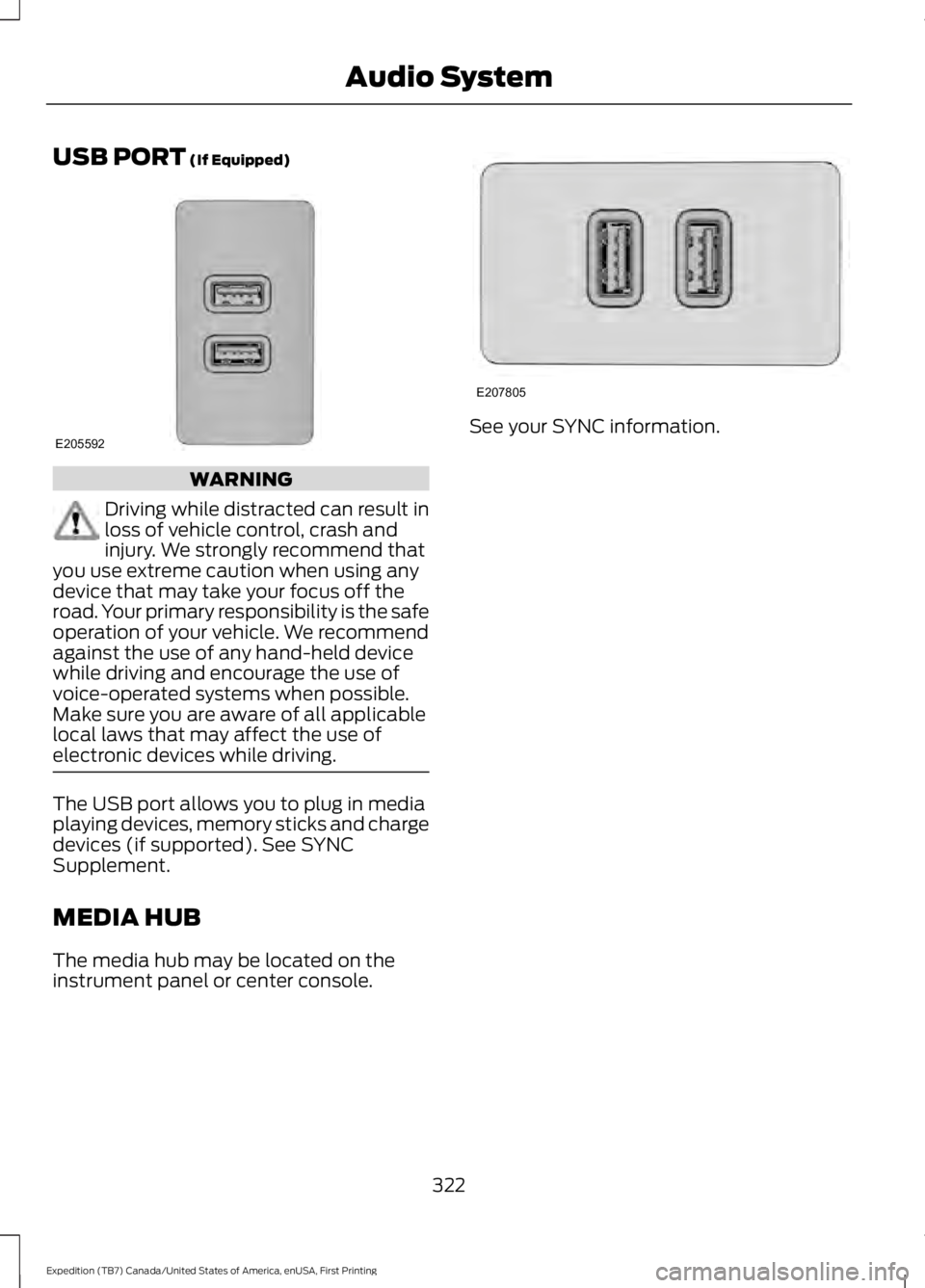
USB PORT (If Equipped)
WARNING
Driving while distracted can result inloss of vehicle control, crash andinjury. We strongly recommend thatyou use extreme caution when using anydevice that may take your focus off theroad. Your primary responsibility is the safeoperation of your vehicle. We recommendagainst the use of any hand-held devicewhile driving and encourage the use ofvoice-operated systems when possible.Make sure you are aware of all applicablelocal laws that may affect the use ofelectronic devices while driving.
The USB port allows you to plug in mediaplaying devices, memory sticks and chargedevices (if supported). See SYNCSupplement.
MEDIA HUB
The media hub may be located on theinstrument panel or center console.
See your SYNC information.
322
Expedition (TB7) Canada/United States of America, enUSA, First Printing
Audio SystemE205592 E207805