2016 FORD EXPEDITION EL service indicator
[x] Cancel search: service indicatorPage 298 of 421
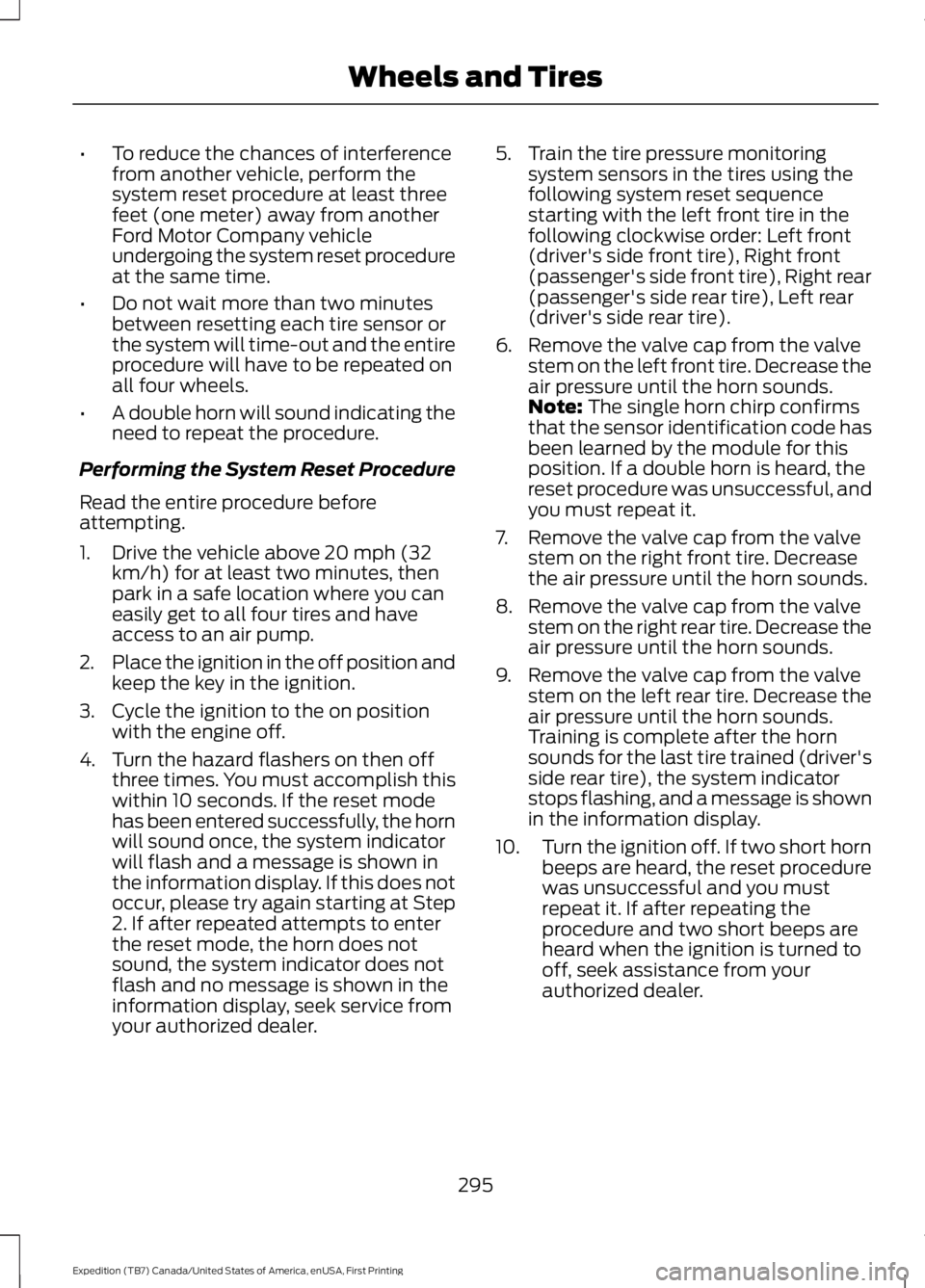
•To reduce the chances of interferencefrom another vehicle, perform thesystem reset procedure at least threefeet (one meter) away from anotherFord Motor Company vehicleundergoing the system reset procedureat the same time.
•Do not wait more than two minutesbetween resetting each tire sensor orthe system will time-out and the entireprocedure will have to be repeated onall four wheels.
•A double horn will sound indicating theneed to repeat the procedure.
Performing the System Reset Procedure
Read the entire procedure beforeattempting.
1. Drive the vehicle above 20 mph (32km/h) for at least two minutes, thenpark in a safe location where you caneasily get to all four tires and haveaccess to an air pump.
2.Place the ignition in the off position andkeep the key in the ignition.
3. Cycle the ignition to the on positionwith the engine off.
4. Turn the hazard flashers on then offthree times. You must accomplish thiswithin 10 seconds. If the reset modehas been entered successfully, the hornwill sound once, the system indicatorwill flash and a message is shown inthe information display. If this does notoccur, please try again starting at Step2. If after repeated attempts to enterthe reset mode, the horn does notsound, the system indicator does notflash and no message is shown in theinformation display, seek service fromyour authorized dealer.
5. Train the tire pressure monitoringsystem sensors in the tires using thefollowing system reset sequencestarting with the left front tire in thefollowing clockwise order: Left front(driver's side front tire), Right front(passenger's side front tire), Right rear(passenger's side rear tire), Left rear(driver's side rear tire).
6. Remove the valve cap from the valvestem on the left front tire. Decrease theair pressure until the horn sounds.Note: The single horn chirp confirmsthat the sensor identification code hasbeen learned by the module for thisposition. If a double horn is heard, thereset procedure was unsuccessful, andyou must repeat it.
7. Remove the valve cap from the valvestem on the right front tire. Decreasethe air pressure until the horn sounds.
8. Remove the valve cap from the valvestem on the right rear tire. Decrease theair pressure until the horn sounds.
9. Remove the valve cap from the valvestem on the left rear tire. Decrease theair pressure until the horn sounds.Training is complete after the hornsounds for the last tire trained (driver'sside rear tire), the system indicatorstops flashing, and a message is shownin the information display.
10.Turn the ignition off. If two short hornbeeps are heard, the reset procedurewas unsuccessful and you mustrepeat it. If after repeating theprocedure and two short beeps areheard when the ignition is turned tooff, seek assistance from yourauthorized dealer.
295
Expedition (TB7) Canada/United States of America, enUSA, First Printing
Wheels and Tires
Page 299 of 421

11.Set all four tires to the recommendedair pressure as indicated on theSafety Compliance CertificationLabel (affixed to either the door hingepillar, door-latch post, or the dooredge that meets the door-latch post,next to the driver's seating position)or Tire Label located on the B-Pillaror the edge of the driver's door.
CHANGING A ROAD WHEEL
WARNINGS
The use of tire sealant may damageyour tire pressure monitoring systemand should only be used in roadsideemergencies. If you must use a sealant, theFord Tire Mobility Kit sealant should beused. The tire pressure monitoring systemsensor and valve stem on the wheel mustbe replaced by an authorized dealer afteruse of the sealant.
If the tire pressure monitor sensorbecomes damaged, it will no longerfunction. See Tire PressureMonitoring System (page 290).
Note:The tire pressure monitoring systemindicator light will illuminate when the sparetire is in use. To restore the full function ofthe monitoring system, all road wheelsequipped with tire pressure monitoringsensors must be mounted on this vehicle.
If you get a flat tire while driving, do notapply the brake heavily. Instead, graduallydecrease your speed. Hold the steeringwheel firmly and slowly move to a safeplace on the side of the road.
Have a flat serviced by an authorizeddealer in order to prevent damage to thesystem sensors See Tire PressureMonitoring System (page 290). Replacethe spare tire with a road tire as soon aspossible. During repairing or replacing ofthe flat tire, have the authorized dealerinspect the system sensor for damage.
Dissimilar Spare Wheel and TireAssembly Information
WARNING
Failure to follow these guidelinescould result in an increased risk ofloss of vehicle control, injury or death.
If you have a dissimilar spare wheel andtire, then it is intended for temporary useonly. This means that if you need to use it,you should replace it as soon as possiblewith a road wheel and tire assembly thatis the same size and type as the road tiresand wheels that were originally providedby Ford. If the dissimilar spare tire or wheelis damaged, it should be replaced ratherthan repaired.
A dissimilar spare wheel and tire assemblyis defined as a spare wheel and tireassembly that is different in brand, size orappearance from the road tires and wheelsand can be one of three types:
1.T-type mini-spare: This spare tirebegins with the letter T for tire size andmay have Temporary Use Only molded inthe sidewall.
2.Full-size dissimilar spare with labelon wheel: This spare tire has a label onthe wheel that states: THIS WHEEL ANDTIRE ASSEMBLY FOR TEMPORARY USEONLY
296
Expedition (TB7) Canada/United States of America, enUSA, First Printing
Wheels and Tires
Page 376 of 421

When the oil change message appears inthe information display, it is time for an oilchange. Make sure you perform the oilchange within two weeks or 500 miles(800 kilometers) of the messageappearing. Make sure you reset theIntelligent Oil-Life Monitor after each oilchange. See Oil Change Indicator Reset(page 246).
If your information display resetsprematurely or becomes inoperative, youshould perform the oil change interval atsix months or 5000 miles (8000kilometers) from your last oil change.Never exceed one year or 10000 miles(16000 kilometers) between oil changeintervals.
Your vehicle is very sophisticated and builtwith multiple, complex, performancesystems. Every manufacturer developsthese systems using differentspecifications and performance features.That is why it is important to rely upon yourdealership to properly diagnose and repairyour vehicle.
Ford Motor Company has recommendedmaintenance intervals for various partsand component systems based uponengineering testing. Ford Motor Companyrelies upon this testing to determine themost appropriate mileage for replacementof oils and fluids to protect your vehicle atthe lowest overall cost to you andrecommends against maintenanceschedules that deviate from the scheduledmaintenance information.
We strongly recommend the use of onlygenuine Ford, Motorcraft orFord-authorized re-manufacturedreplacement parts engineered for yourvehicle.
Additives and Chemicals
This owner's manual and the FordWorkshop Manual list the recommendedadditives and chemicals for your vehicle.We do not recommend using chemicals oradditives not approved by us as part ofyour vehicle’s normal maintenance. Pleaseconsult your warranty information.
Oils, Fluids and Flushing
In many cases, fluid discoloration is anormal operating characteristic and, byitself, does not necessarily indicate aconcern or that the fluid needs to bechanged. However, a qualified expert, suchas the factory-trained technicians at yourdealership, should inspect discolored fluidsthat also show signs of overheating orforeign material contaminationimmediately.
Make sure to change your vehicle’s oils andfluids at the specified intervals or inconjunction with a repair. Flushing is aviable way to change fluid for many vehiclesub-systems during scheduledmaintenance. It is critical that systems areflushed only with new fluid that is the sameas that required to fill and operate thesystem or using a Ford-approved flushingchemical.
Owner Checks and Services
Make sure you perform the following basicmaintenance checks and inspections everymonth or at six-month intervals.
373
Expedition (TB7) Canada/United States of America, enUSA, First Printing
Scheduled Maintenance
Page 412 of 421
Cruise Control..................................................70Principle of Operation......................................186Cruise controlSee: Using Cruise Control................................186Customer Assistance.................................228
D
Data Recording..................................................9Event Data Recording...........................................9Service Data Recording........................................9Daytime Running Lamps.............................76Type 1 - Conventional(Non-Configurable)........................................76Type 2 - Configurable..........................................76Digital Radio....................................................317HD Radio Reception and StationTroubleshooting.............................................318Direction Indicators........................................77Lane Change...........................................................77Drive Control..................................................194Adaptive Steering...............................................195Driver Select Suspension................................194Driver and Passenger Airbags...................36Children and Airbags...........................................37Proper Driver and Front Passenger SeatingAdjustment........................................................37Driving Aids.....................................................188Driving Hints..................................................220Driving Through Water................................221DRLSee: Daytime Running Lamps.........................76
E
Economical Driving.....................................220Emission Control System..........................156On-Board Diagnostics (OBD-II)....................157Readiness for Inspection/Maintenance(I/M) Testing...................................................158End User License Agreement..................391VEHICLE SOFTWARE END USER LICENSEAGREEMENT (EULA) ..................................391Engine Block Heater....................................149Using the Engine Block Heater......................150
Engine Coolant Check................................247Adding Engine Coolant....................................247Checking the Engine Coolant........................247Recycled Engine Coolant................................248Severe Climates.................................................248What You Should Know About Fail-SafeCooling..............................................................248Engine ImmobilizerSee: Passive Anti-Theft System.....................62Engine Oil Check..........................................245Adding Engine Oil..............................................245Engine Oil Dipstick......................................245Engine Specifications................................303Drivebelt Routing...............................................303Environment......................................................14Essential Towing Checks..........................208Before Towing a Trailer.....................................214Hitches..................................................................208Launching or Retrieving a Boat or PersonalWatercraft (PWC).........................................215Safety Chains.......................................................210Trailer Brakes.........................................................211Trailer Lamps........................................................214Trailer Towing Connector (Vehicles with aTrailer Towing Package and 7–PinConnector).....................................................208When Towing a Trailer......................................214Event Data RecordingSee: Data Recording..............................................9Export Unique Options..................................13Extended Service Plan (ESP).................370SERVICE PLANS (CANADA ONLY)..............371SERVICE PLANS (U.S. Only).........................370Exterior Mirrors.................................................81Auto-Dimming Feature......................................82Blind Spot Monitor...............................................82Fold-Away Exterior Mirrors................................81Heated Exterior Mirrors......................................82Memory Mirrors.....................................................82Power Exterior Mirrors.........................................81Power-Folding Mirrors.........................................81Signal Indicator Mirrors......................................82
409
Expedition (TB7) Canada/United States of America, enUSA, First Printing
Index
Page 417 of 421
Safety Precautions........................................151Satellite Radio...............................................319Satellite Radio Electronic Serial Number(ESN)................................................................320Satellite Radio Reception Factors..............320SIRIUS® Satellite Radio Service..................320Troubleshooting..................................................321Scheduled Maintenance Record............381Scheduled Maintenance...........................372Seatbelt Height Adjustment.......................31Second Row Comfort Guide............................32Seatbelt Reminder.........................................33Belt-Minder™........................................................33Seatbelts...........................................................28Principle of Operation........................................28Seatbelt Warning Lamp and IndicatorChime...............................................................32Conditions of operation.....................................33Seats..................................................................122Security..............................................................62Self-Leveling Suspension.........................195Side Airbags......................................................37Sitting in the Correct Position..................122Snow ChainsSee: Using Snow Chains.................................290Special Notices................................................12New Vehicle Limited Warranty.........................12On-board Diagnostics (OBD-II).......................12Special Instructions..............................................12Special Operating Conditions ScheduledMaintenance...............................................378Exceptions............................................................379Speed ControlSee: Cruise Control............................................186Stability Control............................................176Principle of Operation.......................................176Starter SwitchSee: Ignition Switch...........................................145
Starting a Gasoline Engine.......................146Automatic Engine Shutdown........................148Failure to Start......................................................147Guarding Against Exhaust Fumes................149Important Ventilating Information...............149Stopping the Engine When Your Vehicle isMoving...............................................................148Stopping the Engine When Your Vehicle isStationary.........................................................148Vehicles with an Ignition Key.........................146Vehicles with Keyless Start............................146Starting and Stopping the Engine..........145General Information..........................................145Steering............................................................193Electric Power Steering....................................193Steering Wheel...............................................66Storage Compartments.............................144SunroofSee: Moonroof.......................................................83Sun Visors.........................................................83Illuminated Vanity Mirror...................................83Supplementary Restraints System.........35Principle of Operation.........................................35Symbols Glossary.............................................7SYNC™ Applications andServices........................................................340911 Assist..............................................................340SYNC Services: Traffic, Directions &Information (TDI) (If Equipped, UnitedStates Only)...................................................344Vehicle Health Report (If Equipped, UnitedStates Only)....................................................342SYNC™ AppLink™.....................................348SYNC Mobile Apps............................................348SYNC™............................................................323General Information..........................................323SYNC™ Troubleshooting.........................359
T
TailgateSee: Manual Liftgate...........................................55See: Power Liftgate..............................................57Technical SpecificationsSee: Capacities and Specifications............303Terrain Response..........................................179The Better Business Bureau (BBB) AutoLine Program (U.S. Only).......................230
414
Expedition (TB7) Canada/United States of America, enUSA, First Printing
Index
Page 419 of 421
Using SYNC™ With Your Phone............328Accessing Features Through the PhoneMenu..................................................................332Accessing Your Phone Settings...................336Making a Call........................................................331Pairing a Cell Phone for the FirstTime...................................................................328Pairing Subsequent Cell Phones.................329Phone Options during an Active Call..........331Phone Voice Commands................................329Receiving Calls.....................................................331System Settings..................................................337Text Messaging...................................................334Using Traction Control................................175Switching the System Off ...............................175System Indicator Lights andMessages...........................................................175Using Voice Recognition...........................325Initiating a Voice Session................................325System Interaction and Feedback..............326Utilizing the Mediation/ArbitrationProgram (Canada Only)........................230
V
Vehicle Care...................................................264General Information.........................................264Vehicle Certification Label......................306Vehicle Identification Number...............305Vehicle Storage............................................269Battery...................................................................270Body.......................................................................269Brakes.....................................................................270Cooling system...................................................270Engine.....................................................................270Fuel system..........................................................270General..................................................................269Miscellaneous.....................................................270Removing Vehicle From Storage..................270Tires.........................................................................270VentilationSee: Climate Control..........................................113VINSee: Vehicle Identification Number............305Voice Control...................................................69Type One.................................................................69Type Two.................................................................70
W
Warning Lamps and Indicators................884X2............................................................................904X4 Auto.................................................................904X4 HIGH.................................................................914X4 LOW..................................................................91Anti-Lock Braking System................................88Battery.....................................................................88Brake System........................................................88Cruise Control.......................................................88Direction Indicator...............................................88Door Ajar.................................................................88Engine Coolant Temperature..........................88Engine Oil................................................................89Fasten Safety Belt...............................................89Front Airbag...........................................................89Front Fog Lamps..................................................89High Beam..............................................................89Hill Descent............................................................89Liftgate Ajar............................................................89Low Fuel Level......................................................89Low Tire Pressure Warning..............................89Low Washer Fluid................................................89Parking Lamps......................................................89Powertrain Fault...................................................89Service Engine Soon...........................................90Stability Control System...................................90Stability Control System Off...........................90Transmission Tow/Haul....................................90Washer Fluid Check....................................252WashersSee: Cleaning the Exterior..............................264See: Wipers and Washers..................................72Waxing.............................................................265Wheel NutsSee: Changing a Road Wheel.......................296Wheels and Tires..........................................272General Information..........................................272Technical Specifications..................................301Windows and Mirrors...................................80Windshield Washers......................................73Windshield Wipers.........................................72Speed Dependent Wipers.................................72Wiper BladesSee: Checking the Wiper Blades..................254Wipers and Washers......................................72
416
Expedition (TB7) Canada/United States of America, enUSA, First Printing
Index