2016 FORD EXPEDITION EL brake
[x] Cancel search: brakePage 108 of 421
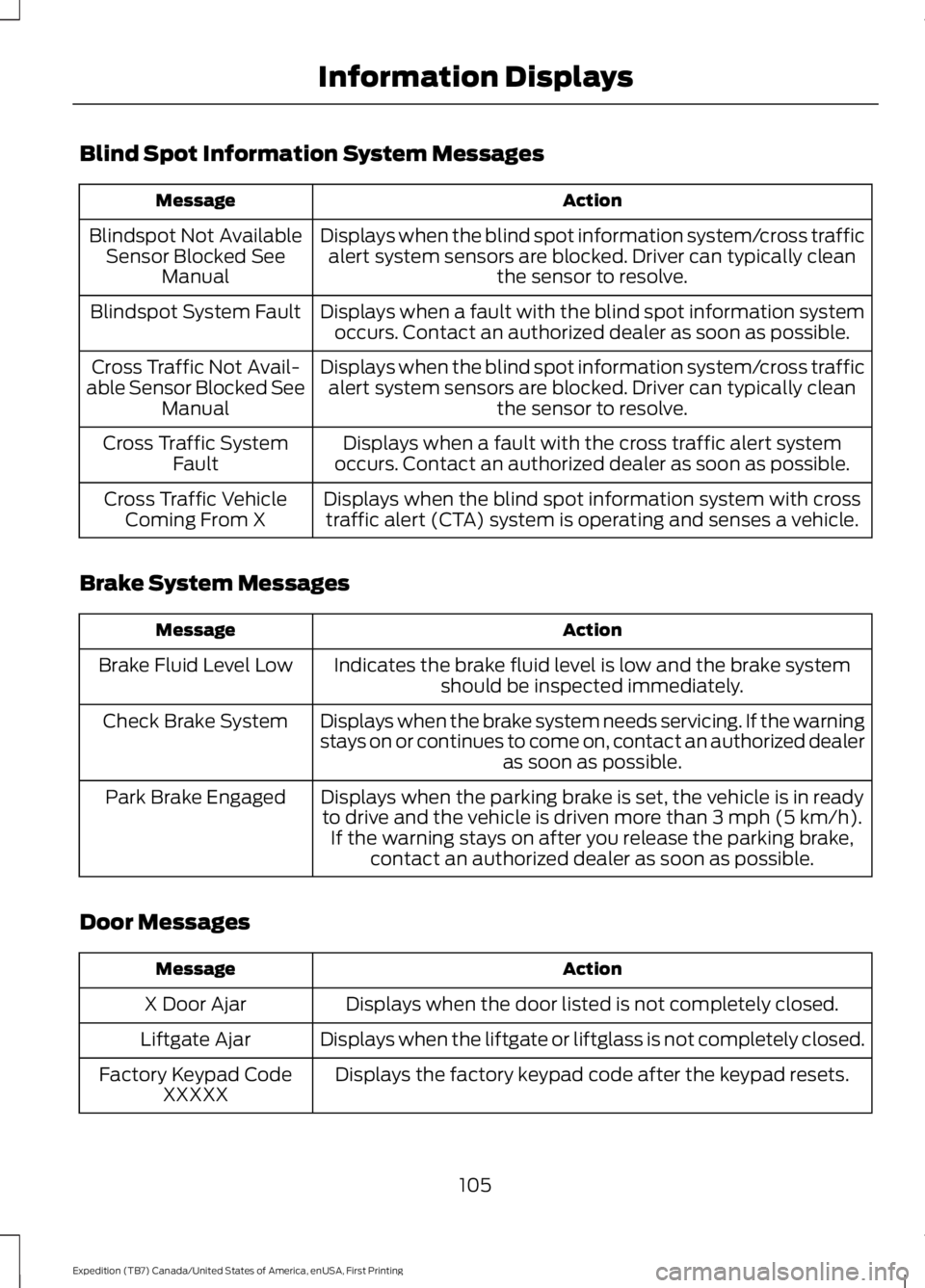
Blind Spot Information System Messages
ActionMessage
Displays when the blind spot information system/cross trafficalert system sensors are blocked. Driver can typically cleanthe sensor to resolve.
Blindspot Not AvailableSensor Blocked SeeManual
Displays when a fault with the blind spot information systemoccurs. Contact an authorized dealer as soon as possible.Blindspot System Fault
Displays when the blind spot information system/cross trafficalert system sensors are blocked. Driver can typically cleanthe sensor to resolve.
Cross Traffic Not Avail-able Sensor Blocked SeeManual
Displays when a fault with the cross traffic alert systemoccurs. Contact an authorized dealer as soon as possible.Cross Traffic SystemFault
Displays when the blind spot information system with crosstraffic alert (CTA) system is operating and senses a vehicle.Cross Traffic VehicleComing From X
Brake System Messages
ActionMessage
Indicates the brake fluid level is low and the brake systemshould be inspected immediately.Brake Fluid Level Low
Displays when the brake system needs servicing. If the warningstays on or continues to come on, contact an authorized dealeras soon as possible.
Check Brake System
Displays when the parking brake is set, the vehicle is in readyto drive and the vehicle is driven more than 3 mph (5 km/h).If the warning stays on after you release the parking brake,contact an authorized dealer as soon as possible.
Park Brake Engaged
Door Messages
ActionMessage
Displays when the door listed is not completely closed.X Door Ajar
Displays when the liftgate or liftglass is not completely closed.Liftgate Ajar
Displays the factory keypad code after the keypad resets.Factory Keypad CodeXXXXX
105
Expedition (TB7) Canada/United States of America, enUSA, First Printing
Information Displays
Page 109 of 421
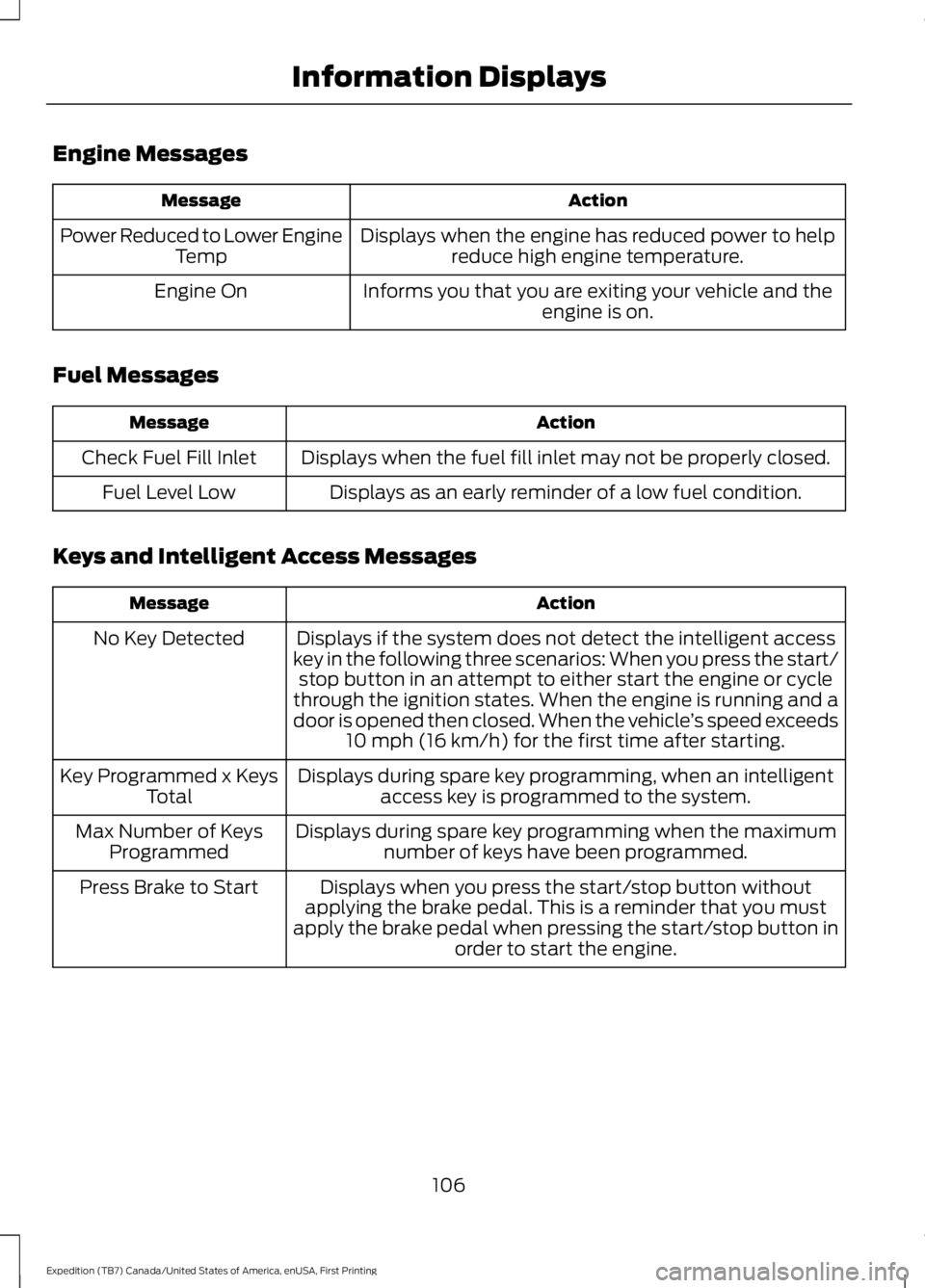
Engine Messages
ActionMessage
Displays when the engine has reduced power to helpreduce high engine temperature.Power Reduced to Lower EngineTemp
Informs you that you are exiting your vehicle and theengine is on.Engine On
Fuel Messages
ActionMessage
Displays when the fuel fill inlet may not be properly closed.Check Fuel Fill Inlet
Displays as an early reminder of a low fuel condition.Fuel Level Low
Keys and Intelligent Access Messages
ActionMessage
Displays if the system does not detect the intelligent accesskey in the following three scenarios: When you press the start/stop button in an attempt to either start the engine or cyclethrough the ignition states. When the engine is running and adoor is opened then closed. When the vehicle’s speed exceeds10 mph (16 km/h) for the first time after starting.
No Key Detected
Displays during spare key programming, when an intelligentaccess key is programmed to the system.Key Programmed x KeysTotal
Displays during spare key programming when the maximumnumber of keys have been programmed.Max Number of KeysProgrammed
Displays when you press the start/stop button withoutapplying the brake pedal. This is a reminder that you mustapply the brake pedal when pressing the start/stop button inorder to start the engine.
Press Brake to Start
106
Expedition (TB7) Canada/United States of America, enUSA, First Printing
Information Displays
Page 112 of 421
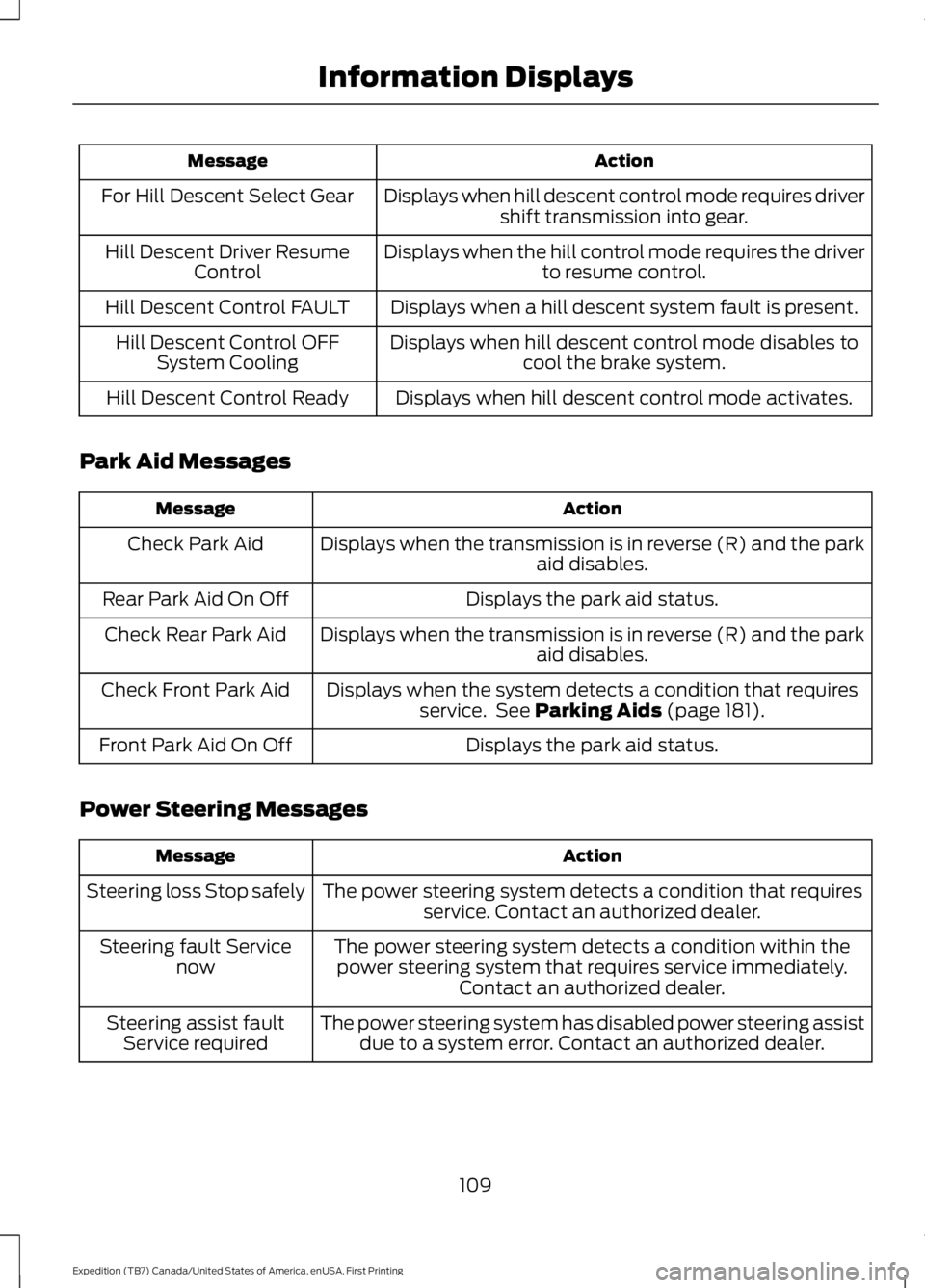
ActionMessage
Displays when hill descent control mode requires drivershift transmission into gear.For Hill Descent Select Gear
Displays when the hill control mode requires the driverto resume control.Hill Descent Driver ResumeControl
Displays when a hill descent system fault is present.Hill Descent Control FAULT
Displays when hill descent control mode disables tocool the brake system.Hill Descent Control OFFSystem Cooling
Displays when hill descent control mode activates.Hill Descent Control Ready
Park Aid Messages
ActionMessage
Displays when the transmission is in reverse (R) and the parkaid disables.Check Park Aid
Displays the park aid status.Rear Park Aid On Off
Displays when the transmission is in reverse (R) and the parkaid disables.Check Rear Park Aid
Displays when the system detects a condition that requiresservice. See Parking Aids (page 181).Check Front Park Aid
Displays the park aid status.Front Park Aid On Off
Power Steering Messages
ActionMessage
The power steering system detects a condition that requiresservice. Contact an authorized dealer.Steering loss Stop safely
The power steering system detects a condition within thepower steering system that requires service immediately.Contact an authorized dealer.
Steering fault Servicenow
The power steering system has disabled power steering assistdue to a system error. Contact an authorized dealer.Steering assist faultService required
109
Expedition (TB7) Canada/United States of America, enUSA, First Printing
Information Displays
Page 113 of 421

Remote Start Messages
ActionMessage
Displays as a reminder to turn the key to on to drive the vehicleafter a remote start.To Drive: Turn Key to On
Displays as a reminder to apply the brake and the start buttonto drive the vehicle after a remote start.To Drive: Press Brakeand START Button
Suspension System Messages
ActionMessage
Displays when there is a problem with your vehicle’s suspen-sion system. Contact an authorized dealer for service.Driver Select Susp.malfunction Servicerequired
Tire Messages
ActionMessage
Displays when one or more tires on your vehicle have low tirepressure.Tire Pressure LOW
Displays when the tire pressure monitoring system ismalfunctioning. If the warning stays on or continues to comeon, contact an authorized dealer.
Tire Pressure MonitorFault
Displays when a tire pressure sensor is malfunctioning or yourspare tire is in use. See Wheels and Tires (page 272). If thewarning stays on or continues to come on, contact anauthorized dealer.
Tire Pressure SensorFault
Trailer Messages
ActionMessage
Displays the current gain setting for the trailer brakewhen a trailer is not connected.Trailer Brake Gain: XX.X NoTrailer
Displays and a chime sounds in response to faultssensed by the TBC.Trailer Brake Module Fault
Displays when a correct trailer connection is sensedduring a given ignition cycle.Trailer Connected
110
Expedition (TB7) Canada/United States of America, enUSA, First Printing
Information Displays
Page 114 of 421
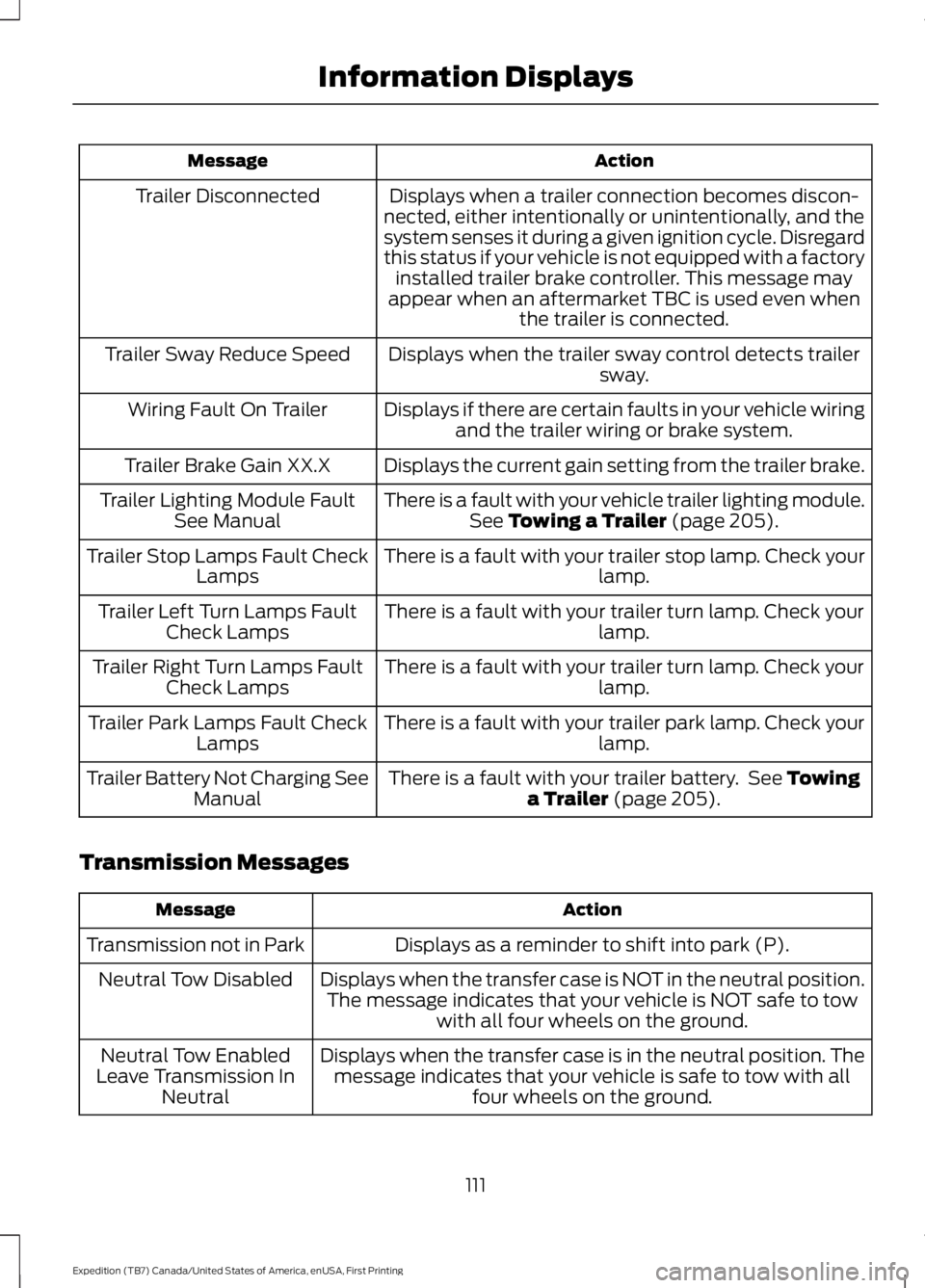
ActionMessage
Displays when a trailer connection becomes discon-nected, either intentionally or unintentionally, and thesystem senses it during a given ignition cycle. Disregardthis status if your vehicle is not equipped with a factoryinstalled trailer brake controller. This message mayappear when an aftermarket TBC is used even whenthe trailer is connected.
Trailer Disconnected
Displays when the trailer sway control detects trailersway.Trailer Sway Reduce Speed
Displays if there are certain faults in your vehicle wiringand the trailer wiring or brake system.Wiring Fault On Trailer
Displays the current gain setting from the trailer brake.Trailer Brake Gain XX.X
There is a fault with your vehicle trailer lighting module.See Towing a Trailer (page 205).Trailer Lighting Module FaultSee Manual
There is a fault with your trailer stop lamp. Check yourlamp.Trailer Stop Lamps Fault CheckLamps
There is a fault with your trailer turn lamp. Check yourlamp.Trailer Left Turn Lamps FaultCheck Lamps
There is a fault with your trailer turn lamp. Check yourlamp.Trailer Right Turn Lamps FaultCheck Lamps
There is a fault with your trailer park lamp. Check yourlamp.Trailer Park Lamps Fault CheckLamps
There is a fault with your trailer battery. See Towinga Trailer (page 205).Trailer Battery Not Charging SeeManual
Transmission Messages
ActionMessage
Displays as a reminder to shift into park (P).Transmission not in Park
Displays when the transfer case is NOT in the neutral position.The message indicates that your vehicle is NOT safe to towwith all four wheels on the ground.
Neutral Tow Disabled
Displays when the transfer case is in the neutral position. Themessage indicates that your vehicle is safe to tow with allfour wheels on the ground.
Neutral Tow EnabledLeave Transmission InNeutral
111
Expedition (TB7) Canada/United States of America, enUSA, First Printing
Information Displays
Page 115 of 421
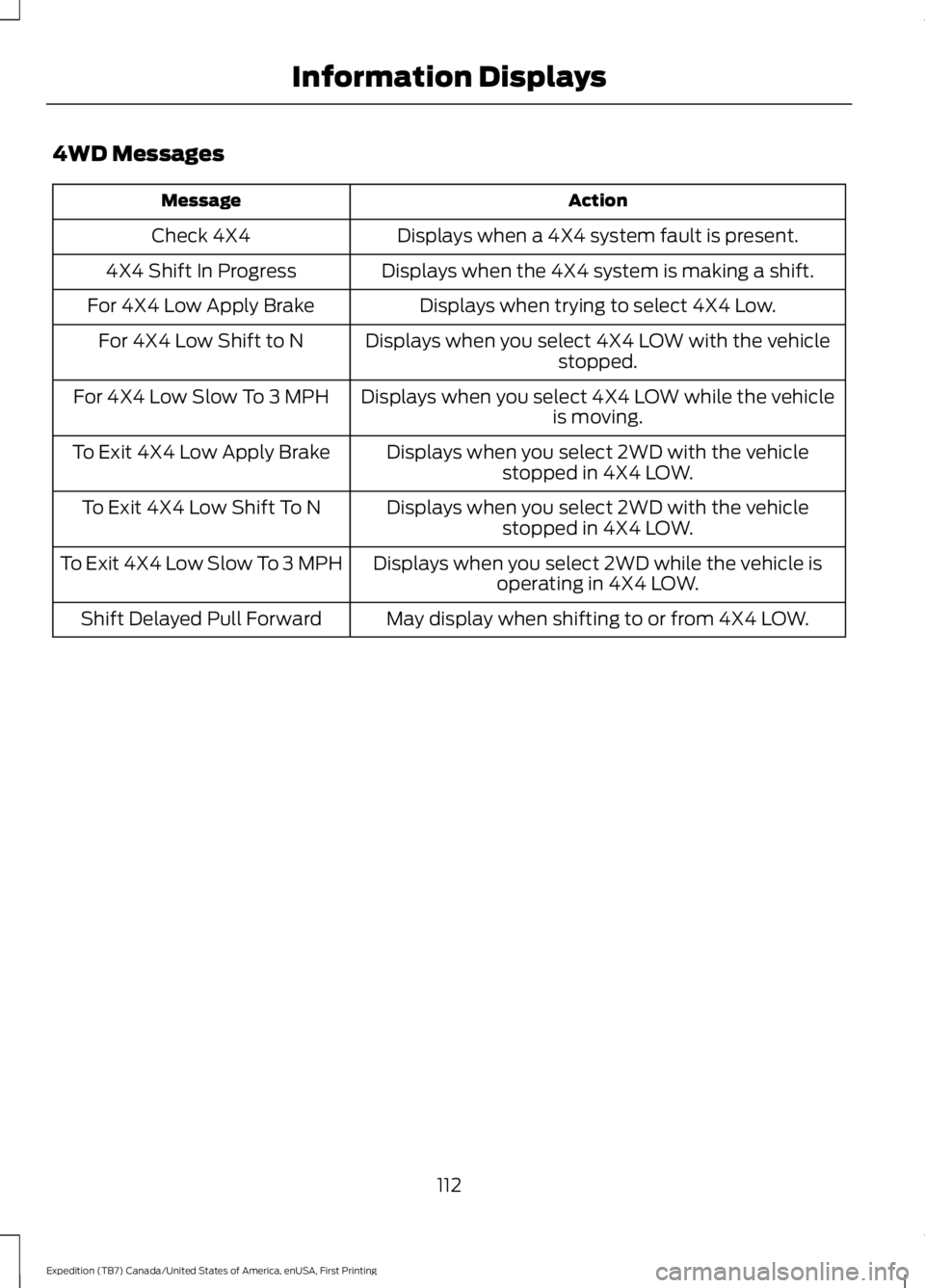
4WD Messages
ActionMessage
Displays when a 4X4 system fault is present.Check 4X4
Displays when the 4X4 system is making a shift.4X4 Shift In Progress
Displays when trying to select 4X4 Low.For 4X4 Low Apply Brake
Displays when you select 4X4 LOW with the vehiclestopped.For 4X4 Low Shift to N
Displays when you select 4X4 LOW while the vehicleis moving.For 4X4 Low Slow To 3 MPH
Displays when you select 2WD with the vehiclestopped in 4X4 LOW.To Exit 4X4 Low Apply Brake
Displays when you select 2WD with the vehiclestopped in 4X4 LOW.To Exit 4X4 Low Shift To N
Displays when you select 2WD while the vehicle isoperating in 4X4 LOW.To Exit 4X4 Low Slow To 3 MPH
May display when shifting to or from 4X4 LOW.Shift Delayed Pull Forward
112
Expedition (TB7) Canada/United States of America, enUSA, First Printing
Information Displays
Page 149 of 421
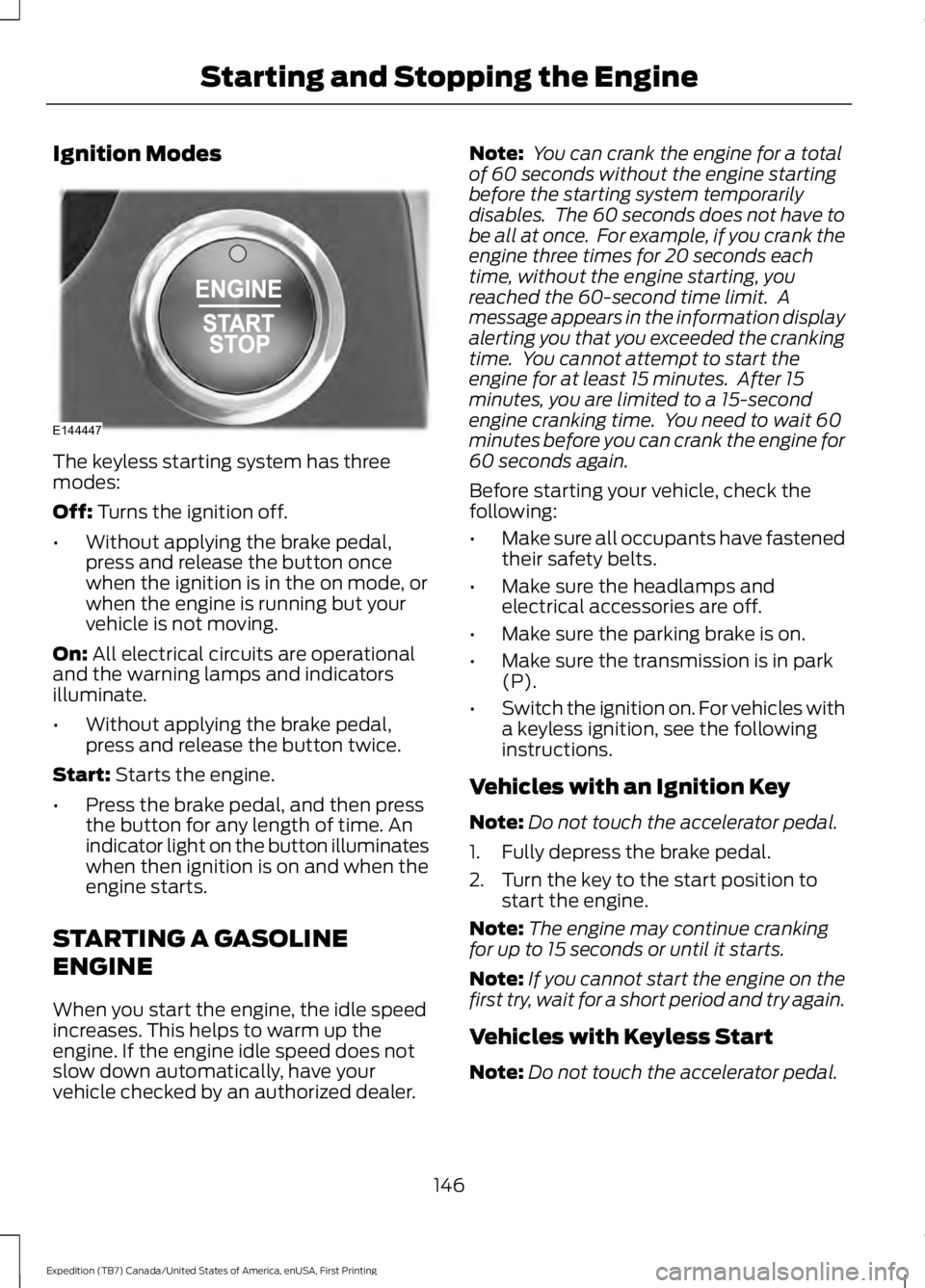
Ignition Modes
The keyless starting system has threemodes:
Off: Turns the ignition off.
•Without applying the brake pedal,press and release the button oncewhen the ignition is in the on mode, orwhen the engine is running but yourvehicle is not moving.
On: All electrical circuits are operationaland the warning lamps and indicatorsilluminate.
•Without applying the brake pedal,press and release the button twice.
Start: Starts the engine.
•Press the brake pedal, and then pressthe button for any length of time. Anindicator light on the button illuminateswhen then ignition is on and when theengine starts.
STARTING A GASOLINE
ENGINE
When you start the engine, the idle speedincreases. This helps to warm up theengine. If the engine idle speed does notslow down automatically, have yourvehicle checked by an authorized dealer.
Note: You can crank the engine for a totalof 60 seconds without the engine startingbefore the starting system temporarilydisables. The 60 seconds does not have tobe all at once. For example, if you crank theengine three times for 20 seconds eachtime, without the engine starting, youreached the 60-second time limit. Amessage appears in the information displayalerting you that you exceeded the crankingtime. You cannot attempt to start theengine for at least 15 minutes. After 15minutes, you are limited to a 15-secondengine cranking time. You need to wait 60minutes before you can crank the engine for60 seconds again.
Before starting your vehicle, check thefollowing:
•Make sure all occupants have fastenedtheir safety belts.
•Make sure the headlamps andelectrical accessories are off.
•Make sure the parking brake is on.
•Make sure the transmission is in park(P).
•Switch the ignition on. For vehicles witha keyless ignition, see the followinginstructions.
Vehicles with an Ignition Key
Note:Do not touch the accelerator pedal.
1. Fully depress the brake pedal.
2. Turn the key to the start position tostart the engine.
Note:The engine may continue crankingfor up to 15 seconds or until it starts.
Note:If you cannot start the engine on thefirst try, wait for a short period and try again.
Vehicles with Keyless Start
Note:Do not touch the accelerator pedal.
146
Expedition (TB7) Canada/United States of America, enUSA, First Printing
Starting and Stopping the EngineE144447
Page 150 of 421
Note:You must have your intelligent accesskey in your vehicle in order to shift thetransmission out of park (P).
1. Fully depress the brake pedal.
2. Press the push button ignition switch.
The system does not function if:
•The passive key frequencies arejammed.
•The key battery has no charge.
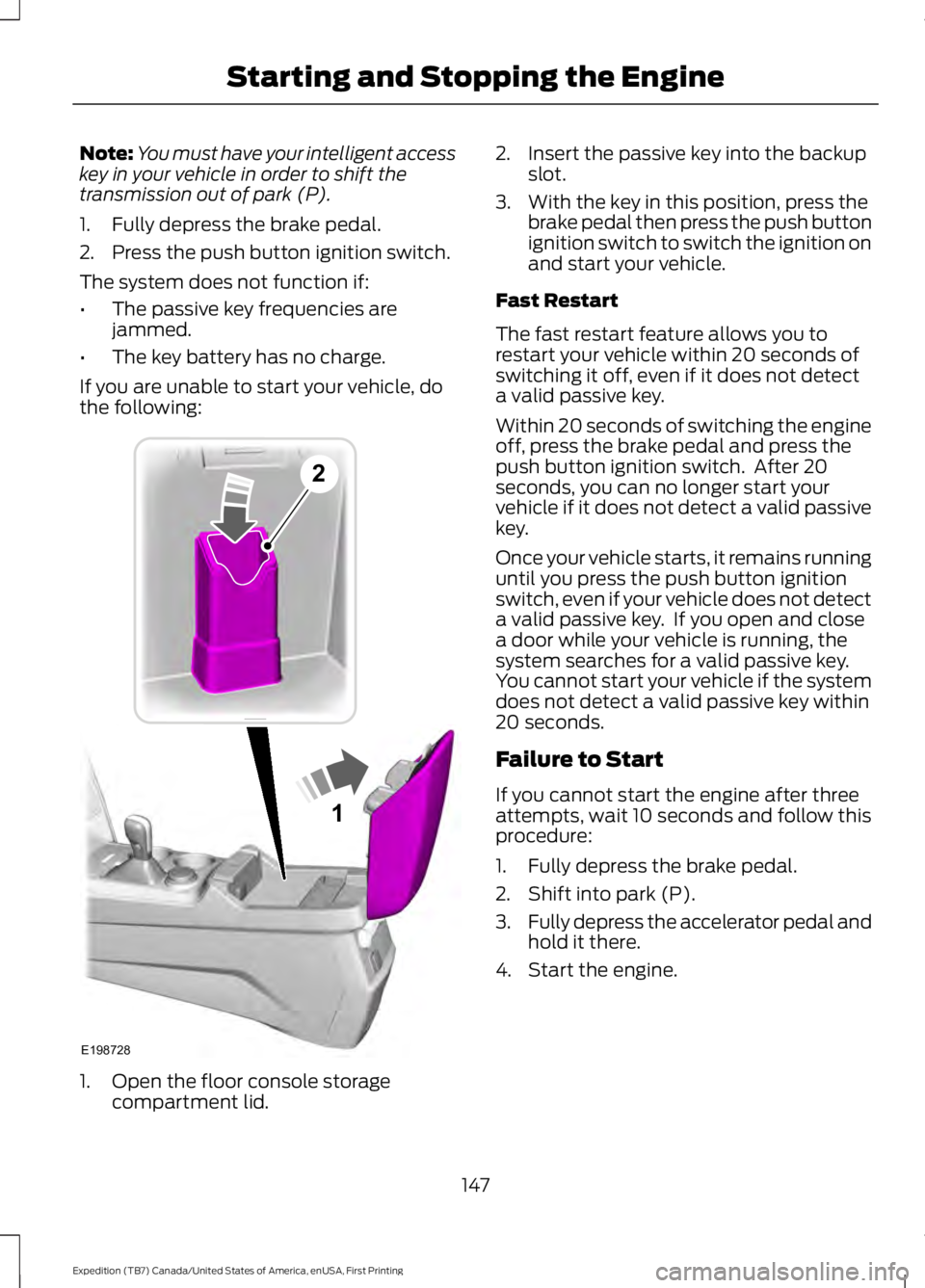
If you are unable to start your vehicle, dothe following:
1. Open the floor console storagecompartment lid.
2. Insert the passive key into the backupslot.
3. With the key in this position, press thebrake pedal then press the push buttonignition switch to switch the ignition onand start your vehicle.
Fast Restart
The fast restart feature allows you torestart your vehicle within 20 seconds ofswitching it off, even if it does not detecta valid passive key.
Within 20 seconds of switching the engineoff, press the brake pedal and press thepush button ignition switch. After 20seconds, you can no longer start yourvehicle if it does not detect a valid passivekey.
Once your vehicle starts, it remains runninguntil you press the push button ignitionswitch, even if your vehicle does not detecta valid passive key. If you open and closea door while your vehicle is running, thesystem searches for a valid passive key.You cannot start your vehicle if the systemdoes not detect a valid passive key within20 seconds.
Failure to Start
If you cannot start the engine after threeattempts, wait 10 seconds and follow thisprocedure:
1. Fully depress the brake pedal.
2. Shift into park (P).
3.Fully depress the accelerator pedal andhold it there.
4. Start the engine.
147
Expedition (TB7) Canada/United States of America, enUSA, First Printing
Starting and Stopping the Engine1
E198728
2