Page 151 of 587
WARNING!(Continued)
•Close the lid when not in use and while driving the
vehicle.
• If this outlet is mishandled, it may cause an electric
shock and failure.
CAUTION!
• Many accessories that can be plugged in draw
power from the vehicle’s battery, even when not in
use (i.e., cellular phones, etc.). Eventually, if
plugged in long enough, the vehicle’s battery will
discharge sufficiently to degrade battery life and/or
prevent the engine from starting.
(Continued)
CAUTION! (Continued)
•Accessories that draw higher power (i.e., coolers,
vacuum cleaners, lights, etc.) will degrade the bat-
tery even more quickly. Only use these intermit-
tently and with greater caution.
• After the use of high power draw accessories, or
long periods of the vehicle not being started (with
accessories still plugged in), the vehicle must be
driven a sufficient length of time to allow the
generator to recharge the vehicle’s battery.
Cigar Lighter — Optional
NOTE: Cigar lighters can be purchased at an authorized
dealer through MOPAR parts. To ensure proper cigar
lighter operation, a MOPAR knob and element must be
used.
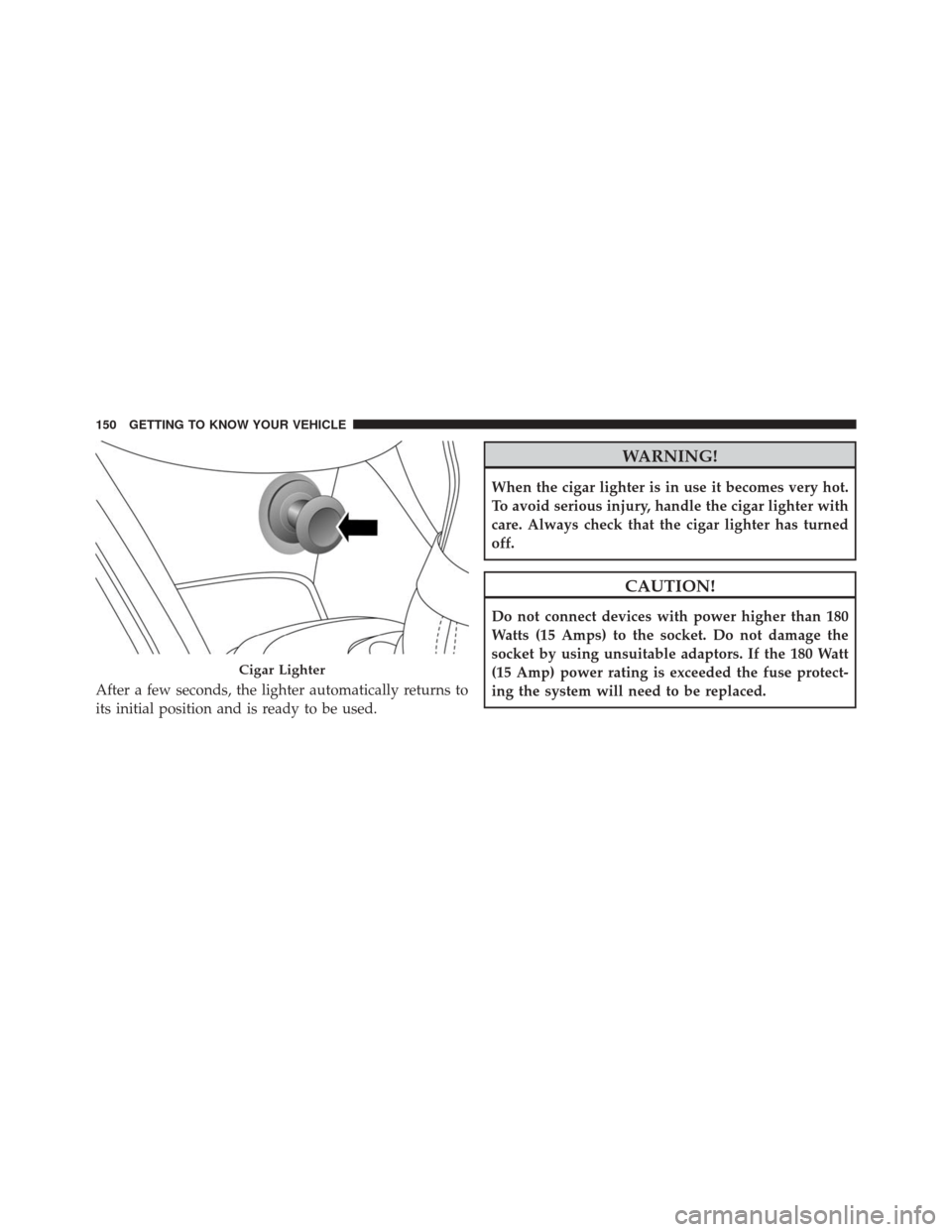
The cigar lighter is located on the center console. Push
lighter inward to heat.
4
GETTING TO KNOW YOUR VEHICLE 149
Page 152 of 587
After a few seconds, the lighter automatically returns to
its initial position and is ready to be used.
WARNING!
When the cigar lighter is in use it becomes very hot.
To avoid serious injury, handle the cigar lighter with
care. Always check that the cigar lighter has turned
off.
CAUTION!
Do not connect devices with power higher than 180
Watts (15 Amps) to the socket. Do not damage the
socket by using unsuitable adaptors. If the 180 Watt
(15 Amp) power rating is exceeded the fuse protect-
ing the system will need to be replaced.
Cigar Lighter
150 GETTING TO KNOW YOUR VEHICLE
Page 159 of 587
GETTING TO KNOW YOUR INSTRUMENT CLUSTER
CONTENTS
�INSTRUMENT CLUSTER .................158
� ONBOARD DIAGNOSTIC SYSTEM (OBD II) . . .160
� ELECTRONIC VEHICLE INFORMATION CENTER
(EVIC) .............................. .161
▫ EVIC Description ..................... .161
▫ Mapping And Reconfigurable Zone Display
(EVIC) — If Equipped ..................161
▫ EVIC Control Buttons ..................163
▫ Engine Oil Change Reset ................164 ▫
EVIC Main Menu .....................165
� TRIP COMPUTER ..................... .173
▫ Quantities Displayed ...................174
▫ OK Button ......................... .174
� WARNING LIGHTS AND MESSAGES ........175
▫ Telltales On The EVIC Instrument Cluster . . . .176
▫ Symbols Displayed In The EVIC ...........186
5
Page 161 of 587
1. Speedometer•Indicates the speed of the car
2. Fuel Level Gauge •The fuel gauge in the EVIC indicates the amount of
fuel left in the tank.
• The light comes on, together with a chime and the
display of a message in the EVIC, when the gas tank
has 1.5 to 2 gallons (5 to 7 liters) of fuel remaining.
3. EVIC Display •The vehicle can be equipped with multifunctional
EVIC which offers useful information to the driver.
• With the ignition in the STOP/OFF position (and the
key removed, for vehicles with mechanical key),
opening/closing of a door will activate the EVIC for
viewing, and display the total miles or kilometers in
the odometer. 4. Engine Coolant Temperature
•The temperature gauge in the EVIC displays the
temperature of the engine coolant and starts provid-
ing indications when the coolant temperature ex-
ceeds approximately 122° F. In the normal use of the
car, the temperature gauge can move in different
directions based on the use of the car. The light
comes on, together with a chime and the display of a
message in the EVIC, to indicate an excessive in-
crease in the temperature of the engine coolant. Stop
the engine and contact you approved automotive
dealer.
5. Tachometer •Indicates the engine RPM
NOTE: The illumination of the graphics on the instru-
ment cluster may vary according to the version (Mono-
color or Color display).
5
GETTING TO KNOW YOUR INSTRUMENT CLUSTER 159
Page 162 of 587
ONBOARD DIAGNOSTIC SYSTEM (OBD II)
Your vehicle is equipped with a sophisticated onboard
diagnostic system called OBD II. This system monitors
the performance of the emissions, engine, and automatic
transmission control systems. When these systems are
operating properly, your vehicle will provide excellent
performance and fuel economy, as well as engine emis-
sions well within current government regulations.
If any of these systems require service, the OBD II system
will turn on the “Malfunction Indicator Light (MIL).” It
will also store diagnostic codes and other information to
assist your service technician in making repairs. Al-
though your vehicle will usually be drivable and not
need towing, see your authorized dealer for service as
soon as possible.
CAUTION!
•Prolonged driving with the MIL on could cause
further damage to the emission control system. It
could also affect fuel economy and driveability.
The vehicle must be serviced before any emissions
tests can be performed.
• If the MIL is flashing, while the engine is running,
severe catalytic converter damage and power loss
will soon occur. Immediate service is required.
160 GETTING TO KNOW YOUR INSTRUMENT CLUSTER
Page 168 of 587
•Drive Mode Selector
– Auto Mode
– Sport Mode
– Traction/All Weather Mode
• Vehicle Info
– Tire Pressure
– Oil Temperature
– Battery Voltage
• Driver Assist
– Lane Departure Warning
• Audio
• Navigation
• Messages
• Settings
– Display – Units
– Clock & Date
– Security
– Safety & Assistance
– Lights
– Doors & Locks
Trip
This EVIC menu item allows you to view and select
information about the
�Trip computer�:
• Speedometer
– View and change the speedometer scale from MPH to km/h (km/h to MPH).
• Instantaneous info
– View and change the distance (miles or km)
– View and change the instantaneous consumption (mpg, or l/ 100km or km/l)
166 GETTING TO KNOW YOUR INSTRUMENT CLUSTER
Page 170 of 587

Vehicle Info
Push and release the UP or DOWN arrow button until
�Vehicle Info�is highlighted in the EVIC. Push and
release the RIGHT arrow button and Coolant Temp will
be displayed. Push the RIGHT or LEFT arrow button to
scroll through the following information displays:
• Tire pressure
– View the information relating to the TPMS system (if equipped).
• Oil Temperature
– View the engine oil temperature.
• Battery Voltage
– View the voltage value (state of charge) of the battery.
Driver Assist
This menu item allows you to change the settings ( �No-
tice LaneSense� and�Intensity LaneSense�) relating to the
LaneSense system (if equipped).
• Notice LaneSense
• By selecting this function, you can select the �readi-
ness� of LaneSense, choosing between the options
�Near,�� Medium,� or�Far.�
• Intensity LaneSense
• Using this function, you can select the force applied to
the steering wheel to keep the car in the roadway
through the electrical drive system due to LaneSense.
Audio
This menu item allows you to view the instrument
cluster display and the information present on the dis-
play of the Uconnect system.
168 GETTING TO KNOW YOUR INSTRUMENT CLUSTER
Page 171 of 587
The information displayed is:
•“Radio (AM or FM)”
• View Radio Station Name (if equipped), frequency,
and graphical icon
• �MP3”
• Title display or number song playing
• �USB�
• Title display or number song playing
• �Ipod�
• Display song title (if equipped)
Messages (Stored)
This menu item allows you to display the information
messages/malfunction stored. The background color of the display varies according to
the priorities of the failure:
•
Failed Messages with low priority displays in yellow
• Failed Messages with high priority displays in red
Settings
This menu item allows you to change the settings for the
following:
•Display
• Units
• Clock and Date
• Security
• Safety and Assistance
• Lights
• Doors and Locks5
GETTING TO KNOW YOUR INSTRUMENT CLUSTER 169