Page 145 of 587
Displacement Load Floor
To position the load from the lower to the upper position,
proceed as follows:
1. Grasp the load floor handle and lift up the load floor.
2. Correctly place the load floor on the side panel guidesand on the rear cross member.
Access To Tire Service Kit Or Spare Tire
To access the Tire Service Kit or spare tire and container
carrier, proceed as follows:
1. Grasp the load floor handle and remove the floor.
2. Pull the tab and lift up on the carpet.
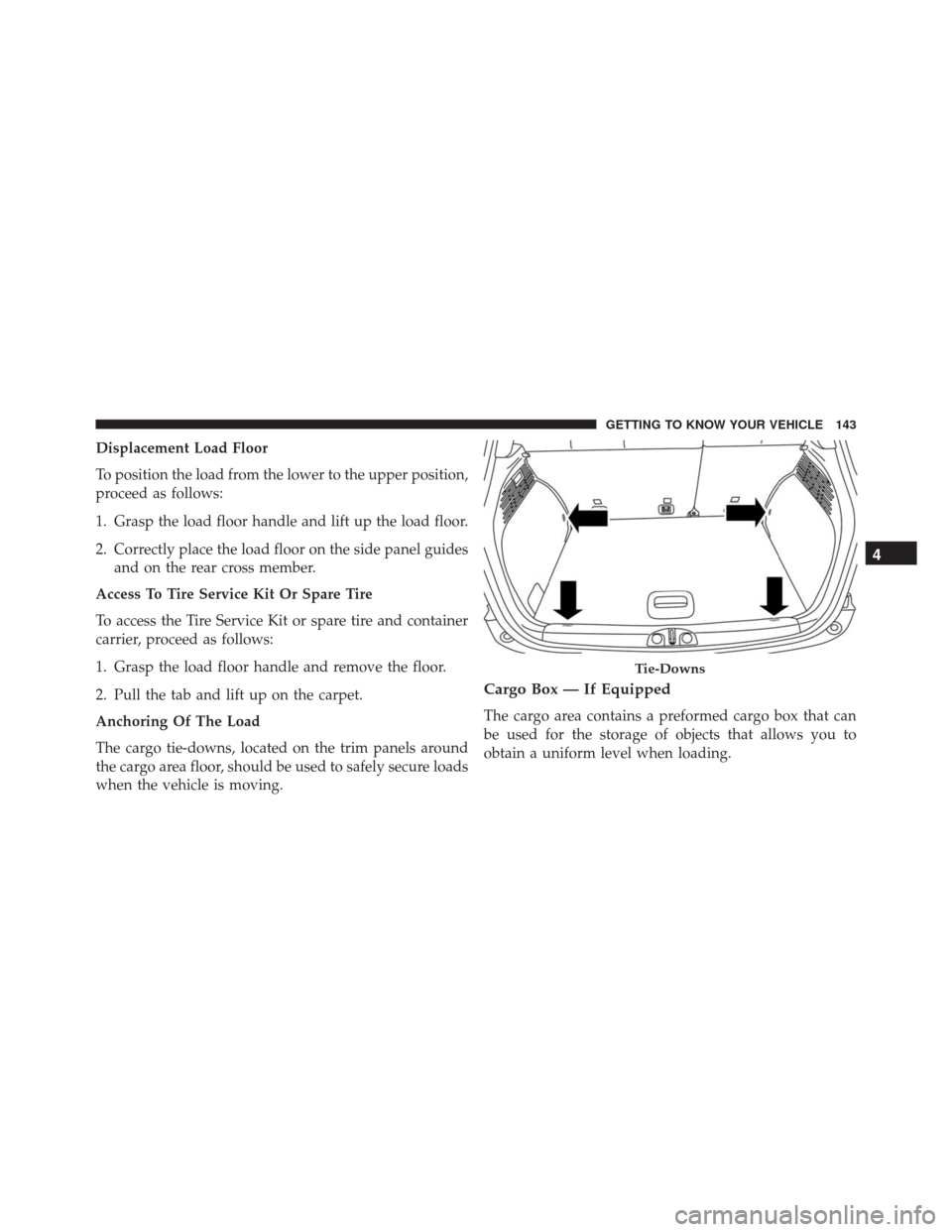
Anchoring Of The Load
The cargo tie-downs, located on the trim panels around
the cargo area floor, should be used to safely secure loads
when the vehicle is moving.
Cargo Box — If Equipped
The cargo area contains a preformed cargo box that can
be used for the storage of objects that allows you to
obtain a uniform level when loading.
Tie-Downs
4
GETTING TO KNOW YOUR VEHICLE 143
Page 156 of 587
ROOF LUGGAGE RACK — IF EQUIPPED
Your vehicle may be equipped with a Roof Luggage Rack
for transporting accessories.
Crossbars should always be used whenever cargo is
placed on the Roof Luggage Rack. Check the straps
frequently to be sure that the load remains securely
attached.
NOTE:Crossbars can be purchased at a authorized
dealer through Mopar parts. External racks do not in-
crease the total load carrying capacity of the vehicle. Be
sure that the total occupant and luggage load inside the
vehicle, plus the load on the Roof Luggage Rack, do not
exceed the maximum vehicle load capacity.
The load carried on the roof, when equipped with a
luggage rack, must not exceed 150 lbs (68 kg), and it
should be uniformly distributed over the cargo area. Do not use the sunroof when using the crossbars.CAUTION!
•
To avoid damage to the Roof Luggage Rack and
vehicle, do not exceed the maximum roof rack load
capacity. Always distribute heavy loads as evenly
as possible and secure the load appropriately.
• Long loads, which extend over the windshield,
such as wood panels or surfboards, should be
secured to both the front and rear of the vehicle.
• Place a blanket or other protection between the
surface of the roof and the load.
• Travel at reduced speeds and turn corners carefully
when carrying large or heavy loads on the roof
rack. Wind forces, due to natural causes or nearby
truck traffic, can add sudden upward loads. This is
especially true on large flat loads and may result in
damage to the cargo or your vehicle.
154 GETTING TO KNOW YOUR VEHICLE
Page 157 of 587
WARNING!
Roof rack cargo must be securely tied down before
driving your vehicle. Improperly secured loads may
fall off the vehicle, particularly at high speeds, re-
sulting in personal injury or property damage. Fol-
low the Roof Luggage Rack warnings and cautions
when carrying cargo on your roof rack.
4
GETTING TO KNOW YOUR VEHICLE 155
Page 168 of 587
•Drive Mode Selector
– Auto Mode
– Sport Mode
– Traction/All Weather Mode
• Vehicle Info
– Tire Pressure
– Oil Temperature
– Battery Voltage
• Driver Assist
– Lane Departure Warning
• Audio
• Navigation
• Messages
• Settings
– Display – Units
– Clock & Date
– Security
– Safety & Assistance
– Lights
– Doors & Locks
Trip
This EVIC menu item allows you to view and select
information about the
�Trip computer�:
• Speedometer
– View and change the speedometer scale from MPH to km/h (km/h to MPH).
• Instantaneous info
– View and change the distance (miles or km)
– View and change the instantaneous consumption (mpg, or l/ 100km or km/l)
166 GETTING TO KNOW YOUR INSTRUMENT CLUSTER
Page 171 of 587
The information displayed is:
•“Radio (AM or FM)”
• View Radio Station Name (if equipped), frequency,
and graphical icon
• �MP3”
• Title display or number song playing
• �USB�
• Title display or number song playing
• �Ipod�
• Display song title (if equipped)
Messages (Stored)
This menu item allows you to display the information
messages/malfunction stored. The background color of the display varies according to
the priorities of the failure:
•
Failed Messages with low priority displays in yellow
• Failed Messages with high priority displays in red
Settings
This menu item allows you to change the settings for the
following:
•Display
• Units
• Clock and Date
• Security
• Safety and Assistance
• Lights
• Doors and Locks5
GETTING TO KNOW YOUR INSTRUMENT CLUSTER 169
Page 173 of 587
Clock and Date
By selecting the item�clock and date,�you can adjust the
clock.
Possible options are:
• Set Time: Adjust hours/minutes
• Set Format: Adjust the time format �12h�(12 hours) or
� 24h� (24 hours)
• Set Date: Adjust day/month/year
Security
By selecting the item “Security,” you can make the
following adjustments:
• Speed Warning: Set the vehicle speed limit (MPH
or km/h), which the driver is notified through a visual
and acoustic signaling (display of a message and a
symbol on the display). •
Seat Belt Buzzer: This function is only viewable when
the Seat Belt Reminder (SBR) system is active.
• Hill Start Assist: Activation/Deactivation of the Hill
Start Assist system.
Safety and Assistance
By selecting the item �Safety & Assistance,� you can make
the following adjustments:
• FCW: A selection of operating modes of the system
Forward Collision Warning Plus
• FCW Sensitivity: A selection of the �readiness�of
intervention of the Forward Collision Warning Plus
system, based on the distance to the obstacle
• ParkSense: A selection of the type of information
provided by ParkSense
• ParkSense Vol.: A selection of the volume of acoustic
signals provided by ParkSense
5
GETTING TO KNOW YOUR INSTRUMENT CLUSTER 171
Page 191 of 587

NOTE:
•Driving with this light illuminated may cause serious
damage to the engine. If the overheated oil comes in
contact with the engine or exhaust components, a fire
may occur.
• If the light turns on while driving, stop the vehicle and
shut off the engine as soon as possible.
SENTRY KEY / Vehicle Security Alarm System Failure •What Does It Mean
System Failure Sentry Key
After placing the ignition to the MAR/
RUN position, if there is a problem with the
system, the Vehicle Security Light will illuminate.
This condition will result in the engine being shut off
after two seconds.
• What To Do
Contact an authorized dealer as soon as possible. Enhanced Accident Response System
•What Does It Mean
The light illuminates when there is a fuel
system shut off.
• What To Do
To reactivate the fuel system shut off, refer to �En-
hanced Accident Response System� in�In Case Of
Emergency� for more information. If you cannot
restore the supply of fuel, contact an authorized
dealer.
Engine Oil Pressure Sensor Failure •What Does It Mean
This light indicates engine oil pressure sen-
sor failure. Please contact an authorized
dealer.
5
GETTING TO KNOW YOUR INSTRUMENT CLUSTER 189
Page 209 of 587
NOTE:The DST feature is only meant to help the driver
realize the correct course of action through small torques
on the steering wheel, which means the effectiveness of
the DST feature is highly dependent on the drivers
sensitivity and overall reaction to the applied torque. It is
very important to realize that this feature will not steer
the vehicle, meaning the driver is still responsible for
steering the vehicle.
OCCUPANT RESTRAINT SYSTEMS
Some of the most important safety features in your
vehicle are the restraint systems:
• Seat Belt Systems
• Supplemental Restraint Systems (SRS) Air Bags
• Child Restraints
Important Safety Precautions
Please pay close attention to the information in this
section. It tells you how to use your restraint system
properly, to keep you and your passengers as safe as
possible.
Here are some simple steps you can take to minimize the
risk of harm from a deploying air bag:
1. Children 12 years old and under should always ride
buckled up in a vehicle with a rear seat.
2. If a child from 2 to 12 years old (not in a rear-facing child restraint) must ride in the front passenger seat,
move the seat as far back as possible and use the
proper child restraint. (Refer to “Child Restraints”)
3. Children that are not big enough to wear the vehicle seat belt properly (Refer to �Child Restraints�) should
be secured in a vehicle with a rear seat in child
6
SAFETY 207