Page 146 of 707
Blind Spot Alert Lights/Chime
When operating in Blind Spot Alert Lights/Chime mode,
the BSM system will provide a visual alert in the appro-
priate side view mirror based on a detected object. If the
turn signal is then activated, and it corresponds to an
alert present on that side of the vehicle, an audible chime
will also be sounded. Whenever a turn signal and de-
tected object are present on the same side at the same
time, both the visual and audio alerts will be issued. In
addition to the audible alert the radio (if on) volume will
be reduced.
NOTE:
•Whenever an audible alert is requested by the BSM
system, the radio volume is reduced.
• If the hazard flashers are on, the system will request
the appropriate visual alert only. When the system is in RCP, the system shall respond with
both visual and audible alerts when a detected object is
present. Whenever an audible alert is requested, the radio
volume is reduced. Turn/hazard signal status is ignored;
the RCP state always requests the chime.
Blind Spot Alert Off
When the BSM system is turned off there will be no
visual or audible alerts from either the BSM or RCP
systems.
NOTE:
The BSM system will store the current operating
mode when the vehicle is shut off. Each time the vehicle
is started the previously stored mode will be recalled and
used.
144 UNDERSTANDING THE FEATURES OF YOUR VEHICLE
Page 160 of 707
NOTE:This may not be the last number dialed from the
Uconnect Phone.
Call Continuation
Call continuation is the progression of a phone call on the
Uconnect Phone after the vehicle ignition key has been
switched to OFF. Call continuation functionality avail-
able on the vehicle can be any one of three types:
• After the ignition key is switched to OFF, a call can
continue on the Uconnect Phone either until the call
ends, or until the vehicle battery condition dictates
cessation of the call on the Uconnect Phone and
transfer of the call to the mobile phone.
• After the ignition key is cycled to OFF, a call can
continue on the Uconnect Phone for a certain duration,
after which the call is automatically transferred from
the Uconnect Phone to the mobile phone.
• An active call is automatically transferred to the mo-
bile phone after the ignition key is cycled to OFF.
Uconnect Phone Features
Language Selection
To change the language that the Uconnect Phone is using:
• Push the Phone
button to begin.
•After the “Ready” prompt and the following beep, say
the name of the language you wish to switch to
English, Espanol, or Francais.
• Continue to follow the system prompts to complete the
language selection.
After selecting one of the languages, all prompts and
voice commands will be in that language.
NOTE: After every Uconnect Phone language change
operation, only the language-specific 32-name phone-
book is usable. The paired phone name is not language-
specific and is usable across all languages.
158 UNDERSTANDING THE FEATURES OF YOUR VEHICLE
Page 163 of 707
Working With Automated Systems
This method is used in instances where one generally has
to press numbers on the mobile phone keypad while
navigating through an automated telephone system.
You can use your Uconnect Phone to access a voice mail
system or an automated service, such as a paging service
or automated customer service line. Some services re-
quire immediate response selection. In some instances,
that may be too quick for use of the Uconnect Phone.
When calling a number with your Uconnect Phone that
normally requires you to enter in a touch-tone sequence
on your mobile phone keypad, you can push the Voice
Command
button and say the sequence you wish
to enter, followed by the word “Send.” For example, if
required to enter your PIN followed with a pound, (3
7 4 6 #), you can push the Voice Command
button
andsay,“3746# Send.” Saying a number, or
sequence of numbers, followed by “Send,” is also to be used for navigating through an automated customer
service center menu structure, and to leave a number
on a pager.
You can also send stored Uconnect phonebook entries as
tones for fast and easy access to voice mail and pager
entries. To use this feature, dial the number you wish to
call and then push the Voice Command
button and
say “Send.” The system will prompt you to enter the
name or number and say the name of the phonebook
entry you wish to send. The Uconnect Phone will then
send the corresponding phone number associated
with the phonebook entry, as tones over the phone.
NOTE:
• You may not hear all of the tones due to mobile phone
network configurations. This is normal.
3
UNDERSTANDING THE FEATURES OF YOUR VEHICLE 161
Page 177 of 707
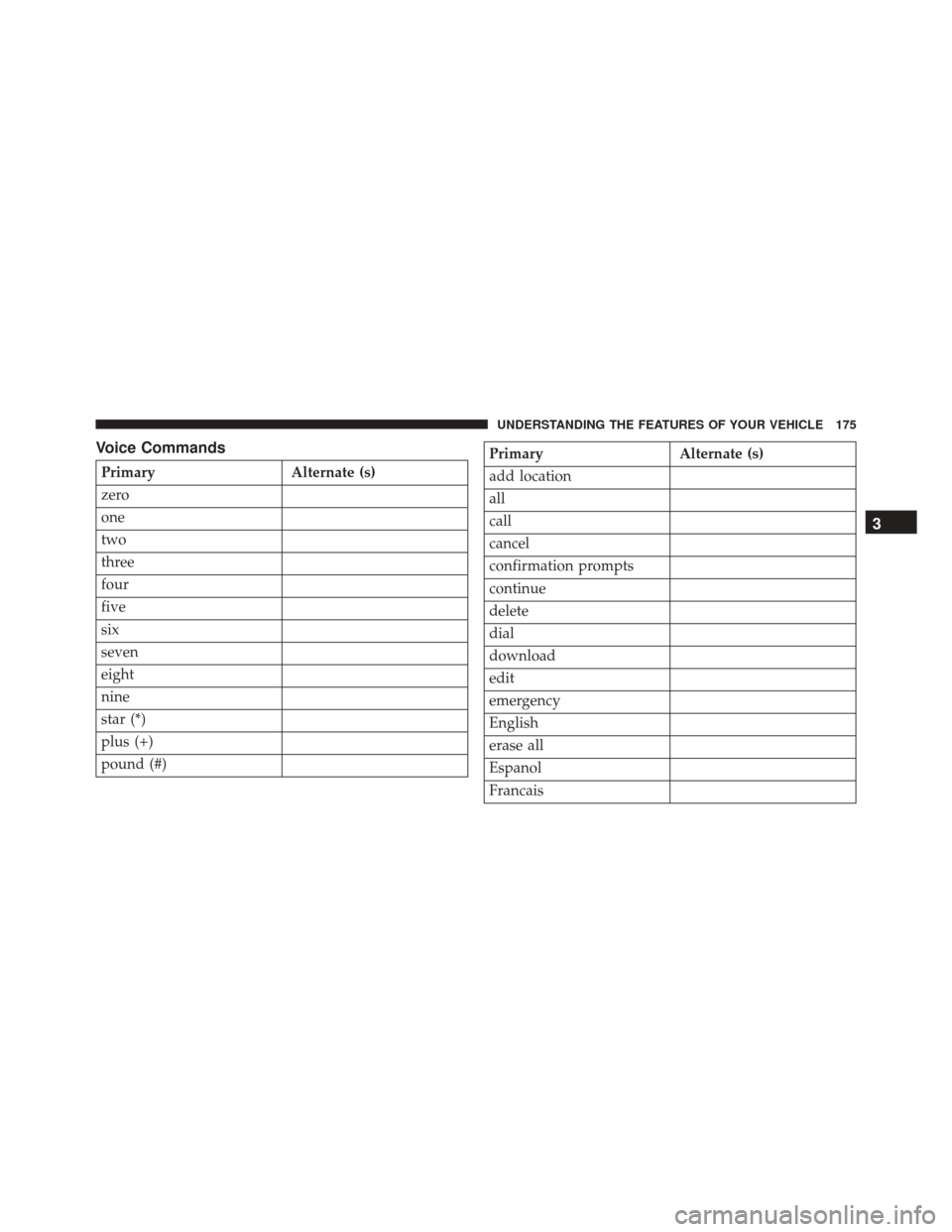
Voice Commands
PrimaryAlternate (s)
zero
one
two
three
four
five
six
seven
eight
nine
star (*)
plus (+)
pound (#)
Primary Alternate (s)
add location
all
call
cancel
confirmation prompts
continue
delete
dial
download
edit
emergency
English
erase all
Espanol
Francais
3
UNDERSTANDING THE FEATURES OF YOUR VEHICLE 175
Page 179 of 707
General Information
This device complies with Part 15 of the FCC rules and
RSS 210 of Industry Canada. Operation is subject to the
following conditions:
•Changes or modifications not expressly approved by
the party responsible for compliance could void the
user’s authority to operate the equipment.
• This device may not cause harmful interference.
• This device must accept any interference received,
including interference that may cause undesired op-
eration.
VOICE COMMAND — IF EQUIPPED
Voice Command System Operation
The Uconnect Voice Command system allows
you to control your AM, FM radio, disk player,
USB mass storage class device, iPod family of
devices, Bluetooth Streaming Audio Device,
satellite radio, and a memo recorder.
NOTE: Take care to speak into the Voice Interface System
as calmly and normally as possible. The ability of the
Voice Interface System to recognize user voice commands
may be negatively affected by rapid speaking or a raised
voice level.3
UNDERSTANDING THE FEATURES OF YOUR VEHICLE 177
Page 190 of 707

WARNING!
•Persons who are unable to feel pain to the skin
because of advanced age, chronic illness, diabetes,
spinal cord injury, medication, alcohol use, exhaus-
tion or other physical condition must exercise care
when using the seat heater. It may cause burns
even at low temperatures, especially if used for
long periods of time.
• Do not place anything on the seat or seatback that
insulates against heat, such as a blanket or cushion.
This may cause the seat heater to overheat. Sitting
in a seat that has been overheated could cause
serious burns due to the increased surface tempera-
ture of the seat.
Vehicles Equipped With Remote Start
On models that are equipped with remote start, the
driver ’s heated seat can be programmed through the Electronic Vehicle Information Center (EVIC) to come on
during a remote start. Refer to “Electronic Vehicle Infor-
mation Center (EVIC)” in “Understanding Your Instru-
ment Panel” for further information.
Front Heated Seats
There are two heated seat switches that allow the driver
and passenger to operate the seats independently. The
controls for each heater are located on the switch bank
below the climate controls.
You can choose from HI, LO or OFF heat settings. Amber
indicator lights in each switch indicate the level of heat in
use. Two indicator lights will illuminate for HI, one for
LO and none for OFF.
Push the switch once to select HI-level heating.
Push the switch a second time to select LO-
level heating. Push the switch a third time to
shut the heating elements OFF.
188 UNDERSTANDING THE FEATURES OF YOUR VEHICLE
Page 233 of 707

Windshield Washers
To use the Washer, push on the end of the lever to the
second detent and hold while spray is desired. If the lever
is pushed while on the intermittent setting, the wipers
will turn on and operate for several wipe cycles after the
lever is released, and then resume the intermittent inter-
val previously selected. If the lever is pushed while the
wipers are in the off position, the wipers will operate
several wipe cycles, then turn off.
Mist Feature
Push the end of the multifunction lever inward (toward
the steering column) to the first detent and release for a
single wiping cycle.
NOTE:The mist feature does not activate the washer
pump; therefore, no washer fluid will be sprayed on the
windshield. The wash function must be used in order to
spray the windshield with washer fluid.
Rear Wiper And Washer
Rotating the rotary ring to the first detent activates the
rear intermittent wipers. To activate the washers, rotate
the rotary ring fully forward and the washers will spray
until the ring is released, and then resume the intermit-
tent interval.
NOTE: Rear window wipers function in the intermittent
wiper speed only.
Rain Sensing Wipers — If Equipped
This feature senses moisture on the windshield and
automatically activates the wipers for the driver. This
feature is especially useful for road splash or overspray
from the windshield washers of the vehicle ahead. Rotate
the end of the multifunction lever to one of the five
intermittent wiper sensitivity settings to activate this
feature.
3
UNDERSTANDING THE FEATURES OF YOUR VEHICLE 231
Page 237 of 707

Vehicles Equipped With Remote Start
On models that are equipped with remote start, the
heated steering wheel can be programed to come on
during a remote start. Refer to “Electronic Vehicle Infor-
mation Center (EVIC)” in “Understanding Your Instru-
ment Panel” for further information.
WARNING!
•Persons who are unable to feel pain to the skin
because of advanced age, chronic illness, diabetes,
spinal cord injury, medication, alcohol use, exhaus-
tion, or other physical conditions must exercise
care when using the steering wheel heater. It may
cause burns even at low temperatures, especially if
used for long periods.
(Continued)
WARNING! (Continued)
•Do not place anything on the steering wheel that
insulates against heat, such as a blanket or steering
wheel covers of any type and material. This may
cause the steering wheel heater to overheat.
ELECTRONIC SPEED CONTROL — IF EQUIPPED
When engaged, the Electronic Speed Control takes over
accelerator operations at speeds greater than 25 mph
(40 km/h).
The Electronic Speed Control buttons are located on the
right side of the steering wheel.
3
UNDERSTANDING THE FEATURES OF YOUR VEHICLE 235