Page 243 of 276
241
jumper_en_Chap10b_Autoradio-Fiat-4_ed01-2015
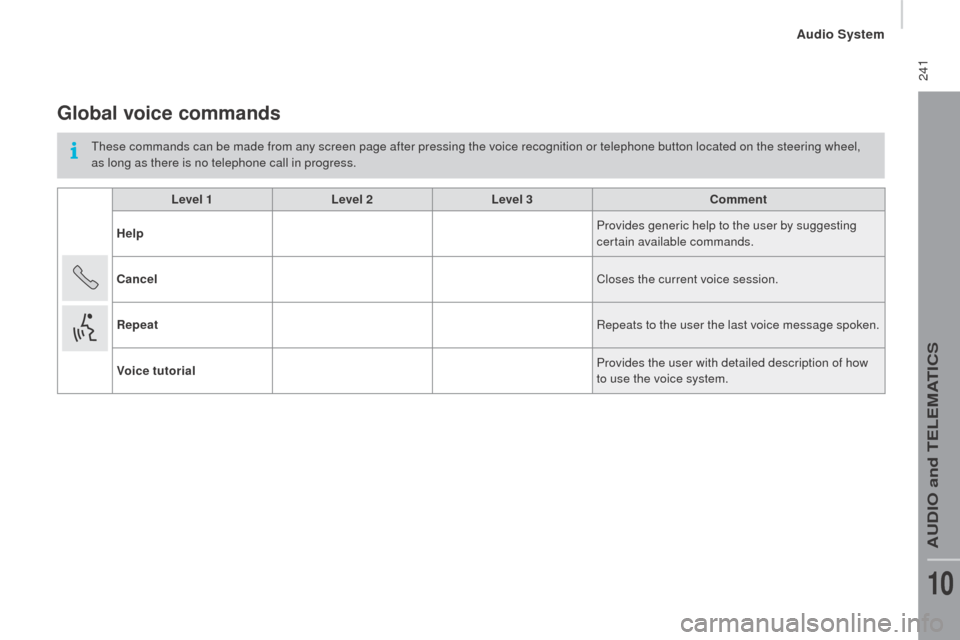
Global voice commands
These commands can be made from any screen page after pressing the voice recognition or telephone button located on the steering wheel,
as long as there is no telephone call in progress.Level 1 Level 2Level 3
co
mment
Help Provides generic help to the user by suggesting
certain available commands.
ca
ncel Closes the current voice session.
rep
eat
re
peats to the user the last voice message spoken.
Voice tutorial Provides the user with detailed description of how
to use the voice system.
Audio System
AUDio and TELEMATiCS
10
Page 244 of 276

242
jumper_en_Chap10b_Autoradio-Fiat-4_ed01-2015
Level 1Level 2Level 3co mment
c
all * Henri
d
u
pont Dials the telephone number associated with contact
Henri Dupont.
c
all* Henri
d
u
pontMobile phone Dials the telephone number labelled mobile phone
associated with contact Henri Dupont.
ca
ll number 0123456789 Calls the telephone number 0123456789.
ca
ll again Calls the number or contact of the last call made.
ca
ll back Calls the number or contact of the last call received.
re
cent calls* Displays the list of recent calls: outgoing, missed
and incoming.
ca
lls made* Displays the list of outgoing calls.
Missed calls* Displays the list of missed calls.
*
T
his function is available only if the telephone connected to the system supports downloading of contacts and recent calls and if the
download has been done.
"telephone" voice commands
if a telephone is connected to the system, these voice commands can be issued from any main screen page after pressing the telephone
button on the steering wheel, as long as there is no telephone call in progress.
If there is no telephone connected, a voice message announces: "No telephone connected. Connect a telephone and try again" and the voice
session will be closed.
Audio System
Page 246 of 276
244
jumper_en_Chap10b_Autoradio-Fiat-4_ed01-2015
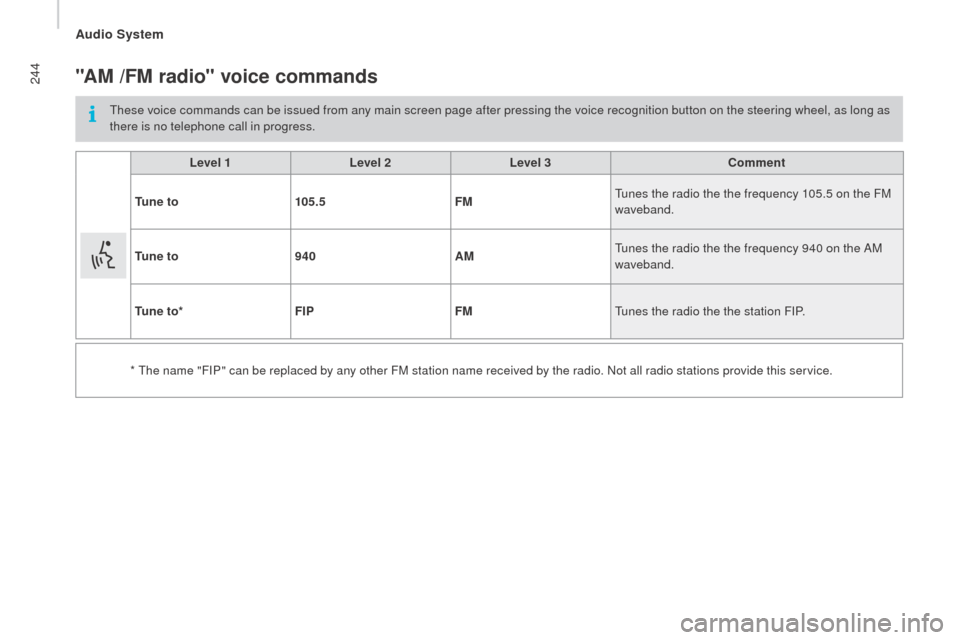
"AM /FM radio" voice commands
These voice commands can be issued from any main screen page after pressing the voice recognition button on the steering wheel, as long as
there is no telephone call in progress.Level 1 Level 2Level 3
co
mment
t
u n e t o 105.5 FMTunes the radio the the frequency 105.5 on the FM
waveband.
t
u n e t o 940 AMTunes the radio the the frequency 940 on the AM
waveband.
t
u n e t o * FIP FMTunes the radio the the station F
iP
.
* The name "F
iP
" can be replaced by any other FM station name received by the radio. n
o
t all radio stations provide this service.
Audio System
Page 247 of 276
245
jumper_en_Chap10b_Autoradio-Fiat-4_ed01-2015
"Media" voice commands
These voice commands can be issued from any main screen page after pressing the voice recognition button on the steering wheel, as long as
there is no telephone call in progress.Level 1 Level 2Level 3
co
mment
Play track "
ti
tle 1" Plays the track "Title 1".
Play album "Album 1 " Plays the songs in album "Album 1".
Play ar tist "Ar tist 1 " Plays the songs by "Artist 1".
Play musical genre "
j
azz" Plays the songs of the "Jazz" musical genre.
Play playlist "Playlist 1 " Plays the songs in the playlist "Playlist 1".
Play podcast "
ra
dio 1" Plays the podcast "Podcast 1".
Play audio book "Book 1 " Plays the audio book "Book 1".
Play track number "5 " Plays track number "5".
Select "
u
SB" Selects the USB media as the active audio source.
Scan "Album " Displays the list of albums available.
Audio System
AUDio and TELEMATiCS
10
Page 248 of 276
246
jumper_en_Chap10b_Autoradio-Fiat-4_ed01-2015
"test message" voice commands
These voice commands can be issued from any main screen page after pressing the telephone button on the steering wheel, as long as there
is no telephone call in progress.Level 1 Level 2Level 3
co
mment
Send a text to 0123456789
Starts the voice procedure for sending a pre-
defined text message using the system.
Send a text to Henri
d
u
pontMobile phone
d
isplay text Henri
d
u
pontMobile phone Displays the message box downloaded from the
telephone.
Audio System
Page 249 of 276
247
jumper_en_Chap10b_Autoradio-Fiat-4_ed01-2015
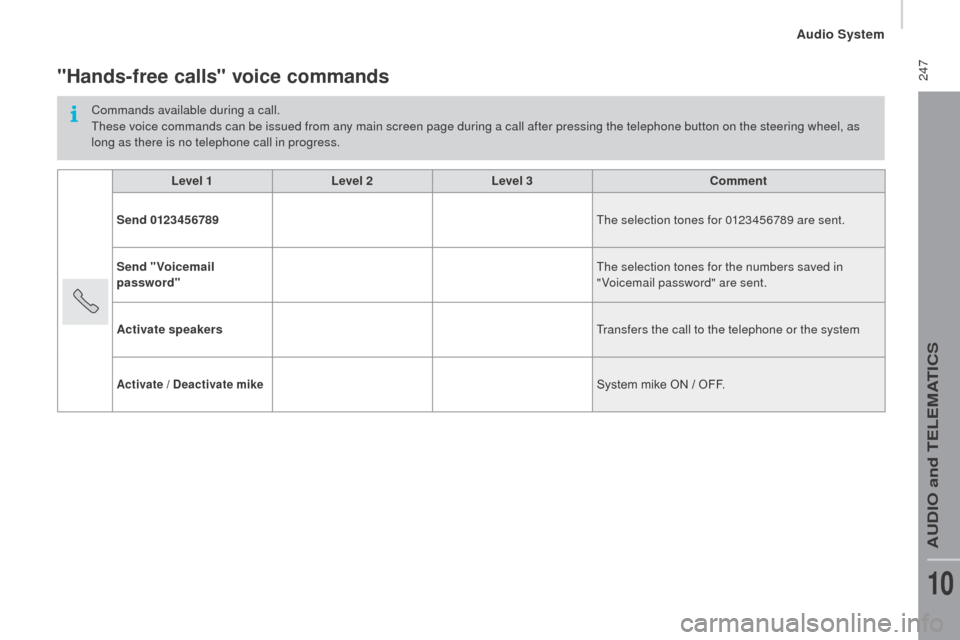
"Hands-free calls" voice commands
Commands available during a call.
These voice commands can be issued from any main screen page during a call after pressing the telephone button on the steering wheel, as
long as there is no telephone call in progress.Level 1 Level 2Level 3
co
mment
Send 0123456789 The selection tones for 0123456789 are sent.
Send "Voicemail
password" The selection tones for the numbers saved in
"Voicemail password" are sent.
Activate speakers Transfers the call to the telephone or the system
Activate / deactivate mikeSystem mike ON / OFF.
Audio System
AUDio and TELEMATiCS
10
Page 254 of 276
252
jumper_en_Chap11_Particularites_ed01-2015
dIMEnSIOnS
The dimensions are given in millimetres.
cHASSIS cAB
FLOO r c AB
L1 L2L2S L3L4
L
o
verall length 4
908 5
358 5
708 5
9436
208
A Wheelbase 3
000 3
450 3
800 4
0354
035
B Front overhang 948
cr
ear overhang 9601 225
dOverall width (incl./excl. mirrors) 2 508 / 2
050
- Passable width 2
207
- Max permitted body width 2
350
E Front track 1
810
-
r
ear track 1
790
- Width of increased rear track 1
980
F
o
verall height 2
153
- Max permitted body height 3
500
Chassis cab / Floor cab
Page 258 of 276
256
jumper_en_Chap11_Particularites_ed01-2015
dIMEnSIOnS
The dimensions are given in millimetres.
c
HASSIS d O u BLE c AB
FLOO
r d O u BLE c AB
L2 L3L4
L
o
verall length 5 7986 2286 678
A Wheelbase 3 4504 0354 035
B Front overhang 948948948
cr
ear overhang 1 2451 3401 695
dWidth (with / without mirrors) 2 508 / 2 1002 508 / 2 1002 508 / 2 100
E Front track 1 8101 8101 810
-
r
ear track 1 7901 7901 790
F
o
verall height 2 4242 4242 424
Double cab