2016 Citroen DS5 service
[x] Cancel search: servicePage 280 of 500

DS5_en_Chap11b_BTA_ed02-2015
Emergency or assistance call
If an impact is detected by the airbag
control unit, and independently of
the deployment of any airbags, an
emergency call is made automatically.
Localised Emergency call
In an emergency, press this
button for more than 2 seconds.
Flashing of the green indicator
lamp and a voice message
confirm that the call has
been made to the "Localised
Emergency Call"* centre.
Pressing this button again immediately cancels
the call.
The green indicator lamp goes off.
At any time, pressing this button for more than
8 seconds cancels the call.
The green indicator lamp remains on (without
flashing) when communication is established.
It goes off at the end of the call.
This call is dealt with by the "Localised
Emergency Call" centre, which receives
locating information from the vehicle and
can send a detailed alert to the appropriate
emergency services.
In countries in which a centre is not
operational, or when the locating service
has been expressly declined, the call is dealt
with directly by the emergency services (112)
without the vehicle location. *
Th
ese services are subject to conditions and
availability.
Consult a CITROËN dealer. If you benefit from the DS Connect
B
OX
offer with the SOS and assistance
pack included, you also have available
additional services in your MyCITROËN
personal space,
via the CITROËN Internet website in
your country, accessible on
www.citroen.com.
Page 281 of 500

279
DS5_en_Chap11b_BTA_ed02-2015
* These services are subject to conditions and
availability.
Consult a CITROËN dealer.
Localised Assistance call
If you purchased your vehicle outside
the CITROËN dealer network, we
invite you to have a dealer check the
configuration of these services and, if
desired, modified to suit your wishes.
In a multi-lingual country, configuration
is possible in the official national
language of your choice.
For technical reasons, particularly
to improve the quality of Telematic
services to customers, the
manufacturer reserves the right to
carry out updates to the vehicle's on-
board telematic system.
Press this button for more than
2
s
econds to request assistance
if the vehicle breaks down.
A voice message confirms that
the call has been started*.
Pressing this button again immediately cancels
the request.
The cancellation is confirmed by a voice
message.
Operation of the system
When the ignition is switched on,
the green indicator lamp comes
on for 3 seconds indicating that
the system is operating correctly.
The orange indicator lamp is on fixed: the back-
up battery should be replaced.
In both cases, the emergency and assistance
calls service may not work.
Contact a qualified repairer as soon as
possible. The orange indicator lamp
flashes then goes off: the system
has a fault.
The fault with the system does not
prevent the vehicle being driven.
Audio and Telematics
Page 294 of 500
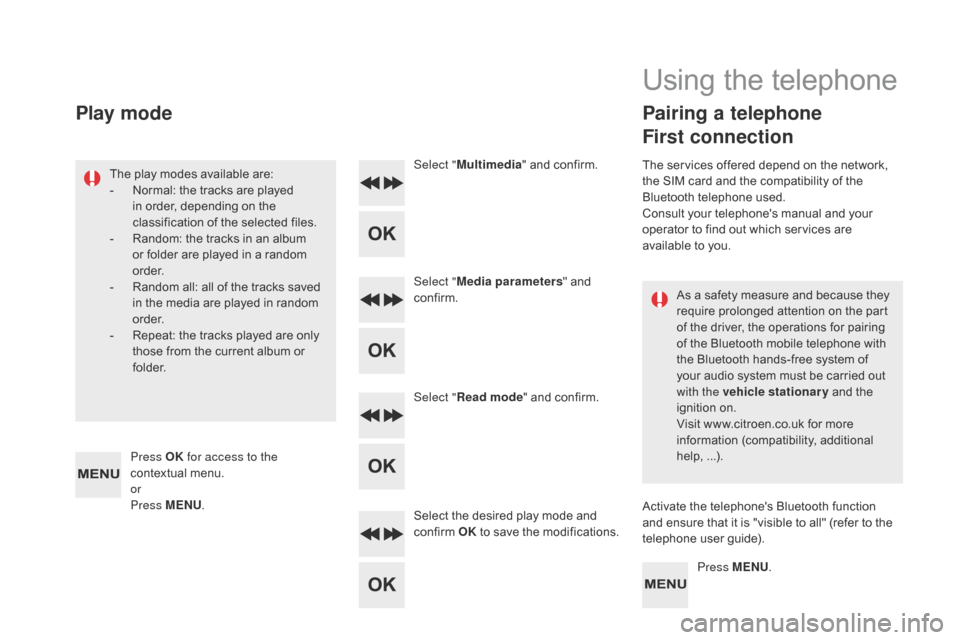
DS5_en_Chap11d_RD5_ed02-2015
As a safety measure and because they
require prolonged attention on the part
of the driver, the operations for pairing
of the Bluetooth mobile telephone with
the Bluetooth hands-free system of
your audio system must be carried out
with the vehicle stationary and the
ignition on.
Visit www.citroen.co.uk for more
information (compatibility, additional
help, ...).
The play modes available are:
-
No
rmal: the tracks are played
in order, depending on the
classification of the selected files.
-
Ra
ndom: the tracks in an album
or folder are played in a random
o r d e r.
- Ra
ndom all: all of the tracks saved
in the media are played in random
o r d e r.
-
Re
peat: the tracks played are only
those from the current album or
f o l d e r. Select "
Multimedia " and confirm.
Select " Media parameters " and
confirm.
Select " Read mode " and confirm.
Select the desired play mode and
confirm OK to save the modifications.
Press MENU.
Press OK
for access to the
contextual menu.
or
Press MENU .
Play mode
Using the telephone
Pairing a telephone
First connection
The services offered depend on the network,
the SIM card and the compatibility of the
Bluetooth telephone used.
Consult your telephone's manual and your
operator to find out which services are
available to you.
Activate the telephone's Bluetooth function
and ensure that it is "visible to all" (refer to the
telephone user guide).
Page 307 of 500

305
DS5_en_Chap11d_RD5_ed02-2015
QUESTIONANSWER SOLUTION
The CD is ejected
automatically or is not
played by the player. The CD is inserted upside down, is unplayable, does not contain
any audio data or contains an audio format which the player cannot
p l ay.
The CD is protected by an anti-pirating protection system which is
not recognised by the audio equipment. -
Ch
eck that the CD is inserted in the player
the right way up.
-
Ch
eck the condition of the CD: the CD
cannot be played if it is too damaged.
-
Ch
eck the content in the case of a recorded
CD: consult the advice in the "Audio" section.
-
Th
e audio equipment's CD player does not
play DVDs.
-
Du
e to their quality level, certain writeable
CDs will not be played by the audio system.
The CD player sound is
p o o r. The CD used is scratched or of poor quality.
Insert good quality CDs and store them in
suitable conditions.
The audio settings (bass, treble, ambience) are unsuitable. Set the treble or bass level to 0, without selecting
an ambience.
I am unable to connect my
Bluetooth telephone. It is possible that Bluetooth is switched off on the telephone or that
the telephone has not been made not visible. -
Ch
eck that your telephone has Bluetooth
switched on.
-
Ch
eck in the telephone's settings that it is
" Visible to all".
The Bluetooth telephone is not compatible with the system. You can check the compatibility of your
telephone on www.citroen.co.uk (services).
The Bluetooth connection
is cut. The battery of the peripheral may not be sufficiently charged. Recharge the battery of the peripheral device.
Audio and Telematics
Page 315 of 500

313
Pads, brake ...................................................252
P aint colour code .......................................... 2 74
P
arking brake, electric
............ 26
, 103, 107, 252
Parking sensors, front
................................... 137
P
arking sensors, rear.................................... 13 6
Petrol
............................................................. 24
0
Plates, identification ...................................... 2 74
Player, MP3 CD
.....................................
288, 289
Port, USB
................................................85
, 290
Pressures, tyres
.....................................19
7, 274
Pre-tensioning seat belts
.............................. 188
P
riming the fuel system
................................ 246
P
rotecting children
.................16
0 -176, 188, 190
Puncture
........................................................ 19
6Rear screen, demisting
............................. 80
, 95
Recharging the battery
................................. 225
R
eduction of electrical load
..........................
227
R
egeneration of the particle filter
.................
2 51
R
einitialising the remote control
.....................
59
Re
mote control
.................................... 52
-55, 60
Removing a wheel
........................................ 20
6
Removing the mat
........................................... 84
R
eplacing bulbs
.....................................
21
1-218
Replacing fuses
..................................... 2
19-222
Replacing the air filter
................................... 2 51
R
eplacing the oil filter
...................................
2 51
R
eplacing the passenger
compartment filter ...................................... 2 51
R esetting the service indicator .......................35
Re
setting the trip recorder
.................. 37
, 46, 47
Reversing camera
......................................... 13
8
Reversing lamp
............................................. 216
Ro
of bars
.......................................................232
R
oof, Cockpit glass
.........................................68
Ru
nning out of fuel (Diesel)
..........................246
O
P
S
Safety, children ......................16 0 -176, 188, 190
Saturation of the particle filter (Diesel)
............................................... 2 51
S
creen, instrument panel
.......................... 18
, 46
Screen menu map
................................. 30
1, 302
Screen, monochrome
.....................39
, 284, 301
Screenwash reservoir
................................... 249
R
adio
............................................................. 28
5
Range, AdBlue
......................................
254, 255
R
Oil change ..................................................... 2 47
Oil consumption ............................................ 247
O
Il, engine
...............................................
36, 247
Opening the boot
................................
52-54, 62
Opening the doors
....................................
52, 54 Screenwash, front .........................................
15 4
S
creenwash, rear ..........................................15
4
SCR (Selective Catalytic Reduction)
.................. 253
Se
at belts
.......................................16
8, 18 6 -188
Seats, front
................................................. 7
2 -74
Seats, heated
.................................................. 76
S
eats, rear
................................................. 77
, 79
Serial number, vehicle
.................................. 2 74
S
ervice indicator
.............................................33
Ser
vicing
.........................................................14
S
ettings, equipment
.................................. 39
, 45
Sidelamps
.............. 14
2, 145, 148, 211-213, 216
Side repeater
................................................ 2
15
Ski flap
............................................................ 86
S
now chains
..................................................210
S
ocket, 12 V accessory
............................ 82
, 83
Sockets, audio
................................85
, 290, 291
Speed limiter
.........................................
128, 130
Spotlamps, side
.................................... 14
9, 215
Starting the engine
....................... 10
0, 102, 111
Starting using another battery
...................... 224
S
teering mounted controls, audio
................283
S
teering wheel, adjustment
............................81
St
ickers, expressive
......................................233
St
op & Start
..................................2
2, 48, 92, 95,
118, 223, 226, 239, 243, 251
Storage
................................................
82, 85 - 87
Storing driving positions
................................. 74
St
owing rings
..................................................
87
Switching off the engine
............... 10
0, 102, 111
Synchronising the remote control
................... 59
Alphabetical index
Page 316 of 500

v
W
T
Ventilation .................................................
89, 90
Visibility ........................................................... 95
W
arning and indicator lamps
..................... 19
- 31
Warning lamp, braking system
....................... 27
W
arning lamp, Diesel engine pre-heater
....... 21
War
ning lamps
.................................... 21
, 24, 26
Warning lamp, SCR emissions control system
........................................................... 3
0
Warning lamp, Service.................................... 25
Washing (advice) ................................... 138, 233
Weights
.................................................
265, 269
Wheel, spare
......................................... 20
2, 203
Window controls
............................................. 66
Wip
er blades (changing)
....................... 15
6, 228
Wiper, rear ..................................................... 15 4
Wipers
............................................. 22
, 153, 155
Wipers, automatic rain sensitive
........... 153
, 155
U
Under-inflation (detection) ............................11 6
U nlocking .................................................. 52, 54
Unlocking from the inside
............................... 61
Ta
ble of weights
....................................26
5, 269
Tables of engines
..................................
264, 267
Tables of fuses
.............................................. 219
T
ank, AdBlue
® additive ......................... 25
3, 258
Tank, fuel ............................................... 239, 242
Technical data
....................................... 26
4-276
Temperature, coolant
...................................... 32
Th
ird brake lamp
........................................... 218
T
hree flashes (direction indicators)
.............. 180
T
ime (setting)
......................................
38, 39, 42
To o l s
......................................................
202, 203
Topping-up the AdBlue
® additive ................. 258
T
otal distance recorder ................................... 37
To
uch screen ................................. 38, 43, 45, 47
To w b a r
........................................................... 2
31
Towed loads
..........................................26
5, 269
Towing another vehicle
................................. 230
T
raction control (ASR)
............................ 27
, 182
Traffic information (TA)
................................. 286
Tr
a i l e r
......................................................
99, 231
Trajectory control systems
............................ 182
T
riangle, warning ............................................. 88
Trip computer
............................................ 46-
48
Trip distance recorder
..................................... 37
Ty
r e s
........................................................ 14
, 276
Tyre under-inflation detection
....................... 11 6U
nlocking the boot
..........................................
53
Un
locking the doors
........................................
61
URE
A
....................................................
253, 254
USB player
...................................................... 85
Page 326 of 500

On-line handbook
If the "MyCITROËN" function is not available on the CITROËN public website for your country, you
can fi nd your handbook at the following address:
http://service.citroen.com/ddb/
Find your handbook on the CITROËN website, under "MyCITROËN".
Select:
Select one of the following means of access to
view your handbook on-line...
This personal and customisable space allows you to establish direct and special contact with the
manufacturer.
the language,
the vehicle, its body style,
the print edition of your handbook appropriate for the date of registration of your vehicle.
Scan this code for direct access to your handbook.
Referring to the handbook on-line also gives you
access to the latest information available, easily
identifi ed by the bookmark, associated with this
symbol:
Page 327 of 500

1 Audio and Telematics
7-inch touch screen tablet
GPS satellite navigation - Multimedia audio - Bluetooth ®
telephone
Contents
First steps 2
Steering mounted controls 4
Menus 5
Navigation 6
Navigation - Guidance 14
Tr a ffi c 18
Radio Media 20
Radio 26
DAB (Digital Audio Broadcasting) radio 28
Media 30
Settings 34
Connected services 42
Internet browser 43
MirrorLink
TM 46
CarPlay® 50
Te l e p h o n e 5 4
Frequently asked questions 62
The system is protected in such a way that it will only operate in
your vehicle.
As a safety measure, the driver should only carry out operations
which require prolonged attention while the vehicle is stationary.
The display of the energy economy mode message signals
that the electrical equipment currently operating is going into
standby.
Refer to the energy economy mode section of your vehicle's
handbook.