2016 CITROEN DS3 CABRIO system settings
[x] Cancel search: system settingsPage 319 of 450
1
1
1
2
3
4
5
6
7
8
9
10
11
317
Level 1Level 2 Level 3 Comments
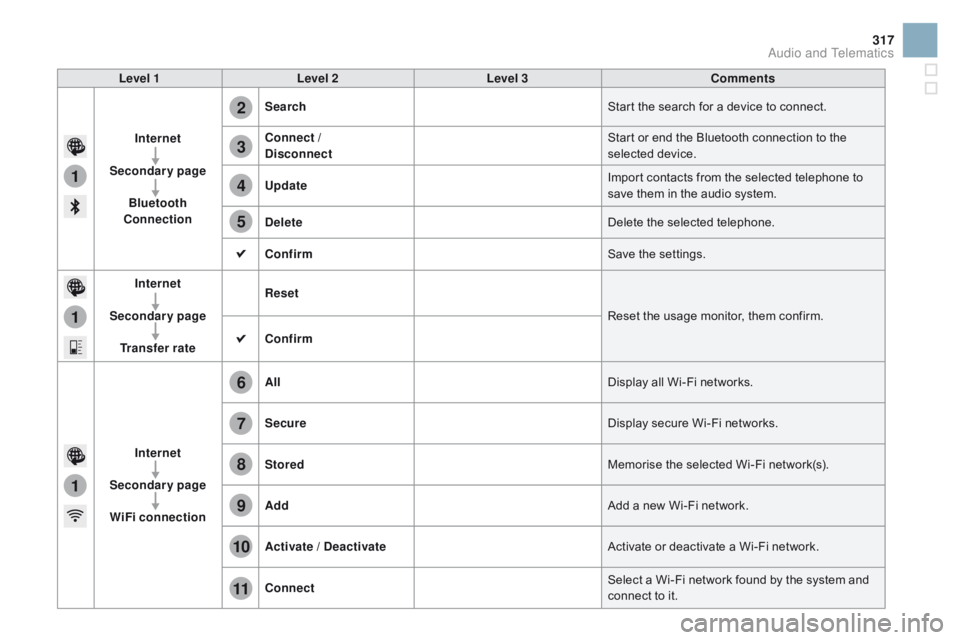
Internet
Secondary page Bluetooth
Connection Search
Start
the search for a device to connect.
Connect /
d
isconnect Start
or end the Bluetooth connection to the
s
elected
d
evice.
Update Import
contacts from the selected telephone to
s
ave them in the audio system.
de
lete Delete
the selected telephone.
Confirm Save
the settings.
Internet
Secondary page Transfer rate Reset
Reset
the usage monitor, them confirm.
Confirm
Internet
Secondary page WiFi connection All
Display
all Wi-Fi networks.
Secure Display
secure Wi-Fi networks.
Stored Memorise
the selected Wi-Fi network(s).
Add Add
a new Wi-Fi network.
Activate /
d
e
activate Activate
or deactivate a Wi-Fi network.
Connect Select
a Wi-Fi network found by the system and
c
onnect to it.
Audio and Telematics
Page 325 of 450
1
1
1
19
20
21
22
23
24
25
26
323
Level 1Level 2 Level 3 Comments
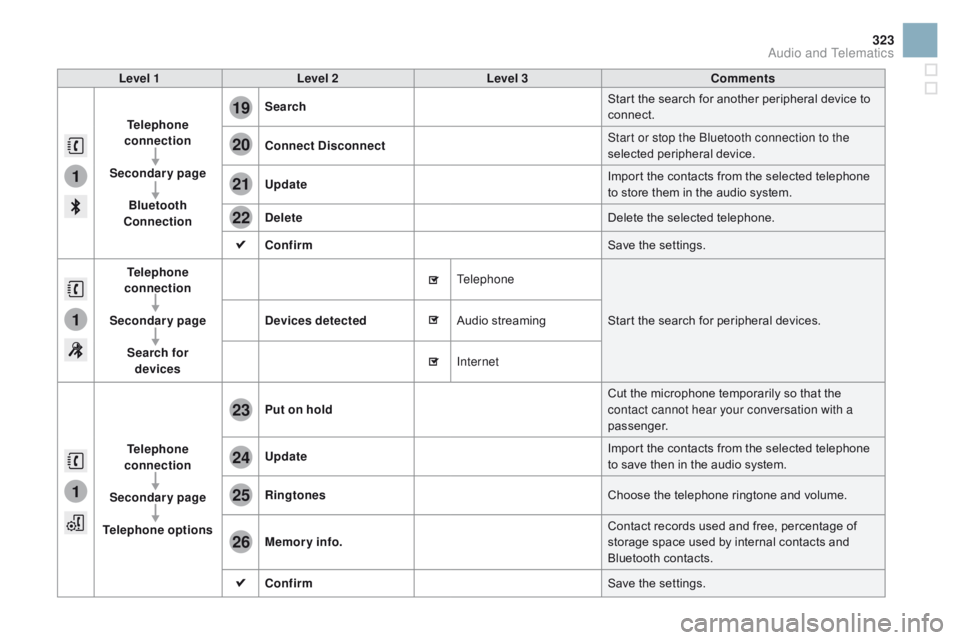
Telephone
connection
Secondary page Bluetooth
Connection Search
Start
the search for another peripheral device to
c
onnect.
Connect
d isconnect Start or stop the Bluetooth connection to the
selected
pe
ripheral
d
evice.
Update Import
the contacts from the selected telephone
t
o store them in the audio system.
de
lete Delete
the selected telephone.
Confirm Save
the settings.
Telephone
conn ection
Secondary page Search for devices
de
vices detected Telephone
Start
the search for peripheral devices.
Audio
s
treaming
Internet
Telephone
connection
Secondary page
Telephone options Put on hold
Cut
the microphone temporarily so that the
c
ontact cannot hear your conversation with a
passenger.
Update Import
the contacts from the selected telephone
t
o save then in the audio system.
Ringtones Choose
the telephone ringtone and volume.
Memory info. Contact
records used and free, percentage of
s
torage space used by internal contacts and
Bl
uetooth
c
ontacts.
Confirm Save
the settings.
Audio and Telematics
Page 330 of 450

Frequently asked questions
The table below gives answers to the most frequently asked questions on your audio system.
Q UESTIO
nAnSW
ERSOLUTIO
n
T
he route calculation is
not
successful. The
navigation settings may conflict with the current location
(
exclusion of toll roads on a toll motor way).Check
the settings in the "Navigation" menu.
The
POIs do not appear. The POIs have not been selected.Select
the POIs in the list of POIs.
The
Hazard zone audible
w
arning does not work.The
audible warning is not active.Activate
audible warnings in the "Navigation"
m
enu.
The
system does not
s
uggest a detour around
a
n incident on the route.The
guidance criteria do not take account of TMC messages.Select the "Traffic info" function in the list of
guidance
c
riteria.
I
receive a Accident-prone
a
rea alert which is not on
my
route. Other
than guidance, the system announces all Hazard zone
p
ositioned in a cone located in front of the vehicle. It may provide
a
n alert for a Hazard zone located on nearby or parallel roads.Zoom
in on the map to view the exact position of
t
he Accident-prone area. Select "On the route" to
n
o longer receive alerts other than guidance or to
r
educe the time for the announcement.
navigation
Page 331 of 450

329
QUESTIOnAnSWERSOLUTIOn
C
ertain
traffic jams along
t
he
route are not indicated
i
n
real
time. On
starting, it is several minutes before the system begins to
r
eceive the traffic information. Wait
until the traffic information is being received
c
orrectly (display of the traffic information icons
o
n the map).
The
filters are too restrictive. Modify
the "Geographic filter" settings.
In
certain countries, only major routes (motor ways...) are listed for
t
he traffic information. This
phenomenon is normal. The system is
d
ependent on the traffic information available.
The
altitude is not
d
isplayed. On
starting, the initialisation of the GPS may take up to 3 minutes to
r
eceive more than 4 satellites correctly.Wait
until the system has completed starting
u
p, so that there is GPS coverage of at least
4
satellites.
Depending
on the geographical environment (tunnel...) or the
w
eather, the conditions of reception of the GPS signal may vary.This
phenomenon is normal. The system
i
s dependent on the GPS signal reception
c
onditions.
Audio and Telematics
Page 335 of 450

333
QUESTIOnAnSWERSOLUTIOn
T
here
is a difference in
s
ound
quality between the
d
ifferent audio sources. For
optimum sound quality, the audio settings for Volume, Bass,
T
reble, Equalizer and Loudness can be adapted to the different
s
ound sources, which may result in audible differences when
c
hanging
s
ource. Check
that the audio settings for (Volume, Bass,
T
reble, Equalizer, Loudness) are adapted to the
s
ources listened to. It is advisable to set the
a
udio functions (Bass, Treble, Fr-Re balance,
L
e-Ri balance) to the middle position, select the
"
Linear", musical ambience and set the loudness
c
orrection to the "Inactive" position in radio
m
ode.
With
the engine off, the
s
ystem
switches off after a
f
ew
minutes of use. When
the engine is switched off, the system's operating time
d
epends on the state of charge of the battery.
The
switch-off is normal: the system switches to economy mode
a
nd switches off to prevent discharging of the vehicle's battery.Start
the vehicle's engine to increase the battery
c
harge.
Audio and Telematics
Page 336 of 450

QUESTIOnAnSWERSOLUTIOn
I
cannot connect my
B
luetooth
t
elephone. The
telephone's Bluetooth function may be switched off or the
t
elephone may not be visible. -
C
heck that your telephone's Bluetooth
f
unction is switched on.
-
C
heck in the telephone settings that it is
"
visible to all".
The
Bluetooth telephone is not compatible with the system.You
can check the compatibility of your
t
elephone at www.citroen.co.uk (services).
The
volume of the
t
elephone
c
onnected
i
n
Bluetooth mode is
ina
udible. The
volume depends both on the system and on the telephone. Increase the volume of the audio system, to
m
aximum if required, and increase the volume of
t
he telephone if necessary.
The
ambient noise level has an influence on the quality of
t
elephone
c
ommunication. Reduce
the ambient noise level (close the
w
indows, reduce the booster fan speed, slow
d
own,
...
).
Some
contacts are
d
uplicated in the list. The
options for synchronizing contacts are synchronizing the
c
ontacts on the SIM card, the contacts on the telephone, or both.
W
hen both synchronizations are selected, some contacts may be
dup
licated. Select
"Display SIM card contacts" or "Display
t
elephone
c
ontacts".
Contacts are not shown in
alphabetical
o
rder. Some
telephones offer display options. Depending on the settings
c
hosen, contacts can be transferred in a specific order.Modify
the display setting in the telephone
d
i r e c to r y.
The
system does not
r
eceive
SMS
text
messages. The
Bluetooth mode does not permit sending SMS text messages
t
o the system.
Telephone
Page 352 of 450

The table below gives answers to the most frequently asked questions on your audio system.
Q UESTIO
nAnSW
ERSOLUTIO
n
W
ith the engine off, the
a
udio system switches off
a
fter a few minutes of use.When
the engine is switched off, the audio system operating time
d
epends on the state of charge of the battery.
The
switch-off is normal: the audio equipment switches to economy
m
ode and switches off to prevent discharging of the vehicle's
b
attery. Start
the vehicle's engine to increase the battery
c
harge.
The
message "the audio
s
ystem is overheated"
a
ppears on the display.In
order to protect the installation if the surrounding temperature
i
s too high, the audio system switches to an automatic thermal
p
rotection mode leading to a reduction in volume or CD play
s
topping. Switch
the audio system off for a few minutes to
a
llow the system to cool.
Frequently asked questions
QUESTIOnAnSWERSOLUTIOn
T
here
is a difference in
s
ound
quality between the
d
ifferent audio sources
(
radio,
C
D...). For
optimum sound quality, the audio settings (Volume, Bass,
T
reble, Ambience, Loudness) can be adapted to the different sound
s
ources, which may result in audible differences when changing
s
ource (radio, CD...). Check
that the audio settings (Volume, Bass,
T
reble, Ambience, Loudness) are adapted to
t
he sources listened to. It is advisable to set
t
he audio functions (Bass, Treble, Front-Rear
B
alance, Left-Right Balance) to the middle
p
osition, select the musical ambience "None"
a
nd set the loudness correction to the "Active"
p
osition in CD mode or to the "Inactive" position
i
n radio mode.
Radio
Page 354 of 450

Media
QUESTIOnAnSWERSOLUTIOn
T
he
message "USB
p
eripheral error" is
displayed
on the screen.
The Bluetooth connection
is
cut. The
battery of the peripheral may not be sufficiently charged. Recharge the battery of the peripheral device.
The
USB memory stick is not recognised.
The
USB memory stick may be corrupt.Reformat
the USB memory stick.
The
CD is ejected
a
utomatically or is not
p
layed
by the player. The
CD is inserted upside down, is unplayable, does not contain
a
ny audio data or contains an audio format which the player cannot
p
l ay.
The
CD is protected by an anti-pirating protection system which is
n
ot recognised by the audio equipment.-
C
heck that the CD is inserted in the player
t
he right way up.
-
C
heck the condition of the CD: the CD
c
annot be played if it is too damaged.
-
C
heck the content in the case of a recorded
C
D: consult the advice in the "Audio" section.
-
T
he audio equipment's CD player does not
p
lay DVDs.
-
D
ue to their quality level, certain writeable
C
Ds will not be played by the audio system.
The
CD player sound is
p
o o r. The
CD used is scratched or of poor quality.Insert
good quality CDs and store them in
sui
table
c
onditions.
The
audio equipment settings (bass, treble, ambiences) are
un
suitable. Set
the treble or bass level to 0, without selecting
an am
bience.