Page 357 of 396
355
C4-2_en_Chap10c_RD5_ed02-2015
Steering mounted controls
Audio system
Audio / Bluetooth telephone system
Media: change the multimedia s
ource.
Telephone:
start a call.
Call
in progress: access to the
t
elephone menu (End call, Secret
m
ode, Hands-free mode).
Telephone,
press and hold: reject an
i
ncoming call, end a call in progress;
o
ther than call in progress, access to
t
he telephone menu. Media:
change the multimedia s
ource.
Press
and hold: mute / restore sound.
Decrease
volume.
Radio,
rotate: automatic search for p
revious / next station.
Media,
rotate: previous / next track.
Press:
confirm a selection.
Radio:
display the list of stations.
Media:
display the list of tracks.
Radio,
press and hold: update the list
o
f stations received.
Increase
volume.
.
Audio and Telematics
Page 359 of 396
357
C4-2_en_Chap10c_RD5_ed02-2015
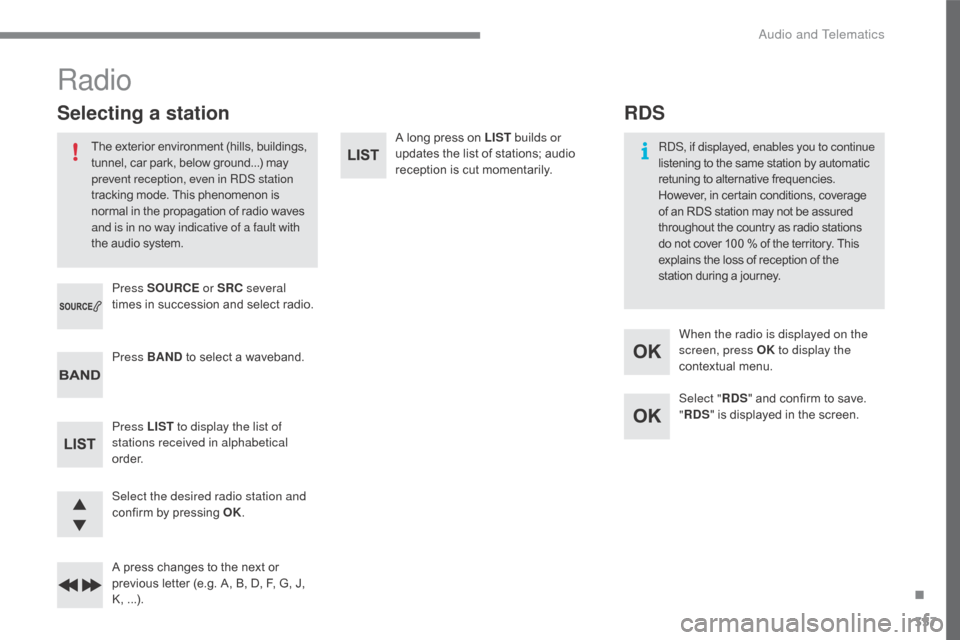
A long press on LIST b uilds or
updates the list of stations; audio
r
eception is cut momentarily.
Select the desired radio station and
confirm
by
pressing
OK.
A
press
changes
to
the
next
or
p
revious
letter
(e.g.
A,
B,
D,
F,
G,
J,
K
,
...
).
Press BAND
to
select
a
waveband.
Press LIST to display the list of
stations received in alphabetical
o r d e r. Press SOURCE or SRC several
times
in
succession
and
select
radio.
Radio
The exterior environment (hills, buildings, t unnel, car park, below ground...) may p
revent reception, even in RDS station
tracking
mode. This phenomenon is
n
ormal in the propagation of radio waves
a
nd is in no way indicative of a fault with
the
audio system.
Selecting a station
Select "RDS" and confirm to save.
" RDS "
is displayed in the screen.
When the radio is displayed on the
screen, press OK
to display the
contextual menu.
RDS, if displayed, enables you to continue
listening to the same station by automatic
r
etuning to alternative frequencies.
H
owever, in certain conditions, coverage
o
f
an RDS station may not be assured
t
hroughout the country as radio stations
d
o
not cover 100 % of the territory. This
e
xplains the loss of reception of the
s
tation during a journey.
RDS
.
Audio and Telematics
Page 362 of 396

360
C4-2_en_Chap10c_RD5_ed02-2015
Select "Multimedia " and confirm.
Select " DAB
/ FM auto tracking "
and
confirm
Long
press:
select
the
desired
c
ategories
of
announcements
from
T
ransport,
News,
Entertainment
and
F
lash
sp
ecial
(
availability
a
ccording
t
o
the
station).
Change
of
station
within
the
same
"
multiplex
s
ervice". Press the "
Menu" button.
Start
a
search
for
the
next
"multiplex
ser
vice".
Change
band
(FM1,
FM2,
DAB, ...)
Digital
radio
provides
a
superior
audio
q
uality
and
also
additional
categories
of
t
raffic
announcements
(TA
INFO).
The
different
"multiplex
services"
o
ffer a choice of radio stations in
alphabetical
o
rder.
Digital radio
When the radio station is displayed in
the screen, press on " OK" to display
the
contextual menu.
(Frequency
hopping (RDS), DAB / FM
a
uto tracking, RadioText (TXT) display,
I
nformation on the station, ...)
DAB / FM tracking
"DAB" does not have 100% coverage of t
he country.
When
the digital signal is weak,
"DAB
/ FM auto tracking" allows you to
c
ontinue listening to the same station,
b
y automatically switching to the
c
orresponding analogue "FM" station
(
if it exists). If
"DAB / FM auto tracking" is on, there
w
ill be a difference of a few seconds
in the programme when the system c
hanges to analogue "FM" radio, with
s
ometimes a variation in volume.
When
the strength of the digital signal
i
s good again, the system automatically
s
witches back to "DAB"
If
the "DAB" station you are listening
t
o is not available on "FM" ("DAB/FM "
option
barred), or if "DAB / FM auto
t
racking" is not on, the sound will be cut
w
hen the digital signal is too weak.
Audio and Telematics
Page:
< prev 1-8 9-16 17-24
