Page 247 of 620
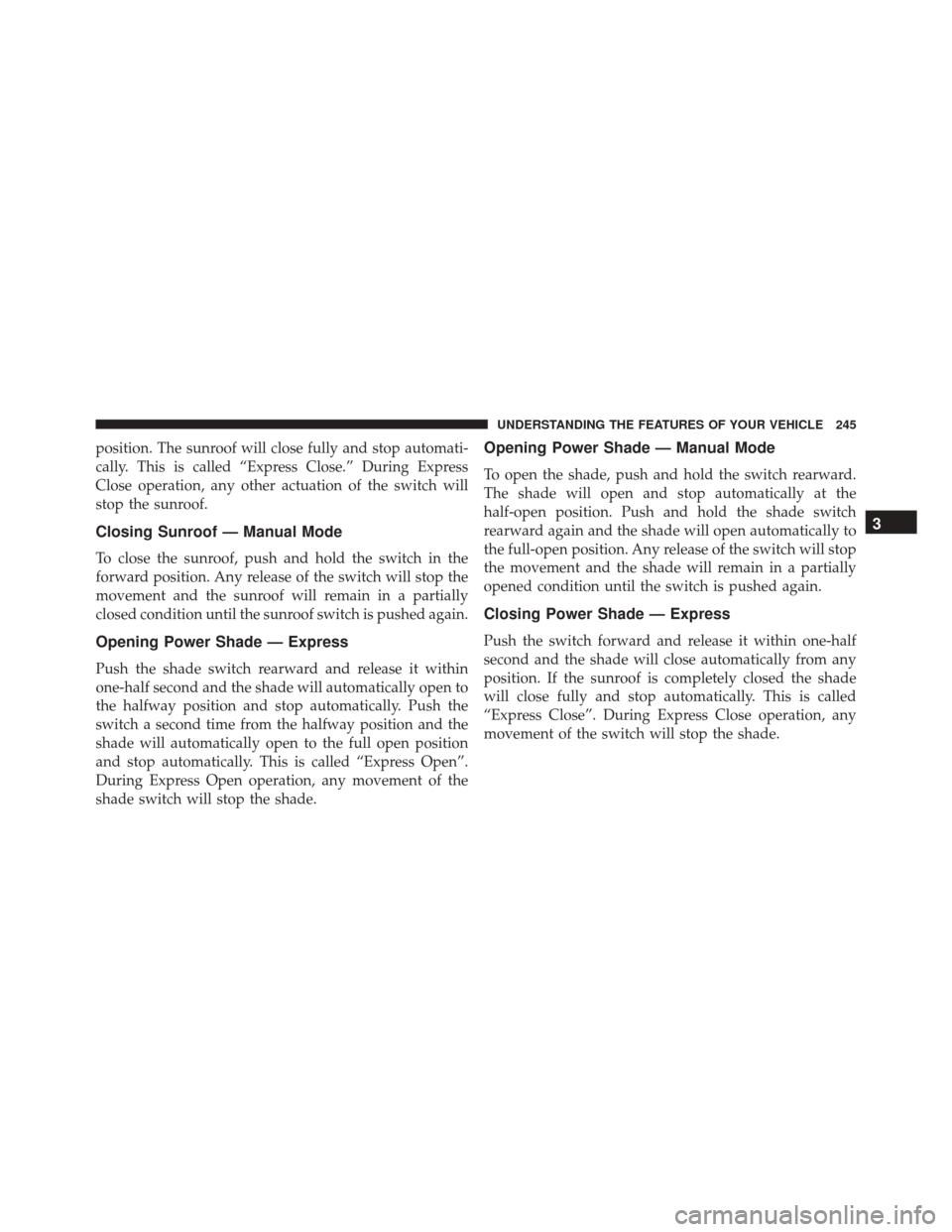
position. The sunroof will close fully and stop automati-
cally. This is called “Express Close.” During Express
Close operation, any other actuation of the switch will
stop the sunroof.
Closing Sunroof — Manual Mode
To close the sunroof, push and hold the switch in the
forward position. Any release of the switch will stop the
movement and the sunroof will remain in a partially
closed condition until the sunroof switch is pushed again.
Opening Power Shade — Express
Push the shade switch rearward and release it within
one-half second and the shade will automatically open to
the halfway position and stop automatically. Push the
switch a second time from the halfway position and the
shade will automatically open to the full open position
and stop automatically. This is called “Express Open”.
During Express Open operation, any movement of the
shade switch will stop the shade.
Opening Power Shade — Manual Mode
To open the shade, push and hold the switch rearward.
The shade will open and stop automatically at the
half-open position. Push and hold the shade switch
rearward again and the shade will open automatically to
the full-open position. Any release of the switch will stop
the movement and the shade will remain in a partially
opened condition until the switch is pushed again.
Closing Power Shade — Express
Push the switch forward and release it within one-half
second and the shade will close automatically from any
position. If the sunroof is completely closed the shade
will close fully and stop automatically. This is called
“Express Close”. During Express Close operation, any
movement of the switch will stop the shade.
3
UNDERSTANDING THE FEATURES OF YOUR VEHICLE 245
Page 248 of 620
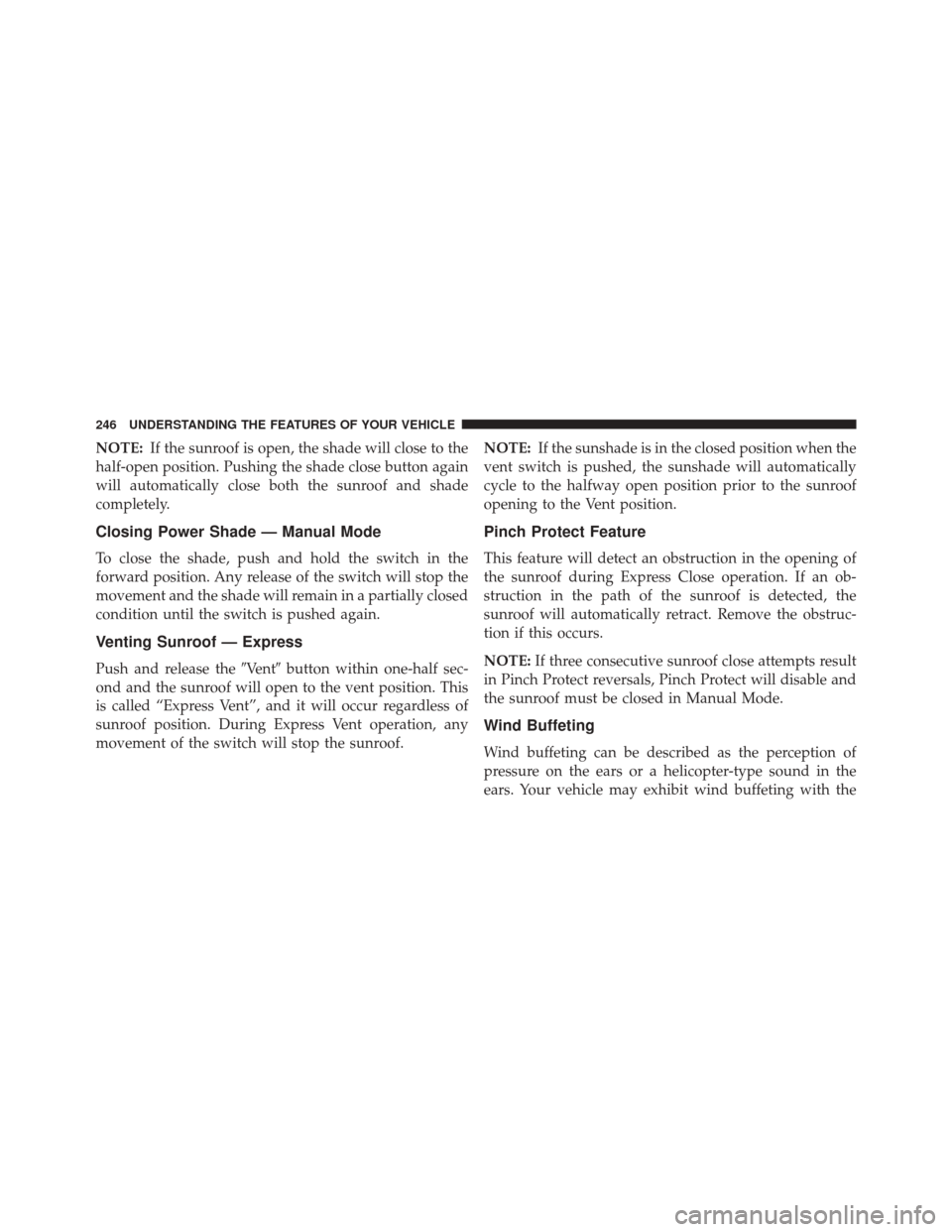
NOTE:If the sunroof is open, the shade will close to the
half-open position. Pushing the shade close button again
will automatically close both the sunroof and shade
completely.
Closing Power Shade — Manual Mode
To close the shade, push and hold the switch in the
forward position. Any release of the switch will stop the
movement and the shade will remain in a partially closed
condition until the switch is pushed again.
Venting Sunroof — Express
Push and release the �Vent�button within one-half sec-
ond and the sunroof will open to the vent position. This
is called “Express Vent”, and it will occur regardless of
sunroof position. During Express Vent operation, any
movement of the switch will stop the sunroof. NOTE:
If the sunshade is in the closed position when the
vent switch is pushed, the sunshade will automatically
cycle to the halfway open position prior to the sunroof
opening to the Vent position.
Pinch Protect Feature
This feature will detect an obstruction in the opening of
the sunroof during Express Close operation. If an ob-
struction in the path of the sunroof is detected, the
sunroof will automatically retract. Remove the obstruc-
tion if this occurs.
NOTE: If three consecutive sunroof close attempts result
in Pinch Protect reversals, Pinch Protect will disable and
the sunroof must be closed in Manual Mode.
Wind Buffeting
Wind buffeting can be described as the perception of
pressure on the ears or a helicopter-type sound in the
ears. Your vehicle may exhibit wind buffeting with the
246 UNDERSTANDING THE FEATURES OF YOUR VEHICLE
Page 249 of 620
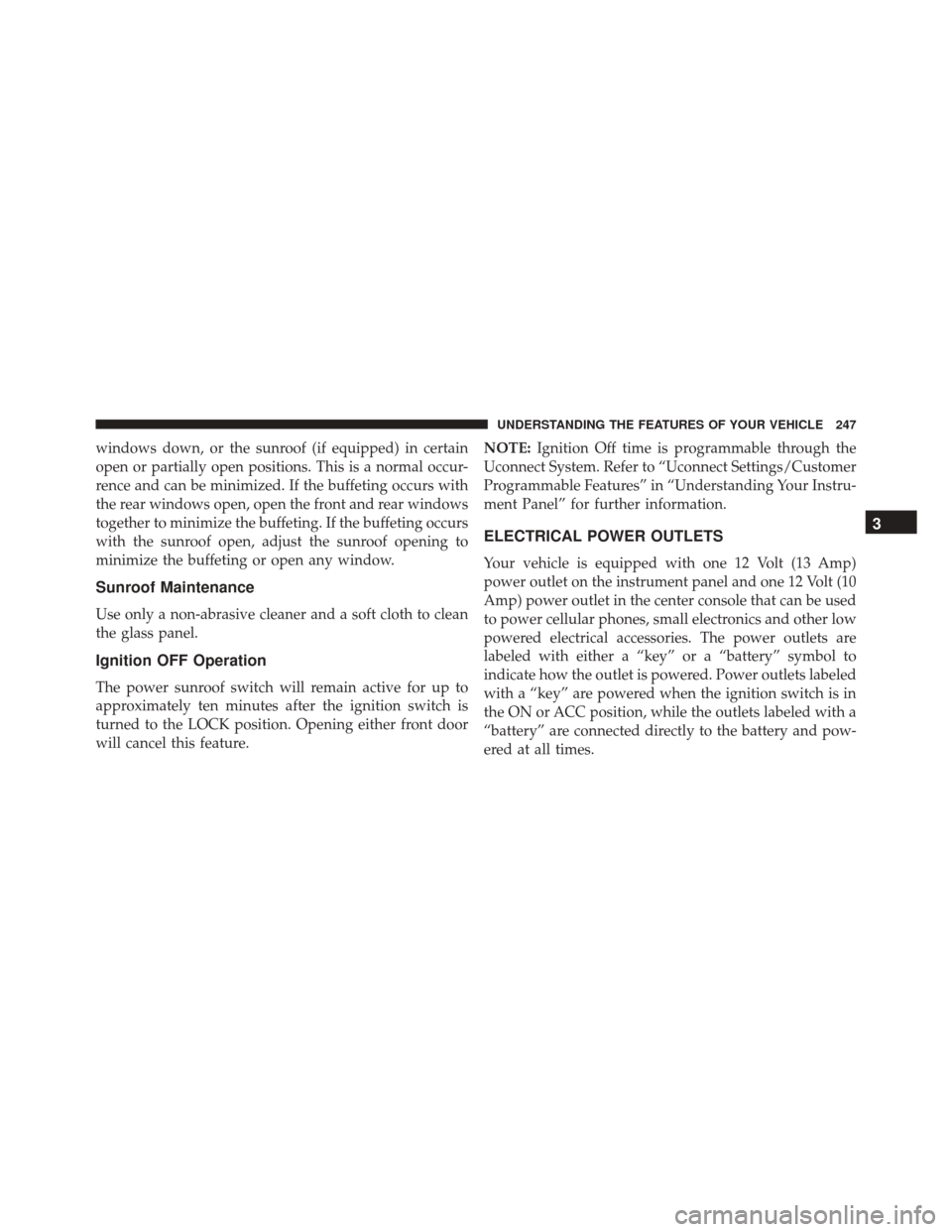
windows down, or the sunroof (if equipped) in certain
open or partially open positions. This is a normal occur-
rence and can be minimized. If the buffeting occurs with
the rear windows open, open the front and rear windows
together to minimize the buffeting. If the buffeting occurs
with the sunroof open, adjust the sunroof opening to
minimize the buffeting or open any window.
Sunroof Maintenance
Use only a non-abrasive cleaner and a soft cloth to clean
the glass panel.
Ignition OFF Operation
The power sunroof switch will remain active for up to
approximately ten minutes after the ignition switch is
turned to the LOCK position. Opening either front door
will cancel this feature.NOTE:
Ignition Off time is programmable through the
Uconnect System. Refer to “Uconnect Settings/Customer
Programmable Features” in “Understanding Your Instru-
ment Panel” for further information.
ELECTRICAL POWER OUTLETS
Your vehicle is equipped with one 12 Volt (13 Amp)
power outlet on the instrument panel and one 12 Volt (10
Amp) power outlet in the center console that can be used
to power cellular phones, small electronics and other low
powered electrical accessories. The power outlets are
labeled with either a “key” or a “battery” symbol to
indicate how the outlet is powered. Power outlets labeled
with a “key” are powered when the ignition switch is in
the ON or ACC position, while the outlets labeled with a
“battery” are connected directly to the battery and pow-
ered at all times.
3
UNDERSTANDING THE FEATURES OF YOUR VEHICLE 247
Page 333 of 620
•Engine Off Power Delay
When this feature is selected, the power window
switches, radio, Uconnect Phone system (if equipped),
DVD video system (if equipped), power sunroof (if
equipped), and power outlets will remain active for up to
10 minutes after the ignition is cycled to OFF. Opening
either front door will cancel this feature. To change the
Engine Off Power Delay setting, press the “+” or “-”
button on the touchscreen to select your desired time
interval, and choose from “0 seconds,” “45 seconds,” “5
minutes” or “10 minutes.”
• Headlight Off Delay
When this feature is selected, the driver can choose to
have the headlights remain on for 0, 30, 60, or 90 seconds
when exiting the vehicle. To change the Headlight Off
Delay status press the “+” or “–” button on the touch-
screen to select your desired time interval.Audio
After pressing the “Audio” button on the touchscreen the
following settings will be available.
• Balance/Fade
This feature allows you to adjust the Balance and Fade
settings. Press and drag the speaker icon, use the arrows
to adjust, or tap the ‘C’ icon to readjust to the center.
• Equalizer
This feature allows you to adjust the Bass, Mid and Treble
settings. Adjust the settings with the “+” and “–” setting
buttons on the touchscreen or by selecting any point on
the scale between the “+” and “–” buttons on the
touchscreen.
NOTE: Bass/Mid/Treble allow you to simply slide your
finger up or down to change the setting as well as press
directly on the desired setting.
4
UNDERSTANDING YOUR INSTRUMENT PANEL 331
Page 556 of 620
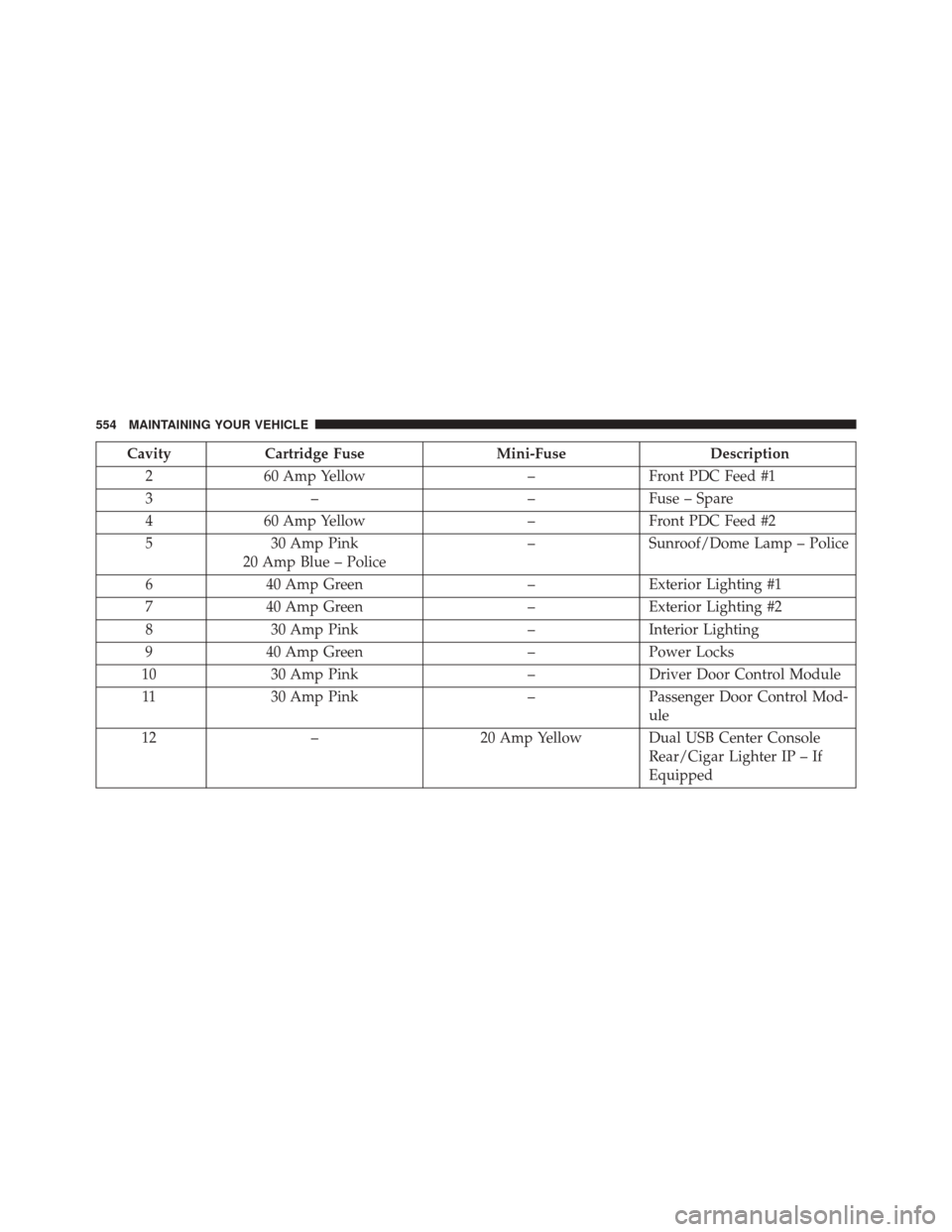
CavityCartridge Fuse Mini-FuseDescription
2 60 Amp Yellow –Front PDC Feed #1
3 – –Fuse – Spare
4 60 Amp Yellow –Front PDC Feed #2
5 30 Amp Pink
20 Amp Blue – Police –
Sunroof/Dome Lamp – Police
6 40 Amp Green –Exterior Lighting #1
7 40 Amp Green –Exterior Lighting #2
8 30 Amp Pink –Interior Lighting
9 40 Amp Green –Power Locks
10 30 Amp Pink –Driver Door Control Module
11 30 Amp Pink –Passenger Door Control Mod-
ule
12 – 20 Amp Yellow Dual USB Center Console
Rear/Cigar Lighter IP – If
Equipped
554 MAINTAINING YOUR VEHICLE
Page 609 of 620
Synthetic............................ .518
Viscosity ......................... .517, 566
Oil Filter, Change ........................ .518
Oil Filter, Selection ....................... .518
Oil Pressure Light ........................ .278
Onboard Diagnostic System ..................510
Operating Precautions ..................... .510
Operator Manual (Owner’s Manual) .............4
Outside Rearview Mirrors ...................118
Overheating, Engine ...................... .478
Owner’s Manual (Operator Manual) ..........4,588
Paddle Shifters .......................... .391
Paddle Shift Mode ....................... .391
Paint Care ............................. .539
Panic Alarm ..............................24
Parking Brake ........................... .400
ParkSense System, Rear .....................215
Passing Light ........................... .159Passive Entry
.............................36
Pedals, Adjustable ........................ .172
Personalized Menu Bar .....................350
Pets ....................................98
Placard, Tire And Loading Information ..........424
Power Brakes .............................. .402
Deck Lid Release ........................45
Distribution Center (Fuses) ................552
Door Locks ............................33
Mirrors ............................. .121
Outlet (Auxiliary Electrical Outlet) ...........247
Seats ............................... .134
Steering ............................. .398
Sunroof ............................. .243
Tilt/Telescoping Steering Column ............169
Windows ..............................41
Power Seats Down .............................. .135
10
INDEX 607