Page 360 of 620
Apple iPhone iOS 6 or later supports readingincoming
text messages only. To enable this feature on your Apple
iPhone, follow these 4 simple steps:
iPhone Notification Settings
1 — Select “Settings”
2 — Select “Bluetooth”
3 — Select the (i) for the paired vehicle
4 — Turn on “Show Notifications”
358 UNDERSTANDING YOUR INSTRUMENT PANEL
Page 366 of 620
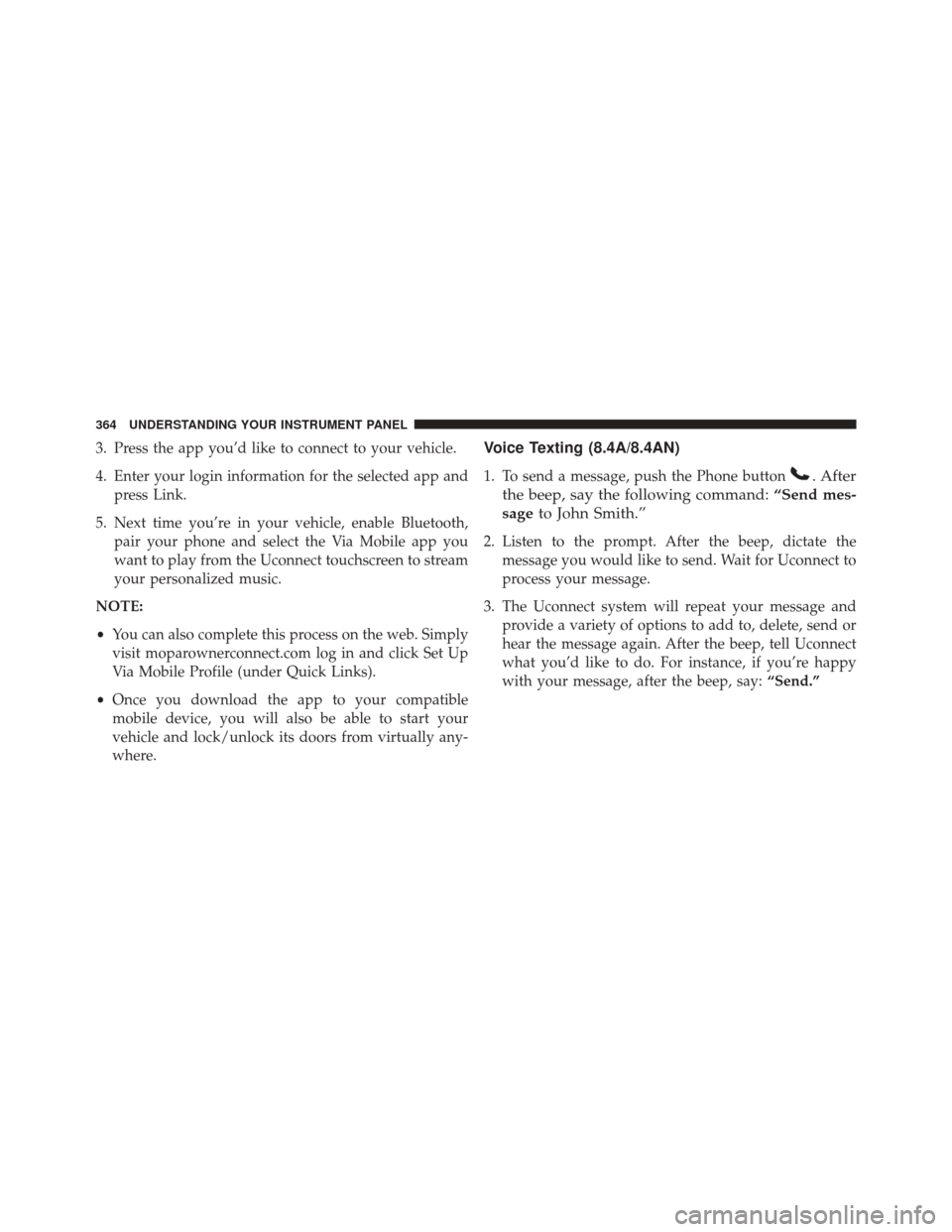
3. Press the app you’d like to connect to your vehicle.
4. Enter your login information for the selected app andpress Link.
5. Next time you’re in your vehicle, enable Bluetooth, pair your phone and select the Via Mobile app you
want to play from the Uconnect touchscreen to stream
your personalized music.
NOTE:
• You can also complete this process on the web. Simply
visit moparownerconnect.com log in and click Set Up
Via Mobile Profile (under Quick Links).
• Once you download the app to your compatible
mobile device, you will also be able to start your
vehicle and lock/unlock its doors from virtually any-
where.Voice Texting (8.4A/8.4AN)
1. To send a message, push the Phone button. After
the beep, say the following command: “Send mes-
sage to John Smith.”
2. Listen to the prompt. After the beep, dictate the
message you would like to send. Wait for Uconnect to
process your message.
3. The Uconnect system will repeat your message and provide a variety of options to add to, delete, send or
hear the message again. After the beep, tell Uconnect
what you’d like to do. For instance, if you’re happy
with your message, after the beep, say: “Send.”
364 UNDERSTANDING YOUR INSTRUMENT PANEL
Page 367 of 620
You must be registered with Uconnect Access and have a
compatible MAP – enabled smartphone to use your voice
to send a personalized text message. For details about
MAP, visit UconnectPhone.com.
Apple iPhone iOS6 or later supports readingincoming
text messages only. To enable this feature on your Apple
iPhone, follow these 4 simple steps:
iPhone Notification Settings
1 — Select “Settings”
2 — Select “Bluetooth”
3 — Select the (i) for the paired vehicle
4 — Turn on “Show Notifications”
4
UNDERSTANDING YOUR INSTRUMENT PANEL 365
Page 371 of 620
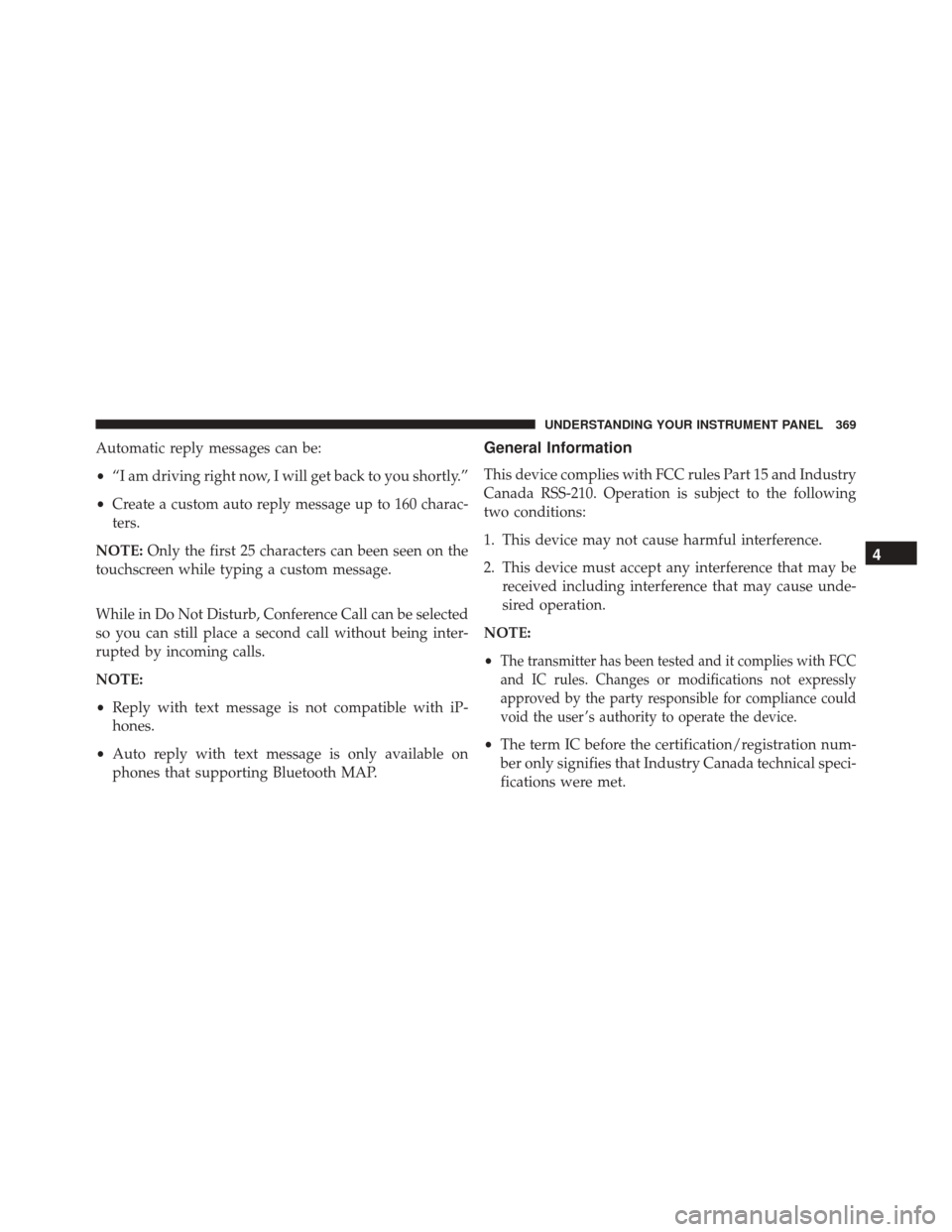
Automatic reply messages can be:
•“I am driving right now, I will get back to you shortly.”
• Create a custom auto reply message up to 160 charac-
ters.
NOTE: Only the first 25 characters can been seen on the
touchscreen while typing a custom message.
While in Do Not Disturb, Conference Call can be selected
so you can still place a second call without being inter-
rupted by incoming calls.
NOTE:
• Reply with text message is not compatible with iP-
hones.
• Auto reply with text message is only available on
phones that supporting Bluetooth MAP.General Information
This device complies with FCC rules Part 15 and Industry
Canada RSS-210. Operation is subject to the following
two conditions:
1. This device may not cause harmful interference.
2. This device must accept any interference that may be received including interference that may cause unde-
sired operation.
NOTE:
•
The transmitter has been tested and it complies with FCC
and IC rules. Changes or modifications not expressly
approved by the party responsible for compliance could
void the user ’s authority to operate the device.
• The term IC before the certification/registration num-
ber only signifies that Industry Canada technical speci-
fications were met.
4
UNDERSTANDING YOUR INSTRUMENT PANEL 369
Page 550 of 620
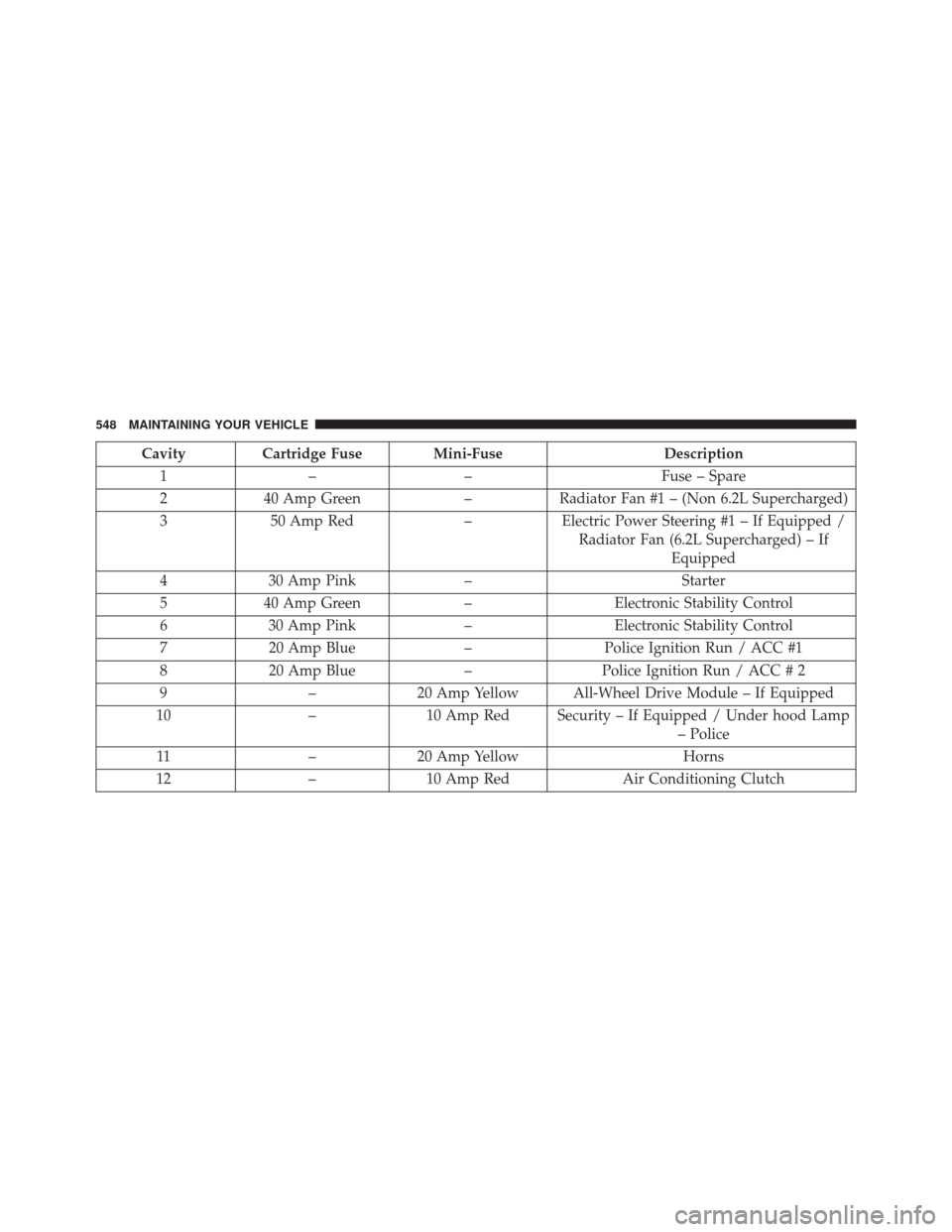
CavityCartridge Fuse Mini-Fuse Description
1 – – Fuse – Spare
2 40 Amp Green –Radiator Fan #1 – (Non 6.2L Supercharged)
3 50 Amp Red –Electric Power Steering #1 – If Equipped /
Radiator Fan (6.2L Supercharged) – If Equipped
4 30 Amp Pink – Starter
5 40 Amp Green –Electronic Stability Control
6 30 Amp Pink –Electronic Stability Control
7 20 Amp Blue –Police Ignition Run / ACC #1
8 20 Amp Blue –Police Ignition Run / ACC # 2
9 –20 Amp Yellow All-Wheel Drive Module – If Equipped
10 –10 Amp Red Security – If Equipped / Under hood Lamp
– Police
11 –20 Amp Yellow Horns
12 –10 Amp Red Air Conditioning Clutch
548 MAINTAINING YOUR VEHICLE
Page 551 of 620
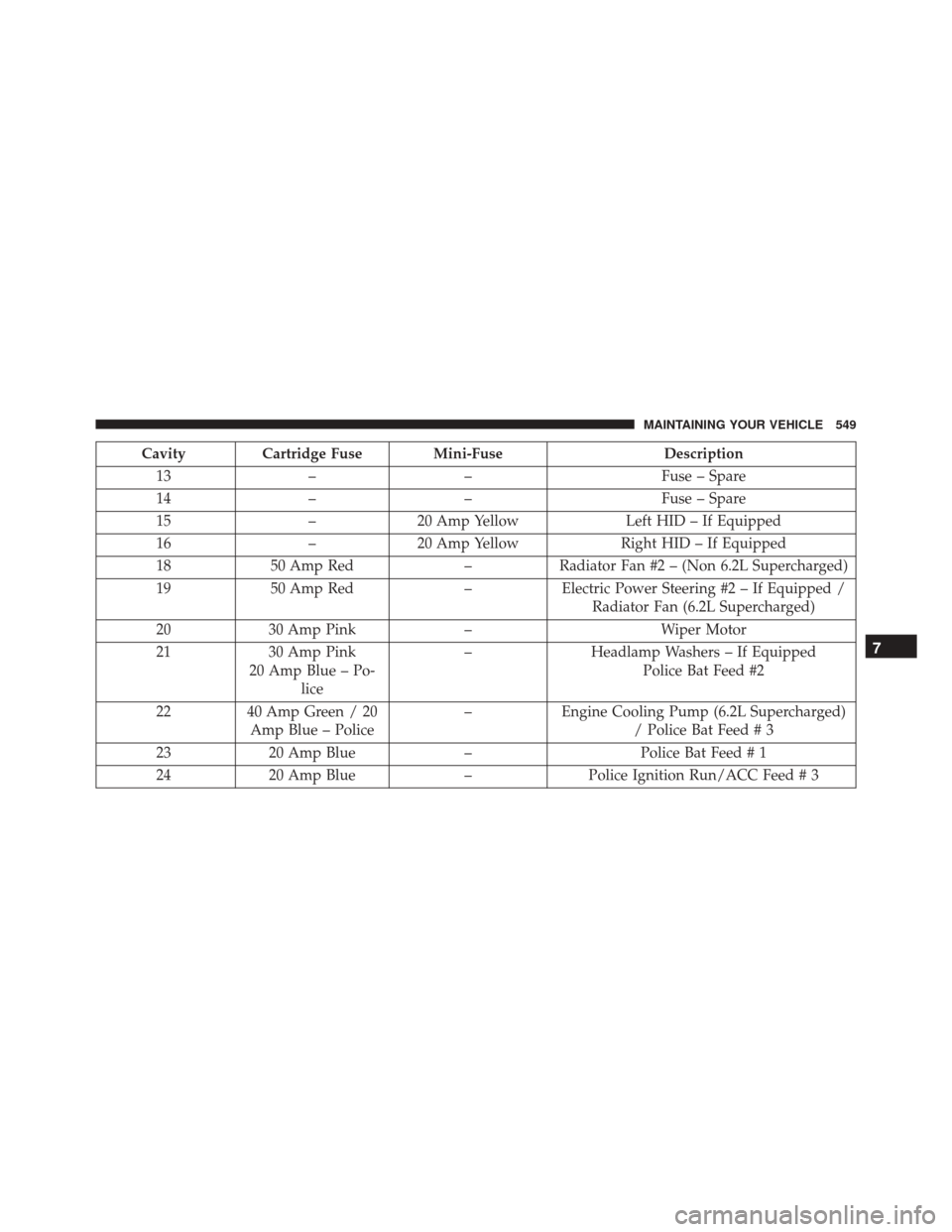
CavityCartridge Fuse Mini-Fuse Description
13 – – Fuse – Spare
14 – – Fuse – Spare
15 –20 Amp Yellow Left HID – If Equipped
16 –20 Amp Yellow Right HID – If Equipped
18 50 Amp Red –Radiator Fan #2 – (Non 6.2L Supercharged)
19 50 Amp Red –Electric Power Steering #2 – If Equipped /
Radiator Fan (6.2L Supercharged)
20 30 Amp Pink – Wiper Motor
21 30 Amp Pink
20 Amp Blue – Po- lice –
Headlamp Washers – If Equipped
Police Bat Feed #2
22 40 Amp Green / 20
Amp Blue – Police –
Engine Cooling Pump (6.2L Supercharged)
/ Police Bat Feed # 3
23 20 Amp Blue –Police Bat Feed # 1
24 20 Amp Blue –Police Ignition Run/ACC Feed # 3
7
MAINTAINING YOUR VEHICLE 549
Page 552 of 620
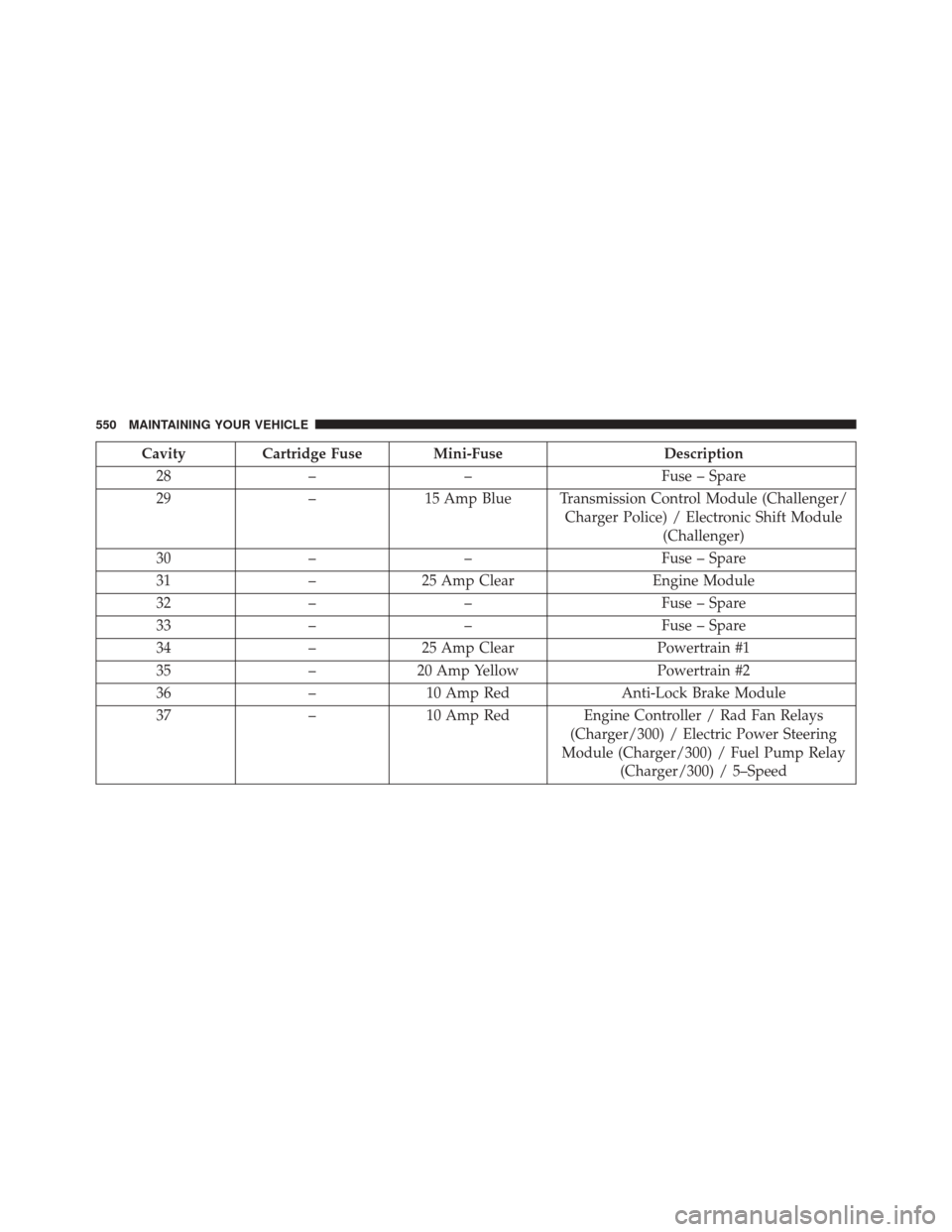
CavityCartridge Fuse Mini-Fuse Description
28 – – Fuse – Spare
29 –15 Amp Blue Transmission Control Module (Challenger/
Charger Police) / Electronic Shift Module(Challenger)
30 – – Fuse – Spare
31 –25 Amp Clear Engine Module
32 – – Fuse – Spare
33 – – Fuse – Spare
34 –25 Amp Clear Powertrain #1
35 –20 Amp Yellow Powertrain #2
36 –10 Amp Red Anti-Lock Brake Module
37 –10 Amp Red Engine Controller / Rad Fan Relays
(Charger/300) / Electric Power Steering
Module (Charger/300) / Fuel Pump Relay (Charger/300) / 5–Speed
550 MAINTAINING YOUR VEHICLE
Page 556 of 620
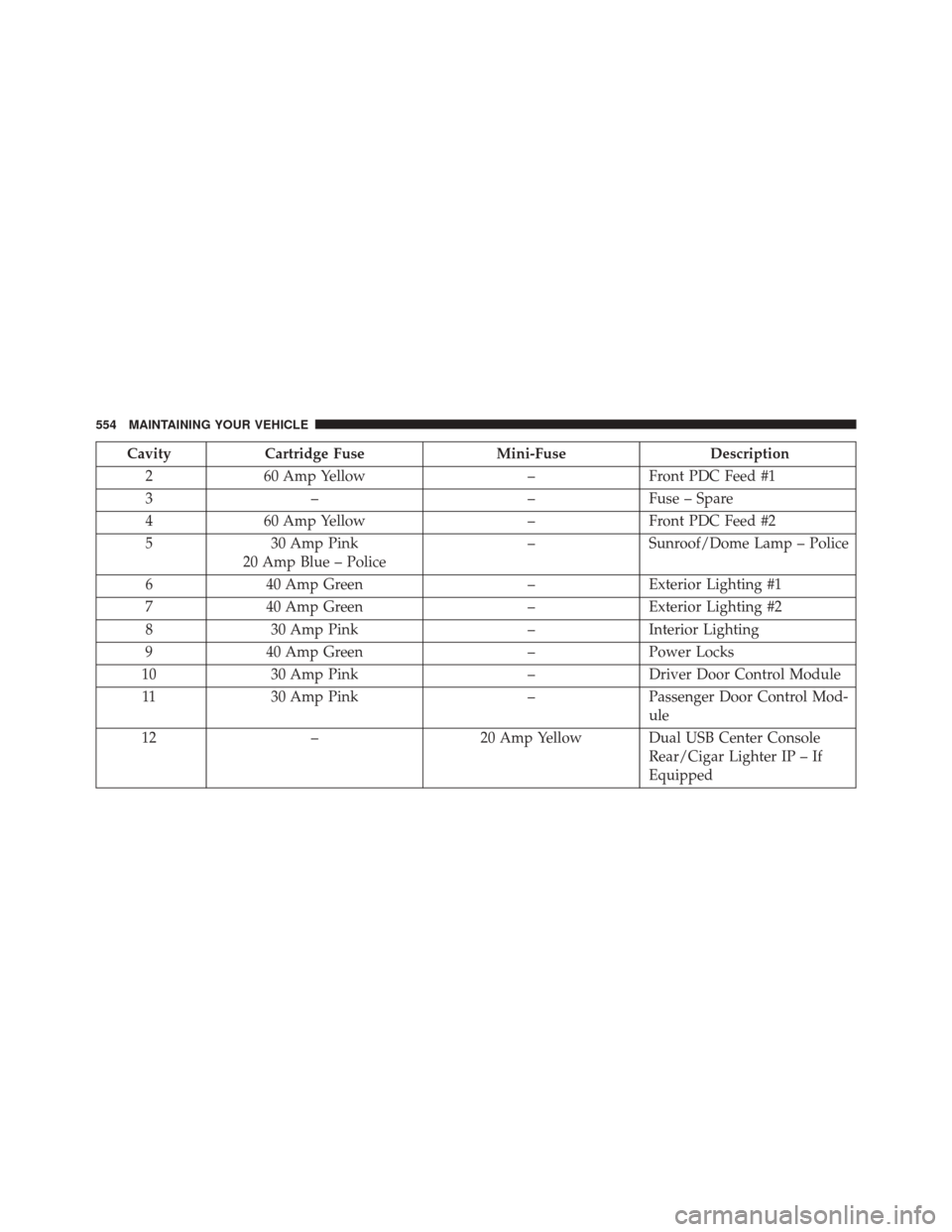
CavityCartridge Fuse Mini-FuseDescription
2 60 Amp Yellow –Front PDC Feed #1
3 – –Fuse – Spare
4 60 Amp Yellow –Front PDC Feed #2
5 30 Amp Pink
20 Amp Blue – Police –
Sunroof/Dome Lamp – Police
6 40 Amp Green –Exterior Lighting #1
7 40 Amp Green –Exterior Lighting #2
8 30 Amp Pink –Interior Lighting
9 40 Amp Green –Power Locks
10 30 Amp Pink –Driver Door Control Module
11 30 Amp Pink –Passenger Door Control Mod-
ule
12 – 20 Amp Yellow Dual USB Center Console
Rear/Cigar Lighter IP – If
Equipped
554 MAINTAINING YOUR VEHICLE