Chevrolet Malibu Limited/Cruze Limited MyLink Infotainment System
(GMNA-Localizing-U.S./Canada-9282853) - 2016 - crc - 4/16/15
Radio 15
Radio
AM-FM Radio
Playing the Radio
OorVOL/O(Volume/Power):
. Press to turn the radio on or off.
. Turn to increase or decrease the
volume of the active source.
The steering wheel controls can
also be used to adjust the volume.
See Steering Wheel Controls 09.
Radio Operation
The radio will work when the ignition
is in ON/RUN or ACC/
ACCESSORY. When the ignition
changes from ON/RUN to LOCK/
OFF, the radio will continue to work
for 10 minutes or until the driver
door is opened.
The radio can be turned on by
pressing the power button on the
radio and will stay on for
10 minutes. Opening the driver door
will not turn the radio off when
pressing the power button. Some radios may stay on longer
and reset the time for 10 minutes if
there are any additional presses of
any radio button.
The radio can be turned off at any
time by pressing the power button.
Audio Source
Press SRCE on the faceplate or
SRC on the steering wheel controls
to display and scroll through the
available sources AM, FM, XM (if
equipped), Pandora (if equipped),
Stitcher, CD, USB, AUX, and
Bluetooth Audio.
Infotainment System Settings
Tone Settings
To access the tone settings, press
TONE on the faceplate or touch the
Tone Settings screen button on the
Home Page. Tone settings are
specific to each source.To adjust the settings:
.
Bass: Touch + or −to change
the level.
. Mid (Midrange): Touch + or −to
change the level.
. Treble: Touch + or −to change
the level.
. EQ: Press or turn the TUNE/
MENU or MENU/SEL knob to
cycle through the preset EQ
options. If the vehicle is
equipped with the Bose
®Energy
Efficient Series sound system,
EQ provides a choice of Manual
or Talk.
. Fade: Touch the F or R button
for more sound from the front or
rear speakers. The middle
position balances the sound
between the front and rear
speakers.
. Balance: Touch the L or R button
for more sound from the left or
right speakers. The middle
position balances the sound
between the left and right
speakers.
Chevrolet Malibu Limited/Cruze Limited MyLink Infotainment System
(GMNA-Localizing-U.S./Canada-9282853) - 2016 - crc - 4/16/15
Radio 31
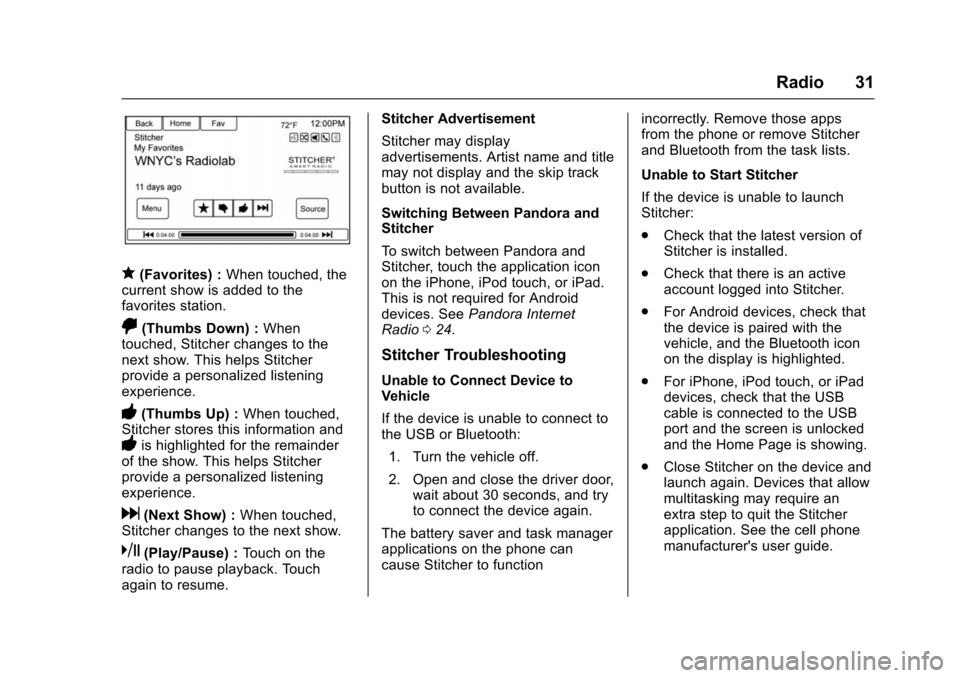
q(Favorites) :When touched, the
current show is added to the
favorites station.
,(Thumbs Down) : When
touched, Stitcher changes to the
next show. This helps Stitcher
provide a personalized listening
experience.
-(Thumbs Up) : When touched,
Stitcher stores this information and
-is highlighted for the remainder
of the show. This helps Stitcher
provide a personalized listening
experience.
d(Next Show) : When touched,
Stitcher changes to the next show.
k(Play/Pause) : Touch on the
radio to pause playback. Touch
again to resume. Stitcher Advertisement
Stitcher may display
advertisements. Artist name and title
may not display and the skip track
button is not available.
Switching Between Pandora and
Stitcher
To switch between Pandora and
Stitcher, touch the application icon
on the iPhone, iPod touch, or iPad.
This is not required for Android
devices. See
Pandora Internet
Radio 024.
Stitcher Troubleshooting
Unable to Connect Device to
Vehicle
If the device is unable to connect to
the USB or Bluetooth:
1. Turn the vehicle off.
2. Open and close the driver door, wait about 30 seconds, and try
to connect the device again.
The battery saver and task manager
applications on the phone can
cause Stitcher to function incorrectly. Remove those apps
from the phone or remove Stitcher
and Bluetooth from the task lists.
Unable to Start Stitcher
If the device is unable to launch
Stitcher:
.
Check that the latest version of
Stitcher is installed.
. Check that there is an active
account logged into Stitcher.
. For Android devices, check that
the device is paired with the
vehicle, and the Bluetooth icon
on the display is highlighted.
. For iPhone, iPod touch, or iPad
devices, check that the USB
cable is connected to the USB
port and the screen is unlocked
and the Home Page is showing.
. Close Stitcher on the device and
launch again. Devices that allow
multitasking may require an
extra step to quit the Stitcher
application. See the cell phone
manufacturer's user guide.