2016 BMW M4 warning lights
[x] Cancel search: warning lightsPage 125 of 228
WARNING
When driving with a roof load, for exam‐
ple with a roof rack, the higher centre of gravity
can mean that driving safety is no longer guar‐
anteed in critical driving situations. Danger of
accident or damage to property. Do not deacti‐
vate Dynamic Stability Control DSC when driv‐
ing with a roof load.◀
Overview
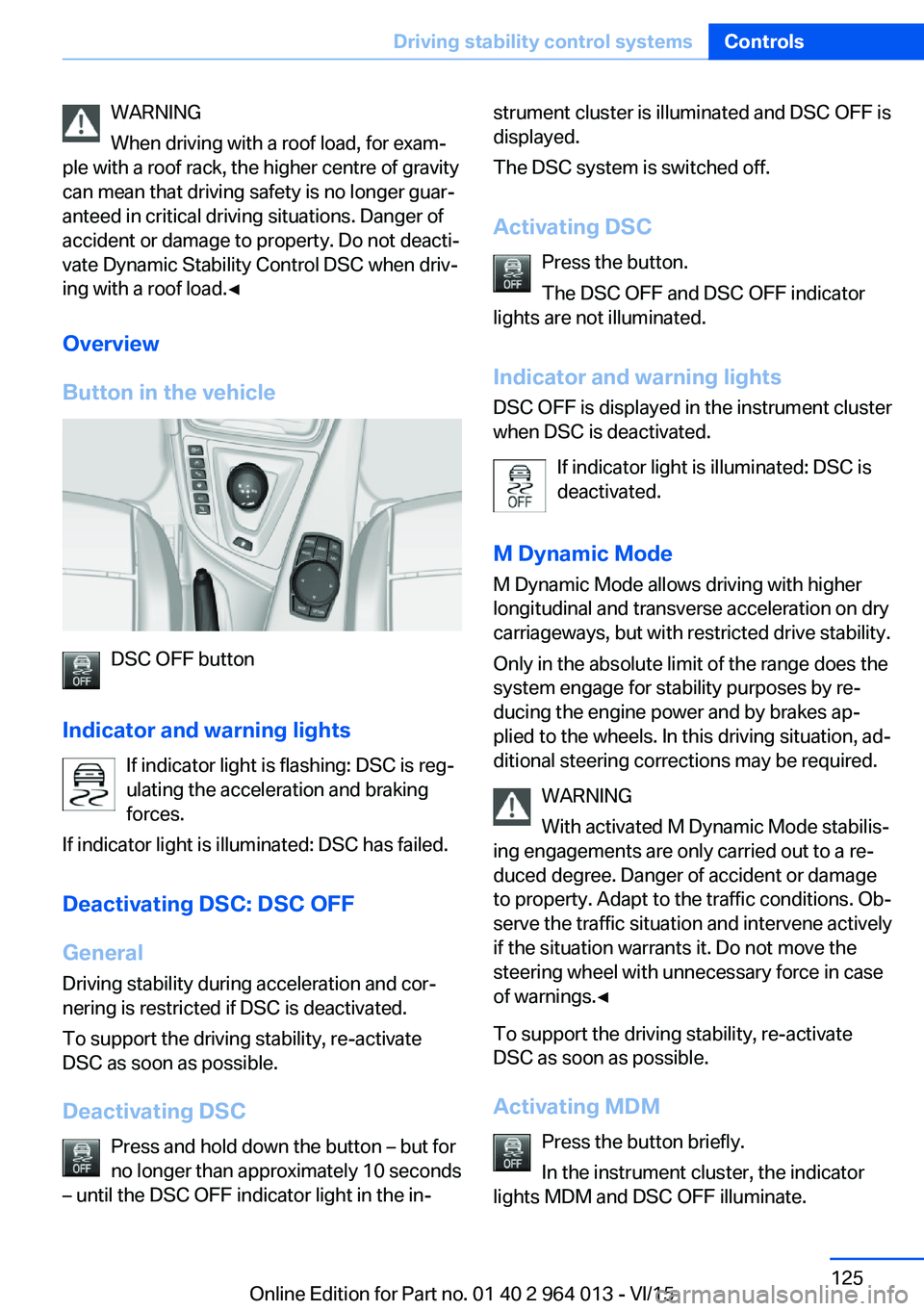
Button in the vehicle
DSC OFF button
Indicator and warning lights If indicator light is flashing: DSC is reg‐ulating the acceleration and braking
forces.
If indicator light is illuminated: DSC has failed.
Deactivating DSC: DSC OFF
General Driving stability during acceleration and cor‐
nering is restricted if DSC is deactivated.
To support the driving stability, re-activate
DSC as soon as possible.
Deactivating DSC Press and hold down the button – but for
no longer than approximately 10 seconds
– until the DSC OFF indicator light in the in‐
strument cluster is illuminated and DSC OFF is
displayed.
The DSC system is switched off.
Activating DSC Press the button.
The DSC OFF and DSC OFF indicator
lights are not illuminated.
Indicator and warning lights DSC OFF is displayed in the instrument cluster
when DSC is deactivated.
If indicator light is illuminated: DSC is
deactivated.
M Dynamic Mode
M Dynamic Mode allows driving with higher
longitudinal and transverse acceleration on dry
carriageways, but with restricted drive stability.
Only in the absolute limit of the range does the
system engage for stability purposes by re‐
ducing the engine power and by brakes ap‐
plied to the wheels. In this driving situation, ad‐
ditional steering corrections may be required.
WARNING
With activated M Dynamic Mode stabilis‐
ing engagements are only carried out to a re‐
duced degree. Danger of accident or damage
to property. Adapt to the traffic conditions. Ob‐
serve the traffic situation and intervene actively
if the situation warrants it. Do not move the
steering wheel with unnecessary force in case
of warnings.◀
To support the driving stability, re-activate
DSC as soon as possible.
Activating MDM Press the button briefly.
In the instrument cluster, the indicator
lights MDM and DSC OFF illuminate.Seite 125Driving stability control systemsControls125
Online Edition for Part no. 01 40 2 964 013 - VI/15
Page 126 of 228
Deactivating MDMPress the button.
Indicator lights MDM and DSC OFF no
longer illuminate.
Via M DriveOn the Control Display:1."Settings"2."M Drive 1" or "M Drive 2"3. Select the symbol.4."MDM"
To call up the desired M Drive with the selec‐
ted settings, press the corresponding button
on the steering wheel:
▷▷
A message appears in the instrument cluster.
This message is operated by pressing the but‐
ton again.
Deactivating MDM
Press the corresponding button 1 or button 2
on the steering wheel again.
M Dynamic Mode and the settings selected
under M Drive are deactivated.
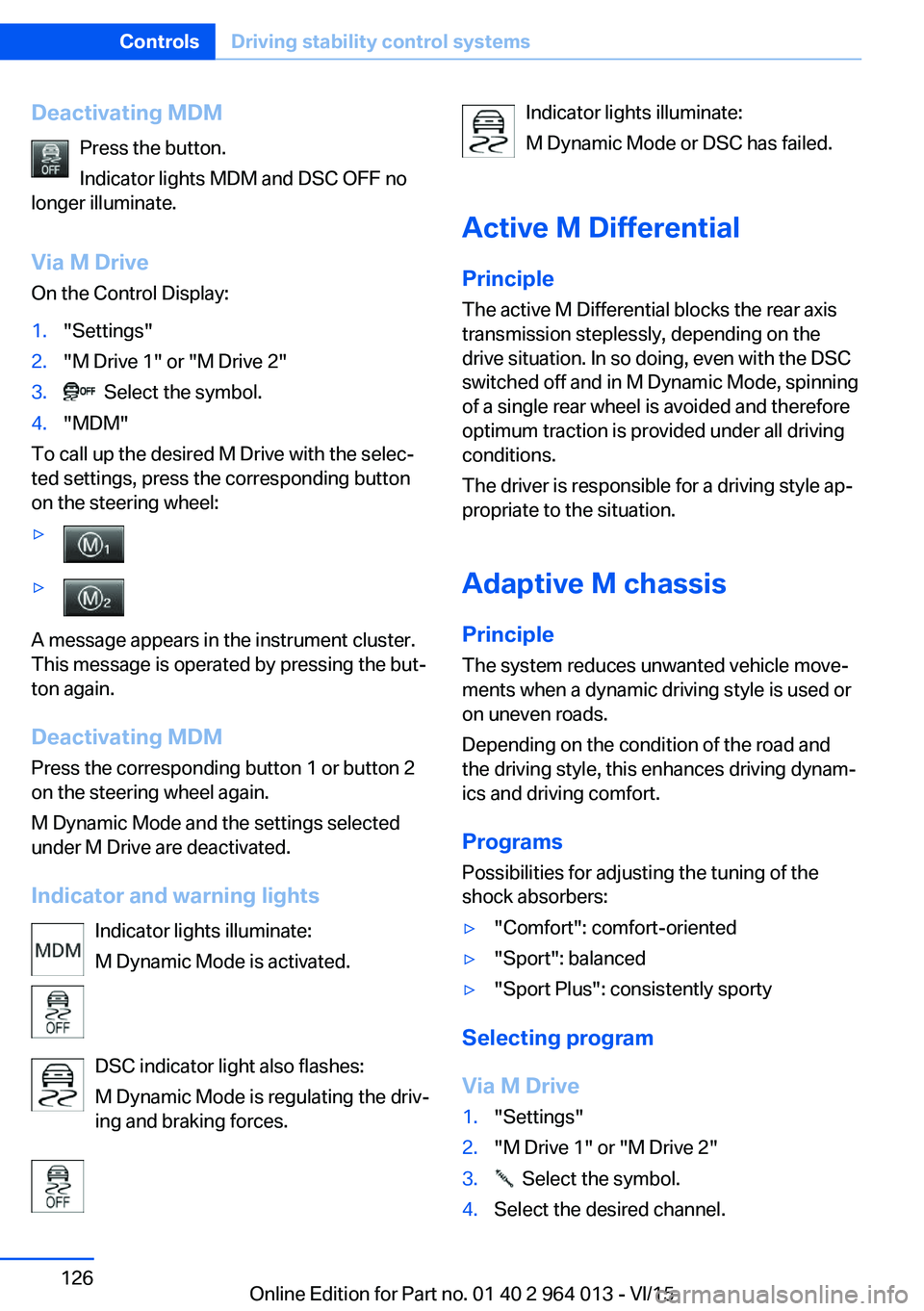
Indicator and warning lights Indicator lights illuminate:
M Dynamic Mode is activated.
DSC indicator light also flashes:
M Dynamic Mode is regulating the driv‐
ing and braking forces.
Indicator lights illuminate:
M Dynamic Mode or DSC has failed.
Active M Differential
Principle The active M Differential blocks the rear axis
transmission steplessly, depending on the
drive situation. In so doing, even with the DSC
switched off and in M Dynamic Mode, spinning
of a single rear wheel is avoided and therefore
optimum traction is provided under all driving
conditions.
The driver is responsible for a driving style ap‐
propriate to the situation.
Adaptive M chassis PrincipleThe system reduces unwanted vehicle move‐
ments when a dynamic driving style is used or
on uneven roads.
Depending on the condition of the road and
the driving style, this enhances driving dynam‐
ics and driving comfort.
Programs Possibilities for adjusting the tuning of the
shock absorbers:▷"Comfort": comfort-oriented▷"Sport": balanced▷"Sport Plus": consistently sporty
Selecting program
Via M Drive
1."Settings"2."M Drive 1" or "M Drive 2"3. Select the symbol.4.Select the desired channel.Seite 126ControlsDriving stability control systems126
Online Edition for Part no. 01 40 2 964 013 - VI/15
Page 133 of 228

▷With persons with certain clothing, for ex‐
ample a coat.▷With external disruption to the ultrasound,
for example by passing vehicles or loud
machines.▷If the sensors are dirty, iced-up, damaged
or incorrectly adjusted.▷In certain weather conditions, for example
high humidity, rain, snowfall, extreme heat
or strong wind.▷With trailer noses and tow hitches of other
vehicles.▷With thin or wedge-shaped objects.▷With moving objects.▷For higher, protruding objects, for example
projecting walls or loads.▷For objects with corners and sharp edges.▷For objects with fine surfaces or struc‐
tures, for example fences.▷For objects with porous surfaces.
Low objects already indicated, such as kerbs,
may enter the sensors' blind areas before or
after a continuous tone is given.
False alarms
Under the following conditions, PDC can issue
a warning although there is no obstacle in the
detection range:
▷In heavy rain.▷If the sensors are very dirty or covered with
ice.▷If the sensors are covered with snow.▷On rough road surfaces.▷On uneven ground, for example speed
bumps.▷In large, rectangular buildings with smooth
walls, for example underground car parks.▷In car washes.▷Due to dense exhaust gas.▷Due to other ultrasonic sources, for exam‐
ple sweeping machines, steam-jet cleaners
or neon lights.
The functional disruption is reported by an
alternating continuous tone between the
front and rear loudspeakers. As soon as
the disruption by other ultrasound sources
is no longer present, the system is fully
functional again.
Malfunction
A Check Control message is shown.
The recording area of the sensors is shown
hatched on the Control Display.
PDC has failed. Have the system checked.
Surround view Principle
Surround view contains various camera assis‐
tance systems, providing support when park‐
ing, manoeuvring and exits and junctions with
poor visibility.
▷Rear-view camera, see page 133.▷Side view, see page 136.▷Top view, see page 137.
Rear-view camera
Principle The rear-view camera offers assistance when
reversing into a parking space or manoeuvring.
To achieve this, the area behind the vehicle is
displayed on the Control Display.
Notes WARNING
The system does not take your personal
responsibility from you when you are estimat‐
ing the traffic situation. Danger of accidents.
Adapt driving style to the driving conditions.
Seite 133Driving comfortControls133
Online Edition for Part no. 01 40 2 964 013 - VI/15
Page 178 of 228
ted speed for the tyres fitted must be dis‐
played in the driver's field of view. The sticker
is available from a Service Partner or a qualified
specialist workshop.
If winter tyres are fitted, observe and comply
with the respectively permitted maximum
speed.
Interchanging front and rear wheels
The manufacturer of your vehicle advises
against interchanging the front and rear
wheels. This could impair vehicle handling
Such a change is not permitted in vehicles with
different tyre or rim dimensions on the front
and rear axles.
Tyre storage
Store wheels and tyres in a cool, dry and pref‐
erably dark place when not in use.
Protect tyres against contamination from oil,
grease and fuel.
Do not exceed the maximum tyre pressure in‐
dicated on the tyre's side wall.
Remedying flat tyres Safety measures▷Park the vehicle on a solid surface and as
far away from moving traffic as possible.▷Switch on hazard warning lights.▷Protect the vehicle against rolling, by ap‐
plying the parking brake.▷Engage the steering wheel lock in the
straight ahead position of the wheels.▷Allow all vehicle occupants get out of the
vehicle and guide them out of the danger
area, for example behind the crash barrier.▷Set up warning triangle an appropriate dis‐
tance away.Mobility system
Principle With the mobility system, minor tyre damage
can be quickly sealed, to allow you to drive on.
To do that, liquid sealant is pumped into the
tyres which encloses the damage from the in‐ side when it hardens.
The compressor can be used to check the tyre
inflation pressure.
Notes▷Please observe the notes on the applica‐
tion of the Mobility system which are on
the compressor and the sealant container.▷Applying the Mobility system can be inef‐
fective for tyre damage as from a size of
approximately 4 mm.▷Contact a Service Partner or a qualified
specialist workshop if you are unable to put
the tyre back in operation.▷If possible, foreign matter that has penetra‐
ted the tyre should remain inside the tyre.▷Remove the speed limit sticker from the
sealant container and attach to the steer‐
ing wheel.▷Using sealants can damage the TPM wheel
electronics. If sealant is used, check the
electronics as soon as you get an opportu‐
nity and have them replaced if necessary.
DANGER
A blocked exhaust pipe or inadequate
ventilation can allow harmful exhaust fumes to
penetrate the vehicle. The exhaust gas con‐
tains carbon monoxide, which is colourless and
odourless, but highly toxic. In enclosed spaces,
the exhaust fumes can also build up outside
the vehicle. Danger of fatal injury. Keep the ex‐
haust pipe clear and ensure sufficient ventila‐
tion.◀
Storage
Mobility system is located under boot floor.
Seite 178MobilityWheels and tyres178
Online Edition for Part no. 01 40 2 964 013 - VI/15
Page 194 of 228
ist workshop, if you are not familiar with it or it
is not described here.
A box containing spare bulbs is available from
a Service Partner or a qualified specialist work‐
shop.
WARNING
Lamps can become hot during operation.
Contact with the lamps can lead to burns. Dan‐
ger of injury. Only replace lamps in cooled-
down condition.◀
WARNING
Short circuits can occur when working on
switched on lighting systems. Danger of injury
or damage to property. Switch the respective
lights off when working on the lighting system.
Observe the possibly enclosed notes of the
lamp manufacturer.◀
DANGER
High voltages can be applied to the light‐
ing system. Danger of fatal injury. Have work
on the lighting system including replacing the
lamps performed by a Service Partner or a
qualified specialist workshop.◀
ATTENTION
Dirty lamps have a reduced lifetime. Dan‐
ger of damage to property. Do not touch the
glass of new lamps with your bare hands. Use
a clean tissue, cloth or similar, or hold the bulb
by its base.◀
Light-emitting diodes, LEDs
Some equipment versions have light-emitting
diodes behind a cover as a light source.
These resemble conventional lasers and are
classified by legislation as Class 1 light-emit‐
ting diodes.
WARNING
Excessively intense brightness can irri‐
tate or harm the retina of the eye. Danger of in‐
jury. Do not look directly at the headlights orother light sources for a sustained period. Do
not remove covers from LEDs.◀
Headlight glass
During cool or humid weather, the exterior
lights can mist over. When driving with the light
switched on, the condensation disappears af‐
ter a short time. There is no need to replace
the headlight glass.
If the headlights do not demist, even when
driving with the lights switched on and increas‐ ing moisture builds up, for example water
droplets in the lights, have these checked by a
Service Partner or a qualified specialist work‐
shop.
Headlight adjustment The adjustments of the headlight can be affec‐
ted by changing lights and bulbs. Have the
headlight adjustment checked and if necessary
corrected by a Service Partner or a qualified
specialist workshop after changing lights and
lamps.
Front lights, replacing the bulbs
Xenon headlight Notes DANGER
High voltages can be applied to the light‐
ing system. Danger of fatal injury. Have work
on the lighting system including replacing the
lamps performed by a Service Partner or a
qualified specialist workshop.◀
These bulbs have a very long service life and
are highly unlikely to fail. Frequent switching
on and off shortens the service life.Seite 194MobilityReplacing parts194
Online Edition for Part no. 01 40 2 964 013 - VI/15
Page 197 of 228
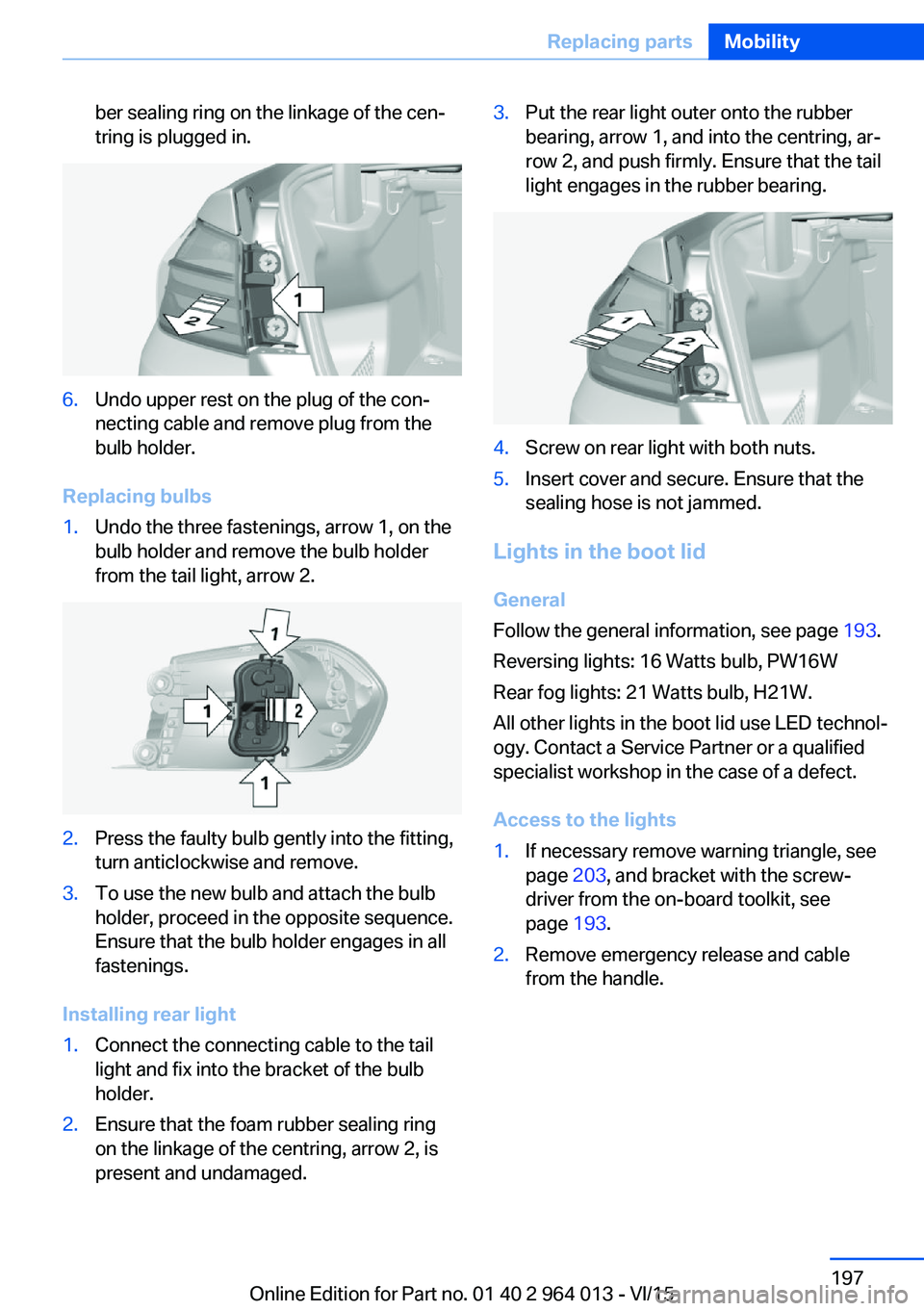
ber sealing ring on the linkage of the cen‐
tring is plugged in.6.Undo upper rest on the plug of the con‐
necting cable and remove plug from the
bulb holder.
Replacing bulbs
1.Undo the three fastenings, arrow 1, on the
bulb holder and remove the bulb holder
from the tail light, arrow 2.2.Press the faulty bulb gently into the fitting,
turn anticlockwise and remove.3.To use the new bulb and attach the bulb
holder, proceed in the opposite sequence.
Ensure that the bulb holder engages in all
fastenings.
Installing rear light
1.Connect the connecting cable to the tail
light and fix into the bracket of the bulb
holder.2.Ensure that the foam rubber sealing ring
on the linkage of the centring, arrow 2, is
present and undamaged.3.Put the rear light outer onto the rubber
bearing, arrow 1, and into the centring, ar‐
row 2, and push firmly. Ensure that the tail
light engages in the rubber bearing.4.Screw on rear light with both nuts.5.Insert cover and secure. Ensure that the
sealing hose is not jammed.
Lights in the boot lid
General
Follow the general information, see page 193.
Reversing lights: 16 Watts bulb, PW16W
Rear fog lights: 21 Watts bulb, H21W.
All other lights in the boot lid use LED technol‐
ogy. Contact a Service Partner or a qualified
specialist workshop in the case of a defect.
Access to the lights
1.If necessary remove warning triangle, see
page 203, and bracket with the screw‐
driver from the on-board toolkit, see
page 193.2.Remove emergency release and cable
from the handle.Seite 197Replacing partsMobility197
Online Edition for Part no. 01 40 2 964 013 - VI/15
Page 199 of 228

5.Install the cable on the handle of the emer‐
gency release and engage the handle into
the fastening.6.Fit the bracket for the warning triangle.7.Attach the warning triangle.
Tail lights, number plate lights and
centre brake light
These lights use LED technology. Contact a
Service Partner or a qualified specialist work‐
shop in the case of a defect.
Changing a wheel
Notes
When using sealants, immediate wheel change
in the event of loss of tyre pressure in case of
puncture is not required.
As a result, no spare wheel is available.
The tools for changing wheels are available as
optional accessories from a Service Partner or
a qualified specialist workshop.
Jack mounting points
The jack mounting points are located in the il‐
lustrated positions.
Thiefproof wheel studs
The adapter of the thiefproof wheel studs can
be found in the tool kit or in an oddments tray
in the tool kit.
▷Wheel stud, arrow 1.▷Adapter, arrow 2.
Removing
1.Place the adapter on the wheel stud.2.Unscrew wheel stud.
After reattaching the wheel stud, remove the
adapter again.
Car battery Maintenance
The battery is maintenance-free.
More information regarding the battery can be
enquired with a Service Partner or a qualified
specialist workshop.
Replacing the battery ATTENTION
Vehicle batteries that have been categor‐
ised by the manufacturer of the vehicle as un‐
suitable can damage systems, or prevent func‐
tions from being carried out. Danger of
damage to property. Only use vehicle batteries
that have been classified as suitable by the ve‐
hicle manufacturer.◀
When the vehicle battery has been changed,
have the battery registered on the vehicle by a
Service Partner or a qualified specialist work‐
shop to ensure that all comfort functions are
fully available and any appropriate Check Con‐
trol messages are no longer displayed.
Seite 199Replacing partsMobility199
Online Edition for Part no. 01 40 2 964 013 - VI/15
Page 202 of 228

Help in the event of a breakdownVehicle equipment
This chapter describes all standard, national
and special equipment provided in the model
series. Equipment not available in the vehicle is
therefore also described, for example the se‐
lected special equipment or national version.
This also applies to safety-relevant functions
and systems. Comply with the relevant na‐
tional regulations when using the correspond‐
ing functions and systems.
Hazard warning lights
The button is located in the centre console.
Intelligent emergency call
Principle This system can be used for sending an emer‐
gency call in emergency situations.
General Press the SOS button in an emergency only.
Even if no emergency call through BMW is
possible, in some cases an emergency call may still be set up to a public emergency call
number. This depends on factors such as the
specific mobile telephone network and the na‐
tional regulations.
For technical reasons, it might not be possible
to make an emergency call in highly adverse
conditions.
Overview
SOS button in headlining
Requirements
▷SIM card integrated into the vehicle is acti‐
vated.▷Radio ready state is switched on.▷Emergency call system is functional.
Making an emergency call
1.Briefly press the cover flap to open it.2.Press the SOS button until the LED on the
button is illuminated green.▷LED illuminated green: emergency call ac‐
tivated.
If a cancellation request is shown on the
display, the emergency call can be cancel‐
led.
If the situation permits, wait in the vehicle
until voice contact has been established.▷LED flashes green when the connection to
the emergency number has been estab‐
lished.
When an emergency call is sent via BMW,
data is sent to the emergency call centre in
order to decide what rescue measures areSeite 202MobilityHelp in the event of a breakdown202
Online Edition for Part no. 01 40 2 964 013 - VI/15