2016 BMW M4 rear view mirror
[x] Cancel search: rear view mirrorPage 117 of 228

▷On returning to the correct lane.▷With strong braking.▷On indicating.
System limits
The function can be restricted, for example in
the following situations:
▷In thick fog and heavy rain or snow.▷With missing, worn, poorly visible, merg‐
ing/separating or ambiguous boundary
lines, for example in areas where there are
road works.▷If boundary lines are covered by snow, ice,
dirt or water.▷On sharp bends or narrow roads.▷If the boundary lines are not white.▷If boundary lines are obscured.▷If the vehicle is moving too close to the ve‐
hicle ahead.▷With bright oncoming light.▷When the windscreen in front of the rear-
view mirror is covered with condensation,
dirt, stickers, labels, etc.▷During the calibration process of the cam‐
era immediately after the vehicle is sup‐
plied.Lane change warning
Principle
Two radar sensors in the rear bumper monitor
the area behind and beside the vehicle as of
approx. 20 km/h, approx.12 mph.
In some equipment configurations, the radar
sensors are active from approximately
50 km/h, approximately 30 mph.
The system indicates when vehicles are in the
blind spot, arrow 1, or are approaching from
the rear on an adjacent lane, arrow 2.
The light in the exterior mirror housing illumi‐
nates at a dimmed level.
Before changing lanes with the turn indicator
switched on, the system issues a warning the
above situations.
The light in the exterior mirror housing flashes
and the steering wheel vibrates.
Notes WARNING
The system does not take your personal
responsibility from you when you are estimat‐
ing the visibility conditions and traffic situation.
Danger of accidents. Adapt driving style to the
driving conditions. Observe the traffic situation
and intervene actively if the situation warrants
it.◀
Seite 117SecurityControls117
Online Edition for Part no. 01 40 2 964 013 - VI/15
Page 118 of 228

Overview
Button in the vehicle
Lane change warning
Radar sensors
The radar sensors are located in the rear
bumper.
Switching on/off Press the button.
▷On: LED is illuminated.▷Off: LED turns off.
The setting is stored for the currently used
profile.
Display
Light in the exterior mirror housing
Information level
The dimmed light in the exterior mirror housing
indicates when vehicles are in the blind spot or
are approaching from the rear.
Warning
If the turn indicator is set while a vehicle is in
the critical area, the steering wheel vibrates
briefly and the light in the exterior mirror hous‐
ing flashes brightly.
The warning is terminated when indicating is
completed or the other vehicle has left the crit‐
ical area.
Brief flashA brief flash of the light when unlocking the ve‐
hicle is used as a self-test of the system.
System limits
The function can be restricted in the following
situations:
▷If the speed of the approaching vehicle is
very much higher than that of your own
speed.▷In thick fog and heavy rain or snow.▷On sharp bends or narrow roads.▷If the bumper is soiled, iced-over or a
sticker is attached to it.
A Check Control message is displayed in the
event of limited functionality.
Seite 118ControlsSecurity118
Online Edition for Part no. 01 40 2 964 013 - VI/15
Page 137 of 228
Cleaning camera lenses, see page 211.
Switching on/off Switching on/off manually Press the button.
Automatic switching off when moving
forwards
The system switches off when a certain dis‐
tance or speed is exceeded.
Switch the system back on if necessary.
Display
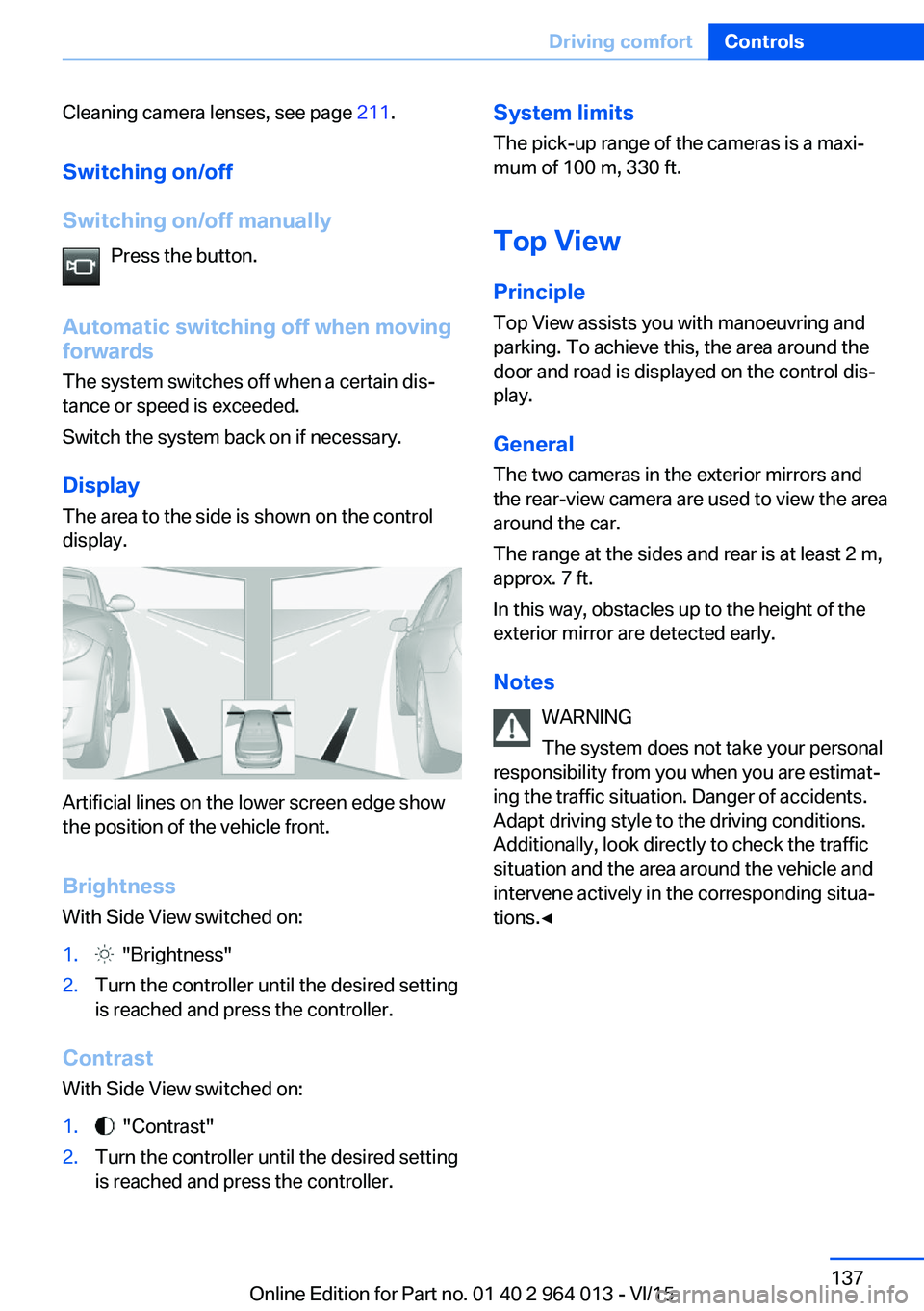
The area to the side is shown on the control
display.
Artificial lines on the lower screen edge show
the position of the vehicle front.
Brightness
With Side View switched on:
1. "Brightness"2.Turn the controller until the desired setting
is reached and press the controller.
Contrast
With Side View switched on:
1. "Contrast"2.Turn the controller until the desired setting
is reached and press the controller.System limits
The pick-up range of the cameras is a maxi‐
mum of 100 m, 330 ft.
Top View
Principle Top View assists you with manoeuvring and
parking. To achieve this, the area around the
door and road is displayed on the control dis‐
play.
General
The two cameras in the exterior mirrors and
the rear-view camera are used to view the area
around the car.
The range at the sides and rear is at least 2 m,
approx. 7 ft.
In this way, obstacles up to the height of the
exterior mirror are detected early.
Notes WARNING
The system does not take your personal
responsibility from you when you are estimat‐
ing the traffic situation. Danger of accidents.
Adapt driving style to the driving conditions.
Additionally, look directly to check the traffic
situation and the area around the vehicle and
intervene actively in the corresponding situa‐
tions.◀Seite 137Driving comfortControls137
Online Edition for Part no. 01 40 2 964 013 - VI/15
Page 138 of 228
Overview
Button in the vehicle
Top View
Cameras
The lenses of the Top View cameras are loca‐
ted in the base of the mirror housings. Dirt can
impair the quality of the picture.
Cleaning camera lenses, see page 211.
Switching on/off Automatic activation While the engine is running, engage selector
lever position R.
The images from Top View and PDC are dis‐
played if the system was switched on using the
iDrive.
Automatic switching off when movingforwards
The system switches off when a certain dis‐
tance or speed is exceeded.
Switch the system back on if necessary.
Switching on/off manually Press the button.▷On: LED is illuminated.▷Off: LED turns off.
Top View is shown.
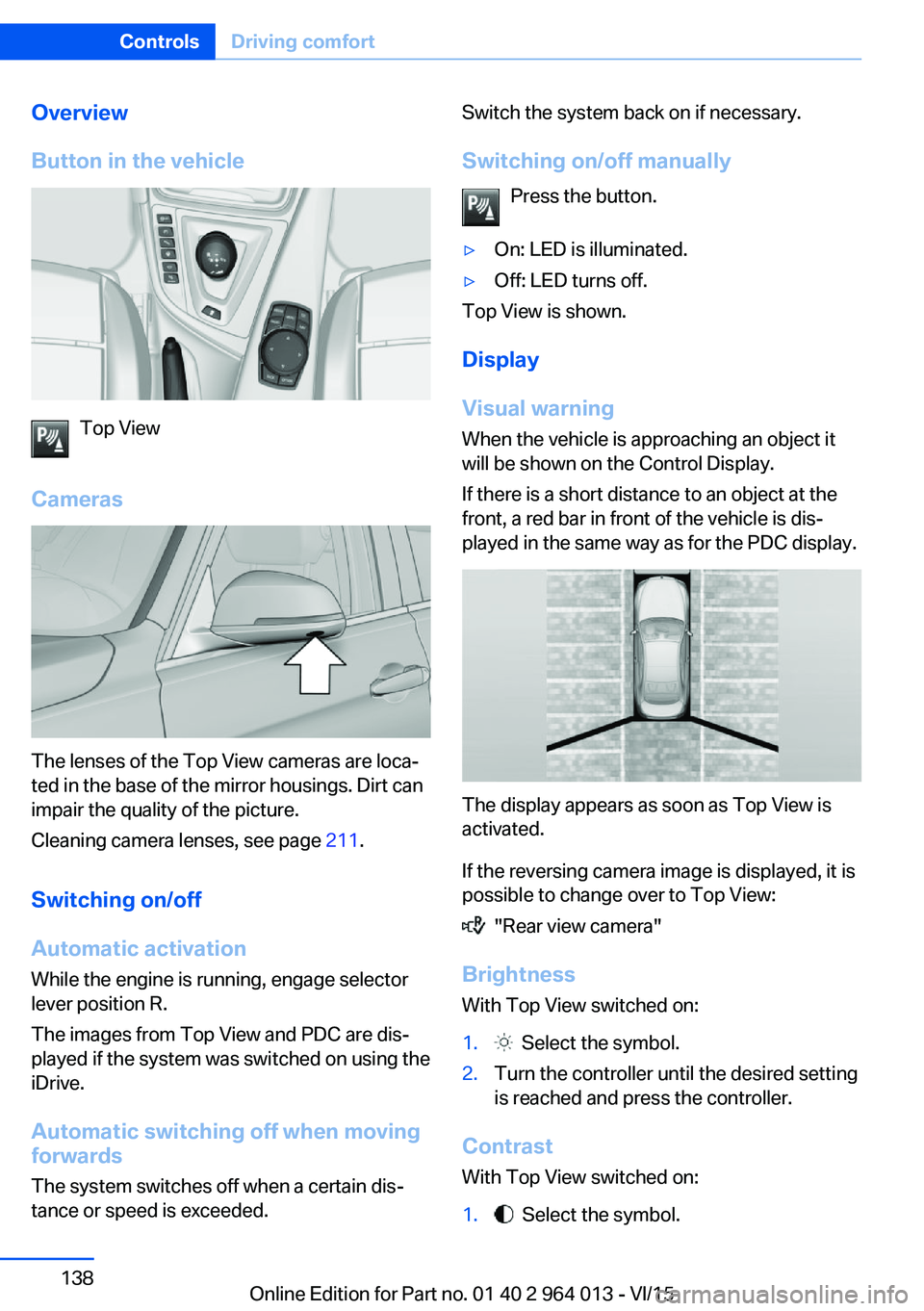
Display
Visual warning
When the vehicle is approaching an object it
will be shown on the Control Display.
If there is a short distance to an object at the
front, a red bar in front of the vehicle is dis‐
played in the same way as for the PDC display.
The display appears as soon as Top View is
activated.
If the reversing camera image is displayed, it is
possible to change over to Top View:
"Rear view camera"
Brightness
With Top View switched on:
1. Select the symbol.2.Turn the controller until the desired setting
is reached and press the controller.
Contrast
With Top View switched on:
1. Select the symbol.Seite 138ControlsDriving comfort138
Online Edition for Part no. 01 40 2 964 013 - VI/15
Page 139 of 228

2.Turn the controller until the desired setting
is reached and press the controller.
Displaying the turning circle and
driving lane line
▷The static red turning circle line indicates
the space requirement to the side with full
steering angle.▷The variable green driving lane line helps to
estimate the actual space requirement to
the side.
The lane line depends on the engaged
gear and the current steering angle. The
lane line is continuously adjusted by the
steering wheel movement.
"Parking guidance lines"
The turning circle and driving lane lines are
displayed.
System limits
Top View cannot be used in the following sit‐
uations:
▷With a door open.▷With the boot lid open.▷With an exterior mirror folded in.▷In poor light conditions.
In some of these situations a Check Control
message is displayed.
Park Assistant
Principle
The system supports you when parking in par‐
allel to the road.
Ultrasonic sensors measure parking spaces on
both sides of the vehicle.
The park assistant calculates the ideal parking
line and takes over steering during the process
of parking.
When parking up, also follow the visual and au‐
dible information and notes of the PDC, the
Park Assistant and the rear-view camera, and
respond accordingly.
The park assistant incorporates Park Distance
Control, PDC, see page 131.
Notes WARNING
The system does not take your personal
responsibility from you when you are estimat‐
ing the traffic situation. Due to limits of the sys‐
tem, it cannot respond independently in a rea‐
sonable way in all traffic conditions. Danger of
accidents. Adapt driving style to the driving
conditions. Observe the traffic situation and in‐
tervene actively if the situation warrants it.◀
ATTENTION
The Park Assistant may steer across
curbs or up onto curbs. Danger of damage to
property. Observe the traffic situation and in‐
tervene actively if the situation warrants it.◀
An engine stopped by the Auto Start Stop
function is automatically started by activating
the Park Assistant.Seite 139Driving comfortControls139
Online Edition for Part no. 01 40 2 964 013 - VI/15
Page 196 of 228
In the event of a defect, contact the Service
Centre.
Turn indicator in exterior mirror Turn indicators in the exterior mirrors are de‐
signed in the LED technology. Contact a Serv‐
ice Partner or a qualified specialist workshop in
the case of a defect.
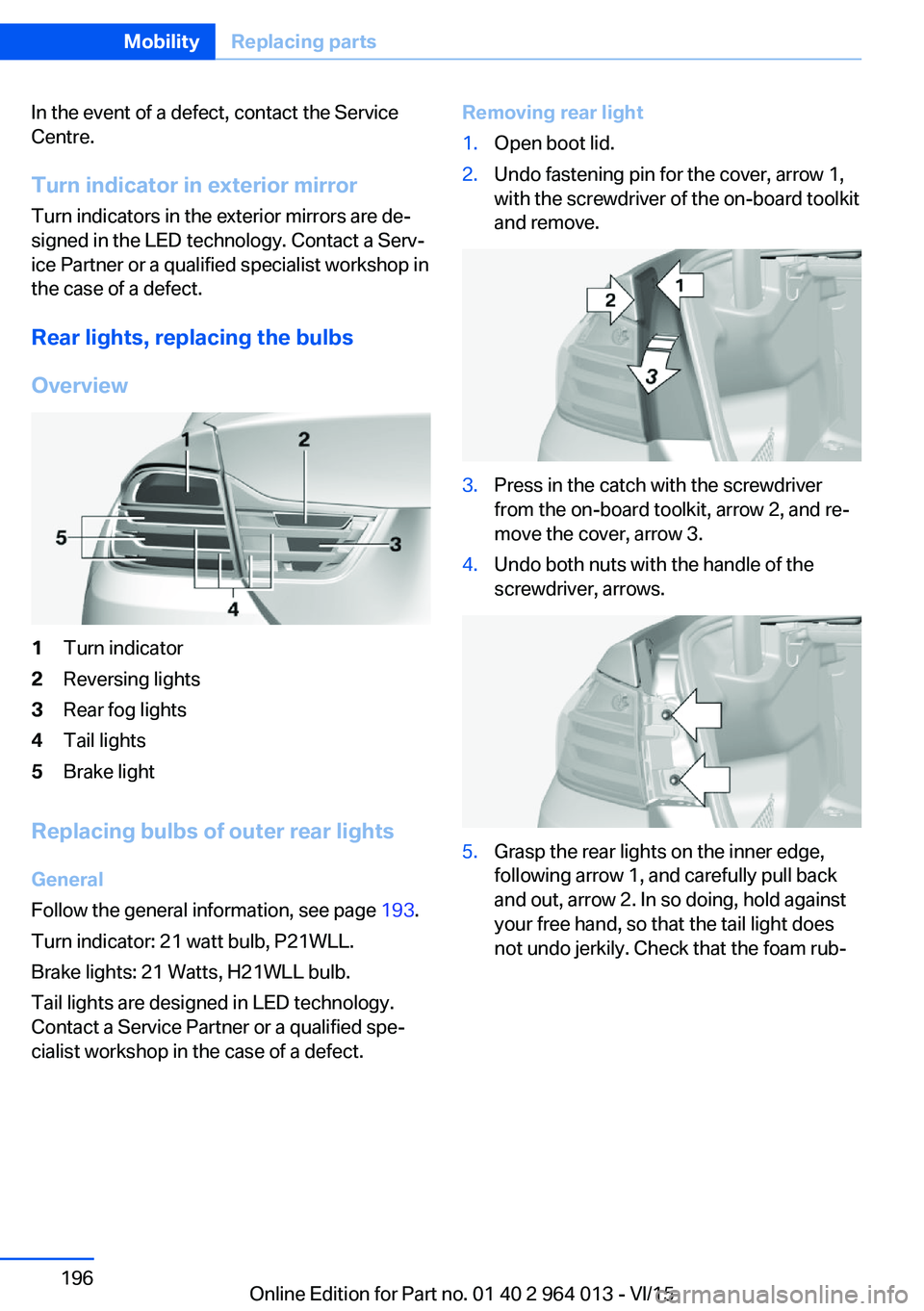
Rear lights, replacing the bulbs
Overview1Turn indicator2Reversing lights3Rear fog lights4Tail lights5Brake light
Replacing bulbs of outer rear lights
General
Follow the general information, see page 193.
Turn indicator: 21 watt bulb, P21WLL.
Brake lights: 21 Watts, H21WLL bulb.
Tail lights are designed in LED technology.
Contact a Service Partner or a qualified spe‐
cialist workshop in the case of a defect.
Removing rear light1.Open boot lid.2.Undo fastening pin for the cover, arrow 1,
with the screwdriver of the on-board toolkit
and remove.3.Press in the catch with the screwdriver
from the on-board toolkit, arrow 2, and re‐
move the cover, arrow 3.4.Undo both nuts with the handle of the
screwdriver, arrows.5.Grasp the rear lights on the inner edge,
following arrow 1, and carefully pull back
and out, arrow 2. In so doing, hold against
your free hand, so that the tail light does
not undo jerkily. Check that the foam rub‐Seite 196MobilityReplacing parts196
Online Edition for Part no. 01 40 2 964 013 - VI/15
Page 219 of 228

Breakdown, wheelchange 199
Brightness of the Control Dis‐ play 94
Bulb change, rear 196
Bulb change, xenon head‐ light 194
Buttons on the steering wheel 12
Button, start/stop 65
C
Camera, rear-view cam‐ era 134
Camera, Side View 136
Camera, Top View 138
Carbon ceramic brakes M 160
Car care 209
Care, displays 211
Care products 209
Care, vehicle 209
Car jack 199
Car key, see Remote con‐ trol 32
Carpet, care 211
Carrying children safely 58
Car washes 208
Catalytic converter, see Hot exhaust system 163
CBS, Condition Based Serv‐ ice 191
Central key, see Remote con‐ trol 32
Central locking system 38
Central screen, see Control Display 16
Centre armrest 154
Centre console 14
Ceramic brakes 160
Changes, technical, see Your own safety 7
Changing bulb, rear 196
Charcoal canister 146
Chassis, electronic 126 Chassis number, see Vehicle
identification number 9
Check control 80
Checking the oil level elec‐ tronically 185
Child's seats 58
Children, carrying 58
Child restraints 58
Child seat classes, ISOFIX 61
Child seat mounting 59
Child seat mountings, ISO‐ FIX 61
Chrome parts, care 210
Cigarette lighter 149
Cleaning displays 211
Clock 85
Closing/opening using door lock 37
Closing/opening with remote control 35
Coat hooks 155
Cockpit 12
Comfort Access 39
Comfort closing with the re‐ mote control 36
Comfort opening with the re‐ mote control 36
Compound brakes 160
Compressor 178
Computer, see on-board computer 90
Condensate under the vehi‐ cle 165
Condensation on win‐ dows 146
Condition Based Service, CBS 191
Confirmation signals 42
ConnectedDrive 6
ConnectedDrive services 6
Connecting electrical applian‐ ces 150
Contactless opening of boot lid 40
Control Display 16
Control display, settings 93 Controller 17
Control systems, driving sta‐ bility 123
Coolant 189
Coolant temperature 84
Cooling effect, maximum 145
Cooling function 145
Cooling system 189
Cornering light 100
Corrosion of brake discs 164
Courtesy light when unlock‐ ing 35
Courtesy light with the vehi‐ cle locked 36
Cruise Control 129
Cupholder 155
Current fuel consumption 86
D
Damage, tyres 176
Damper control 126
Data, technical 214
Date 85
Daytime driving lights 100
Deactivation, airbags 106
Defrosting, see Defrosting windows 146
Defrosting windows 146
Defrost, see Defrosting win‐ dows 146
Deleting personal data 23
Differential lock 126
Digital clock 85
Digital speed 85
Digital speedometer 85
Dimensions 214
Dimmable exterior mirrors 56
Dimming rear-view mirror 56
Dipping headlights, see High- beam assistance 100
Display in windscreen 94
Display lighting, see Instru‐ ment lighting 102
Displays, cleaning 211 Seite 219Everything from A to ZReference219
Online Edition for Part no. 01 40 2 964 013 - VI/15
Page 220 of 228

Displays, electronic, instru‐ment cluster 79
Disposal, coolant 190
Disposal, vehicle battery 200
Distance to destination 91
Distance warning, see PDC 131
Door key, see Remote con‐ trol 32
Door lock 37
Double clutch transmis‐ sion 74
Downhill gradients 164
Drinks holder, see Cu‐ pholder 155
Drivelogic 76
Drive Mode 75
Drive-off assistant 127
Drive programs, see Drive‐ logic 76
Driving Assistant, see Intelli‐ gent Safety 110
Driving dynamics, system states 86
Driving dynamic systems 86
Driving hints 163
Driving information, gen‐ eral 163
Driving information, running in 162
Driving into a car wash 208
Driving lane lines, rear-view camera 135
Driving lights control, auto‐ matic 99
Driving on racing tracks 161
Driving stability control sys‐ tems 123
Drying air, see Cooling func‐ tion 145
DSC Dynamic Stability Con‐ trol 124
Dynamic brake lights 120
Dynamic Stability Control, DSC 124 E
EfficientDynamics 86
EfficientDynamics display 86
EfficientDynamics menu 86
Electrical Glass Roof 45
Electrical power windows 43
Electric steering wheel lock 57
Electronic displays, instru‐ ment cluster 79
Electronic oil measure‐ ment 185
Electronic Stability Program, ESP, see DSC 124
Emergency call 202
Emergency release, boot lid 39
Emergency release, fuel filler flap 172
Emergency start function, en‐ gine start 33
Energy Control 86
Energy recuperation 86
Engine, automatic shut- off 67
Engine, automatic start-stop function 67
Engine compartment 182
Engine coolant 189
Engine Dynamics Control 78
Engine oil 185
Engine oil additives 187
Engine oil change 187
Engine oil filler neck 186
Engine oil grades, alterna‐ tive 187
Engine oil grades, suita‐ ble 187
Engine oil level, checking electronically 185
Engine oil temperature 84
Engine start 66
Engine start with malfunc‐ tion 33
Engine temperature 84 Entering letters and digits 23
ESP, Electronic Stability Pro‐ gram, see DSC 124
Exhaust system 163
Expanding the boot 151
Extended BMW Online serv‐ ices 6
Exterior mirror, automatically dimming 56
Exterior mirrors 55
External starting 203
Eye for towing, see Towing eye 206
Eyes for securing load 166
F Failure message, see Check control 80
False alarm 43
Fastening seat belts, see Seat belts 52
Fault displays, see Check control 80
Favourites buttons, iDrive 22
Filler neck for engine oil 186
Fine wood, care 210
First-aid kit 203
Flat tyre, warning lamp 108, 109
Flooding 163
Floor carpet, care 211
Fold-out position, windscreen wiper 72
Foot brake 163
Foot mats, care 211
Front airbags 104
Front-end collision warning with city braking func‐
tion 111
Front head restraints 54
Front lights 194
Front neck supports, see Head restraints 54
Front passenger airbags, de‐ activating/activating 106 Seite 220ReferenceEverything from A to Z220
Online Edition for Part no. 01 40 2 964 013 - VI/15