2016 BMW M4 lights
[x] Cancel search: lightsPage 74 of 228
Reverse gear
Engage this position only when the vehicle is
stationary.
To overcome the resistance of the selector
lever move in a dynamic movement towards
the left and engage the reverse gear.
M double clutch
transmission with Drivelogic
General The M double clutch transmission with Drive‐
logic is an automated manual gearbox with two
clutches and partial gears, by which the gears
are changed without interrupting traction.
It is operated using the selector lever or two
paddles on the steering wheel.
Functions▷Drive mode or sequential mode.▷Various drive programs, Drivelogic.▷Shift Lights, see page 96▷Automatic downshift and protection
against shifting even in sequential mode.▷Launch Control.▷Low Speed Assistant.
Selector lever, selector lever position
Overview
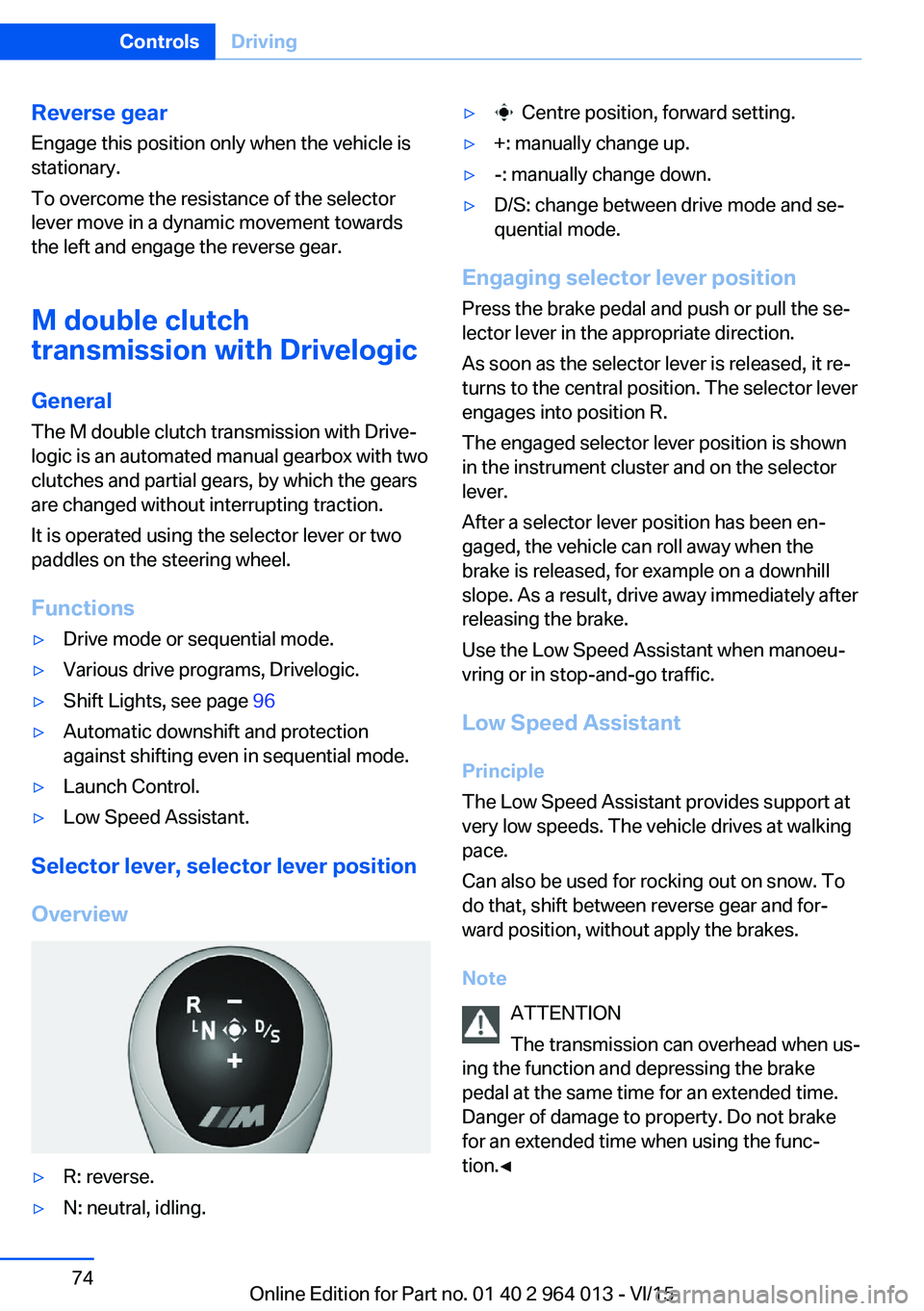
▷R: reverse.▷N: neutral, idling.▷ Centre position, forward setting.▷+: manually change up.▷-: manually change down.▷D/S: change between drive mode and se‐
quential mode.
Engaging selector lever position
Press the brake pedal and push or pull the se‐
lector lever in the appropriate direction.
As soon as the selector lever is released, it re‐
turns to the central position. The selector lever
engages into position R.
The engaged selector lever position is shown
in the instrument cluster and on the selector
lever.
After a selector lever position has been en‐
gaged, the vehicle can roll away when the
brake is released, for example on a downhill
slope. As a result, drive away immediately after
releasing the brake.
Use the Low Speed Assistant when manoeu‐
vring or in stop-and-go traffic.
Low Speed Assistant
Principle
The Low Speed Assistant provides support at
very low speeds. The vehicle drives at walking
pace.
Can also be used for rocking out on snow. To
do that, shift between reverse gear and for‐
ward position, without apply the brakes.
Note ATTENTION
The transmission can overhead when us‐
ing the function and depressing the brake
pedal at the same time for an extended time.
Danger of damage to property. Do not brake
for an extended time when using the func‐
tion.◀
Seite 74ControlsDriving74
Online Edition for Part no. 01 40 2 964 013 - VI/15
Page 79 of 228

DisplaysVehicle equipmentThis chapter describes all standard, national
and special equipment provided in the model
series. Equipment not available in the vehicle is
therefore also described, for example the se‐lected special equipment or national version.
This also applies to safety-relevant functions
and systems. Comply with the relevant na‐
tional regulations when using the correspond‐
ing functions and systems.
Overview, Instrument cluster
1Fuel gauge 842Speedometer3Messages, for example, Check Control4Revolution counter 84Shift Lights 965Engine oil temperature 846Current fuel consumption7Electronic displays 798Reset kilometres 84
Electronic displays
▷Selection lists, see page 90.▷Outside temperature, see page 84.▷Auto Start Stop function, see page 68.▷On-board computer, see page 90.▷Date, see page 85.▷Digital speedometer, see page 85.Seite 79DisplaysControls79
Online Edition for Part no. 01 40 2 964 013 - VI/15
Page 80 of 228

▷Energy recuperation, see page 86.▷Gear display with Drivelogic, see
page 85.▷Seat belt reminder for rear seats, see
page 53.▷Kilometres/trip odometer, see page 84.▷Messages, for example Check Control, see
page 80.▷Current fuel consumption, see page 86.▷Navigation display, see Owner's Handbook
for Navigation, Entertainment, Communi‐
cation.▷Range, see page 85.▷Service requirements, see page 87.▷Speed Limit Information, see page 88.▷System states of the driving dynamics, see
page 86.▷Time, see page 85.
Check control
Principle The check control monitors vehicle functionsand alerts you to any faults in the monitored
systems.
A check control message is displayed as a
combination of indicator or warning lights and
text messages in the instrument cluster and
the Head-Up Display.
If applicable, the text message shown in the
Control Display is accompanied by an addi‐
tional acoustic sound.
Indicator and warning lamps
General Indicator and warning lights in the instrument
cluster can illuminate in a variety of combina‐
tions and colours.
When the engine starts or the ignition is
switched on, the functionality of some lights is
briefly checked.
Red lights
Seat belt reminder Seat belt is not fastened on the driver's
side. For some country versions: front
passenger's seat belt is not fastened or
objects are detected on the front passenger
seat.
Flashing or illuminating: seat belt on the driv‐
er's or front passenger side is not fastened.
The seat belt reminder can also be triggered if
there are objects in the front passenger seat.
Check whether the seat belt has been fas‐
tened correctly.
Not for Australia/New Zealand: Belt
reminder for rear seats
Red: seat belt not fastened on the cor‐
responding rear seat.
Green: seat belt fastened on the corre‐
sponding rear seat.
Airbag system Airbag system and belt tensioner may
be faulty.
Have vehicle immediately checked by a
Service Centre or a qualified specialist work‐
shop.
Parking brake, brake system For further information see release
parking brake, see page 70.
Front-end collision warning Illuminating: forewarning, for example if
a danger of collision is anticipated orSeite 80ControlsDisplays80
Online Edition for Part no. 01 40 2 964 013 - VI/15
Page 81 of 228

there is a very short distance to a vehicle
ahead.
Increase distance.
Flashing: acute warning in the event of an im‐
mediate collision if the vehicle approaches an‐
other vehicle with relatively high differential
speed.
Engage by braking and swerving as required.
Person warning Symbol in the instrument cluster.If there is a risk of collision with a de‐
tected person, the symbol lights up and
a signal sounds.
Yellow lights
Anti-lock Brake System, ABS Avoid abrupt braking if possible. Brak‐
ing force reinforcement faulty. Con‐
sider longer braking distance. Have this
immediately checked by a Service Centre or a
qualified specialist workshop.
Dynamic Stability Control DSC Flashing: DSC is regulating the accel‐
eration and braking forces. The vehicle
is stabilised. Decrease speed and ad‐
just driving style to the road conditions.
Illuminating: DSC has failed. Have system
checked by a Service Centre or a qualified
specialist workshop.
For further information see Dynamic Stability
Control, DSC, see page 124.
Dynamic Stability Control DSC deactivated Dynamic Stability Control DSC is
switched off.
For further information see Dynamic
Stability Control DSC, see page 124.M Dynamic Mode
M Dynamic Mode MDM is switched on.
For more information, see M Dynamic
Mode, see page 125.
Also flashing: MDM regulates accelera‐
tion and braking forces. The vehicle is
stabilised.
Illuminated: MDM has failed. Have sys‐
tem checked by a Service Centre or a
qualified specialist workshop.
For more information, see M Dynamic
Mode, see page 125.
Runflat indicator RPA The runflat indicator reports a pressure
loss in a tyre.
Reduce your speed and carefully stop
the vehicle. Avoid violent or sudden braking
and steering manoeuvres.
For more information, see Runflat indicator,
see page 109.
Tyre Pressure Monitor TPM Illuminating: the Tyre Pressure Monitor
reports a pressure loss in a tyre.
Reduce your speed and carefully stop
the vehicle. Avoid violent or sudden braking
and steering manoeuvres.
Flashing and then illuminating continuously: no
flat tyres or loss of tyre pressure can be detec‐
ted.▷Fault due to systems or devices with the
same frequency: the system is automati‐
cally reactivated upon leaving the field of
interference.▷TPM could not shut down the reset: exe‐
cute a reset of the system again.Seite 81DisplaysControls81
Online Edition for Part no. 01 40 2 964 013 - VI/15
Page 82 of 228

▷Wheel without TPM electronics is fitted:
have the vehicle checked by a Service
Partner or a qualified specialist workshop if
necessary.▷Malfunction: have the system checked by a
Service Partner or a qualified specialist
workshop.
For more information, see Tyre Pressure Moni‐
tor, see page 107.
Steering system Steering system faulty.
Have steering system checked by a
Service Centre or a qualified specialist
workshop.
Engine functions Have vehicle checked by a Service
Centre or a qualified specialist work‐
shop.
For further information see socket for on-
board diagnosis, see page 192.
Lane departure warning System is switched on and warns you
under certain conditions if you leave a
detected lane without indicating first.
For further information see Lane Departure
Warning, see page 115.
Manual speed limiter Illuminating: the system is switched on.
Flashing: set speed limit exceeded. An
acoustic signal may sound.
Reduce speed or deactivate system.
Rear fog lights Rear fog lights are switched on.
For further information see rear fog lights, see
page 102.
Green lights Turn indicator Turn signal is switched on.If the indicator light flashes more rap‐
idly than usual, a turn signal light has
failed.
For further information see turn indicator, see
page 70.
Side lights, driving lights Side lights or driving lights are
switched on.
For further information see side lights/
low-beam headlights, low-beam headlight
control, see page 98.
High-beam assistance High-beam assistance is switched on.
High-beam headlights are switched on
and off automatically depending on the
traffic situation.
For further information see high beam assis‐
tance, see page 100.
Cruise Control The system is switched on. The speed
set using the control functions on the
steering wheel is maintained.
Blue lights
High-beam headlights High-beam headlights are switched on.
For further information see high-beam
headlights, see page 70.Seite 82ControlsDisplays82
Online Edition for Part no. 01 40 2 964 013 - VI/15
Page 83 of 228

General lightsCheck Control At least one Check Control message is
displayed or saved.
M Drive M Drive 1 is activated.
M Drive 2 is activated.
Text messages Text messages and symbols in the instrument
cluster explain the meaning of a check control
message and the indicator and warning lights.
Supplementary text messages You can call up additional information, for ex‐
ample the cause of the fault and any action re‐
quired, via check control.
The supplementary text is automatically shown
in the Control Display for urgent messages.
Symbols Depending on the Check Control message, the
following functions can be selected.▷ "Owner's Handbook"
Display additional information on the
Check Control message in the integrated
Owner's Handbook.▷ "Service request"
Contact a Service Partner or a qualified
specialist workshop.▷ "Mobile Care"
Contact the Mobile Service Centre.Hiding Check Control messages
Press the button on turn indicator lever.
▷Some Check Control messages are dis‐
played permanently and remain until the
fault has been repaired. If there are a num‐
ber of malfunctions simultaneously, the
messages are displayed in succession.
These messages can be hidden for ap‐
proximately eight seconds. They are then
displayed again automatically.▷Other Check Control messages are auto‐
matically hidden after approximately
20 seconds. They remain saved and can
be displayed again.
Displaying check control messages saved in memory
On the Control Display:
1."Vehicle information"2."Vehicle status"3. "Check Control"4.Select a text message.
Messages displayed at the end of
a journey
Certain messages displayed when driving are
displayed again when the ignition is switched
off.
Seite 83DisplaysControls83
Online Edition for Part no. 01 40 2 964 013 - VI/15
Page 95 of 228

Switching on/off1."Settings"2."Head-up display"3."Head-up display"
Display
Standard view The following information is displayed in the
Head-Up Display:
▷Speed.▷Navigation system.▷Check Control messages.▷Selection list from the instrument cluster.▷Driver Assistance Systems.
Some of this information is only shown briefly
when needed.
M View
1Current engine speed, highlighted2Shift Lights3Forewarning field, engine speed display4Red warning field, engine speed display5Speed6Gear display/warning messages7Speed Limit Information with No Passing
Information
Activate M View:
Select displays in the head-up display.
Selecting displays on the Head-Up
Display
On the Control Display:1."Settings"2."Head-up display"3."Information displayed"4.Select desired display on Head-Up Dis‐
play.
Adjusting brightness
The brightness is automatically adapted to the
ambient light.
The base setting can be adjusted manually.
On the Control Display:
1."Settings"2."Head-up display"3."Brightness"4.Turn the Controller until the desired bright‐
ness is obtained.5.Press the Controller.
The brightness of the Head-Up Display can
also be influenced using the instrument light‐
ing if the low-beam headlights are switched on.
The setting is saved for the currently used pro‐
file.
Adjusting height
On the Control Display:
1."Settings"2."Head-up display"3."Height"4.Turn the Controller until the desired height
is obtained.5.Press the Controller.
The setting is saved for the currently used pro‐
file.
Seite 95DisplaysControls95
Online Edition for Part no. 01 40 2 964 013 - VI/15
Page 96 of 228
Adjusting rotation
The image of the Head-Up Display can be ro‐
tated around its axis.
On the Control Display:1."Settings"2."Head-up display"3."Rotation"4.Turn the Controller until the desired set‐
ting is reached.5.Press the Controller.
The setting is saved for the currently used pro‐
file.
Special windscreen
The windscreen constitutes part of the sys‐
tem.
The shape of the windscreen enables a precise
projection.
A film in the windscreen prevents double im‐
ages occurring.
For this reason, have the special windscreen
replaced by a Service Partner or a qualified
specialist workshop.
Shift Lights General
The display is on the Head-Up Display and in
the instrument cluster.
Shift Lights in the instrument cluster
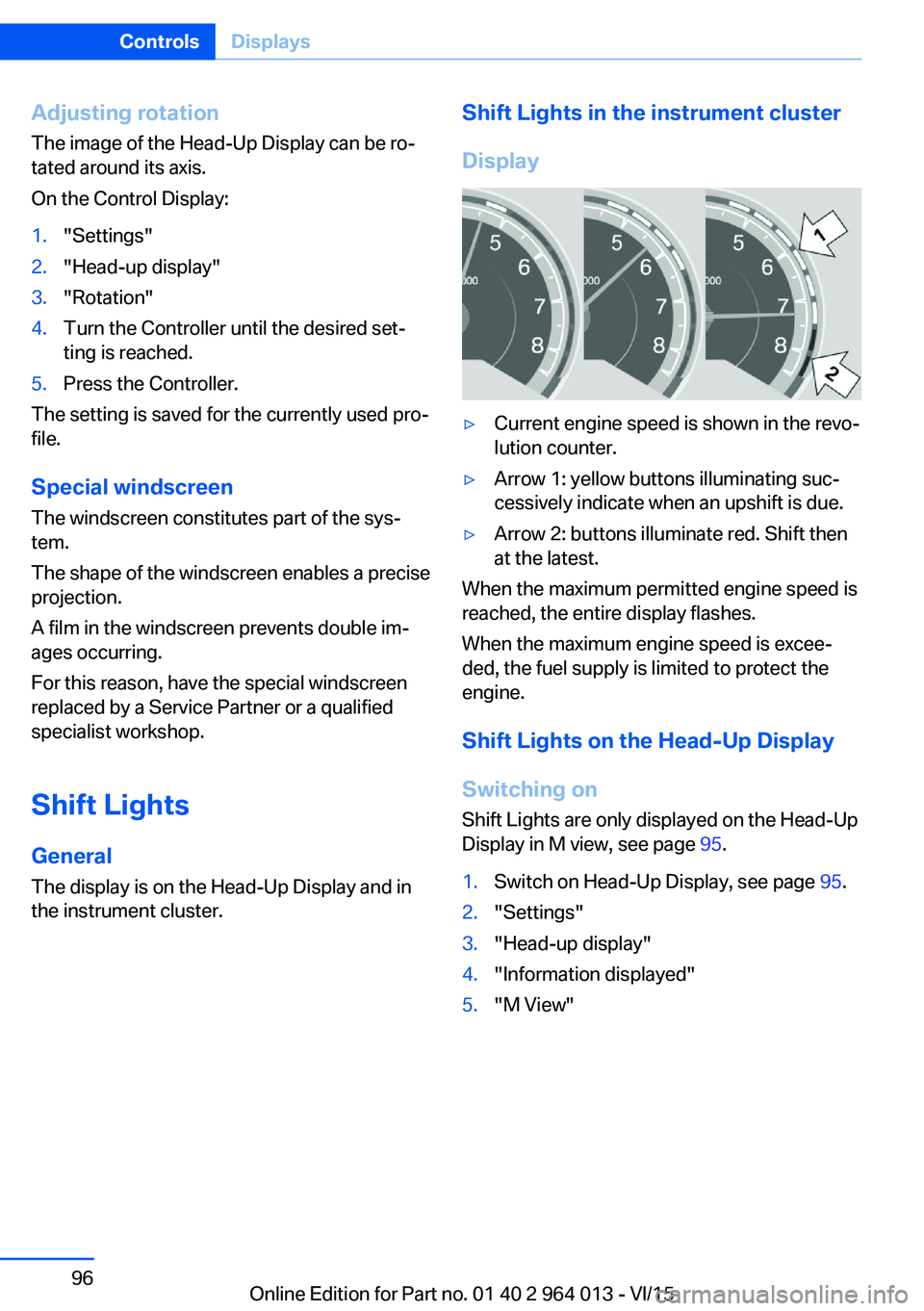
Display▷Current engine speed is shown in the revo‐
lution counter.▷Arrow 1: yellow buttons illuminating suc‐
cessively indicate when an upshift is due.▷Arrow 2: buttons illuminate red. Shift then
at the latest.
When the maximum permitted engine speed is
reached, the entire display flashes.
When the maximum engine speed is excee‐
ded, the fuel supply is limited to protect the
engine.
Shift Lights on the Head-Up DisplaySwitching on Shift Lights are only displayed on the Head-Up
Display in M view, see page 95.
1.Switch on Head-Up Display, see page 95.2."Settings"3."Head-up display"4."Information displayed"5."M View"Seite 96ControlsDisplays96
Online Edition for Part no. 01 40 2 964 013 - VI/15