2016 AUDI TT ROADSTER load capacity
[x] Cancel search: load capacityPage 208 of 306

Downloaded from www.Manualslib.com manuals search engine Media
Supported media and file formats
Overview
The following audio/video file specifications are supported by the DVD drive, the jukebox*, the SD card
readers and the connection for the USB mass storage device:
Audio files
Video files•
Supported SD/SDHC/SDXC/MMC
memory cards: with a capacity of up to 128 GB
media DVD
drive: audio CDs (up to 80 minutes) with CD text (artist, album, tracks)*; CD-ROMs
with a capacity of up to 700 MB; DVD±R/RW; video DVDs; audio DVDs compatible with
video DVD;
Audi music interface: mobile devices �page 197 (e.g. iPod, MTP players, USB mass
storage devices belonging to "USB Device Subclass 1 and 6" compatible with USB 2.0,
USB sticks, USB MP3 players (plug-and-play capable), external USB flash memories and
external USB hard drives)
File system Memory
cards: exFAT, FAT, FAT32, NTFS
USB mass storage devices: FAT, FAT32, NTFS
USB mass storage partitions: max. 2 partitions per USB connection
CD/DVD file systems: !509660, Joliet, UDF
Metadata Album covers:
GIF, JPG, PNG up to
800x800 px.; depending on availability,
the album cover will be displayed using the
corresponding medium or Gracenote.
Format MPEG-1/-
Windows MPEG-2/-
FLA( MPEG-1/-
MPEG4
Windows Media Vid-
2 Media 4 2
AVC
eo 9
Layer 3 Audio 9
(H.264)
and 10
File exten- .mp3 .wma
.m4a; .flac
.mpg; .mp4;
.wmv;
sion .m4b; .mpeg .m4v; .asf
.aac .mov;
.avi
Playlists .M3U; .PLS; .WPL; .M3U8; .ASX
Specifica- Up to max. 320 kbit/sec and 48 kHz Up
to max. 2000 kbit/sec, 720x576 px and
tions 48
kHz sampling frequency
sampling 25 fps
frequen-cy
Number DVD drive*: max. 1000 files per medium
of files
Jukebox*: memory approx. 10 GB; max. 3000 files can be copied
USB mass storage devices and memory cards: max. 10000 files per medium; max.
1000 files per playlist/directory
(@ Note
- The format Windows Media Audio 9 Voice is
not supported by the media drives. of
audio files with variable bit rate, the dis
play of the remaining playing time may dif
fer from the actual figure.
- The display of country-specific characters
(e.g. for ID3 tag information) depends on
the language set on the system; it cannot
-
We recommend a compression rate of at
least 160 kbit/sec for MP3 files. In the case
206
Page 209 of 306

Downloaded from www.Manualslib.com manuals search engine 0
N
,.....
N
......
0
,.....
Vl
CX) Media
be ensured that these characters are always
dis played correctly. -
Some functions of MTP players such as vid
eo playback and the rating of tracks are not
supported.
- The manufacturer will provide you with in
formation on the "USB Device Subclass" of a
USB memory device.
CD drive
Applies to: vehicles with CD drive
The CD drive supports the following audio fi
le specifications:
Audio files
Supported Audio
CDs (up to 80 minutes) with CD text (artist, album, track)*, CD-ROMs with a
media capacity
of up to 700 MB
File system CD
file systems: 1509660, Joliet, UDF
Metadata Album
covers: GIF, JPG, PNG up to 800x800 px.; depending on availability, the al-
bum cover will be displayed using the corresponding medium.
Format MPEG-1/-2
Windows Media Au-MPEG-2/-4
FLAC
Layer 3
dio 9 and 10
File extension .mp3
.wma
.m4a;
.flac
.m4b;
.aac
Playlists .M3U;
.PLS; .WPL; .M3U8; .ASX
Specifications Up
to max. 320 kbit/sec and 48 kHz sampling frequency 48 kHz sampling
frequency
Number max.
1000 files per medium
of files
@ Note
- We recommend a compression rate of at
least 160 kbit/sec for MP3 files. In the case
of audio files with variable bit rate, the dis
play of the remaining playing time may dif
fer from the actual figure. -
The display of country-specific characters
(e.g. for ID3 tag information) depends on
the language set on the system; it cannot
be ensured that these characters are always
dis played correctly.
Troubleshooting Subject Advice
Audi music interface* /Bluetooth au-Please
observe the notes in the chapter ¢ page 197, Multime-
dio player*: The mobile device is not dia connections/¢ page 194, Bluetooth audio play
er. For in-
supported. formation on which mobile devices are supported, please see
the Audi mobile device database at www.audi.com/blue-
tooth.
Audi music interface*/AUX input: Set
the volume of the mobile device to about 70% of maxi-
When playback is started via the AUX
mum ¢ page 203, Input level.
input, the volume is too high/low.
207
Page 210 of 306
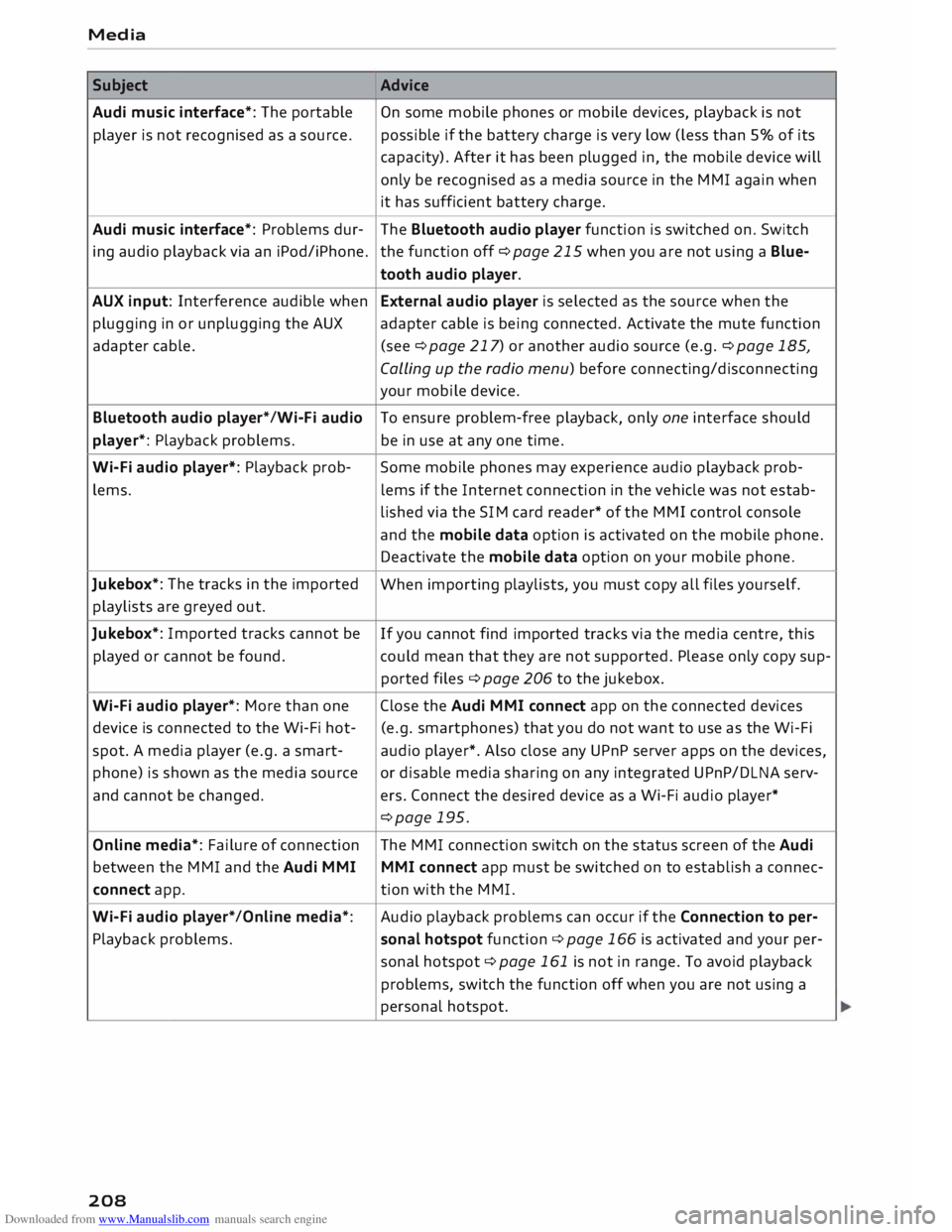
Downloaded from www.Manualslib.com manuals search engine Media
Subject Advice
Audi music interface*: The portable
On some mobile phones or mobile devices, playback is not
player is not recognised as a source. possible
if the battery charge is very low (less than 5% of its
capacity). After it has been plugged in, the mobile device will
only be recognised as a media source in the MMI again when
it has sufficient battery charge.
Audi music interface*: Problems dur-
The Bluetooth audio player function is switched on. Switch
ing audio playback via an iPod/iPhone. the function off ¢page 215 when you are not using a Blue-
tooth audio player.
AUX input: Interference audible when External audio player is selected as the source when the
plugging in or unplugging the AUX adapter cable is being connected. Activate the mute function
adapter cable. (see ¢page 217) or another audio source (e.g. ¢page 185,
Calling up the radio menu) before connecting/disconnecting
your mobile device.
Bluetooth audio player*/Wi-Fi audio
To ensure problem-free playback, only one interface should
player*: Playback problems. be in use at any one time.
Wi-Fi audio player*: Playback prob-
Some mobile phones may experience audio playback prob-
lems. lems
if the Internet connection in the vehicle was not estab-
lished via the SIM card reader* of the MMI control console
and the mobile data option is activated on the mobile phone.
Deactivate the mobile data option on your mobile phone.
Jukebox*: The tracks in the imported
When importing playlists, you must copy all files yourself.
playlists are greyed out.
Jukebox*: Imported tracks cannot be
If you cannot find imported tracks via the media centre, this
played or cannot be found. could mean that they are not supported. Please only copy sup-
ported files¢ page 206 to the jukebox.
Wi-Fi audio player*: More than one Close the Audi MMI connect app on the connected devices
device is connected to the Wi-Fi hot- (e.g.
smartphones) that you do not want to use as the Wi-Fi
spot. A media player (e.g. a smart-
audio player*. Also close any UPnP server apps on the devices,
phone) is shown as the media source
or disable media sharing on any integrated UPnP/DLNA serv-
and cannot be changed. ers. Connect the desired device as a Wi-Fi audio player*
¢page 195.
Online media*: Failure of connection The MMI connection switch on the status screen of the Audi
between the MMI and the Audi MMI
MMI connect app must be switched on to establish a connec-
connect app. tion
with the MMI.
Wi-Fi audio player* /Online media*: Audio
playback problems can occur if the Connection to per-
Playback problems. sonal
hotspot function¢ page 166 is activated and your per-
sonal hotspot ¢ page 161 is not in range. To avoid playback
problems, switch the function off when you are not using a
personal hotspot.
208
Page 214 of 306

Downloaded from www.Manualslib.com manuals search engine System
settings
System settings
Setting the time and
date
The time can be set manually or via CPS.
... Select: I MEN
U
I button > Settings > left control
button > MMI settings > Date & time ....
Or: Select: !MENU! button
> Car > left control
button > Vehicle settings > Date & time.
Set automatically
The time and date are automatically updated
when this function is switched on�-
Time Important: The Set automatically function must
be deactivated.
Press the rotary pushbutton. You can adjust the
time manually by turning and pressing the rotary
pushbutton.
Date
Important: The Set automatically function must
be deactivated.
Press the rotary pushbutton. You can adjust the
date manually by turning and pressing the rotary
pushbutton.
Time zone
When selecting the correct time zone, a list of
corresponding countries is displayed as an exam
ple.
Automatic time zone*
When this function is activated �, the time is au
tomatically adjusted to the relevant time zone.
Time format
When this option is set to 24h, for example
13:00 will be displayed as the time. When it is
set to AM/PM, for example 1:00 PM will be dis
played.
l l
The Qi standard enables you to charge your mobile phone
wirelessly.
212 Date
format
When this option is set to DD.MM.YYYY, for ex
ample 31.08.2017 will be displayed as the date.
When it is set to MM/DD/YYYY, for example
08/31/2017 will be displayed. When it is set to
YYYY-MM-DD, for example 2017-08-31 will be
displayed.
MMI settings
... Select: I MEN
U
I button >Settings> Left control
button > MMI settings.
Language
You can change the language of the display along
with the language of the navigation cues* and
the speech dialogue system*.
The number of languages available depends on
the market.
Measurement units
The following measurement units are available:
- Speed (km/h or mph)
- Distance (km or miles)
- Temperature (0
( or °F)
- Consumption (ltr/100 km, mpg (US), mpg (UK)
or km/ltr)
- Capacity (litres, gallons)
Reminder signal
Applies to: vehicles with Audi phone box
Important: Your mobile phone must be Qi com
patible 1
>
, or it must be connected to the Audi
music interface (!)¢ page 146, Fig. 142 using a
USB adapter cable.
You can use the reminder signal to keep yourself
informed of the charging status of the mobile
phone in the Audi phone box*. The following set
tings are available:
- off: Switches the reminder signal off.
- sound: A sound is played as the reminder sig-
nal. �
Page 244 of 306

Downloaded from www.Manualslib.com manuals search engine Checking
and topping up fluids
months so that you can continue to operate your
vehicle reliably. Ask at your filling station wheth
er the diesel fuel available there is suitable for
the current conditions and for the temperatures
which could potentially occur.
CD CAUTION
- Never use FAME fuels (biodiesel), petrol,
heating oil, thinners or any other fuels or
additives, as these could cause serious dam
age to the fuel system and the engine.
- Never start the engine if you fill up with the
wrong type of fuel, as this could damage
the fuel system and the engine. Obtain pro
fessional assistance.
Filling the tank
Procedure for filling the tank
Fig. 207 Vehicle as seen from the rear right: Opening the
fuel tank flap .,..
N
N
u..
a,
Fig. 208 Vehicle as seen from the rear right: Inserting the
filler nozzle
The fuel tank flap is unlocked and Locked auto
matically by the central Locking system.
... Press
the tank flap -arrow- ¢ Fig. 207 to open
it. Your vehicle has a new self-sealing fuel tank
without a tank cap.
242 ...
Insert the filler nozzle into the fuel filler neck
as far as the stop ¢ Fig. 208 and ensure it is
properly engaged .
... Start refuelling. When the automatic filler noz
zle is operated correctly it will switch itself off
as soon as the tank is full. Do not try to put in
more fuel after the nozzle cuts out, as this will
fill the expansion chamber in the fuel tank.
.., When the fuel filler pump switches itself off,
wait for 5 seconds before pulling out the filler
nozzle so that any remaining fuel can flow into
the tank opening.
... Close the tank flap. Make sure you hear it click
into place.
The correct fuel grade for your vehicle is given on
a sticker on the inside of the tank flap. Further
notes on fuel ¢ page 241.
The tank capacity of your vehicle is given in the
Technical data section ¢ page 288 .
A WARNING
Fuel is highly inflammable and can cause seri
ous burns and other injuries.
- When filling your tank or a spare fuel canis
ter with fuel, do not smoke and keep away
from naked flames -risk of explosion!
- Observe all relevant statutory regulations
on using, storing and transporting spare
fuel canisters.
- For safety reasons we do not recommend
carrying a spare fuel canister in the vehicle.
The canister could become damaged in an
accident and Leak.
- If, in exceptional circumstances, you have to
carry a spare fuel canister, please observe
the following warnings:
- Never fill fuel into the spare fuel canister
with the canister placed in or on top of the
vehicle. An electrostatic charge could
build up during filling, causing the fuel va
pour to ignite -risk of explosion! Always
place the canister on the ground to fill it.
- Insert the filler nozzle as far as possible
into the spare fuel canister .
- If the spare fuel canister is made of metal,
the filler nozzle must be in contact with �
Page 253 of 306

Downloaded from www.Manualslib.com manuals search engine 0
N
,.....
N
......
0
,.....
Vl
CX) Explanation
of warnings on vehicle battery:
® Wear safety
glasses!
A Battery
acid is extremely corrosive. Wear
protective gloves and safety glasses.
@ Keep
open flames, sparks, uncovered
Lights and Lit cigarettes away from the
battery!
� A
highly explosive mixture of gases may
be given off when the battery is under
charge!
® Keep children
away from batteries and
battery acid.
.&_ WARNING
Any work on the batteries and electrical sys
tem in your vehicle entails a risk of injury and
chemical burns in addition to danger of acci
dent or fire. For this reason, you must have
the work carried out by a qualified workshop.
CD CAUTION
If the car is left standing for Long periods,
protect the battery from frost. The battery
will be damaged irreparably if it is allowed to
freeze <=> page 2 51.
@ For the sake of the environment
'8 Batteries contain toxic substances including
sulphuric acid and Lead. Please contact a
qualified workshop if you have any questions.
Vehicle battery
The term "vehicle battery" refers to the 12 Volt
battery in your vehicle.
If the vehicle is not used for long periods
If you do not drive your vehicle for a period of
several days or weeks, the power management
will gradually shut off the on-board systems one
by one, or reduce the amount of current they are
using. This Limits the amount of power consumed
and helps to ensure reliable starting even after a
Long period <=> page 118. Certain convenience fea
tures, such as interior Lighting or electric seat ad
justment, may not be available. These functions Checking
and topping up fluids
will be restored when you switch on the ignition
and start the engine.
Even though some systems are deactivated auto
matically, certain electrical equipment continues
to draw current even when the ignition is off. If
the vehicle is Left standing for Long periods, this
can result in total battery discharge. If the vehi
cle battery is allowed to discharge completely, an
internal chemical reaction damages the battery
irreparably. To avoid this, the vehicle battery
should be recharged at Least once a month
<=> page 251. Please contact a qualified workshop
if you have any questions.
Winter conditions
Cold weather is very hard on the vehicle battery.
The starting capacity may be reduced as a result.
For this reason, you should have the vehicle bat
tery checked by a qualified workshop before the
start of winter.
Charging the vehicle battery
Fig. 219 Engine compartment: Terminals for jump leads
and battery charger
Important: Only use chargers with a maximum
charge voltage of 14.8 V (the battery cables do
not have to be disconnected).
� Note the warnings c:> A in General warnings
for batteries on page 251 and<=> A_ .
� Switch
off all electrical equipment and the igni
tion.
� Open the bonnet<=> page 245.
� Open the red cap on the positive terminal
<=>Fig. 219.
� Connect the charger cables to the jump-start
terminals as specified <=> Fig. 219.
�
251
Page 254 of 306

Downloaded from www.Manualslib.com manuals search engine Checking
and topping up fluids
... Now connect the battery charger to the mains
and switch on.
... After charging the battery: switch off the bat-
tery charger and disconnect the mains cable .
... Detach the charger cables from the terminals.
... Refit
the red cap onto the positive terminal.
... Close the bonnet ¢page 245.
A WARNING
- A highly explosive mixture of gases may be
given off when the battery is under charge.
Only charge the vehicle battery in a well
ventilated area.
- When it is discharged the vehicle battery
can freeze at temperatures around 0°
(. You
must not use a vehicle battery which has
frozen, even after it has thawed, because
the ice may have cracked the battery casing
and allowed the battery acid to escape -risk
of explosion and chemical burns! Please
contact a qualified workshop if you have any
questions.
- Do not connect or disconnect the charging
cables during the charging process -risk of
explosion!
1 Note
- Use only the terminals in the engine com
partment to charge the vehicle battery.
- Before you charge the vehicle battery, al
ways read and follow the manufacturer's in
structions for using the battery charger.
Windscreen washer
Fig. 220 Engine compartment: Cap of windscreen washer
container
252 �
0
>
u..
co The
container for the windscreen washer@ con
tains the cleaning fluid for the windscreen and
the headlight washer system* ¢ page 246,
Fig. 214. For the container capacity, please refer
to¢ page 288 .
Clean water should be used when topping up. If
possible, use soft water to prevent scaling on the
washer jets. Always add washer fluid to the wa
ter. In cold weather you should add anti-freeze to
the water to prevent it from freezing.
CD CAUTION
- The anti-freeze concentration must be
matched to the climate of the country in
which you are driving. If the concentration
is too high, damage to the car may result.
- Never put in radiator anti-freeze or other
additives.
- Never use washer fluid which contains paint
thinners or solvents as it can damage the
paintwork.
Service interval display
The service interval display detects when the
next service is due for your vehicle .
There are two service interval display levels:
- Inspection or oil change reminder: After a cer
tain mileage, a service reminder will appear on
the infotainment display each time the ignition
is switched on/off. The distance or time re
maining will be shown briefly.
- Inspection or oil change due: When your vehi
cle is due for an inspection, oil change or both,
the corresponding reminder Inspection due!,
Oil change due! or Oil change and inspection
due! will appear briefly after you switch the ig
nition on/off.
Checking the service intervals
You can look up the distance and time remaining
until the next oil change and next service inspec
tion. Select the following on the infotainment
system: IM EN u I button > Car > left control but
ton > Servicing & checks > Service intervals.
Applies to: vehicles with flexible oil change serv
ice
Page 279 of 306
![AUDI TT ROADSTER 2016 Owners Manual Downloaded from www.Manualslib.com manuals search engine 0
<t
0
N
,.....
N
......
0
,.....
Vl
CX) ]ump-starting
Before starting the engine
If necessary, the engine can be started by](/manual-img/6/57670/w960_57670-278.png "AUDI TT ROADSTER 2016 Owners Manual Downloaded from www.Manualslib.com manuals search engine 0
<t
0
N
,.....
N
......
0
,.....
Vl
CX) ]ump-starting
Before starting the engine
If necessary, the engine can be started by")
Downloaded from www.Manualslib.com manuals search engine 0
N
,.....
N
......
0
,.....
Vl
CX) ]ump-starting
Before starting the engine
If necessary, the engine can be started by con
necting it to the battery of another vehicle.
If the engine fails to start because of a dis
charged battery, the vehicle battery can be con
nected to the battery of another vehicle to start
the engine. Suitable jump leads are required.
Both vehicle batteries must be rated at 12 Volts.
The capacity (Ah) of the booster battery should
not be significantly lower than that of the dis
charged battery.
Jump leads
The jump leads must be heavy enough to carry
the starter current. Refer to the details given by
the manufacturer.
Only use jump leads with insulated battery
clamps.
Positive cable -usually red.
Negative cable -usually black.
A WARNING
- When it is discharged the battery can freeze
at temperatures around 0°
(. A frozen bat
tery must first be thawed out before con
necting the jump leads -risk of explosion
and chemical burns! After jump-starting the
vehicle, drive to a qualified workshop with
out delay and have the vehicle battery
checked.
- Note the safety warnings referring to work
ing in the engine compartment ¢ page 244.
ij}) Note
- There must be no contact between the two
vehicles as otherwise current could flow as
soon as the positive terminals are connec
ted. This would discharge the boosting bat
tery.
- The discharged vehicle battery must be
properly connected to the vehicle's electri
cal system. Mobility
- Switch off the car telephone if necessary.
Details will be given in the manufacturer's
instructions for the car telephone.
Starting the engine
The two jump Leads must be connected in the
correct sequence.
Fig. 240 Engine compartment: Terminals for jump leads
and battery charger
Fig. 241 Jump-starting with the battery of another vehi
cle: A -Discharged battery, B -Boosting battery
Preparations
... Apply the parking brake and move the gear lev
er to neutral (manual gearbox) or move these
lector lever to P (automatic gearbox).
... Switch off all electrical equipment and the igni-
tion on both vehicles.
Connecting and disconnecting the jump
leads
... Before jump-starting the vehicle you must open
the cap on the positive terminal.
... Connect one end of the red jump lead to the
positive terminal (!) ¢Fig. 241 ofthejump
start connection @ in your vehicle.
... Connect the other end of the red jump lead to
the positive terminal @of the boosting battery
® · �
277