2016 AUDI TT COUPE phone
[x] Cancel search: phonePage 167 of 322
Downloaded from www.Manualslib.com manuals search engine Media
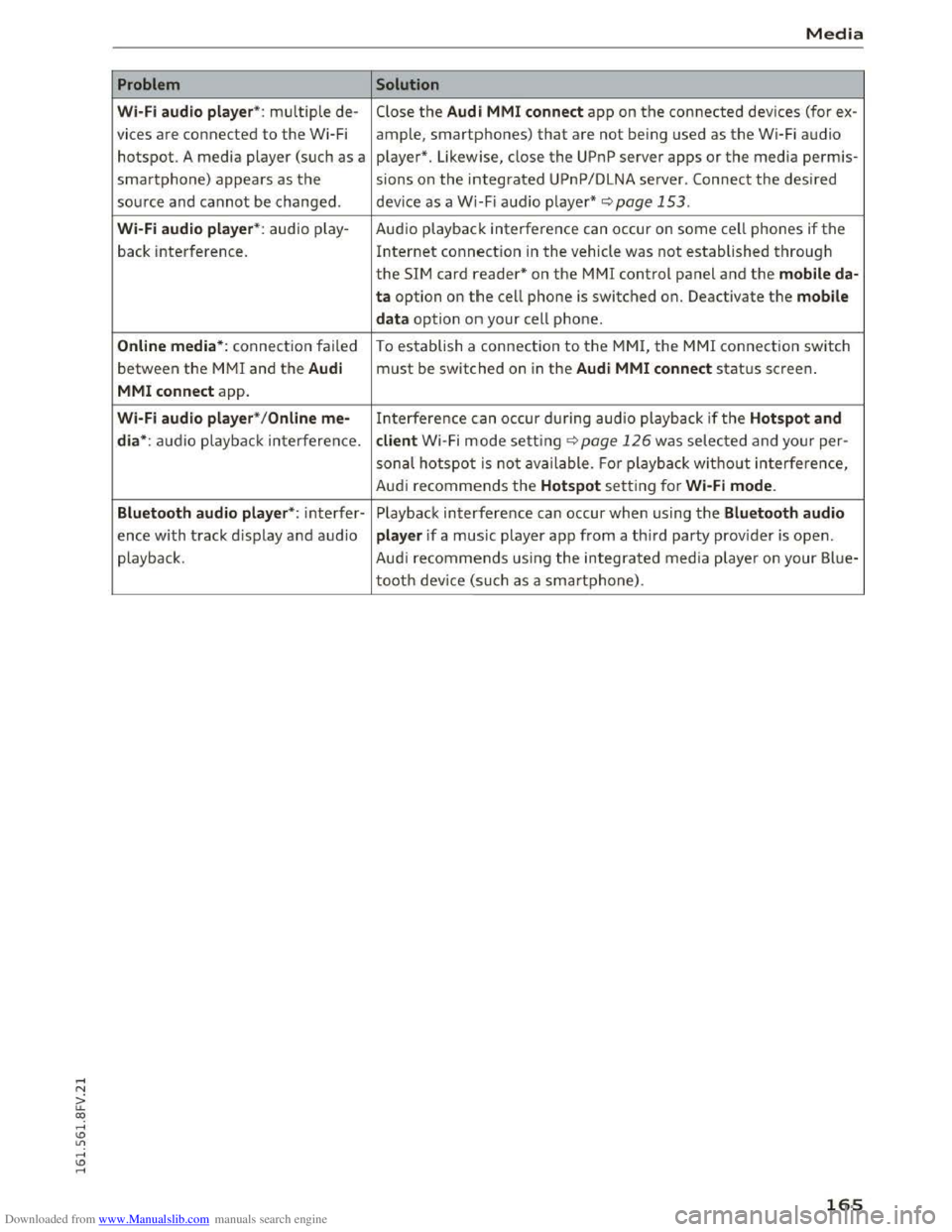
Problem Solution
Wi·Fi aud io pl aye r*: multiple de-Close the Audi MMI conn ect app on the connected devices (for ex-
vices
are connected to the Wi-Fi ample, smartphones) that are not being used as the Wi-Fi audio
hotspot. A media player (such as a player*. Likewise, close the UPnP server apps or the media perm is-
smartphone) appears as the sions on the integrated UPnP/DLNA server. Connect the desired
source and cannot be changed. device as a Wi-Fi audio player* <::;>page 153.
Wi-Fi audio play er* : audio play - Audio playback interference can occur on some cell phones if the
back interference. Internet connection in the vehicle was not established through
the SIM card reader* on the MMI control panel and the mobile da·
ta option on t h e cell phone is switched on. Deactivate the mobile
d a
ta option on your cell phone.
Online media *: connection failed To establish a connection to the MMI, the MMI connection switch
between the MMI and the Audi must be switched on in the Audi MMI c o nnect status screen.
MMI conne ct app.
Wi-Fi audio pla ye r* / Onl in e me-Interference can occur during audio playback if the Hots p ot and
di a*:
audio playback interference. client Wi -Fi mode setting c::;, page 126 was selected and your per-
sonal hotspot is not ava ilable. Fo r playbac k without interference,
Aud i
recommends the Hotspot setting for Wi·Fi mode .
Bluetooth
aud io pla yer*: interfer-Playback interference can occur when using the Blue tooth audio
ence with track d isplay and audio player if a music player app from a third party provider is open.
playback . Audi
recommends using the integrated media playe r on your Blue-
tooth device (such as a smartphone).
165
Page 169 of 322

Downloaded from www.Manualslib.com manuals search engine ...... N
> u. CX> ...... u:>
"' ...... u:> ......
-Radio
- Media s
ettings
-Jukebox*
- Directory *
-
Telephone*
-
Bluetooth and Wi·Fi *
-Nav igation settings*
-Navigation and online memory*
-
Voice recognition*
- Message
settings*
-Apps *
-
Operating tips
- Audi connect*
You can select the desired func tions individ ually
or all at once with the Select all entries optio n.
Select and confirm Restore factory settings.
{!) Tips
Make sure that not only the sett ings were de
leted
but a lso the stored data, if applicable.
Connection manager
Introduction
The connection manager gives you an overview
of your connected devices and their network sta
tus.
~ Select: IM ENU I button > Settings > left control
button> MMI settings> Connection manager.
If a mobile device was already connected, the
name of the dev ice and the connection mode will
dis pl ay under th e correspond ing menu item.
Using the telephone
-Connect new device : search for and connect a
cell phone.
' Data connection
Applies to vehicles with Audi connect
-Connect new device : search for and connect a
mobile device (such as a
smartphone).
-List of devices already connected: select your
cell
phone from the list of all the devices that
System settings
are already connected. Or: insert a mini SIM
card into
the SIM card reader Qpage 121.
MMI connect app
Applies to vehicles with Audi connect
Requirement: the Audi MMI connect app must
be installed and open on your mobile device.
-
Connect new device : search for and connect a
mobile device (such
as a smartphone).
-List of device s already connected: select your
mobi le device
from the list of all the devices
that are already connected.
Music
Applies to vehicles wit h Bluetooth or Wi-Fi au dio player
Audio player*
Requirement: the Bluetooth function and visibili
ty on the MM! Q page 168 and cell phone must
be switched on.
-
Connect new devi ce : press the control knob.
Select Bluetooth audio player . Search for and
connect a new device.
-List of devices already connected: select a
Bluetooth device
from the list of all the devices
that are already connected.
Wi·Fi audio player*
Requirement: the Wi·Fi hotspot on the MMI
Q page 126 and the Wi-Fi on your cell phone
must be switched on.
-
Connect new device : press the control kno b.
S earc h
for and connect a Wi-F i capa ble device.
- Disconnect
Wi·Fi audio player: deactivate th e
Wi-Fi on your
Wi·Fi capable device. The device
will
be automatically removed from the list.
Directory
Requirement: cell phones must not be connected
to the MM! through the Bluetooth remote SIM
access profile or through the Handsfree profile.
-
Connect new d evice : search for and connect a
new cell phone.
Or: insert a mini SIM card into
the SIM card reader Qpage 121. ..,.
167
Page 170 of 322

Downloaded from www.Manualslib.com manuals search engine System settings
-
Lis t of devices already co nn ected : select your
cell phone from the list of all the cell phones
that are already connected.
Additional options
Depending on the selected function, you can use
the right control button to access the available
additional options in the connection manager.
Bluetooth settings
-Bluetooth : when the function is switched on
~, the Bluetooth symbol appears in the Info
tainment system display. The MMI visibility for
Bluetooth devices can be turned on or off using
the Visible /Invi sible settings. Howeve r, it is
still possible to establish a Bluetooth connec
tion w ith pa ired devices when the visibility is
switched off. Bluetooth shoul d be switched t o
Invisible when the pairing process is complete
so that the MMI is not visible to others. Blue
tooth can be switched off. Then a Bluetooth
connection is not possible.
-Delete Bluetooth device: the selected cell
phone/mobile device is disconnected from the
MMI.
-Show Bluetooth profi les: you can individually
Connect or Dis connect the H andsfree , Car
phone and Directory/contacts profiles.
- Bluetooth audio player : switch this function on
~to select the Bluetooth audio player as a
source in the Media menu.
-Bluetooth name: the MMI Bluetooth name (for
example ,,AUDI MMI 2613") is displayed and
can be changed.
Online settings*
-Data connection settings: see~ page 127,
Configuring
the data connection
- Data usage coun ter : the amount of data pack
ets that are sent and received through the MMI
is displayed. You can reset the data usage infor
mation to zero using the Reset data cou nter
option.
-Netwo rk status: the mobile network provider
for data service as well as the network status
are displayed.
168
Wi-Fi settings*
See ~page 126, Wi-Fi Hotspot.
SIM PIN settings*
-Automatic PIN en try : when this function is
switched on~, the SIM PIN is automatically
saved in the MMI after it is entered for the first
time. The SIM PIN for four different SIM cards
can be saved in the MMI. With the function
switched off, the currently stored SIM PIN is
deleted from the MMI. When the automatic
PIN entry is switched on, there are no SIM PIN
prompts.
- Disable PIN query : when switched on, there are
no SIM PIN queries. The automatic PIN entry is
not used in this case.
-Change PIN: you can change the PIN on your
SIM card. First enter the current SIM PIN. The
SIM PIN can only contain digits 0-9. The new
SIM PIN must be entered twice for security and
then it will be saved to the SIM card.
Network settings*
- Logi
n: you can chose an autom atic login to
your cell phone service provider's network, or
you can choose a manual login from the list of
available networks.
-Netwo rk selection : available networks in the
present location can be selected under network
selection. This function is only available for the
manual login setting.
(D Tips
Some SIM cards do not allow the SIM PIN
queries to be switched off.
System update
"'Select: IMENUI button> Settings> left control
button > Sy ste m ma intenance .
-
System update : slide the storage device with
the update data into the appropriate drive
¢page 150. Select and confirm the drive>
Start update . The duration of the process de
pends on the size of the update.
Page 171 of 322

Downloaded from www.Manualslib.com manuals search engine -Reset driv e r in stallation: the selected media
driver package is
reset to the settings at the
time of delivery.
- Ver
sion in fo rmation: information on the MMI
software version and the navigation database*
software version is displayed. The Software in
formation function also provides information
on the software contained in the MMI and the
licensing agreement.
Sound settings
The sound distribution and volume of the MM!
can be adjusted individually . The settings depend
on vehicle equipment.
Fig. 14 0 Adjusting the balance/fader
"'Se lect: I MENU I butt on >Sound > left contro l
button > Entertainment.
Treble I Bass
You can adjust the Treble and Bass settings by
turning
the control knob. The changed settings
only apply for the audio source that is active at
the time. This allows you to adjust the sound set
tings for each audio source separately.
Balance/Fader (sound focus)
- Adju sting the sound distribution to the left or
right: press the control knob. Turn the control
knob to the left or right to the desired position.
- Adjusting
the sound distribution to the front
or rear: press the control knob again. Turn the
control knob to the left or right to the desired
position.
- Adjusting
the sound distribution ratio with
the MMI touch: mov e your finger in the desired
direction
on the M MI touch control pad.
System settings
Speed-dependent volume
You can adjust how much the volume changes to
compensate for noise inside the vehicle by turn
ing the control knob.
Volume settings
Adjusting the volume
The volume of an audio source or a system mes
sage (for example, from the voice recognition
system) can be adjusted directly while the sound
is playing using the On/Off knob.
-Increasing or decreasing the volume: turn the
On/Off knob@¢ page 95, fig. 90 to the right
or left.
- Muting
or pausing: press the On/Off knob
briefly . Or :
turn the On/Off knob to the left un
til the mute symbol appears. An active audio/
video source is stopped.
-Unmuting or resuming: press the On/Off knob
briefly . Or :
turn the On/Off knob to the right.
(0 Tips
Volumes that are too hig h or too low are au
tomatically
adjusted to a set level when the
MMI is switched on.
Adjusting the system volume
"'Select: IMENUI button> Sound> left control
button.
Telephone
Mute telephone: messages and ringtones a re set
to mute.
R i
ngtone: <::)page 119, Ringtone and volume
settings.
Ringtone volume: you can adjust the volume of
the selected ringtone by turning the control
knob.
Message volume: the volume of the notification
for an incoming
text message can be adjusted by
turning
the control knob. ..,..
169
Page 172 of 322

Downloaded from www.Manualslib.com manuals search engine System settings
Microphone sensitivity: the vo lume of a phone
call can be adjusted during the phone call using
the control knob.
Navigation
Voice guidance:~ page 138, Voice guidance.
Voice guidance during phone call: 9 page 138,
Voice guidance.
Voice guidance volume: the voice guidance vol
ume can be adjusted during active route guid
ance by turning the control knob.
Entertainment fader: the volume of audio play
back can be
temporarily lowered when the park
i n g
system or voice guidance is active .
Voice recognition
Short dialog : prompts in a shorter format can be
switched on or off.
Speech dialog system volume: you can adjust
the volume of the announcements by turning the
control knob.
Parking aid*
You can adjust the signal tone volume by turning
the control knob.
-Adjusting the Front volume : select and con
firm
High , Medium or Low .
- Adjusting
the Rear volume: select and confirm
High, Medium or Low.
MMI touch
The volume
of the MM! touch voice prompts can
be
adjusted by turning the control knob.
Audi Heartbeat
You can adjust the Audi Heartbeat volume by
turning the control knob.
170
Restarting the MMI
(reset)
Fig. 141 Button combination to restart th e system
... Briefly press the control knob and both rocker
switches at the same time Q fig. 141 .
Notes on software
Licenses
You can find information about the software con
tained in the MMI and the license agreement in
your MM!. Select: I MENU! button >Settings > left
control button > System maintenance >Version
information .
Or: on the Internet at
www.audi.com/softwareinfo.
Page 174 of 322

Downloaded from www.Manualslib.com manuals search engine Safe driving
... Fasten your safety belt and wear it properly . Al
so instruct your passengers to fasten their
safety belts properly ¢ page 180.
What impairs driving safety?
Safe driving is directly related to the condition of
the vehicle, the driver as well as the driver 's abili
ty to concentrate on the road without being dis
tracted .
The driver is responsible for the safety of the ve
h icle
and all of its occupants. If your ability to
drive is impaired, safety risks for everybody in the
veh icle increase and you also become a hazard to
everyone else on the road ¢.&,.Therefore :
... Do not let yourself be distracted by passengers
or by using a cellular telephone .
... NEVER drive when your driving ability is im
paired (by medications, alcohol,
drugs, etc.).
... Observe all traffic laws, rules of the road and
speed limits and plain common sense.
... ALWAYS ad just you r speed to road, traffic and
weather cond itions.
... Take frequent breaks on long trips. Do not drive
for
more than two ho urs at a stretch.
... Do NOT drive when you are tired, under pres
sure or when you are stressed.
A WARNING
Impaired dr iv ing safety increases the risk of
serious personal injury and death whenever a
vehicle is
being used.
172
Correct passenger
seating positions
Proper seating position for the driver
The proper driver seating position is important
for safe, relaxed driving.
Fig. 142 Correct seating pos it ion
For your own safety and to reduce the risk of in
jury
in the event of an acc ident, we recommend
that you adjust the driver's seat to the following
position:
... Adjust the driver's seat so that you can easily
push the pedals all the way to the floor while
keeping
your knee(s) slightly bent¢.&,.
... Adjust the angle of the seatback so that it is in
an
upright position so that your back comes in
full contact with it when you drive.
... Adjust the steering wheel so that there is a d is
tance of at least 10 in (25 cm) between the
steering wheel and your breast bone ¢fig. 142.
If not possible, see your authorized Audi deal
ership about adaptive equipment .
... Adjust the steering wheel so that the steering
wheel and airbag cover points at your chest and
not at your face .
... Grasp the top of the steering wheel with your
elbow(s) slightly bent .
... Fasten and wear safety belts correctly
¢ page 184 .
... Always keep both feet in the footwell so that
you are in control of the vehicle at all times.
For detailed information on how to adj ust the
driver's seat, see¢ page 44, Seats and storage. ....
Page 195 of 322

Downloaded from www.Manualslib.com manuals search engine -Objects in the zone of a deploying airbag
can
become projectiles when the airbag de
ploys and cause serious personal injury.
- Never hold
things in your hands or on your
lap
when the vehicle is in use.
-Never place accessories or other objects
(such as cup holders, telephone brackets,
note pads, navigation systems, or things
that are large, heavy, or bulky) on the doors;
never
attach then to the doors or the wind
shield; never place
them over or near or at
tach them to the area marked ,.AIRBAG" on
the steering wheel, instrument panel or the
seat backrests; never place them between
these areas and you or any other person in
the vehicle.
- Never
attach objects to the windshield
above
the passenger front airbag, such as
accessory GPS navigation units or music
players. Such
objects could cause serious in
jury
in a collision, especially when the air
bags inflate.
- Never recline
the front passenger seat to
transport objects. Items can also move into
the deployment area of the side airbags or
the front airbag during breaking or in a sud
den maneuver. Objects near the airbags can
fly dangerously through the passenger com
partment and cause injury, particularly
when the seat is reclined and the airbags in
flate.
A WARNING
A person on the front passenger seat, espe
cially infants and small children, will receive
serious injuries and can even be killed by be
ing
too close to the airbag when it inflates.
- Although
the Advanced Airbag System in
your vehicle is designed to turn off the front
passenger airbag if an infant or a small child
is on
the front passenger seat, nobody can
absolutely guarantee that deployment un
der these special conditions is impossible in
all conceivable situations that may happen
during the useful life of your vehicle.
- The Advanced Airbag
System can deploy in
accordance with the "low risk" option under
-I
Airbag system
the U.S. Federal Standard if a child that is
heavier
than the typical one-year old child is
on
the front passenger seat and the other
conditions for airbag deployment are met.
- Accident statistics have shown that children
are generally safer in the rear seat area than
in the front seating position .
- For
their own safety, all children, especially
12 years and younger, should always ride in
the back properly restrained for their age
and size.
Advanced front airbag system
Your vehicle is equipped with a front Advanced
Airbag
System in compliance with United States
Federal Motor Vehicle Safety Standard 208 asap
plicable at the time your vehicle was manufac
tured.
The front Advanced Airbag System supplements
the safety belts to provide additional protection
for the driver's and front passenger's heads and
upper bodies in frontal crashes. The airbags in
flate only in frontal impacts when the vehicle de
celeration is high enough.
The front Advanced Airbag System for the front
seat occupants is not a substitute for your safety
belts. Rather, it is part of the overall occupant re
straint system in your vehicle. Always remember
that the airbag system can only help to protect
you, if you are sitting upright, wearing your safe
ty belt and wearing it properly. This is why you
and your passengers must always be properly re
strained, not just because the law requires you to
be.
The Advanced Airbag
System in your vehicle has
been certified to meet the "low risk" require-
ments for 3 and 6 year-old children on the pas
senger side and very small adults on the driver
side. The low risk
deployment criteria are intend
ed to help reduce the risk of injury through inter
action with the front airbag that can occur, for
example, by being too close to the steering wheel
and instrument panel when the airbag inflates.
In addition,
the system has been certified to
comply with the "suppression" requirements of .,..
193
Page 200 of 322

Downloaded from www.Manualslib.com manuals search engine Airbag sy ste m
When an airbag deploys, fine dust is released.
This is normal and is not caused by a fire in the
vehicle. This dust is made up mostly of a powder
used to lubricate the airbags as they deploy. It
could irritate skin.
It is important to remember that while the sup
plemental airbag system is designed to reduce
the likelihood of serious injuries, other injuries,
for example swelling , bruising and minor abra
sions, can also happen when airbags inflate. Air
bags do not protect the arms or the lower parts
of the body. Front airbags supplement the three
point safety belts only in some frontal collisions
in which the vehicle deceleration is high enough
to deploy the airbags.
Front airbag s will not deploy:
-ifthe ignit ion is switched off when a crash oc-
curs,
-in side collisions,
-
in rear-end collisions,
-
in rollovers,
-
when the crash deceleration measured by the
airbag system is less than the minimum thresh
old needed for airbag deployment as registered
by the electronic control unit.
The front passenge r airbag will also not
deploy:
-when the front passenger seat is not occupied,
-
when the electrical capacitance measured by
the capacitive passenger detection system for
the front passenger seat indicates that the pas
senger side frontal airbag must be switc hed off
by the electronic control unit (the PASSENGER
AIR
BAG OFF light Q page 200 and how they
work comes on and stays on).
A WARNING
Sitting in the wrong position can increase the
risk of serious injury in crashes.
-To reduce the risk of injury when the airbags
inflate, the driver and passengers must al
ways
sit in an upright position, must not
lean against or place any part of their body
too close to the area where the airbags are
located.
198
-Occupants who are unbelted, out of position
or too close to the airbag can be seriously
injured
by an airbag as it unfolds with great
force in the blink of an eye Q page 189.
A WARNING
A child in a rearward-facing child seat instal
led
on the front passenger seat will be seri
ously injured
and can be killed if the front air
bag inflates -even with an Advanced Airbag
System.
-The inflating airbag will hit the child seat or
infant carrier with great force and will
smash the child seat and child against the
backrest, center armrest, door or roof.
- Always install rear-facing
child seats on the
rear seat.
- If you must install a rearward facing child
seat on the front passenger seat because of
exceptional circumstances and the PASSEN
GER AIR BAG OFF light does not come on
and stay on, immediately install the rear
facing child seat in a rear seating position
and have the airbag system inspected by
your Audi dealer.
A WARNING
Objects between you and the airbag will in
crease the risk of injury in a crash by interfer
ing with the way the airbag unfolds or by be
ing pushed into you as the airbag inflates.
- Never hold
things in your hands or on your
lap when the vehicle is in use.
-
-Never transport items on or in the area of
the front passenger seat. Objects could
move in
to the area of the front airbags dur
ing braking or other sudden maneuver and
become dangerous projectiles that can
cause serious personal injury if the airbags
inflate.
- Never place
or attach accessories or other
objects (such as cup holders, telephone
brackets, large, heavy or bulky objects) on
the doors, over or near the area marked
"AIRBAG" on the steering wheel, instru
ment panel, seat backrests or between