2016 AUDI RS7 SPORTBACK ECU
[x] Cancel search: ECUPage 64 of 282

Sea ts and stor age
by Aud i for your vehicle . The same applies to
damage resulting from incorrect roof rack
i nstallation.
- Always check the roof rack mo untings and
hardware before each trip and during a trip
to make sure everyth ing is securely tight
ened . If necessary, ret ighten the mo untings
and check the ent ire system from time to
time .
- After mounting a roof rack system, or when
you transport objects on the roof of your ve hicle, the height of the veh icle is nat urally
i nc reased . Be careful when d riving under
l ow b ridges or in par king ga rages for exam
ple. This could ca use damage to the load
and even the vehi cle itself.
- M ake su re the open rear lid and the sun
r oof* do not come into contac t with the roof
rack .
Loading the roof rack
Always distribute loads evenly. Make sure any
t hing on the roof rack is securely tied down .
• Always distribute the loads on the roof rack
evenly .
• Always attach i tems to the roof rack securely
before you drive off .
The max imum pe rm iss ib le roof weigh t is
220 lb
( 100 kg ).
The roof weight is the tota l of the
weight of the roof rack , the atta chments and the
cargo you are carrying. You must also not exceed
the maximum load we ight for the roof rack you
are us ing .
When using a roof rack system wh ich has a lower
load carrying capacity, you must not use up the
tota l maximum p erm issible load carry ing capac i
ty specified above . Instead, you shou ld load the
r oof rack system only to the maximum capac ity
specified by the manufacturer of the roof rack
system .
.,&. WARNING
Weak, damaged o r improper straps used to
secure items to the roof rack ca n fa il dur ing
62
hard brak ing or in a collision and cause seri
ous persona l injury.
- Make sure the roof rack is installed exactly
as specified above
c> page 61 .
-Always use suitable mo unting straps for se
cur ing items to the roof rack to he lp prevent
items from shifting or flying forward.
- Items on the roof rack must always be se
curely mounted .
- The use of a roof rack can negative ly affect
the way a vehicle handles . Cargo that is
large, heavy, b ulky, long or flat will have a
greater negative influence on the vehicle 's
aerodynamics, center o f grav ity and overall
handling . Always drive slowly, avo id sudden
braking and maneuvers when transporting
cargo on t he roof of your vehicle.
- Never exceed the maximum permissib le
load ca rry ing capacity of the roof of yo ur ve
hicle, t he pe rm iss ible axle weights and the
pe rm issib le tota l we igh t of yo ur vehicle
~ page 259, Weights.
@ For the sake of the environment
As a resu lt of the increased wind resistance
crea ted by a roof ra ck, yo ur vehicle is using
f u el u nnecessa rily . S o remove the roof r ack
a fte r using it .
Luggage compartment
Loading luggage compartment
Luggage items must be stowed securely.
Fig. 66 Place heavy objects as far forwa rd a s po ssib le.
Note the following to p reserve the veh icle's good
handling chara cte ris tics. ..,.
Page 65 of 282

.. Distribute the load as evenly as possible .
.. Place heavy objects as far forward as possib le
¢ fig. 66 .
.. Secure luggage items with the cargo net* or
with non-elastic retaining straps to the tie
down r ings*
¢ page 64.
A WARNING
-loose objects in the luggage compartment
can slide about s udden ly and alter the vehi
cle's handling characte ristics.
- loose objects in the passenger compa rt
ment can fly forward during abrupt mane u
vers or ac ciden ts a nd injure oc cupants.
- Always store objects in the luggage com
partment and use sui table straps, particu
larly with heavy objects.
- When you transport heavy objects, always
remember that a change in the cente r of
grav ity may result in a change in the ve hi
cle's handling characteristics .
- Follow a ll warnings
¢ page 118, Driving
safety.
@ Tips
The tire pressure must be adjusted to the load
- see the t ire pressu re sticker lo cated on the
driver's s ide B-pillar.
Luggage compartment cover
The luggage compartment cover consists of two
parts.
• • Fig. 67 Cove r in the ope n lu gg age compartme nt lid
Seats and storag e
Fig. 68 Cover beh in d th e rear be nch sea t
Removing the cover in th e luggage
compartment lid
.,. Remove the knobs (D ¢ fig. 67 from the ball
mounts .
.. Pull the cover @ out of the retainers @in the
direction of the arrow.
Installing the cover in the luggage
compartment lid
.,. Slide the cover upward into the retainers @.
.. Press the knobs
seat
.. Pull the cover ¢ fig. 68 back.
.. Pull the cover upward to release.
Installing the cove r behind the rea r bench
se at
.. Place the left and right sides of the cover into
the mounts on the side trim.
.. Slide the cover forward until it locks into place .
A WARNING -~·
- To prevent accidents, never install the lug-
gage compartment cover unsecured.
- The luggage compartment cover is not a surface for stor ing objects . Objects p laced
on the cover could endanger all veh icle oc
cupants dur ing sudden braking maneuvers
or in a crash .
(D Note
The defogger and antenna w ires in the rear
window can be damaged by objects on the luggage compartment cover rubbing against
them .
63
Page 66 of 282

Seats and storage
Enlarging cargo capacity of the vehicle
interior
The seat backs can be folded forward to enlarge
the cargo capacity.
Fig. 69 Release h andle on the seatback
Folding the seatback forward
.,. When you pull the release lever@¢ fig. 69 in
the direction of the arrow, the safety knob @
pops out far enough for the red marking on
knob to be visib le.
• Fold the seatback forward.
Raising the seatback
• Raise the seatback until it is securely latched
¢ &, .When you can no longer see the red mark
on the safety knob@, the seat is latched.
A WARNING
-The backrest must always be securely latch
ed so that the safety belt of the center seat
ing position can work properly to help pro
tect the occupant.
- The backrest must be securely latched in po
sition so that no items contained in the lug
gage compartment can slide forward upon
sudden braking.
- Always check whether the latch is fully en
gaged by pulling the seatback forward.
- Never allow safety belts to become dam
aged by being caught in door or seat hard
ware.
- Torn or frayed safety belts can tear and
damaged belt hardware can break in a
crash. Inspect the belts periodically. Belts
showing damage to webbing, bindings,
buckles, or retractors must be replaced.
64
(D Note
- If you move the front seat back when the
rear seat backrest is folded forward, you
could damage the head restraints on the
rear seat.
- Slide the belt guide on the outside safety
belt all the way up before folding the back
rest back forward. Make sure the seat belt is
not pinched or damaged when the rear seat
backrest if folded back. Other objects
should be removed from the rear seat bench
to protect the seatback from damage .
Tie-downs and cargo net
The cargo net* prevents small objects from slid
ing .
Fig. 70 Locat ion of the tie -downs in the lugg age compart
ment
Fig. 71 Lugg age compa rtment: cargo net*
• To secure objects with the luggage compart
ment net*, fold the tie-down bracket upward
¢ fig. 70 .
• Insert the hooks on the luggage compartment
net* into the tie-downs ¢
fig. 71.
• Read and heed all WARNINGS ¢ page 124,
Storing cargo correctly. ..,.
Page 67 of 282

,&_ WARNING
Weak, damaged or improper straps used to
secure items to tie-downs can fail during hard
braking or in a collision and cause serious per·
sonal injury.
- Always use suitab le retaining straps and
properly secure items to the tie -downs in
the luggage compartment to help prevent
items from shifting or flying forward.
- Never attach a child seat tether strap to a
t ie-down.
- For strength-related reasons, the mounting
hooks can on ly be used to secure objects
we ighing up to 10 lb. (5 kg). Heavier objects
will not be adequately secured -there is a
r isk of inj ury.
Storage hooks
Fig. 72 Luggage compartment: storage hooks
You can also use the hooks to hang light purses,
bags, etc.
& WARNING
-
-
Th e ho oks can hold a max imum weight of
6 .6 lbs. (3 kg). Heavier objects are not ade
quately secu red. There is risk of personal in
Jury .
Seats and storag e
Reversible mat
Applies to: veh icles w ith revers ib le m at
The reversible mat protects the luggage com·
partment and bumper from dirt and scratches .
Fig. 73 Luggage compartment: reversible mat with back
rest folded forward
You can use the reversib le mat w ith the dirt-re
s istant side or the decorat ive side. After loading
or unloading , fold up the reve rsible mat and
cl ose the luggage compartment lid. Only store
the reversible mat if it is dry.
Pass-through with ski
bag
Preparing the pass -through
Applies to : veh icles w it h sk i sack
Long objects such as skis can be transported in
the ski sack* .
Fig . 74 Rear bench seat : open ing the pass-through
Opening the trunk pass -through
.,. Fold the center a rm res t in the rear forward and
out .
.,. Pull the release handle¢
fig. 74 and fold down
the cover of the pass-through in the vehicle in-
terior. .,,.
65
Page 68 of 282

Sea ts and stor age
.,. Open the rear lid .
.,. Push the ski sack* through the opening from
the luggage compartment .
.,. Secure the ski sack¢
page 66 .
Closi ng th e trunk pass-th rough
.,. Open the rear lid .
.,. Remove the ski sack from the trunk pass
through .
.,. Push the pass-through cover up inside the vehi
cle until it latches.
.,. Raise the center armrest in the vehicle again.
.,. Close the rear lid.
A WARNING
Objects must only be transported in the sk i
sack since the ski sack can be sec ured. Individ
ual objects cannot be secured. There is a risk
o f i njury .
@ Tips
You can also open the pass-through from the
luggage compartment. Push the release but
ton down and push the cover forw ard.
Securing the ski sack
A pp lies to: ve hicles w ith sk i sack
The ski sack must be secured in the luggage com
partment.
F ig . 75 Luggage compa rtment: Secur ing t he bag
66
Fig. 76 Secur ing the objects in t he ski sack
Securing the ski sack in the luggag e
compartment
.,. The ski sac k has two be lts with hooks on the
unde rside
~ fig. 75 @. Hang the hooks to the
rear fastening eye lets in the luggage compart
ment .
Securing the objects in the ski sack
.,. There is also a securing st rap ~ fig . 76 @ in the
sack. Pu ll the strap tau t using the free end of
the strap .
A WARNING
-The ski sack is intended only for the trans
portation of skis and other light objects. To
reduce the r isk of serious personal injury,
never transport heavy or pointed objects in
the sk i sack.
- When braking rapidly or during an accident,
the load could be displaced and cause injury
to occupants.
- Sharp edges on the load must be covered
for protection . Always fasten the be lt t ight
ly around the sack and its contents
~fig. 76 .
(D Tips
-Never stow the ski sack away when it is sti ll
wet or damp (for example, snow melting
from skis) . Allow it to dry completely before
stowing it away.
- Posit ion skis in the ski sack with the pointed
ends facing the front and sk i poles with the
pointed ends facing the rear.
-
Page 88 of 282

Audi adaptive cruise control and braking guard
detection and range limits that may prevent
the proper detection of other vehicles .
- The radar sensor's function and range can
be reduced by rain, snow and heavy spray.
Moving vehicles up ahead may not be
promptly detected or may not be detected
at all.
- Reflective surfaces including crash barriers
or tunnel entrances may impair the function
of the radar sensor.
@ Tips
- You can cancel the braking with increasing
force that is initiated by the system by brak
ing yourself, by accelerating noticeably or
by swerving .
- Braking guard error messages¢
page 86.
- Keep in mind that braking guard can brake
unexpectedly. Always secure any cargo or
objects that you are transporting to reduce
the risk of damage or injury.
Settings in the Infotainment system
Applies to: vehicles with Audi adapt ive cruise contro l
~ Select: the ICARI function button > (Car)* Sys
tems
control button > Driver assistance > Audi
braking guard.
System -
Switch the braking guard On/Off . When
you switch the ignition on, the message
Braking
guard: Off
appears if the system is switched off.
Early warning -The distance and approach warn
ings in the display can be switched
On/Off .
(D Tips
-Your settings are automatically stored and
assigned to the remote control key being
used.
- If you restrict or switch off the ESC, the braking guard also switches itself off
¢page 181 .
- Switch braking guard off when you are load
ing the vehicle onto a vehicle carrier, train,
ship or other type of transportation. This
can prevent undesired warnings from the
braking guard system.
86
Messages
Applies to: vehicles with Audi adapt ive c ru ise control
Braking guard: off
This driver message appears if the system is
turned off via the infotainment . Otherwise, if the
system is turned off, the information appears ev
ery time shortly after the start of the trip.
The driver message also appears if the system is
not available due to a malfunction or if the ESC is
not switched on¢
page 181. If this is the case,
the system will not provide warnings about a
possible collision.
Braking guard: activated
This driver message appears if sharp brake pres
sure was applied due to an acute warning .
ACC: Unavailable!
ACC and Audi braking guard: not available
The system cannot detect moving vehicles up
ahead correctly and is switched off. The sensors
have been displaced or are not working properly.
T he Audi pre sense funct ions may also be affect
e d. Dr ive to your authorized Audi dealer or au
thori zed Audi service facility immediately to have
the malfunction corrected.
ACC: currently unavailable. No sensor vision
ACC and braking guide: currently unavailable.
No sensor vision
This message appears if the sensor view is obstructed, for example by leaves, snow , heavy
spray or dirt. Clean the sensors ¢
page 79,
fig. 86.
ACC: Currently unavailable. Gradient too steep
The road exceeds the maximum possible angle
for proper adaptive cruise control operation .
Adaptive cruise control is switched off .
ACC: Only available in D, S or M
Select the D/S or M selector lever position.
ACC: currently unavailable. Parking brake ap
plied
Page 98 of 282
Audi dri ve s elec t
Cur ve ligh t*
The curve ligh t adapts to driving on curves . The
pivoting action and the lighting are also adapted
to the mode .
Adaptive cru is e control *
The behavior when accele rating can be adjusted
from comfortab le to sporty, depending on the
drive select mode. Adaptive cru ise control also
responds to the driving behavior of the vehicle
ahead in a more conservative or sporty manner.
Engine sound
The sound of the engine is adapted to the select
ed mode and ranges from subt le to sporty.
(D Note
- Make sure there is enough clearance above
and below the veh icle when parking. The
height of the vehicle can change once it is
parked due to temperature f luctuations,
changes to the load conditions and changes
to the driving modes, which can affect clear
ance.
- When transporting the vehicle on a car car
rier, train, ship or by other means, only tie
the vehicle down at the running surface of
the tires, which is the outer circumference.
Securing the vehicle at the axle compo
nents, suspension struts or towing eyes is
not permitted because the pressu re in the
a ir suspension struts can change dur ing
transport. The vehicle may not be secured
sufficiently if this happens.
@ Tips
- In some models, the maximum vehicle
speed can only be reached in the
Auto and
D ynami c modes.
- Se lec ting the
D ynami c mode results in spor
ty shifting characterist ics. The S gear posi
tion engages automatica lly.
96
- In veh icles that have dynamic steering *, op
erating noise is heard when starting or stop
ping the engine . This does not indicate a
problem.
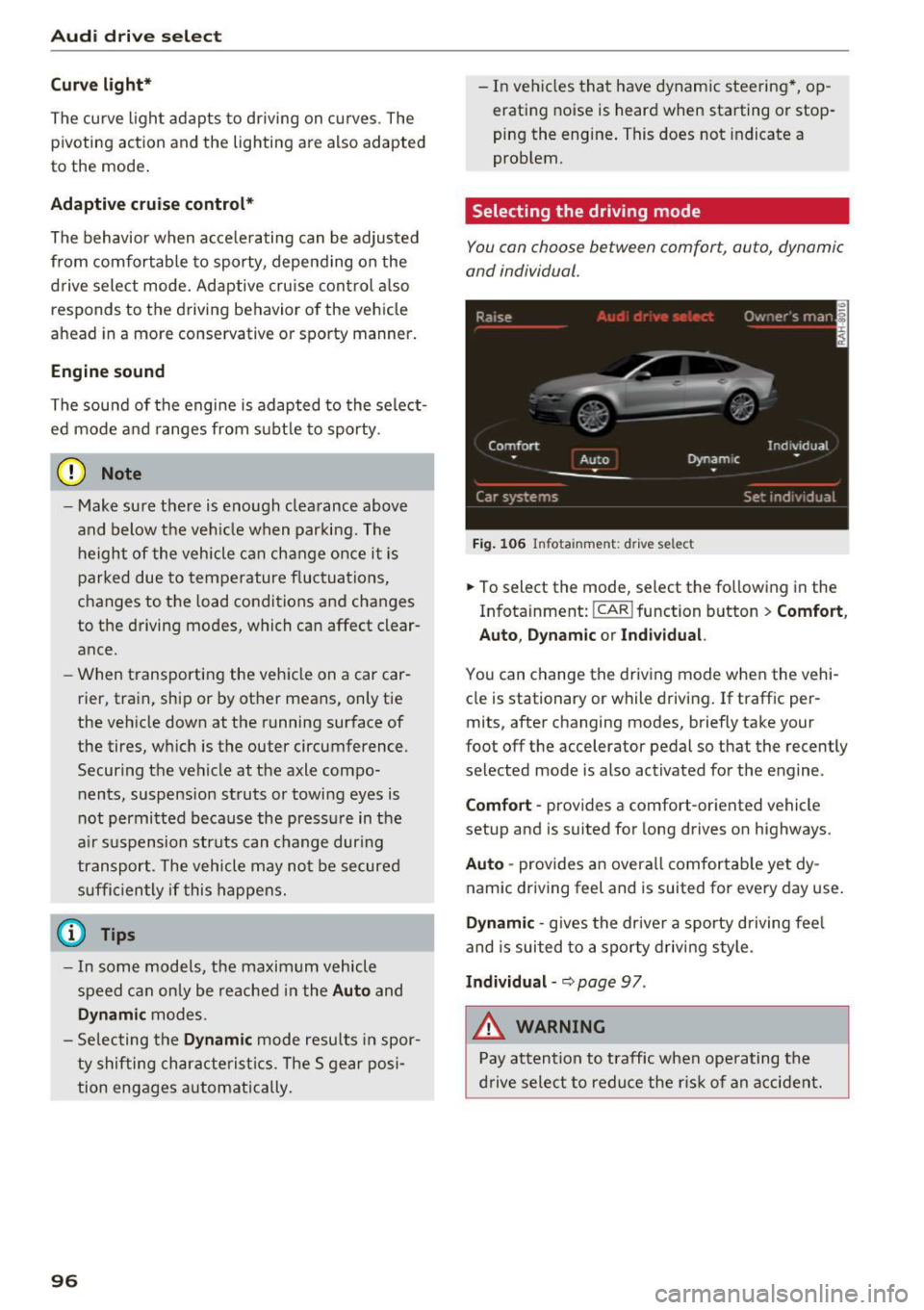
Selecting the driving mode
You con choose between comfort, auto, dynamic
and individual .
Fig. 106 Infota inment: drive se lect
.,. To select the mode, select the following in the
Infotainment:
! CAR ! function button > Comf ort ,
Auto , Dyn amic or In d iv idual.
You can change the driv ing mode when the vehi
cle is stationary or while driving . If traffic per
mits, after changing modes, briefly take your
foot off the accelerator pedal so that the recently
selected mode is also activated for the engine .
Comfo rt -prov ides a comfort-oriented vehicle
setup and is suited for long drives on highways.
Aut o -provides an overall comfortab le yet dy
namic driving feel and is suited for every day use.
Dynami c -gives the drive r a sporty d riving feel
and is suited to a sporty driving style .
Indi vidua l -~ page 97 .
&_ WARNING
Pay attention to traffic when ope rating the
d rive select to reduce the r is k of an accident.
-
Page 106 of 282

Automatic transmission
-Before driving down a steep slope, reduce
your speed and shift into a lower gear with
"tiptron ic".
- Do not ride the brakes or press the brake
pedal too often or too long when driving
down a hill. Constant braking causes the
brakes to overheat and substantially re
duces braking performance, increases brak
ing distance or causes complete failure of
the brake system.
- To prevent the vehicle from rolling back
when stopping on inclines, always hold it in
place with the brake pedal or parking brake.
- Never hold the vehicle on an incline with a
slipping clutch. The clutch opens automati
cally when it becomes too hot from the
overload. An indicator lamp
[i'J illuminates
and a driver message appears
¢ page 105
when the clutch is overloaded.
- If the engine must remain running, never
have any driving position engaged when
checking under the hood. Make sure these
lector lever has securely engaged and is
locked in P with the parking brake set
¢ page 203. Otherwise, any increase in en
gine speed may set the vehicle in motion,
even with the parking brake applied .
@ Note
-When stopping on an incline, do not try to
hold the vehicle in place by pressing the ac
celerator pedal while a driving gear is se
lected . This can cause the transmission to
overheat and can damage it . Activate the
parking brake or press the brake pedal to
prevent the vehicle from rolling.
- Allowing the vehicle to roll when the engine
is stopped and the selector lever is in N will
damage the transmission because it is not
lubricated under those circumstances.
(D Tips
For safety reasons, the parking brake is re
leased automatically only when the driver's
safety belt is engaged in the buckle.
104
· Hill descent control
The hill descent control system assists the driver
when driving down declines .
Hill descent control is activated when the selec
tor lever is in D/S and you press the brake pedal.
The transmission automatically selects a gear
that is suitable for the incline. Hill descent con
trol tries to maintain the speed achieved at the
time of braking, within physical and technical
limitations. If may still be necessary to adjust the
speed with the brakes.
Hill descent control switches off once the decline
levels out or you press the accelerator pedal.
On vehicles with the cruise control system*
Q page 77, hill descent control is also activated
when the speed is set.
A WARNING
Hill descent control cannot overcome physical
limitations, so it may not be able to maintain
a constant speed under all conditions. Always be ready to apply the brakes.