2016 AUDI RS7 SPORTBACK ECO mode
[x] Cancel search: ECO modePage 62 of 282
Seats and storage
-Never carry any beverage containers with
hot liquids, such as hot coffee or hot tea, in
the vehicle while it is moving. In case of an
accident, sudden braking or other vehicle movement, hot liquid could spill, causing
scalding burns. Spilled hot liquid can also cause an accident and personal injury .
- Use only soft cups in the cupholder. Hard
cups and glasses can cause injury in an acci
dent .
- Never use the cupholder or adapter as an
ashtray - risk of fire.
(D Note
Only drink containers with lids should be car
ried in the cupholder. Liquid could spill out
and damage your vehicle's electronic equip
ment or stain the upholstery, etc.
Cooled glove compartment
Applies to : ve hicles with coole d glove compar tme nt
The cooled glove compartment only functions
when the AIC system is switched on .
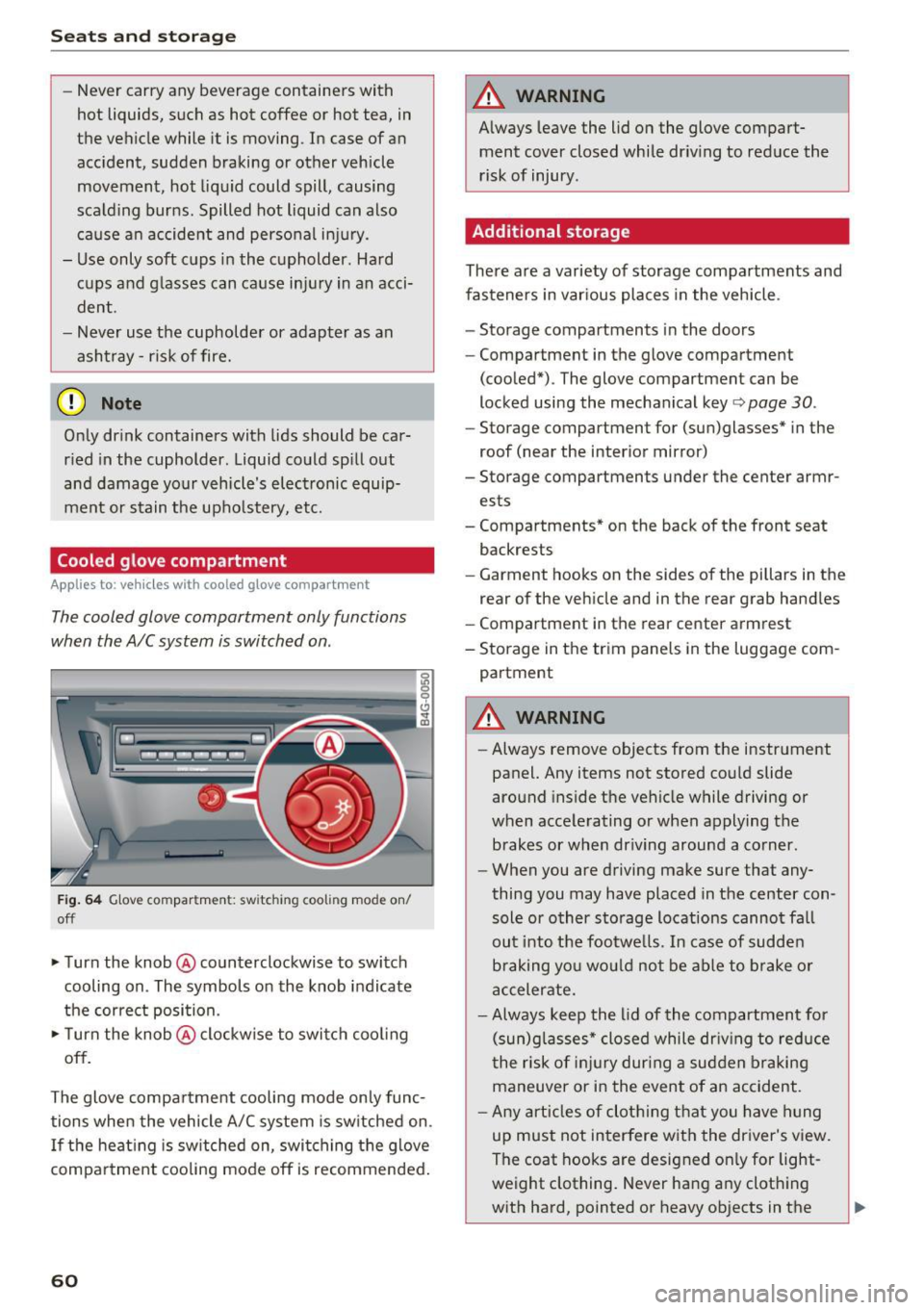
Fig. 64 Glove compar tment: sw itch in g coo ling mode on/
off
• Turn the knob @counterclockwise to switch
cooling on . The symbols on the knob indicate
the correct position.
• Turn the knob @clockwise to switch cooling
off.
The glove compartment cooling mode only func tions when the vehicle A/C system is switched on.
If the heating is switched on, switching the glove
compartment cooling mode off is recommended.
60
A WARNING
Always leave the lid on the glove compart
ment cover closed while driving to reduce the
risk of injury .
Additional storage
There are a variety of storage compartments and
fasteners in various places in the vehicle .
- Storage compartments in the doors
- Compartment in the glove compartment
(cooled*) . The glove compartment can be
locked using the mechanical key
r:::> page 30 .
-Storage compartment for (sun)glasses* in the
roof (near the interior mirror)
- Storage compartments under the center armr
ests
- Compartments* on the back of the front seat
backrests
- Garment hooks on the sides of the pillars in the
rear of the vehicle and in the rear grab handles
- Compartment in the rear center armrest
- Storage in the trim panels in the luggage com-
partment
A WARNING
- Always remove objects from the instrument
panel. Any items not stored could slide
around inside the vehicle while driving or
when accelerating or when applying the brakes or when driving around a corner.
- When you are driving make sure that any
thing you may have placed in the center con
sole or other storage locations cannot fall
out into the footwells . In case of sudden
braking you would not be able to brake or
accelerate.
- Always keep the lid of the compartment for
(sun)glasses* closed while driving to reduce
the risk of injury during a sudden braking
maneuver or in the event of an accident.
- Any articles of clothing that you have hung
up must not interfere with the driver's view.
The coat hooks are designed only for light
weight clothing. Never hang any clothing
with hard, pointed or heavy objects in the
Page 69 of 282

Warm and cold 4-zone deluxe automatic
climate control
Description
A pplies to: ve hicles with four -zone auto matic clim ate con trol
The climate control system warms, cools and
adds humidity to the air in the vehicle interior. It
is the most effective when the windows and sun
roof* are closed. If the temperature ins ide the
parked vehicle becomes very warm, opening the
window briefly will speed up the cooling process.
In a ll heating mode functions except
defrost, the
b lower only sw itches to a higher speed once the
engine coolant has reached a certain tempera
ture.
Condensation from the cooling system can drip
and form a puddle of water under the veh icle.
This is normal and does not mean there is a leak.
Pollutant filt er
The po llutant filter removes pollutants such as
dust and pollen from the air.
The air poll utants filter must be changed a t the
intervals specified in you r Warranty
& Mainte
nance booklet, so that the air conditioner can
properly work .
I f yo u drive you r vehicle in a n area with high air
pollu tion, the fil ter may need to be changed
more frequently than specified in your Audi War
ranty & Maintenance booklet . If in doubt, ask
your author ized Audi Service Advisor for advice.
Key coded settings
The clima te con trol settings are autom atically
stored and assigned to the remo te control key
that is in use.
A WARNING
Reduced visibi lity is dangerous and can ca use
accidents.
Warm and c old
- For safe driving it is very important t hat all
windows be free of ice, snow and condensa
tion.
- Complete ly familiar ize yourself with the
proper use and function of the heating and
ventilation system and especially how to de
fog and defrost the windows .
- Never use the windshield wiper/washer sys
tem in freezing weather until you have
warmed the windshield fi rst, using the heat
i n g and vent ilation system . The was he r so lu
tion may freeze on the w indshield and re
duce visibili ty.
(D Note
- If you suspect that the air conditioner has
been damaged, sw itch the system off to
avoid furthe r damage and have it inspected
by a qualified dea lership.
- Repa irs to the Aud i a ir cond itione r requ ire
special techn ica l know ledge and s pe ci al
t oo ls. Cont act an a uthorized Audi de aler fo r
assistance .
@ For the sake of the environment
By red ucing t he amo unt of fuel you use, yo u
also red uce the amount of pollu tan ts emitte d
i nto the air.
(D Tips
- K eep the air intake s lots (in fro nt of the
w indshield) free from i ce , sn ow and debr is
in orde r to maint ain the proper func tion of
the climate control system .
- Th e energy m anagemen t sys tem may switch
t he seat heating* or rear window defros ter
off temporarily. These systems are availab le
agai n as soon as t he energy ba lance has
been restored.
- Air escapes through vents under the rear
w indow . When placing items of clothing on
the luggage compartment cover, ensure
that the openings are not covered.
67
Page 70 of 282

Warm and cold
Operating
Applies to: vehicles with 4-zone deluxe automatic climate control
Fig . 77 4-zone deluxe a utomat ic climate contro l: cont rols
F ig. 78 4-zone deluxe automat ic climate contro l syste m:
rear controls
N :g
9 CJ
" lD
Press the buttons to turn the functions on or off.
Use the controls to adjust the temperature, the
b lower speed and the a ir distribution . The LED in
a butto n wi ll light up when the funct ion is
sw itched on. The front settings a re shown in the
clim ate cont rol sys tem display and in the Info
tainment system disp lay for a few seconds. The
driver and front passenger settings can be ad
justed separately.
The settings can also be adjus ted in the rear
¢fig . 78.
IOFF ! Switching the climate control syst em
on /off
The I OFF I b utton swi tc h es the clima te contro l
system on or off . It also switches on whe n you
p ress the control. Airflow from outside is b locked
when the climate control system is switched off.
68
The ! O FF ! button in the rear only switches the A/C
system on/off in the rear of the ve hicle.
IA/C l Switching cooling mode on /off
The air is not coo led and h umid ity is not removed
when coo ling mode is switched off . This can
cause fog on the windows. The coo ling mode
switches off automatically when there are cold outside temperatures.
l ""-'I Switching recirculation mode on /off
In recirculat ion mode, the air inside the vehicle is
c irculated and filtered. This prevents the unf il
tered air outs ide the ve hicle from entering the
vehicle interior. We recommend sw itching recir
cu lation mode on when driving throug h a tunnel
or when sitt ing in traffic ¢,&. .
The
! AUTOI button or l lllP FRONT ! button switches
recircu lation mode off.
IAUTO I Switching automatic mode on
Automat ic mo de main tains a constan t tempera
ture inside t he vehi cle. Ai r temperatu re, a irflow
and air distrib ution are controlled automatically.
Adjusting the temperature
Temperatures between 60 ° F (+ 16 °C) and 84 ° F
( + 28 °C) c an be se t. O utsi de of t his range,
lo o r hi
will appear in the cl imate control system display .
At both of these settings, the cl imate contro l
1111-
Page 71 of 282

system runs continuously at maximum cooling or
heating power. There is no temperature regula
tion.
Adjusting the blower~
You can adjust the volume of air generated by the
b lower to your preference. To have the blower
regulated automatica lly, press the
IAUTOI but
ton.
~ Adjusting air distribution
You can manually select the vents where the air
will flow. To have the air distribution reg ulated
automatically , press the
IAUTO ! button.
~ Adjusting seat heating*/seat ventilation*
Pressing the button switches the seat heating/
seat ventilat ion on at the highest setting (leve l
3). The LEDs indicate the temperature level. To
reduce the temperature, press the button again.
To switch the seat heating/seat ventilation off,
press the button repeated ly until the LED turns
off .
Afte r 10 minutes, the seat heating automatically
switches from level 3 to level 2.
I@ FRONT I Switching the defroster on/off
The windshield and s ide windows are defrosted
or cleared of condensation as qu ickly as possib le.
The maximum amount of air flows mainly from
the vents below the windshield. Recirculation
mode switches off. The temperature shou ld be
set to approximate ly 22
°C.
The IAU TOI button switches the defroster off.
IQiD REARI Switching the rear window defogger
on/off
The rear window heate r o nl y operates when the
engine is running.
It switches off automatical ly
after a few minutes, depending on the outs ide
temperature.
To prevent the rear w indow heater from switch
in g off automatically , press and hold the
IQiil REAR I
button for more than 2 seconds. This is stored
until the ignition is switched off.
Warm and cold
I SYNC ! Synchronization
When synchronization is switched on, the set
tings for the driver's s ide are applied to the front
passenger's side (except for seat heating/ventila
tion *). The settings in the rear are also synchron
ized. Synchronization switches off if the settings
are adjusted on the front passenger's side or in
the rear.
You can synchronize the settings in a row by
pressing and holding a control. For example, to
apply the settings for the front passenger's side
to the driver's side, press and hold the control on
the front passenger's s ide. The same applies to
the rear.
Residual heat*
With the ign ition turned off, you can activate the
residual heat function by pressing the~ button
<=> fig. 77. The residual heat from the coolant is
used to heat the veh icle inter ior. The residual
heat function sw itches off automat ica lly after
about 30 minutes.
Air vents
You can open or close the center and rear vents in
the cockpit and the
vents in the rear center con
sole and door pillars using the ridged thumb
whee ls. The levers adjust the direction of the air
flow from the vents.
_&. WARNING
-You should not use the recirculation mode
for an extended period since no fresh air is
drawn in. With the air-conditioning switch
ed off, the windows can fog up, which in
creases the risk of an accident.
- Individuals with reduced sensitivity to pain
or temperature could develop burns when
using the seat heat ing funct ion. To reduce
the risk of injury, these individuals should
not use seat heating .
(D Note
To avoid damage to the heating elements in
the seats, do not kneel on the seats or place
heavy pressure on one point of the seat.
69
Page 76 of 282

Driving
This message appea rs and a warning tone sounds
if you open the driver's door when the ignition is
sw itched on.
Pr es s brake pedal to start engine
This message appears if you do not press the
brake pedal whe n starting the eng ine.
fll I s key in the veh icle?
This indicator light turns on and th is message ap
pears if the ignition key was removed from the
ve hicle when the engine was running . If the igni
tion key is no longer in the veh icle, you can not
sw itch on the ig nit ion or start t he eng ine once
you stop i t. You also cannot loc k the vehicle from
the o utside.
Shift to P , otherwise vehicle can roll away .
Doors do not lock if lever i s not
in P.
This message appears for safety reasons if the
transmission is not in the P position when you
sw itch the ignition off . Move the selector lever to
the P pos ition. Otherwise the veh icle is not pro
tected from rolling and it ca nnot be locked .
II Key is not recogn ized. Hold back of key
against marked area. Se e owner's manual
If the indicator light t urns on and th is message
appears, there is a malfunction
c:;, page 74.
Starting the engine when there is a
malfunction
It may not be possible to s tart the engine under
certain circumstances, for example if the battery
in the vehicle key is drained, if interference is af
fected the key or if there is a system malfunc tion.
F ig. 83 Center conso le/ ma ster key: sta rt in g t he e ng in e if
t h e re is a ma lfunction
74
Requirement : the messa ge Key i s not recog
nized. Hold back of key against marked area .
See owner's manual
must displayed and the II
indicator light must tu rn on .
.,. Ho ld the m aster key in the locat ion ind icated as
shown in the illustration
f >l) c:;, fig . 83.
.,. Press the brake pe dal c:;, &. in Starting the en
gine on page 73 .
.,. Press the ~ I S _T _A _ R_ T_ E_N _G _I _N _E _ S_ T_ O_ P~ I button. The
eng ine will start .
.,. Dr ive to an author ized Audi dealer or author
ized Aud i Serv ice Facility immediately to have
t he malfu nction corrected.
@ Tips
You can v iew the message aga in by pressing
the
! S TA RT ENGI NE S TOP I button.
Electromechanical
parking brake
Operation
The elec tromechanical parking broke replaces
the hand broke.
Fig. 84 Ce nte r conso le: Pa rk ing brake
.,. Pull on the swi tch@) c:;, fig. 84 to app ly the
parking br ake. T he indicator lights in the switc h
and - (USA models)/ . (Canada mode ls) in
the inst rument cluste r ill uminate .
.,. With the ignition switched on, step on the
brake pedal or the accelerator pedal and press
the switch ®lat the same time to release the
park ing brake. The indicator lights in the switc h
and - (USA models)/ . (Canada mode ls) in
t he inst rument cl uste r go ou t.
Page 78 of 282

Driving
back. The braking force of the parking brake is
only released if sufficient drive power has been built up at the wheels.
(D Tips
For safety reasons, the parking brake is only
released automatically when the driver's safe
ty belt is buckled.
Emergency braking function
This is used if the conventional brake system
fails or locks up.
... To brake your vehicle in an emergency , pull the
~ switch and hold it pulled .
... As soon as you release the~ switch or acceler-
ate, the braking stops.
If you pull the switch(®) and hold it above a
speed of about 5 mph (8 km/h), the emergency
braking function is initiated. The vehicle is braked
at all four wheels by activating the hydraulic brake system. The brake performance is similar
to making an emergency stop¢.&..
In order not to activate the emergency braking by
mistake, an audible warning tone (buzzer)
sounds when the~ switch is pulled. As soon as
the ~ switch is released, or the accelerator pedal
is depressed, emergency braking stops .
A WARNING
Emergency braking should only be used in an
emergency, when the normal brake pedal has
failed or the brake pedal is obstructed. Using
the parking brake for emergency braking will
slow your vehicle down as if you had made a
full braking maneuver. ESC and the associat
ed components (ABS, ASR, EDL) cannot over
come the laws of physics. In corners and
when road or weather conditions are bad, a
full brake application can cause the vehicle to
skid or the rear end to break away, which in
creases the risk of an accident.
76
Speed warning system
' Introduction
The speed warning system helps you to stay un
der a specified maximum speed .
The speed warning system warns you if you are
exceeding the maximum speed that you have set.
You will hear a warning tone when your speed ex ceeds the stored value by approximately 3 mph
(3 km/h) . An indicator light. (USA models)/.
(Canada models) in the instrument cluster dis
play also turns on at the same time. The indicator
light./. turns off when the speed decreases
below the stored maximum speed.
Setting a threshold is recommended if you would
like to be reminded when you reach a certain
maximum speed. Situations where you may want
to do so include driving in a country with a gener
al speed limit or if there is a specified maximum
speed for winter tires.
(D Tips
Even though your vehicle is equipped with a
speed warning system, you should still watch
the speedometer to make sure you are not
driving faster than the speed limit.
' Setting the threshold
You can set, change and delete the warning
threshold in the Infotainment system.
... Select: the I CARI function button > (Car)* Sys
tems
control button > Driver assistance >
Speed warning .
You can set any threshold between 20 mph
(30 km/h) and 150 mph (240 km/h). Settings
can each be adjusted in increments of 5 mph (10
km/h).
Page 86 of 282

Audi adapt ive crui se con trol a nd b rakin g guar d
The higher the speed, the greater the distance in
yards (meters)
c::;, .&. . The Distanc e 3 setting is
recommended .
The distances provided are specified values. De
pending on the driving situat ion and the how the
vehicle ahead is driving, the actual distance may
be more or less than these target d istances.
The various symbols for the time increments ap
pear briefly in the information line@q
page 81,
fig. 91
when you change the settings.
c:::, _c:::, __ _ Dist ance 1 : This setting co rresponds
to a distance of 92 feet/28 meters when travel ing at 62 mph (100 km/h), or a time interval of 1
second.
c:::, __ c:::, __ Dista nc e 2 : This setting corresponds
to a distance of 118 feet/36 mete rs when trave l
ing at 62 mph (100 km/h), or a time interval of
1.3 seconds .
c:::, ___ c:::,_ Distance 3: This setting corresponds
to a distance of 164 feet/SO mete rs when trave l
ing at 62 mph (100 km/h), or a time interval of
1.8 seconds .
c:::, __ __ c:::, Distance 4 : This setting corresponds
to a distance of 210 feet/64 mete rs when trave l
ing at 62 mph (100 km/h), or a time interval of
2.3 seconds .
A WARNING
Following other vehicles too closely increases
the risk of collisions and ser ious personal in
jury.
- Setting short distances to the traffic ahead
reduces the time and distance available to
br ing your vehicle to a safe stop and makes
it eve n mo re necessary to pay close atten
tion to traffic .
- Always obey applicable traffic laws, use
good judgme nt, and select a safe following
distance for the traffic, road and weathe r
condit ions.
(0 Tips
- Distanc e 3 is set automatically each time
you switch the ignit ion on .
84
- Your standard settings are automatically
stored and assigned to the remote control
key being used.
Selecting the driving mode
App lies to: vehicles with Aud i adapt ive cru ise control
.,. Select the desired driving mode in drive select
c::;,page95.
@ Tips
Your settings are automatically stored and as
signed to the remote contro l key being used.
Prompt for driver intervention
App lies to : vehicles with A udi ada ptive c ruise control
Fig . 95 Ins trume nt cluster: request for d river intervention
In c ertain situations, the system w ill prompt you
to take action. This could happen, for example, if
braking by the adaptive cruise control system is
not enough to maintain enough distance to the
vehicle ahead .
The ind icator light . and the symbol in the dis
play will warn you about the s ituation
c::;, fig . 95 .
You w ill also hear an acoustic signal.
- Press the brake pedal to slow your vehicle
down.
Page 97 of 282

Audi drive select Drive settings
Introduction
Drive select makes it possible to experience dif
ferent types of vehicle settings in one vehicle.
The driver can select
Comfort, Auto and Dynami c
modes in the Infotainment system to switch, for
examp le, between a sporty and a comfortab le
driving mode. In the
Individual mode, the set
tings can be adjusted to your personal preferen
ces. This makes it possible to combine settings
such as a sporty engine with smooth steering.
_& WARNING
-
Improper use of the Audi dr ive select can
cause collisions, other accidents and serious
personal inju ry.
Description
The follow ing systems are affected by drive se
lect:
Engine and transmission
Depending on the mode, the eng ine and the
transmission respond quicker or in a more bal
anced manner to accelerator pedal movements.
I n the sporty dynamic mode, the transmission
shifts at higher RPMs.
Air suspension*
The adaptive air suspension/adaptive air suspen
sion sport*
(A ir suspension in the MMI) is an
e lectronically controlled air suspension and
damping system. They are adjusted depending
on the se lected dr iv ing mode, the driver's steer
ing, braking and acceleration input and the road
surface, vehicle speed and load. A sporty setting
is generally used in vehicles with adaptive air sus
pension sport*.
The vehicle clearance varies depending on these lected mode and the speed.
The highway setting is activated automatically
when yo u drive above 75 mph (120 km/h) for
more than 30 seconds in the
Auto or Dynamic
Audi drive select
mode. The ground clearance is increased auto
matically if the speed drops be low 44 mph (70
km/h) for more than 120 seconds.
Steering
T he steering adapts in terms of steer ing effort
and steering ratios. Indirect stee ring that moves
easily, like the steering in com fort mode, is best
suited to long drives on a highway. In contrast,
dynamic mode provides sporty, direct steering.
T he following applies to vehicles with dynamic
steering*: the steering ratio changes based on
vehicle speed in order to maintain optimum
steering effort for the driver at all times . This
sets the steering to be less sensitive at higher
speeds in order to provide improved vehicle con
trol. At reduced speeds, however, steering is
more direct in order to keep the steering effort as
min imal as possible when the dr iver is maneuver
ing the vehicle. At low and average speeds, dy
nam ic steering additionally provides more re
sponsive stee ring performance.
Adaptive dampers*
The adapt ive dampers* use sensors to record in
format ion regard ing stee ring movements, brak
ing and accele ration operations by the driver,
road surface, driving speed, and load . This makes
it possible to adapt damping to the driving situa
tion virtua lly in real time. Drive select also makes
it possible to satisfy the desire for sporty suspen
s ion (Dynamic) and comfortable suspension
(Comfort) without giving up balanced tuning (Au
to) .
Sport differential*
As a component of the all whee l drive system
(quattro)
c::> page 184, the Sport differentia l*
distributes the driving power to the rear axle de
pending on the situation. The distribution of
power varies depending on the selected mode,
from balanced (comfort) to ag ile (dynamic) . The
goal is a high level of agility and ability to accel
erate on curves. The vehicle is very responsive to
steering.
95