2016 AUDI A6 light
[x] Cancel search: lightPage 105 of 294

Night vision assist
Night vision assist with
pedestrian and wild
an imal highlighting
Description
Applies to vehicles: with night visio n assist
The night vision assist con detect, highlight and,
if necessary, worn about pedestrians and large
wild animals.
Night vision assistant with pedestrian and wild
animal detection assists you in darkness by using
an infrared camera to monitor the area in front of
your vehicle, within the limits of the system . It
can display objects up to approximately 1000 feet (300 meters) away . The heat image
detected by the camera is shown in the instru
ment cluster display . Warm areas appear lighter
and cold areas appear darker .
Highlighting detected pedestrians and wild
animals
Applies to vehicles: with night vision ass ist
Fig. 109 Inst rume nt cluster: Yellow pedestrian highlight ·
ing
Fig. 110 Instrument cluster: symbol when infrared image rl 1.0 is not vis ible U"I
M I.Cl rl
N ig ht vis io n a ssis t
Within the limits of the system, night vision as
sistant can detect pedestrians and wild animals
that are within the detection range between ap
proximately 32 feet (10 meters) and 295 feet
(90 meters) in front of the vehicle. When it is
dark outside and the headlights are switched on,
detected pedestrians and w ild an imals are
marked in yellow
c::> fig. 109 within the limits of
the system
c::> page 104 . Wild animal detection is
not active in bu ilt -up areas. The system only de
tects large wild animals such as deer.
(D Tips
If another display such as nav igat ion replaces
the image from the night vision assist the~-,
symbol appears in a tab
c::> fig. 110 . You can
access night vision assist using the buttons in
the multifunction steering wheel
c::> page 24.
Pedestrian and wild animal warning
Applies to vehicles: with night vision assist
Fig. 111 Instrument cluster: @Pedestrian warning, @
w ild animal warning
F ig. 1 12 In strument cluster: @Pedestrian warning/ @
wild animal warning, when the image from the night vision
ass ist is not selected in the instrument duster display ....
103
Page 106 of 294

Night vision assist
Display in the instrument cluster/head-up
display*
If there are pedestrians or wild animals in an
area in front of your vehicle that is classified as
critical, the system will direct your attention to
this :
- Pedestrians or wild animals are highlighted in
red and the corresponding symbol. or.
turns on
¢fig. 111.
-There is also a tone.
The area class ified as crit ica l is based on the vehi
cle speed and the steering wheel angle . Pedes
trian and wild animal warning encourages you to
pay more attention.
If the n ight vision assist image is replaced by an
other display (such as the on-board computer),
the red indicator light . or. will appear if
there is a pedestrian or wild animal warning
¢ fig. 112 .
If the head-up display* is switched on and the
night vision assist content is activated, • or.
will appear in the head-up display*.
Marking light*
To direct the driver's at tention to a pedest rian,
the head lights can flash on the pedestrian three
times in a row when there is a pedestrian warn
ing .
This happens at speeds above approx imately
35 mph (60 km/h) when you are traveling out
side of well-lit areas and when flashing the head lights will not create glare for a vehicle detected
in the oncoming lane . The marker light* is con
trolled by the high beam assist*
c;, page 45, High
beam assist.
The marking light is not used for wi ld animals.
104
General information
Applies to vehicles: with night vision assist
Fig. 113 Front of the vehicle: night vision camera
The following situations may affect the function
of the night vision assist system:
- Poor visibility such as snow, rain, fog or heavy
spray
- Dirty lens on the night vision assist camera
Make sure the night vision assist camera
¢fig. 113 is not covered by sticke rs, deposits or
any other obstructions because that can affect
the camera function. For information on clean
ing, refer to
c;, page 203.
Pedestrian and wild anima l detect ion depends on
the difference in temperature between the per
son/wild animal and the background area . Pedes
trians/wild animals may not be detected if the
difference is too small. Pedestrian and wild ani mal marking and the marker light* are deactivat
ed at temperatures above approximately 77 °F
(25 °() and when it is light outside . When the
night vision assistant image is selected in the in
strument cluster display, the
II symbol appears
i n the upper right.
.&_ WARNING
Pay attention to traffic and the area around
your vehicle when night vision assist is switch
ed on . As the driver, you are always responsi
ble for assessing the traffic situat ion.
- Night vision assist can only warn about peo
ple and wild animals located within the visu
al range of the infrared camera. The visual
range corresponds to the image in the in
strument cluster display .
-
Page 107 of 294
.... N
0 CJ '
-Night vision assist may not detect people or
wild animals and mark them if
- they are not in an upright position, for ex
ample if they are sitting or lying down
and/or
- the silhouette in the display appears in
complete or interrupted, for example be
cause the person is partially covered by a
vehicle or an animal by tall grass. This could increase the risk of an accident.
- Never try to swerve around animals if doing
so will endanger you or other road users, be
cause this increases the risk of an accident.
(D Tips
- Even though the system evaluates the
shape and heat given off by all detected ob
j ects, there are limits to the system. There
may be false warnings.
- For technical reasons, the image pauses in
split second intervals.
Switching on/off
Applies to vehicles: with night vision ass ist
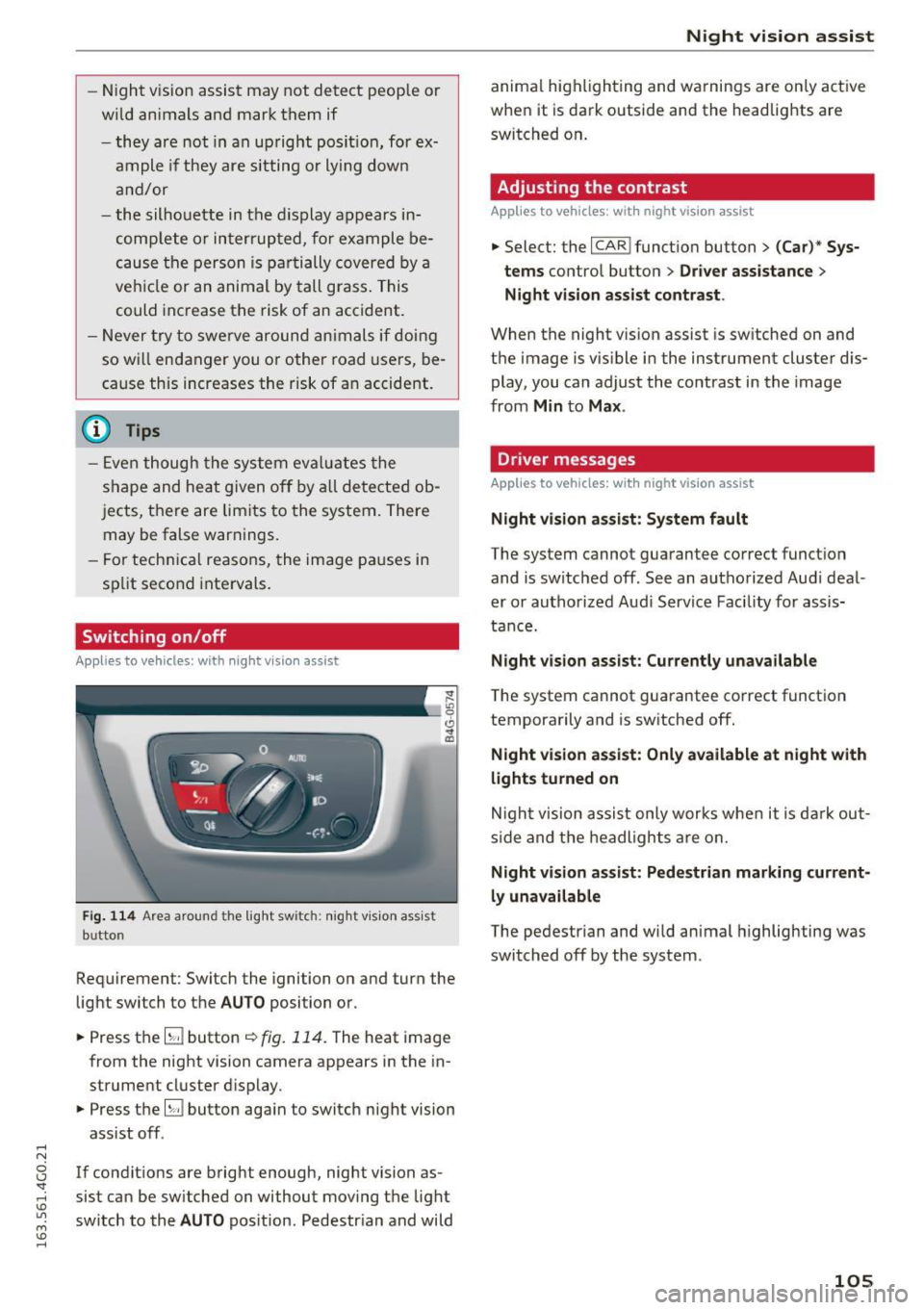
Fig. 114 Area around the light switc h: nigh t vis ion assist
b u tto n
Requirement : Switch the ignition on and turn the
light switch to the
AUTO position or .
.,. Press th e
lliJ button ~ fig. 114. The heat image
from the night vision camera appears in the in
strument cluster display .
.,. Press the
lliJ button aga in to switch night vision
assist off .
If condit ions are bright enough, night vision as
sist can be sw itched on without moving the light
switch to the
AUTO position. Pedestrian and wild
Night vision assist
animal highlighting and warnings are only active
when it is dark outside and the headlights are
switched on .
Adjusting the contrast
Applies to vehicles: wit h night vision assist
.,. Select: the I CARI function button > (Car)* Sys
tems
contro l button > Driver assistance >
Night vision assist contrast .
When the night vision assist is sw itched on and
the image is visible in the instrument cluster dis
play, you can adjust the contrast in the image
from
Min to Max .
Driver messages
Applies to vehicles: with night vision assist
Night vision assist: System fault
The system cannot guarantee correct function
and is switched off . See an authorized Audi deal
er or authorized Audi Service Facility for assis
tance.
Night vision assist: Currently unavailable
The system cannot guarantee correct function
temporarily and is switched off.
Night vision assist: Only available at night with
lights turned on
Night vision assist only works when it is dark out
side and the headlights are on.
Night vision assist: Pedestrian marking current
ly unavailable
The pedestrian and wild animal highlighting was
switched off by the system .
105
Page 108 of 294
Automatic transmission
Automatic transmission S tronic, tiptronic
Introduction
The automatic transmission is controlled elec
tronically. The transmission upshifts or down
shifts automatically depending on which drive
program is selected.
When a
moderate driving style is used, the
transmission selects the most economical driving
mode. The transmission upshifts at a lower RPM
and downshifts at a higher RPM to improve fuel
efficiency.
The transmission switches to a sporty mode after
a kick-down or when the driver uses a
sporty
driving style
characterized by quick accelerator
pedal movements, heavy acceleration, frequent
changes in speed and traveling at the maximum
speed.
If desired , th e driver can also select the gears
manually (tiptronic mode) 9 page 110.
Various automatic transmissions may be instal
led, depending on the model:
S tronic transmission
The S tronic is a dual-clutch transmission. Power
is transferred using two clutches that work inde
pendently from one another. They replace the
torque converter used in conventional automatic
transmissions and allow the vehicle to accelerate
without a noticeable interruption in traction.
tiptronic transmission
In the tiptronic transmission, power is transfer
red by a torque converter.
106
Selector lever positions
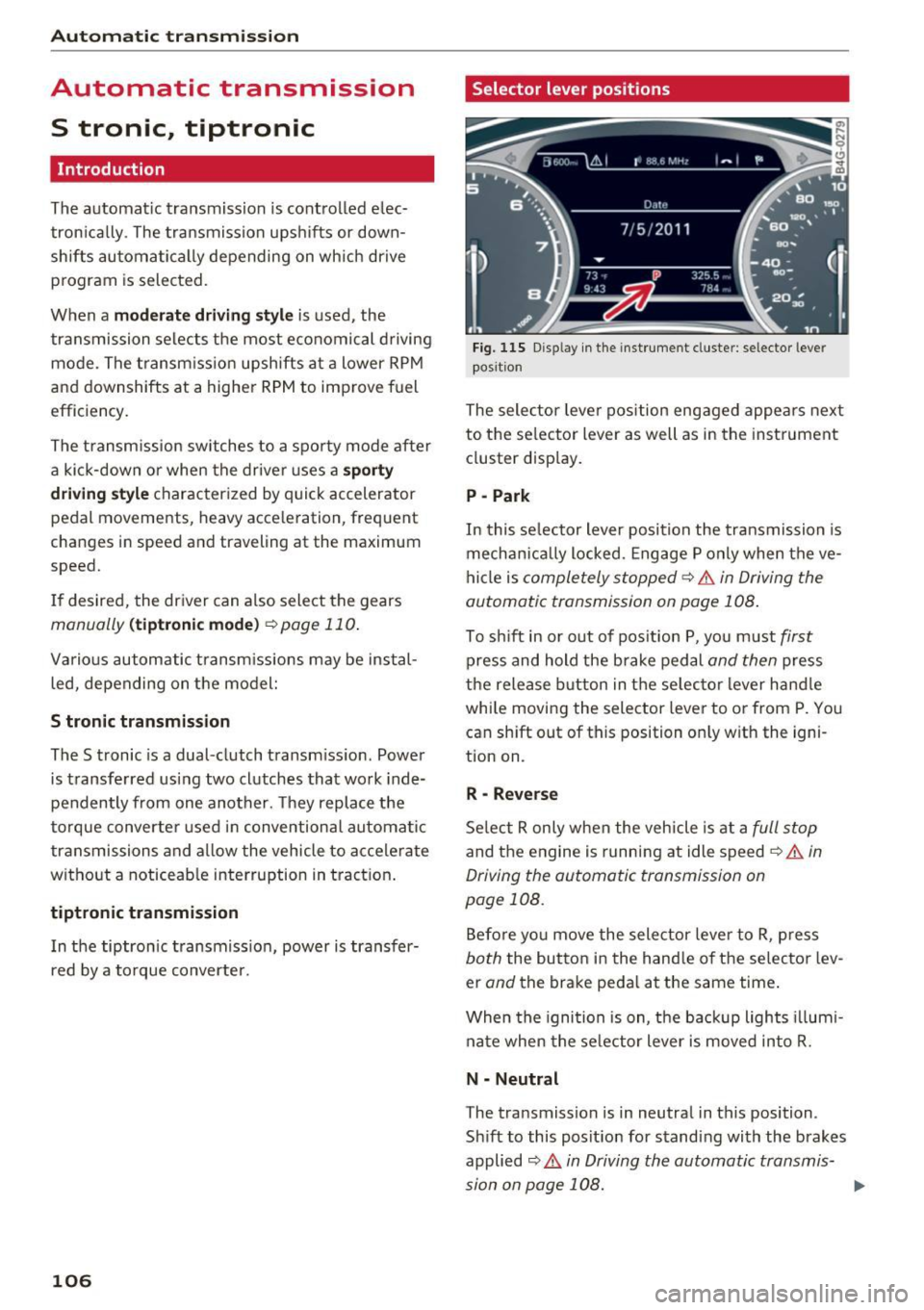
Fig. 115 Display in the instrument cluster: selector lever
position
The selector lever position engaged appears next
to the selector lever as well as in the instrument
cluster display.
P -Park
In this selector lever position the transmission is
mechanically locked. Engage P only when the ve
hicle is
completely stopped¢&. in Driving the
automatic transmission on page 108.
To shift in or out of position P, you must first
press and hold the brake pedal and then press
the release button in the selector lever handle
while moving the selector lever to or from P. You
can shift out of this position only with the igni
tion on.
R -Reverse
Select R only when the vehicle is at a full stop
and the engine is running at idle speed¢&. in
Driving the automatic transmission on
page 108.
Before you move the selector lever to R, press
both the button in the handle of the selector lev
er
and the brake pedal at the same time.
When the ignition is on, the backup lights illumi
nate when the selector lever is moved into R.
N -Neutral
The transmission is in neutral in this position.
Shift to this position for standing with the brakes
applied
9 A in Driving the automatic transmis
sion on page 108.
...
Page 110 of 294

Automatic transmissio n
than 2 seconds when the brake pedal is not
pressed.
Lock button
The lock button in the selecto r lever hand le pre
ve nts yo u from moving the selector lever un in
tentionally while in some se lector lever positions .
The positions that require the lock button to be
pr essed are marked in co lor in the i llustration
¢ fig. 116 .
Driving the automatic transmission
Starting the engine
~ T he selector lever must be in P or N.
Starting off
~ Press and hold the brake pedal.
~ Press and hold the release button in the selec
tor lever handle, se lect the des ired selector lev
er position such as D/S and r ele ase the button.
~ Wait briefly until the transmission has shifted
(you w ill feel a slight movement).
~ Remove your foot from the brake pedal and ac
celerate .
Stopping t emporar ily
~ Keep the vehicle stationary using the braking
pedal , for example at traffic lights .
~ Do not press the accelerator pedal when doing
th is .
~ To prevent the vehicle from rolling when you
start driving, set the park ing brake when stop
ping on steep inclines¢,& .
~ The pa rk ing brake w ill release automatically
and the vehi cle will start moving once you press
the accelerator pedal.
Stopping /parking
If the se lector lever is not in the P posit ion when
you open the d river's door, the vehicle could roll.
The message
Tran smission : Car ma y roll! Shift
to park!
appears .
~ Press and hold the brake pedal unt il the vehicle
has come to a complete stop.
~ Apply the pa rking brake ¢ page 77, Parking .
~ Select the P selector leve r position ¢ ,& .
108
Stopping on an incline
~ Always press the brake pedal to ho ld the vehi
cle in p lace and prevent it from "rolling back"
¢
,& . Do not try to prevent the vehicle from
"rolling back" when a gear is engaged by in
creas ing the engine speed ¢(D .
Starting on an inclin e
~ Activate the pa rk ing br ake.
~ With the driving gear selected, press the accel
erator pedal carefully. The parking brake will
re lease a utomatically if your seat belt is fas
tened.
Under certain circumstances, such as driving in
the mountains, it may be useful to switch tempo rarily to the manual sh ift program in order to ad
j ust the gears to the dr iv ing cond it ions by hand
Q ,&. .
On s lopes, activate the parking brake first and
then move the selector lever to the P position.
This prevents too much stress from being placed
on the locking mechanism.
A WARNING
- The vehicle can also roll when the eng ine is
stopped .
- Unintended vehicle movement can cause se
rious injury .
- Never leave your veh icle with the engine
r u nning while in gear. If you must leave
your veh icle when the eng ine is r unning, ac
tivate t he pa rking bra ke a nd move the selec
to r lever to P.
- P owe r is still transmitted to the wheels
when the engine is runn ing a t idle . To p re
ve nt the vehicle from "creeping ", yo u m ust
keep your foot on the b rake when the en
gine is running and the se lector lever is in D/
5 or R or "tiptronic" mode is se lected .
- D o not press the acce le ra tor peda l when
changing the se lector lever posit ion while
the vehicle is stationary and the engine is
r u nning.
- Never sh ift into R or P whi le driving.
Page 112 of 294

Automatic transmission
Manual shift program
Using the manual shift program you can man
ually select gears .
)
r
Fig. 117 Center console: shifting the gears manually
Fig. 118 Steering whee l: Shift paddles•
Gear selection with selector lever
The tiptronic mode can be selected eith er with
the vehicle stationary or on the
move.
• Push the selector lever to the right from D/S.
An M appears in the instrument cluster display
as soon as the transmission has shifted.
• To upshift, push the selector lever forward to
the plus position
G) ¢ fig. 117 .
• To downshift, push the lever to the minus posi-
tion
0 .
Gear selection with shift paddles*
The shift paddles are activated when the selector
lever is in D/S or the tiptronic manual shift pro
gram.
• To upshift , touch the shift padd le on the right
G)¢fig. 118.
• To downshift, touch the shift paddle on the left
0.
The transmission automatically shifts up or down
before critical engine speed is reached .
110
The transmission only allows manual shifting
when the engine speed is within the permitted
range.
(D Tips
- When you shift into the next lower gear, the
transmiss ion will downshift on ly when there
is no possibility of over-rewing the engine .
- When the kick-down comes on, the trans
mission will shift down to a lower gear, de
pending on vehicle and engine speeds.
- Tiptronic is inoperative when the transmis
sion is in the fail-safe mode.
Kick-down
Kick-down enables maximum acceleration.
When you press the accelerator pedal down be
yond the resistan ce point, the automatic tra ns
mission downshifts into a lower gear, depending
on vehicle speed and engine RPM. It shifts up in
to the next higher gear once the maximum speci
fied engine RPM is reached.
A WARNING
Please note that the whee ls could spin on
slick or slippery roads when kick-down is ac
tive.
Launch control program
App lies to vehicles: with S t ronic
The launch control program provides the best
possible acceleration when starting from a stop .
Requirement: The engine must be at operating
temperature and the steering wheel must not be
turned.
• Deactivate the Start-Stop-System *¢
page 81 .
The LED in the !CA.l "'! button turns on.
• With the engine running, press the
~,~-0-F F~I but
ton briefly¢
page 188. The II indicator light
turns on and the message
Stabilization control
(ESC): Off. Warning! Reduced stability
ap
pears in the instrument cluster display.
• Pull the selector leve r back out of the D/S posi
tion briefly to select the S position or se lect the .,..
Page 113 of 294

DYNAMIC driving mode in drive select
¢page 101.
~ Press the brake pedal firmly with your left food
and hold it all the way down for at least 1 sec
ond.
~ At the same time, press the gas pedal all the
way dow n with your right foot unt il the engine
reaches and stays at a high RPM level.
~ Remove your foot from the b rake pedal within
5 seconds
¢ /1. .
& WARNING
-
-Always adapt yo ur driv ing to the tra ffic flow.
- Only use the La unch control prog ram when
road and traffic conditions allow it and oth
er drivers wi ll not be endangered or both
ered by your driving and the vehicle's accel
eration.
- Please note that the drive whee ls can spin
and the vehicle can break away when sport
mode is switched on, especia lly when the
road is s lippery.
- Once the vehicle has started moving, press
the
I~ OF FI button briefly to tu rn the sport
mode off.
@ Tips
- The t ransmission temperature may increase
s ignificantly after using the launch control
program. If that happens, the program may
not be available for a few m inutes. It w ill be
available again after a cool-down pe riod .
- When accelerating using the la unch control
p rogram, all veh icle parts are subject to
heavy loads. This can lead to increased
wear .
Transmission malfunction
[il Transmi ssion : Please press brake pedal and
s elect gear again.
Press the brake pedal and se lect the des ired se
l ecto r lever pos it io n aga in . You can t hen continue
,... driving.
N
~ [il Transmission overheating : Pl ease drive con-
~ se rvatively . Lil
M v:, ....
Autom atic tran sm iss ion
The t ransmission temperature has inc reased sig
nificantly due to the sporty driving manner . Drive
i n a less spo rty manner unt il the temperatu re re
turns to the normal range and the ind icator light
switches of.
[il Tran smission malfunction: you can continue
driving
T he re is a system malfunction in t he tra nsmis
s ion . You may contin ue driving . Dr ive to your A udi
dealer or authorized A udi Service Faci lity soon to
have the malfunction cor rected.
[il Transmission malfunction: You can continue
dri ving with limited functionality
T he re is a system malfu nction in t he transmis
s io n. The transm ission is swi tc hi ng to eme rge ncy
mode. This mode only sh ifts into ce rtain gears or
will no longer shift at a ll. The eng ine may sta ll.
Drive to an authorized A udi dealer or authorized
Audi Se rvice Facility immed iate ly to have the
malfunction corrected.
l'iJ li'J Transmission malfunct ion: No reverse
gear . You can continue driving
S tronic t ransm iss io n: Th ere is a sys tem ma lf u nc
t io n in the t ransm iss ion. The tra nsmission is
swi tching to emergency mode . This mode only
shifts into ce rtain gears or w ill no longer shift at
al l. The engine may stal l. You cannot engage the
reve rse gear. Dr ive to an a uthori zed Audi dealer
or authorized Audi Serv ice Facility immediately to
have the malfunction corrected .
[il Transmission malfunction: Stop vehicle and
shift to park.
Do not continue dr iving. Se lect t he P selector lev
er position and see an authorized A udi dealer or
autho rized Aud i Serv ice Facility for ass istance.
(D Note
If t he transm ission has swi tched to emergen
cy mode, drive to your autho rized Aud i dea ler
or authorized Audi Service Facility immediate
l y to have the ma lfunction co rrected.
111
Page 115 of 294
Parking systems
General information
Applies to vehicles: with parking system plus/rear view cam
era/peripheral cameras
Depending on your vehicle's equipment, various
parking aids will help you when parking and ma
neuvering.
The
parking system plus assists you when park
ing by audibly and visually indicating objects de
tected
in front of and behind the vehicle
r::!:>page 114.
The rear view camera shows the area behind the
vehicle in the Infotainment display. This display
assists you when you are cross or parallel parking
r::!:> page 115. In addition, you are assisted by the
functions from the parking system plus
r::!:>page 114.
The peripheral cameras assist you with parking
and maneuvering. You are aided by various cam
e ras depending on the vehicle equipment leve l
¢ page 118. In addition, you are assisted by the
functions from the parking system plus
r::!:>page 114.
A WARNING
-Always look for traffic and check the area
around your vehicle by looking at it directly
as well. The parking system cannot replace
the driver's attention. The driver is always
responsible for safety during parking and
for all other maneuvers.
-
-Please note that some surfaces, such as
clothing, are not detected by the system.
- Sensors and cameras have blind spots in
which people and objects cannot be detect ed. Be especially cautious of children and
animals.
- The sensors can be displaced by impacts or
damage to the radiator grille, bumper,
wheel housing and the underbody. The park
ing systems may become impaired as a re
sult. Have your authorized Audi dealer or
qualified workshop check their function.
- Make sure the sensors are not covered by
stickers, deposits or any other obstructions
Parking systems
as it may impair the sensor function. For in
formation on cleaning, refer to
r::!:>page203.
(D Note
-Some objects are not detected by the sys
tem under certain circumstances:
- Objects such as barrier chains, trailer draw
bars, vertical poles or fences
- Objects above the sensors such as wall ex tensions
- Objects with specific surfaces or struc
tures such as chain link fences or powder
snow.
- If you continue driving closer to a low-lying
object, it may disappear from the sensor
range. Note that you will no longer be
warned about this obstacle.
(D Tips
- The system may provide a warning even
though there are no obstacles in the cover age area in some situations, such as:
- certain road surfaces or for long grass.
- external ultrasonic sources e.g. from cleaning vehicles.
- heavy rain, snow or thick vehicle exhaust.
- We recommend that you practice parking in
a traffic-free location or parking lot to be
come familiar with the system. When doing
this, there should be good light and weath
er conditions.
- You can change the volume and pitch of the
signals as well as the display
r::!:>page 123.
-Please refer to the instructions for towing a
trailer
r::!:>page 123.
-What appears in the infotainment display is
somewhat time-delayed.
113