2016 AUDI A6 instrument cluster
[x] Cancel search: instrument clusterPage 28 of 294

Instrumen ts and ind icator ligh ts
Econom y tip s
In certain s ituations, economy tips appear auto
matica lly for a sho rt time in the efficiency pro
gram
c:> fig. 10. If you fo llow these economy tips,
you can reduce your vehicle's fuel consumption.
To t urn an economy tip off immed iate ly after it
appears, press any button on the multifunction
steering wheel.
(D Tips
- If you e rase the data in the efficiency pro
gram, the values in the on-board computer
will a lso be reset.
- Once you have turned an economy tip off, it
will only appear again after you turn the ig
nition on again .
- The economy t ips are not displayed in every
instance, but rather in intervals over a peri
od of t ime.
Odometer
F ig . 1 1 Instrument cluster: odometer and reset button
The display of distance dr iven is shown in miles
"mi" or kilometers "km". The units of measure
ment (kilometers/m iles) can be changed in the
Infotainment system.
Upp er odometer
The trip odome ter shows the d istance driven
since it was last reset. It can be used to measure
short distances. The last digit shows distances of 100 meters or 1/10 of a mile .
The trip odome ter can be reset to zero by press
ing the reset bu tton
E§J .
26
Lo wer odom eter
The lower odomete r shows the tota l number of
k ilometers or miles that the vehicle has driven.
Malfunction indicator
If there is a malfunction in the instrument clus
ter,
DEF will appear in the trip odometer display.
Have the malfunction corrected as soon as possi
ble.
Time/date display
Fig. 12 Instrument cluster: Time and date
The date, time of day and time and date format
can be set in the Infotainment system. Refer to
the Infotainment system operat ing manu al for
inst ructions.
When you open the dr iver's door, the date and
time appear in the instrumen t cluster display for
30 seconds.
Service interval display
The service interval display detects when your ve
hicle is due for service.
Fig. 13 Instrument cluster display: service interval d isplay
(example)
The serv ice interval display works in two stages: II>
Page 29 of 294

.... N
0 CJ '
-Inspection or oil change reminder: After a cer
tain distance driven, a message appears in the
instrument cluster display each time the ign i
tion is switched on or off¢
fig. 13. The remain
ing distance or time is displayed briefly.
-Inspection or oil change due: If your vehicle is
due for an inspection or oil change or both, a
message appears briefly in the instrument clus
ter display when sw itching the ign ition on or
off:
Inspection due! or Oil change due! or Oil
change and inspection due! .
Checking service intervals
You can check the remaining distance or time un
til the next oil change or next inspection n the
Car menu. To do this, select: the
ICARI function
button
> (Car)* Systems control button > Service
& control > Service intervals .
Resetting the indicator
Your authorized Audi dealer or authorized Audi
Service Facility will reset the service interval dis
play after performing service .
If you have changed the oil yourself, you must re
set the oil change interval.
To reset the indicator, select: the
ICARI function
button
> (Car)* System control button > Service
& control > Service intervals. Turn the control
knob downward to
Reset oil change interval and
press the control knob.
(D Note
-Only reset the oil change indicator if the oil
was changed.
- Following the service intervals is critical to
maintain ing the service life and va lue of
your vehicle, especially the engine. Even if
the mileage on the vehicle is low, do not ex
ceed the time for the next service.
- Calculating the t ime to the next oil change
i s interrupted when the vehicle battery is
disconnected.
If the vehicle is not driven for
a long period of time, check the mainte
nance schedule so that you can follow the
maintenance interva ls.
Instruments and indicator lights
Head-up display
Applies to vehicles: with Head-up display
Fig. 14 Example : Indicato rs in the Head -up d isplay
Fig . 15 Instrument panel: head-up display knob
The Head-up display projects certain warnings or
selected information from the assistance sys
tems* or navigation* on the windshield . The dis
play appears w ithin the driver's field of vision.
Switching on/off
.. To switch the head-up display on or off, press
the knob~¢
fig. 15 .
Adjusting the height
The height of the display can be adjusted to the
individual driver .
.. Make sure you are seated correctly
r=!)page 126.
.. Turn the knob~ to adjust the disp lay .
Settings in the Infotainment system
.. Select: the I CAR I function button> (Car)* Sys
tem
control button > Driver assistance > Head
up display > Head-up display contents
or Dis-
play brightness. .,..
27
Page 30 of 294

Instruments and indicator lights
Display content
In the Infotainment system, you can specify
which information should be displayed: For ex
ample, this can include navigation information *,
Adapt ive cruise control* or night vision assist* .
The display of certai n in formation and some of
the red indicator lig hts cannot be hidden in the
Infotainment system.
Display brightness
You can adjust the display brightness in the Info
tainment system. The display brightness decreas
es automatically as the amount of light decreas
es. The basic level of brightness is adjusted with
the instrument illumination¢
page 48.
(D Note
To prevent scratches on the glass covering the
Head-up display, do not place any objects in
the projection opening.
@ Tips
-Sunglasses with polarization filt ers and un
favorable lighting conditions can affect the
display.
- An optim um display depends on the seat
position and the height adjustment of the
head-up display.
- A specia l windshield is needed for the head
up display function.
- F or informat ion on cleaning, refer to
c::;;, ta
ble on page
205.
On Board Diagnostic
System (OBD)
Malfunction Indicator Lamp (MIL)
The Malfunction Indicator Lamp (MIL) ¢..ifi in the
instrument cluster is part of the On-Board Diag
nostic (OBD II) system .
The warning/indicator light illuminates when the
ignit ion is switched on and goes out after the en
gine starts and the idle has stabilized . This indi
cates that the MIL is working properly.
If the light does not go out after the engine is
started, or illuminates wh ile you are driving, a
28
malfunction may exist in the engine system. If
the light illuminates, the catalytic converter
could be damaged.
Continue driving
with reduced power (avoiding
sustained high speeds and/or rapid accelera
tions) and have the condition corrected . Contact
your authorized Audi dea ler.
If t he light illuminates, the electronic speed lim
iter may also be ma lfunctioning. For more infor
mation ¢
page 29, Electronic speed limiter.
An improperly closed fuel filler cap may also
cause the MIL light to illuminate
c::;;, page 210.
On-Board Diagnostics
Fig. 16 Loca tion of Data Link Connector (DLC)
On-Boa rd Diagnostics monitors the components
of your emission control system. Each monitored
component in your engine system has been as
s ig ned a code . In case o f a malfunct ion, the com
pon ent will be identified and the fault stored as a
code in the contro l module memory.
The MIL light may also illum inate if there is a
leak in the on-boa rd fuel vapor recovery system.
If the light illuminates after a refuelling, stop
the vehicle and make sure the fuel filler cap is properly closed
c::;;, page 210.
In order to make an accu rate diagnosis, the stor
ed data can only be displayed using special diag
nostic equipment (generic scan tool for OBD) .
In order to connect the special diagnostic equip
ment, push the plug into the Data Link Connector
(DLC). The DLC is located to the right of the hood
release r:!>
fig. 16. ..,.
Page 43 of 294

.... N
0 CJ '
Correcting power window malfunctions
After disconnecting the vehicle battery, the one
touch up and down feature must be activated
again .
.,. Pull the powe r window switch until the window
is completely ra ised.
.,. Release the switch and pull it aga in for at least
one second.
Valet parking
The valet parking feature protects the luggage
compartment from unauthorized access .
Fig. 34 Lu gg age comp artment : v a let parkin g button
W ith "valet parking" activated, the rea r lid can
no t be opened .
.,. Remove the mechanical key
Q page 30.
.,. Open the glove compartment and activate
Q fig . 34 the "valet parking" feature by press
ing the
I VA LETI button . The indicator light in
the switch illuminates .
.,. Close the glove compartment and lock it with
the mechanical key.
.,. Lock both rear seatbacks w ith the mechanical
key
Q page 64 .
.,. Leave the master key with the service personnel
for park ing and keep the mechanical key with
you .
When the "valet parking" feature is activated:
- the un locking button for the rear lid
~ in the
driver's door is inact ive
- the button~ on the master key is inactive
- the opening handle in the rear lid is inactive.
Opening and closing
The vehicle can be driven and locked and un
locked with the master key. Access to the lug
gage compartment is blocked.
When the valet parking function is switched on ,
the message
Valet parking activated appears in
the instrument cluster display when you switch
the ignition on .
Sunroof
Description
Fig. 35 Section from hea dline r: sun roo f b utton
@ Tilting /sliding
.,. To tilt the sunroof completely, press the switch
briefly to the second level.
"' To open the sunroof completely, pull the sw itch
briefly to the second level¢,&. .
.. To select an intermediate position , press/pu ll
the switch to the first level until the desired po
sition is reached .
@ Opening /sliding (version 1)
"'To move the roof into the reduced wind noise
position, press the button back briefly to the
second level. The roof will open all the way if
you press the button back to the second level
again.
.,. To close the sunroof completely, press the
switch forward briefly to the second level
Q ,&..
.. To select an intermediate position, press/pull
the switch forward/back to the first level until
the desired position is reached.
@ Opening/sliding (version 2)
.,. To open the sunroof complete ly, press the
switch back to just before the second level.
41
Page 47 of 294
.... N
0 CJ '
-In cool or damp weather, the inside of the
headlights, turn signals and tai l lights can
fog over due to the temperature difference
between the inside and outside. They will
clear short ly after switching them on. This
does not affect the service life of the light
i ng.
Turn signals and high beam lever
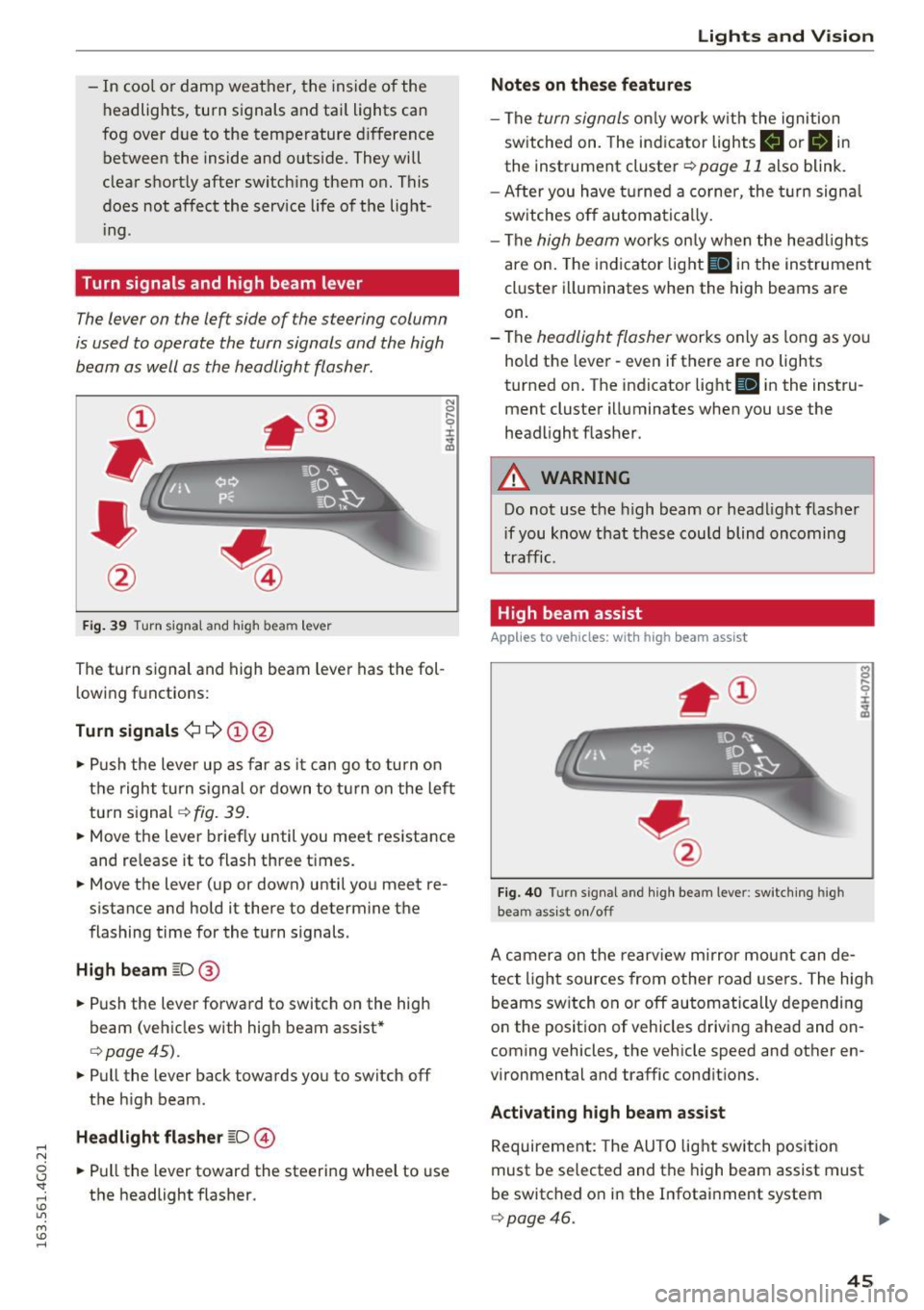
The lever on the left side of the steering column
is used to operate the turn signals and the high
beam as well as the headlight flasher.
F ig . 39 Turn signal and high beam lever
The turn s ignal and high beam lever has the fol
lowing fu nctions:
Turn signals¢¢ (!)@
N
0
..... 0
~ IJl
• Push the lever up as far as it can go to turn on
the right turn s ignal or down to turn on the left
turn signal¢
fig. 39 .
• Move the lever brief ly until you meet resistance
and re lease it to flash three times.
• Move the lever (up or down) until you meet re
s istan ce and hold it there to determine the
flashing time for the turn signals.
High beam ~D@
• Push the lever forward to switch on the high
beam (vehicles with high beam assist*
¢ page45).
• Pull the lever back towards you to switch off
the high beam .
Headlight flasher ~D@
• Pull the lever toward the steering wheel to use
the headlight flasher .
Lights and V ision
Notes on these features
-The turn signals only work w ith the ignition
sw itched on. The indicator lights
B or B in
the instrument cluster¢ page 11 also blink.
- After you have turned a corner , the turn signa l
switches off automatically.
- The
high beam works on ly when the headlights
are on. The indicator light
II in the instrument
cluster illuminates when the high beams are
on.
- The
headlight flasher works only as long as yo u
hold the lever -even if there are no lights
turned on. The indicator light
Iii in the instru
ment cluster illuminates when you use the
headlight flasher .
A WARNING
-Do not use the high beam or headlight flasher
i f you know that these could blind oncoming
traffic.
High beam assist
Applies to veh icles: w ith high beam assist
Fig. 40 Turn signal and high beam lever: switching high
beam assist on/off
A camera on the rearview mirror mount can de
tect light sources from other road users. The high
beams switch on or off automatically depending
on the posit ion of vehicles driving ahead and on
coming vehicles, the vehicle speed and other en
vironmental and traffic conditions.
Activating high beam assist
Requirement: The AUTO light switch position
must be selected and the high beam assist must
be switched o n in the Infotainment system
¢page 46.
45
Page 48 of 294

Lights and Vi sion
"'T o activ ate t he h igh beam assist, tap the lever
forward
(D . The ii indicator light appears in
the instr ument cluster d isp lay an d the high
beam assist is switched on/off automatically.
The
Bl indicator lig ht also turns on if the h igh
beams are switched on .
Switching the high beam s on /off manually
If the high beams did not sw itch on/off a utomat
ically as expected, you may sw itch them on or off
manually instead:
"'T o swi tc h the high beams on manually, tap the
l ever forward
(D . The Bl indicator lig ht t urns
on.
"' To switc h the high beams off manually, p ull the
lever back@. The h igh beam assist is deact i
vated .
Operating the headlight flasher
"'To ope rate the headlight flasher w hen the h igh
beam assist is act ivated and high beams are
switched off, p ull the leve r back @. The high
beam assist rema ins ac tive .
Me ssages in the instrument cluster display
ml Audi adaptive light: system fault!
Headlight a ssist: System fault
Dr ive to an a uthorized Aud i dea ler or a uth orized
Aud i Serv ice Fac ility immediately to have t he
malfunct io n co rrected. You can still switc h the
h igh beams on or off ma nually.
Headlight assist: Unavailable No camera view
The camera v iew is b locked, fo r example by a
sticke r or debr is.
The senso r is locate d between the interior rear
view m ir ror and the windshield. Therefore, do not
p lace any st ic kers in this area on the windshie ld.
A WARNING
-
H igh beam assist is only intended to assist
the drive r. The dr iver is still responsible for
cont rolli ng the headligh ts a nd switch ing
t hem ma nually de pendi ng on light and vis ibil
i t y conditions.
It ma y be ne cess ary to operate
t he m man ually i n situ at io ns such as:
46
- In adverse weat her condi tions such as fog,
heavy rain, blowing snow or spray ing water.
- On roads where oncoming traffic may be
pa rtially obscure d, such as expressways.
- When the re are roa d users that do not have
suff icient lighting, such as bicyclers or
veh icles with dirty tail lamps.
- In tig ht curves an d on stee p slopes.
- In poorly lit a re a s.
- W it h st ro ng refle cto rs, such a s signs .
-If th e ar ea of the wi ndshi eld n ear the s ensor
i s f ogged over, dirty, icy or covered with a
s tick er.
Adjusting the exterior lighting
The settings are adjusted in the MMI.
"'Select: !C A R! function button> (Car) * systems
cont rol button > Vehicle settings > Exterior
lighting .
Automatic headlights
You can adjust the following sett ings in the Au
tomatic headl ights
menu:
Headlights activation time -You can adjust if the
h eadlights switch o n
Early, Med . or Late accord
i ng to the sens itiv ity o f the lig ht sensor .
Audi adaptive light* -You can sw itch ad aptive
li ght
On an d Off .
Automatic high beams*
Y ou can switch the hig h beam assist on an d off .
Daytime running lights
USA models:
You can switch the daytime runn ing
li gh ts
on and off .
Canada models:
The function cannot be turned
off. It is act ivated a utomatically each time the ig
nit ion is switched on. This menu item is shown
"g reye d out" .
Coming home, Leaving home
The coming home function ill uminates the a rea
outside the vehicle when you switch the ign ition
off and open the driver's door. To turn the func-
tion on , se lect
Lights when leav ing car > On . .,._
Page 74 of 294

Warm and cold
Basic settings
Applies to vehicles: with four-zone automatic climate control
The climate control system basic settings are ac
cessed in the Infotainment system.
• Se lect : the ICARI function button> (Car)* Sys-
tems
control button > AC.
Rear seat settings
When this function is selected, all settings for
the rea r can be adjusted through the climate con
trol system in the cockpit . The climate control
system sett ings cannot be adjusted in the rear
seat at the same time. Th is function switches
off
after a certa in period of time or when one of the
controls in the cockpit is pressed .
Recirculation mode
The sensit ivity level of the automatic recircula
tion mode can be set at various levels from
Off to
Sensitive . Recirculation mode is controlled auto
matically .
If the windows fog up, press the
I@ FRONT I button .
Footwell temperature
You can adjust the footwell temperature so that
it is coo ler or warmer.
Auxiliary heater*
I n vehicles with diesel engines*, the auxiliary
heate r helps to warm the ve hicle interio r more
quickly . The auxiliary heater is controlled auto
matically in the
Auto sett ing .
Steering wheel heating
Applies to veh icles: w ith heate d steering wheel
The steering wheel rim can be heated.
Fig. 77 Steer ing whee l: s tee ring w hee l h eat button
72
M :g 0
t!i
"' m
• Press the [ii button to switch steering wheel
heating on/off. The message
Steering wheel
heating on /Steering wheel heating off
ap
pears in the instrument cluster display .
The temperature is mai nta ined at a constant lev
el when steering wheel heating is switched on .
The steering wheel heating settings are stored
automatica lly and assigned to the remote control
key that is in use.
Page 79 of 294

.. Drive to an authorized A udi dealer or author
ized Audi Service Facility immediately to have
the malfunction corrected.
@ Tips
You can view the message again by pressi ng
the
I START E NGINE STOP! button.
Electromechanical
parking brake
Operation
The elec trome chanical parking brake replaces
the hand brake.
Fig. 8 2 Center co nsole : Park ing b rake
.. Pull on the switch C®> c> fig . 82 to apply the
parking brake . The ind icator lights in the sw itch
and - (USA
models) ,11 (Canada models) in
the instr ument cluster illum inate .
.. With the ign it ion sw itched on, step on the
bra ke pedal or the a cce le rato r pedal and press
the switch
(®) at the same time to release t he
parking b rake. The ind icator lights in the sw itch
and - (USA
models) ,11 (Canada models) in
the instrument cluster go out .
Your ve hicle is equipped with an e lec tromechani
cal parking brake. The parking brake is designed
to prevent the vehicle from rolling unintentional
l y and rep laces the hand brake.
I n addition to t he norma l func tions of a tradi
tional hand brake, the electromechanica l parking
b rake provides various conve nience and safety
;::j fu nctions .
0 CJ '
Drivi ng
When starting from rest
-The integra l sta rting assist helps yo u when
driving by au toma tically re leas ing the parking
brake
Q page 78 , Starting from a stop.
- When start ing on inclines, t he s tarti ng assist
prevents the veh icle from un in ten tionally ro ll
ing back . The braking force of the parking bra ke
is not re leased unti l sufficient dr iving force has
been bu ilt up at the whee ls.
Emergency brake function
An emergency brake ensures that t he vehicle can
be s lowed down even if t he
normal brakes fail
Q page 78, Emergency braking function .
A WARNING
--
Do not press the accelerator peda l inadver
tently if the veh icle is stationary but the en
g ine is running and a gear is selected. Other
wise the veh icle w ill sta rt to move immediate
l y and co uld res ult in a crash.
@ Tips
- If the park ing bra ke is applied w ith the igni
tion switched off, the indicator lights in the
switch and -(USA
models) ,11 (Cana
da models) in the instr ument cluster will go
out afte r a certain pe riod of time.
- Occasional noises when the parking brake is
applie d and released are normal and are not
a ca use for con cern.
- When the vehicle is pa rked, the parking
brake goes through a self-test cycle at regu
lar in tervals. Any as so ci ate d noi ses are nor
ma l.
Parking
.. Press the brake pedal to stop the veh icle.
.. Pull the switch ~ to set the pa rking brake .
.. Move the selector lever to P .
.. Turn the engine off
c> &, .
.,. Turn the steering wheel when park ing on in
clines so that the wheels w ill roll into the curb
if the vehicle starts moving.
77
...