2016 AUDI A6 instrument cluster
[x] Cancel search: instrument clusterPage 82 of 294

Driving
-The ignition will turn off if you press the
I STAR T ENGINE STOP! button during a stop
phase. The needle in the tachometer moves
into the
OFF position.
General information
Applies to veh icles: with Start-Stop-System
Th e standard Start-Stop mode con be canceled
for different system-related reasons.
Fig. 84 Instrument cluste r: En gin e stop temporarily un·
available
Engine does not switch off
Before and during each stop phase, the system
checks if certain conditions have been met. For
example, the engine will not switch
off in the fol
lowing situations :
- The engine has not reached the minimum re
quired temperature for Start-Stop mode.
- The interior temperature selected by the A/C
system has not been reached.
- The outside temperature is extremely high/low.
- The windshield is being defrosted®.
- The parking system* is be switched on.
- The battery charge level is too low.
- The steering wheel is turned at a sharp angle or
is moving .
- After engaging the reverse gear .
- On sharp inclines.
@j also appears in the instrument cluster dis
play.
Engine automatically restarts
The standard Start-Stop mode will be canceled
during a stop phase in the following situations .
The engine restarts without any action by the
driver.
80
- The vehicle rolls, for example while on a slope.
- The interior temperature varies from the tem-
perature selected in the A/C system.
- The windshield is being defrosted®.
- The brake pedal is pressed several times in a
row.
- The battery charge level becomes too low.
- High power consumption.
The engine can turn
off again when the condi
tions for Start-Stop mode are met.
Ignition is switched off automatically
To prevent the battery from draining, the igni
tion
will switch off automatically under the fol·
lowing conditions:
- The vehicle has already been driven.
- The Start-Stop-System has stopped the engine.
- The driver's door is opened.
- The driver's safety belt is removed.
- The brake pedal is not pressed down .
- The vehicle is stationary.
In this case, the activated low beam is replaced
by the parking light. The parking lights will
switch
off after approximately 30 minutes or
when you lock the vehicle.
If the Start-Stop-System has not turned off the
engine or if you have switched the Start-Stop
System
off manually, the ignition will not be au
tomatically switched
off and the engine will con
tinue to run
cc> .&. .
A WARNING
Never allow the engine to run in confined
spaces, because this increases the risk of as
phyxiation .
(D Tips
-If you shift into the D or N position after
shifting into reverse, the vehicle must be
driven faster than 6 mph (10 km/h) in order
for the engine to switch off again .
Page 83 of 294

..... N
0 CJ '
Switching the Start-Stop-System on/off
manually
Applies to vehicles: with Start-Stop-System
If you do not wish to use the system, you can
switch it off manually .
Fig. 85 Center co nso le: Start -S top -Syste m but ton
.. To switch the Start -Stop-System off/on man
ually, press the
l(A)••I button. The L ED in the but
ton turns on when the system is sw itched off.
@ Tips
I f you switch the system off during a stop
phase, the engine will start again automati
cally.
Messages in the instrument cluster display
Applies to vehicles: with Start-Stop-Sys tem
Start-stop system deactivated: Please restart
engine manually
This message appea rs when specifi c condi tions
are not met dur ing a stop phase and t he S tart
S top -Sy stem w ill
not be able to resta rt the en
gine. The engine must be sta rted with the
I START ENGINE ST OPI button.
Start-stop system : System fault! Currently
unavailable
There is a mal function in the Start -Stop -System .
Drive the ve hicl e to an authorized repa ir facility
for servicing as soon as possible to correct the malfunct ion .
D rivi ng
Speed warning system
Introduction
The speed warning system helps you to stay un
der a specified maximum speed.
The speed warn ing system warns you if you are
exceed ing the maximum speed that you have set.
You will hear a warn ing tone when your speed ex
ceeds the s tored value by approx imately 3 mph
(3 km/h) . An indicator light . (USA models)/ .
(Canada models) in the instrume nt cl uste r d is
play a lso tu rns on at t he same time. The indicator
lig ht •• tur ns off when the speed decreases
below the stored maximum speed.
Setting a th reshold is recommended if yo u wo uld
lik e to be rem inded whe n you reach a cer tain
ma ximum speed. Situations where you may want
to do so incl ude driving in a co untry with a gener
al speed limit or if there is a spec ified maximum
speed for winter tires.
@ Tips
Eve n though your vehicle is eq uipped w ith a
speed warning system, yo u should still watch
the speedometer to make sure you are not
driving faster than the speed lim it.
Setting the threshold
You can set, change and delete the warning
threshold in the Infotainment system.
.. Select: the I CAR ! funct ion button > (Car) * Sys
tems
contro l button > Driver as sistance >
Speed warning .
You can set a ny thresho ld between 20 mp h
(30 km/h) and 150 mph (240 km/ h). Settings
can eac h be adjusted in increments of 6 mph
(10 km/h).
81
Page 84 of 294

Driving
Cruise control system
Switching on
Applies to vehicles: with cruise control system
The cruise control system makes it possible to
drive a constant speed that is 30 km/h or higher.
0
f
®t
0
F ig. 86 Operating lever: Cruise control system
F ig. 87 Instrument cluster: Selected speed
,. To switch the cruise control on, pull the lever
into position
(D c::> fig. 86.
,. Drive at the speed to be maintained .
,. To store the speed, press the button @.
The stored speed and the indicator light
lij;(l)~i4 (USA models) 1B (Canada models) appear
in the instrument cluster display
c:> fig. 87. T he
display may vary, depending on the type of dis
play in your vehicle .
This information is also shown briefly in the
Head-up display*.
The speed is kept constant by modifying engine
power or through an active brake intervent ion.
A WARNING
- Always pay attention to the traffic around
you when the cruise control is in operation.
You are always responsible for your speed
82
-
and the distance between your vehicle and
other vehicles.
- For safety reasons, cruise control should not
be used in the city, in stop-and-go traffic, on
winding roads and when road conditions are
poor (such as ice, fog, gravel, heavy rain and
hydroplaning), because this increases the
r isk of an accident.
- Switch the cruise control off temporarily
when dr iving in turning lanes, highway exits
or in construction zones .
- Please note that unconsciously "resting"
your foot on the accelerator pedal prevents the cruise contro l from braking. This is due
to the control system being overridden by
the driver's acceleration.
- If a brake system malfunction such as over
heating occurs when the cruise control sys
tem is switched on, the braking function in
the system may be switched off. The rest of
the cruise control system functions remain active as long as the indicator light
1ij;(i)~14 (USA models) 1B (Canada models) is
on .
(D Tips
The brake lights illuminate as soon as the
brakes apply automat ically.
Changing speed
Applies to vehicles: with cruise co ntrol system
,. To increase or decrease the speed in incre
ments, tap the lever toward
010 c::> page 82,
fig . 86 .
,. To increase or decrease the speed quickly, hold
the lever in the
010 direction until the de
sired speed is disp layed.
You can also press the accelerator pedal down to increase your speed, e .g . if you want to pass
someone . The speed you saved earlier will re
sume as soon as you release the accelerator ped
al.
If, however, you exceed your saved speed by
6 mph (10 km/h) for longer than 5 minutes, the
cruise contro l will turn off temporarily. The green
symbol
[tj;(l)~i4 (US models) 1 B ..,.
Page 88 of 294

Audi adaptive cruise control and braking guard
Audi adaptive cruise
control
Description
Applies to vehicles: with Audi adaptive cruise control
F ig. 91 Detection range
What can adaptive cruise control do?
The adaptive cruise control system uses video, ra
dar and ultrasound . Moving vehicles ahead can
be recognized up to about 650 feet (200 m)
away .
On open roads with no traffic, adaptive cru ise
control works like a regular cruise control sys
tem. The stored speed is ma inta ined. When ap
proaching a moving vehicle detected up ahead,
the adaptive cruise cont rol system automatically
slows down to match that vehicle's speed and
then maintains the distance that the driver previ ously stored. As soon as the system does not de
tect a vehicle up ahead, adaptive cruise control
accelerates back up to the stored speed.
In stop-and-go traffic, adaptive cruise control can
brake until the vehicle stops and accelerate again
under certain conditions and if this is possible
within the system's limits and capabilities
¢ page 88. Adaptive cruise control will not
make an emergency stop .
Which functions can be controlled?
When you switch adaptive cruise control on, you
can set the current speed as the "control speed"
¢ page 86, Switching on and off.
When driving, you can stop cruise control
¢ page 88 or change the speed ¢ page 8 7 at
any time.
86
You can also set the distance to the object ahead and set the adaptive cruise control driving pro
gram
¢ page 88.
Switching on and off
Applies to vehicles: with Audi adaptive cruise control
Fig. 92 Selector leve r: switch ing on/off
Fig. 93 Instrument cluster : adaptive cruise contro l
You can set any speed between 20 mph and 95
mph (30 and 150 km/h) .
Indicator lamps and messages in the instrument
cluster display inform you about the current sys
tem status and settings.
An addi tional indicator appears in the Head-up
D isplay* .
Switching adaptive cruise control on
.,. Pull the lever toward you into position ©
¢
fig . 92 . ACC standby appears in the instru
ment cluster display.
Setting the speed and activating regulation
.,. To set the current speed, press the ISETI button
¢ fig. 92. The set speed is shown in the tach
ometer @ and is also shown br iefly in the dis-
play @¢
fig. 93 . II>
Page 90 of 294
Audi adaptive cruise control and braking guard
Driving in stop-and-go traffic
Applies to vehicles: with Audi adaptive cruise control
The adaptive cruise control system also assists
you in stop-and-go traffic.
If a previous detected
vehicle ahead stops, your vehicle will brake to a
stop, within the limits of the system.
• To resume driving with adaptive cruise control,
tap the accelerator pedal or
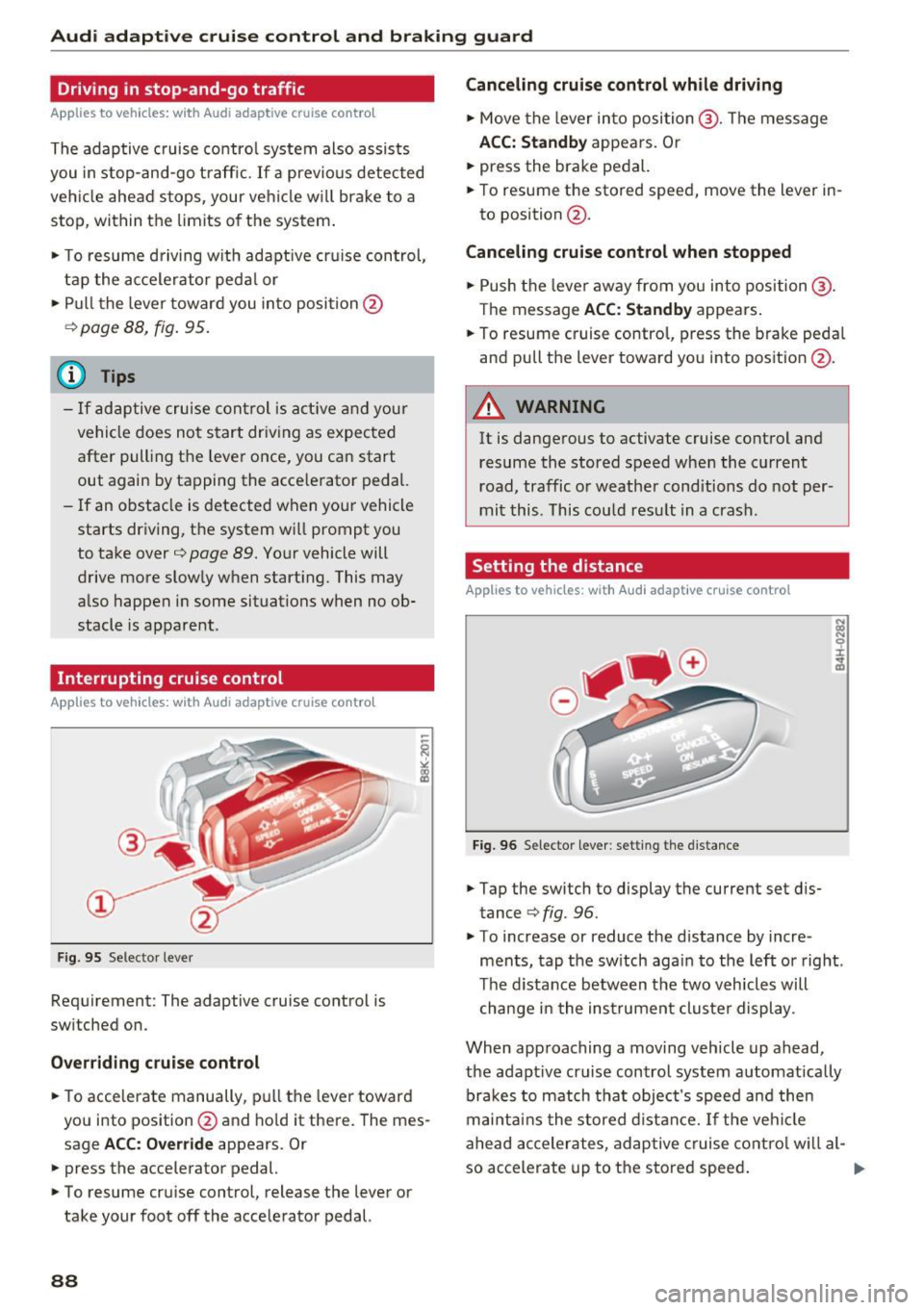
• Pull the lever toward you into position @
¢ page 88, fig. 95.
(Di Tips
-If adaptive cruise control is active and your
vehicle does not start driving as expected
after pulling the lever once, you can start
out again by tapping the accelerator pedal.
- If an obstacle is detected when your vehicle
starts driving, the system will prompt you
to take over¢
page 89. Your vehicle will
drive more slowly when starting. This may
also happen in some situations when no ob
stacle is apparent.
Interrupting cruise control
Applies to vehicles: with Audi adaptive cruise contro l
Fig. 95 Selector lever
Requirement: The adaptive cruise control is
switched on.
Overriding cruise control
• To accelerate manually, pull the lever toward
you into position@and hold it there. The mes
sage
ACC: Override appears. Or
• press the accelerator pedal.
• To resume cruise control, release the lever or
take your foot off the accelerator pedal.
88
Canceling cruise control while driving
• Move the lever into position @. The message
ACC: Standby appears. Or
• press the brake pedal.
• To resume the stored speed, move the lever in
to position @.
Canceling cruise control when stopped
• Push the lever away from you into position@.
The message
ACC: Standby appears.
• To resume cruise control, press the brake pedal
and pull the lever toward you into position @.
A WARNING
It is dangerous to activate cruise control and
resume the stored speed when the current
road, traffic or weather conditions do not per
mit this . This could result in a crash.
Setting the distance
Applies to vehicles: with Audi adapt ive cruise control
Fig. 96 Selector lever: setting the dista nce
• Tap the switch to display the current set dis
tance ¢
fig. 96.
• To increase or reduce the distance by incre
ments, tap the switch again to the left or right.
The distance between the two vehicles will
change in the instrument cluster display.
When approaching a moving vehicle up ahead,
the adaptive cruise control system automatically brakes to match that object's speed and then
maintains the stored distance.
If the vehicle
ahead accelerates, adaptive cruise control will al-
so accelerate up to the stored speed.
II--
Page 92 of 294

Audi adaptive cruise control and braking guard
Audi braking guard
Description
Applies to vehicles: w ith Audi adaptive cruise co ntro l
Fig. 98 Instrument cluster: approach warning
Braking guard uses radar sensors and a video
camera . It also functions within the limits of the
system when adaptive cruise control is switched
off .
What can braking guard do?
When detected in time, the system can assess
situations when a vehicle ahead brakes suddenly
or if your own vehicle is traveling at a high speed
and approaching a vehicle up ahead that is mov
ing more slowly . Braking guard does not react if
it cannot detect the situat ion.
The system advises you of various situations:
- The
distance warning is given if you are too
close to the vehicle ahead for a long time.
If the
vehicle ahead brakes sharply, you will not be
able to avo id a coll is ion. The indicator light.
in the display comes on .
- The
approach warning is given when a detected
vehicle up ahead in your lane is moving much
more slowly than you are or if it brakes sharply .
When this warning is g iven, it may only be pos
sible to avo id a collision by swerving or braking
sharp ly. Th e indicator light. and indicator in
the display will warn you about the danger
qfig. 98. You will also hear an acoustic signal.
If you do not react fast enough or do not react at
all to t he situation, braking guard will intervene
by braking.
l ) Thi s is not ava ilab le in some co un tri es .
90
-If a collision is imminent, the system will first
provide an
acute warning by briefly and sharply
app lying the brakes.
- If you do not react to the acute warning, brak
ing guard can brake with increasing force with
in the limits of the system. This reduces the ve
hicle speed in the event of a collision.
- The system can initiate maximum braking
shortly before a co llision
1
) . Full deceleration at
high speeds occurs only in vehicles with adap
tive cruise control and side assist (pre sense
plus) .
- If the braking guard senses that you are not
braking hard enough when a collision is immi
nent, it can increase the braking force .
- The pre sense functions also engage when a
collision is imminent
qpage 184.
Which functions can be controlled?
You can switch braking guard and the distance/
approach warning on or off in the MMI
q page 91, Settings in the Infotainment sys
tem .
A WARNING
Lack of attent ion can cause collisions, other
accidents and serious personal injuries . The
b ra king guard is an assist system and cannot
prevent a collision by itself. The driver must
always intervene . The driver is always respon
sib le for braking at the correct time .
- Always pay close atten tion to traffic, even
when the braking guard is switched on. Be
ready to intervene and be ready to take
comp lete contro l whenever necessary. Al
ways keep the safe and legal distance be
tween your vehicle and vehicles up ahead.
- Braking guard works with in limits and will
not respond outside the system limits, for
example when approaching a stopped vehi
cle or stationary obstacle (end of a traffic
jam or vehicle that has broken down in traf
fic) .
- Always remember that the radar sensor for
-
the brak ing guard works only within def ined Ill>
Page 96 of 294

Audi active lane assist
Switching on and off
Applies to vehicles: w ith Audi active lane assist
Fig. 99 Turn sig nal lever : act ive lane assist b utton
Fig. 100 Windsh ield: camera window fo r ac tive lane assist
• Press the c::> fig. 99 button to switch the system
on and off . The . or
ra, indicator light in the
instrument cluster turns on or off .
Indicator lights
• Ready:
The indicator light turns on when the
system is ready for use . The system can now be
operated .
• Not ready: The indicator light turns on if the
system is switched on but is inoperab le. This may
be due to the following reasons:
- The re is no lane marker line.
- The relevant lane marker lines are not detected
(for example, markings in a construction zone
or because they are obstructed by snow, dirt,
water or backlighting).
- The vehicle's speed is below the speed needed
to activate it, which is about 40 mph (65 km/
h).
-The lane is narrower than about 8 ft. (2.5 m) or
wider than 15 ft (4.5 m).
- The curve is too sharp.
94
- The driver's hands are not on the steering
wheel.
(1) Tips
Make sure the camera's field of view
¢ fig.
100 is not obstructed by stickers or any
thing e lse . For information on cleaning, refer
to
¢ page 203 .
Lane assist display in the instrument
cluster
Applies to vehicles: wit h Audi active la ne ass ist
Fig. 101 Instrument cl uster: act ive la ne ass ist is sw itched
on a nd p rovid ing warn ings
Fig. 102 Instrument cl uste r: active lane assist is sw itched
on but not ready to provide warnings
You can call up the active lane ass ist display us
ing the buttons in the multifunction steering
wheel
c::> page 23.
An additional indicator appears in the Head-up display *.
Page 105 of 294

Night vision assist
Night vision assist with
pedestrian and wild
an imal highlighting
Description
Applies to vehicles: with night visio n assist
The night vision assist con detect, highlight and,
if necessary, worn about pedestrians and large
wild animals.
Night vision assistant with pedestrian and wild
animal detection assists you in darkness by using
an infrared camera to monitor the area in front of
your vehicle, within the limits of the system . It
can display objects up to approximately 1000 feet (300 meters) away . The heat image
detected by the camera is shown in the instru
ment cluster display . Warm areas appear lighter
and cold areas appear darker .
Highlighting detected pedestrians and wild
animals
Applies to vehicles: with night vision ass ist
Fig. 109 Inst rume nt cluster: Yellow pedestrian highlight ·
ing
Fig. 110 Instrument cluster: symbol when infrared image rl 1.0 is not vis ible U"I
M I.Cl rl
N ig ht vis io n a ssis t
Within the limits of the system, night vision as
sistant can detect pedestrians and wild animals
that are within the detection range between ap
proximately 32 feet (10 meters) and 295 feet
(90 meters) in front of the vehicle. When it is
dark outside and the headlights are switched on,
detected pedestrians and w ild an imals are
marked in yellow
c::> fig. 109 within the limits of
the system
c::> page 104 . Wild animal detection is
not active in bu ilt -up areas. The system only de
tects large wild animals such as deer.
(D Tips
If another display such as nav igat ion replaces
the image from the night vision assist the~-,
symbol appears in a tab
c::> fig. 110 . You can
access night vision assist using the buttons in
the multifunction steering wheel
c::> page 24.
Pedestrian and wild animal warning
Applies to vehicles: with night vision assist
Fig. 111 Instrument cluster: @Pedestrian warning, @
w ild animal warning
F ig. 1 12 In strument cluster: @Pedestrian warning/ @
wild animal warning, when the image from the night vision
ass ist is not selected in the instrument duster display ....
103