2016 AUDI A5 COUPE ignition
[x] Cancel search: ignitionPage 50 of 264

Light and Vision
Q/P -Adjusting the left/right exter ior mir ror.
Move th e knob in the des ired direction.
(@. -Heat ing the m irro r glass depending on the
ou tside temperat ure*.
.9 -Folding exterior mirrors* . In the Infotain
men t system, you can select if the mirrors fold in
automatically when you lock the vehicle
¢ page 36.
Front passenger's exterior mirror tilt
function*
To help you see the curb when ba cking in to a
pa rking space , the surface of the mirror tilts
slightly. For this to happen, the knob must be in
the posit ion for the front passenger's outs ide
mirror.
You can adjust the ti lted mi rror sur fa ce by turn
ing the knob in the desired direction. When you
move out of reverse and into another gear, the
new mirror position is sto red and assigned to the
key yo u are using.
The mirror goes back into its o riginal position
once yo u drive forward faster than 9 mph
(15 km/h) or tu rn the ignition off .
A WARNING
Curved mirror surfaces (convex or spherical *)
increase your f ield of view. Remember that
vehicles or other objects will appear smaller
and fa rther away than when seen in a flat mir
ror. If you use t his mirro r to est imate distan
ces of following vehicles whe n cha ng ing
lanes, yo u co uld estimate incor rectly and
c ause an accident .
(D Note
-If the mir ror housing was moved by outs ide
fo rces (such as an impac t when maneuver
in g), y ou must use the powe r fo ldi ng func
tion to fold the mirro r all the way out . The
mirror housing must not be moved back in
to place by hand beca use this would impa ir
the function of the m irror mechanism.
- If you wash the ve hicle in an automatic car
wash, yo u m ust fold the exte rior m irrors i n
to reduce the risk of damage to the mirrors.
48
N ever fold power fold ing ex terior mirrors *
by hand . On ly fold them in and out using
the power controls .
(D Tips
-If the power adjusting function malfunc
tions, the glass in both mirrors can be ad
justed by p ressing on the edge of it by hand .
- The exte rior m irro r settings are sto red w it h
the memory function* ¢
page 58.
Dimming the mirrors
Fig. 4 3 Auto mat ic d immin g rear view m irro r•
Manual dimming rearview mirror
.,. Pull the lever on the bottom of the m irror ba ck .
Automatic dimming rearview mirror *
.,. Press the button@¢ fig. 43. The indicator
light @ turns on . The rearview and ex ter ior*
m irrors d im au tomat ica lly when light shines on
t hem, for e xamp le from headlig hts on a veh icle
to the re ar.
A WARNING
Electrolyte f luid can leak from automa tic di m
ming mi rrors if the glass is broken . Electro
lyte fl uid can irritate s kin, eyes and respirato
ry system.
- Repeated or prolonged exposure to electro
lyte ca n cause irritation to the respiratory
system, especially among people with asth ma or other respiratory conditions . Get
fresh air immediately by leaving the vehicle
or, if that is not possible, open windows a nd
doors all the way. ..,.
Page 52 of 264

Light and Vision
You can adjust the settings for the rear sun shade
so the shade retracts automatically when you se
lect the reverse gear . To do th is, select the ICAR !
function button
> Wi ndows > Re ar bli nd > auto
ma tic > on
or! CAR ! function button> C ar sys
tems *
control button > Vehicle settings > Auto
matic rear blind > On .
The cu rrent sett ing is au
tomatically stored and assigned to the remote
key. The sun shade is extended aga in as soon as
the vehicle is tr aveling fo rwa rd a t a spee d grea ter
than
9 mph (15 km/h) if the ign ition has not
been switc hed off in the meant ime.
_& WARNING
Whe n lowe ring or ra is ing the sunsha de, make
sure there is nothing in its way and that it has
a free path to travel. Th is could cause person
al injury.
@ Tips
- Pressing the button rn several times con
secutively can trigger the over load protec
tion. The sun shade can o nly be extended/
r etracted again after a brief wa iting pe riod.
- The rea r window sun shade only functions
when the vehicle interior is warmer than
14°F (-10°C) .
Windshield wipers
Switching the windshield wipers on
Fig . 4 7 W inds hield w iper leve r
Move the wi ndshield wipe r lever to the cor re
spond ing pos ition:
@ -Windshield wiper off
0 0 -N st co Ul
(!) -Interval mode. To extend/shorten the wiper
intervals, move the switch @to the left/right. In
50
vehicles with a rain senso r* the wipe rs turn on in
the rain once the vehicle speed exceeds approxi
mately 2 mph (4 km/ h). The higher the sensitivi
ty of the rain sensor * is set (sw itch @to the
right), t he earlier the windshield wipers react to
moistu re on the w indshield . In some models, you
can switc h rain senso r mode off and switch inte r
mittent mode on in the MM !* . Select: ICAR !func
t ion but to n >
Car systems * contro l butto n > Driv
er assist > Rain sensor .
In intermi tten t m ode,
you can a djus t the interval time using the @
swi tch .
@ -Slow w ip ing
@ -Fast w iping
@ -Sing le wipe
® -Cl ean the w indshie ld. To eli mina te wate r
drop le ts, the windshield wi per performs one af
te rwipe operation after severa l seconds while
driv ing. You can switch this function off by mov
ing the leve r to pos ition ® within
10 seconds of
the afterw ipe operation. The afterwipe function
i s react ivated the next time the ignition is sw itch
ed o n.
Cleaning the headlig hts*. The headlight was her
system* operates only when the headlights are
o n. If you move the lever to position @, the
headlig hts are washed in inte rva ls .
_& WARNING
- Th e rain sensor i s onl y int en ded to ass ist t he
driver. T he dr iver is s till respo nsible for
manu ally swi tching the w ipers on a ccor ding
t o the visi bility con ditions.
- The winds hield may not be t re ated w ith w a
ter-re pelling wi ndsh ield co ati ng ag ents. Un
favorable con dit io ns, su ch as wetness, d ark
ness , low sun, ca n resu lt in i ncreased g lare .
Wiper blade chatte r is also possib le .
- Pro perly functioning w indshield wiper
b lades are required fo r a clear v iew and safe
driving
c::> page 51, Replacing windshield
wiper blades.
(D Note
- I n the case of frost, c hec k whether the
w indshie ld wi pe r b lades are frozen to t he
Page 53 of 264

.... N
0 Ico ....
wipers can damage the wiper blades!
- Prior to using a car wash, the windshield
wipe r system must be switched off (lever in
position @). This helps to prevent uninten
tional switching on and damage to the
windsh ield wiper system.
(D Tips
- The windshield wipers are switched off
when the ignition is turned off. Activate the
windsh ield wipers after the ign it ion is
switched back on by moving the winds hield
wiper lever to any posit ion.
- Worn or dirty windshield wiper blades result
i n streak ing . This can affect the ra in sensor*
funct ion. Check your windshield wiper
blades regularly .
- The washer fluid nozzles of the windshield
washer system are heated at low tempera
tures when the ignition is on .
- When stopping temporarily, (e.g . at a traf
fic light) the set speed of the windshie ld
wipe rs is automatically reduced by one
speed.
Cleaning windshield wiper blades
Clean the windshield wiper blades when they be
gin to leave streaks. Use a soft cloth and g lass
cleaner to clean the w indshield wiper blades.
.,. Place the w indshield wipe r arms i n the service
pos it ion . Refer to ¢
page 51.
.,. Lift the wiper arm away from the front window.
8_ WARNING
Dirty w indshield wiper blades can impair your
view. This can lead to accidents.
Light and Vision
Replacing windshield wiper blades
Fig. 48 Remov ing windsh ield wiper blade
Wipe r ser vice posit ion /blade repl acement
position
" Switch the ignit ion off and move the windshield
w iper lever to position @¢
page 50, fig. 47.
The windsh ield wipers move into t he service po
sition.
" To bring the wipers b ack in to the o riginal posi
t ion, switch the ignition on and press the w ind
shie ld wiper lever .
Yo u can also turn the service posit io n on o r off in
the radio/MMI *:
.,. Switch the windshie ld w ipers off (posit ion @
¢page 50, fig . 47) .
.. Select: iCAR ! function button > Windshield
wipe rs
> Se rvice po sition > on /off . Or
"Select: iCAR ! function button > Car systems "
control button > Servicing & check s> Wiper
service position > On /Off .
Remo ving the wiper blade
.. Lift the w indshie ld wiper arm up from the
w indshield.
" Press the locking knob
(D ¢ fig. 48 on the w iper
b lade . Hold the wiper blade firmly .
" Remove the wiper blade in the direction of the
ar row .
Attaching the wiper blade .,. Insta ll the new wiper blade in the retainer on
the wiper arm @until you hear it click into
place on the w iper arm .
" Place t he w iper arm back on the windshield .
" Tu rn the se rvice pos ition off. ..,.
51
Page 54 of 264
Light and Vision
_&. WARNING
For your safety, you should replace the wiper
blades once or twice a year. See your author
ized Audi dealer for replacement blades.
(D Note
-The windshield wiper blades must only be
replaced when in the service position! Oth
erwise, you risk damaging the paint on the hood or the windshield wiper motor.
- You should not move your vehicle or press
the windshield wiper lever when the wiper
arms are folded away from the windshield.
The windshield wipers would move back in
to their original position and could damage
the hood and windshield .
- To help prevent damage to the wiper sys
tem, always loosen blades which are frozen
to the windshield before operating wipers.
- To help prevent damage to wiper blades, do
not use gasoline , kerosene, paint thinner, or
other solvents on or near the wiper blades.
- To help prevent damage to the wiper arms
or other components, do not attempt to move the wipers by hand.
@ Tips
- Commercial hot waxes applied by automatic
car washes affect the how easily the glass
surface can be cleaned.
- You can also use the service position, for ex
ample, if you want to protect the windshield
from icing by using a cover.
52
Digital compass
Switching the compass on and off
App lies to ve hicles: w ith d ig ital compass
The compass direction is shown in the rearview
mirror.
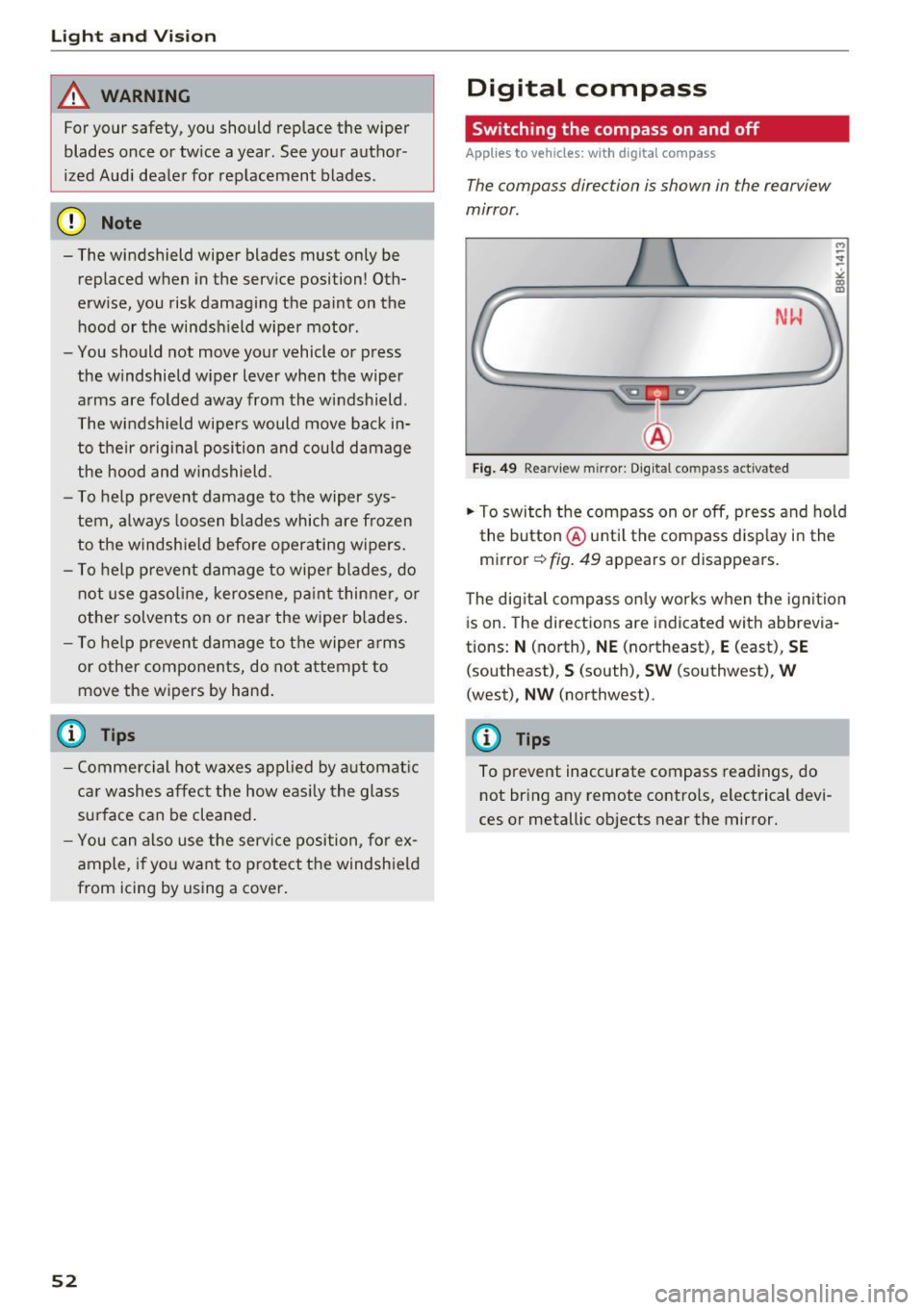
Fig. 49 Rearv iew m irror: Digital compass activated
.. To switch the compass on or off, press and hold
the button @until the compass display in the
mirror
c:!:> fig. 49 appears or disappears.
The digital compass only works when the ignition
is on. The directions are indicated with abbrevia
tions:
N (north), NE (northeast), E (east), SE
(southeast), S (south), SW (southwest), W
(west), NW (northwest).
(D Tips
To prevent inaccurate compass readings, do not bring any remote controls, electrical devi
ces or metallic objects near the mirror.
Page 57 of 264

,-1 N
0 1-CX)
rl I.Cl U"I
,-1 I.Cl ......
sudden braking or an accident, you would not
be able to brake or accelerate.
Front passenger's seat
Always move the front passenger seat into the
r e armos t position .
To avoid contact with t he a irbag while it is de
p loying, do not sit any closer to the inst rument
panel than necessary and a lways wear the three
point saf ety b elt prov id ed adjust ed correctly. W e
r ecommend that you ad just the passenger's seat
in the following manner:
• Bring the backrest up to an (almost) upright
position .
Do not ride with the s eat r eclin ed .
• Applies to vehicles with adjustable head re
strain ts: Adjust the head restraint so the upper
edge is as even as possible with the top of your
head . If that is not possible, try to adjust the
head restraint so that it is as close to th is posi
t ion as poss ible
q poge 57.
• Place your feet on the floor in front of the pas
senger's seat.
Front seats
Power seat adjustment
App lies to vehicles : with power adjustable seats
Fig. 51 Fro nt s eats: pow er se at ad just ment
Controls
@ -Adjusting the l umbar support *: press the
b utton in the corresponding position
q .&, .
@-Moving the se at up/down: p ress the but ton
up/dow n
q .&,.
@ -Mov ing the seat fo rwa rd/back: press the but
ton fo rwa rd/back
q .&, .
Seats and storag e
©-Adjust ing the backrest ang le: press the bu t
ton forward/back
~ ,& .
©-Raising/loweri ng* the head restra ints: press
t h e b utton up/down
q .&, .
@-Lengthening/shortening the upper th igh
support*: lift the handle. A spr ing moves the
front sea t cu shion fo rward
q ,.&. .
_& WARNING
-Never adjust the drive r's or front passen g
er's seat while the ve hicle is moving .
If you
do this while the veh icle is moving , you will
be out of position. Always adjust the d river's
or front passenger's seat when the vehicle is not moving.
- Be carefu l when adjust ing the seat height.
C heck to see t hat no one is in the way, or se
rious inju ry could result!
- Because the seats can be e lectrically adjust
ed w it h the ignition off or with the ignit ion
key removed, never leave children unatte nd
ed in the vehicle . Unsupe rvised use of the
electric seat ad justmen ts may cause ser ious
lnJ Ury.
- To reduce the risk of injury in the case of
sudden b raking or acc ident, front passen
ge rs must neve r ride i n a moving veh icle
wit h the backrest reclined. Safety belts and
the airbag system on ly o ffer maximum pro
tect ion when the bac krest is upr ight and the
safety belts a re prope rly positioned on the
body. The more the backrest is reclined, the
greater the risk of pe rsonal injury from an
incorrect seating position and improper ly
positioned safety belts .
55
Page 61 of 264

..... N
0 1-CX)
..... I.Cl U"I
..... I.Cl ......
In addition to the driver 's seat settings, you can
also store and access the exterior mirror adjust
ment settings* using the remote control key or
memory button.
Remote control key
Ap plies to vehi cles: with seat memory
To assign the driver's seat settings to the remote
control key when locking the vehicle, the function
must be act ivated in the radio or MMI*
• Se lect :
ICAR I fu nction button> S eat adjus t
ment > Driver's seat > Remot e control ke y
>
on .Or
• Select :
I CARI fu nct ion button> Car sy stem s*
contro l button > Vehicle setting s > Seats>
Driver' s seat > Remot e control ke y > On.
@ Tips
If you do not want ano th er d river's settings to
be assigned to the remote key, switch off the
memory function us ing t he r adio or MMI* or
the
I O N/O FF I button ~ page 59.
Memory buttons
Applies to vehicles: with seat memo ry
Fi g. 59 Drive r's doo r: m emory funct io n butto ns
The memo ry buttons are located in the dr iver's
door.
Switching the memory function on /off
• Press the ION/OF F I button to switch the memo
ry function on/off . The word
OFF lights up
when the memory function is sw itched off . Seat
profi les are ne ither stored no r recalled .
Seats and storag e
Storing a seat profile
• Press the ISE T! button. Whe n the word SET
lights up, the memory is ready to s tore set
tings.
• Press a memory button
dII or[ II) brief ly . A
tone conf irms that the settings were stored.
Acces sing a seat profile
• If the d river's doo r is open and the ignition is
sw itched off, press the memory button.
• If the driver's door is closed or the ignition is
switched on, press and hold the memory but
ton unti l the seat adjustment is complete.
A WARNING
- For safety reasons, the seat sett ing can on ly
be recalled when the vehicle is stationary
otherwise yo u risk hav ing an accident.
- In an emergency the recall proced ure can be
cancelled by pressing the
! ON/O FF I switch or
by tappi ng the memory buttons.
Ashtray
Fig. 60 Cen te r console : ash tray
Opening /closing
• To open the asht ray, s lide the cover up
~ fig . 60.
• To close the ashtray, press down on the cover .
Emptying the ashtray
• To remove the i nse rt, slide the latch to the
r igh t~
fig . 60 -arrow -.
• To ins tall the insert, press it down into the
mount.
59
Page 72 of 264

Warm and cold
1- 1 Switching recirculation mode on/off
In r ecirculation mode, the air inside the vehicle is
circu lated and filtered. This prevents the unfil
tered air outside the vehicle from entering the
ve hicl e interior. We recommend switching recir
culation mode on when driving through a tunnel
or when sitting in traffic¢.&,.
The
IAUTOI button or l
IAUTO I Switching automatic mode on
Automatic mode maintains a constant tempera
ture inside the vehicle. Air temperature, airflow
and air distribution are controlled automatically.
Adjusting the temperature
Temperatures between 60 °f (+16 °C) and 84 °f
( + 28 °C) can be set. Outside of this range,
LO or
HI will appear in the climate control system dis
p la y. At both of these settings, the climate con
trol system runs continuously at maximum cool
ing or heating power. There is no temperature
regulation.
~ Adjusting the airflow
You can adjust the airflow manually to suit your
needs. To have the airflow regulated automati
cally, press the
IAU TO I button.
~ Adjusting the air distribution
You can manually select the vents where the air
will flow. To have the air dist ribution regulated
automatically , press the
IAU TO I button.
QJ Adjusting seat heating*
Pressing the button switches the seat heating on
at the highest setting (level 3) . The LEDs indicate
the temperature level. To reduce the tempera
ture, press the button aga in. To switch the seat
heating off, press the button repeated ly until the
L ED turns off.
After 10 minutes, the seat heating automatically
switches from level 3 to level 2.
~ Adjusting seat ventilation*
Pressing the button switches the seat vent ilation
on at the highest setting (level 3). The LEDs indi-
70
cate the ventilation level. To reduce the venti la
tion level, press the button again. To switch the
seat ventilation off, press the button repeatedly
until the LED turns off.
I@ FRONT I Switch the defroster on/off
The windshield and side windows are defrosted
or cleared of condensation as quick ly as possible.
The maximum amount of air f lows mainly from
the vents below the windshield. Recirculation
mode switches off. The temperature should be
set to 72 °f (22 °C) or higher. The temperature is
controlled automatically.
The
! AU TOI button switches the defroster off.
lliil REAR I Switching rear window heater on/
off
The rear window heater only operates when the
engine is running. It switches off automatically
after a few m inutes, depending on the outside
temperature.
To prevent the rear window heater from switch
ing off automatica lly, press and hold the
loo REARI
button for more than 2 seconds. T his remains
stored until the ignition is sw itched off.
Air vents
You can open and close the center and rear air
vents using the thumbwheels. The levers adjust
the direction of the airflow from the vents.
In vehicles with a 3-zone deluxe automatic cli
mate contro l system*, you can adjust the air tem
perature in the rear by turning the thumbwheel
toward the red side to make it warmer or toward
the blue side to make it cooler.
A WARNING
- Do not use the rec irculat ion for extended
periods of time. The windows could fog up
since no fresh air can enter the vehicle . If
the windows fog up, press the air recircula
tion button again immediate ly to switch off
the air recirculat ion function or select de
frost.
- Individuals with reduced sensitiv it y to pain
or temperature could develop burns when
using the seat heating function. To reduce
-
Page 74 of 264

Driving
Driving
Steering
Manually adjustable steering wheel
The steering wheel position is fully adjustable up
and down and forward and back .
Fig. 75 Lever under the steering column
First, adjust the driver's seat correctly.
• Pull the lever¢
fig. 75 ¢ .&_ .
• Move the steering wheel to the desired posi
tion.
• Push the lever against the steering column un-
til it locks.
There must be at least 10 inches (25 cm) be tween your chest and the center of the steering
wheel. If you cannot sit more than 10 inches (25
cm) from the steering wheel, see if adaptive
equipment is available to help you reach the ped
als and increase the distance from the steering
wheel.
For detailed information on how to adjust the
driver's seat, see
¢page 55.
A WARNING
Improper use of steering wheel adjustment
and improper seating position can cause seri
ous personal injury.
- Adjust the steering wheel column only when
the vehicle is not moving to prevent loss of
vehicle control.
- Adjust the driver's seat or steering wheel so
that there is a minimum of 10 inches (25
cm) between your chest and the steering
wheel
¢page 113, fig. 118 . If you cannot
72
maintain this minimum distance, the airbag
system cannot protect you properly.
- If physical limitations prevent you from sit
ting 10 inches (25 cm) or more from the
steering wheel, check with your authorized
Audi dealer to see if adaptive equipment is
available.
- If the steering wheel is aligned with your
face, the supplemental driver's airbag can
not provide as much protection in an acci
dent. Always make sure that the steering
wheel is aligned with your chest.
- Always hold the steering wheel with your
hands at the 9 o'clock and 3 o'clock posi
tions to reduce the risk of personal injury if
the driver's airbag deploys.
- Never hold the steering wheel at the 12
o'clock position or with your hands inside
the steering wheel rim or on the steering
wheel hub. Holding the steering wheel the
wrong way can cause serious injuries to the
hands, arms and head if the driver's airbag
deploys.
Ignition lock
Starting engine with the key
Applies to vehicles: wit h ignition lock
The ignition is switched on and the engine start
ed with the ignition key .
Fig. 76 Ignition key
Starting the engine
• Insert the key into the ignition lock.
• Manual transmission: Fully depress the clutch
pedal and move the shift lever to the neutral
position. ..,.