2016 AUDI A3 CABRIOLET wheel
[x] Cancel search: wheelPage 75 of 272

Driving
(D Tips
-If the parking brake is set while the ignition
i s sw itched off, the
tG)a indicator light in the
b utton and in the instrument cluster dis
play - (USA models)/ . (Canada mod
e ls) will turn off after a certain amount of
time.
- If dr iver's door is opened while the ign ition
i s sw itched on, the pa rking brake sets a uto
ma tically. T his prevents unin tended ro lling
of the vehicle.
- Occasiona l noises when the parking brake is
set and re leased a re no rmal a nd a re not a
cause for con cer n.
- When the vehicle is par ked, the park ing
b rake goes thro ugh a se lf-test cycle at reg u
l a r int erva ls. A ny no is es asso ciated with th is
a re normal.
- If t here is a power fa ilure, the p arking bra ke
will not se t if i t is re le a se d, and it will not
r ele ase if it is set¢.&.. See an au thori zed
A udi dealer or au thorized A ud i Service Fa
cility for ass istance .
Parking
~ Press the brake pedal to stop the vehicle.
~ Pull the (D switch to set the park ing brake
¢ page 73, fig. 78 .
~ Place the selector lever in the P pos ition.
~ Turn the eng ine off ¢&_ .
~ Turn the steering whee l when pa rking on in
clin es so that the whee ls will roll into the curb
if the ve hicle starts mov ing .
A WARNING
-Always take the vehicle key with you when
leaving the vehicle, even fo r a short period
of time. This applies particularly when chi l
dren rema in in the veh icle . Otherwise ch il
dren could start the engine, release the
par kin g brake or operate elect rical eq uip
me nt such as powe r windows, which in
c reases the ris k of an acc ident.
- When the vehicle is locked, no one -particu
larly not children -sho uld rem ain i n the ve
hicle. Loc ked doors ma ke it more diffic ult
74
-
for emergency workers to get into the vehi
cle, which puts lives at risk.
Starting from a stop
The start assist function ensures that the park
ing broke is released automatically upon start
ing.
Stopping and sett ing the parking brake
~ Pull the (D swi tc h to set t he pa rking brake
¢ page 73, fig . 78 .
Starting and automatically releasing the
parking brake
Require ment: the d river 's doo r mus t be closed
and the driver 's sa fe ty belt must be fastened.
~ When you press the acce lerato r pedal, the
parking bra ke is a utomat ica lly re leased and
your veh icle begi ns to move.
When stopp ing at a traff ic signa l or stopping in
c ity traff ic, the par king b rake can be applied . The
vehicle does no t have to be held wi th the brake
pedal. The par king bra ke elim inates the ten dency
to creep when a se lector lever posi tion is engag
ed. As soon as you p ress the accelerator pedal,
the parking brake releases a utomat ica lly and the
vehicle starts to move.
Starting on slopes
When star ting on in cli nes, the hill start assist
prevents the vehicle from unintentiona lly rolling
b ack . The b raking force of t he parking brake is
not re leased unti l sufficient dr iv ing force has
been built up at the wheels.
@ Tips
F o r safety reasons, the parking brake is re
l eased a utomatica lly on ly when the driver 's
safety be lt is fastened and the driver's door is
l ocked.
Page 78 of 272

<( co ..... N
" N ..... 0 r--. > 00
-Never select R or P while driving, because
this increases the risk of an accident.
- Power is sti ll transmitted to the wheels
when the engine is running at idle. To pre
vent the vehicle from "creeping" , you must
keep your foot on the brake in all selector
lever positions (except P) when the engine is
runn ing . Otherwise, th is increases the r isk
of an accident.
- Do not inadvertently press the accelerator
peda l when the veh icle is stopped if a gear is
engaged . Otherwise the veh icle w ill start to
move immediately, even if the pa rking brake
is set . Th is cou ld res ult in a crash.
- Do not press the accelerator pedal when
changing the selector lever pos ition while
the vehicle is stationary and the engine is running .
- Never leave yo ur vehicle wi th t he engine
running wh ile in gear. If yo u must leave
your vehicle when the engine is running, set the parking brake and move the selector lev
er to the P position.
- Due to an accident risk, the selector lever
must be in the
P pos ition and the parking
brake must be set before opening the hood
and working on a running engine. Always
read and follow the applicable warnings
¢ page 188, Working in the engine com
partment .
(D Note
Never let the veh icle roll downhill with engi ne
off and the selector lever in the N position,
because this could damage the automatic
tra nsmission and cata lytic converter .
@ Tips
- Audi drive select: Sporty shifting character
i stics can be selected using the
D ynamic
d riving mode. 5 wi ll appea r in the in stru
ment cluster disp lay instead of D .
- If yo u accidentally select N while driv ing ,
take your foot off the accele rato r pedal im
med iate ly and w ait for the engine to slow
down to idle before se lecting Dor 5 .
Automa tic tr ansm iss ion
-If there is a power failure, the se lector lever
wi ll not move out of the P position. The
eme rgency re lease can be used if t his hap
pens
¢ page 83 .
Selector lever lock
Applies to : vehicles with automatic transmissions
The s elector l ever lock prevents you from sel ect
ing a gear occidentally , causing the veh icle to
roll .
Fig . 80 Sele cto r lever lock
To release the se lector lever lock:
.,. Switch on the ign ition .
•
lll 0 0
> a,
lock button .
Automatic shift lock (ASL)
The selector lever is locked in the P a nd N posi
t ions when the ignition is switched on. You must
press the brake pedal to select another position .
You must also press the interlock button if you
are moving from the P position. The following
message appears in the d isplay when the se lector
lever is in the P or N posit io n to rem ind the driv
er:
When station ary apply footbrake while select
ing
gear
T he automatic sh ift lock only funct ions w hen the
vehicle is stat ionary or at speeds below I mph
(2 km/h) . At higher speeds, the lock is au toma ti
ca lly deac tiva ted in the N pos it ion.
T he selector lever is not locked when shifting
quickly through N, for example from R to D . This
makes it possibl e to free the vehicle when it is ..,.
77
Page 80 of 272

<( co .... N ,.__
N .... 0 ,.__
> co
Stopping /p ark ing
If the selecto r lever is not in the P position when
you open the driver's door, the vehicle could rol l.
I n vehicles with a convenience key*, the message :
Shift to P, v eh icle can roll awa y. Doo rs can be
lo cked onl y i n P
appears. You will also hear a
warning tone.
~ Press and hold the brake pedal¢.&_ .
~ Set the parking brake.
~ Select the P selector lever pos ition.
Stopp ing on an incline
~ Always press the brake peda l to hold the vehi
cle in place and prevent it from "rolling back"
¢
A -Do not try to prevent the vehicle from
"ro lling back" when a gear is engaged by in
creasing the engine speed¢@) .
Starting on a n incline in vehicl es w ithout Hill
H old *
~ Set the parking brake.
~ With the driving gear se lected, press the acce l
erator pedal carefully. The parking brake re
leases automatically . Requirement: the driver's
door must be closed and the driver's safety belt
must be fastened .
Starting on an incline in vehicle s with Hill
Hold*
~ With the driving gear selected, remove your
foot from the brake pedal and press the accel
erator pedal¢
page 75, Hill hold.
Under certain c ircumstances, (such as driving in
the mountains or towing a trailer), it may be use
fu l to sw itch temporari ly to the manua l shift pro
g ram in orde r to adjust the gears to t he d riving
conditions by hand
¢ page 81 .
When parking on a level surface , simply place the
se lector lever in the P position. On inclines, acti
vate the parking b rake first and then move the
selecto r lever to the P position
¢ page 73. This
prevents the locking mechanism from being
l oaded too heavi ly and wi ll make it easier to
move the selector lever out of the P position.
Autom atic tran sm iss ion
A WARNING
- The vehicle can roll even when the eng ine is
sw itched off .
- Unintended vehicle movement can lead to
serious injuries .
- Never leave your veh icle w ith the engine
running while in gear. If you must leave
your veh icle when the engine is running, set
the park ing brake and move the selector lev
er to the P posit ion.
- Power is still transferred to the wheels when the engine is runn ing at idle. To pre
vent the vehicle from "creeping", yo u must
keep your foot on the b rake when the en
g ine is r unning and the selector lever is in
the D, Sor R position or " tip tronic" mode is
selected.
- Do not in adver ten tly press the accelerator
pedal when the vehicle is stationary. Other
wise the vehicle wi ll start to move immedi
ately, even if the parking brake is set. This
could result in a crash.
- Do not press the acce lerator pedal when
changing the se lector lever position while
the vehicle is stationary and the engine is running.
- Never engage the R or P selector level pos i
tions while dr iv ing.
It could cause a crash.
- Before driving down a steep slope, reduce your speed and sh ift into a lower gear w ith
"t i ptronic".
- Do not r ide the brakes or press the brake
pedal too often or too long when dr iving
downhill. Constant braking causes the brakes to overheat and substant ially re
duces bra king performance, increases b rak
ing d istance or causes comp lete failure of
the brake sys tem.
- I f you must stop on an incline, a lways hold
the vehicle in place w it h the foot brake or
p ar king brake to p reve nt i t from rolling
back.
- Never hold the vehicle on an incline with a
slipp ing clu tc h . The clutch opens automati
cally when it becomes too hot from the
overload . The
mJ indicator light turns on
79
Page 82 of 272
<( co ..... N
" N ..... 0 r--. > 00
Shifting manually (tiptronic mode)
Applies to: vehicles with automatic transmissions
The tiptronic allows the driver to shift the gears
manually.
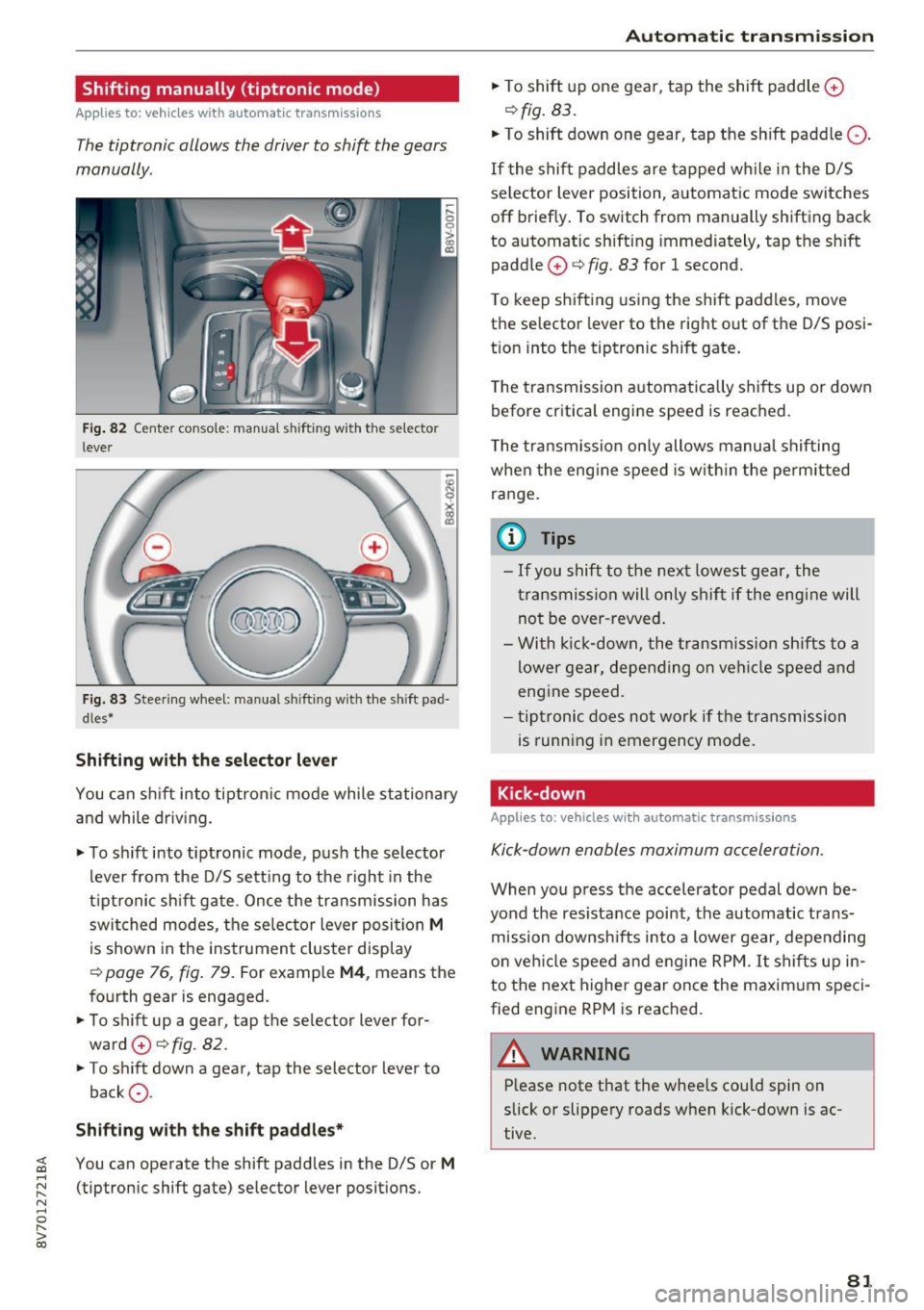
Fig . 82 Center conso le: manua l shifting with the selector
lever
Fig. 83 Steering wheel: manual sh ifting with the shift pad·
dles*
Shifting with th e select or lever
You can sh ift into tiptron ic mode while stationary
and while driv ing.
• To sh ift into tiptronic mode, push the selector
lever from the D/S sett ing to the right in the
tiptronic shift gate. Once the transmission has
switched modes, the se lector lever posi tion
M
is shown in the instrument cluster display
r:::>page 76, fig. 79. For example M4, means the
fourth gear is engaged.
• To shift up a gear, tap the selector lever for
ward
0 r:::> fig. 82.
• To shift down a gear, tap the selector lever to
back
a .
Shifting with the sh ift padd le s*
You can operate the shift padd les in the D/S or M
(tiptronic shift gate) selector lever positions.
Aut oma tic tr ansm iss ion
• To shift up one gear, tap the shift paddle 0
r:::> fig. 83.
• To shift down one gear, tap the shift paddle Q.
If the shift paddles are tapped while in the D/S
selector lever position, automatic mode switches
off briefly. To switch from manually shifting back
to automatic shifting immed iately, tap the sh ift
paddle
0 ¢ fig. 83 for 1 second.
T o keep shifting using the shift padd les, move
the selector lever to the rig ht out of the D/S posi
t ion into the tiptronic shift gate .
T he transmission automatically shifts up or down
before critica l engine speed is reached.
T he transmission only allows manua l shifting
whe n the eng ine speed is w it hi n the pe rmitted
ra nge.
(0 Tips
- If you shift to the next lowest gear, the
transmission will only shift if the eng ine will
not be over -revved .
- With k ick-down, the t ransmiss ion shifts to a
lower gear, depending on vehi cle speed and
engine speed.
- tiptronic does not work if the transmission
is running in emergency mode.
Kick-down
Applies to: vehicles with automatic transmissions
Kick-down enables maximum acceleration.
When you press the accelerator pedal down be
yond the res istance point, the automatic trans
mission downsh ifts into a lower gear, depending
o n veh icle speed and engine RPM.
It shifts up in
to the next higher gear once the maxim um speci
fied eng ine RPM is reached.
A WARNING ~
P lease note that the wheels cou ld spin on
slick or slippery roads when kick-down is ac
tive.
-
81
Page 83 of 272

Automatic transmissio n
Launch Control-Program
Applies to: vehicles with Launch Control
The Launch Control Program enables maximum
acceleration .
Requirement: the engine must be at operating
temperature and the steer ing wheel must not be
turned .
.,. With the engine runn ing, press the
i ,; OFF ! but
ton br iefly one time
l) .
"' Pull the selector lever back out of the 0/5 posi
tion briefly to select the 5 posit ion, or press it
toward the rig ht into the tiptronic pos ition or
select the
Dynami c driving mode in d rive se
lect*
~ page 106.
"' Press the b rake pedal firmly with your left foot
and hold it all the way down for at least 1 sec
ond.
"' At the same time, press the gas pedal a ll the
way down w ith your right foot unti l the engine
reaches and stays at a high RPM level.
"' Remove your left foot from the brake.
_.&. WARNING
-Always adapt you r driv ing to the traffic flow .
- Only use Launch Control when road and traf-
fic cond itions allow it and other dr ivers will
not be endangered or impacted by your d riv
ing and the vehicle's a cce le ration.
- Please note that the dr ive wheels can sp in
and the vehicle can break away when sport
mode is switched on, especia lly when the
road is s lippery.
- Once the vehi cle has sta rted moving, press
the
l .!'3 OFF ! button briefly to tu rn the sport
mode off.
(D Tips
- The t ransmiss ion temperature may increase
significantly after using t he launch control
program.
If tha t happens, the p rogram may
l ) In vehicles with a driver info rma tion system, an ESC light
i n the in st rument cl uste r stays on cont inuous ly and t he
message Sta bilization co ntrol (ES C): sport . Warning! Re
st ricted stab il ity app ears temp orar ily .
82
not be avai lab le for a few minutes. It will be
available again after a coo l-down period.
- When accelerating using the launch contro l
program, all vehicle parts are s ubject to
heavy loads. This can lead to increased
wear .
Emergency mode
App lies to: vehicles with auto matic transmissions
In the event of a system malfunction, there is an
emergency program.
If all of the selector lever positions are hig hlight
ed with a light background in the instrument
cluster disp lay, there is a system malfunction and
the 5 tronic transmission is running in the emer
gency program. The veh icle can still be driven in
emergency mode, but only with reduced speed
and not in all gears . In some cases, the vehicle
cannot dri ve in rever se .
(D Note
If the transmission runs in emergency mode,
drive to an authorized A udi dealer or author
ized Audi Se rvice Facility immed iate ly to have
the malfunct ion corrected.
Transmission malfunction
• Tran smi ssion malfun ction ! Pl ea se stop the
vehicle and sele ct P
There is a ma lfunction in the transm ission . Park
the ve hicle secure ly and do not cont inue driving.
See an author ized Audi dealer or authorized A udi
Se rvice Facility for assistance.
• Tran smi ssion overheating! Pleas e stop the
v e hicle!
The transmission is too hot and can become dam
aged . Stop and let the transmiss ion cool w ith the
engine r unning (at idle) in the P se lector lever po
s it ion. Then the ind icator light and the message ..,.
Page 88 of 272

<( co .... N ,.__
N .... 0 ,.__
> co
Before you actually tow your trailer, practice
turning, stopping and backing up in an area away
from traff ic. Keep practicing until you have be
come completely familiar with the way your vehi
cle-trailer combination behaves and responds.
Backing up is difficult and requires practice.
Backing up with a trailer generally requires steer
ing action opposite to that when backing up your
vehicle without a trailer.
Maintain a greater distance between your vehicle
and the one in front of you. You wi ll need more
room to stop. To compensate for the trailer, you
will need a larger than normal turning radius.
When passing, remember that you cannot accel
erate as fast as you norma lly would because of
the added load. Make sure you have enough room
to pass. After passing, allow plenty of room for
your trailer before changing lanes again.
Avoid jerky starts, sharp turns or rap id lane
changes.
@ Tips
- Do not tow a trailer during the break-in peri
od of your vehicle.
- If you tow a trailer, your Audi may require
more frequent maintenance due to the ex
tra load
<=> page 2 53.
Parking on a slope
Do not pork on a slope with a trailer. If it cannot
be avoided, do so only ofter doing the following:
When parking:
.. Apply the foot brake .
.. Have someone pla ce chocks under both the ve
hicle and the trailer wheels .
.. With chocks in place, slowly release the brakes
until the wheel chocks absorb the load .
.. Turn the wheels towards the curb .
.. Apply the parking brake .
.. Select the P selector lever position.
When restarting after parking :
.. Apply the foot brake.
.. Start the engine .
.. Select the D/S selector lever position.
Trailer mode
.. Release the parking brake and slowly pull out
and away from the wheel chocks.
.. Stop and have someone retrieve the whee l
chocks.
{!) Tips
If you move the selector lever of the automat
ic transmission to P before applying the park
ing brake and before blocking the wheels, you
may have to use more force later to move the
lever out of the P posit ion.
87
Page 94 of 272

Switching adaptive crui se control on
"' Pull the lever toward you into position @
¢
fig. 91. A CC: s tandby appea rs in the instru
ment cluster disp lay .
Saving the speed and activating regulati on
"'T o save the c urrent speed , press the ISETI
¢ fig. 91 button . The stored speed is shown in
t h e tachomete r LED line @and appears briefly
in the information line ®¢
fig. 92 .
"' To activate the regulation whi le stationary, you
must press the brake pedal.
Sw itching adaptiv e cruise control off
"' Push the lever away from you into position @
until it clicks i nto place ¢
fig. 91 . The message
AC C: off appears.
The stored speed in the LED line is e rased.
@ Indicato r lights
II -adaptive cruise control is switched on. No
objects are detected ahead. The stored speed is
maintained.
• -An object a head was detected . The adaptive
cruise control system regulates the speed and
d istance to the object ahead and brakes/acce ler
ates automatica lly.
fij -adaptive cru ise control is switched on. An
object ahead was detected. Your vehicle remains
stopped and w ill not start driving automatica lly.
• -T he automatic bra king is no t enough to
maintain a sufficient distance to a n object ahead.
You must intervene ¢
page 96, Request for
driver intervention.
© Instrument cluster display
I f adaptive cruise control is not shown in the in
s trument cluster disp lay, yo u can call it up using
the mu ltifunction steering wheel b uttons
¢ page 24.
Based on the g raph ics in the d isp lay, you can de
termine if the system is m ainta ining a distance to
;;!; a vehicle ahead and what that distance to this ve-....
~ hide is: N ....
R No vehi cle -No object ahead was detected.
> 00
Assist
White vehicl e -An object ahead was de tected .
Red vehicl e -Request for the dr iver to take action
¢page 96.
Both
arrows on t he scal e@ indicate the d istance
to the object ahead . No arrow appears when the
vehicle is on an open road and t here is no object
ahead. If an object is detec ted ahead, the a rrow
moves on the sca le.
T he green zone o n the scale indicates the store
distance. For informat ion on changing the dis
t a nce, refer to ¢
page 95. If the dis tance se
l ected is exceeded or not reached, the arrow
moves into the red zone on the scale.
A WARNING
- Using adaptive cruise control incorrectly can
cause collisions, other accidents and ser ious
in ju ries.
- If you press the
!SET ! button w hen driving at
speeds be low 20 mph (30 km/h), the vehi
cle acce lerates automatically up to 20 mph
(30 km/h), wh ich is the minimum speed
that can be set.
{!) Tips
- If you switch the ignit ion or the adaptive
cruise control system off, the set speed is
erased for safety reason.
- The Elect ronic Stabilization Control (ESC)
and Anti-S lip Regulat ion (ASR) both sw itch
on when the adaptive cruise control is
switched on . ESC and ASR ca nnot be switch
ed off when adapt ive cruise control is
switched on.
- With the adaptive cruise control act ivated
t he ESC spo rt mode cannot be activated.
93
Page 99 of 272

<( co .... N r--N .... 0 r--> co
-Please note that the sensor does not always
detect all objects . This increases the risk of
a collision.
- Pre sense front does not react to people or
animals or objects that are crossing the ve
hicle's path or are difficult to detect
¢ page 91 .
-Reflective objects such as guard rails or the
entrance to a tunnel, heavy rain and ice can
affect the function of the radar sensor and
the system's ability to detect a collision risk.
- Lack of attention can lead to collisions, oth
er accidents and serious injuries. pre sense
front is an assistance system and cannot
prevent a collision by itself. The driver must
always intervene . The driver is always re
sponsible for braking at the correct time.
- Always pay attention to traffic , even when
pre sense front is switched on. Always be
ready to intervene and take over complete
control of the vehicle whenever it is neces
sary. Always follow traffic laws regarding
maintaining a safe distance between your
vehicle and vehicles ahead.
- pre sense front works within certain limits
and cannot react to situations that are out
side of the system limits, such as when ap
proaching a stationary vehicle or a station
ary obstacle (the end of a traffic jam or ave
hicle that has broken down).
- Always keep in mind that the radar sensor
for pre sense front only works within de
fined detection zones , which means other
vehicles may not always be detected cor
rectly.
- The function and range of the radar sensor
can be impaired by rain, snow and heavy
mist. Vehicles ahead may not be detected
right away, or not detected at all.
(1) Note
The sensor can be displaced by impacts or
damage to the bumper, wheel housing and
underbody. Pre sense front can be impaired
by this. Have an authorized Audi dea ler or au
thorized Audi Service Facility check their func
tion .
Assist
{!) Tips
-You can cancel the braking with increasing
force that is initiated by the system by brak
ing yourself, by accelerating noticeably or
by swerving.
- For information on driver messages about
pre sense, refer to
¢ page 100.
- Keep in mind that pre sense front can brake
unexpectedly. Always secure any cargo or
objects that you are transporting to reduce
the risk of damage or injury.
- Certain pre sense front functions switch off
when ESC is switched off (sport mode) or
when driving in reverse.
- The pre sense front functions are not availa
ble if there is a malfunction in the adaptive
cruise control* system
Q page 96 or
Q page 100 .
-Keep in mind that pre sense front can brake
abruptly . Always secure cargo or objects
that you transport to reduce the risk of
damage or injury.
Settings in the Infotainment system
Appl ies to: vehicles with Audi pre sense front or Audi adaptive
cruise contro l
.,. In the MMI, select: the I MENU I button >Ca r>
Systems*
control button > Driver assistance >
Audi pre sense.
Switching the system on and off
Audi pre sense (Syste m): if the system is switch
ed off , it automatically switches on once the igni
tion is switched on again .
System -Switch Audi pre sense On-Off. With
th is, you can switch the prewarning and the brak
ing intervention from Audi pre sense on or off .
Early warning -The distance and approach warn
ings can be switched
On/Off .
(D Tips
-If you restrict or switch off the ESC, the pre
sense also switches itse lf off ¢
page 117 .
-Switch the pre sense off when you a re load
ing the vehicle onto a vehicle carrier, train,
ship or other type of transportation. This ..,.
99