2016 AUDI A3 CABRIOLET service
[x] Cancel search: servicePage 21 of 272

Instruments and indicator lights
Audi dealer or authorized Audi Service Facility im
m ediately to have the malfunction corrected.
~ i. Engine oil level (min .)
Ill Check oil level
You may continue driving for the time being.
Check the engine oil level as soon as possible
r::!) page 191.
-If the engine oil level is too low, add engine oil
¢page 193 .
-If the engine oil level is correct and the indica
tor light st ill turns on, drive at low engine
speed to an authorized Audi dealer or author
ized Audi Service Facility.
~ .... Engine oil sensor
• Oil level sensor: system fault!
The sensor to check the engine oil level has
failed. Drive to an authorized Audi dealer or au
thorized Audi Service Facility immediately to have
the malfunction corrected.
(D Note
Refer to the description in the Owner's Man
ual ¢
page 193, Checking the engine oil level
and adding oil.
Bil Tank system
D Please refuel
If the indicator light turns first turns on and this
message appears, the tank contains the follow
ing amount of fuel :
- Front wheel drive: approximately 1.8 gallons (7
liters)
- All wheel drive: approximately 2.2 gallons (8.S
liters)
D Please refuel immediately
If the indicator light turns on the message ap
pears, the fuel tank is almost empty . Refuel the
vehicle immediate ly.
D Fuel tank malfunction! Please contact Serv
ice
20
If the indicator light turns on and this message
appears, there is a malfunction in the tank sys
tem.
Drive to an authorized Audi dealer or authorized
Audi Service Facility immediately to have the
malfunction corrected .
@ For the sake of the environment
Fuel should never enter the sewer system or
come into contact with the ground.
(D Tips
More information on refueling is available on
page
¢page 185.
.. Washer fluid level
C·w$ Please add washer fluid
Fill the washer fluid for the windshield washer
system and the headlight washer system* when
the ignition is switched off¢
page 202.
• Windshield wipers
m Windshield wiper: system fault!
There is a malfunction with the windsh ield wip
ers .
Drive to an authorized Audi dealer or authorized
Audi Service Facility immediate ly to have the
malfunction corrected .
~ Defective light bulb warning
Applies to: vehicles with driver info rmation system
If the J:i indicator light turns on, a bulb has
failed . The message indicates the location of the
bulb.
Replace the bulb immediately.
Vehicle lights: system fault!
There is a malfunction in the headlights or the
light switch. Drive to an authori zed Audi dealer or
authorized Aud i Service Facility immediately to
have the malfunction corrected .
...
Page 22 of 272

<( co .... N ,.__
N .... 0 ,.__
> co
A WARNING 1=
- Light bu lbs are under pressu re and can ex-
plode when bulbs are replaced, which in
c reases the risk of injury.
- With gas-disc harge lamps" (xe no n head
lights), the hig h-voltage component mus t
be hand led ap propr iately. Otherw ise, t her e
is a r is k of fatal in jury.
-
~(i) Dynamic Headlight range control system
App lies to: vehicles with Xenon headlights
El Headlight range control : sy stem fault!
There is a malfunction in the dy namic headlight
range cont rol sys tem, w hich may cause glare for
o ther driv ers .
Drive to an authorized Aud i dea ler or a uthorized
Aud i Service Fac ility immediately to have t he
mal funct ion corrected .
~O Audi adaptive light
Applies to: vehicles with Audi adaptive light
m;J Audi adaptive light: system fault!
There is a malfunction in the adapt ive lights. The
h eadlights still f unction .
Drive to an autho rized Aud i dea le r or a uthorized
Aud i Service Faci lity immediately to have the
malfunct ion corrected.
~ D Light/rain sensor
App lies to: vehicles with light/rain sensor
II Automatic headlights: system fault!
El Automatic wipers: system fault!
The ligh t/ra in senso r is ma lfunct io ni ng.
The low beams remain swi tched on at all times
fo r safety reasons when t he lig ht switch i s in the
AUTO posi tion. You can con tinue to tur n t he
lights on and
off usi ng the light swi tch . You can
still control a ll wiper functions that are inde
pendent of the ra in sensor .
Dr ive to an a utho riz e d Aud i de aler o r au thor ized
Aud i Service Faci lity immediately to have t he
malfunct ion corrected.
Instruments and ind icator lights
Q Adaptive dampers
Applies to: vehicles with Audi drive se lect
II Su spension : system fault!
The re is an adapt ive damper malfunction .
Drive to an authorized A udi dealer or authorized
A udi Se rvice Facility immed iate ly to have the
malfunction corrected.
¢i ¢ Turn signals
If the . or. in dicator light blinks, a tur n sig
nal is tu rned on .
If both indicato r ligh ts a re blink
i ng, t he e mergency flas hers are on .
In an ind icator light blinks tw ice as fast as usual
t h en a bli nke r bulb has fa iled. Carefu lly drive to
an a uth o rize d Aud i deale r or a uth ori zed Aud i
Se rvice Facility i mmed iate ly to have the ma lfu nc
t ion co rre cte d.
(D Tips
Fo r mor e information o n the turn signa ls, re
fer to
q page 4 5 .
On-Board Diagnostic
system (OBD)
System indicator light (MIL)
The system indicato r ligh t (M IL) ¢4 in t he instru
me nt cl uster is part of the O n Boar d D iagnostic
System (O BD II).
T he warn ing/i nd icator lig ht tu rns on when the ig
ni tion is sw itched on and tu rns
off once the en
gine is started a nd is r unning in idle at a s tab le
s p eed. This in dica tes t hat the MIL is f un ct io ning
correc tly.
If the light does not turn off after starting the
engine
o r tur ns o n while d riv in g, this may ind i
ca te there is a m alfunction in the en gine . If the
i ndica tor t urns o n, the cat alytic conve rter m ay be
damaged.
Dr ive
with reduced engine performance (avo id
hig h speeds for exte nded per io d s of t ime and/o r .,.
21
Page 23 of 272

Instruments and indicator lights
fast acceleration) and have the malfunction cor
rected . See an authorized Audi dealer or
author ized Audi Service Facility .
The indica tor may turn on if the electronic speed
limiter is fau lty. For additional information, refer
to
¢ page 88, Electronic speed limiter .
The MIL may also turn on if the fuel filler cap is
not closed correctly
¢ page 186.
On-Board Diagnostics
F ig. 6 Location of Data Link Connecto r (DLC)
On-Board Diagnostics monitors the components
of yo ur emission control system. Each monitored
component in your eng ine system has been as
signed a code. In case of a ma lfunction, the com
ponent wi ll be identified and the fault stored as a
code in the control module memory.
The MIL light may also ill uminate if there is a
leak in the on -board fuel vapor recovery system.
If the light illuminates after a refuelling, stop
the vehicle and make sure the fuel filler cap is
properly closed¢
page 186.
In order to make an accurate diagnosis, the stor
ed data can on ly be displayed using specia l diag
nostic eq uipment (generic scan tool for OBD).
I n order to connect the specia l diagnostic equip
ment, push the plug into the Data Link Connector
(DLC). The DLC is located to the right of the hood
release ¢
fig. 6.
Your authorized Audi dealer or a qualified servi ce
station can interpret the code and perform the
necessary repair.
22
A WARNING
Do not use t he diagnostic connector for per
sonal use. Incorrect usage can cause malfunc
tions, which can increase the risk
of a colli
sion!
Page 24 of 272

<( co ..... N
" N ..... 0 r--. > 00
Driver information
system
Overview
Applies to: ve hicles with driver information system
Fig. 7 Instrument cluster : Driver Information System (ex
ample)
Data is automatically recorded, processed and
displayed in the driver information system . Set·
tings for special equipment can be adjusted in
the MMI. Select the
I MENU I button >Car > Sys
tems*
control button.
Introduction
The driver information system is controlled
through the multifunction steering wheel
¢ page 24, fig . 8 .
The Driver Information System ¢ fig. 7 contains
the following information:
- @ Tab (register)
- @ Vehicle information
-© Status line (selector lever position, outside
temperat ure¢ page
11)
-@ On-board computer D , fJ
-© Odometer and trip odometer or on-board
computer
D
The following functions are possible, depending
on vehicle equipment:
Driver in forma tion system
@ ®
First tab ~ Vehicle functions:
On-boa rd computer, time, date
¢page24
Efficiency program
¢page25
Digital speedometer
Assist
Aud i adaptive cruise control*
¢page 90
Audi active lane ass ist*
¢ page 100
Reduced display
Second
ti/ & Messages and indicator lights
tab
c,,,d Service reminder indicator
¢ page202
Third tab fl I I Audio/ I'>) Radio
Fourth ,.,.
Telephone*
tab
Fifth tab
$I~ Navigation*
The second tab is only visible if at least one indi
cator light or message is shown or if that system
is switched on.
Display
In the driver information system you will see:
Radio station or CD
Time and date
¢page 10
Odometer, trip odomete r ¢page 11
Outside air temperature ¢page 11
Service interval display ¢page202
Indicator lights and messages ¢ page 12
Digital speedometer
Cruise control system
¢page BB
Speed warning <=:>page BB
Selector lever positions ¢ page 76
On-board computer display ¢page 23
On-board computer display
The on-board computer display monitors the dif
ferent memory levels :
- Short-term memory (on-board computer 1)
23
Page 28 of 272

<( co .... N r--N .... 0 r--> co
Opening and closing
Central locking
Key set
Fig. 13 Your vehicle key set
The key set contains two remote control keys or
conven ience keys*. To fold the key out and back
in place, press the release button ¢
fig. 13
-arrow-.
Remote control key or convenience key
The convenience key* is a remote control key with
special functions ¢
page 30 and¢ page 70.
With the remote control key, you can lock and
unlock the vehicle centrally and start the engine.
Number of keys
You can check the number of keys ass igned to
your vehicle in the MMI. This allows you to make
sure you have received all of the keys when you
purchase a used vehicle . Select: the
I MENU I but
ton
> Car > Systems* control button > Program
med keys.
Replacing a key
If a key is lost, see an authorized Audi dealer or
authorized Audi Service Facility. Have
this key de
activated.
It is important to bring all keys with
you . If a key is lost, you should report it to your
insurance company.
Immobilizer
The immobilizer prevents unauthorized use of
the vehicle . The vehicle may not start if another
radio device such as a key for another vehicle or a
transponder is located on the key ring.
Opening and closing
Data in the remote control key or
convenience key
While driving, service and maintenance-relevant
data is continuous ly stored on your remote con
trol key or convenience key*. Your Audi service advisor can read out this data and tell you about
the work your vehicle needs.
A WARNING
--- Always take the vehicle key with you when
leaving the vehicle, even for a sho rt period
of tim e. This applies particularly when chil
dren remain in the vehicle. Otherwise the
children could start the engine o r operate
electrica l equipment such as power win
dows .
- Do not remove the key from the ignition
lock until the veh icle has come to a com
p lete stop. Otherwise, the steering lock
could engage suddenly and increase the risk
of an acc ident.
(D Tips
The operation of the remote control key can
be temporarily disrupted by interference from
transmitters in the vicinity of the vehicle
working in the same frequency range (for ex
ample, a cell phone or rad io equipment) .
Central locking system description
You can lock and unlock the vehicle centrally.
T here are different ways, depending on vehicle
equipment:
- Remote control key¢
page 29,
-Lock cylinder on the driver's door ¢page 32,
or
- Sensors in the front door handles*
¢page 30,
- Central locking switch inside¢ page 31.
Selective unlocking
The doors and luggage compartment lid will lock
when they close. You can set in the MMI whether
only the dr iver 's door or the entire vehicle should
unlock when un locking
¢ page 31. .,..
27
Page 29 of 272

Opening and clo sin g
Autom atic locking (Auto L ock )
The Auto Lock funct ion locks all doors and the
luggage compartment lid once the speed has ex
ceeded approximately 9 mph (15 km/h).
The car is unlocked again once the ign ition key is
removed. In addition, the vehicle can be un locked
if the opening function in the power locking sys
tem switch is used or one of the door handles is
pu lled .
I n t he event of a crash with airbag deployment,
the doors automat ica lly unlock to allow access to
the v ehicle .
Anti-theft alarm system*
If t he anti- theft alarm system detects a vehicle
b reak-in, a udio and v isua l warning signals are
tr iggered.
The ant i-theft alarm system turns on automati
cally when you lock the vehicle .
It deactivates
when unlocking using the remote con trol key or
by to uch ing the sensor on the door handle (con
venience key) .
To sw itch the a la rm off, press the@ button on
the remote con trol key or convenience key or
sw itch the ignition on. The a la rm also stops auto
matica lly after a certain amou nt of time.
Turn signals
The turn s ignals flash tw ice when you un lock the
ve hicl e and flash once when you lock the vehicle .
I f the blinking continues, one of the doors or the
luggage compartment lid/hood is not closed or
the ignition is still switc hed on .
Unintentionall y locking your self out
There are safeguard s under the fo llow ing cond i
tions, which prevent you from lock ing your re
mote control key in the ve hicle:
- The vehicle will not lock when the driver 's door
is open
c> page 31.
- When locking using the~ button in the centra l
locking switch, the vehicle will not lock if a door
is open
c> page 31 .
-On vehicles with a convenience key*, the lug
gage compartment lid un locks aga in after do s-
28
ing if the most recent ly used key is in the lug
gage compartment.
Do no t lock your ve hicle w ith the remote cont rol
key or convenience key* until all doors and the
l uggage compartment li d are closed. This helps
to prevent you from locking yourself out acciden
ta lly.
{i) Tips
- Do not leave va luables unattended i n the ve
hicle. A locked ve hicle is not a safe!
- If the LED in the upper edge of the drive r's
door turns on for about 30 seconds after
the vehicle is locked, there is a malfunction
in the power locking or the anti-theft a larm
system* . Have the problem corrected by an
authorized Audi dealer or authorized Aud i
Service Facility.
LED and batteries in the remote control key
Fig. 14 Remote control key : LED
Fig. 15 Remote con tro l key : o penin g the cover
LED in the remote control ke y
The LED c> fig. 14 info rms you of the remote con
tro l key funct ion.
.,. If you press a button briefly, the LED blinks
once.
Page 30 of 272
<( co ..... N
" N ..... 0 r--. > 00
.. If you press a button longer (convenience open
ing*), the LED blinks several times .
.. If the LED does not blink, the remote control
key battery is dead. The message
Ill Please
change key battery
may also appear in the in
strument cluster display . Replace the battery .
Replacing the remote control key battery
.. Pry the cover @off of the key (Dusing a coin
¢fig . 15 .
.,. Insert the new battery with the "+" facing up .
.. Press the cover back onto the key until it clicks
into place .
We recommend having the battery replaced by
an authorized Audi dealer or authorized Audi
Service Facility .
@ For the sake of the environment
Dead batteries must be disposed of using
methods that will not harm the env ironment.
Do not dispose of them in household trash .
@ Tips
The replacement battery must meet the same
specifications as the orig inal battery.
Remote control key synchronization
The remote control key must be synchronized if
the vehicle does not lock and unlock with the re
mote control.
.. Press the remote control key button~-
1> Insert the key in the driver's door lock within 30
seconds .
.,. Press the~ button or~ button .
Open ing and closing
Unlocking/locking by remote control
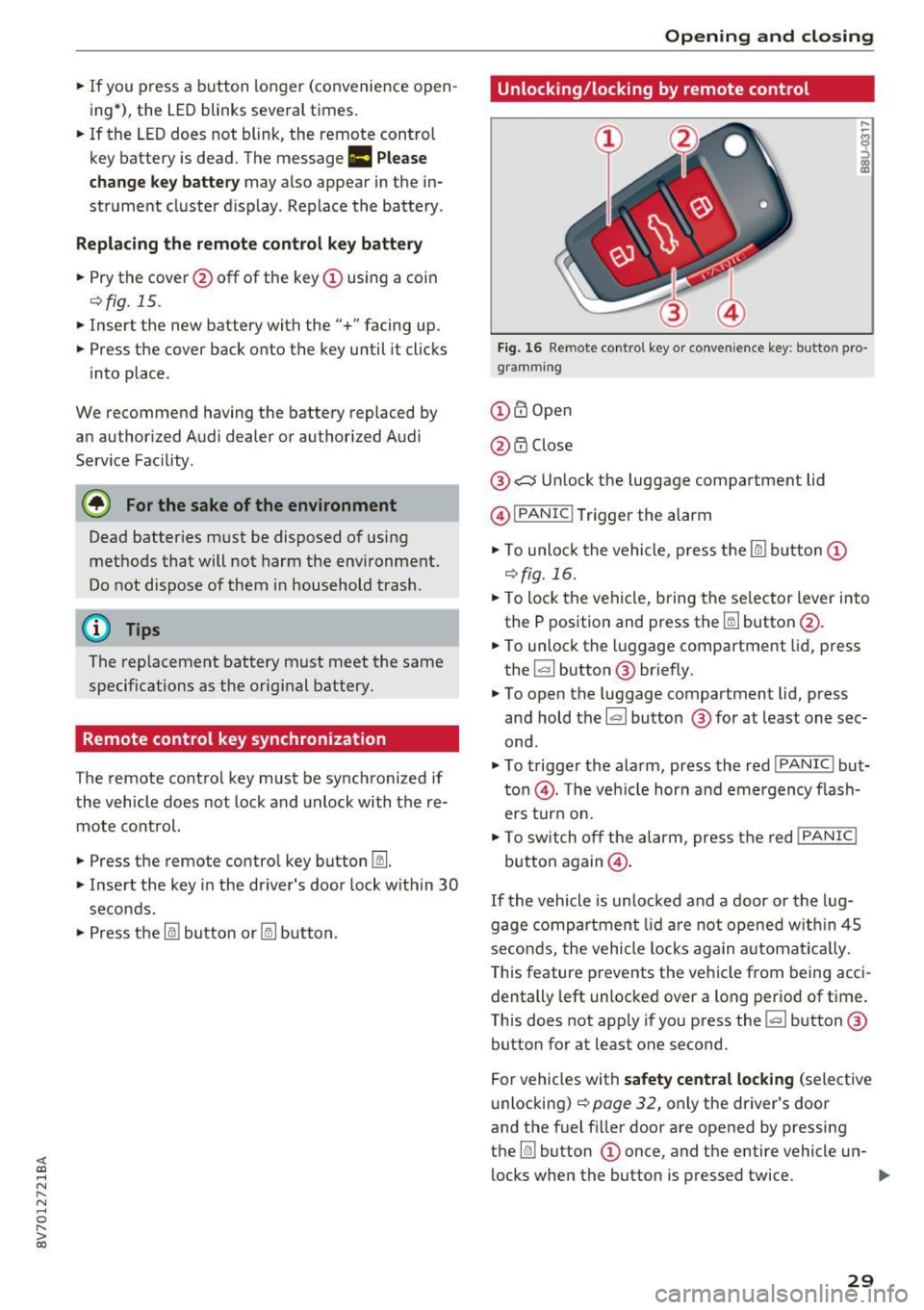
Fig. 16 Remote control key or conve nien ce key : button pro
gramm ing
(D m Open
@ i'.D Close
® .:::::$Unlock the luggage compartment lid
@ I
PANIC ! Trigger the alarm
... To unloc k the vehicle , press the~ but ton (D
c::>fig.16 .
.. To lock the vehicle, bring the selector lever into
the P position and press the~ button @.
.. To unlock the luggage compartment lid, press
the ~ button ® briefly.
.,. To open the luggage compartment lid, press
and hold the~ but ton ® for at least one sec
ond .
... To trigger the alarm, press the red I
PANIC ! but
ton @. T he veh icle horn and emergency flash
ers turn on.
.. To switch off the alarm, press the red
!PANIC I
button again@.
If the vehicle is unlocked and a door or the lug
gage compartment lid are not opened w ithin 45
seconds, the vehicle locks again automat ically.
This feature prevents the vehicle from being acci
dentally left unlocked over a long period of time.
This does not apply if you press the~ button ®
button for at least one second.
For vehicles with
safety central locking (selective
unlocking)
c::> page 32, only the driver's door
and the fuel f iller door are opened by pressing
the ~ button (D once, and the entire vehicle un-
locks when the button is pressed twice .
Ill>
29
Page 38 of 272

<( co ..... N
" N ..... 0 r--. > 00
distance from the power top to reduce the
risk of injury.
- When operating the power top, visibility to
the rear is limited. Avoid operating the top
while driving in reverse .
(D Note
- To prevent damage to the power top:
- do not store any objects in the power top
storage compartment.
- make sure there is enough space above
the vehicle when opening or closing the
power top.
- To reduce the risk of damage, make sure
there are no sensitive objects in the power
top storage compartment's range of mo
tion.
(D Tips
- To prevent the battery from draining unnec
essarily, do not open or close the power top
repeatedly when the engine is switched off.
- A message will appear in the instrument cluster if there is a malfunction in the power
top
~ page 38.
- The power top can also be operated manual ly temporari ly if there is a malfunction
~ page 40, Power top emergency opera
tion.
An authori zed A udi dealer or au thor
i zed Audi Service Facility should diag nose
and correct the cause of the malfunction as
soon as possib le .
- If the vehicle is parked with the power top open, the vehicle interior is not protected
from damaging weather or unauthorized ac
cess. Lock any items you leave behind in the
luggage compartment. Close the power top
before leaving the vehicle.
- The side windows automat ically lower
slightly when opening or closing the power
top.
P owe r top
Power top convenience opening and closing
Fig. 26 Turning the key to open and close
Con ven ien ce opening with the dri ver door
lock
g: 0
0
>
18
.,. Turn the key once in the driver door lock to the
open ing position @ Q
fig. 26.
.,. Turn the key to the opening position again
within tw o seconds and hold it there unti l the
power top opens comple tely.
Conven ienc e closing with the driver door lock
.,. Turn the key once in the driver door lock to the
clos ing pos ition @Q
fig. 26.
.,. Turn the key to the closing position again w ith
in two second s
and ho ld it there un til the pow
er top or a ll the windows close comp letely .
Convenience closing with the convenience
ke y*
.,. Touch the senso r* in one of the door hand les.
Do not place your hand in the door handle when
doing this.
.,. Touch this sensor * a second time
w ith in tw o
sec ond s
and keep touching it unt il the power
top or a ll windows are closed completely. Do
not place your hand in the door handle when
doing this .
The opening or closing process will stop
imm ed i
ate ly
if you re lease the key or stop touching the
sensor*.
A WARNING
Read and follow the important safety precau
tions
~ .&. in Opening and closing the power
top on page 36 .
37