Page 5 of 100
Downloaded from www.Manualslib.com manuals search engine 12/29/2015Bedienungsanleitung < Service & Zubehör < Volkswagen Deutschland
2/32
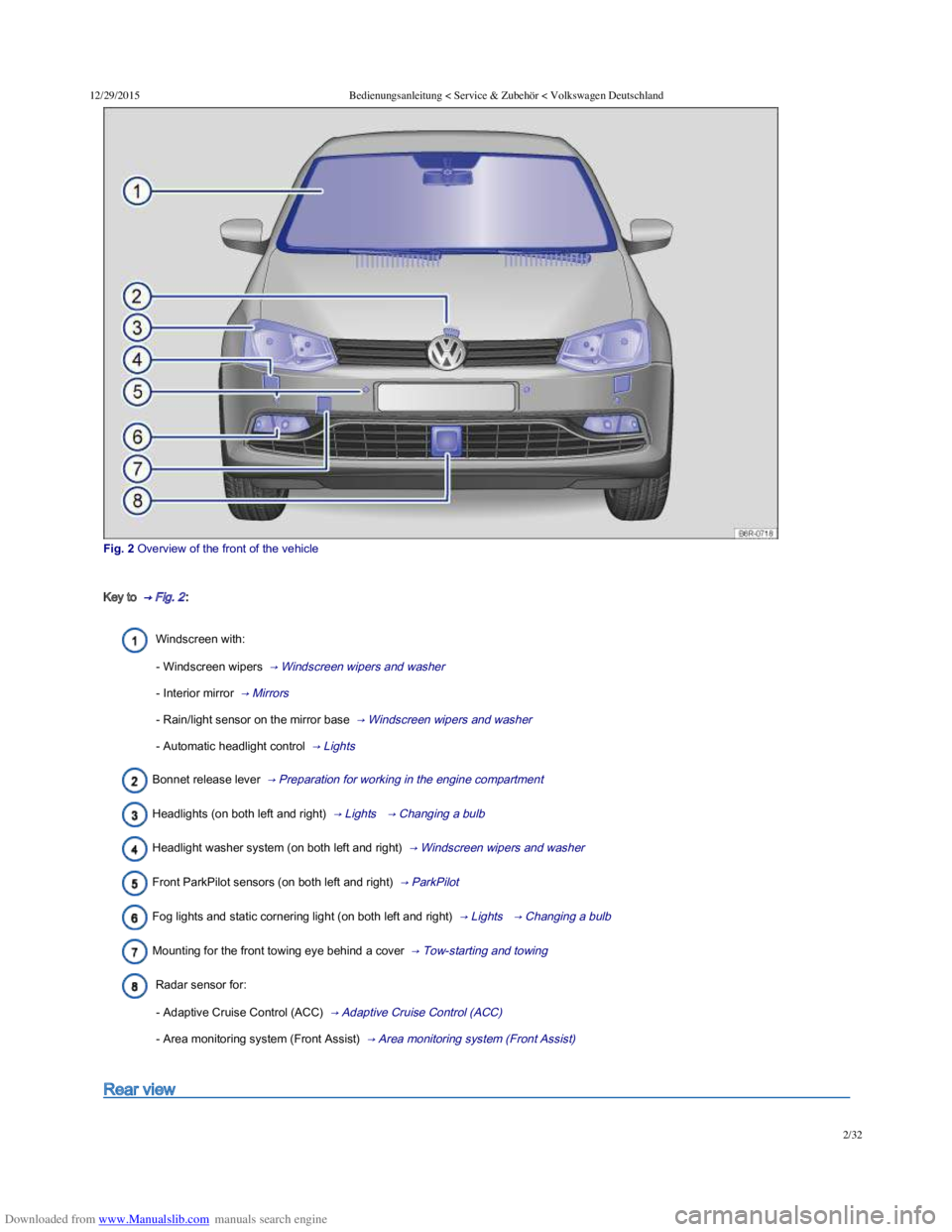
Fig. 2 Overview of the front of the vehicle
Key to → Fig. 2 :
Windscreen with:
- Windscreen wipers → Windscreen wipers and washer
- Interior mirror → Mirrors
- Rain/light sensor on the mirror base → Windscreen wipers and washer
- Automatic headlight control → Lights
Bonnet release lever → Preparation for working in the engine compartment
Headlights (on both left and right) → Lights → Changing a bulb
Headlight washer system (on both left and right) → Windscreen wipers and washer
Front ParkPilot sensors (on both left and right) → ParkPilot
Fog lights and static cornering light (on both left and right) → Lights → Changing a bulb
Mounting for the front towing eye behind a cover → Tow-starting and towing
Radar sensor for:
- Adaptive Cruise Control (ACC) → Adaptive Cruise Control (ACC)
- Area monitoring system (Front Assist) → Area monitoring system (Front Assist)
Rear view
Page 6 of 100
Downloaded from www.Manualslib.com manuals search engine 12/29/2015Bedienungsanleitung < Service & Zubehör < Volkswagen Deutschland
3/32
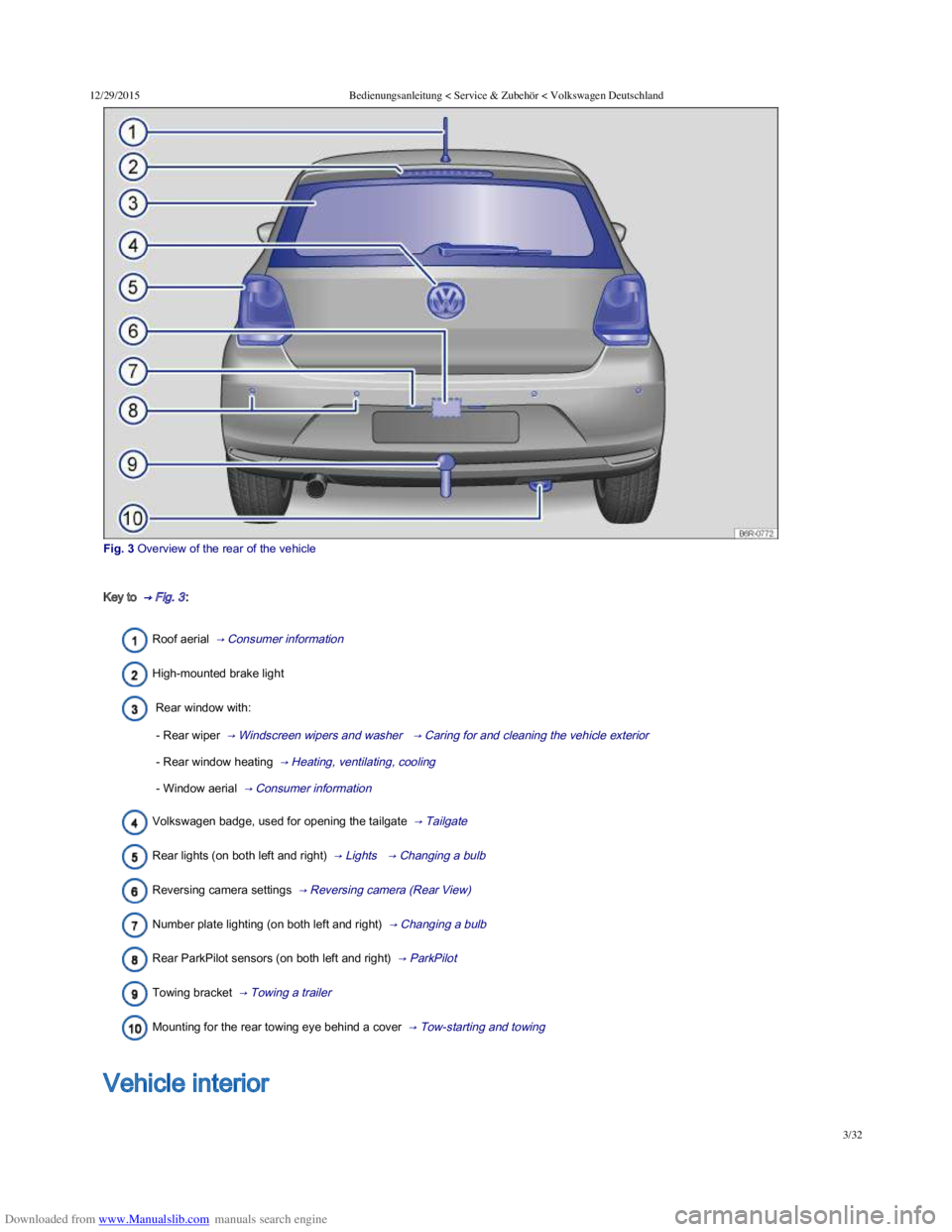
Fig. 3 Overview of the rear of the vehicle
Key to → Fig. 3 :
Roof aerial → Consumer information
High-mounted brake light
Rear window with:
- Rear wiper → Windscreen wipers and washer → Caring for and cleaning the vehicle exterior
- Rear window heating → Heating, ventilating, cooling
- Window aerial → Consumer information
Volkswagen badge, used for opening the tailgate → Tailgate
Rear lights (on both left and right) → Lights → Changing a bulb
Reversing camera settings → Reversing camera (Rear View)
Number plate lighting (on both left and right) → Changing a bulb
Rear ParkPilot sensors (on both left and right) → ParkPilot
Towing bracket → Towing a trailer
Mounting for the rear towing eye behind a cover → Tow-starting and towing
Overview of the driver door
Vehicle interior
Page 7 of 100
Downloaded from www.Manualslib.com manuals search engine 12/29/2015Bedienungsanleitung < Service & Zubehör < Volkswagen Deutschland
4/32
Overview of the driver door
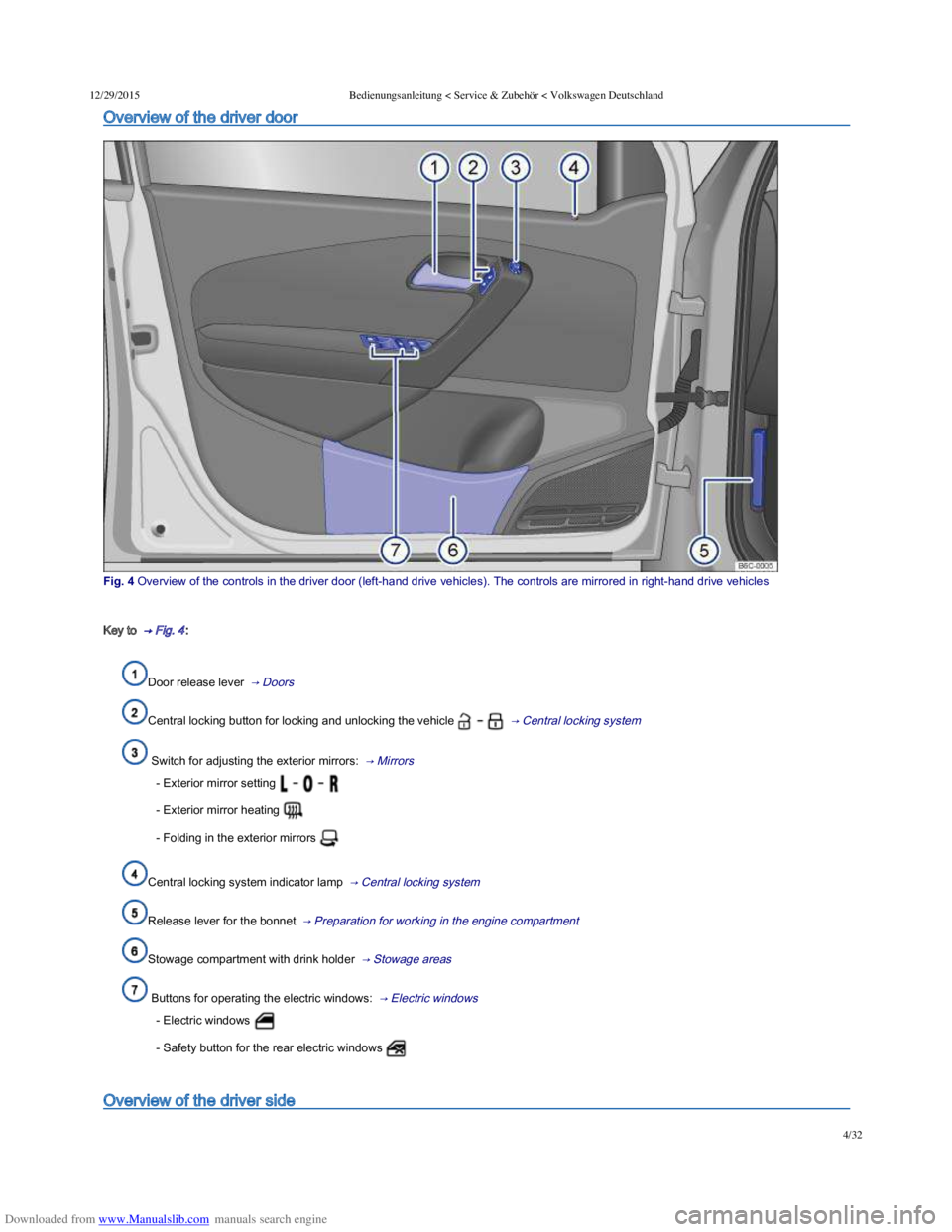
Fig. 4 Overview of the controls in the driver door (lefthand drive vehicles). The controls are mirrored in righthand drive vehicles
Key to → Fig. 4 :
Door release lever → Doors
Central locking button for locking and unlocking the vehicle → Central locking system
Switch for adjusting the exterior mirrors: → Mirrors
- Exterior mirror setting
- Exterior mirror heating
- Folding in the exterior mirrors
Central locking system indicator lamp → Central locking system
Release lever for the bonnet → Preparation for working in the engine compartment
Stowage compartment with drink holder → Stowage areas
Buttons for operating the electric windows: → Electric windows
- Electric windows
- Safety button for the rear electric windows
Overview of the driver side
Page 8 of 100
Downloaded from www.Manualslib.com manuals search engine 12/29/2015Bedienungsanleitung < Service & Zubehör < Volkswagen Deutschland
5/32
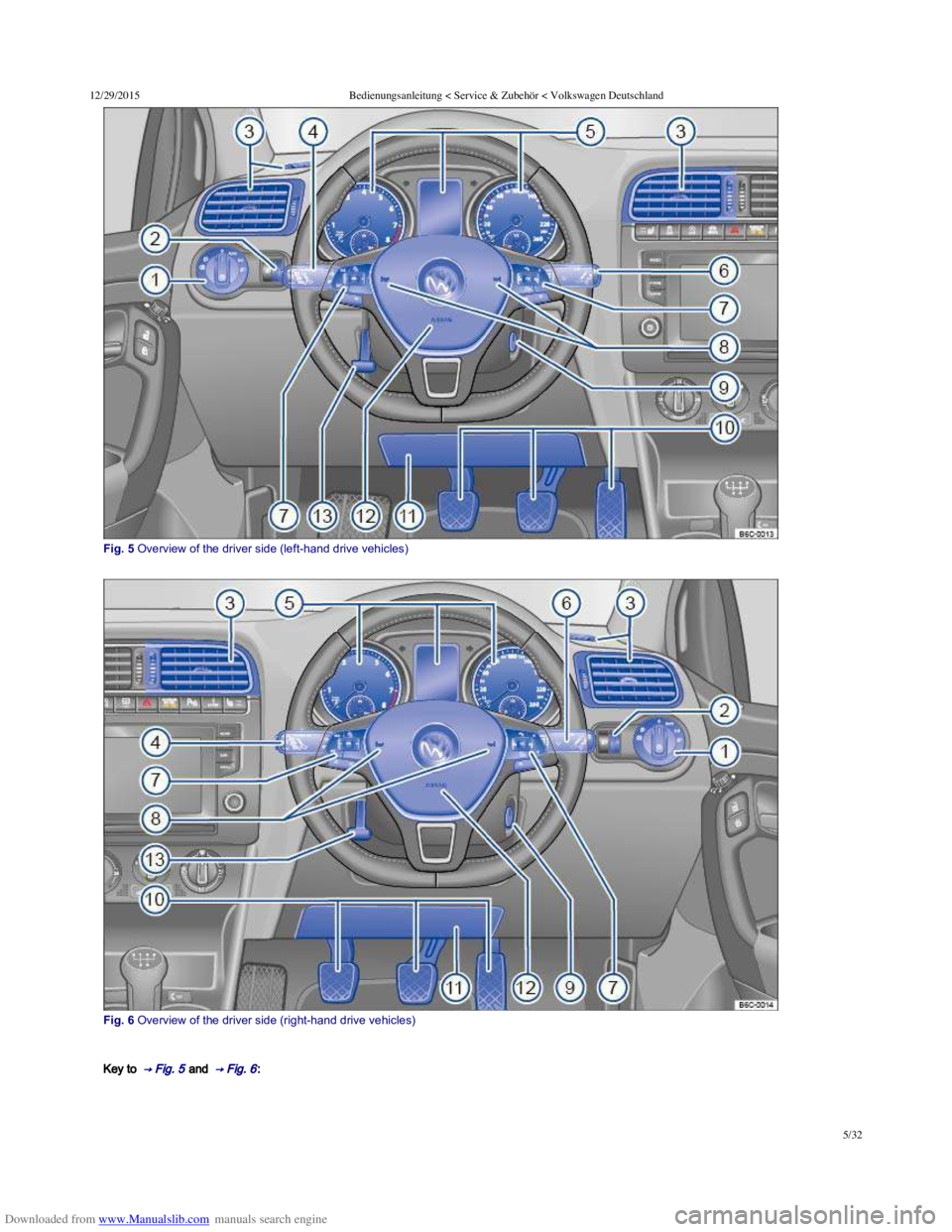
Fig. 5 Overview of the driver side (lefthand drive vehicles)
Fig. 6 Overview of the driver side (righthand drive vehicles)
Key to → Fig. 5 and → Fig. 6 :
Page 10 of 100
Downloaded from www.Manualslib.com manuals search engine 12/29/2015Bedienungsanleitung < Service & Zubehör < Volkswagen Deutschland
7/32
- Buttons for operating the Adaptive Cruise Control (ACC) , , , – – → Adaptive Cruise
Control (ACC)
- Volume setting for the radio, navigation announcements or a telephone conversation –
- Buttons for operating the Volkswagen information system – – , ,
- Opening the main telephone menu or accepting a telephone call
- Activating voice commands
- Audio, navigation –
Horn (works only when the ignition is switched on)
Ignition lock → Starting and stopping the engine
Pedals → Changing gear
Fuse box cover → Fuses
Driver front airbag → Airbag system
Lever for adjusting the steering column → Adjusting the seat position
Upper section of the centre console
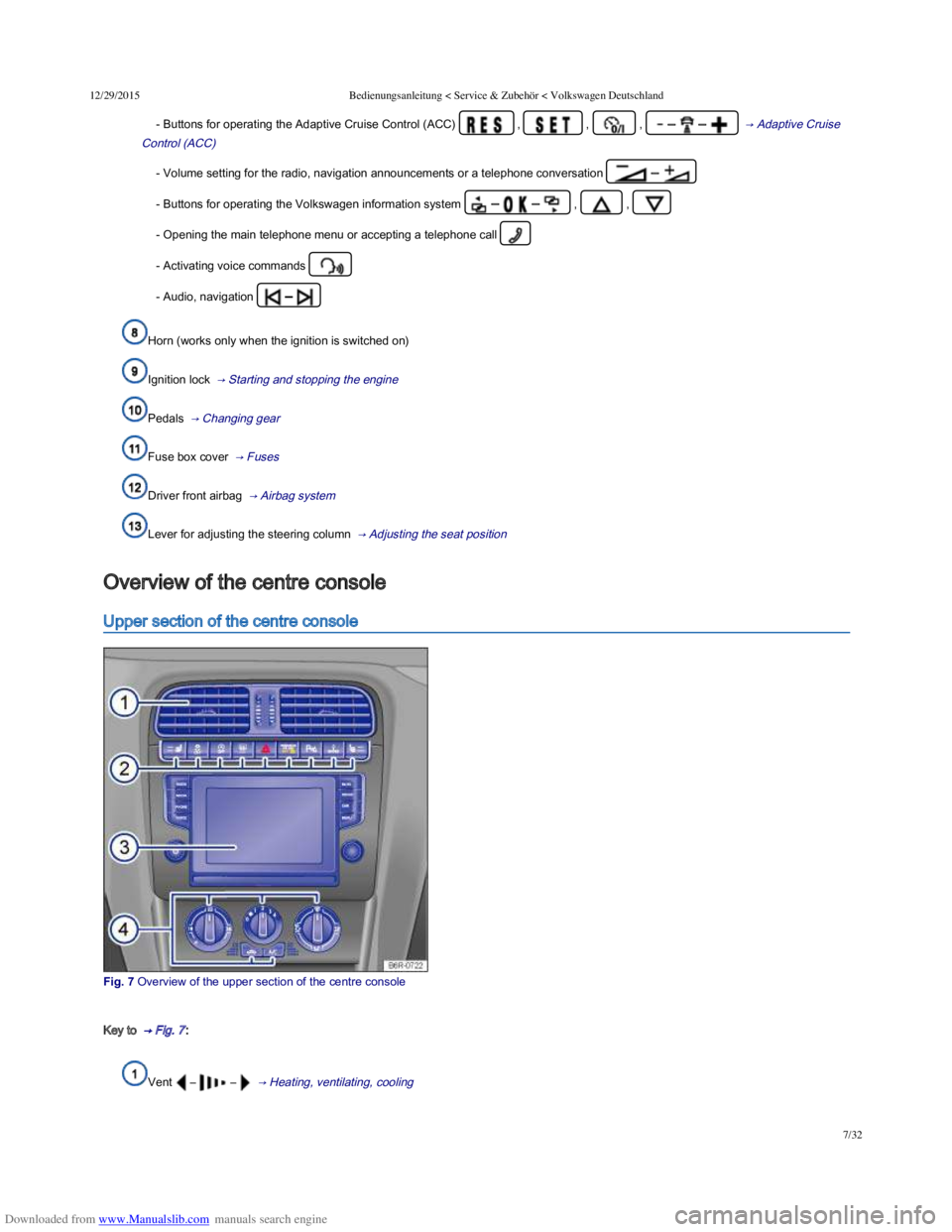
Fig. 7 Overview of the upper section of the centre console
Key to → Fig. 7 :
Vent – – → Heating, ventilating, cooling
Overview of the centre console
Page 12 of 100
Downloaded from www.Manualslib.com manuals search engine 12/29/2015Bedienungsanleitung < Service & Zubehör < Volkswagen Deutschland
9/32
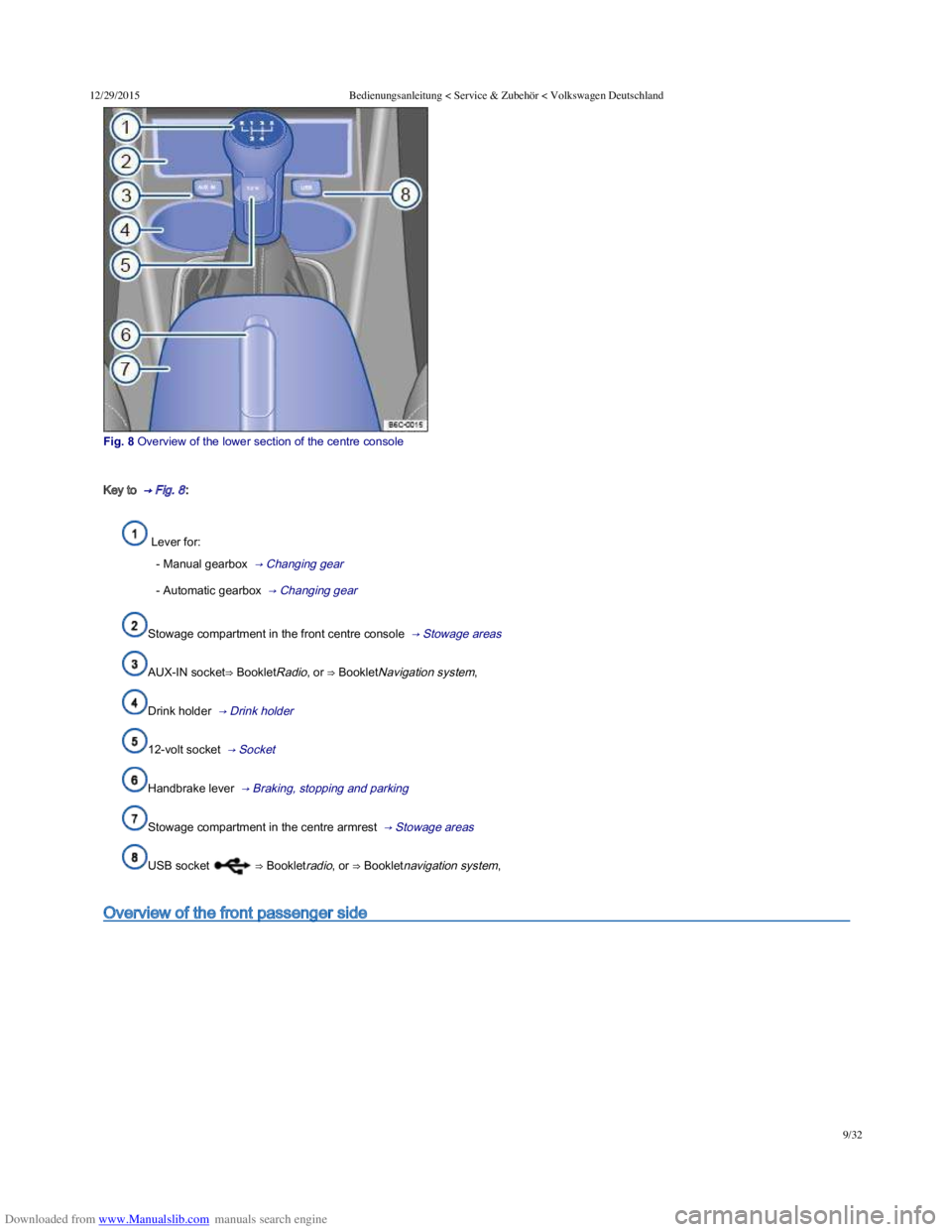
Fig. 8 Overview of the lower section of the centre console
Key to → Fig. 8 :
Lever for:
- Manual gearbox → Changing gear
- Automatic gearbox → Changing gear
Stowage compartment in the front centre console → Stowage areas
AUX-IN socket⇒ BookletRadio, or ⇒ BookletNavigation system,
Drink holder → Drink holder
12-volt socket → Socket
Handbrake lever → Braking, stopping and parking
Stowage compartment in the centre armrest → Stowage areas
USB socket ⇒ Bookletradio, or ⇒ Bookletnavigation system,
Overview of the front passenger side
Page 13 of 100
Downloaded from www.Manualslib.com manuals search engine 12/29/2015Bedienungsanleitung < Service & Zubehör < Volkswagen Deutschland
10/32
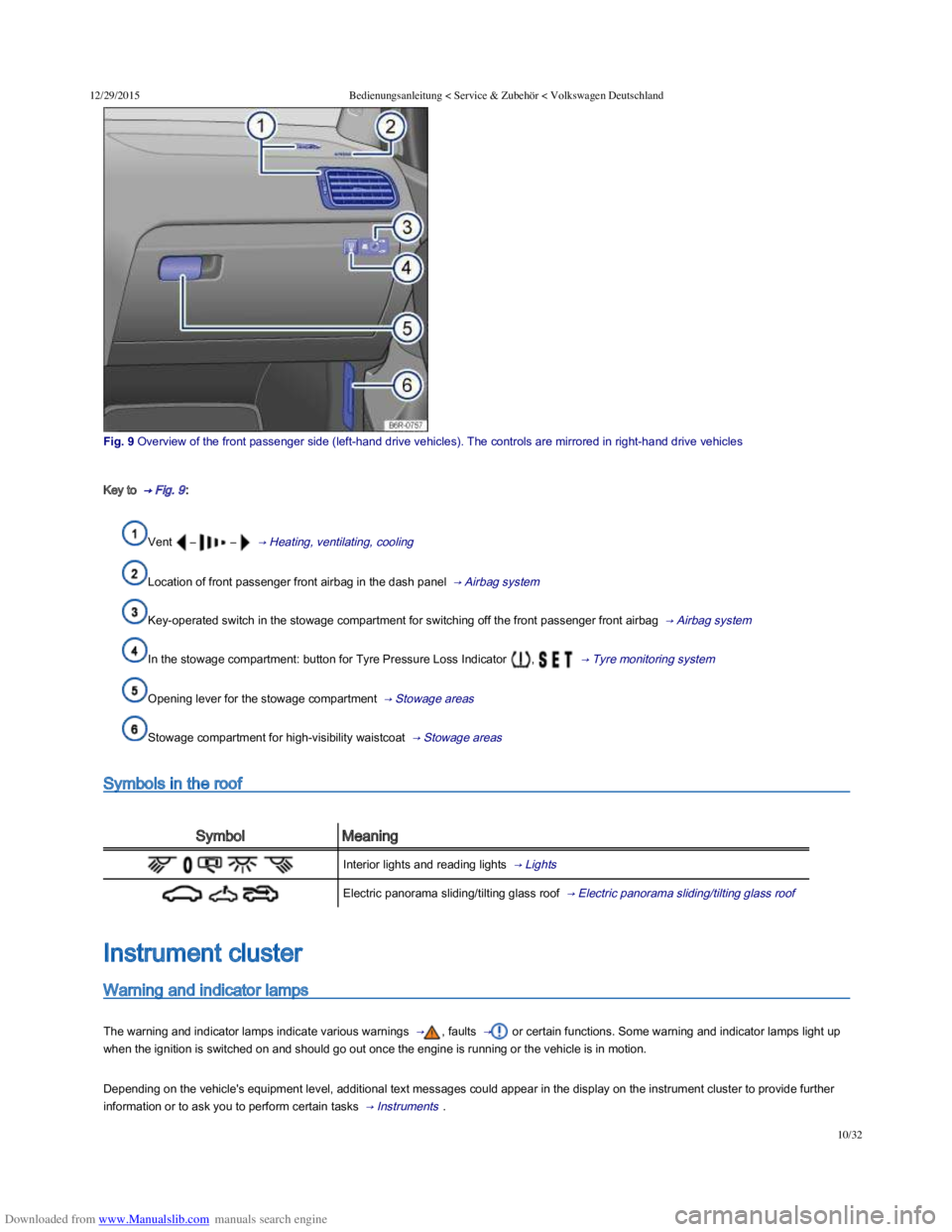
Fig. 9 Overview of the front passenger side (lefthand drive vehicles). The controls are mirrored in righthand drive vehicles
Key to → Fig. 9 :
Vent – – → Heating, ventilating, cooling
Location of front passenger front airbag in the dash panel → Airbag system
Key-operated switch in the stowage compartment for switching off the front passenger front airbag → Airbag system
In the stowage compartment: button for Tyre Pressure Loss Indicator , → Tyre monitoring system
Opening lever for the stowage compartment → Stowage areas
Stowage compartment for high-visibility waistcoat → Stowage areas
Symbols in the roof
SymbolMeaning
Interior lights and reading lights → Lights
Electric panorama sliding/tilting glass roof → Electric panorama sliding/tilting glass roof
Warning and indicator lamps
The warning and indicator lamps indicate various warnings → , faults → or certain functions. Some warning and indicator lamps light up
when the ignition is switched on and should go out once the engine is running or the vehicle is in motion.
Depending on the vehicle's equipment level, additional text messages could appear in the display on the instrument cluster to provide further
information or to ask you to perform certain tasks → Instruments .
Instrument cluster
Page 19 of 100
Downloaded from www.Manualslib.com manuals search engine 12/29/2015Bedienungsanleitung < Service & Zubehör < Volkswagen Deutschland
16/32
Mileage displays
Time
Radio and navigation information ⇒ BookletRadio, or ⇒ BookletNavigation system,
Telephone information ⇒ BookletNavigation system, or ⇒ BookletRadio/navigation system,
Outside temperature
Compass display
Selector lever positions → Changing gear
Gear change indicator → Changing gear
Driving data display (multifunction display (MFD)) and menus for various settings → Volkswagen information system
Service interval display → Service interval display
Speed warning for winter tyres
Start/stop system status display → Pull-away assist systems
Status display for active cylinder management (ACT®) → Driving with respect for the environment
Engine code
Fuel gauge → Filling the tank
Open doors, bonnet and tailgate
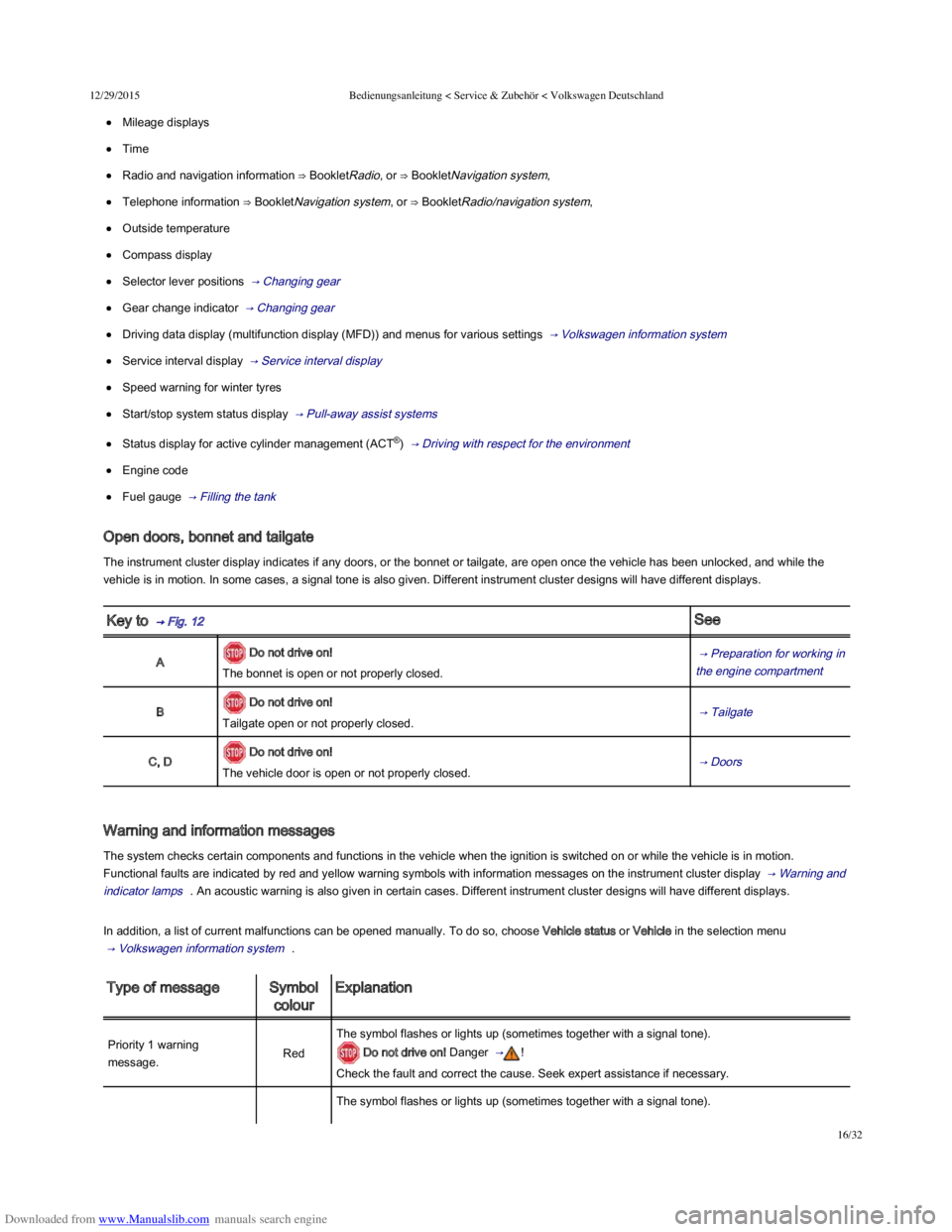
The instrument cluster display indicates if any doors, or the bonnet or tailgate, are open once the vehicle has been unlocked, and while the
vehicle is in motion. In some cases, a signal tone is also given. Different instrument cluster designs will have different displays.
Key to → Fig. 12 See
A Do not drive on!
The bonnet is open or not properly closed.
→ Preparation for working in
the engine compartment
B Do not drive on!
Tailgate open or not properly closed. → Tailgate
C, D Do not drive on!
The vehicle door is open or not properly closed. → Doors
Warning and information messages
The system checks certain components and functions in the vehicle when the ignition is switched on or while the vehicle is in motion.
Functional faults are indicated by red and yellow warning symbols with information messages on the instrument cluster display → Warning and
indicator lamps . An acoustic warning is also given in certain cases. Different instrument cluster designs will have different displays.
In addition, a list of current malfunctions can be opened manually. To do so, choose Vehicle status or Vehicle in the selection menu
→ Volkswagen information system .
Type of messageSymbol
colour
Explanation
Priority 1 warning
message.Red
The symbol flashes or lights up (sometimes together with a signal tone).
Do not drive on! Danger → !
Check the fault and correct the cause. Seek expert assistance if necessary.
The symbol flashes or lights up (sometimes together with a signal tone).