2015 VOLKSWAGEN POLO buttons
[x] Cancel search: buttonsPage 62 of 100
Downloaded from www.Manualslib.com manuals search engine 12/29/2015Bedienungsanleitung < Service & Zubehör < Volkswagen Deutschland
27/136
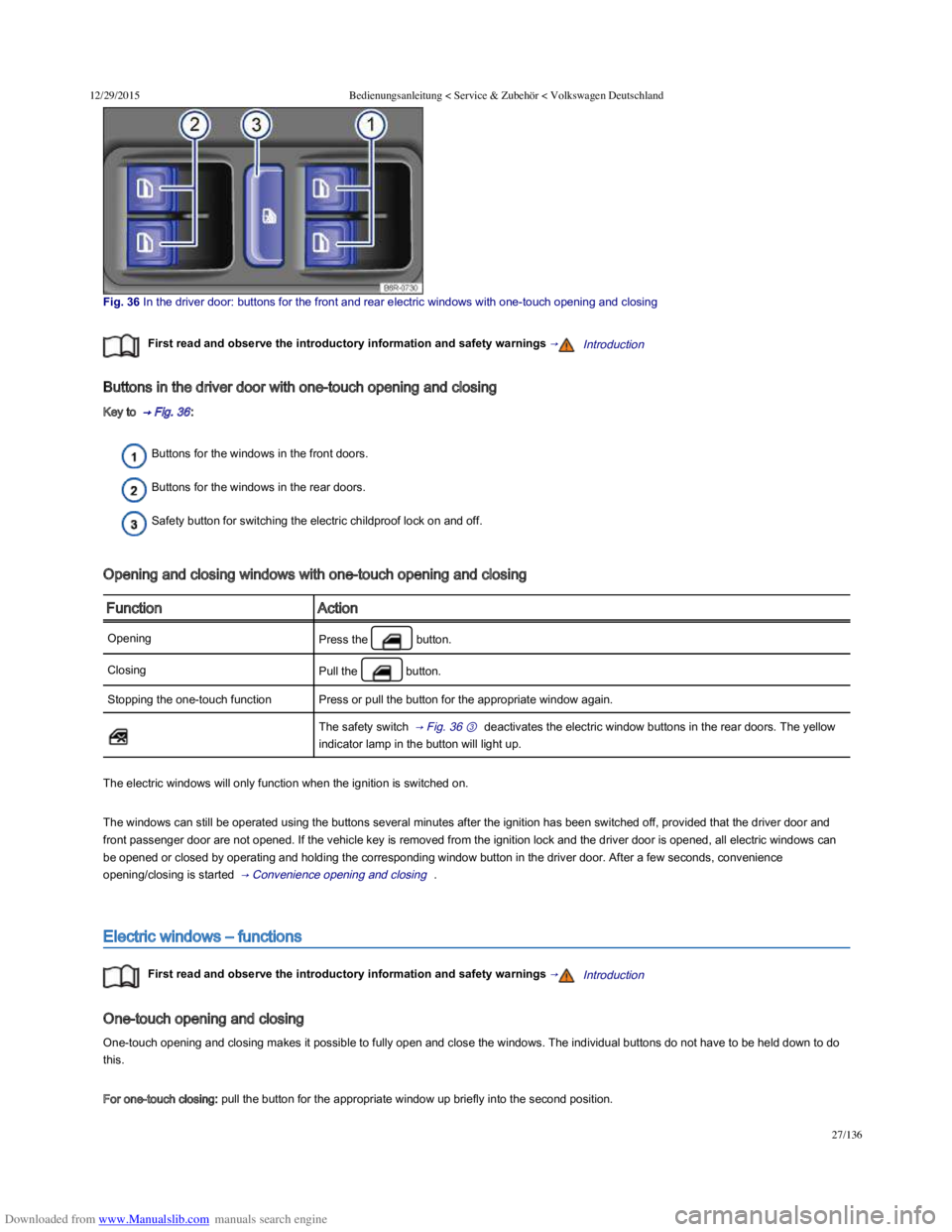
Fig. 36 In the driver door: buttons for the front and rear electric windows with onetouch opening and closing
First read and observe the introductory information and safety warnings →Introduction
Buttons in the driver door with one-touch opening and closing
Key to → Fig. 36 :
Buttons for the windows in the front doors.
Buttons for the windows in the rear doors.
Safety button for switching the electric childproof lock on and off.
Opening and closing windows with one-touch opening and closing
FunctionAction
OpeningPress the button.
ClosingPull the button.
Stopping the one-touch functionPress or pull the button for the appropriate window again.
The safety switch → Fig. 36 ③ deactivates the electric window buttons in the rear doors. The yellow
indicator lamp in the button will light up.
The electric windows will only function when the ignition is switched on.
The windows can still be operated using the buttons several minutes after the ignition has been switched off, provided that the driver door and
front passenger door are not opened. If the vehicle key is removed from the ignition lock and the driver door is opened, all electric windows can
be opened or closed by operating and holding the corresponding window button in the driver door. After a few seconds, convenience
opening/closing is started → Convenience opening and closing .
Electric windows – functions
First read and observe the introductory information and safety warnings →Introduction
One-touch opening and closing
One-touch opening and closing makes it possible to fully open and close the windows. The individual buttons do not have to be held down to do
this.
For one-touch closing: pull the button for the appropriate window up briefly into the second position.
Page 63 of 100
Downloaded from www.Manualslib.com manuals search engine 12/29/2015Bedienungsanleitung < Service & Zubehör < Volkswagen Deutschland
28/136
For one-touch opening: press the button for the appropriate window down briefly into the second position.
Stopping the one-touch function: press or pull the button for the appropriate window again.
Restoring one-touch opening and closing
One-touch opening and closing is deactivated if the vehicle battery has been disconnected or discharged while the windows were not fully closed.
The function will have to be reset.
Close all windows and doors.
Pull up the button for the window and hold it in this position for at least one second.
Let go of the button then pull it up again and hold it in this position. One-touch opening and closing is now ready for operation.
The one-touch function can be restored for individual windows or for several windows at the same time.
Convenience opening and closing
The windows can be opened and closed from outside the vehicle using the vehicle key:
Press and hold the locking or unlocking button on the vehicle key. All electric windows will be either opened or closed.
To interrupt this function, let go of the locking or unlocking button.
During convenience closing, first the windows and then the electric panorama sliding/tilting glass roof.
One-touch opening and closing and the roll-back function will not work if there is a fault in the electric windows. Go to a qualified
workshop.
Roll-back function for the electric windows
First read and observe the introductory information and safety warnings →Introduction
The roll-back function for the electric windows can reduce the risk of injuries when the windows are closing → . If the one-touch closing
function for a window does not work because it is stiff or is being obstructed, the window will automatically open again.
Check to see why the window has not closed.
Try to close the window again.
Careless or unsupervised use of the electric windows can cause serious injuries.
The electric windows should only be opened or closed when you are sure that nobody is in their operating area.
Never leave children or people requiring assistance alone in the vehicle when the vehicle is locked. The windows can no longer be opened
in an emergency.
Always take all vehicle keys with you every time you leave the vehicle. The windows can still be operated using the buttons several minutes
after the ignition has been switched off, provided that the driver door and front passenger door are not opened.
When transporting children on the rear bench seat, the rear electric windows should always be deactivated using the safety button so that
they cannot be opened or closed.
WARNING
Page 67 of 100
Downloaded from www.Manualslib.com manuals search engine 12/29/2015Bedienungsanleitung < Service & Zubehör < Volkswagen Deutschland
32/136
Convenience opening and closing
The electric panorama sliding/tilting glass roof can be opened and closed from the outside with the vehicle key.
Press and hold the locking or unlocking button on the vehicle key. The electric panorama sliding/tilting roof is tilted or closed.
Let go of the lock or unlock button to interrupt this function.
During convenience closing, first the windows and then the electric panorama sliding/tilting glass roof.
A variety of settings related to window operation can be made and adjusted using the button and the and
Opening and closing function buttons → Menu and system settings (SETUP) .
The rotary control of the electric panorama sliding/tilting glass roof remains in the last position selected if the roof is closed from outside
the vehicle using convenience closing. It will have to be re-positioned the next time you drive.
In special driving situations, for example, oversteering or understeering, the open electric panorama sliding/tilting glass roof can be
automatically closed to a small gap at speeds of approx. 30 km/h (18 mph).
Roll-back function of the electric panorama sliding/tilting glass roof
First read and observe the introductory information and safety warnings →Introduction
The roll-back function can reduce the risk of injury when the electric panorama sliding/tilting glass roof is being closed → . If the electric
panorama sliding/tilting glass roof is not able to close because it is stiff or obstructed, it will automatically open again immediately.
Check why the electric panorama sliding/tilting glass roof has not closed.
Try to close the electric panorama sliding/tilting glass roof again.
If the electric panorama sliding/tilting glass roof is still stiff or obstructed, it stops at this point. Then close the electric panorama sliding/tilting
glass roof without the roll-back function
Closing the electric panorama sliding/tilting glass roof without the roll-back function
Pull the switch → Fig. 38 ⑤ within approximately 5 seconds after the roll-back function has been triggered and hold it in this position until the
electric panorama sliding/tilting glass roof is closed completely.
The electric panorama sliding/tilting glass roof will then close without the roll-back function.
If the electric panorama sliding/tilting glass roof still cannot be closed, go to a qualified workshop.
If you let go of the switch during the closing procedure, the electric panorama sliding/tilting glass roof will open automatically.
The roll-back function is also active if the windows and electric panorama sliding/tilting glass roof are closed with the vehicle key
→ Convenience opening and closing .
Closing the electric panorama sliding/tilting glass roof without the roll-back function can cause severe injuries.
Always be careful when closing the electric panorama sliding/tilting glass roof.
Ensure that nobody is obstructing the operating area of the electric panorama sliding/tilting glass roof, especially if the roll-back function is
not active.
The roll-back function does not prevent fingers or other body parts from being pressed against the roof frame and sustaining injury.
WARNING
Page 78 of 100
Downloaded from www.Manualslib.com manuals search engine 12/29/2015Bedienungsanleitung < Service & Zubehör < Volkswagen Deutschland
43/136
Seat heating
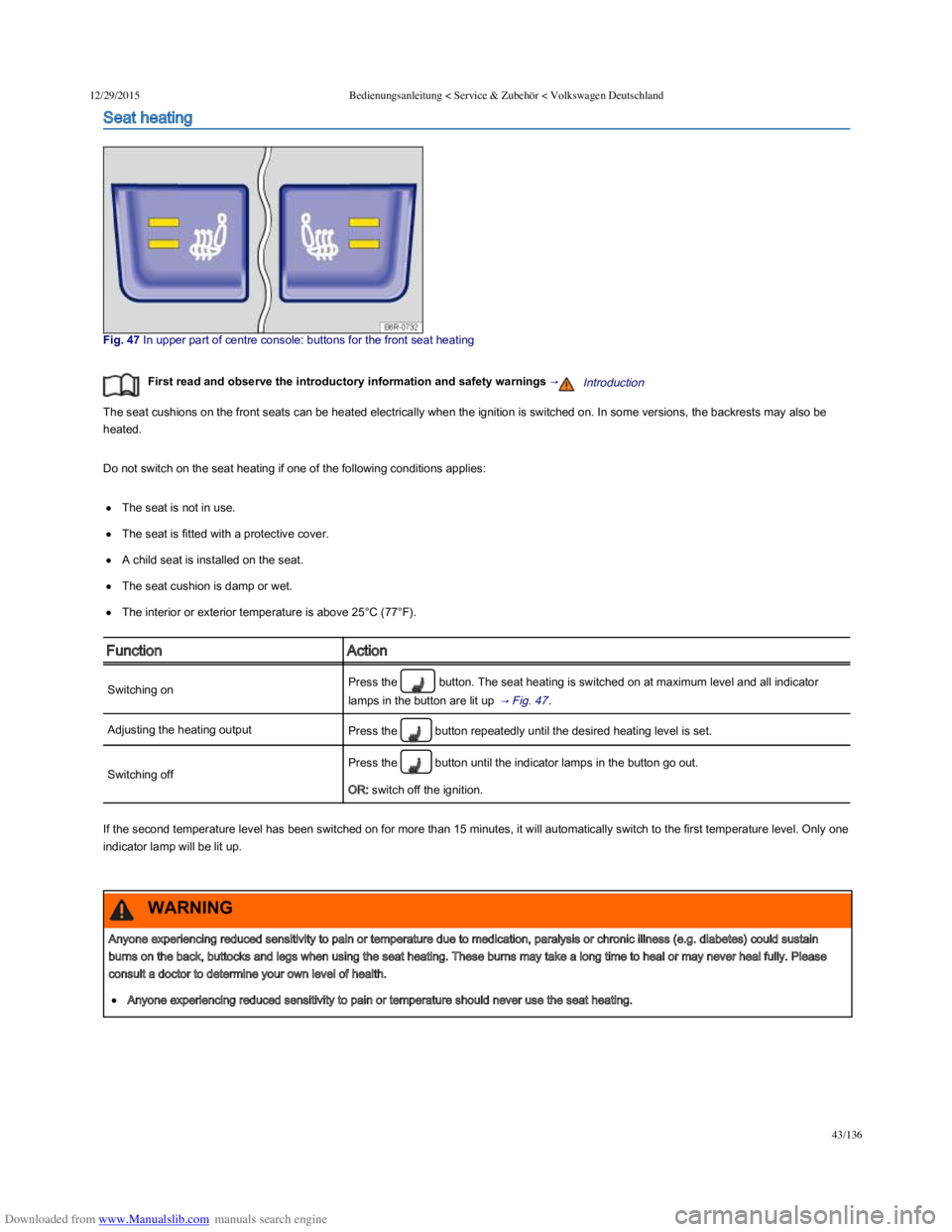
Fig. 47 In upper part of centre console: buttons for the front seat heating
First read and observe the introductory information and safety warnings →Introduction
The seat cushions on the front seats can be heated electrically when the ignition is switched on. In some versions, the backrests may also be
heated.
Do not switch on the seat heating if one of the following conditions applies:
The seat is not in use.
The seat is fitted with a protective cover.
A child seat is installed on the seat.
The seat cushion is damp or wet.
The interior or exterior temperature is above 25°C (77°F).
FunctionAction
Switching onPress the button. The seat heating is switched on at maximum level and all indicator
lamps in the button are lit up → Fig. 47 .
Adjusting the heating outputPress the button repeatedly until the desired heating level is set.
Switching off
Press the button until the indicator lamps in the button go out.
OR: switch off the ignition.
If the second temperature level has been switched on for more than 15 minutes, it will automatically switch to the first temperature level. Only one
indicator lamp will be lit up.
Anyone experiencing reduced sensitivity to pain or temperature due to medication, paralysis or chronic illness (e.g. diabetes) could sustain
burns on the back, buttocks and legs when using the seat heating. These burns may take a long time to heal or may never heal fully. Please
consult a doctor to determine your own level of health.
Anyone experiencing reduced sensitivity to pain or temperature should never use the seat heating.
WARNING