Page 286 of 540
2865-2. Using the audio system
HILUX_OM_OM0K219E_(EE)●
MP3 and WMA playback
When a disc containing MP3 or WMA files is inserted, all files on the disc
are first checked. Once the file check is finished, the first MP3 or WMA file
is played. To make the file check finish more quickly, we recommend you do
not write in any files other than MP3 or WMA files or create any unneces-
sary folders.
If the discs contain a mixture of music data and MP3 or WMA format data,
only music data can be played.
● Extensions
If the file extensions .mp3 and .wma are used for files other than MP3 and
WMA files, they will be mistakenly recognized and played as MP3 and
WMA files. This may result in large amounts of interference and damage to
the speakers.
● Playback
• To play MP3 file with steady sound quality, we recommend a fixed bit rate
of 128 kbps and a sampling frequency of 44.1 kHz.
• CD-R or CD-RW playback may not be possible in some instances, depending on the characteristics of the disc.
• There is a wide variety of freeware and other encoding software for MP3 and WMA files on the market, and depending on the status of the encod-
ing and the file format, poor sound quality or noise at the start of playback
may result. In some cases, playback may not be possible at all.
• When files other than MP3 or WMA fi les are recorded on a disc, it may
take more time to recognize the disc and in some cases, playback may
not be possible at all.
• Microsoft, Windows, and Windows Media are the registered trademarks of Microsoft Corporation in the U.S. and other countries.
NOTICE
■CDs and adapters that cannot be used
→ P. 279
■ CD Player precautions
→ P. 280
HILUX_OM_OM0K219E_(EE).book Page 286 Wednesday, May 14, 2014 3:06 PM
Page 287 of 540
287
5
5-2. Using the audio system
Interior features
HILUX_OM_OM0K219E_(EE)
Operating an iPod
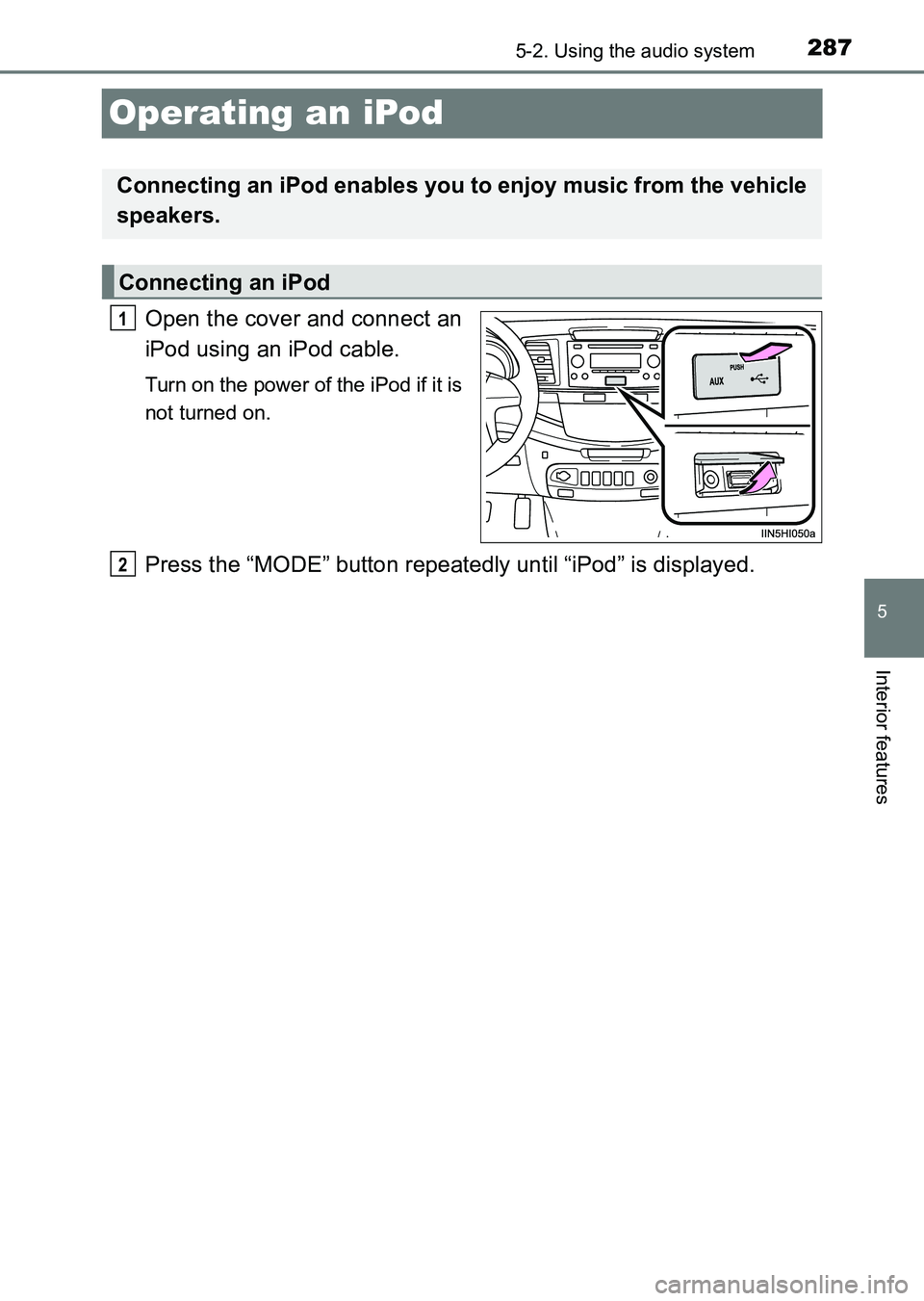
Open the cover and connect an
iPod using an iPod cable.
Turn on the power of the iPod if it is
not turned on.
Press the “MODE” button repeatedly until “iPod” is displayed.
Connecting an iPod enables you to enjoy music from the vehicle
speakers.
Connecting an iPod
1
2
HILUX_OM_OM0K219E_(EE).book Page 287 Wednesday, May 14, 2014 3:06 PM
Page 288 of 540
2885-2. Using the audio system
HILUX_OM_OM0K219E_(EE)
Press (MENU) to select iPod menu mode.
Turning the tune/scroll knob clockwise changes the play mode in
the following order:
“Playlists” → “Artists” → “Albums” → “Songs” → “Podcasts” →
“Genres” → “Composers” → “Audiobooks”
Press the knob to select the desired play mode.
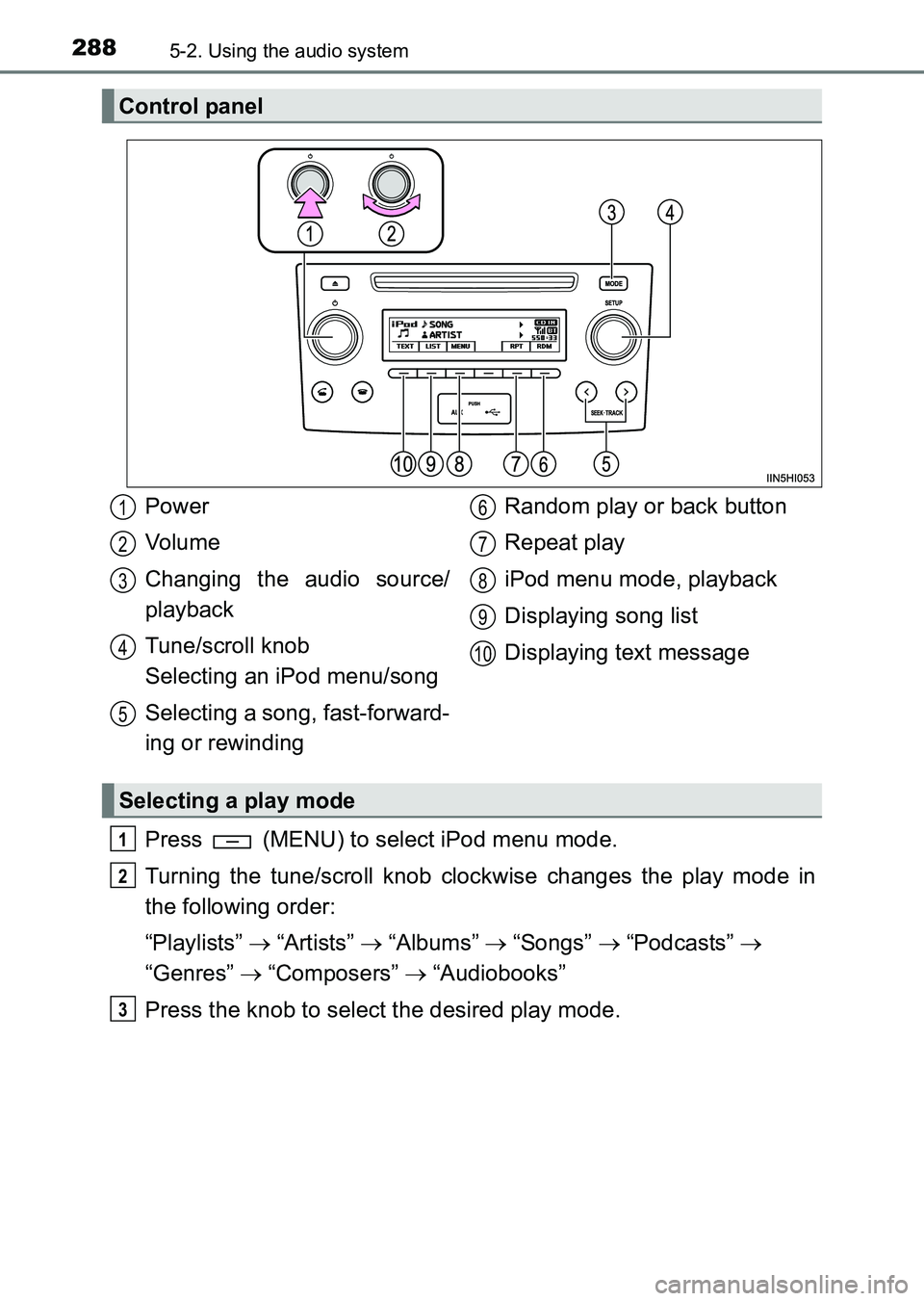
Control panel
Power
Vo lu m e
Changing the audio source/
playback
Tune/scroll knob
Selecting an iPod menu/song
Selecting a song, fast-forward-
ing or rewinding Random play or back button
Repeat play
iPod menu mode, playback
Displaying song list
Displaying text message
Selecting a play mode
1
2
3
4
5
6
7
8
9
10
1
2
3
HILUX_OM_OM0K219E_(EE).book Page 288 Wednesday, May 14, 2014
3:06 PM
Page 289 of 540
2895-2. Using the audio system
5
Interior features
HILUX_OM_OM0K219E_(EE)■
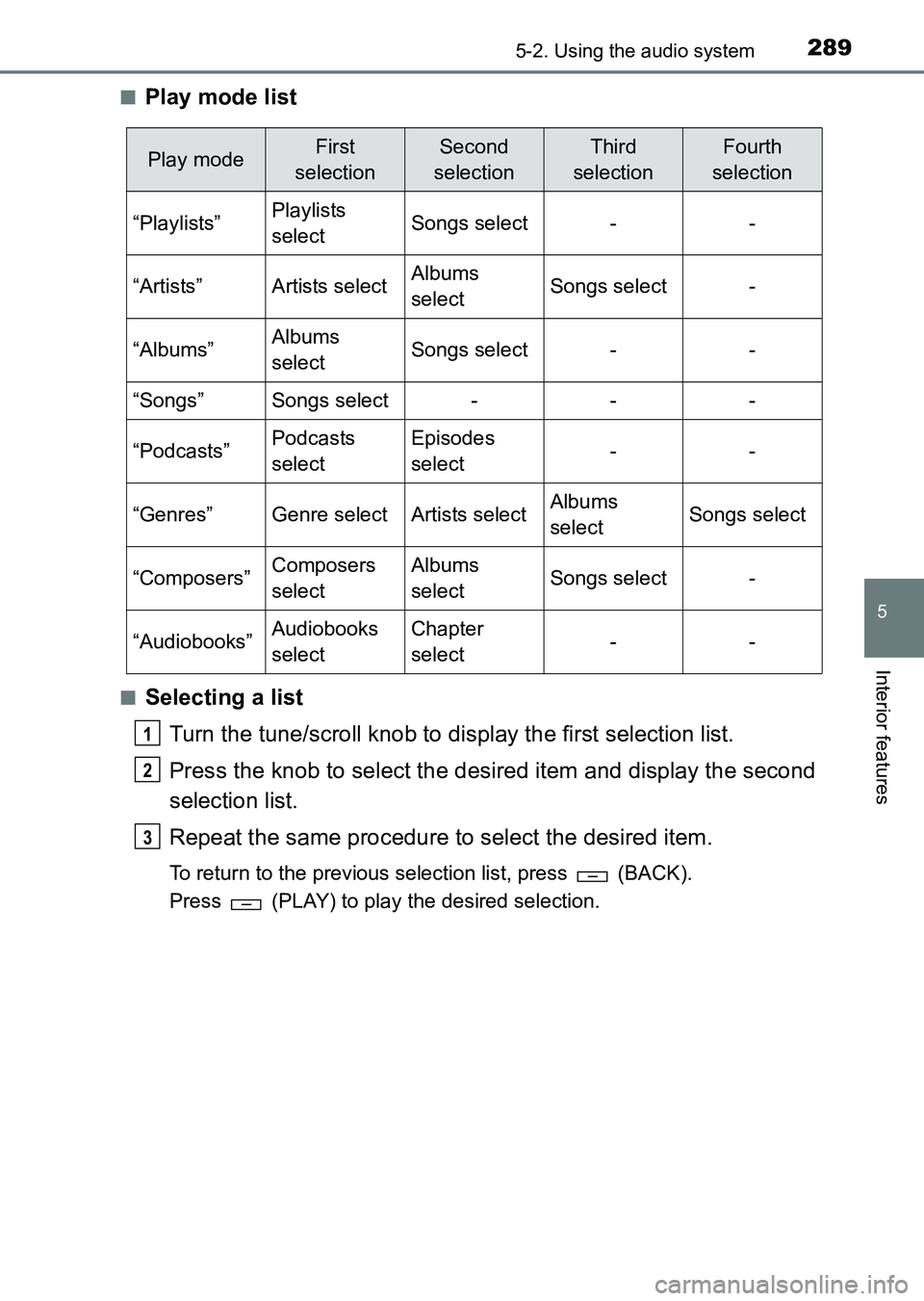
Play mode list
■Selecting a list
Turn the tune/scroll knob to display the first selection list.
Press the knob to select the desired item and display the second
selection list.
Repeat the same procedure to select the desired item.
To return to the previous selection list, press (BACK).
Press (PLAY) to play the desired selection.
Play modeFirst
selectionSecond
selectionThird
selectionFourth
selection
“Playlists”Playlists
selectSongs select--
“Artists”Artists selectAlbums
selectSongs select-
“Albums”Albums
selectSongs select--
“Songs”Songs select---
“Podcasts”Podcasts
selectEpisodes
select--
“Genres”Genre selectArtists selectAlbums
selectSongs select
“Composers”Composers
selectAlbums
selectSongs select-
“Audiobooks”Audiobooks
selectChapter
select--
1
2
3
HILUX_OM_OM0K219E_(EE).book Page 289 Wednesday, May 14, 2014 3:06 PM
Page 290 of 540
2905-2. Using the audio system
HILUX_OM_OM0K219E_(EE)
Turn the tune/scroll knob or press the “<” or “>” button of
“SEEK•TRACK” to select the desired song.Press (LIST).
The song list will be displayed.
Turn the tune/scroll knob to select a song.
Press the knob to play the song.
To return to the previous display, press (BACK).
Press and hold the “<” or “>” button of “SEEK•TRACK”.
Press (RPT).
To cancel, press (RPT) again.
Pressing (RDM) changes modes in the following order:
Track random →Album random →Off
Selecting songs
Selecting a song from the song list
Fast-forwarding and rewinding songs
Repeat play
Random play
1
2
3
HILUX_OM_OM0K219E_(EE).book Page 290 Wednesday, May 14, 2014 3:06 PM
Page 291 of 540
2915-2. Using the audio system
5
Interior features
HILUX_OM_OM0K219E_(EE)
Press the (TEXT) display or hide the album title.
If there are continuing texts, is displayed.
Press and hold (TEXT) to display the remaining texts.
■About iPod
●“Made for iPod” and “Made for iPhone” mean that an electronic accessory
has been designed to connect specifically to iPod, or iPhone, respectively,
and has been certified by the developer to meet Apple performance stan-
dards.
● Apple is not responsible for the operation of this device or its compliance
with safety and regulatory standards. Please note that the use of this acces-
sory with iPod or iPhone may affect wireless performance.
● iPhone, iPod, iPod classic, iPod nano, iPod shuffle, and iPod touch are
trademarks of Apple Inc., registered in the U.S. and other countries.
■ iPod functions
●When an iPod is connected and the audio source is changed to iPod mode,
the iPod will resume play from the same point in which it was last used.
● Depending on the iPod that is connected to the system, certain functions
may not be available. Disconnecting the device and reconnecting it once
again may resolve some malfunctions.
● While connected to the system, the iPod cannot be operated with its own
controls. It is necessary to use the controls of the vehicle’s audio system
instead.
Switching the display
HILUX_OM_OM0K219E_(EE).book Page 291 Wednesday, May 14, 2014 3:06 PM
Page 292 of 540
2925-2. Using the audio system
HILUX_OM_OM0K219E_(EE)■
iPod problems
To resolve most problems encountered when using your iPod, disconnect
your iPod from the vehicle iPod connection and reset it.
For instructions on how to reset your iPod, refer to your iPod Owner’s Man-
ual.
■ Display
→ P. 278
■ Error messages
“ERROR”:
This indicates a problem in the iPod or its connection.
“NO SONGS”:
This indicates that there is no music data in the iPod.
“NO PLAYLIST”:
This indicates that some available songs are not found in a selected playlist.
“UPDATE YOUR iPod”:
This indicates that the version of the iPod is not compatible. Upgrade your
iPod software to the latest version.
HILUX_OM_OM0K219E_(EE).book Page 292 Wednesday, May 14, 2014 3:06 PM
Page 293 of 540
2935-2. Using the audio system
5
Interior features
HILUX_OM_OM0K219E_(EE)■
Compatible models
The following iPod
®, iPod nano®, iPod classic®, iPod touch® and iPhone®
devices can be used with this system.
●Made for
• iPod touch (5th generation)
• iPod touch (4th generation)
• iPod touch (3rd generation)
• iPod touch (2nd generation)
• iPod touch (1st generation)
• iPod classic
• iPod with video
• iPod nano (6th generation)
• iPod nano (5th generation)
• iPod nano (4th generation)
• iPod nano (3rd generation)
• iPod nano (2nd generation)
• iPod nano (1st generation)
• iPhone 5
• iPhone 4S
• iPhone 4
• iPhone 3GS
• iPhone 3G
• iPhone
Depending on differences between models or software versions etc., some
models might be incompatible with this system.
Items related to standards and limitations are as follows:
● Maximum number of lists in device: 9999
● Maximum number of songs in device: 65535
● Maximum number of songs per list: 65535
CAUTION
■While driving
Do not connect iPod or operate the controls. Doing so may cause an acci-
dent, resulting in death or serious injury.
HILUX_OM_OM0K219E_(EE).book Page 293 Wednesday, May 14, 2014 3:06 PM